Securing Your Knowledge Base in the Help Center
Hello Everyone!
Welcome to this week's edition on customizing the Knowledge Base in the Help Center. As the core of self-service for customers, the Knowledge Base is essential, but some organizations, like ZylkerShop, choose to restrict access to registered users only.
Here are the codes to hide the Follow option and Social Sharing option in the Knowledge Base.
Steps to add the CSS code
i. Navigate Setup (S) >> Channels >> Help Center >> Select the Help Center portal >> Select Customization. Click Customize on the theme you want to change.
ii. On the left panel, under Customize, click on CSS and paste the code. On the top right of the screen, click Preview to view the changes, and then click Publish to see the live changes.


Hide the Follow option in the Knowledge Base
When users follow every article they read, they might become overwhelmed with notifications during updates and maintenance in the Knowledge Base. To manage their content and prevent information overload, ZylkerShop decided to hide the Follow option in its Knowledge Base.

- /*Elegant Theme*/
- .articleDetail .KBArticleRightContainer__userFollowOption,
- .articleList .KBArticleRightContainer__userFollowOption,
- .article_subcategory .KBArticleRightContainer__userFollowOption,
- .articleDetail .KBArticleRightContainer__followerCount,
- .article_subcategory .KBArticleRightContainer__followerCount,
- .articleList .KBArticleRightContainer__followerCount,
- .ContentList__subCategory .ListHeader__dottedPopup,
- .KbCategory__box .KbCategory__dottedPopup,
- .KbDetailRtContainer__widgetRight .KbDetailRtContainer__widgetSection:nth-child(1),
- .articleList .ArticleListRightContainer__widgetRight .ArticleListRightContainer__widgetSection:nth-child(1) .ArticleListRightContainer__followOption,
- .articleList .ArticleListRightContainer__widgetRight .ArticleListRightContainer__widgetSection:nth-child(1) .ArticleListRightContainer__subscribeDescription{
- display:none;
- }
- /*Materialized Theme*/
- .articleDetail .KBArticleRightContainer__userFollowOption,
- .articleList .KBArticleRightContainer__userFollowOption,
- .article_subcategory .KBArticleRightContainer__userFollowOption,
- .articleDetail .KBArticleRightContainer__followerCount,
- .article_subcategory .KBArticleRightContainer__followerCount,
- .articleList .KBArticleRightContainer__followerCount,
- .ContentList__subCategory .ListHeader__dottedPopup,
- .KbCategory__box .KbCategory__dottedPopup,
- .KbDetailRtContainer__widgetRight .KbDetailRtContainer__widgetSection:nth-child(1),
- .articleList .ArticleListRightContainer__widgetRight .ArticleListRightContainer__widgetSection:nth-child(1) .ArticleListRightContainer__followOption,
- .articleList .ArticleListRightContainer__widgetRight .ArticleListRightContainer__widgetSection:nth-child(1) .ArticleListRightContainer__subscribeDescription{
- display:none;
- }
- /*Flat Theme*/
- .article_subcategory .KBProductHeader__button,
- .article_subcategory .CategoryList__titlePart .CategoryList__dottedPopup,
- .articleList .KBListContainer__info,
- .articleDetail .KBDetailsContainer__info{
- display:none;
- }
- /*Classic Theme*/
- .article_subcategory .SubscribeDepart__subs .SubscribeDepart__followContent,
- .articleList .SubscribeDepart__subs .SubscribeDepart__followContent,
- .articleDetail .ArticleDetailRightContainer__followContentLow{
- display:none;
- }

Hide the Social sharing option in the Knowledge Base
Accidental information sharing through social media could lead to a data breach, compromising the organization’s privacy. Therefore, ZylkerShop chose to refrain from providing options to share Knowledge Base information on social media.
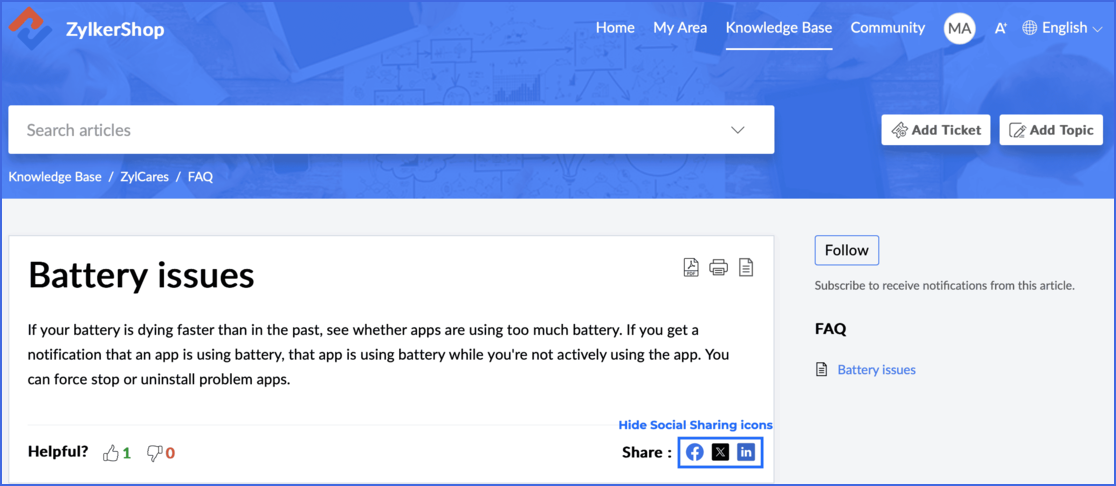
- /*Elegant Theme*/
- .KbDetailLtContainer__userSocialIcon{
- display: none
- }
- /*Materialized Theme*/
- .Feed__footerCol .ActionBar__actionBarActionssecondary { display: none; }
- /*Flat Theme*/
- .KBDetailsContainer__info + .KBDetailsContainer__info{
- display:none;
- }
- /*Classic Theme*/
- .ArticleCmd__articleLike>div:last-child
- {
- display:none;
- }

Stay tuned for a few more customization options for your Knowledge Base in your Help Center.
Until Next week, GoodBye.
Regards,
Lydia Kiruba | Zoho Desk