Spotlight #7 - Automatic Transitions in Blueprint
Previously, records could not be moved from one state to another without user intervention. With automatic transitions, move records from one state to another automatically, when it elapses its pre-defined time. This Spotlight discusses how automatic transitions optimise your sales conversion process in Blueprints. If you'd like a deeper understanding of how Blueprint works, check this out.
Automatic Transitions in Blueprint
Automatic transition, as the name suggests, auto-moves a record from one state to another state when it exceeds a pre-defined time. We can set the time, varying from 15 minutes to even months for the automatic transition of a record to another state. It fills the process gaps where mistimed or delayed transitions can be triggered, as fail-safe default transitions in a sales process. Thus preventing sales process delays and helping to optimize conversion.
Business use-case
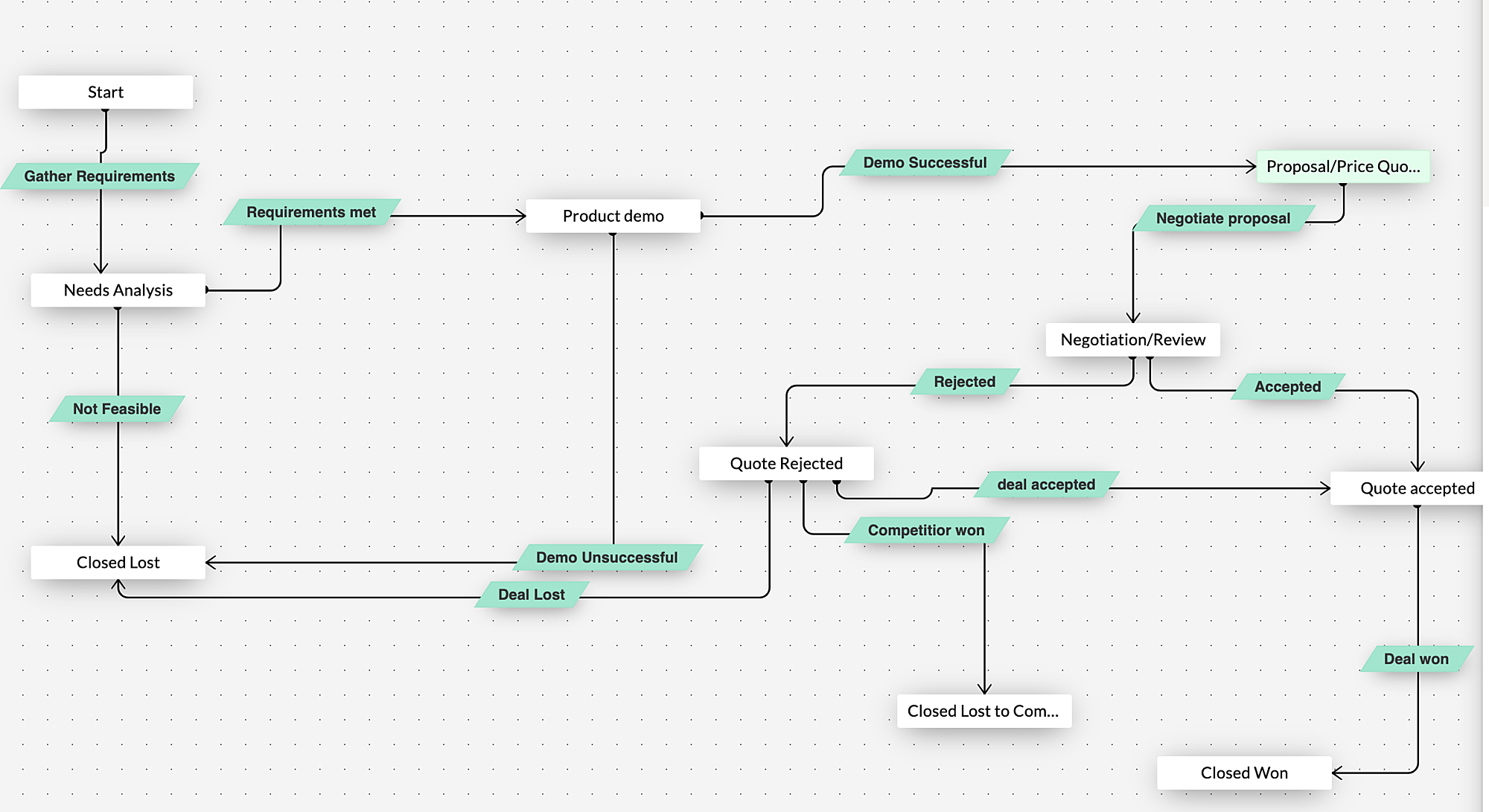
For a better understanding, let us consider the sales process of Zylker, a software product company. The sales team gathers the client requirements and analyses them carefully. Once suitable products are identified, a demo is set up for the client. The client is then sent a quote, post which the record enters the negotiation stage. If the client accepts the quote, the deal gets marked as Won. Most of you must be familiar with Blueprints in Zoho CRM that helps execute this process in a systematic manner.
Assume Joey, one of Zylker's sales reps has gone on an unplanned leave. Before going on leave, he had asked for detailed requirements from the client. Let's say the client has already submitted his requirement through an email. As Joe has not validated the requirements and performed the next transition in the sales pipeline, the deal is stuck in the "Needs analysis" stage. This delays the sales process.
By defining a set time for each stage, Joey can ensure that any record that lapses the pre-set time can then be moved to the next stage automatically. If the deal elapses the wait time in "Need analysis" state, the record gets moved automatically to the
"Negotiation" state.
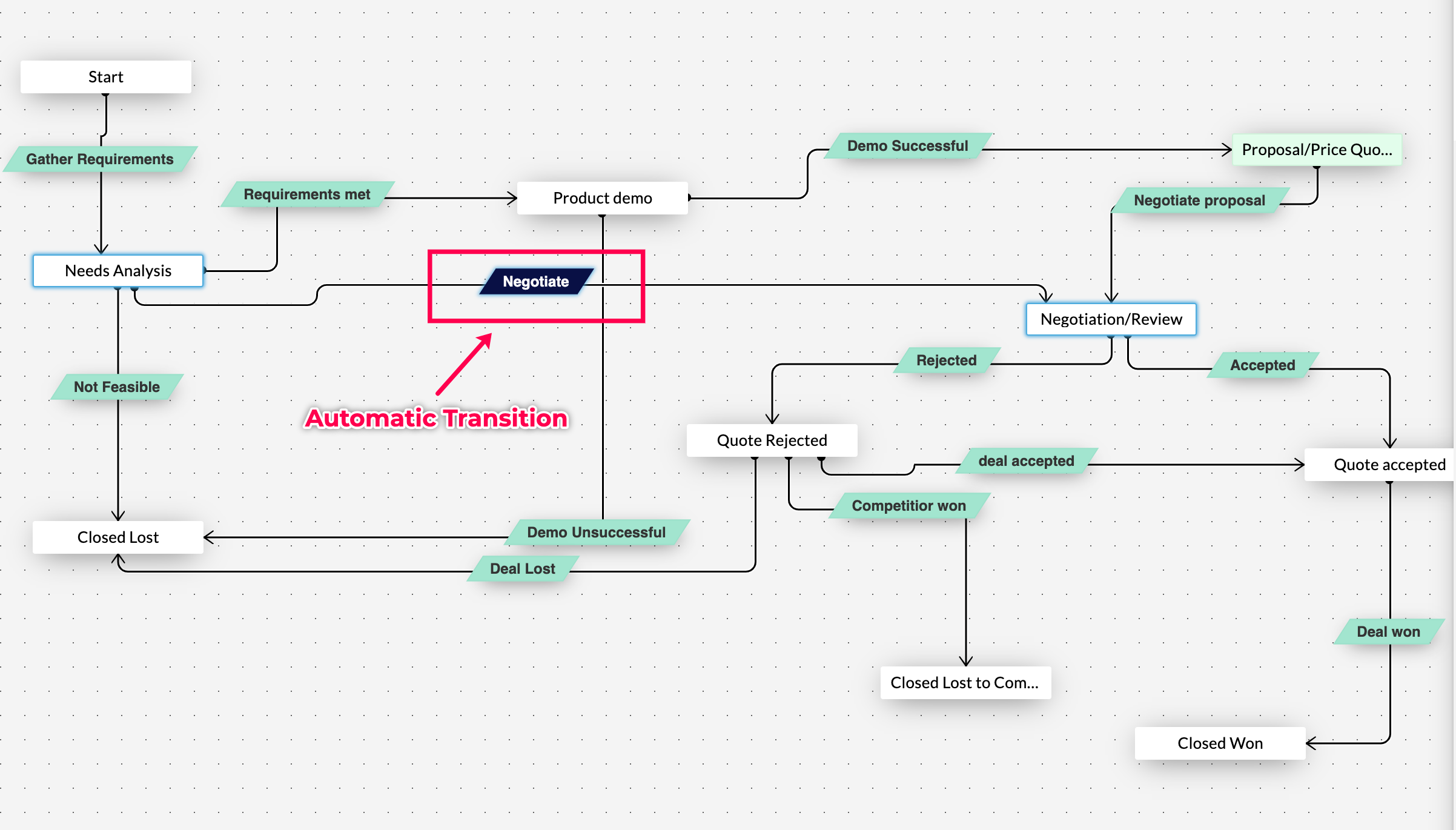
This ensures that the record is not left idle for want of human intervention. Of course, not all stages require an automatic transition. This can be set in line with the sales process.
Now let us check out how to configure automatic transition
- To configure automatic transition, create a new transition between need analysis and negotiation
- Below the transition name, there is a small check box called automatic transition - "Check" and "Save" it.
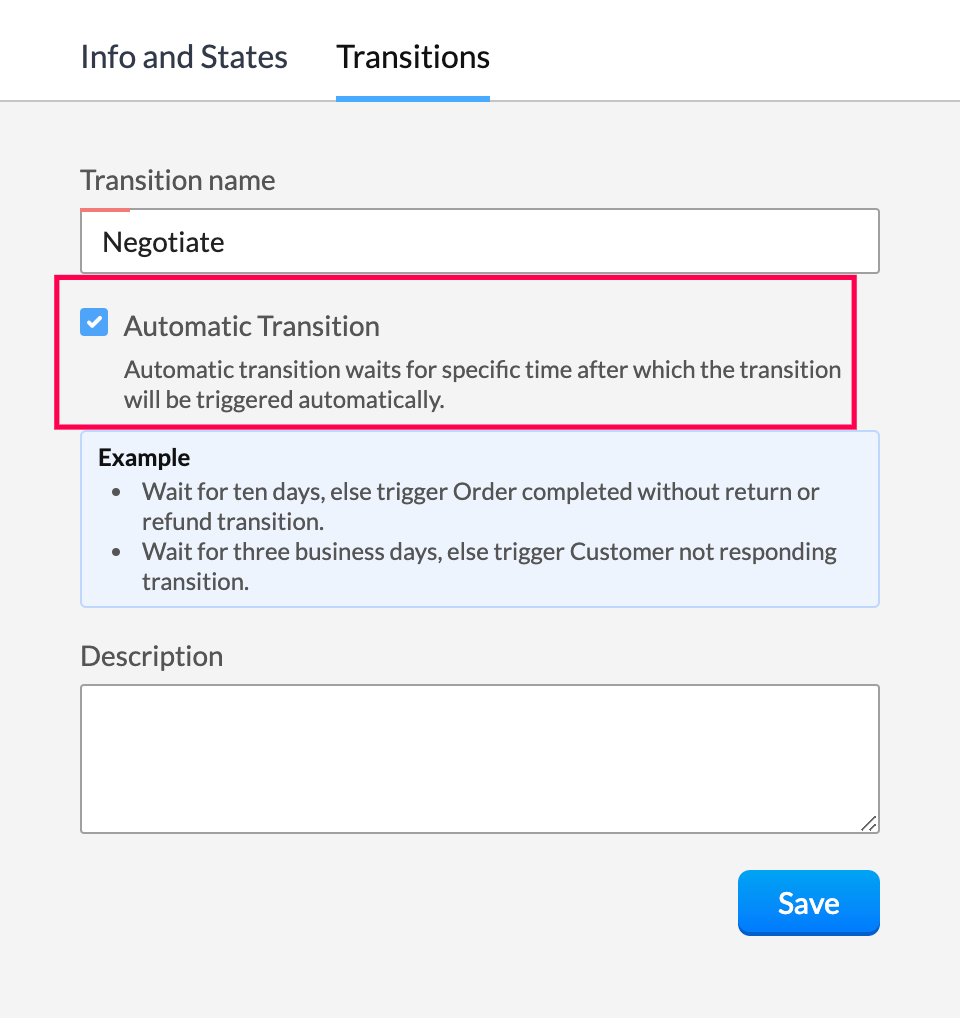
- Choose the wait time - days, hours or minutes.
- If the record stays in the current state for more than the defined time, it will be transferred to the AT configured state automatically.
- Customise actions such as email notification, webhook, actions and much more to get executed upon the transition.
To check how it gets executed. Create a new deal. In case none of the Transitions are selected in the automatic transition configured state, an info message gets displayed that states <this transition> will be executed automatically on <date> and <time>.

Leveraging automatic transition ensures that the record is not stuck beyond a point in a particular state and helps further sales conversion.
Topic Participants
Shaveethira G
Solutions to Success - Milton
Kevin Flynn
marketing
Onsite Ergonomics
Sticky Posts
How to reach the official Zoho Support channels and avoid fake ones.
Dear Customers, Thanks a lot for choosing Zoho! Our applications are built to help achieve your day-to-day business goals. We are committed to engaging with you, to understand and develop solutions that enhance your productivity. We are happy and ready to help you use our services effectively. Understanding and avoiding fake support Just like using popular bank names and financial applications for phishing purposes, using Zoho and claiming to be providing Zoho Support or services with false numbersFunction #35: Close all tasks associated with a lead and create a new task.
Welcome back everyone! Last week, we learnt how to close all tasks of a deal depending upon the deal stage. This week, let's look at a custom function that lets you close all of the tasks associated with a lead while simultaneously creating a new task, like when you need to halt all progress towards a lead while the lead is not available at the moment but create a reminder task. Business scenario: The success of a company, in one way or another, is determined by the leads it gets. Each lead is justZoho CRM Webinar - Redesigning Daily User Experiences with Canvas
<br> Your users across roles use the CRM for day-to-day tasks that are necessary. Whether they perform their tasks on time, the right way, or at all depends on a lot of factors, including User Experience. Many businesses struggle with rigid layouts,Join us at the Canada ZUG Meetup: What’s New in Zoho CRM
Hello Zoho Community! Start your year with fresh insights into Zoho CRM’s latest updates and tools. Whether you're a CRM beginner or a experienced user, this meetup is crafted to help you optimise your processes and leverage new features. Explore practicalCRM Hack #2: Automate sending of birthday greetings to your customers.
Hello everyone! What sets you apart as a sales person is your ability to add that personal touch to your business relationship with your customers. Sending a gift on a special day, or leaving a note wishing them on their birthdays, are small, yet significant actions that show your customers that you care. And these are actions done without any expectations :) You must be engaging with a lot of customers and it is highly unlikely that they all are your friends on Facebook or some social channel,
Recent Topics
Taz bot not working — What should I do to resolve this issue?
I am experiencing issues with the Taz bot in Zoho Cliq—not receiving responses or it does not seem to work as expected. Could you please explain why the Taz bot might not be functioning and what steps I should take to resolve this issue? Thank you!OneNote Migration
I am trying to migrate two notebooks from OneNote. For five days now I have had no notification that migration has completed and the migration page show 50% complete - one notebook completed one not finished. It just stays like this. I am unable to cancelSet various time slot reminders for task and event
Hi I would like known if there is possibility to set various time reminders for a task or event like we have the possibility to do in google calendar or google task. For example I'am creating an event or task and I want to be alerted before 30min andZoho Calendar not functioning---cannot edit, add attendees, etc.
Hello, My calendar is acting strange. I'm using Chrome as my browser and pop ups are not blocked (the calendar worked fine yesterday). When creating an event, I'm not able to "edit" the event and add attendees, etc. The link is non-responsive. I cannotSpilt Axis for stacked column and line graph
Each month around this time I prepare a business review deck. One of the biggest annoyances I have with Zoho, also happens to be something that most other platforms have provided for a long time now, and that is being able to create a chart with stackedPin a note on top
Dear Zoho Notebook Team, Please highly consider adding ability to pin a note on top and arrange pinned notes. I have a lot of notes that I want to pin important ones on top and this feature is missing badly. Thank you.Windows 11 app ver 2.2.8
I have been trialing Zoho Notes syncing between my PC and iphone. No problems with iphone but the Windows 64 bit app ver 2.2.8 was very buggy and would lock up completely, needing a Control Alt Delete etc to close it down. It seemed to be connected toDeluge Script: Onboarding → Access Form
Hello everyone, Edit: Sorry, I think I put this topic in the wrong section. I’ve recently run into an issue that’s been giving me a bit of a headache for the past few weeks. Context: This is my first time using Deluge to create a script, but it’s notWindows Device Authentication
We have recently started using ManageEngine, and my boss saw a device management feature in the Zoho One directory. We thought it would either help give us more intergration into Zoho one through bringing ManageEngine services through Zoho one. Or, itHow can I change spell check language?
I cannot find the way to change spell check language. My "display language" is English, and I want to have the same one for Spell Check, but it is Russian!!! How can I change it? In one of your explanations you mentioned that I have to choose it fromMail is so slow - doesn't even work!
Mail has been getting slower and slower - and today it's not even pulling up emails in either Inbox or Unread. This is beyond frustrating since email is a big part of business. Sent a request through the useless help portal - no response. Called the uselessUser marked as SPAMMER. Mail Fetch has also been disabled for any active POP accounts.
I am the administrator for joelles.com One of our accounts has been blocked saying this: User marked as SPAMMER. Mail Fetch has also been disabled for any active POP accounts. I cannot change the disabled account in the control panel as it says that itIs there a way to sync Tags between CRM and Campaigns/Marketing Hub?
I wonder if there is a way to synch the tags between CRM and Marketing-Hub / Campaigns?how to see if a specific contact opened an email in zoho campaign?
how to see if a specific contact opened an email in zoho campaign?Revenue Management: #8 Revenue Recognition in Educational & Training Institutions
Educational Institutions and training centres typically collect course fees at the time of enrolment, sometimes for a one-day workshop and sometimes for a year-long certification course. You might also charge separately for course materials or evaluation.Maximum file limit in zoho people LMS
Dear Team, I am having approximately 4.9 GB of material, including PPTs and videos for uploading in zoho people LMS course. May I know what is the maximum limit limit for the course files Thanking you, With regards, Logeswar V Executive _ OperationsDynamically prefill ticket fields
Hello, I am using Zoho Desk to collect tickets of our clients about orders they placed on our website. I would like to be able to prefill two tickets fields dynamically, in this case a readonly field for the order id, and a hidden field for the sellerOptimize your Knowledge Base for better visibility by allowing search engine crawling and indexing
All you need to know about no-follow and no-index in KB. What are article crawlability and indexability? Crawlability and indexability are vital for making an article visible and accessible to search engines. When a search engine crawls an article, itHas anyone created a public ASAP Guide that I can check out?
I am thinking of adding an ASAP guide to my web application, but I have noticed that the ASAP widget itself can be really slow to load sometimes. Has anyone created a public ASAP Guide that I can check to see how performant it is? I don't want to spendWhat’s New in Zoho Analytics – September 2025
Hello Users!! In this month’s update, we’re raising the bar across multiple touchpoints, from how you bring in data, plan and track projects to how you design and brand your dashboards. We’ve added the all-new Gantt chart for project visualization, expandedZoho MCP has no tools for Creator or 3rd Party Apps?
I don't see a Zoho MCP community forum so putting this here. Two big problems I see: 1) Although Zoho advertises "over 950 3rd party apps" as available through their MCP, when I go to "Add Tools" there are ZERO 3rd party apps available to choose from.Zoho Forms - Zoho Drive connection - Shared Drives not supported
Hello i am stuck with Google Drive Connection There is no supported shared drives Connection is not support shared drives boolean Query Parameters - supportsAllDrives=true&supportsTeamDrives=true to activate fetch files from the shared drives. Ahat needCan't create package until Bill created?
I can't understand why we cannot create a package until a Bill is created? We are having to created draft Bills to create a package when the item is received, but we may not have received a Bill from the supplier. Also, Bill # is required, but we normallyWhats the Time out Limit for API Calls from Deluge?
Hi Creator Devs, We are making API calls to third party server via Deluge. Getting this error message: Error at line : 24, The task has been terminated since the API call is taking too long to respond. Please try again after sometime. Whats the defaultHow to get the authorization code for domain transfer from Zoho?
I have transferred my domain from zoho to godaddy, and that needs a authorization code. I haven't got any mail containing that. How to get the authorization code from domain transfer? Thanks, ArunHow can I optimize a Zoho Site page for SEO when embedding external menu or restaurant links?
Hi everyone, I’m experimenting with building small content hubs on Zoho Sites and want to make sure I’m doing it in an SEO-friendly way. For example, I tried creating a page that highlights restaurant menu items and linked out to a resource like this:Diff signature for compose new email and replies
Hi, How do i have different signature for replies and new emails. its inconvenient to have one large signature for replies. Usually on Outlook we have the option to keep separate signatures for new emails and for replies.Zoho Website Site Speed Up & Setting
We are experiencing slow loading speeds on our Zoho website and would like assistance in optimizing its performance. Kindly review the site and suggest or implement necessary improvements to enhance speed, especially related to: > Caching mechanisms >No option for pick up in Zoho Books / Inventory but yes on commerce
Is it planned to release soon on books/inventory?Accessing Zoho form enteries via API
Hi As a user I can view enteries to a form at: https://forms.zoho.com/<myOrganisation>/report/<myReportName>/records/web How do I access these entries via API? I don't have any problem with scope and getting tokens. But I have no idea what the API callBlueprint Issue - Being able to set a subform field as mandatory
I'm creating a blueprint. My record involves a subform which is only shown once field is set but the field gets set in step two of the process. My problem - I can't save the record as the subform field is set to mandatory - If I unset the mandatory field,Blueprint - Mandatory file upload field
Hi, File upload (as we as image upload) field cannot be set as mandatory during a blueprint transition. Is there a workaround? Setting attachments as mandatory doesn't solve this need as we have no control over which attachments are added, nor can weZoho Books - Include Quote Status in Workflow Field Triggers
Hi Zoho Books team, I recently tried to create a Workflow rule based on when a Quote is Accepted by the customer. This is something which I thought would be very easy to do, however I discovered that Status is not listed as a field which can be monitoredZoho Books - Show Related Sales Orders on Quotes
Hi Books team, I've noticed that the Quotes don't show show the related Sales Order. My feature request is to also show related Sales Orders above the Quote so it's easy to follow the thread of records in the sales and fulfilment process. Below screenshotAdd VAT/Tax line to bank adjustments
When categorising transactions and matching bank feeds with transactions such as customer payments, we use the "Add Adjustment" to add things like fees/bank fees. It would be useful to choose a VAT/Tax rate here. Whilst there is a bank charges option when adding a payment, this goes into the default bank charges account. We use the adjustments so that we can choose the account and separate our fees. We use different card providers and Worldpay charges VAT so we are stuck. We cannot integrate withNew Menu Layout Feedback
I'd really like to see the banking item back on the top of the menu. I'm sure part of it is just because that's what I'm accustomed to. However, for a bookkeeping program, I think there's a logic to having banking be on top. Not a giant issue, but somethingForm Accessibility
Hi, is there an update on the accessibility standard of Zoho forms? Are the forms WCAG 2.1 AA compliant?Cannot schedule report delivery
The only 'send option' available when exporting reports is 'immediately' The option to schedule the report is missing.adding attachment in sendmail script where attachment is in a CRM field
Hi all, I have a custom field of type 'File Upload' in one of my modules in my CRM. I want to include the file in that field as an attachment to an email - which is done from a button on the 'Results' module. I have created a script and a button to initiate an email from that module. The Deluge scripting window has allowed me to add arguments for all the fields I need to use except for the one file upload type field. My script currently looks like the below (content of the email omitted). As you[Free Webinar] Learning Table Series - AI-Enhanced Insurance Claim Management in Zoho Creator
Hello Everyone! We’re excited to invite you to another edition of Learning Table Series, where we showcase how Zoho Creator empowers industries with innovative and automated solutions. Struggling with lengthy claim processes, a lack of visibility intoNext Page