Supercharge your VoC analyses with data from anywhere: Modules are now sources for VoC
Dear customers,
We hope you're well!
Your customers talk about your brand, praise your service, criticize your offerings, or promote your business—literally from anywhere on the internet—and it has become strategically necessary to factor in all possible feedback to improve, optimize, and grow your business.
Foreseeing opportunities this feedback could bring, we've developed the ability to use any module as a source to process VoC analyses, and we're excited to talk about it.
A module as a source
Previously, VoC channeled various kinds of responses into Zoho CRM for analysis:
- Tickets from Zoho Desk
- Survey responses from Zoho Survey
- Social media mentions from Zoho Social
- Email responses from email integrations
- Calls from PhoneBridge integrations
- Notes from CRM records
All these are mostly service responses. However, customer opinions aren't just limited to their "official" feedback responses. You probably also receive feedback in the following forms, to name a few:
- Comments on your social media posts
- Reviews about your products
- Discussions on community platforms
- Messages on networking sites
- Ideas in forums
- Blog comments
These represent feedback your business gets externally, and tapping into them can benefit your business—big time.
But how do you do it?
The anchor is your business. By identifying your business's presence online and connecting various platforms with Zoho CRM, you can channelize this feedback as records and ultimately map these destination modules as sources of VoC data.
Zoho Marketplace, REST APIs, webhooks, Zoho DataPrep, and Zoho Flow are all various ways you can channelize this data. Here are some examples:
Analyze and act upon YouTube comments using Zoho Flow
Zoho Flow is Zoho's app integration tool, which connects applications and enables data to flow between them based on triggers and actions you can configure. Using it, you can trigger actions in Zoho CRM whenever a YouTube video gets a new comment. The action in Zoho CRM could be that a record is created or a field is updated from where data can be used for VoC processing.

Similarly, using Zoho Flow's gallery of readily available triggers, you can import reviews from Trustpilot, the Collect Reviews app, and Zoho Connect apps available in their gallery.
Gather real-time feedback from hotel guests using kiosks
With Zoho CRM's Kiosk Studio, you can collect customer feedback when they check out. Ask about their experiences using the fields available in Kiosk Studio's interface, save that data in dedicated modules or route it into an existing module, and use that module as a source for VoC processing.
Survey responses via Zoho DataPrep
Businesses use surveys for various reasons, and the Zoho Survey integration already funnels survey data into VoC analysis. If you use other data providers—like Zoho Forms or SurveyMonkey—you can identify, clean, and bring responses into Zoho CRM through Zoho's DataPrep application, and then subject it to VoC analysis.
Parse reviews from Zoho Marketplace and other B2B app stores
Your apps serve as other sources of customer feedback. Whether it's from a mobile app or a B2B marketplace, these apps are rich sources of reviews. This includes data from apps like Google Business, Amazon, Apple's App Store, the Google Play store, G2, Yelp, and other providers, from which you can derive data via code-based integrations.
Adding modules as sources
Once you have feedback from your desired sources stored in modules in Zoho CRM, it's time to add these modules as VoC sources.

Existing standard sources, like Zoho Desk, Zoho Survey, emails, calls, and social media, are called basic data sources. Any module you select as a source is called an advanced source.
 Note: Feedback from the Notes source is now nested as and parsed from a child module.
Here's how you configure any module as a source:
Under Module as a source, choose the source module that contains your reviews, then fill out the following fields:
- Display name: This labels the source module.
- Choose field for response to be extracted: This tells the system which field(s) to import data from—typically descriptive multi-line fields.
- Choose a response provider: This is your lead or customers. This tells the system whom the feedback should be attributed to and which record to associate the analysis with.
- Response time: This defines the time frame from which the system should include feedback data.
That's all you need to do. VoC will start importing your feedback data for analysis. To associate data with existing customers, you can also include them in your settings .
Derive insights from your modules and act on them
The minute your source modules are configured, you can build dashboards that include them, filter records based on their attributes, and automate workflows as you would for any other VoC response.
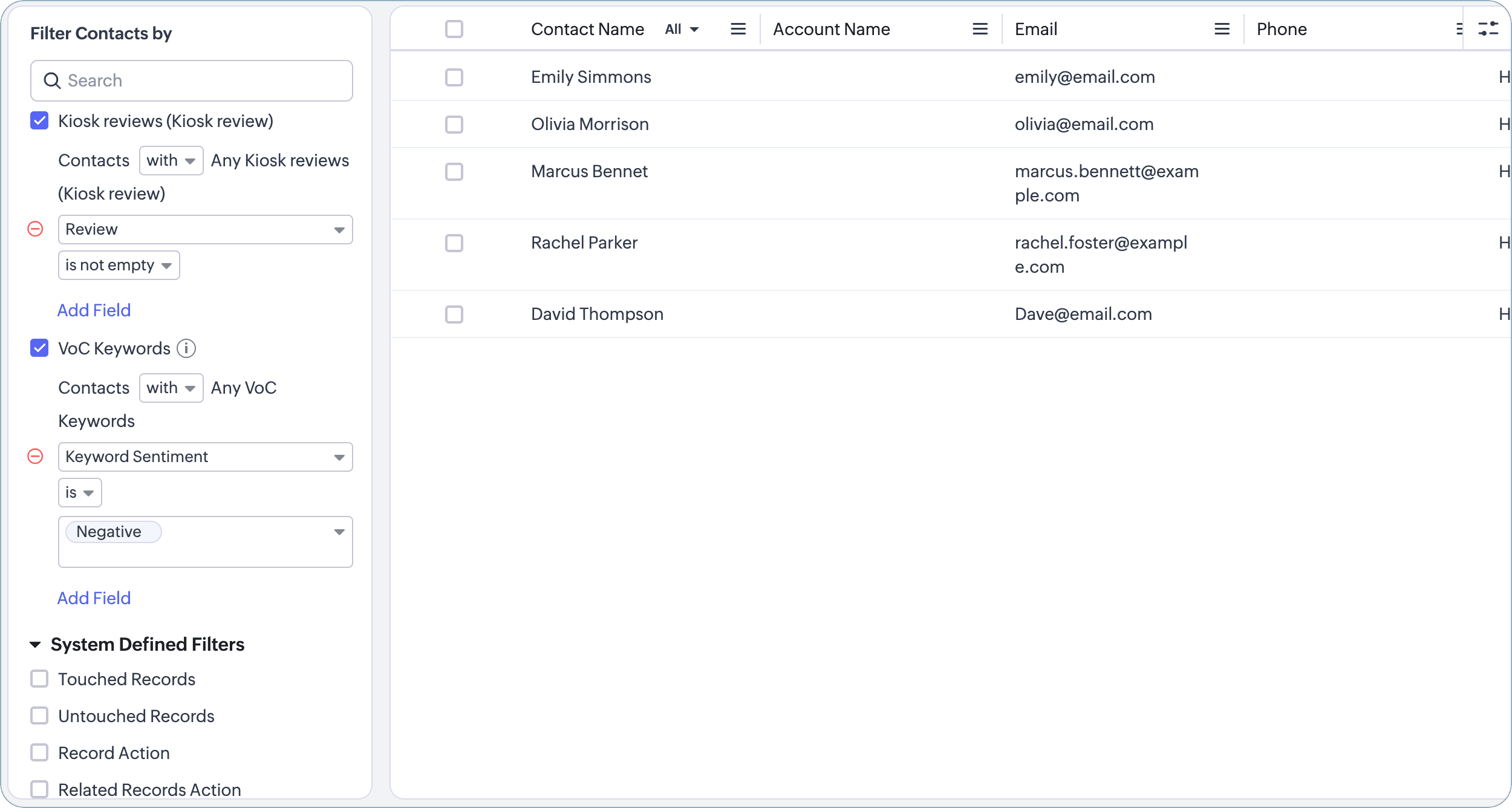
There—that's how you can add bring reviews from the Internet to power your VoC analyses.
With the emphasis on customer experience growing, we are working to boost VoC with more CX-bound capabilities each day. We shall meet you with one such in the near future. See you!
With the emphasis on customer experience growing, we are working to boost VoC with more CX-bound capabilities each day. We shall meet you with one such in the near future. See you!
Release: Available for customers in all DCs
Resource: Help document
Thanks and have a good one!
Kind regards,
Saranya Balasubramanian
Kind regards,
Saranya Balasubramanian
Topic Participants
Saranya Balasubramanian
Sticky Posts
Good news! Calendar in Zoho CRM gets a face lift
Dear Customers, We are delighted to unveil the revamped calendar UI in Zoho CRM. With a complete visual overhaul aligned with CRM for Everyone, the calendar now offers a more intuitive and flexible scheduling experience. What’s new? Distinguish activitiesVoC in Zoho CRM is now data savvy: Explore response drilldown, summary components and participation in CRM criteria
VoC has all the goods when it comes to customer intelligence—which is why we're constantly enhancing it. We recently added the following: A customer drilldown component that shows you the list of prospects and customers behind a chart's attribute ExpandedWrapping up 2025 on a high note: CRM Release Highlights of the year
Dear Customers, 2025 was an eventful year for us at Zoho CRM. We’ve had releases of all sizes and impact, and we are excited to look back, break it down, and rediscover them with you! Before we rewind—we’d like to take a minute and sincerely thank youPresenting ABM for Zoho CRM: Expand and retain your customers with precision
Picture this scenario: You're a growing SaaS company ready to launch a powerful business suite, and are looking to gain traction and momentum. But as a business with a tight budget, you know acquiring new customers is slow, expensive, and often deliversCreate and populate a record in an instant: Introducing zero-shot field prompting to Zia's ICR
A couple of months ago, we upgraded our in-house AI image detection and validation tool, Zia Vision, with intelligent character recognition (ICR). By training Zia with sample images, you could create and enrich CRM records with data extracted from standard
Recent Topics
Conditional Layouts On Multi Select Field
How we can use Conditional Layouts On Multi Select Field field? Please help.Multiple columns in a form
I am evaluating Zoho Creator. However, I am seeing almost no layout control on a form. Just a basic 1 or 2 column format that is then imposed on the entire form. That's not going to work for many, many real world cases. We need multiple columns per line, and we need each line/section to occupy a single column or be able to span the columns. Someone please tell me that I'm missing something and the capability is actually there.Global search
Hi! I think it would be great to have a global search that would give you results from all records of a database, no only for a single field of a single form as we have now. Thanks!Any insights about API/v2? Having problem for a while.
I don't know why it is throwing a 404 error, my report name is correct. Has someone had this issue and how you fix it?Edit QR code with redirect to form
Guten morgen, wir haben ein Formular Reklamation_erstellen. Dort soll ein QR Code erstellt werden, der im Lieferschein angezeigt wird. Beim Scannen auf dem soll das jeweilige Formular zum BEARBEITEN geöffnet werden. Leider bekomme ich es nur so hin, dassGetting all the ingredients together for baking an app
Good day everyone. After reading a lot of the help docs and watching videos, I now started on my app. To prevent hours and hours wasted on going down the wrong track, I would like some clarification on the following. But first some background: I haveHelp Needed with Configuring ZC Microservice
I'm attempting to create a simple microservice, but am running into problems with scope and auth. Using Custom API Builder, here's my setup: 1. Method: GET 2. Auth: OAuth2 3. User Scope: All users 4. Response: Standard 5. Function: A function that returnsCreator Simplified #10: Predefine Form Field Values and Make Them Read-Only for Users
Hey Creators, Ready for this week's tip in the Creator Simplified series? Today, we will explore how to have read only fields in a form. Use Case: Assume a scenario where the default value for a Department field needs to be English Literature, but youZoho Mail : Email Outgoing Blocked
I suddenly received the following message yesterday. I cannot send any mail. Please resolve as soon as possible, I cannot work without sending email. Dear User, We regret to inform you that your email outgoing has been blocked and you will not be ableCreator and Tables
Good day. I am trying to create my first application. I have imported my data into Tables and am creating my app in Creator. I do not see my tables and cannot see how to write forms data to a table. Even the Workflow just uses the form. In one of thecustomer Name and address details
i created one application there is no customer details in that . how to add customer details andRecalculate every row in the subform
Hello, Can anyone help me with a script, please? I have an issue. Sometimes it happens, that in a multi row subform one of the rows show an incorrect row total value. Not really understand how it can happen, if I have a 20 row subform, 19 rows show correctCreating Repeat Forms that remove redundancies
I wanted to understand if you can make multi-layer forms that reduce the need for users to input information in again and again. We want a form that our suppliers fill out per ingredient they sell, and the end result should have the Ingredient (SectionWhat is the difference between the free plan and the mail lite plan?
What is the difference between the free plan and the mail lite plan? How many emails can I send per day?Unblock email
Hi The outgoing mail from a client of me is blocked. I already made tickets and tickets are send to the EU desk but nobody is responding. The problem is already 4 days! There is absolutely no help from the support. I am really not satisfied at all! CanDomain verification failure
Hello Zoho Support, I purchased my domain directly through Zoho Mail, but the domain verification keeps failing with the message “TXT verification failed.” I’ve already waited and retried several times, but it still won’t verify. Could you please manuallyUnable to send message;Reason:554 5.1.8 Email Outgoing Blocked.
My email account is unable to send emails, and I urgently need to use it. How can I resolve this?If there is anything we have done wrong, please let us know in advance so we can actively cooperate to improve. User ID: 850482493URGENT: Email stopped workin - can't access admin panel
For some reason email sending stopped working. When I try to send an email it fails with "Unable to send message;Reason:451 4.7.1 Temporary system error" I can receive email just fine I see in my notifications some errors about the MX records, howeverCan I associate an invoice to a Project after the fact?
We have generated an invoice but would like to assoicate it to a Zoho Project after the fact. Is there any way to accomplish that? Thanks, ScottEmails I send as a cc or bcc NEVER GO THROUGH TO THA RECEIVER !!
every time i send a cc or bcc copy of an email to anyone when I’m using my zohomail.com email - no one ever gets the cc of bcc copy if the email: why???? And i triple check that the email addresses are correct; then i get back an email message (EVERYTIME)Add Support for Authenticator App MFA in Zoho Desk Help Center
Hello Zoho Desk Team, We hope you are doing well. We would like to request an enhancement related to security for the Zoho Desk Help Center (customer portal). Currently, the Help Center supports MFA for portal users via SAML, JWT, SMS authentication,Auto-fill Contacts in Zoho Mail not working for me
We just switched to Zoho Mail for our company, and I am noticing that the "auto fill" feature when composing an email -- where the "to" field is autofilled (like in the attachment) from Contatcts works for everyone except me. Any way I might have madeHow to unlink a SAML user from the existing Zoho Desk user (domain change case)
Hi everyone, I’m trying to understand how to handle a situation where a customer changes their company domain. In our setup, users authenticate via SAML, so when the domain changes, the SAML system treats them as a new user. However, in Zoho Desk, I’dPrice Managment
I have been in discussions with Zoho for some time and not getting what I need. Maybe someone can help explain the logic behind this for me as I fail to understand. When creating an item, you input a sales rate and purchase rate. These rates are justRelated to zoho survey
Hi team. I want to know something regarding zoho survey question builder. I have two questions each of dropdown (One answer) - question type. In the first question, there are 16 answer choices and in the second question, there are 3 answer choices. ForText Message
When trying to sent a text message, it says its an error i should contact a zoho agentZoho POS is now available for Canadian retailers
Hey everyone, We're excited to introduce the all-new Canadian edition of Zoho POS, which helps retail businesses simplify and manage their end-to-end business operations. Start by signing up and exploring the 15-day free trial. Sign up now How does ZohoPayroll In Canada
Hi, When can we expect to have payroll in Canada with booksMass update to change or shift all project dates and keep project structure + shift all sub-tasks dates with main tasks
Most users would expect that if they change the start date of their project then that will be reflected inside the actual project and any project structure would be retained. Additionally if a task list with associated sub-tasks is moved, most users would expect that those sub-tasks would also be moved along with their parent task. This is not the case. For a total Project shift of dates: * the start and end date from > "Edit Project" page can have a radio button added to "shift all project tasksClosing Accounting Periods - Invoice/Posting dates
Hi, I have seen in another thread but I'm unsure on how the 'transaction locking' works with regards to new and old transactions. When producing monthly accounts if I close December 24 accounts on 8th Jan 25 will transaction locking prevent me from postingIn-person ZUG Meetups for Real Estate Professionals - US Q1 2026
The Real Estate Zoho User Group is going on a multi-city, in-person meetup tour across the US, and we’d love to see you there! These meetups are a great opportunity to: Connect with fellow real estate professionals using Zoho Share challenges and discoverZoho CRM custom fields not showing in zoho creator
Hi Team, I have created a Products form with Zoho CRM integration and connected it to Products module of CRM. But when I see the reports of Products in Zoho creator then I am not able to see custom fields of Products module. Only standard fields of ProductsSending email notifications based on language
Hello. I would like to know how we can bypass the default notifications (which are just in English) for when a ticket is created/replied to/closed, to be in other languages, based on the language field in the ticket? I can create other email templates,Zoho Error: This Operation has been restricted. Please contact support-as@zohocorp.com for further details
Hello There, l tried to verify my domain (florindagoreti.com.br) and its shows this error: This Operation has been restricted. Please contact support-as@zohocorp.com for further details. Screenshot Given Below - please check what went wrong. ThanksDownload a file from within a zoho creator widget
I have a widget running in Zoho Creator , it displays uploaded documents in a table file, and I have added a download link in the view. ( The widget is created with html, css and javascript). I do not succeed in getting the download working. Do I haveZoho / Outlook Calendar sync
The current Marketplace -> Microsoft -> Meetings integration needs 2 changes. 1. The current language for the Two-Way sync option should be changed. It currently states, "Sync both your Zoho CRM Calendar and Office 365 Calendar meetings with each other."Email content just contain 'OK' ,not what we expect
create campaign API URL: https://campaigns.zoho.com/api/v1.1/createCampaign req params: {'campaignname': 'General_Outreach_d0cfc415-43aa-4b96-bb09-558e76a3dda3_50_20251117_214806_660', 'from_email': 'admin@allinmedia.ai', 'subject': 'ALL IN MEDIA', 'list_details':Reopen ticket
Hello! Can I reopen a ticket just using the API ticket/sendReply ? What's the rules to do it? I'm trying but it doesn't reopen the ticket, it just send the replyAllow Admins to Transfer Ownership of Their Own Files & Folders
Hi Zoho WorkDrive Team, Hope you are doing well. We would like to request an important enhancement to the ownership-transfer functionality in Zoho WorkDrive, specifically regarding administrator capabilities. As administrators, we have the ability toTip#46: Capture accurate log hours
Hello everyone, Use the newly introduced timer settings that will streamline the usage of timers and help admins or workspace owners to manage the time entries of the workspace users better. Check out the below mentioned timer settings added to the TimesheetNext Page