Timeline View in CRM - a linear way to visualize records over time
Hello all,
We would like to introduce the next phase in our quest to deliver a seamless user experience as part of the CRM for Everyone: the Timeline View. It allows you to visualize your records plotted across a given timeline. You can view the records by days, weeks, months, or quarters.
In other words, this view offers you a bird’s-eye perspective of the entire module, factoring in "time" as a critical parameter or scale to display records, based on which you can make quick, broad inferences, at a glance, before delving into detailed specifics.
With the new Timeline View, you can:
- Achieve a consolidated, visual representation of records plotted across a timeframe from which you can derive important time-centric inferences, such as identifying which tasks are ongoing, completed, or yet to begin.
- Gain insight into the duration of a record or task.
- Stay organized by providing a clear, chronological layout of your work, making it easier to allocate resources, monitor ongoing tasks, and ensure everything stays on track.
Let us look at a few scenarios to get a clearer understanding of the functions and benefits of the Timeline View.
Scenario I:
Olivia, the Operations Manager at Zylker Properties, manages a variety of projects and tasks, juggling the complexities of planning and execution in her daily workflow. To stay organized and efficient, she uses the Timeline View, a versatile tool that visually arranges records along a timeline, based on their start and end dates.

Let's look into what all she can achieve by using the Timeline View
- It allows Olivia to quickly identify the Property Deals that are In Progress (represented by blue bars), making it possible for her to prioritize and direct her team's attention to these active transactions.
- Besides, she can also see the Completed Property Deals (marked in green), and Property Deals slated for future execution (that appear in yellow).
- This intuitive color-coding system provides a comprehensive snapshot of each Property Deal, allowing Olivia to assess the status of the entire set of deals at a glance.

Additionally, she can also track the lifespan of each property deal, gaining valuable insight into where adjustments or interventions may be required.
She can spot trends, such as which periods experience higher volumes of property deal creation and closing, allowing for more effective resource planning.

To optimize team performance further, she can group property deals by deal owner, providing a clear view of each team member’s workload.
Besides, this feature enables her to assess how many property deals each person is managing, ensuring a balanced distribution of responsibilities and improving overall efficiency across the team.
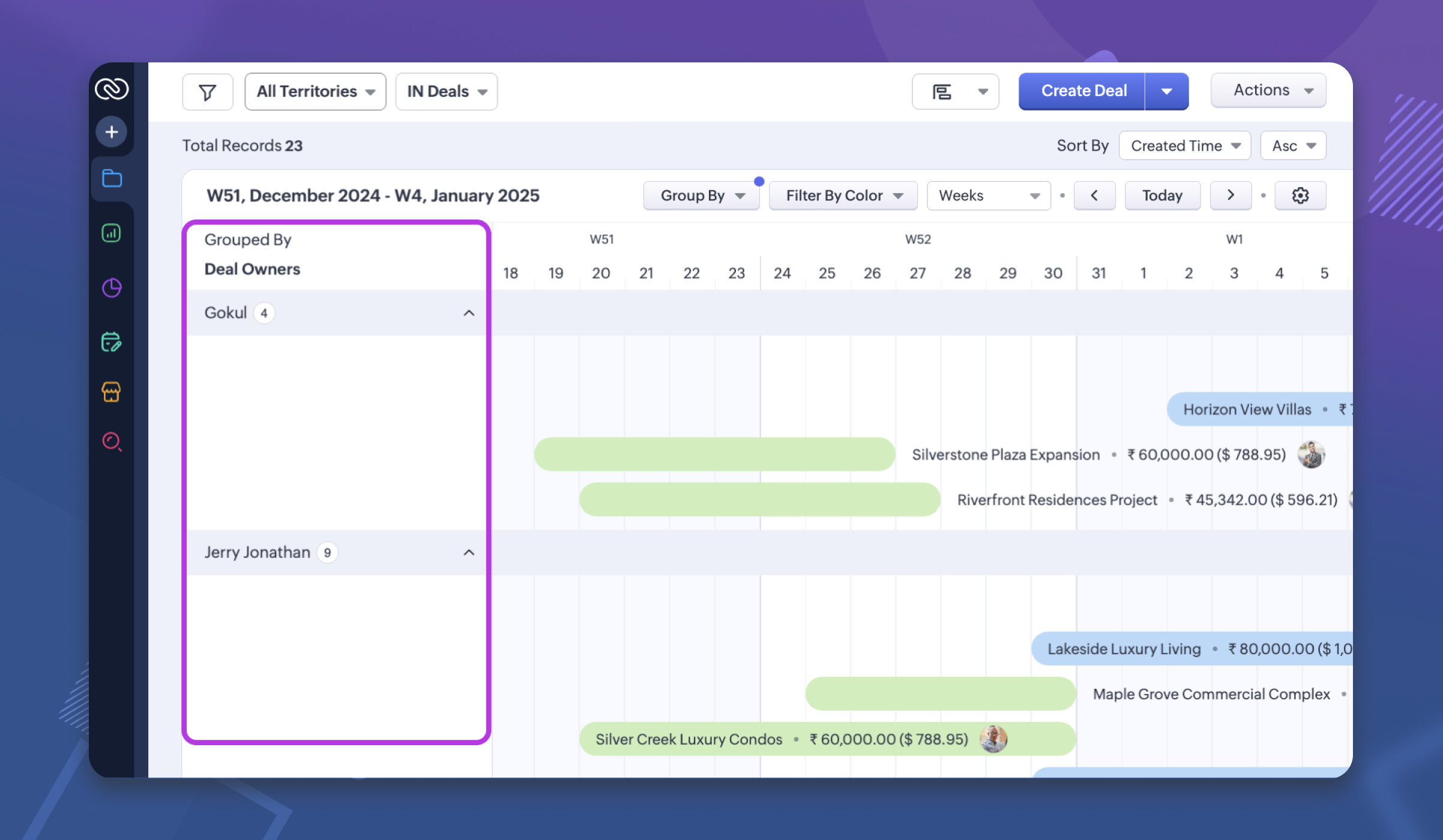
Scenario II:
Yvonne Riehl, the Sales Onboarding Manager at the organization, oversees the onboarding process for new sign-ups. To manage the workload effectively and ensure an even distribution of responsibilities among the team, Yvonne uses the Timeline View. This tool visually displays each onboarding session along a timeline, allowing Yvonne to group the sessions by team member.
With this view, Yvonne can quickly identify when a team member is overloaded with too many onboarding sessions scheduled at a particular time. She can then make adjustments by resizing or repositioning the sessions on the timeline, balancing the workload and ensuring that no one is overwhelmed. This streamlined approach helps Yvonne optimize scheduling and maintain a smooth and efficient onboarding process for both the team and new customers.

Note.
Records without a Start Date or with an End Date earlier than the Start Date will not appear in the Timeline View and will still be visible in the List View.
Records that have a Start Date, but do not have an End Date, are represented as in the image below.
Users will need 'Manage Views' profile permissions to create and edit the Timeline View configuration.
What's next:
Provide the ability to mark a record as complete based on a picklist value.
Availability: Opened to all customer accounts in all DCs who have enabled CRM for Everyone.
Editions: Enterprise and above
DCs: All
Provide the ability to mark a record as complete based on a picklist value.
Availability: Opened to all customer accounts in all DCs who have enabled CRM for Everyone.
Editions: Enterprise and above
DCs: All
Topic Participants
Anna Sakhi John
Ivan Staykov
Ishwarya SG
Sticky Posts
Enhancement to ICR’s field prompting: Preferred data extraction using advanced field prompting
Dear Customers, We hope you’re well A quick background Intelligent Character Recognition (ICR) comes as part of Zia’s optical recognition capability called Zia Vision. When we introduced it last April, the data extraction was training-based and was applicableGood news! Calendar in Zoho CRM gets a face lift
Dear Customers, We are delighted to unveil the revamped calendar UI in Zoho CRM. With a complete visual overhaul aligned with CRM for Everyone, the calendar now offers a more intuitive and flexible scheduling experience. What’s new? Distinguish activitiesAccessibility in Zoho CRM: Not just a feature—a way to empower
For instructions on setting up these controls, please check this help document: Configuring accessibility controls. Hello everyone, Today (December 3, 2024), on the International Day of Persons with Disabilities, we begin our journey towards a CRM thatScaling the customer journey: What's new in CommandCenter
Dear Customers, The last time we connected about CommandCenter, it was about the tool's new controls and revamped UI. Personally, the overhaul of the UI from the last update, still excites me. Today, we're here with news about its scalability and addedZoho CRM's sales trend and sales follow-up trend dashboards are now customizable
Dear Customers, We're here with good news! Sales trend and sales follow-up trend are two system-defined dashboards that help you understand trends and anomalies in your sales outreach and conversion efforts. They use Zia's intelligence to identify patterns
Recent Topics
Approval Workflow for Purchase Orders Abrir
The requirement is , that all purchase orders greater than or equal to 5000 go through an approval process from certain people, but within books I only see that the approvers can be by levels or any approver but we cannot enter a rule like these. CanUnable to create new finance account in Zoho Books Android app due to missing account number field.
Free plan I have enabled a setting via the website requiring unique account codes to be specified for all accounts. When using the android app, go to expenses, new expense, select account, new account. Promoted to enter the Account name and description.How to Fetch data from Sales Order and Insert into Purchase Order with Deluge
Hello, I am wanting to write a Deluge script that would take the shipping address on a Sales Order and upon conversion to a Sales Order automatically insert it into that corresponding PO. I am new to Deluge but understand that it has great capabilities.Google Drive shared folder
My deluge script has stopped working, no longer collecting files from Google Drive - have these connections finally been deprecated ?? They seem to be active but errors occur when updating them ?Zoho Desk: Mobile Updates | Q1 2026
Hello everyone, Greetings! As we gear up for the end of Q1, we are excited to share a quick journey into all that released in the first quarter of 2026. We have brought in a few enhancements in the mobile apps that improve overall user experience andCRM x WorkDrive: We're rolling out the WorkDrive-powered file storage experience for existing users
Release plan: Gradual rollout to customers without file storage add-ons, in this order: 1. Standalone CRM 2. CRM Plus and Zoho One DCs: All | Editions: All Available now for: - Standalone CRM accounts in Free and Standard editions without file storageAdditional Address - Company Name
It would be very helpful to have a "Company Name" field in the Additional Address shipping section. In a situation where you drop-ship orders to a different address or different company entirely, it may be necessary to list the company name of the receiver. I understand that the Attention field can be used for that purpose, but that's not really the intended purpose of that field.All new Address Field in Zoho CRM: maintain structured and accurate address inputs
Availability Update: 29 September 2025: It's currently available for all new sign-ups and for existing Zoho CRM orgs which are in the Professional edition exclusively for IN DC users. 2 March 2026: Available to users in all DCs except US and EU DC. 24Zoho Payroll's Kuwait, Oman, Qatar, Bahrain and Canada edition is available in Zoho One
Great news for Zoho One users! Zoho Payroll has expanded to five new regions: Kuwait, Oman, Qatar, Bahrain, and Canada. And the best part? These new editions are fully integrated with Zoho One, just like our existing editions in India, the UAE, SaudiDoes Zoho Creator support multilingual translation for user-entered data?
I understand that Zoho Creator provides localization support for UI elements such as field labels and static text. I would like to know: Does Zoho Creator support automatic translation of user-entered data (for example, form inputs or stored records)Upload field on tasks module
Hello, Why I cannot add an upload field to a Task? Or maybe when creating the task make attachements visible, so you can add an attachement while creating the task? Looking forward to your response!WhatsApp phone number migration
Hi @Gowri V and @Pheranda Nongpiur, Thanks for implementing the promised enhancements to the integration between Zoho CRM and WhatsApp. The previous discussion has been locked, so I'm opening this new one. I am copying below a specificHow to let club members update their own profile data
Our club has about 200 members. We keep names, addresses, phones, emails, payment records, etc. for each, recently migrated to Creator. Once a year I send email to each member to confirm or correct their info on file with us, as well as ask for paymentDocument retention in Zoho Sign
Document management doesn’t end at signing. It extends to how long you retain agreements—and how securely you dispose of them. With the document retention option in Zoho Sign, you can define structured, policy-driven timelines for managing completed documents.Sales Allowed Beyond Available Stock and Payment Recorded Without Restriction
Hi, While testing in Zoho Inventory, I noticed that a sales order can be created with a quantity exceeding the available stock in the selected warehouse. In my case: Available stock: 5 units Ordered quantity: 6 units Despite this: I was able to convertDeleting, Adding and Changing a Zoho Books Entry
Zoho Books Community & Support, If a bulk upload of entries were added to an account, what is the process to: - Delete an entry - Change the amount of an entry - Is there a means to manually add an entry other than upload?Zoho Commerce in multiple languages
When will you be able to offer Zoho Commerce in more languages? We sell in multiple markets and want to be able to offer a local version of our webshop. What does the roadmap look like?Zoho CRM - Feature Request - Analytics Components Group By Week Alternative Formats
On the Zoho CRM Analytics Components, please consider adding an option to allow group by week format to be changed to other formats such as Week Commencing or Week Ending dates, rather than the current Week Number. This would provide improved usabilityThe Social Playbook March edition: Myth vs Facts
We’ve all heard a lot of myths growing up. Some sound convincing, some feel believable, and over time they start to feel like facts. But the truth is, a myth is still a myth until it’s backed by real facts. Marketing is no different. Over time, many ideasUpdating Analytical Fields Data
Dear Zoho team, I'm having an issue with the recently added fields in both Analytical Desk and Analytical. How can I generate the data in Analytical when new fields are added? https://analytics.zoho.com/workspace/2436819000000007005/edit/24368190000Marketing Tip #26: Optimize product images for SEO
Product images can do more than make your store look good. They can also help customers discover your products through search. Since search engines can’t "see" images, they rely on text signals to understand what an image is about. Two small actions makeWhat's New in Zoho Analytics - February 2026
Hello Users! We're back with another round of updates for Zoho Analytics. This month's release focuses on giving you greater flexibility in how you visualize, manage, and act on your data - with new features like custom visualizations, remote MCP server,Clone a Module??
I am giong to repurpose the Vendors module but would like to have a separate but very similar module for another group of contacts called Buyers. I have already repurposed Contacts to Sellers. Is it possible to clone (make a duplicate) module of Vendors[Webinar] Solving business challenges: Secure, real-time, and external collaboration
Hi Zoho Writer users, We are excited to announce Zoho Writer's webinar for March 2026: Solving business challenges: Secure, real-time, and external collaboration. Zoho Writer supports real-time collaboration by allowing teams to work together in documents.Realtime Translations of Video via OnAir
It would be an amazing feature to have a drop down selector in the On Air video area for attendees to select a language to convert the original language to.can change deal colors in bigin?
can be super useful if we can change colors deals process any way to do it?You have reached the maximum limit of bank accounts that can be connected to Zoho Books through token.
I can no longer connect to my bank account to download transactions into Zoho Books. I egt the error message: "You have reached the maximum limit of bank accounts that can be connected to Zoho Books through token. To connect more accounts, write to usAssign emails to lead
I have some contacts who refers leads but there is no away to manually assign emails to lead.Separate Items & Services
Hi, please separate items and services into different categories. Thank youCan I import MSG files into Microsoft 365 without Outlook?
Yes, absolutely. You do not need Outlook installed to import MSG files into Microsoft 365. Aryson MSG file Converter is a dedicated tool that eliminates the Outlook dependency entirely, making the migration process simple and efficient for all users.Print Sales Orders, Purchase Orders or Invoices from API
Hello, Is it possible to use the print option that is available in Sales Orders Purchase Orders and Invoices with the API?. I don't see any information in the docs about this. ThanksPush Forms to CRM
Hello, I created a Form but forgot to integrate to CRM before many of the Forms were filled out. Is it possible to push those entries to CRM or should I just export a CSV then upload to CRM?Better use of contacts
Zoho inventory has the ability to add multiple contacts to customers. However Zoho inventory doesn't currently provide a way to link a contact to objects like sales orders. This means that while you can tell what company has placed a sales order you can'tLayout Adjustment.
Hello Latha, Hope you are doing well. I wanted to check with you about adjusting the layout columns in the Service Report from the backend, as currently there is no capability for us to customize the layout from our end. Below is the output that I amInvoice emails repeatedly "Bounced back" from perfectly good email address of clients.
Hi For a couple of months now I am getting tens of invoice email invoices "bounced back" from perfectly sound email addresses when they are sent via Zoho Books. (see attached or an example) (the common theme seems to be that the emails are going to eitherNewby Questions - Vendors, Customers, and Income vs. Other Income Clarifications
Q1. For Deposits, there does not seem to be an option for "Income". "Other Income" is an option however. What is the process to add the option to assign a deposit to type "Income"? Q2. In many cases Vendors and Customer are the same. Vendors may purchaseyodlee bank fees
My bank feeds have been pretty much error-free until this recent Yodlee update. I have configured it as per the information however nothing comes through. It says that bank feeds have been refreshed as of 30th June, 2022. It is the end of the financialCreate Item group from a composite Item
I have applied my mind for hours but cannot figure this out. Can you have a composite item in an item group?. E.g. We bundle different color and size SKU's together as composite items. Also Using composite items as Bill of Materials. We want to createAmazon.in FBA multiple warehouse integration with Zoho Inventory
My organisation subscribed to Zoho One looking at the opportunity to integrate Amazon.in with Inventory. But during the configuration, we understood the integration has severe limitations when it involves multiple warehouses in the same Organisation.Feature Request - Make Available "Alias Name" Field In Item List View
Hi Zoho Inventory Team, I have noticed that the "Alias Name" field does not appear on the list of selectable columns in the Customise Columns feature in the Items module. This would be very useful to see for businesses who are using the Alias Name fieldNext Page