Tip #17: How to mandate partial payment for your appointments
Tip #17: How to mandate partial payment for your appointments


When you require partial payments during the booking process, customers can only schedule with you after paying a certain amount in advance. This deposit acts as a commitment between both parties. Apart from that, it has many more advantages.


Benefits of mandating partial payment

  • Reduced no-shows and cancellations: As the customer has made a deposit, it's less likely that they'll cancel or not show up for the appointment.

  • Only serious inquiries: When people have to invest financially, they will book only when they are sure about proceeding. This filters out customers who book casually with the intention of canceling later.

  • Streamlined processes: Implementing the collection of partial payment through an online scheduler reduces the time and effort needed for follow-up and manual invoicing.

  • Stable revenue: Since only serious customers pop in and book appointments, revenue will be stable for your business.

  • Better time management: As most of the bookings happen without cancellation, you can efficiently manage the time slots for staff members and resources.

Use case

Consider an event management company that has an online scheduler embedded into its website. When clients book event services, such as catering, venue rentals, event decorations, and more, a partial payment requirement ensures commitment and helps cover initial expenses. In certain industries, such as event planning, customers often explore multiple options, which indicates uncertainty about committing to a particular service provider. By mandating partial payment, event planners or service providers can safeguard themselves against last-minute cancellations. Collecting a portion upfront allows event planners to proceed confidently with organizing the events, knowing that the client is invested in the process.


Zoho Bookings allows you to set the deposit amount to be paid while booking an appointment. It provides detailed customization by allowing you to configure different partial payment costs for different services (i.e., each services can have its own deposit amount).


Steps to set up partial payment

  1. Click Services on the Bookings menu bar, then select the required service on the left pane.

  1. Click Service Information in the middle pane.

  2. In the Type of Payment dropdown, select the option Deposit. A textbox will appear; enter the payment amount that should be paid in advance in the text box and click Save.
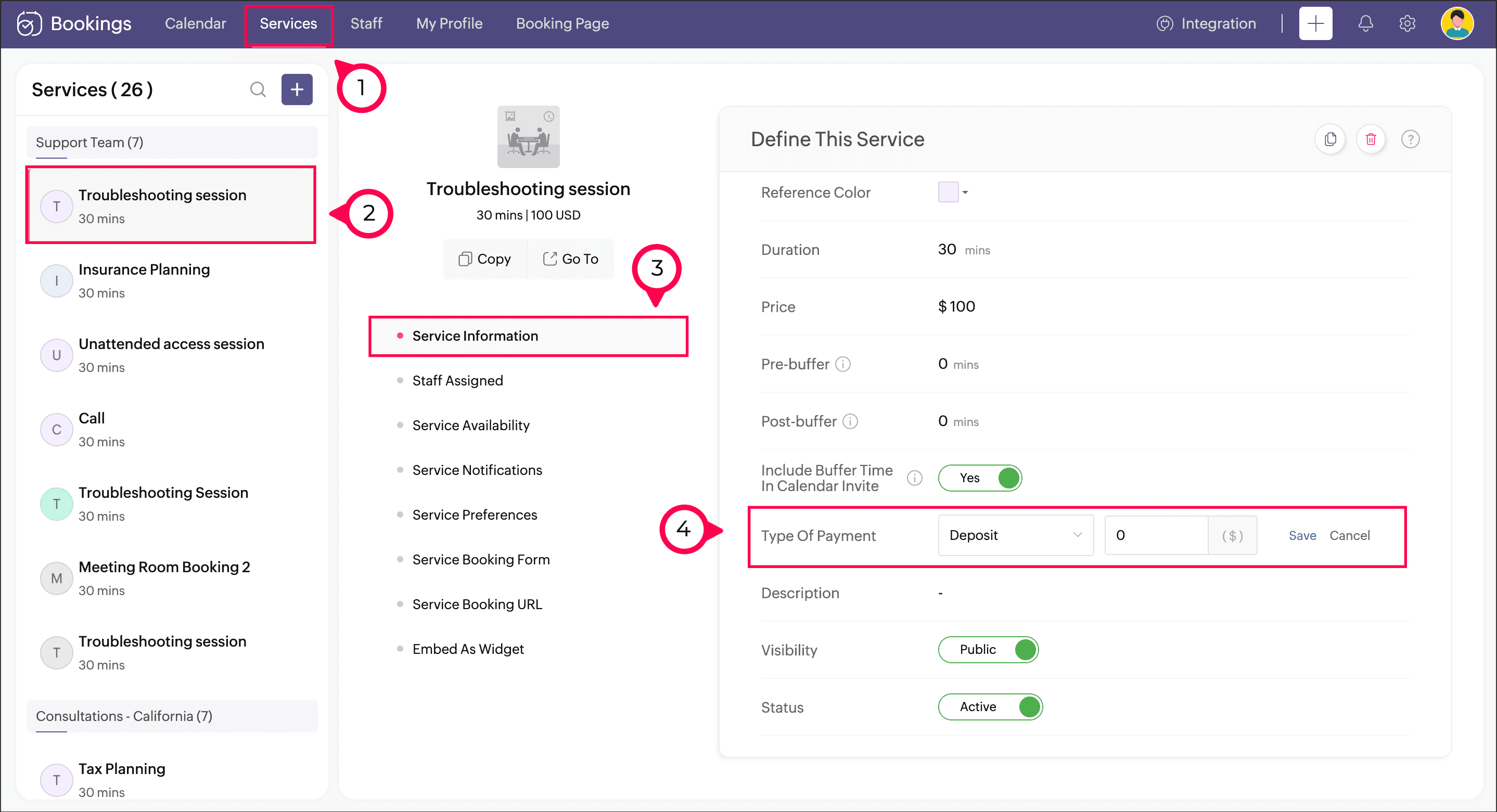


Now, when the customer tries to book a service with you, they'll be prompted to pay this deposit amount. But for this to work as intended, you'll need to configure a payment gateway:

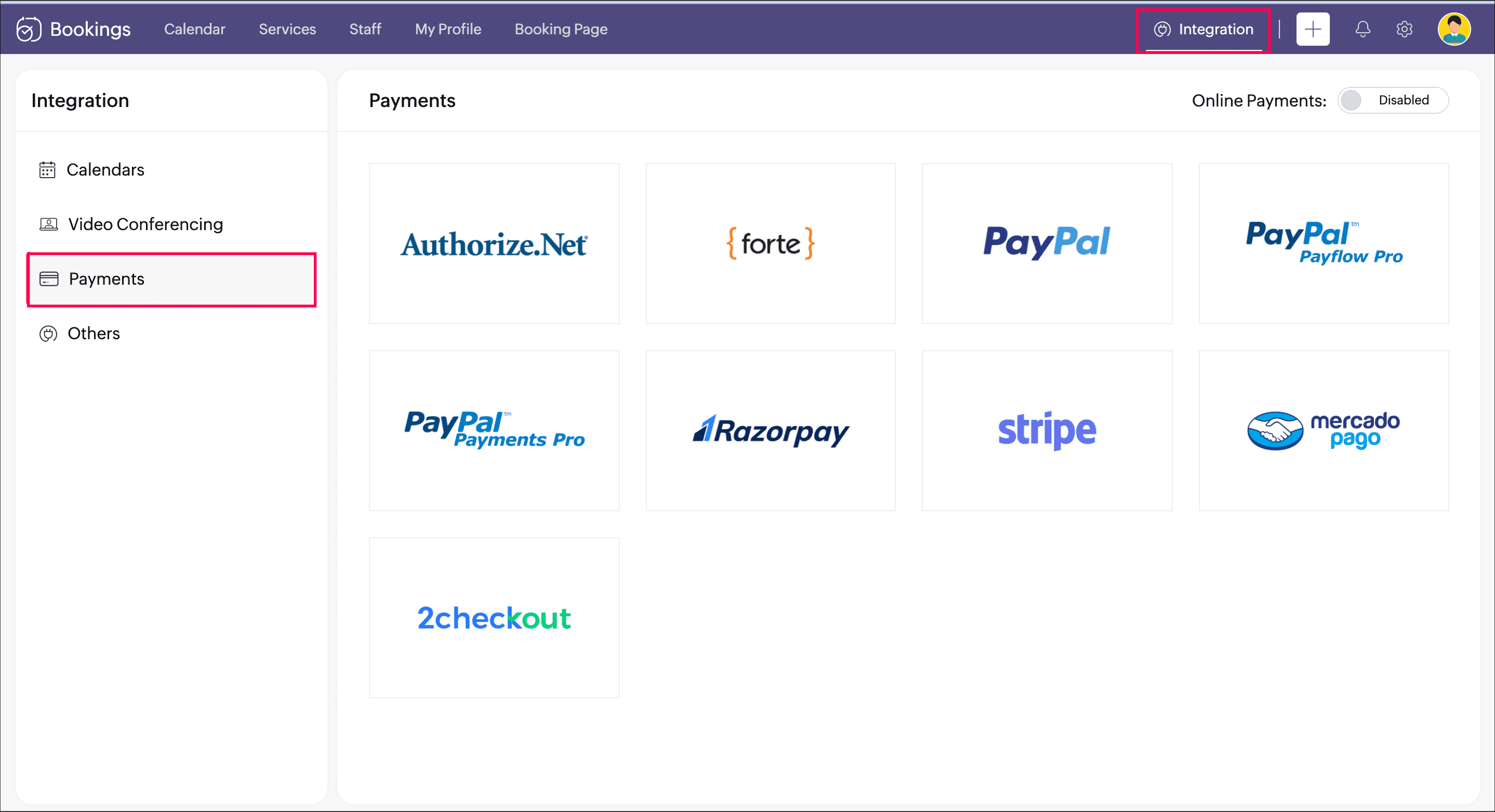
  1. Navigate to Integrations > Payments and configure any one of the payment gateways available. Refer to this help page for more details about adding a payment gateway.


  2. After adding a payment gateway, enable the toggle beside Online Payments.
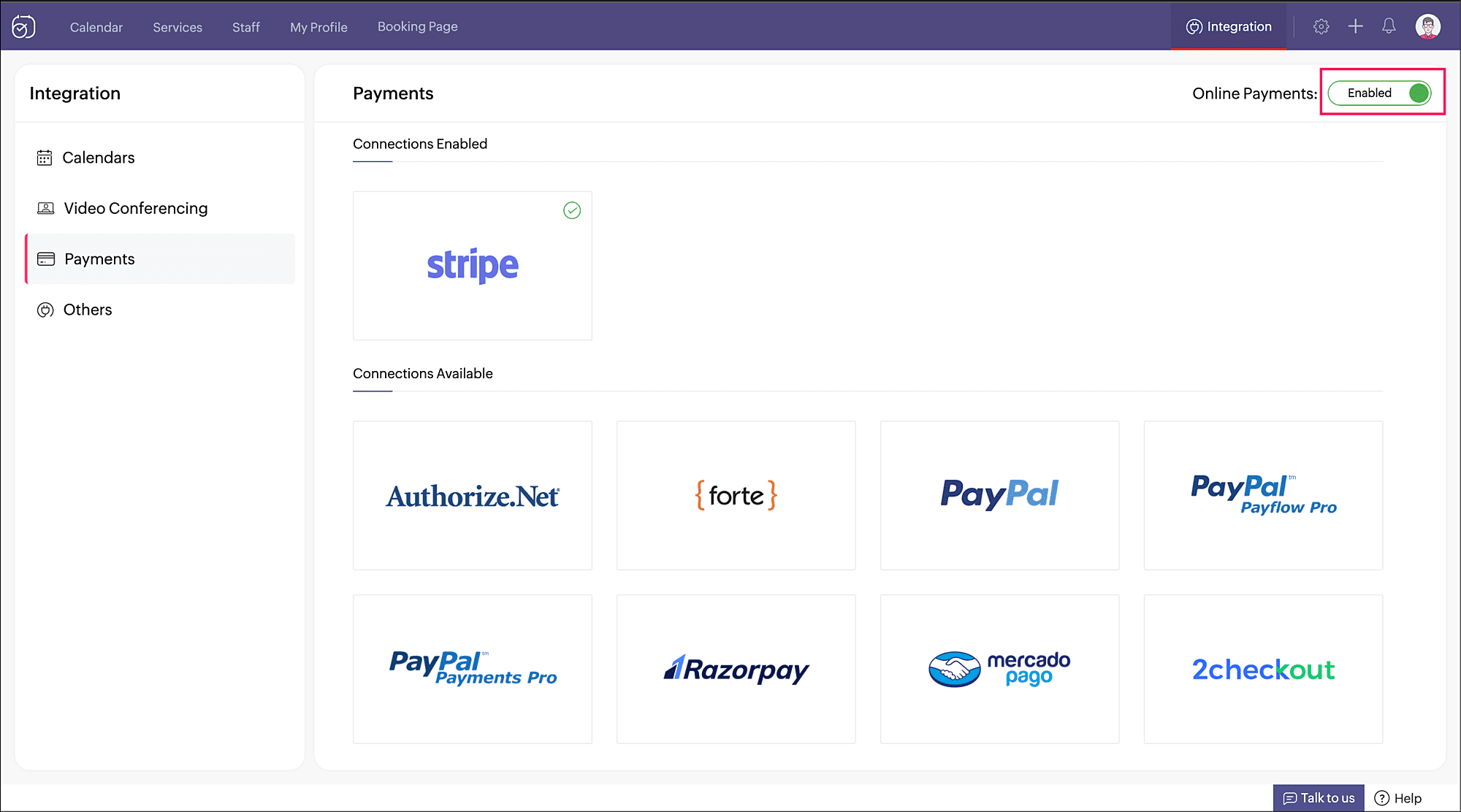


The setup is done; your booking page will allow appointments only when this deposit amount is paid.


Although implementing a partial deposit is necessary in many cases, it's also imperative that you stay flexible to show that you understand reasonable requests. This helps maintain good client relations.


Thank you for checking out this post. Please leave you questions and feedback in the comments section, or write to us at support@zohobookings.com.


Regards,

The Zoho Bookings Team


Related articles

  1. Configure Payments
  2. Payment Integration

    • Sticky Posts

    • Tip #13: Identify where your bookings come from with Source Tracking

      Source tracking is the practice of identifying where your bookings originated. This is important, because online bookings come from a wide variety of sources like social media platforms, your website, email and ad campaigns, partner websites, organic
    • Tip #17: How to mandate partial payment for your appointments

      When you require partial payments during the booking process, customers can only schedule with you after paying a certain amount in advance. This deposit acts as a commitment between both parties. Apart from that, it has many more advantages. Benefits
    • Tip #18: Organize a group workshop in a few steps

      It's the season for workshops—they're everywhere, catering to diverse interests and needs. Whether for more professional goals like leadership development or creative endeavors like painting, there's an abundance of workshops offered every day. A scheduler
    • Tip #16: Custom labels for staff, service, and resources

      Every industry uses its own jargon. Take healthcare, for example; when you visit a doctor, it's not just an appointment, it's a consultation. The people who provide consultations are the providers. Similarly, in the tranquil world of a spa, a massage
    • Tip #15: Customize service prices for each staff member

      It's common practice for a service to be priced differently based on the staff member providing it. For example, an experienced hair stylist may charge more for a haircut compared to the other stylists. This pricing strategy allows businesses to charge
    • Recent Topics

    • Print a document from Zoho Writer via Zoho Creator

      If i use the code below i can get writer to create a new document or email it to me but i want to be able to print it directly from the browser and not have to send it via email and then print. Below is the code im using. Attached options form zoho writer
    • Can I create a CODE 128 custom field for my items in Zoho Inventory and then use it for generating Sales Orders?

      Can anyone helps me, I don't want to use the SKU code for scanning my products.  ​Because all my products have a CODE-128 label attached.
    • Prevent duplicate with custom fields?

      I was wondering something about custom field/custom modules in Zoho Desk. For some reason you can make a custom field mandatory but not unique? For example, if I create a custom module to manage equipment and renewal and make a field serial number no
    • Multiple Vendor SKUs

      One of the big concerns we have with ZOHO Inventory is lack of Vendor Skus like many other inventory software packages offer. Being able to have multiple vendor skus for the same product would be HUGE! It would populate the appropriate vendor Sku for
    • Create Invoice automated with Package

      Does anyone knows how to create an invoice from a SO when we have created the package? We do these manually. and validate that the product packed is the product invoiced (if the order is partially packed) Regards, JS
    • Unable to integrate Zoho Projects and Zoho Workdrive

      I'm a Zoho One subscriber. When I go to Zoho Projects > Settings > Marketplace > Zoho Apps I do not see an option for Zoho Workdrive but I do see one for Zoho Docs that does nothing. How do I get the option to integrate Zoho WorkDrive and Zoho Proje
    • Disable payment thank-you emails

      Hello, can someone please tell me how to disable sending of the "Payment Thank-You" emails? 
    • Internal Fillable Contract with Zoho Writer (Before Sending to Client)

      Hi everyone, I’m trying to automate the following process in Zoho CRM and would appreciate some guidance. Process: When a Deal moves to a specific stage, CRM triggers an automation. CRM sends a contract template to an internal team member so they can
    • How to backdate record payment for the invoice

      I would like to record a payment which happened 2 days ago, but I am not able to select any date later than today. I backdated the invoice, too, but it doesn't change anything
    • Help with deluge script

      Hi Community, this is my first Deluge script. I've pieced it together from reading various articles I want to use it in a workflow to 1 Convert a lead to a contact 2. Create a record in a custom module Below is what I have got so far but it does not fire
    • Marketer's Space: Why email authentication matters in Zoho Campaigns

      Welcome back to another post in Marketer's Space! If you've recently started using Zoho Campaigns, you've probably come across terms like SPF and DKIM. You may have also noticed emails that show "via zcsend.net" in Gmail when testing or sending campaigns.
    • Feature Request: "Send Invitation" Toggle for Events

      I am writing to request a critical "Quality of Life" update for the Activities module. Currently, adding people to the Participants field in an Event triggers an automatic email invitation/acceptance tracking with no way to opt-out. For general events
    • Edit email address that appears on invoice

      Hi How do I change the email address that appears on invoices, it is showing the email address that i used to sign up to zoho with but I want to change it to another email address that we use for accounts. also is there a way to edit the position of a
    • Anyone worked out how to export or screengrab a full heatmap?

      I'd love to be able to include a copy of a heatmap in a report but can't work out how to grab the whole thing as there doesn't appear to be an export function? Thanks in advance.
    • Introducing Zoho Sprints 3.0

      Zoho Sprints is consistently evolving in steady increments. The introduction of the latest version, with its enterprise level solutions, brings to you advanced capabilities that propel your agile efforts in the right direction. Here's a quick glimpse
    • Google Fonts Integration in Pagesense Popup Editor

      Hello Zoho Pagesense Team, We hope you're doing well. We’d like to submit a feature request to enhance Zoho Pagesense’s popup editor with Google Fonts support. Current Limitation: Currently, Pagesense offers a limited set of default fonts. Google Fonts
    • Clone entire dashboards

      If users want to customize a dashboard that is used by other team members, they can't clone it in order to customize the copy. Instead they have to create the same dashboard again manually from scratch. Suggestion: Let users copy the entire dashboard
    • Clone Entire Zoho Boooks Organization, including all transactions for testing & training

      Can Zoho Books support help with direct cloning of entire Zoho Books & Inventory Organization? including all transactions, just like a copy & paste or disk cloning. Is this possible?
    • Restrict portal signup until registration form and payment are completed

      Hi everyone, I am working on a Zoho Creator portal for a project. In our business flow, users must first fill out a registration form and pay a registration fee before they are allowed to access the portal. However, when I share the portal link, users
    • Zoho Creator In-App Notification

      Hi Team, I have implemented an in-app notification using code, as it required some customization. I followed the example in the link below: https://www.zoho.com/deluge/help/pushnotify-using-deluge.html#Example I have a couple of questions regarding this
    • System Components menu not available for Tablet to select language

      I have attached a screenshot of my desktop, mobile, and tablet menu builder options. I am using 2 languages in my application. Language Selection is an option under the System Components part of the menu, but only for my desktop and phone(mobile). My
    • Tip #64- Exploring Technician Console: Screenshot- 'Insider Insights'

      Hello Zoho Assist Community! Have you ever needed to capture exactly what's happening on a remote machine, whether to document an issue, guide a customer, or keep a record of your session? That's where the Screenshot feature in Zoho Assist comes in! With
    • Integration of CRM and Recruit

      hi team, Is it possible to sync deals <> job openings from only 1 pipeline? My configuration of CRM has pipeline for each business unit, so I will have all data in the CRM system. body leasing and recruitment is one BU (hence 1 pipeline) - can I sync
    • Relating Invoices to Projects

      Hi Zoho team, If I have already created previously an invoice in Books, so I want to know how can I associate it with a relevant project? Thank you
    • Create a quote/estimate that includes a range of prices

      I am interested in using Zoho Books' Quote templates to create estimates for my customers. I do a mix of fixed-bid quotes and quotes based on an hourly rate. For the hourly rate quotes/estimates, I like to include a price range, for example: 2-4 labor
    • Budget

      I have just upgraded to the standard plan in order to be able to utilize the budgeting function and record budget amount
    • Capirec bank Automatic feed update

      Can anyone tell me if Zoho supports Automatic bank feed update from a Capitec bank account in south africa?
    • Restrict Payment Methods

      Allow us to restrict certain payment methods specific for each customer.
    • ZOHO Reports are taking longer time to get refresh

      Hi Team, Since last few days, I'm facing issues in getting updated reports. For eg: right after making an expense entry or even posting a journal, it is taking longer then expected for the updated reports. Refer below: "You are viewing the report that
    • Free webinar! Accelerate deals with Zoho Sign for Zoho CRM and Bigin by Zoho CRM

      Hello, Paperwork shouldn’t slow you down. Whether you’re growing a small business or running a large enterprise, manual approvals and slow document turnaround can cost you time and revenue. With Zoho Sign for Zoho CRM and Bigin by Zoho CRM, you can take
    • Can Zoho Marketing Automation send OTP codes via WhatsApp during user registration?

      The flow I would like to implement is: A user signs up in the mobile app and enters their phone number. The system generates a one-time verification code (OTP). The OTP is sent to the user via WhatsApp message. The user enters the code in the app to confirm
    • How to install Widget in inventory module

      Hi, I am trying to install a app into Sales Order Module related list, however there is no button allow me to do that. May I ask how to install widget to inventory module related list?
    • Add Lookup Field in Tasks Module

      Hello, I have a need to add a Lookup field in addition to the ones that are already there in the Tasks module. I've seen this thread and so understand that the reason lookup fields may not be part of it is that there are already links to the tables (
    • CRM x WorkDrive: File storage for new CRM signups is now powered by WorkDrive

      Availability Editions: All DCs: All Release plan: Released for new signups in all DCs. It will be enabled for existing users in a phased manner in the upcoming months. Help documentation: Documents in Zoho CRM Manage folders in Documents tab Manage files
    • Upload own Background Image and set Camera to 16:9

      Hi, in all known online meeting tools, I can set up a background image reflecting our corporate design. This doesn't work in Cliq. Additionally, Cliq detects our cameras as 4:3, showing black bars on the right and left sides during the meeting. Where
    • 【まだ間に合う!】Zoho ユーザー交流会 | AI活用・CRM・Analytics の事例を聞いて、ユーザー同士で交流しよう!

      ユーザーの皆さま、こんにちは。コミュニティチームの藤澤です。 3月27日(金)に東京、新橋で開催する「東京 Zoho ユーザー交流会 NEXUS」へのお申し込みがまだの方は、この機会にぜひお申し込みください!(参加無料) ーーーーーーーーーーーーーーーーーーーーーーーーーーーーーーーーーーーー イベントの詳細はこちらから▷▷ https://www.zohomeetups.com/tokyo2026vol1#/?affl=communityforumpost3 ーーーーーーーーーーーーーーーーーーーーーーーーーーーーーーーーーーーー
    • ZeptoMail API

      Hello Since today, we experience issues with the ZeptoMail API. When trying to send e-mails using: https://api.zeptomail.eu/v1.1/email we receive the error: (503) Site unavailable due to a traffic surge. Please try again shortly. I kindly ask you to identify
    • Sender Email Configuration Error.

      Hello Team, Hope you are all doing well. We are in the process of creating the Zoho FSM environment in the UAE. When we try to add the sender email address “techsupportuae@stryker.com”, we receive the error message: “Error occurred while sending mail
    • Managing user mailbox actions

      An organization often has users with different roles and responsibilities, such as leadership, operations, or support teams. While some users may require full access to email features, others may only need limited functionality. For example, enabling
    • Super Admin Logging in as another User

      How can a Super Admin login as another user. For example, I have a sales rep that is having issues with their Accounts and I want to view their Zoho Account with out having to do a GTM and sharing screens. Moderation Update (8th Aug 2025): We are working
    • Next Page