Tip#9: Group and Un-group pins in the Nearby me map functionality

We have got the option to group the records just so that it makes it easier for you to plan your visits. The records in a particular location will be grouped and displayed with one pin on the map. The pin will display a number depicting the total number of records present around that location. This number will show up when you zoom out in the 'Nearby me' maps.
When you tap the grouped pin, the pins will be un-grouped and display the individual pins of the records on the map.
We also have the option to display the records on the map without grouping them (like it used to be in the older versions of the app) by disabling the grouping option. You choose to either group/ un-group the records based upon your requirement.
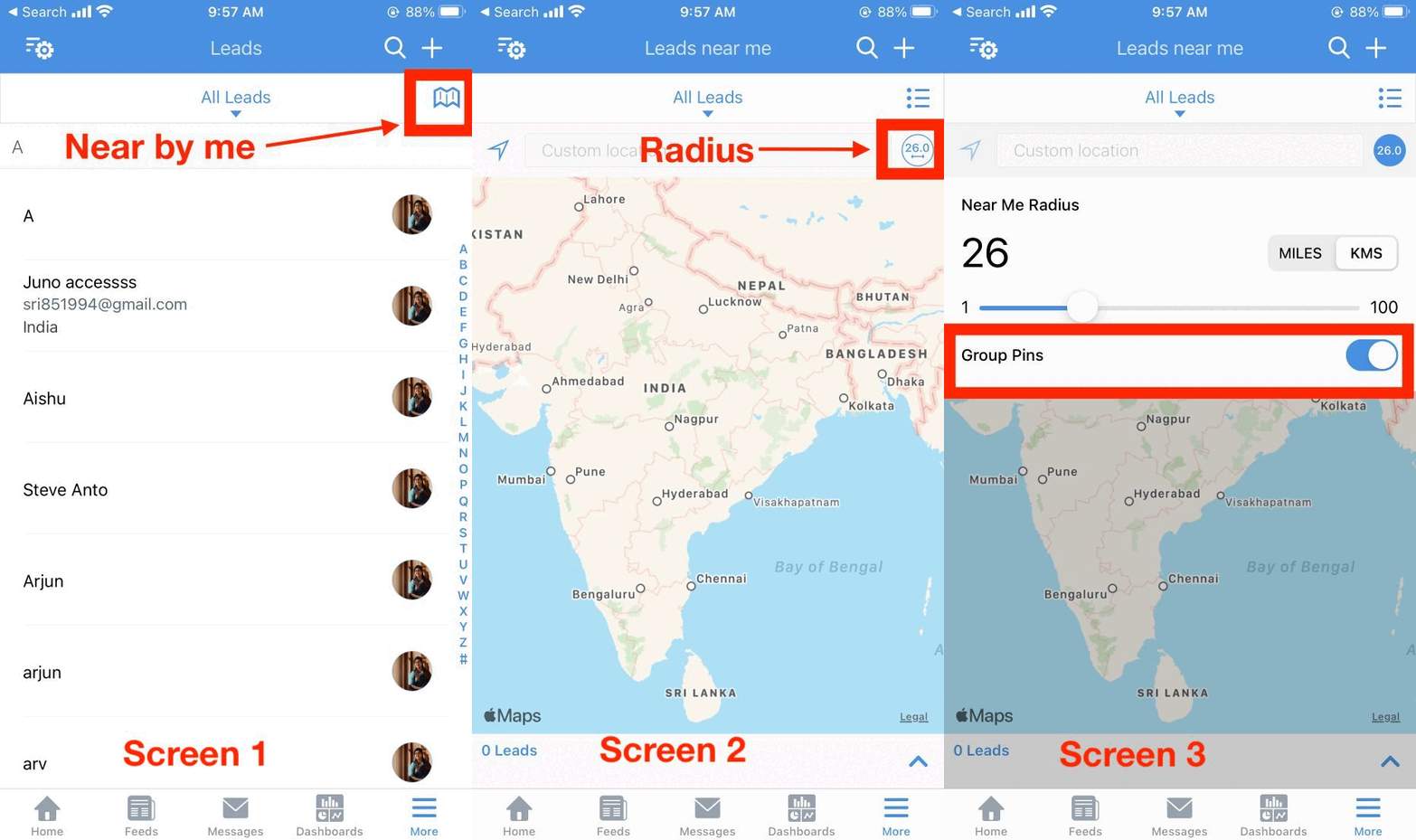
You can enable/ disable the group pins option by following the steps mentioned below:
Go to Zoho CRM mobile app.
Go to the respective module.
Open the near by me map.
Click the radius icon.
Enable/ Disable Group Pins.
I've attached a GIF below for your reference:
This feature is available only in the latest version of the iOS app. Please update the app to the latest version (v3.6.36) from the App Store directly or using the link given below:
I hope you find this useful. Got a question? Leave a comment here and we will get back to you.
Regards,
Sri Priya