We’re transitioning from Zoho ShowTime to TrainerCentral

We’re transitioning from Zoho ShowTime to TrainerCentral

Hello everyone,

Zoho ShowTime was originally built as a training platform to serve training agencies, HR teams, and individual trainers. As the platform grew, we realized that more creators and businesses could benefit from its capabilities. That’s why we launched a new brand, TrainerCentral, a full-featured training platform that handles everything from course creation to live sessions. With a host of new features and added capabilities in TrainerCentral, we’re saying goodbye to Zoho ShowTime and transitioning to a more advanced, comprehensive platform.

With TrainerCentral, you can design multimedia-rich courses that combine videos, documents, quizzes, and assignments to offer self-paced training. Built-in live session tools allow you to host interactive sessions including polls, chats, and surveys, to keep learners engaged. The platform simplifies learner management with detailed progress tracking, analytics, and automated certificates, helping trainers measure performance and learning outcomes with ease.

It also offers a no-code website builder that enables users to create a professional, fully branded academy website to strategize and market their online courses effectively to learners. With its robust, integrated payment gateway system, it facilitates secure, frictionless transactions across global markets.

This migration from Zoho Showtime to TrainerCentral will provide you with access to enhanced features, improved performance, and a unified training experience.

How to migrate from Zoho ShowTime to TrainerCentral.
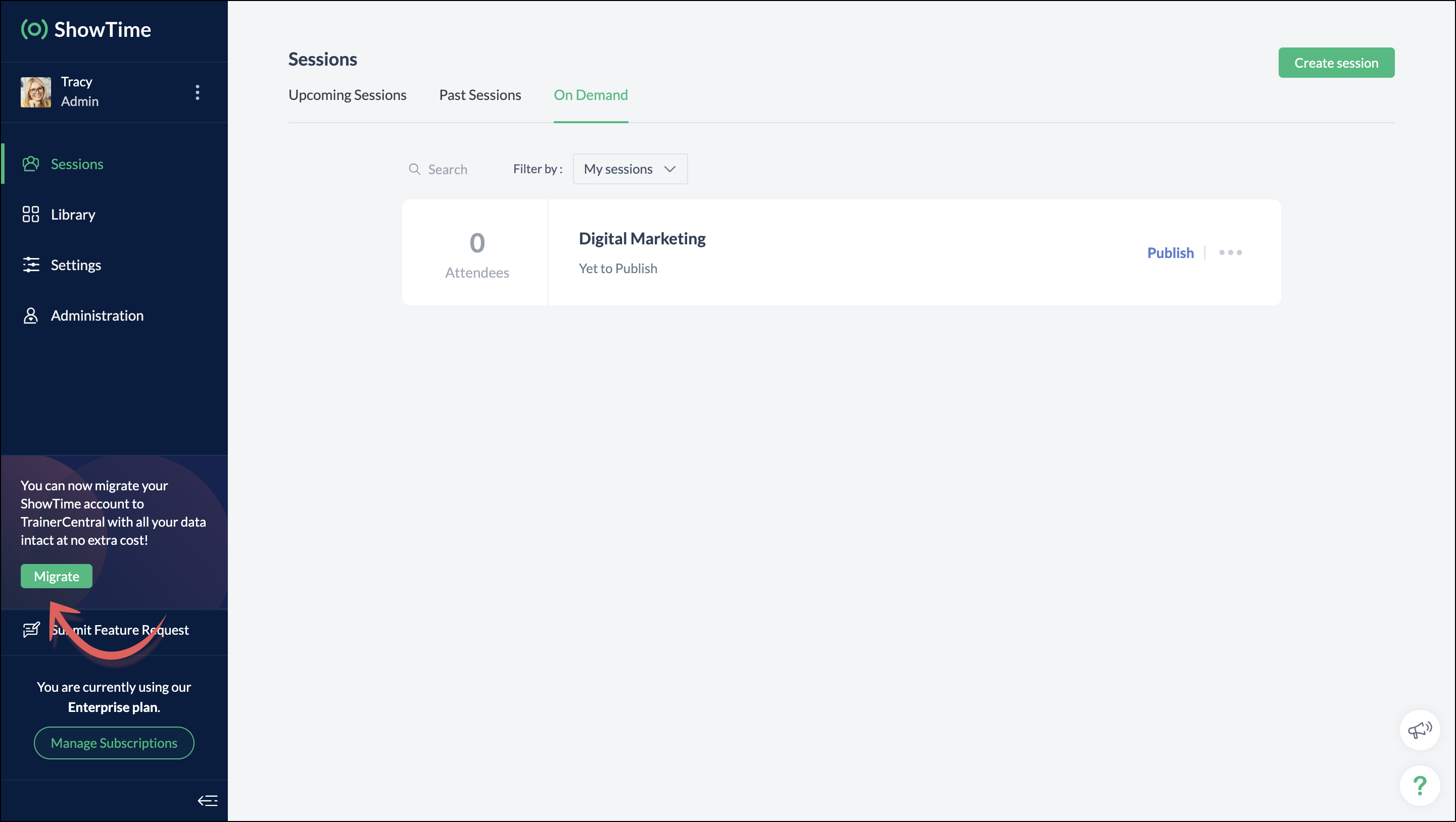


You can migrate your account from Zoho ShowTime to TrainerCentral anytime by clicking the Migrate button in the left pane and following the on-screen instructions. Once migrated, you’ll receive a notification, through which you can access your TrainerCentral account.


  1. Only the super admin of a Zoho ShowTime portal can migrate their portal's data to TrainerCentral.
  2. We’ll be disabling remote session scheduling and learner registration for on-demand sessions starting December 1, 2025. With this transition, Zoho ShowTime will reach its End of Life (EOL) on December 31, 2025.

To avoid any disruptions to your live classes, please move to TrainerCentral before December 31, 2025.

We hope this will elevate your experience to the next level.

If you have any questions, take a look at the FAQ section below, reach out to us at support@zohoshowtime.com, or just leave a comment here.  

FAQ
1. How long will the migration take? 
The migration of your Zoho ShowTime data and account portal is expected to take approximately one to two hours. In the event of any technical issues or glitches during the migration, the product team will address them immediately. In such rare cases, the migration will be completed within 24–48 hours.

2. What will happen to my Zoho ShowTime account if it is not migrated before the sunset?
If you fail to migrate before the sunset, i.e., December 31, 2025, active Zoho ShowTime accounts will be automatically migrated to TrainerCentral.

 3. What will happen after migration? 
You will be able to access TrainerCentral with your Zoho ShowTime credentials and continue your teaching journey seamlessly, with the added benefit of new features.

 4. Will there be any changes to my payment after migration? 
No, there will be no changes to your payment. The amount you currently pay for your Zoho ShowTime subscription will remain the same after migration.

 5. I am a Zoho ShowTime customer or Zoho One user. How will I be mapped to the TrainerCentral plan? 
If you are a Zoho ShowTime customer or a Zoho One user, you will be mapped to the equivalent TrainerCentral plan automatically to ensure a seamless transition.

 6. What happens if I choose not to migrate? 
You can back up your data, including materials, recordings, and analytics associated with your account, and then contact our support team to delete your account.

 7. I am a Zoho One user and purchased paid attendee add-ons. How do I enable them in TrainerCentral? 
You’ll need to reach out to support team to enable it again in TrainerCentral.

8. Will my configured payment gateway and ticket settings in Zoho ShowTime be migrated to my TrainerCentral account automatically?  
All of the sessions and tickets created in Zoho ShowTime will be migrated without any changes to your TrainerCentral account. However, for any new sessions you create in TrainerCentral, you will need to set up your payment gateway and ticketing options again.
Kindly refer to this help link to see the list of payment gateways supported by TrainerCentral.

 9. Where can I find my past sessions and library content from Zoho ShowTime in TrainerCentral after migration?


     Remote session: You can find previously created/conducted Zoho ShowTime remote sessions in Live WorkshopsPast Sessions.

     On-demand session: You can find previously created/conducted Zoho ShowTime on-demand sessions in Live WorkshopsOn demand.

     All materials hosted in your ShowTime library will be moved to TrainerCentral's library.
 10. Will my current integrations like Zoho CRM, Zapier, and Zoho Flow function seamlessly? 
All of your Zoho CRM, Zapier, and Zoho Flow integrations and their functionalities will be migrated seamlessly to TrainerCentral. In Zapier and Zoho Flow, several additional triggers and actions are available for all courses and live workshops.

 11. If I cancel my TrainerCentral subscription after migration, will I get the same plan when I resubscribe to a new TrainerCentral account? 
No. The equivalent plan is provided only if you migrate from Zoho ShowTime. If you resubscribe for a new TrainerCentral account, you’ll be mapped to a new plan.

12. What if I can't see the Migrate button on my 
Zoho ShowTime portal?
If the Migrate button isn’t visible, please contact our support team to help you migrate from Zoho ShowTime to TrainerCentral.

    • Sticky Posts

    • Video tip 02: Customize your feedback and evaluation forms in Zoho ShowTime

      Hello everyone,  Here's a new video tip for all our ShowTime users. Today we will learn few quick, effective ways to evaluate your participants and assess your trainings conducted on Showtime, like MCQs (multiple choice questions), text-boxes, and ratings scale.   Watch the below video to learn how these assessment systems help you effectively evaluate course-related knowledge and skills of your trainees on a regular basis.      Follow this page to learn more such tips and stay updated on all the
    • Video tip 05: Host training courses under your own personalized domain and white-label your email communications.

      Hello everyone,  As a trainer, having your own domain name increases your brand's positioning and reach through search results on top search engines like Google, Yahoo, and Bing. Prospective customers will more readily pay for courses from an organization with a professional, established online presence. A custom domain establishes you as a leader in your area of subject expertise, helping you promote your courses and build brand recognition with your global audience.   In today's video tip, we at
    • Video tip 04: Do you want to set up repeated training sessions at regular intervals? Learn how.

      Hello everyone,    Sometimes it is difficult to organize and manage your everyday work and training sessions. Scheduling recurring or repeated sessions can be even more time-consuming as you need to create and maintain the training content, schedule multiple time slots for the training, manage registrants across each session, and more.    Zoho ShowTime offers a smarter option for these cases that only takes a few clicks. Play the video below to learn how to use the same presentation content and set
    • Spotlight 03: Connect and deliver more effective trainings with ShowTimes' Viewer app

      With the growing need for virtual classroom learning, the use of mobile and tablet software is quickly becoming the most convenient way to share knowledge between educators and students. According to a 2018 study, nearly 67% of digital learners now use mobile devices to complete their online coursework. Additionally, smartphone learners complete course material 45% faster than those using a computer.  Considering these facts, we now introduce our next community spotlight series that will focus on Zoho
    • Video tip 1: Record and share trainings on Zoho ShowTime.

      Hello everyone,   We are excited to launch our video tip of the month series within our ShowTime's community, aimed to help our trainers and educators with brief and practical tips on delivering more effective and comprehensive training.   In this month's video tip, we will show you how to record your training sessions quickly and share them with your attendees and other prospective learners externally. We hope this tip was useful. ShowTime also allows you to automatically record your live trainings
    • Recent Topics

    • Virtual Option for Fields

      Hi, I would like to be able to choose another option other than Read-Only or Disabled, such as Virtual. And with Virtual, the field is shown on the form and avilable in rules, but NOT saved to the Database. A use case is having multiple Large Lists of
    • Zoho Marketing Automation Cannot Sync Lookiup Fields

      Hello all, It seems that Zoho MA cannot sync Lookup fields from the CRM. Can you confirm if this is the case? Is there a workaround? Do you know if Campaigns can sync with custom modules and also with Lookup field in the CRM? Thank you!
    • Specific ListView Canvas on Canvas Home Page Always Loads Most Recent ListView, Not the One Specified

      I had mentioned this to ZOHO, but I mainly wanted to see if others in the Community are also facing this problem. I created a Canvas ListView for a Custom Module, and then created a Canvas Home page (technically on a tab item, but I'm not sure if that
    • Announcing the new SKILL.md for Zoho CRM and the updated OAS repository!

      We are introducing a new zoho-crm skill to make working with Zoho CRM Developer tools (like APIs, functions, widgets, client scripts, queries etc) easier and faster, with the help of AI in your preferred AI harness like Claude Code, Codex, Cursor, VSCode
    • Zoho Campaigns EU Topics API returns HTTP 200 with empty topicDetails

      Hello, Our Zoho Campaigns EU organisation has two custom topics visible in the Campaigns UI, and contacts are subscribed to them. However, an OAuth request with ZohoCampaigns.contact.READ to https://campaigns.zoho.eu/api/v1.1/topics returns HTTP 200 with
    • Caso de Éxito: Cómo Toyota Financial Services unificó la atención al cliente con Zoho

      "Después de seis meses con el CRM en producción estamos encantados." Miriam Cárdenas, Responsable Departamento ATC Toyota Financial Services es la división financiera de Toyota encargada de gestionar la financiación de vehículos y, junto con KINTO España,
    • Zoho Books - France

      L’équipe de Zoho France reçoit régulièrement des questions sur la conformité de ses applications de finances (Zoho Books/ Zoho Invoice) pour le marché français. Voici quelques points pour clarifier la question : Zoho Books est un logiciel de comptabilité
    • Sending Zoho form link from custom function in Zoho CRM

      Hello,  We intend to send a Zoho form link to certain Contacts using a custom function. The Zoho Form must be pre-filled with the Deal information and contacts receiving it should be able to modify the values and upon submission, those modifications must
    • Automatically remove commas

      Team, Please be consistent in Zoho Books. In Payments, you have commas here: But when we copy and paste the amount in the Payments Made field, it does not accept it because the default setting is no commas. Please have Zoho Books remove commas autom
    • Zoho ERP | Product updates | July 2026

      Hello users, We're back with another round of updates to help you streamline your operations. This month's release brings new features and enhancements designed to help you work more efficiently. Read on to discover everything that's new in Zoho ERP this
    • Zoho CRM

      Cuándo voy a adjuntar un archivo .pdf en un registro en el campo Archivo obtengo el siguiente error:
    • Can I hide some products from a particular customer

      HI I want ot give a customer access to the portal but I need to hide some products from them that are not available for them to buy- is this possible ?
    • Dashboard/Component filter by probability

      Hi all Can I request the ability to add a Component or Dashboard filter for Deal Probability? Would be useful to be able to see data of deals more than 60% probable. Olly
    • Admin Logging in as another User

      How can a Super Admin login as another user. For example, I have a sales rep that is having issues with their Accounts and I want to view their Zoho Account with out having to do a GTM and sharing screens. Latest Update (27th April 2026): With the early
    • OpenAI Is Moving to the Responses API: Here's What It Means for SalesIQ

      OpenAI has deprecated its Assistants API and is moving to the Responses API. If you're using OpenAI Assistants with SalesIQ, you may be wondering if you need to make any changes to your existing setup. You don't. SalesIQ has already taken care of the
    • Free webinar: Zoho Sign for Microsoft apps

      Hello, Did you know Zoho Sign works right inside the Microsoft apps you already use? A signature request shouldn't mean leaving Teams for another tab, or downloading an Outlook attachment just to sign it. Zoho Sign integrates with Microsoft 365, Teams,
    • Billing Status and WO Status Field Colors -

      Hello Team, I noticed that the colors of the Billing Status and WO Status fields in the WO module have been changed. (Org ID:170000078905) This is not urgent to correct, but I wanted to bring it to your attention so you can check whether this is a system
    • Introducing throw statements in Deluge

      Hello everyone, We're introducing a powerful addition to Deluge that gives you more precise control over error handling in your scripts. Whether you're calling an external API, validating user input, or enforcing a business rule, there are moments when
    • Zoho Notebook、実はこんなところから使えます

      ユーザーの皆様、こんにちは。ゾーホージャパンの田村です。 前回に続き、今回もZoho Notebookをご紹介します。 関連情報 メモの保存場所、見直しませんか?― Zoho Notebookで始める情報管理 仕事中、「この内容、メモに残してあとで見返したいな」と思う瞬間はありませんか? 会議中の一言、お客様とのやり取り、CRMで見つけた気づき、 ほんの数秒で終わる内容だからこそ、「あとで書こう」と思って、そのまま忘れてしまうこともあります。 そこで今回は、PCやスマートフォンはもちろん、普段お使いのZoho製品からもすぐにアクセスできるノートアプリ「Zoho
    • I have been looking for CVID to get segmate list where & how can fnd it?

      I am trying to get segment details from the Zoho API. The API documentation says that the CVID is a mandatory parameter, but I cannot find the CVID in the "getmailinglists" API. Can you tell me where to find the CVID?
    • How do I increase the email attachment size in Zoho CRM ?

      It looks like I'm limited to 10MB when sending an attachment using the email widget on a record in Zoho CRM. Is there a way to increase the size? Or can I use some other tool? From what I'm reading online, I'm maxed out at 10MB. Any insight would be greatly
    • Introducing Incentives for Zoho CRM: Build, automate, and track sales commissions

      Dear Customers, We are here with an amazing news! We built a direct solution to help manage your commission provisioning activity in your business. From creating commission plans to issuing payouts, this application leverages your sales reps’ performance
    • Subforms and automation

      If a user updates a field how do we create an automation etc. We have a field for returned parts and i want to get an email when that field is ticked. How please as Zoho tells me no automation on subforms. The Reason- Why having waited for ever for FSM
    • Cannot format "start date" field in Zoho Flow

      I am trying to recreate a flow that connects Inventory package creation to Zoho projects (where a task is created in a defined project). I've been able to troubleshoot everything EXCEPT the date fields; specifically the "start date" - which is quite important
    • Dynamic Signature - Record owner

      Hi everyone, I’m using Zoho Writer merge templates from Zoho CRM and have two questions: Owner signature: How can I automatically insert the CRM record owner’s signature in the merged document? I’m not sure where this signature is stored or how to reference
    • GETTING THERE THANKS

      So we are still testing thanks to the great Zoho team for firstly getting pricelists working (essential) and writing some code to hide delivery and pickup options. Brilliant. So price lists are a definite mainly because of VAT. We run our Zoho books with
    • Time Zone is incorrect

      Time zone is not working properly...I've checked it twice. I'm eastern U.S. time it's currently 12:22 pm EST. CRM shows 3:22 pm EST.
    • CRM wants to access other apps and services on this device (Documents area)

      Did anyone else see this today? It only seemed to popup in the Documents area. Blocking it did not stop the ability to upload files there... Why is this coming up and what apps/services is it requesting in the background? Also, is it applicable elsewhere
    • Custom module - change from autonumber to name

      I fear I know the answer to this already, but thought I'd ask the question. I created a custom module and instead of having a name as being the primary field, I changed it to an auto-number. I didn't realise that all searches would only show this reference.
    • Zoho Mail outgoing webhooks stopped delivering events to my domain from Aug 28 to Sep 1, 2026 — temporary suppression by destination domain/IP?

      Dear Zoho Mail support team, I run an application that receives email notifications from several Zoho Mail accounts via outgoing webhooks (Settings → Developer Space → Outgoing Webhooks), with REST API polling as a backup. What happened: between August
    • How can I populate dropdown data with information from another source or app?

      I want to maintain a list of items in another app (say in excel or another database) and sync those as items in a drop down menu, instead of copy pasting to import. Is this kind of a feature available?
    • Dynamic Field Folders in OneDrive

      Hi, With the 2 options today we have either a Dynamic Parent Folder and lots of attachments all in that one folder with only the ability to set the file name (Which is also not incremented so if I upload 5 photos to one field they are all named the same
    • Zoho Tables is now available in Zoho One!

      Hello Zoho One users, We’re excited to announce that Zoho Tables is now included as a part of Zoho One suite! As teams grow, managing projects, approvals, inventories, campaign trackers, and operational workflows across multiple spreadsheets become difficult.
    • Getting there -thanks

      So we are still testing thanks to the great Zoho team for firstly getting pricelists working (essential) and writing some code to hide delivery and pickup options. Brilliant. So price lists are a definite mainly because of VAT. We run our Zoho books with
    • I want to prefill CRM Account information using the GSTIN of the Customer

      Currently i need to add account details manually in zoho crm and when it syncs in zoho books manual working needs to be done. Whereas in zoho books i can prefill the customer details using the GSTIN which is great feature. Can the same be enabled for
    • #3 Making it look like my business

      Day 3: Meera had created her first invoice. The numbers were right, but something still felt unfinished. Her studio name was there, but the address did not look the way she wanted. Her logo was missing, and the invoice did not really feel like it came
    • Using IMAP configuration for shared email inboxes

      Our customer service team utilizes shared email boxes to allow multiple people to view and handle incoming customer requests. For example, the customer sends an email to info@xxxx.com and multiple people can view it and handle the request. How can I configure
    • Scan & Fill with double quote key/value pairs

      Hi, An old Ticket moved to a Topic/Idea: I love the idea of the new Scan & Fill as it nearly covers my previous request for a QR Scanner to read a multi-part QR Code. My QR Codes are hard-coded as below: {"key1":"value1","key2":"value2","key3":"value3"}
    • Increase the "Maximum Saved Entries per User" Options Limit

      Hi, You can create lots of saved entries, yet the Limit when you apply one is 25, we may often expect 32 to be in draft, and therefore want to enforce that, can we increase the limit of this field from 25 to 100 (As you can just turn it off and have more
    • HEIC File Type Viewer

      Hi, It would be nice to be able to click on the images in the All Entries/Reports Tables which are HEIC the same as JPG, PNG, etc. so they open in a viewer from Zoho or the Attachment Service, today HEIC requires you to download each image and open it
    • Next Page