We’re transitioning from Zoho ShowTime to TrainerCentral

We’re transitioning from Zoho ShowTime to TrainerCentral

Hello everyone,

Zoho ShowTime was originally built as a training platform to serve training agencies, HR teams, and individual trainers. As the platform grew, we realized that more creators and businesses could benefit from its capabilities. That’s why we launched a new brand, TrainerCentral, a full-featured training platform that handles everything from course creation to live sessions. With a host of new features and added capabilities in TrainerCentral, we’re saying goodbye to Zoho ShowTime and transitioning to a more advanced, comprehensive platform.

With TrainerCentral, you can design multimedia-rich courses that combine videos, documents, quizzes, and assignments to offer self-paced training. Built-in live session tools allow you to host interactive sessions including polls, chats, and surveys, to keep learners engaged. The platform simplifies learner management with detailed progress tracking, analytics, and automated certificates, helping trainers measure performance and learning outcomes with ease.

It also offers a no-code website builder that enables users to create a professional, fully branded academy website to strategize and market their online courses effectively to learners. With its robust, integrated payment gateway system, it facilitates secure, frictionless transactions across global markets.

This migration from Zoho Showtime to TrainerCentral will provide you with access to enhanced features, improved performance, and a unified training experience.

How to migrate from Zoho ShowTime to TrainerCentral.
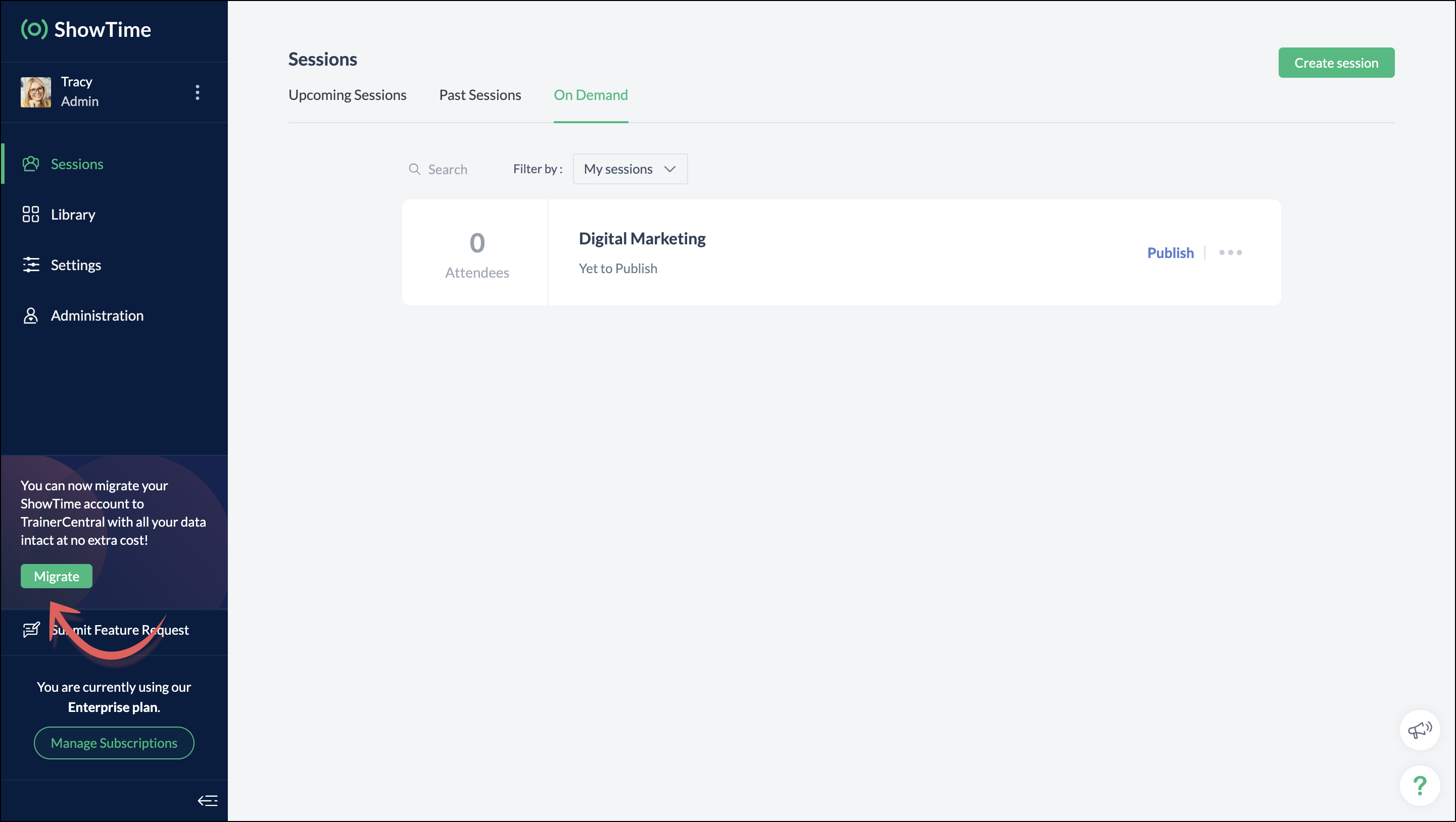


You can migrate your account from Zoho ShowTime to TrainerCentral anytime by clicking the Migrate button in the left pane and following the on-screen instructions. Once migrated, you’ll receive a notification, through which you can access your TrainerCentral account.


  1. Only the super admin of a Zoho ShowTime portal can migrate their portal's data to TrainerCentral.
  2. We’ll be disabling remote session scheduling and learner registration for on-demand sessions starting December 1, 2025. With this transition, Zoho ShowTime will reach its End of Life (EOL) on December 31, 2025.

To avoid any disruptions to your live classes, please move to TrainerCentral before December 31, 2025.

We hope this will elevate your experience to the next level.

If you have any questions, take a look at the FAQ section below, reach out to us at support@zohoshowtime.com, or just leave a comment here.  

FAQ
1. How long will the migration take? 
The migration of your Zoho ShowTime data and account portal is expected to take approximately one to two hours. In the event of any technical issues or glitches during the migration, the product team will address them immediately. In such rare cases, the migration will be completed within 24–48 hours.

2. What will happen to my Zoho ShowTime account if it is not migrated before the sunset?
If you fail to migrate before the sunset, i.e., December 31, 2025, active Zoho ShowTime accounts will be automatically migrated to TrainerCentral.

 3. What will happen after migration? 
You will be able to access TrainerCentral with your Zoho ShowTime credentials and continue your teaching journey seamlessly, with the added benefit of new features.

 4. Will there be any changes to my payment after migration? 
No, there will be no changes to your payment. The amount you currently pay for your Zoho ShowTime subscription will remain the same after migration.

 5. I am a Zoho ShowTime customer or Zoho One user. How will I be mapped to the TrainerCentral plan? 
If you are a Zoho ShowTime customer or a Zoho One user, you will be mapped to the equivalent TrainerCentral plan automatically to ensure a seamless transition.

 6. What happens if I choose not to migrate? 
You can back up your data, including materials, recordings, and analytics associated with your account, and then contact our support team to delete your account.

 7. I am a Zoho One user and purchased paid attendee add-ons. How do I enable them in TrainerCentral? 
You’ll need to reach out to support team to enable it again in TrainerCentral.

8. Will my configured payment gateway and ticket settings in Zoho ShowTime be migrated to my TrainerCentral account automatically?  
All of the sessions and tickets created in Zoho ShowTime will be migrated without any changes to your TrainerCentral account. However, for any new sessions you create in TrainerCentral, you will need to set up your payment gateway and ticketing options again.
Kindly refer to this help link to see the list of payment gateways supported by TrainerCentral.

 9. Where can I find my past sessions and library content from Zoho ShowTime in TrainerCentral after migration?


     Remote session: You can find previously created/conducted Zoho ShowTime remote sessions in Live WorkshopsPast Sessions.

     On-demand session: You can find previously created/conducted Zoho ShowTime on-demand sessions in Live WorkshopsOn demand.

     All materials hosted in your ShowTime library will be moved to TrainerCentral's library.
 10. Will my current integrations like Zoho CRM, Zapier, and Zoho Flow function seamlessly? 
All of your Zoho CRM, Zapier, and Zoho Flow integrations and their functionalities will be migrated seamlessly to TrainerCentral. In Zapier and Zoho Flow, several additional triggers and actions are available for all courses and live workshops.

 11. If I cancel my TrainerCentral subscription after migration, will I get the same plan when I resubscribe to a new TrainerCentral account? 
No. The equivalent plan is provided only if you migrate from Zoho ShowTime. If you resubscribe for a new TrainerCentral account, you’ll be mapped to a new plan.

12. What if I can't see the Migrate button on my 
Zoho ShowTime portal?
If the Migrate button isn’t visible, please contact our support team to help you migrate from Zoho ShowTime to TrainerCentral.

    • Sticky Posts

    • Video tip 02: Customize your feedback and evaluation forms in Zoho ShowTime

      Hello everyone,  Here's a new video tip for all our ShowTime users. Today we will learn few quick, effective ways to evaluate your participants and assess your trainings conducted on Showtime, like MCQs (multiple choice questions), text-boxes, and ratings scale.   Watch the below video to learn how these assessment systems help you effectively evaluate course-related knowledge and skills of your trainees on a regular basis.      Follow this page to learn more such tips and stay updated on all the
    • Video tip 05: Host training courses under your own personalized domain and white-label your email communications.

      Hello everyone,  As a trainer, having your own domain name increases your brand's positioning and reach through search results on top search engines like Google, Yahoo, and Bing. Prospective customers will more readily pay for courses from an organization with a professional, established online presence. A custom domain establishes you as a leader in your area of subject expertise, helping you promote your courses and build brand recognition with your global audience.   In today's video tip, we at
    • Video tip 04: Do you want to set up repeated training sessions at regular intervals? Learn how.

      Hello everyone,    Sometimes it is difficult to organize and manage your everyday work and training sessions. Scheduling recurring or repeated sessions can be even more time-consuming as you need to create and maintain the training content, schedule multiple time slots for the training, manage registrants across each session, and more.    Zoho ShowTime offers a smarter option for these cases that only takes a few clicks. Play the video below to learn how to use the same presentation content and set
    • Spotlight 03: Connect and deliver more effective trainings with ShowTimes' Viewer app

      With the growing need for virtual classroom learning, the use of mobile and tablet software is quickly becoming the most convenient way to share knowledge between educators and students. According to a 2018 study, nearly 67% of digital learners now use mobile devices to complete their online coursework. Additionally, smartphone learners complete course material 45% faster than those using a computer.  Considering these facts, we now introduce our next community spotlight series that will focus on Zoho
    • Video tip 1: Record and share trainings on Zoho ShowTime.

      Hello everyone,   We are excited to launch our video tip of the month series within our ShowTime's community, aimed to help our trainers and educators with brief and practical tips on delivering more effective and comprehensive training.   In this month's video tip, we will show you how to record your training sessions quickly and share them with your attendees and other prospective learners externally. We hope this tip was useful. ShowTime also allows you to automatically record your live trainings
    • Recent Topics

    • Is there a way to configure dark mode for Campaigns emails that go out to customers?

      I've found a lot of information on how to configure dark mode for my (The user) personal Zoho workspace and email, but is there any way to edit dark mode settings on emails that we send out to customers via campaigns?  We sent out a test email the other
    • When Does WorkDrive integrate with Books?

      When Does WorkDrive integrate with Books?
    • Reading from and writing to Zoho Projects Custom Module with Deluge

      Does anyone know if there is a way to read from and write to the Custom Modules that Zoho now supports. I would love to be able to loop through a set of data and create the entities I need to for this new custom module I'm looking to put together.
    • How do I import Connected Records for a Deal?

      Can you point me to an example of the CSV file that would add related records to an existing CRM Deal? I imported a Deal, then tried importing a connected record using a unique ID that references the Deal ID, but it doesn't attach it to the Deal rec
    • FSM integration with Books

      Hi, I have spent a few months working with FSM and have come across a critical gap in the functionality, which I find almost shocking....either that, or I am an idiot. The lack of bi-directional sync between Books and FSM on Sales Orders/ Work Orders
    • How to close an estimate ?

      Hello, I have created estimates, and converted them to invoices to get 50% payment. Now I have 2 cases where the estimate stills shows status partially invoiced, however: 1. for one of them, project stopped half way, so the remaining part will never be
    • Power up your Kiosk Studio with Real-Time Data Capture, Client Scripts & More!

      Hello Everyone, We’re thrilled to announce a powerful set of enhancements to Kiosk Studio in Zoho CRM. These new updates give you more flexibility, faster record handling, and real-time data capture, making your Kiosk flows smarter and more efficient
    • Sharing Tickets to a team within a department

      Hi there, We have a need for one department to be able to share tickets to a specific team within a department, I'm wondering if this is possible? All the shared tickets are going into the 'Shared Tickets' view for the whole department but is there a
    • How do you print out the invoices comments

      I have some invoices where i need to print out the comments that show when reminders and etc were sent how do we print those out in Zoho Books.
    • Unable to load a specific image

      Hi I am trying to upload an svg file, which reports that there is "a problem with the file", but does not say what sort of problem. I can't find anything which says which files are supported, so it may be it does not support svg. (which would be a real shame) The file itself will open in either Firefox or Chrome without problem. For the moment I am using a png file, which does not zoom well of course. David
    • Why does the Address field show the wrong map location even with a correct Pincode?

      I am noticing an issue with the Address field map in Zoho Creator. When I enter a city name that exists in multiple locations within the same state, the map sometimes points to the wrong area even if I have entered the correct Pincode. Currently, it seems
    • Uploaded files are not included when using "Include user submitted data" in Email Notification

      In Send Email notification workflow in Zoho Creator, there is an option called "Include user submitted data" which allows the email to contain all the form submission details. However, when this option is enabled, files or images uploaded through File
    • Books <-> CRM synchronisation with custom Fields

      Hello, We are synchronising Books Customers with CRM Accounts. In CRM Accounts I set up last year a "segments" multiselect field shown below In Books, I set up a custom multi-select field with the same value as in the CRM And set up the synchronisation inside Books. Want to synchronise the Books Segments with the CRM Segments, but the later doesn't exist, and another non-existing is there ?! First, I don't understand where the field Segmentation is coming from. Second, I set CRM Segmentation to sync
    • CRM x WorkDrive: We're rolling out the WorkDrive-powered file storage experience for existing users

      Release plan: Gradual rollout to customers without file storage add-ons, in this order: 1. Standalone CRM 2. CRM Plus and Zoho One DCs: All | Editions: All Available now for: - Standalone CRM accounts in Free and Standard editions without file storage
    • Archive Option in Conversation View

      Hello, I have a suggestion\request to add an "Archive Thread" button in conversation view of Zoho Mail. The best suggestion I have is to put an "Archive Thread" button next to the "Label Entire Thread" button in conversation view. Most users don't just
    • Outlook/Hotmail Blocking Zoho SMTP IPs (S3150)

      We are currently facing a serious deliverability issue with Zoho SMTP while sending transactional OTP emails for our production application. Emails sent to Outlook / Hotmail addresses are being rejected with the following error: 550 - 5.7.1 Unfortunately,
    • Outlook is blocking incoming mail

      Outlook is blocking all emails sent from the Zoho server. ERROR CODE :550 - 5.7.1 Unfortunately, messages from [136.143.169.51] weren't sent. Please contact your Internet service provider since part of their network is on our block list (S3150). It looks
    • Track Marketing Automation Campaigns in Zoho CRM

      Hello, I've been searching but haven't found the exact answer to this question. I am looking to track Marketing Automation email campaigns and activities inside of Zoho CRM. Use Case: Action: Prospect Submits A Lead Form Outcomes: Prospect created in
    • Zoho Social API for generating draft posts from a third-party app ?

      Hello everyone, I hope you are all well. I have a question regarding Zoho Social. I am developing an application that generates social media posts, and I would like to be able to incorporate a feature that allows saving these posts as drafts in Zoho Social.
    • Temporarily rate limited due to IP reputation.

      We have suddenly started receiving the following Mail Delivery Status Notification: Diagnostic-Code: 4.7.650 The mail server [136.143.184.12] has been temporarily rate limited due to IP reputation. For e-mail delivery information, see https://aka.ms/postmaster
    • Incorrect Functioning of Time Logs API (Version 3)

      We need to fetch the list of time logs for each task for our company internal usage. We are trying to achieve it by using the next endpoint: https://projects.zoho.com/api-docs#bulk-time-logs#get-all-project-time-logs Firstly, in the documentation the
    • IMPORTANT: It doesn´t search for letters with portuguese characters.

      Some of my articles have for example the word "vídeo". But if I search for "vídeo" it doesn´t find them. If I search for "video" it does find them. Idealy, it should find the articles either way. But if I have to choose, it would be better to find the
    • IMPORTANT: It doens´t show full article name on search - Should add line break

      When we search for articles, it doesn´t show the full name. There should be a line break so the user can see the full article name, otherwise the user can´t know if that´s the article he/she is looking for. This is very important, otherwise the user has
    • Zoho Books - Payment Gateway - Revolut

      Hi Books Team, My feature request if to include the popular platform Revolut as a payment collection option on invoices in Zoho Books. Please upvote if you are also looking for this option.
    • Zoho Books | Product updates | January 2026

      Hello users, We’ve rolled out new features and enhancements in Zoho Books. From e-filing Form 1099 directly with the IRS to corporation tax support, explore the updates designed to enhance your bookkeeping experience. E-File Form 1099 Directly With the
    • Kaizen #233 - Generating AI-powered Follow-up Emails Using CRM Functions and Widgets

      Hey everyone! Welcome back to another interesting post in the Kaizen series! Sales teams regularly capture interaction notes in CRM after speaking with prospects. However, drafting a follow-up email that reflects the conversation context can be repetitive
    • Connect Bank in Zoho Books

      Can I connect UOB or Ariwallex in Zoho Books?
    • Using MPN across multiple SKUs and inventory tracking

      I have several different SKU's that share a common MPN and would like to track inventory by MPN. SKU1 has MPN1 assigned SKU2 has MPN1 assigned Here is an example If I start with 5 of MPN 1 in stock I want each SKU1 and SKU2 to show as 5 in stock, If I
    • Extend Zoho Canvas Customization to Zoho Creator Forms and Reports

      Currently, Zoho Canvas allows users to design and customize the UI of Zoho CRM modules with a much better visual experience. This helps organizations create cleaner layouts, improve usability, and design interfaces that match their workflows. However,
    • Marketing Tip #1: Optimize item titles for SEO

      Your item title is the first thing both Google and shoppers notice. Instead of a generic “Leather Bag,” go for something detailed like “Handcrafted Leather Laptop Bag – Durable & Stylish.” This helps your items rank better in search results and instantly
    • Feature Enhancement Request – Text Formatting Options in Item Description (Zoho Books/Quotes Module)

      Dear Zoho Development Team, Greetings from Radiant360 Integrated Technical Services LLC. We would like to bring to your attention a functional limitation we've encountered within the Item Table / Quote Description section of Zoho Books (and Zoho CRM Quotes).
    • ZOHO Books Query

      Good day, Can someone please advise. I recently migrated from ZOHO Invoice to ZOHO Books. No that I want to use the inventory on Books I cant as all my items have transaction history. The person I spoke to at ZOHO said I need to create a new Company profile
    • Best way to schedule bill payments to vendors

      I've integrated Forte so that I can convert POs to bills and make payments to my vendors all through Books. Is there a way to schedule the bill payments as some of my vendors are net 30, net 60 and even net 90 days. If I can't get this to work, I'll have
    • ZOHO.CRM.UI.Record.open not working properly

      I have a Zoho CRM Widget and in it I have a block where it will open the blocks Meeting like below block.addEventListener("click", () => { ZOHO.CRM.UI.Record.open({ Entity: "Events", RecordID: meeting.id }).catch(err => { console.error("Open record failed:",
    • Removing To or CC Addresses from Desk Ticket

      I was hoping i could find a way to remove unnecessary email addresses from tickets submitted via email. For example, a customer may email the support address AND others who are in the helpdesk notification group, in either the TO or CC address. This results
    • inventory removal at packing list or shipment.

      currently our system is set to remove inventory at invoice. This is creating an inventory nightmare? Is it possible to change the settings to remove the item from inventory at either the packing slip stage or shipping the item.
    • How to add employee and not invite them to log in?

      I want to add 50 employees, but invite them only when everything will be configured and ready. Is it possible? Should we create employee profiles and then convert them later? Thank you,
    • How is Your eCommerce Experience w/Zoho Inventory?

      First off, I'm SUPER grateful for the advent of Zoho Inventory and now the Zoho Commerce Suite. Overall, Inventory is a great product, especially for customers without an eCommerce presence. For eCommerce companies (especially those shipping more than ~10 packages/day), however, there are certain drawbacks that keep my clients from moving over to Zoho Inventory: Cons: 1. Invoice + Package Creation from Shopify/Other eCommerce Integrations: Zoho Inventory makes the somewhat perplexing decision to
    • Ability to Use Both AND and OR When Creating Rules (Advanced Conditions)

      I'd like to be able to use more complicated logic when setting up rules. E.g. in Zoho Mail, I can choose "Advanced conditions (AND/OR) to create a rule that can be applied to multiple subject lines from the same sender. But in Zoho TeamInbox, I will have
    • Zoho Desktop App- Unable to Minimize/Freezes

      I'm having issues with my Zoho Mail desktop app (PC). When go on my desktop and open the app this is what happens: - Unable to minimize and close app (in the screenshot attached you can see at the top right there is no option to minimize/close) - Unable
    • Next Page