Weekly Tips : Teamwork made easy with Multiple Assignees
Let's say you are working on a big project where different parts of a single task need attention from several people at the same time—like reviewing a proposal that requires input from sales, legal, and finance teams. Instead of sending separate reminders or juggling between multiple to-dos, how can you keep everyone in the loop so the task gets done without anything slipping through the cracks?
Zoho ToDo's Multiple Assignees option allows you to assign a single task to multiple users to make working together easier.
Multiple Assignees
You can assign a task to multiple individuals in ToDo, making it easier for teams to collaborate and complete tasks more efficiently. Whether you are working on a project with other team members or simply need extra hands on a task, you can effortlessly assign up to 5 people to a single task, with all assignees having equal permissions. With Multiple Assignees option, all individuals have equal permissions to edit, update, or manage the task.
Assign Tasks to Multiple Assignees
- Log into Zoho Mail.
- Navigate to ToDo from the left pane.
- Click on the New Task option to create a new task.
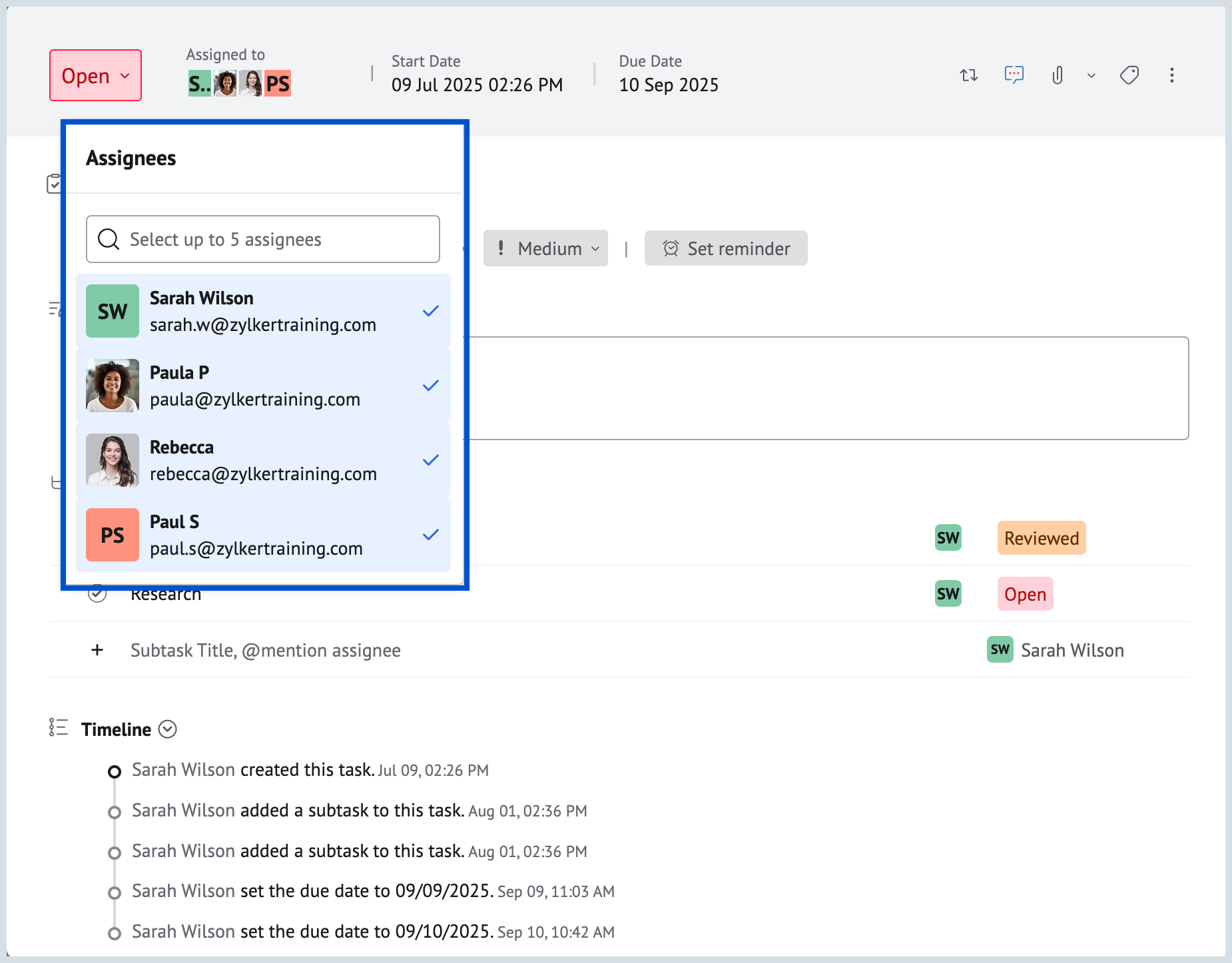
- In the create New Task pop-up, click on Assigned to option. You can assign the task to up to 5 individuals.
- After entering all task details, click Save to add task with multiple assignees.
- Once Assigned, you can view the Assignees in the list and board view.
Teamwork made easy, assign tasks to multiple individuals who need to be involved, all at once.