Hello users,
We're excited to bring you the latest updates and improvements we've made to make your travel and expense management smoother and more effortless. Let's take a quick look at the important updates we've rolled-out in Zoho Expense between January and March.
Added a New Preference in Trips
To restrict users from creating reports for closed and cancelled trips, we've added a new option in the Trips preference. To enable this feature, you can mark the option Restrict report creation for trips and select the trip status from the dropdown.
Enhancements in Real-Time Card Feeds
1. Users using the German edition and five countries in the global edition, including the US, UK, Canada, Germany, and Italy, can now fetch their card feeds instantly in Zoho Expense as soon as a transaction is made using their cards, which are connected for real-time feeds.
Note: This feature is currently available in early access. Write to us at support@zohoexpense.com to enable it for your organization.
2. In addition the Mastercard support for users using the UK edition of Zoho Expense, we now support Visa cards as well.
Shortcut to Edit Expenses
Quickly update the category, date, amount, merchant name, currency, description, and custom fields of your expenses from the expense detail page, without navigating to the edit page in the Expenses and Reports modules. Users can hover over the fields and click the Edit icon that appears next to it. Once the changes are made, click the tick icon next to the updated field to save the updates.
Export All Analytic Report Details
If you'd like to export or download all the data in an analytic report for backup, unmark Export Current View while exporting the analytic report. Once you click this, the report will be exported with all the data. However, this option is available only for exporting analytic reports in XLS, XLSX, CSV, or to Zoho Sheets.
Field Customizations For Recording Advance Refunds
If you'd like to capture specific details related to advance refunds for better clarity and record keeping, you can mandate the Refunded To, Notes, Reference#, and other custom fields for users while recoding an advance refund.
Note: This feature is available in early access. If you want to enable this feature for your organization, write to us at support@zohoexpense.com.
Introducing Multi-Criteria Workflow Rules
Associate multiple criteria to a workflow and automate tasks in Zoho Expense seamlessly. You can trigger actions such as an email, SMS alert, or custom functions, which will execute actions automatically whenever the set conditions are satisfied.
Introducing Online Advance Payments
In addition to recording advance payments offline, we've enabled online payments options for advances. Choose your preferred option to pay employees' advances from the Pay Advance dropdown on the advance details page. Users using the India edition of Zoho Expense can pay via ICICI, HSBC, and Yes Bank, while the US edition users can pay via ACH.
Note: This feature is only available to organizations that've enabled the Paid status feature for Advances.
Add Multiple Items at Once to Purchase Requests
If your users want to add multiple items at once to a purchase request, they can select + Add Items in Bulk from the dropdown next to + Add New Row in the items table. In the pop-up, all the available items in the organization will be displayed. Select the items you want to include in the purchase request and use the plus and minus icons to adjust the item quantity. Once done, click Add Items.
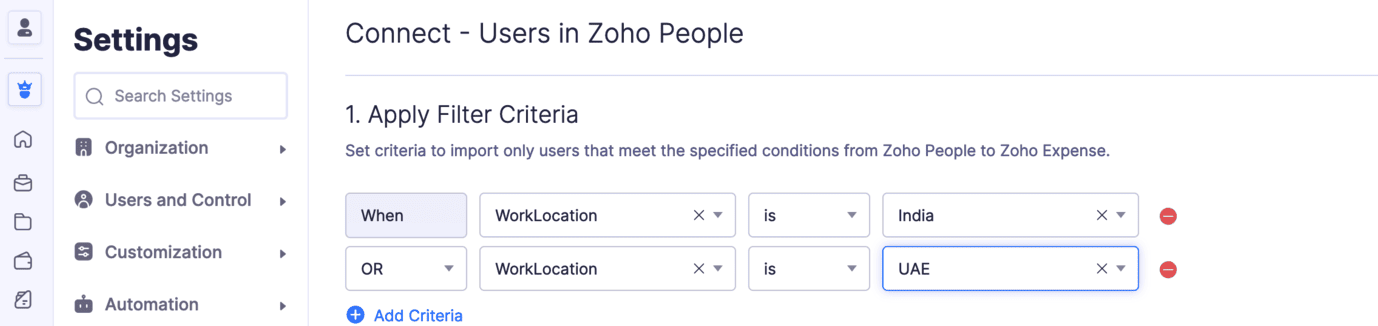
Filter and Import Users from Zoho People to Zoho Expense
Set criteria and import only the users who meet the specified criteria into Zoho Expense. Once you integrate with Zoho People, you can sync its modules with Zoho Expense. Under the Users section, click Configure Now and set the criteria that will be used to filter and sync users into Zoho Expense. 
iOS App Updates:
Calculate Mileage Expenses Using Maps: While calculating mileage expenses using maps, users can add their travel locations. Once added, all the possible routes will be displayed on the map. Choose the travel route, and the distance travelled will be calculated automatically. These details will also be displayed on the expense details screen. Note: This feature is available in early access. Write to us at support@zohoexpense.com to enable it for your organization.Additionally, users can also add their travel locations while creating mileage expenses using the Odometer reading or by manually entering the distance travelled, if you've enabled the calculate mileage using maps feature.
Try out all the new features and let us know what you think in the comments below. If you have any inquiries or feature requests, please write to us at support@zohoexpense.com.
Stay tuned for more updates!
Regards,
Zoho Expense Team
Recent Topics
Weekly Tips : Save Time with Saved Search
Let's assume your work requires you to regularly check emails from important clients that have attachments and were sent within a specific time period. Instead of entering the same conditions every time—like sender, date range, and attachments included—you
Remove 'This is an automated mail from Zoho Sign' in footer
Hi there, Is it possible to remove or change the text under the e-mail templates? I can't figure out how to do that: Would love to hear from you. Kind regards, Tristan
How can I link Products in a Deal Subform to the Products Module
Hello, I have a pricing subform on our Deals page and use a lookup field to associate a product with each line. I want to be able to look at a product page within the Products module and see a list of the deals connected to that product. I have this working
Organize and manage PDFs with Zoho PDF Editor's dashboard
Hello users, Zoho PDF Editor's dashboard is a one-stop place to upload, sort, share PDF files, and more. This article will explore the various capabilities that Zoho PDF Editor's dashboard offers. A few highlights of Zoho PDF Editor's dashboard: Upload
Updating records through Zoho Sheets View doesn't update timeline or trigger workflow rules
I have noticed that when i update a series of record with the zoho sheets view (see here http://d.pr/i/ahnR) it doesn't update timeline history or trigger workflow rules. I am using it in the Deals module. Looking forward for some more info. Denis
Zoho Invoice Customer Login Portal
Are there any plans for a customer portal to Zoho Invoice, ala Freshbooks? I would like customers that I invoice to be able to login to review invoices and invoice history. I have not switched from Freshbooks for this very reason.
Passing Info from Function to Client Script
Hello, I have recently started making use of client script for buttons, allowing me to give the user information or warnings before they proceed. This is great. However, I have never quite managed to pass back any extra information from the function to
Automatically Update Form Attachment Service with Newly added Fields
Hi, When I have a Form Setup and connected to a 3rd Party Service such as OneDrive for Form Attachments, when I later add a new Upload Field I have to remove and redo the entire 3rd Party Setup from scratch. This needs to be improved, such as when new
Cannot get code to work with v2.mergeAndStore!
Please can someone help me pass subform items into a repeating mail merge table row using v2.mergeAndStore? I have a mail merge template created in Writer and stored in Workdrive. This template is referenced by a custom CRM function which merges all of
Drag 'n' Drop Fields to a Sub-Form and "Move Field To" Option
Hi, I would like to be able to move fields from the Main Page to a Sub-Form or from a Sub-Form to either the Main Page or another Sub-Form. Today if you change the design you have to delete and recreate every field, not just move them. Would be nice to
Zoho Payroll for Canada
Is anyone else having problems getting setup for Canada?
Passing the CRM
Hi, I am hoping someone can help. I have a zoho form that has a CRM lookup field. I was hoping to send this to my publicly to clients via a text message and the form then attaches the signed form back to the custom module. This work absolutely fine when
API credit COQL COUNT
The docs describe API credits in COQL from the LIMIT perspective: https://www.zoho.com/crm/developer/docs/api/v8/COQL-Overview.html When using aggregate functions such as `COUNT` or `SUM`, is that billed as 1 API credit?
Super Admin Logging in as another User
How can a Super Admin login as another user. For example, I have a sales rep that is having issues with their Accounts and I want to view their Zoho Account with out having to do a GTM and sharing screens. Moderation Update (8th Aug 2025): We are working
One Contact with Multiple Accounts with Portal enabled
I have a contact that manages different accounts, so he needs to see the invoices of all the companies he manage in Portal but I found it not possible.. any idea? I tried to set different customers with the same email contact with the portal enabled and
User Automation: User based workflow rules & webhooks
User management is an undeniable part of project management and requires adequate monitoring. As teams grow and projects multiply, manual coordination for updating users & permissions becomes difficult and can give way to errors. User automation in Zoho
Disable Zoho Contacts
We don't want to use this app... How can we disable it?
Default Ticket View - Table?
Guys, We mostly use the table view to queue tickets. Maybe I am missing it - but how can I set that view as 'default" for all our agents? Thanks JV
Zoho One IS BUGGY
Here are some things that just don't work: - Disabling applications from certain Spaces - Adding users (probably only for me) - Renaming applications in Zoho One Portal (fixed by now) - Reordering applications in Spaces When I try to reorder: It feels
Paid Support Plans with Automated Billing
We (like many others, I'm sure) are designing or have paid support plans. Our design involves a given number of support hours in each plan. Here are my questions: 1) Are there any plans to add time-based plans in the Zoho Desk Support Plans feature? The
Merge Fields that previously worked are now giving an Error!
Saving a URL Link button on the Deal module. The below fields used to save without issue at all, but now produce an error of "URL contains unsupported merge field!" ${Contacts.Mailing Street} ${Contacts.Mailing City} ${Contacts.Mailing State} ${Contacts.Mailing
Move email between inboxes?
Is it possible to move emails from one team inbox to another? We would like to be able to have a single "catch-all" inbox for incoming requests, and then move the email to the appropriate department inbox. I was hoping we would be able to accomplish this
Clarification on Zoho Forms 1-User Plan: Multiple Submitters and Approvers
Question Content (Copy–Paste Ready) Hello Zoho Team, I would like clarification regarding Zoho Forms pricing and user limits. I am planning to subscribe to the ₹700/month (1 user) plan. My use case is as follows: Only 1 person (myself) will create and
CRM Cadences recognise auto-responses
I have leads in a Cadence. I get an auto-responder reply "I'm out of the office..." Normally Cadences seems to know that isn't a real reply and keeps the lead enrolled in the cadence. However, today, Cadences has UNENROLLED a Lead who sent an auto-reponse
App for Mac OS X please!
It would be awesome to have a mail app for Mac OS X that included all the cool features such as steams, calendar, tasks, contacts, etc. Most people prefer native apps, rather than running it through a web browser. I know that we can use the IMAP, CalDAV,
Facing Issues with Sites Mobile font sizes
my page renediaz.com is facing issues mobile view, when i try to lower font sizes in home page, instead of changing the size, it changes the line space
Zoho Books Payroll
How am I supposed to do payroll and pay my employees with Zoho Books? I think it's pretty strange that an accounting software doesn't have the ability to perform one of the most common functions in business; paying your employees. Am I missing something,
Different Task Layouts for Subtasks
I was wondering how it would be possible for a subtask to have a different task layout to the parent task.
60 Days Into Zoho - Tiktok Branding Startup -7 Questions?!
Wsp Everybody I co-own a TikTok Branding / Consulting Startup & have been using Zoho for the past 60 days - Am now looking to make our overall operations & processes more Efficient & Effective! Curious to know how others are using the platform & what's
Notifications in Cliq client for Linux
If I got it right, Cliq desktop client for Linux does not use the generally accepted notification method via org.freedesktop.Notification interface. For this reason, Cliq notifications do not look and behave as all other notifications. Is it possible
Canvas templates can now be shared with different CRM organizations
----------------------------------------Moderated on 14th February, 2023------------------------------------------- Dear all, This feature is now open for all users in all DCs. To learn more about importing and exporting canvas templates, read our help
Unable to produce monthly P&L reports for previous years
My company just migrated to Books this year. We have 5+ years financial data and need to generate a monthly P&L for 2019 and a monthly P&L YTD for 2020. The latter is easy, but I'm VERY surprised to learn that default reports in Zoho Books cannot create
Change Last Name to not required in Leads
I would like to upload 500 target companies as leads but I don't yet have contact people for them. Can you enable the option for me to turn this requirement off to need a Second Name? Moderation update (10-Jun-23): As we explore potential solutions for
Reply to Email for SO/PO
Hello, We are new to Zoho Books and running into an issue. Our support@ email is our integration user. When our team is sending out PO/SO's we are updating the sender email, but for some reason many of our responses are coming back to our support@ email
ZOHO Payroll Canada
Any plans on the roadmap for Canada?
What's New in Zoho Billing | January 2026
Excited about the latest enhancements in Zoho Billing? Our January updates bring an intelligent AI assistant, smarter subscription management, and improved tax compliance, saving you time and reducing manual work. Dive into the details below to see how
Zoho Books Sandbox environment
Hello. Is there a free sandbox environment for the developers using Zoho Books API? I am working on the Zoho Books add-on and currently not ready to buy a premium service - maybe later when my add-on will start to bring money. Right now I just need a
Multi-currency and Products
One of the main reasons I have gone down the Zoho route is because I need multi-currency support. However, I find that products can only be priced in the home currency, We sell to the US and UK. However, we maintain different price lists for each. There
Cliq iOS can't see shared screen
Hello, I had this morning a video call with a colleague. She is using Cliq Desktop MacOS and wanted to share her screen with me. I'm on iPad. I noticed, while she shared her screen, I could only see her video, but not the shared screen... Does Cliq iOS is able to display shared screen, or is it somewhere else to be found ? Regards
ZOHO Writer Folders
Hi We would love to have ability to create folders on the left hand side. We would then be able create and store our documents within each folder Hope you can provide this feature soon ! dux.centra
Next Page