What's New? (March & April 2023)
Hello everyone!
We are excited to share with you some of the newest features and updates that we have rolled out for our platform. At Zoho Cliq, our primary goal is to make communication effortless and seamless for teams across the globe. With these latest updates, we are confident that we are one step closer to achieving this goal.
From the introduction of dual reply mode and screen share support to the addition of a QR code generator for form view handler and WorkDrive upload restrictions, there is something for everyone. So, let's dive into these updates and explore how they can improve your communication and collaboration experience with Zoho Cliq.
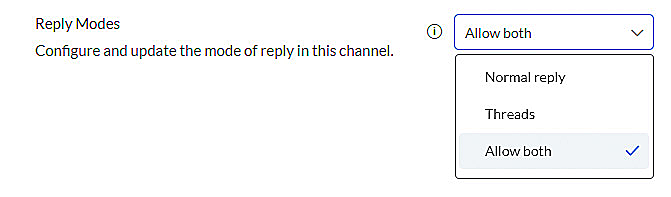
- Dual reply mode: With the new reply mode, you can now choose between thread replies and normal replies, and switch between modes as needed. This feature provides flexibility in how you communicate with your team members and allows you to adjust to the context of the conversation.
- Host handover in meetings: This feature allows you to assign another participant as a host of the meeting when you need to leave without disrupting it. This helps to ensure your meeting continues without interruption, even if you're not able to attend further.
- Optimization of chat switching during meetings: We've optimized the response time for switching between different chats during a meeting to be 50% faster. This enhancement ensures a smoother experience when switching between different conversations, allowing you to stay focused and productive during meetings.
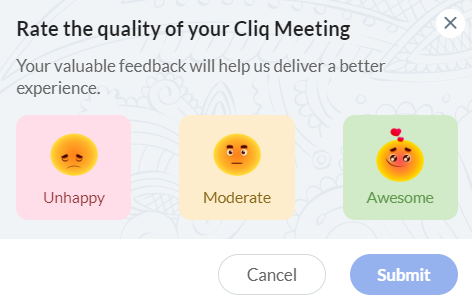
- Feedback after calls: We've made it easier for you to provide feedback after a call. You can now send your feedback directly from a meeting through the more options (kebab button) or via a small feedback pop-up that appears after some calls. This allows you to provide feedback to our developers quickly and easily and help us improve the quality of our service.
- Screen share support: Our new update to the Zoho Cliq iOS app allows you to share your mobile screen in a meeting, providing more mobility and flexibility for remote work. This feature is particularly useful for those who need to present their work or collaborate on a project during a meeting on their phones.
- Microsoft Teams migration: We've made it easy for those who are looking to migrate from MS Teams after Microsoft's sudden decision to discontinue their free Classic version. With just a click of a button in the admin panel, you can start a simplified process to migrate all your data from MS Teams to Cliq. This brand-new import feature allows you to continue conversations in Cliq instantly and manage your communication more efficiently.
- Org policy to limit/allow all users of the organization to install extensions: With the latest update to the organization policy, administrators now have the ability to restrict users from installing extensions that are not verified and available only in the Cliq marketplace. By allowing admins to control the installation of extensions, users are prevented from downloading and installing any extension that may pose a risk to the organization's security. This policy ensures that all extensions are reviewed and approved by Cliq, thereby increasing the credibility of the extensions and minimizing the potential for security threats.
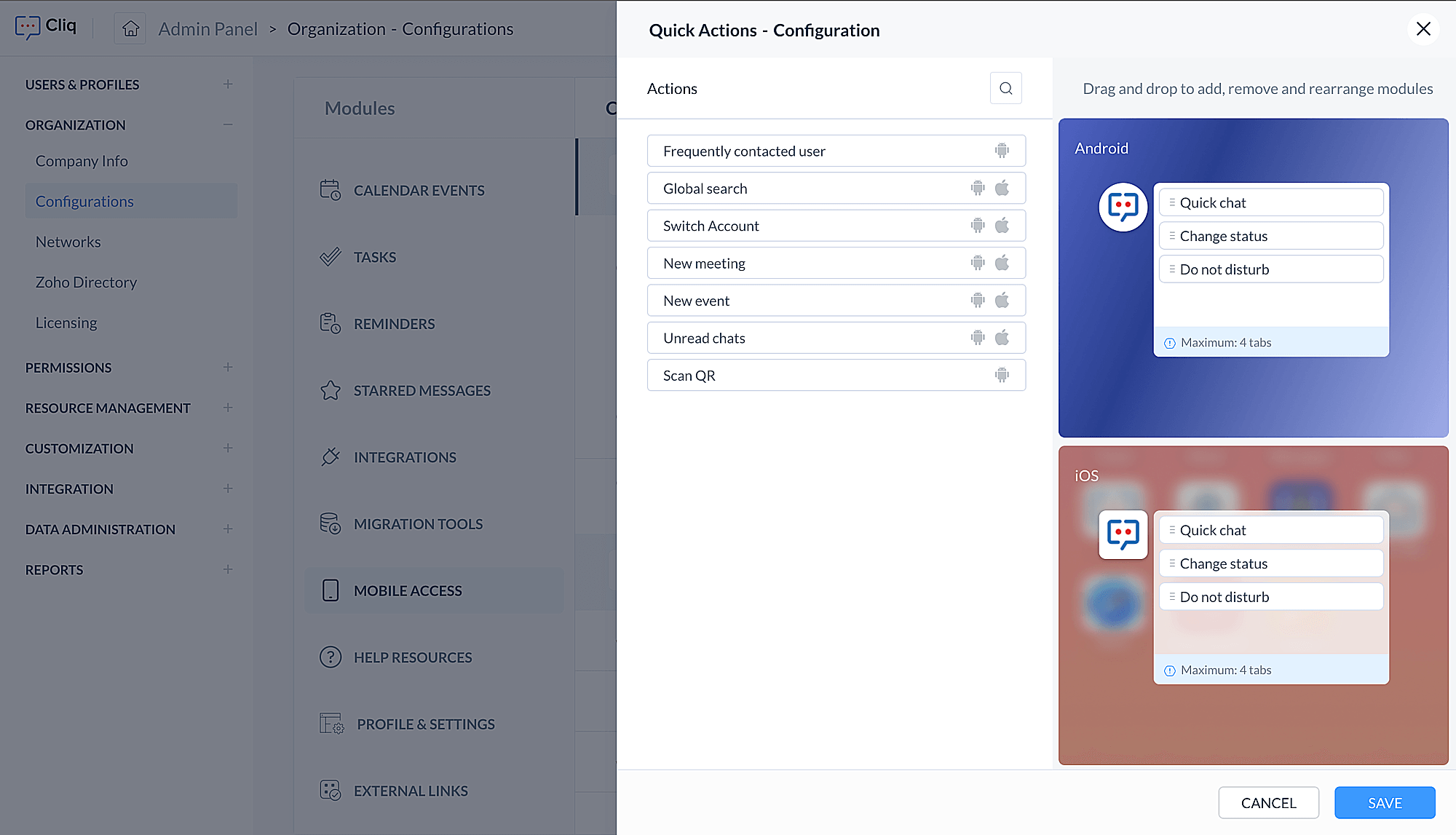
- Admin configuration to customize shortcuts for Cliq iOS and Android apps: Admins can now personalize the Cliq app's shortcut menu on iOS and Android devices. This allows them to choose which shortcuts should appear when their organization's users press and hold the app icon, including frequently contacted users, unread chats, switching accounts, and more. By tailoring the app's functionality to their organization's needs, admins can improve user experience, navigation, and productivity.
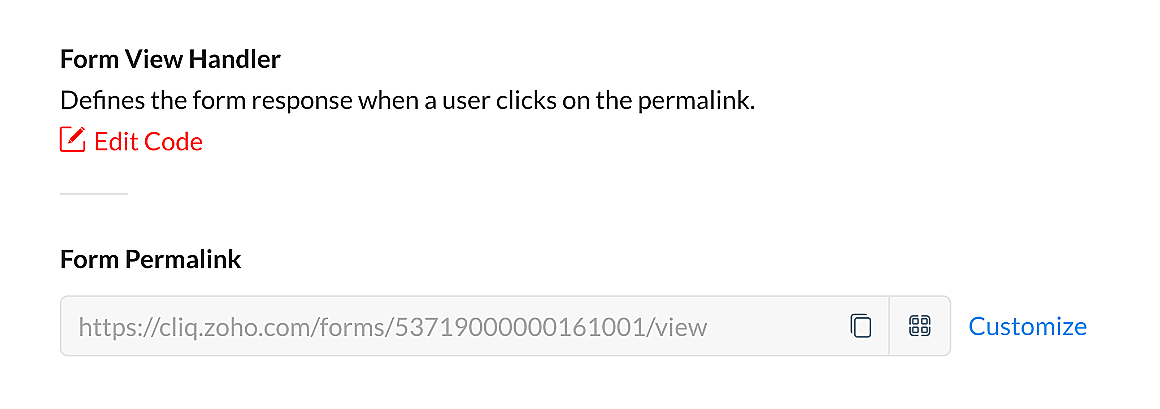
- QR code generator for form view handler: You can now generate a personalized QR code for your forms through the Form View Handler, with custom parameters if required. This makes it easier for users to access the form by scanning the QR code and simplifies the process of collecting and organizing data.
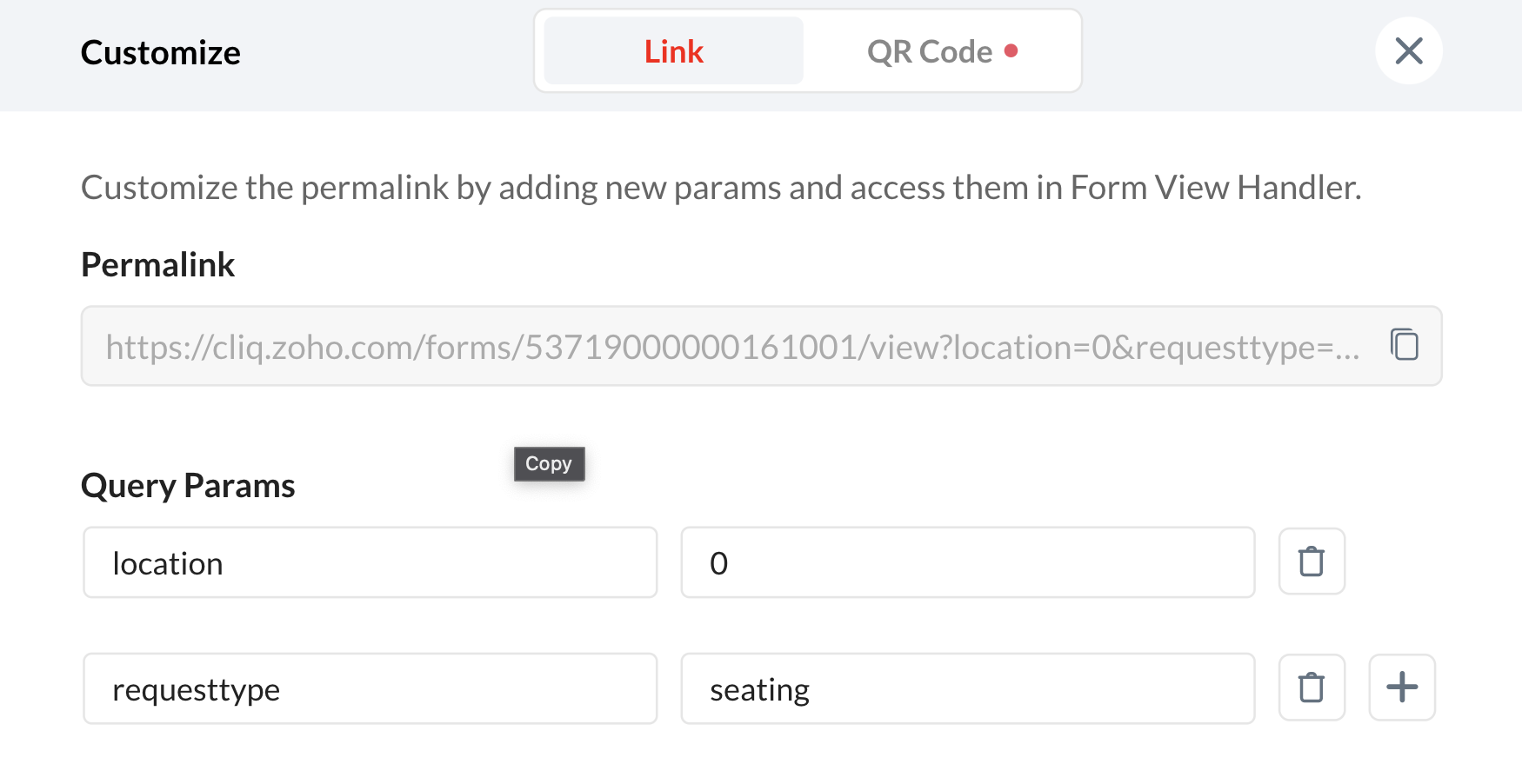
- WorkDrive upload restriction: Admins now have the option to prevent users from uploading files from Zoho WorkDrive in a chat. This provides more control over the type of files that can be shared and helps maintain data privacy and security.
We hope that all these updates will make your communication experience with our platform even better. We are continuously working on adding new features and enhancements to our platform to ensure our users have access to the best communication tools. We want to thank you for your continued support and feedback, and we look forward to hearing from you as you begin to explore these new features.
Topic Participants
Poorvik Palanikumar
Sticky Posts
New in Zoho Chat : Search for contacts, files, links & conversations with the all new powerful 'Smart Search' bar.
With the newly revamped 'Smart Search' bar in Zoho Chat, we have made your search for contacts, chats, files and links super quick and easy using Search Quantifiers. Search for a contact or specific conversations using quantifiers, such as, from: @user_name - to find chats or channel conversations received from a specific user. to: @user_name - to find chats or channel conversations sent to a specific user. in: #channel_name - to find a particular instance in a channel. in: #chat_name - to findNew in Zoho Chat: Threaded conversation at its finest best
Perform effective team communication in Zoho Chat with our new 'Reply' option. Converse and stay focussed on the parent conversation, rather than getting entangled in the web of several, never-ending sub threads. To reply to a certain message, all you need to do is hover to the left hand side of the message. Then, click on the three dots to open a pop up menu. Here, click on the Reply button and type the reply to the message in the compose box and press Enter. Voila, that was pretty simple.Changes in Cliq iOS app notification due to iOS 13 and Xcode 11
Hello everyone! With the iOS 13 update, Apple has updated its policy on usage of VoIP push notifications. Over the past few months, we tried our best to provide a similar experience with the updated policy. Changes in iOS 13: With iOS 13, Apple mandates all VoIP push notifications to be reported to the CallKit framework as a new call. If a VoIP push notification is not reported to the CallKit within a designated time window, iOS will terminate the app. If enough VoIP push notifications are notWhat's new in Zoho Cliq - June 2020 updates
Hello again, everyone! I'm back to share with you the recent feature improvements and updates that we've pulled together for enhancing your experience in Cliq. Here's what's new this June for you all in Cliq's web and iOS app! New on Cliq Web: Drag and drop files to a chat in your left side panel Now you can drag and drop attachments from your open conversation window to a specific chat or channel in the left side menu without opening it. Swift up actions and collaborate efficiently with Cliq's4 Things You Should Do Once You Get Started with Cliq
Hey there, new user! You've successfully logged in and set up your organization and you're all set to start working. What's next? Buckle up because here are 4 essential things you need to do first in order to get the most out of your Cliq experience: 1. Invite your colleagues Now that you've set up your Cliq for business, you need to bring in all your employees, of course, because how else can you collaborate with them? To invite your colleagues to Cliq, head on over to the Admin Panel which
Recent Topics
Boost your CRM communication with new font types, sizes, and default reply-to options while composing emails
Hello Everyone, We’re excited to introduce a series of impactful enhancements to the email composer settings in Zoho CRM. These updates enable you to personalize and optimize your customer interactions with greater efficiency. So what's new? Add custom3 year sick leave cycle
How do you set up a sick leave cycle for South Africa? In SA the sick works like this for the first 6 months you get 0.83 paid sick days a month, then after 6 months you sick leave balance is reset to 30 days that can be used over a 36 month cycle. ThisWorkDrive and CRM not in sync
1/ There is a CRM file upload field with WorkDrive file set as the source: 2/ Then the file is renamed in WorkDrive (outside CRM): 3/ The File in CRM is not synced after the change in WorkDrive; the file name (reference) in CRM record is not updated (hereIntroducing Connected Records to bring business context to every aspect of your work in Zoho CRM for Everyone
Hello Everyone, We are excited to unveil phase one of a powerful enhancement to CRM for Everyone - Connected Records, available only in CRM's Nextgen UI. With CRM for Everyone, businesses can onboard all customer-facing teams onto the CRM platform toIs Zoho Communityspaces now part of Zoho One?
Is Zoho Communityspaces now part of Zoho One?How to update "Lead Status" to more than 100 records
Hello Zoho CRM, How do I update "Lead Status" to more than 100 records at once? To give you a background, these leads were uploaded or Imported at once but the lead status record was incorrectly chosen. So since there was a way to quickly add records in the system no matter how many they are, we are also wondering if there is a quicker way to update these records to the correct "Lead Status". I hope our concern makes sense and that there will be a fix for it. All the best, JonathanBigin’s 2025 Evolution: Highlights from 2025 and What’s Ahead in 2026
Dear Biginners, Wishing you a very happy New Year! As we stand at the cusp of endless possibilities in 2026, we would like to take a moment to reflect on what we achieved together in 2025. Your continued support, thoughtful feedback, and kind words ofSend Supervisor Rule Emails Within Ticket Context in Zoho Desk
Dear Zoho Desk Team, I hope this message finds you well. Currently, emails sent via Supervisor Rules in Zoho Desk are sent outside of the ticket context. As a result, if a client replies to such emails, their response creates a new ticket instead of appendingZoho Desk - Change Time Zone for all users and set default for new user
Hi, Is there a way to set a default time zone so that when user creates an account via the Zoho Desk invitation, they don't need to select the time zone via the hundreds of choice? And, for already created users, can we edit the incorrect time zone selected by the user at the account creation ? Thanks ! FredIntroducing WhatsApp integration in Bigin
Greetings! In today's business landscape, messaging apps play a significant role in customer operations. Customers can engage with businesses, seek support, ask questions, receive personalized recommendations, read reviews, and even make purchases—allAllow Manual Popup Canvas Size Control
Hello Zoho PageSense Team, We hope you're doing well. We would like to request an enhancement to the PageSense popup editor regarding popup sizing. Current Limitation: Currently, the size (width and height) of a popup is strictly controlled by the selectedWhy does Zoho’s diff viewer highlight parts of unchanged lines?
Hi everyone, I’ve noticed something odd in the Zoho editor’s diff view. When I delete a single line, the diff doesn’t just mark that line as removed. Instead, it highlights parts of the next line as if they changed, even though they are identical. Example:CRM x WorkDrive: File storage for new CRM signups is now powered by WorkDrive
Availability Editions: All DCs: All Release plan: Released for new signups in all DCs. It will be enabled for existing users in a phased manner in the upcoming months. Help documentation: Documents in Zoho CRM Manage folders in Documents tab Manage filesPassing the CRM
Hi, I am hoping someone can help. I have a zoho form that has a CRM lookup field. I was hoping to send this to my publicly to clients via a text message and the form then attaches the signed form back to the custom module. This work absolutely fine whenAutomating Employee Birthday Notifications in Zoho Cliq
Have you ever missed a birthday and felt like the office Grinch? Fear not, the Cliq Developer Platform has got your back! With Zoho Cliq's Schedulers, you can be the office party-cipant who never forgets a single cake, balloon, or awkward rendition ofDrop Down Value
Hi, May I know why Zoho Flow treat this drop down as number and not as string. If so, how can I fetch the right value for filtering. This field is from Creator, in Creator upon checking by default it is a string since it's not a lookup field.Zoho Survey reminder settings are extremely confusing
Hi, I just want to set 3 reminders, one week apart from the first email out. Your form is too confusing and I don't understand. Can you simplify and be more specific regarding the language used on the form ?Add deluge function to shorten URLs
Zoho Social contains a nice feature to shorten URLs using zurl.co. It would be really helpful to have similar functionality in a Deluge call please, either as an inbuilt function or a standard integration. My Creator app sends an email with a personalisedform data load issue when saving as duplicate record is made
Hello. I have a form with a lookup when a value is selected the data from the corresponding record is filled into all of the fields in the form. But the form is loaded in such a state that if any value is changed it will take all of the values pre loadedRecurring Tasks and Reminders in Projects
Recurring tasks are tasks that are created once, and then recreated automatically after a designated time period. For example, the invoice for your billable tasks is due every week. You can set that task to recreate itself every week. Also, the futureUnable to remove the “Automatically Assigned” territory from existing records
Hello Zoho Community Team, We are currently using Territory Management in Zoho CRM and have encountered an issue with automatically assigned territories on Account records. Once any account is created the territory is assigned automatically, the AutomaticallyTrack online, in-office, and client location meetings separately with the new meeting venue option
Hello everyone! We’re excited to announce meeting enhancements in Zoho CRM that bring more clarity and structure to how meetings are categorized. You can now specify the meeting venue to clearly indicate whether a meeting is being held online, at theGoogle Fonts Integration in Pagesense Popup Editor
Hello Zoho Pagesense Team, We hope you're doing well. We’d like to submit a feature request to enhance Zoho Pagesense’s popup editor with Google Fonts support. Current Limitation: Currently, Pagesense offers a limited set of default fonts. Google FontsImproved Contact Sync flow in Google Integration with Zoho CRM
Hello Everyone, Your contact sync in Google integration just got revamped! We have redesigned the sync process to give users more control over what data flows into Google and ensure that this data flows effortlessly between Zoho CRM and Google. With thisImproved Functionality PO Bill SO Invoice
Hello, I need to enter over 100 items, it's frustrating to scroll a few item rows and wait for more to load, then scroll again. It would be nice to have buttons that scroll to the top or bottom with one click. Furthermore, these items I'm adding are VATWishes for 2026
Hello, and a happy new year 2026! Let's hope it's better for everyone. I'd like to share some thoughts on Zoho One and what could be useful in the short, medium, and long term. Some things are already there, but not applied to Zoho One. Others seem likeHow to Integrate Zoho Books with Xero (No Native Connection Available)
Hi everyone, I’m currently facing an issue with integrating Zoho Books invoices with Xero, as I’ve noticed Zoho does not provide a native integration with Xero at this time. I would like to ask: What are the common or recommended solutions for syncingHow to install Widget in inventory module
Hi, I am trying to install a app into Sales Order Module related list, however there is no button allow me to do that. May I ask how to install widget to inventory module related list?error while listing mails
I can't access email in any of my folders: Oops, an error occurred - retry produces the second error response: error while listing mails (cannot parse null string). I've signed in and out of Zoho, restarted my iMac.Unlocking New Levels: Zoho Payroll's Journey in 2025
Every year brings its own set of challenges and opportunities to rethink how payroll works across regulations and teams. In 2025, Zoho Payroll continued to evolve with one clear focus: giving businesses more flexibility, clarity, and control as they grow.Sync desktop folders instantly with WorkDrive TrueSync (Beta)
Keeping your important files backed up and accessible has never been easier! With WorkDrive desktop app (TrueSync), you can now automatically sync specific desktop folders to WorkDrive Web, ensuring seamless, real-time updates across devices. Important:MCP no longer works with Claude
Anyone else notice Zoho MCP no longer works with Claude? I'm unable to turn this on in the claude chat. When I try to toggle it on, it just does nothing at all. I've tried in incognito, new browsers, etc. - nothing seems to work.Ability to Edit YouTube Video Title, Description & Thumbnail After Publishing
Hi Zoho Social Team, How are you? We would like to request an enhancement to Zoho Social that enables users to edit YouTube video details after the video has already been published. Your team confirmed that while Zoho Social currently allows editing theFree Webinar : Unlock AI driven business insights with Zoho Inventory + Zoho Analytics
Are you tired of switching between apps and exporting data to build customized reports? Say hello to smarter & streamlined insights! Join us for this exclusive webinar where we explore the power of the Zoho Inventory–Zoho Analytics integration. LearnCritical Issue: Tickets Opened for Zoho Support via the Zoho Help Portal Were Not Processed
Hi everyone, We want to bring to your attention a serious issue we’ve experienced with the Zoho support Help Portal. For more than a week, tickets submitted directly via the Help Portal were not being handled at all. At the same time no alert was postedHide/Show Subform Fields On User Input
Hello, Are there any future updates in Hide/Show Subform Fields "On User Input"?Cloning Item With Images Or The Option With Images
Hello, when I clone an item, I expect the images to carry over to the cloned item, however this is not the case in Inventory. Please make it possible for the images to get cloned or at least can we get a pop up asking if we want to clone the images asCustom validation in CRM schema
Validation rules in CRM layouts work nicely, good docs by @Kiran Karthik P https://help.zoho.com/portal/en/kb/crm/customize-crm-account/validation-rules/articles/create-validation-rules I'd prefer validating data input 'closer to the schema'Adding Default Module Image into mail merge field
As with most people finding their way to these forums i have a specific requirement that doesn't seem to be supported by Zoho I have created 2 custom modules to suit my purpose 1 is an inventory type module that lists aluminium extrusions, and all relevantIs it possible to roll up all Contact emails to the Account view?
Is there a way to track all emails associated with an Account in one single view? Currently, email history is visible when opening an individual Contact record. However, since multiple Contacts are often associated with a single Account, it would be beneficialNext Page