Zoho Books | Product Updates | February 2025

Zoho Books | Product Updates | February 2025

Hello users,

Now that January is over, here are some exciting updates to make this new year even better. We’re back with new features and enhancements in Zoho Books, including comparing fields as criteria in workflow rules and a custom SMTP integration. Explore these updates that are designed to elevate your accounting experience.

Import/Export E-Invoices in the ZUGFeRD and XRechnung Format [Germany Edition]

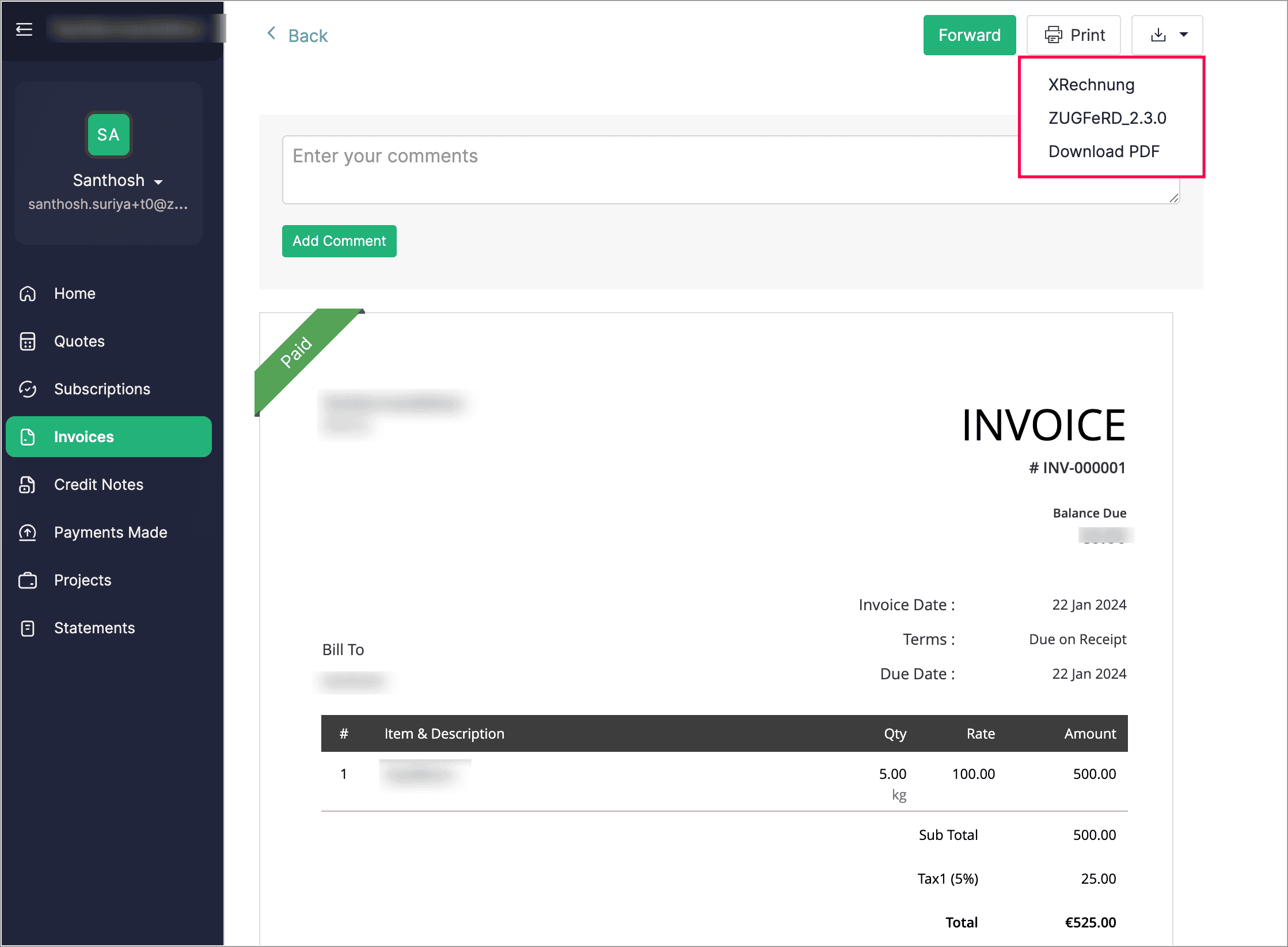
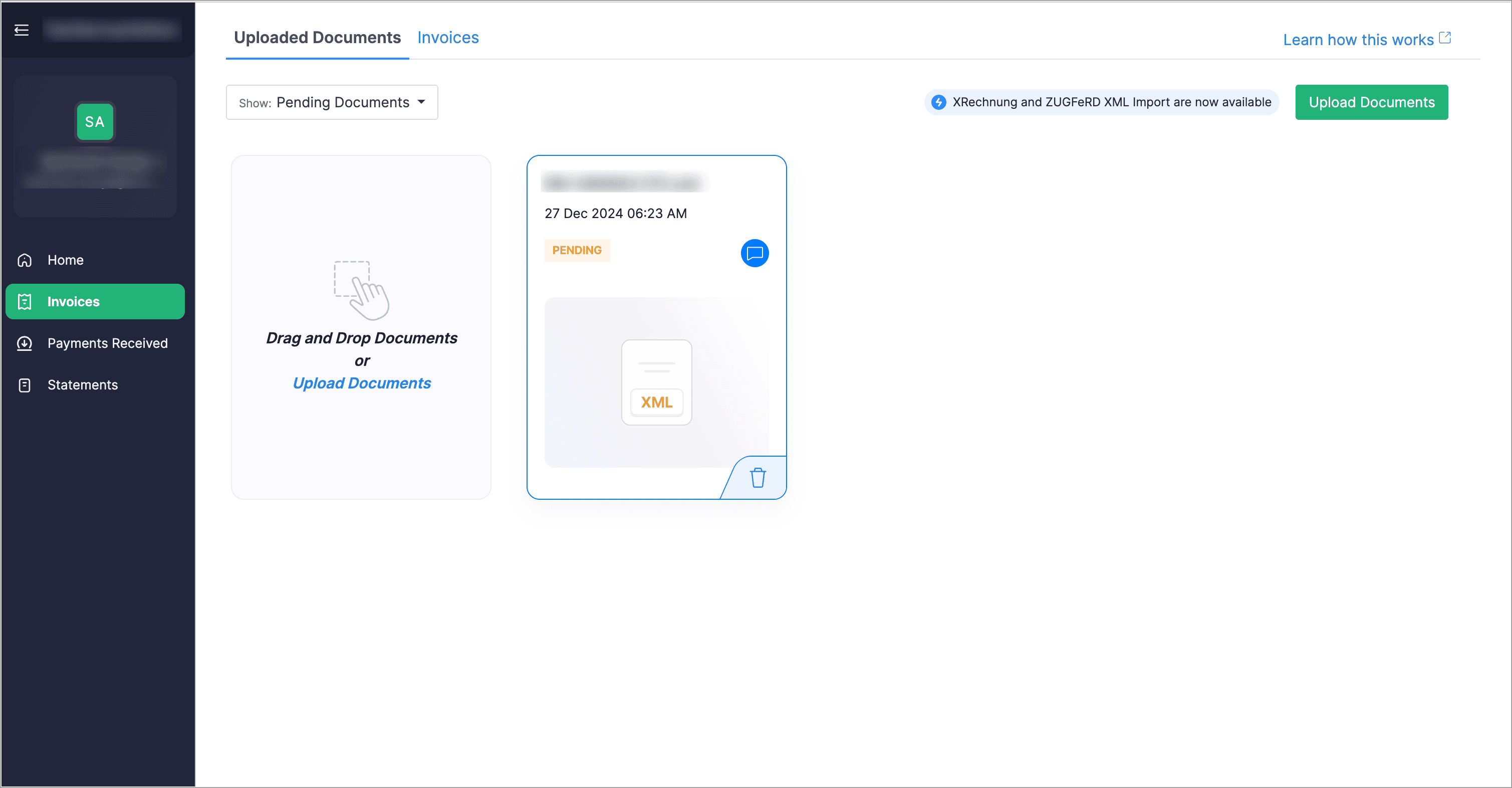
Customers can now download their e-Invoices in both XRechnung and ZUGFeRD formats directly from their customer portal. Additionally, vendors can upload invoices through their vendor portal and later convert them into bills from the Bills module.


Create Compound and Group Taxes [Germany Edition]

We’ve introduced the option to create compound and group taxes to manage local taxes and surcharges. In some cases, additional taxes, such as tourism or municipal taxes, may be charged alongside VAT. If the local tax is included in the total amount, VAT will be calculated on the entire amount (including the surcharge). However, if the local tax is applied separately, it will not be subject to VAT and will not appear in VAT-based reports. Additionally, when creating a tax rate, you can set tracking preferences for both sales and purchases.


Use Field Comparison as Criteria in Workflow Rules

When creating workflow rules, you can now use the comparison of two fields as criteria. For example, you can set a rule that triggers a workflow when the Discount Amount exceeds the Tax Amount.
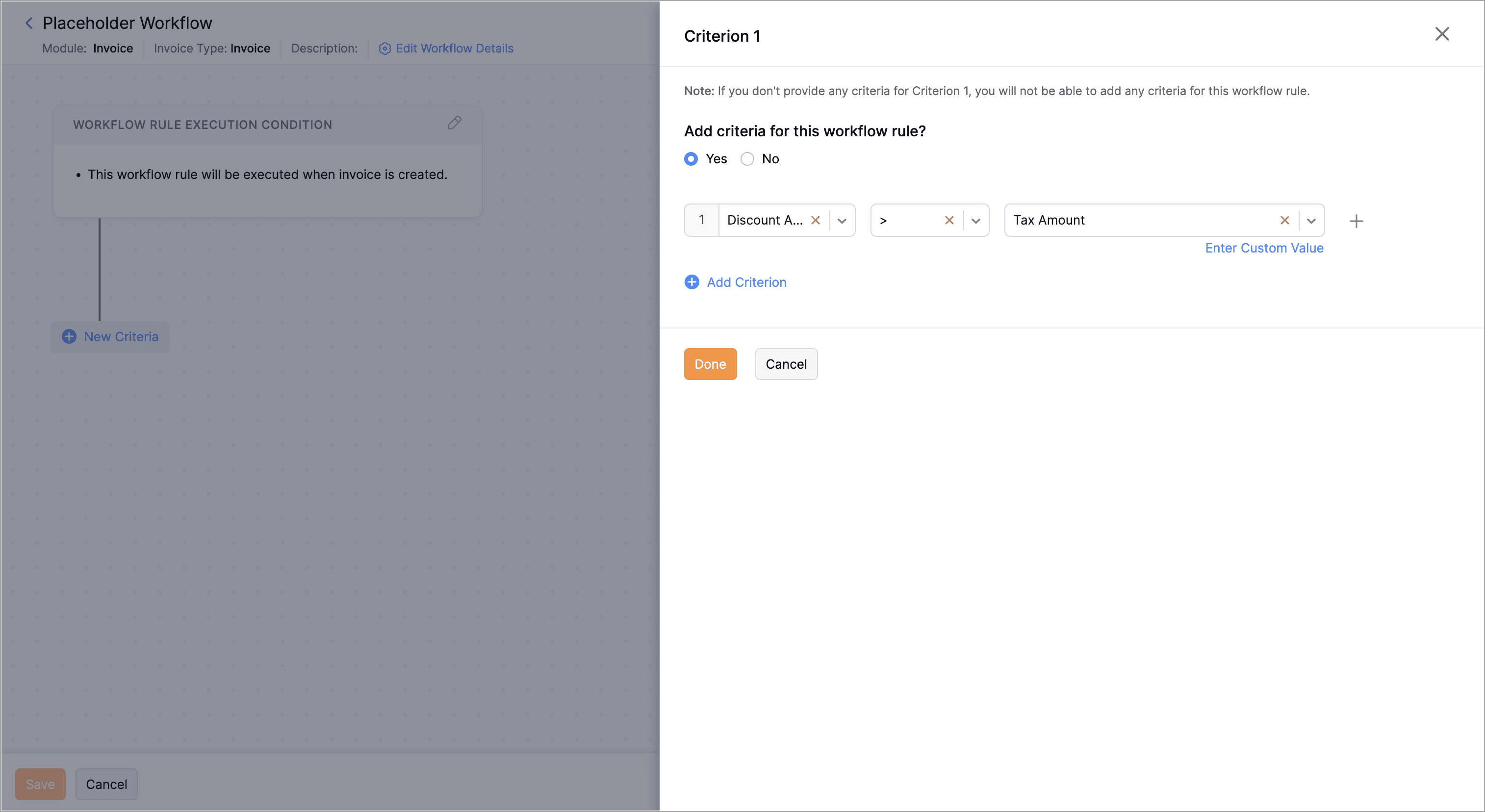


To compare fields as criteria, navigate to Settings > Automation > Workflow Rules > + New Workflow Rule. Enter the Workflow Rule Name and select the Module. Choose an Action Type and click Next. Then, click + New Criteria, select a field from the first dropdown, choose a comparator from the second dropdown, click Select Placeholder below the third dropdown, and select the field to compare. Click Done.
Background Execution Custom Button

When creating a custom button, if the execution takes longer than 10 seconds, you can choose to either wait for it to finish or move it to the background. For tasks that run over five minutes, the system will automatically shift them to the background unless you opt to do so manually. After the process is completed, you'll receive an in-app notification.

Send Emails with Custom SMTP Servers

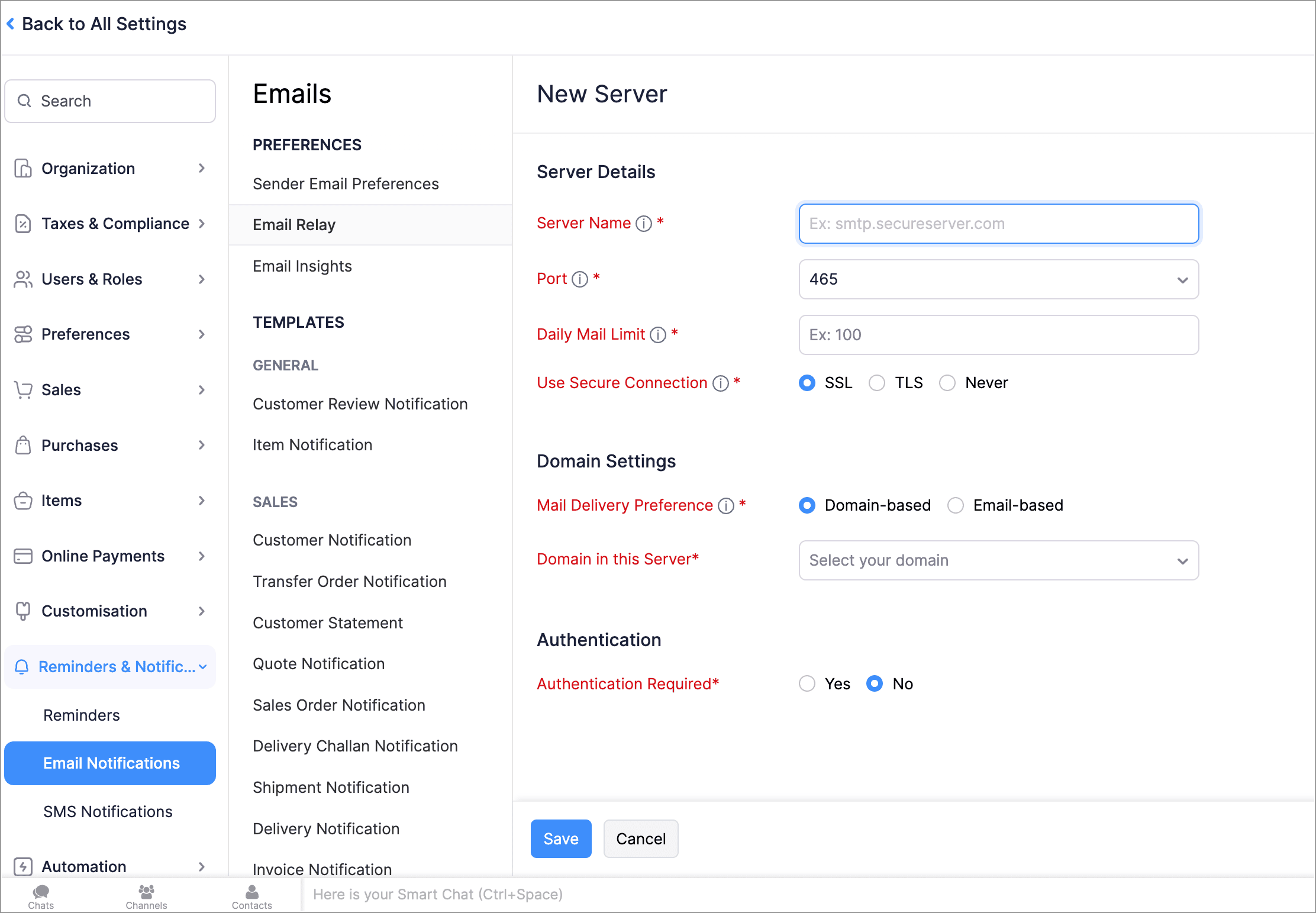
With Email Relay, you can use your own SMTP (Simple Mail Transfer Protocol) servers to send emails and avoid spam filters. You can add multiple SMTP servers, assign them to specific emails or domains, and set a daily sending limit. Once the limit is reached, emails will be sent through our Transmail server.


To setup an email relay, go to Settings > Reminders and Notifications > Email Notifications > Email Relay > + New Server.

Leave Organization

We've introduced the option to leave an organization from the Manage Organizations page. However, if you're the admin who created the organization or the only admin, you'll need to delete the organization instead. Additionally, if you've enabled any integrations in the organization, you'll need to disable them before leaving.


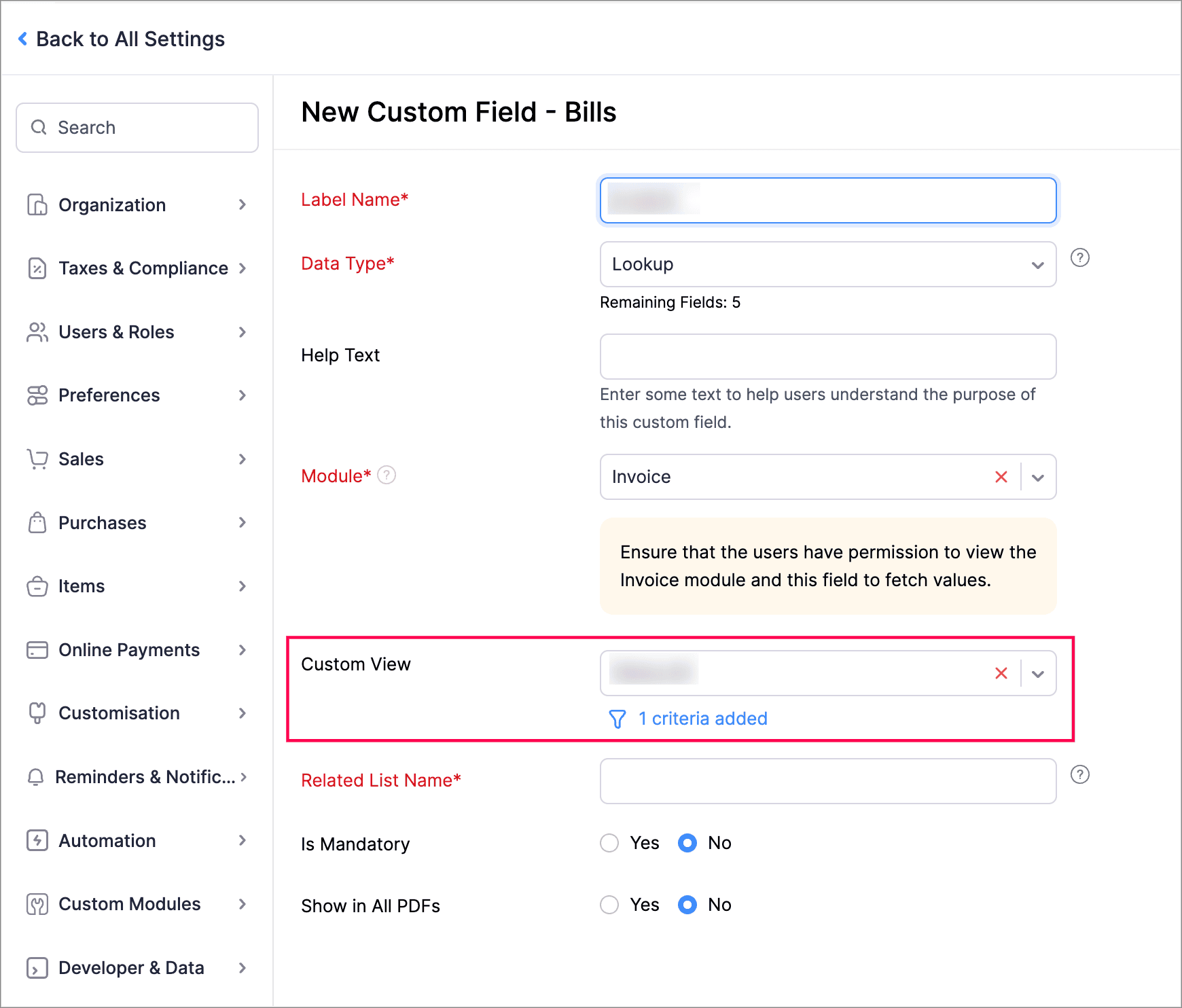
Filter Lookup Custom Fields by Setting Criteria and Using Custom Views

You can now filter your lookup custom fields by using custom views and setting criteria. Records will be filtered based on both the Custom View and Criteria, ensuring all conditions are met.


Create Workflow Rules with Sub-Modules

You can now create workflow rules for sub-entities within the Invoice module. For example, within the Invoice module, you can execute workflows with Bill of Supply, Debit Note, and Late Fee as sub-modules.


To create workflow rules for sub-entities within the Invoice module, navigate to Settings > Automation > Workflow Rules > + New Workflow Rule. Enter the Workflow Rule Name, select the module as Invoice, choose an option under Execute Workflow For, and select the sub-entity from the Invoice Type dropdown.

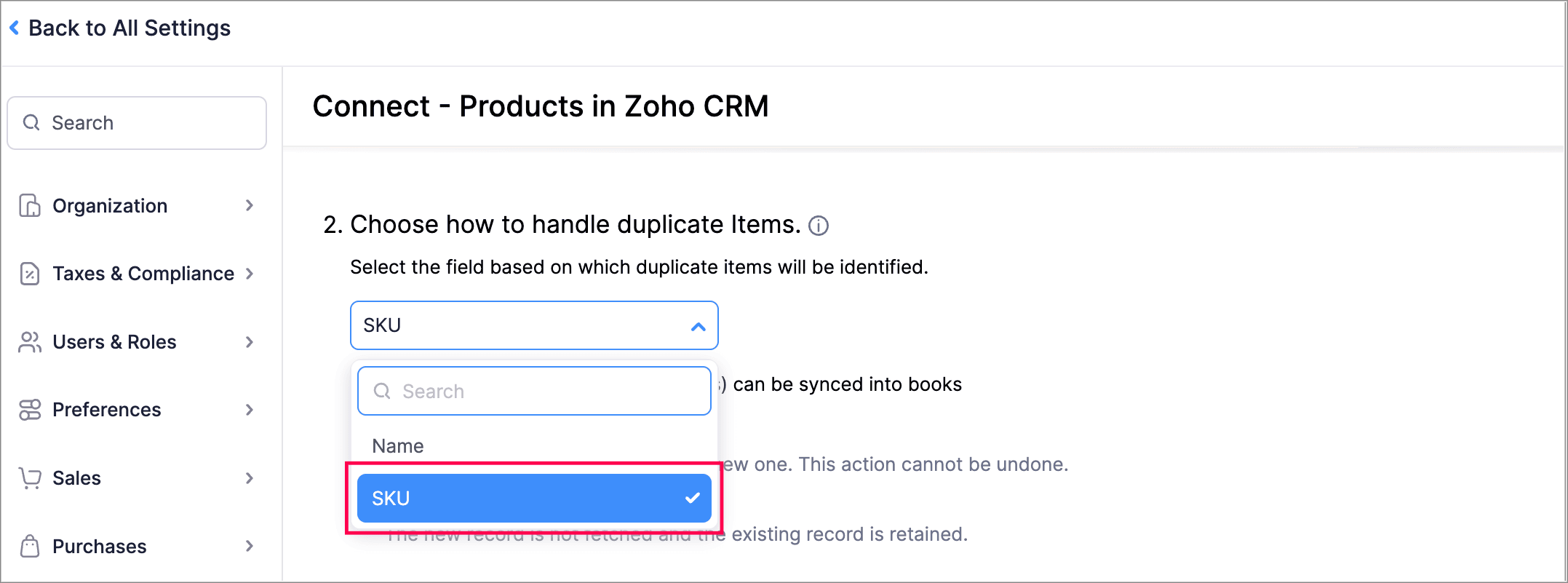
Handle Duplicate Items Using SKU in Zoho Books - Zoho CRM Integration

You can now use product SKU as the field based on which duplicate items will be identified while integrating Zoho Books organization with Zoho CRM.


Zoho Inventory Add-On Updates

Print/Download Purchase Receives

Now, you can print or download your purchase receives. We have also supported a standard template with which you can view the PDF of your purchase receives.

To print or download a purchase receive, go to Purchases > Purchase Receives. Select the purchase receive and click PDF/Print.

To view the PDF of a purchase receive, go to Purchases > Purchase Receives. Select the purchase receive and enable the Show PDF View option on its details page.

Other Feature Enhancements

  • Access your Customer/Vendor Balance Summary reports with the same configuration and filters as before, and create custom reports.
  • We now support exporting the current view of your filtered Tasks that you and your users have to complete.
  • You can now mark the default filters of all modules as your favorites. This change will only be visible to you and will not affect other users in the organization.


    We hope you like the new features and enhancements in Zoho Books! Take some time to explore the latest updates. We’ll be back next month with even more updates, as we continually strive to elevate your accounting experience.

    You can also visit the What's New timeline for bite-sized information about our previous feature updates and enhancements. If you need any assistance, feel free to reach out at support@zohobooks.com.

   Best regards,
   The Zoho Books Team

    • Recent Topics

    • Zoho Sites "pages" management page

      I have 80 plus pages on zoho sites. When I go to the "pages" link to view and edit pages, They are not in any kind of order, so I spend lots of time searching for pages when I need to edit or create new. How can I change the view order of all my pages
    • AI feature in Zoho Desk suggesting answers based on past ticket threads

      Hi I would like to suggest something that would be very useful : instead of suggesting answers based on the Knowledge Base, I think it would be great if Zia could analyze the history of all customer and agents threads, to suggest answers in new tickets.
    • Advanced Customization of the Help Center using JavaScript

      Hello everyone, The Help Center in Zoho Desk can be customized by using HTML and CSS to provide structure and enhance the page's appearance—but what if you want to add interactive and dynamic elements? You can add these effects with JavaScript, a programming
    • Widget shows error

      Hi, May I ask why below characters will be auto added into the widget link and how to solve this error? As my widget shows 404 error now. ?serviceOrigin=https%3A%2F%2Fcrm.zoho.com&frameorigin=https%3A%2F%2Fcrm.zoho.com
    • Using a CRM Client Script Button to create a Books Invoice

      Hello, I need help handling error messages returned to my client script from a function. The scenario I have setup a client script button which is available from each Deal. This CS executes a crm function, which in turn creates an invoice based on the
    • Using IMAP configuration for shared email inboxes

      Our customer service team utilizes shared email boxes to allow multiple people to view and handle incoming customer requests. For example, the customer sends an email to info@xxxx.com and multiple people can view it and handle the request. How can I configure
    • Synchronise item image between Zoho Commerce and Zoho Books/Inventory/CRM

      Here is a blindingly simple idea to tie several Zoho products together. Zoho - please include a method to synchronise the item image (or images) from one Zoho application to another. For example, if you upload an item image in Zoho Inventory, a user should
    • Introducing Zoho POS for the Kingdom of Saudi Arabia

      Hey everyone, We are excited to kick-start December with a completely personalized edition of POS for retail businesses in Saudi Arabia to help run your operations with ease. It offers four different subscription plans—Free, Standard, Professional, and
    • Whatsapp Connection Status still "Pending" after migration

      Hello, I migrated my WhatsApp API to Zoho from another provider a day ago. So far the connection status is still “Pending”. There is a problem? How long does it usually take?
    • Unveiling Zoho Sites 2.0 - A new dimension in website building

      Dear Zoho Sites Users, We are thrilled to announce the launch of Zoho Sites 2.0 today! This refresh represents a significant step forward in the capabilities of Zoho Sites and is crucial for creating a lasting and positive impact on our customers' businesses.
    • Subform edits don't appear in parent record timeline?

      Is it possible to have subform edits (like add row/delete row) appear in the Timeline for parent records? A user can edit a record, only edit the subform, and it doesn't appear in the timeline. Is there a workaround or way that we can show when a user
    • Script Editor not an option

      I am trying to apply a script to a sheet and Script Editor is not an option. I don't want to go outside Sheets to do this (like Creator) if it can be done inside Sheets.
    • Show Custom Button in Portal Listview Canvas

      I have created a custom button that shows in a list view of deals (internally I can see it). I have permissions to allow this button on the portal. But it is not displaying in the canvas list? Before I do too much leg work, is this function allowed?
    • Zoho CRM - Writing Assistant Tone

      Hi Zoho CRM Team, Text in my emails often gets underlined in yellow because I tend to use a more informal tone with my client's, like using "I'm" instead of "I am". Is there some way for me to tell the system that this is my preferred writing tone, so
    • Not able to link email text.

      Kindly check Zoho Sites. I am unable to turn a text into a email link. The save button does not work. Kindly try yourself to see it not responding to save.
    • Adding Multiple Files to a Zoho Vault Entry

      There is a old blog post talking about adding multiple file attachments to one Zoho Vault Secret: https://www.zoho.com/blog/vault/introducing-new-features-in-zoho-vault-powerful-password-sharing-wider-storing.html Is that still possible, I can see how
    • Migrate data from old to new account

      Hy, Have one Old Zoho Notebook Account with Data , want to migrate that whole Data to New Zoho Notebook Account which is in Zoho One . Is that possible ? If Yes then how?
    • Option to Customize Career Site URL Without “/jobs/Careers”

      Dear Zoho Recruit Team, I hope you are doing well. We would like to request an enhancement to the Career Site URL structure in Zoho Recruit. In the old version of the career site, our URL was simply: 👉 https://jobs.domain.com However, after moving to
    • Zoho Analytics Regex Support

      When can we expect full regex support in Zoho Analytics SQL such as REGEXP_REPLACE? Sometimes I need to clean the data and using regex functions is the easiest way to achieve this.
    • Automating Employee Birthday Notifications in Zoho Cliq

      Have you ever missed a birthday and felt like the office Grinch? Fear not, the Cliq Developer Platform has got your back! With Zoho Cliq's Schedulers, you can be the office party-cipant who never forgets a single cake, balloon, or awkward rendition of
    • RTL Support for Webforms in Zoho CRM

      Dear Zoho CRM Support Team, We are writing to request an enhancement to the webform builder functionality within Zoho CRM. Currently, to create a webform in a right-to-left (RTL) language, the entire CRM instance must be set to RTL, which can be inconvenient
    • Zoho Projects - Visual improvement to parent and sub-task relationship

      Hi Projects Team, My feature request is to improve sub-task visibility. Please see screenshot below. I really think parent child relationships could be visually improved. Even if the first letter of the parent task was inline with other same level tasks
    • Add Custom Reports To Dashboard or Home Tab

      Hi there, I think it would be great to be able to add our custom reports to the Home Tab or Dashboards. Thanks! Chad
    • MCP > Creator connection failing with Claude

      I'm trying to get claude to access any of my Zoho Creator apps and it keeps failing. I have enabled all tools for creator and ensured in claude settings that everything is authorised. Here is what claude says : Unfortunately, the error messages I'm receiving
    • Pricing Strategies: #1 Nuances in Pricing

      When Clara first opened her digital printing shop, pricing was simple. She sold handmade greeting cards, planners, business cards, and other physical items at fixed label prices, individually and in bulk. One SKU, one price, one bill, and that's all it
    • [Free Webinar] Learning Table Series – Education Management in Zoho Creator

      Hello Everyone! We’re excited to invite you to another edition of Learning Table Series, where we showcase how Zoho Creator empowers industries with innovative and automated solutions. About the Learning Table Series The Learning Table Series is a free,
    • Channel Configuration and Default Channels

      There are some of the default fields that cannot be removed or changed. Examples are the social media ones, such as Facebook. It would be nice to be able to remove these fields as it would be confusing if someone selected this but it's not configure
    • CRM x WorkDrive: File storage for new CRM signups is now powered by WorkDrive

      Availability Editions: All DCs: All Release plan: Released for new signups in all DCs. It will be enabled for existing users in a phased manner in the upcoming months. Help documentation: Documents in Zoho CRM Manage folders in Documents tab Manage files
    • Move attachments from one module to another with Deluge

      I have created a button that works just like the convert button for my custom modules. I would like this custom function to move any attachments in this record to the new module. I can't seem to find any documentation on how this can be accomplished.
    • Help in function code

      Hi, could someone look at the code below and tell me what 's wrong with it? After a deal creation or edition the code should find the related Account, than all open Deals for that Account and copy the field Total_Open_Deals from the Account record to
    • Automation Series: Auto-update Phase Status

      Hello Folks! You can auto-update your phase's status based on status of underlying tasks using custom functions. In this series, we will showcase how to create and run custom functions, using Deluge, with ease. Follow the steps below and automate your
    • Zoho CRM for Everyone's NextGen UI Gets an Upgrade

      Hello Everyone We've made improvements to Zoho CRM for Everyone's Nextgen UI. These changes are the result of valuable feedback from you where we’ve focused on improving usability, providing wider screen space, and making navigation smoother so everything
    • Is it possible to sync data every 5–10 minutes in Zoho Analytics (CRM or Excel imports)?

      Hello Team, I want to know if Zoho Analytics supports near real-time syncing of data from different sources. My requirements: I am importing data from Zoho CRM → Zoho Analytics I also have some datasets maintained in Excel/CSV I want both data sources
    • how to add subform over sigma in the CRM

      my new module don't have any subform available any way to add this from sigma or from the crm
    • Reporting Limitation on Lead–Product Relation in Zoho CRM

      I noticed that Zoho CRM has a default Products related list under Leads. However, when I try to create a report for Lead–Product association, I’m facing some limitations. To fix this, I’m considering adding a multi-lookup field along with a custom related
    • Zoho Projects - Project Details on the Project Menu

      Hi Project's team, I've helped may businesses setup and use Zoho Project and one thing I see time and time again is confusion on where to find the Project Details information. I would be much more intuitive if Project Details was on the menu before Dashboard.
    • Zoho Projects - Add Feed to Project Tabs

      Hi Projects Team, I'm working on a lightweight communications requirement for one of my customers in relation to communicating with their client users via Zoho Projects. I noticed that the Feed is only available in the Collaboration section, but you can
    • Zoho Logs - Not seeing logs since 30 Nov

      Hi, we have a few functions running, I am testing some new ones and noticed that although I can see executions, I cannot see any logs, even when the first line on the functions is a log. I reviewed some existing functions, one of which is invoked on a
    • Flow - Fetch info from drop down in another module

      I am running into a road block which I thought would be a simple task. My goal - The account is assigned to a "route" which can be selected from a drop down menu and adds a tag to the account accordingly (easy enough). Now when I create a task for this
    • Problem with signature on zoho survey

      Hello, I'm trying to export individual responses with signatures on zoho survey. But the signatures on some of my surveys are not exported as the original image, but as a generic image, same for all (screen joins). Is there a solution to have the signatures
    • Next Page