[Edited]Zoho Campaigns: Introducing workspaces, revamped roles and privileges, and streamlined integrations
Dear user,
Update alert! We're making a bunch of enhancements to improve your experience with Zoho Campaigns (visible in your account starting on August 10, 2023).
What are we changing, exactly? We're glad you asked! :D
The changes are focused on the following:
- Introducing Workspaces: an all-new feature in Campaigns
- Streamlined integration capabilities
- Revamped roles and privileges functionality
The updates will be implemented in phases so you can transition smoothly. Once you've set up topic management (if not done already), move on to the integration setup, and wrap everything up neatly by setting up the new roles and privileges upgrades. Yep, it's that simple! Let's look at it one step at a time.
Integrations
Moving forward, integration will be moved to the organization level. Only the admin of your Zoho Campaigns account (and the other application to be integrated) will have the authority to perform integrations and syncs. Each integration will be limited to one sync.

Starting on August 10, 2023, when you access the Integrations page within the product, you'll encounter a warning message indicating that migration is required. By clicking on this message and selecting Migrate Now, you can initiate the migration process. You'll be presented with information to review. Once done, click Proceed to continue. For the next step, select an existing organization account to set up the sync. This is similar to how you've been initiating syncs in the existing version of Zoho Campaigns.
Why the change?
- Our goal is to introduce instant sync for all the integrations in Zoho Campaigns. This update marks the initial phase towards achieving our goal.
- Right now any user within the same account can create a sync and this brings in more confusion because it would be the same contacts that they bring in from the other application. Even though duplicate contacts will be ignored in the current setup, this new update will be of more help to admin and users to streamline processes within the same account.
- Only the person who created the sync will be able to delete the sync in the account right now. With this update, more privileges are given to the admin.
How's this useful?
Streamlining processes is a good thing. By having a single admin perform integrations and managing one sync per integration, the process becomes organized, de-cluttered, and less confusing, resulting in more consistent data.
How do GoToWebinar, Zoho Meeting, Zoho Backstage, and Eventbrite integrations work now?
Currently, it's possible to create separate syncs for past and upcoming webinars or events.
What's changing?
Since the syncs are unified, only one sync will remain active and all these syncs will be instant to maintain a continuous flow of data. After the admin migrates to the new setup, a new sync flow should be created. All the registrants and attendees from the past and upcoming webinars/events will be synced. The old flow will be disconnected. i.e., syncs created before the migration won't be retained after the migration.
Why the change?
If you're conducting an event or a webinar, you are required to create separate syncs for each of the webinars and events. This update simplifies the process and reduces the time and effort required to manage multiple syncs.
How do Google Analytics integrations work now?
Data in Google Analytics will be pushed to Zoho Campaigns, where all analytics-related information can be viewed.
What's changing?
- Google Analytics will be updated to the newest version (i.e., version 4).
- You won't be able to find screens related to Google Analytics in Zoho Campaigns.
- You'll have to get all analytics-related information directly from Google Analytics.
FAQs
What happens to existing syncs?
Existing syncs will work normally until you migrate to the new setup. Once you migrate, existing active syncs will remain active until July 15, 2024, after which the syncs will be deprecated.
Can the synced account be changed later? If so, what about the data and the actions the syncs perform?
Yes, your organization's admin will be able to change the synced account later. The data of the previously synced account will be available for reference.
Roles and privileges
How do roles and privileges work now?
- Roles and privileges are assigned to users in an organization to control their account access.
- The available roles are Standard Admin and Standard User, and the two levels of data access privileges include Self and Others.
- Users can also create custom roles based on the organization's needs.
What's changing?
Zoho Campaigns now provides four default roles: Admin, Manager, Editor, and Viewer. If you've already created additional roles in your account, those will be migrated to the new setup. Admins will still be able to create new roles and make changes to their privileges. Default roles are not editable.

Why the change?
We have the concept of Self and Others in Zoho Campaigns which makes team collaboration difficult, particularly regarding the management of user role and access to data. The current setup makes it difficult for admin to maintain control within the organization.
Currently, users with Self privilege will be able to create sender addresses and custom fields and these cannot be deleted by the admin. This lack of control makes it challenging for admins to manage the account effectively and keep it organized according to their requirements. The new setup enhances the overall user experience and provides better control and organization options for admins.
How's this useful to me?
At Zoho, we're committed to security and privacy. These changes bring tighter security and control over your organization's data. For example, a designer at your organization can be given an Editor access and a marketer can be given a Manager access in order to launch a campaign. This fine-grained access control allows your organization to be responsible with the data.
FAQs
Can I customize the privileges of different roles?
If you are the admin of your organization, you will be able to create new custom roles and control their privileges. Unfortunately, you cannot customize the privileges for default roles.
Introducing Workspaces for marketing teams
Note: Only for Professional edition accounts.
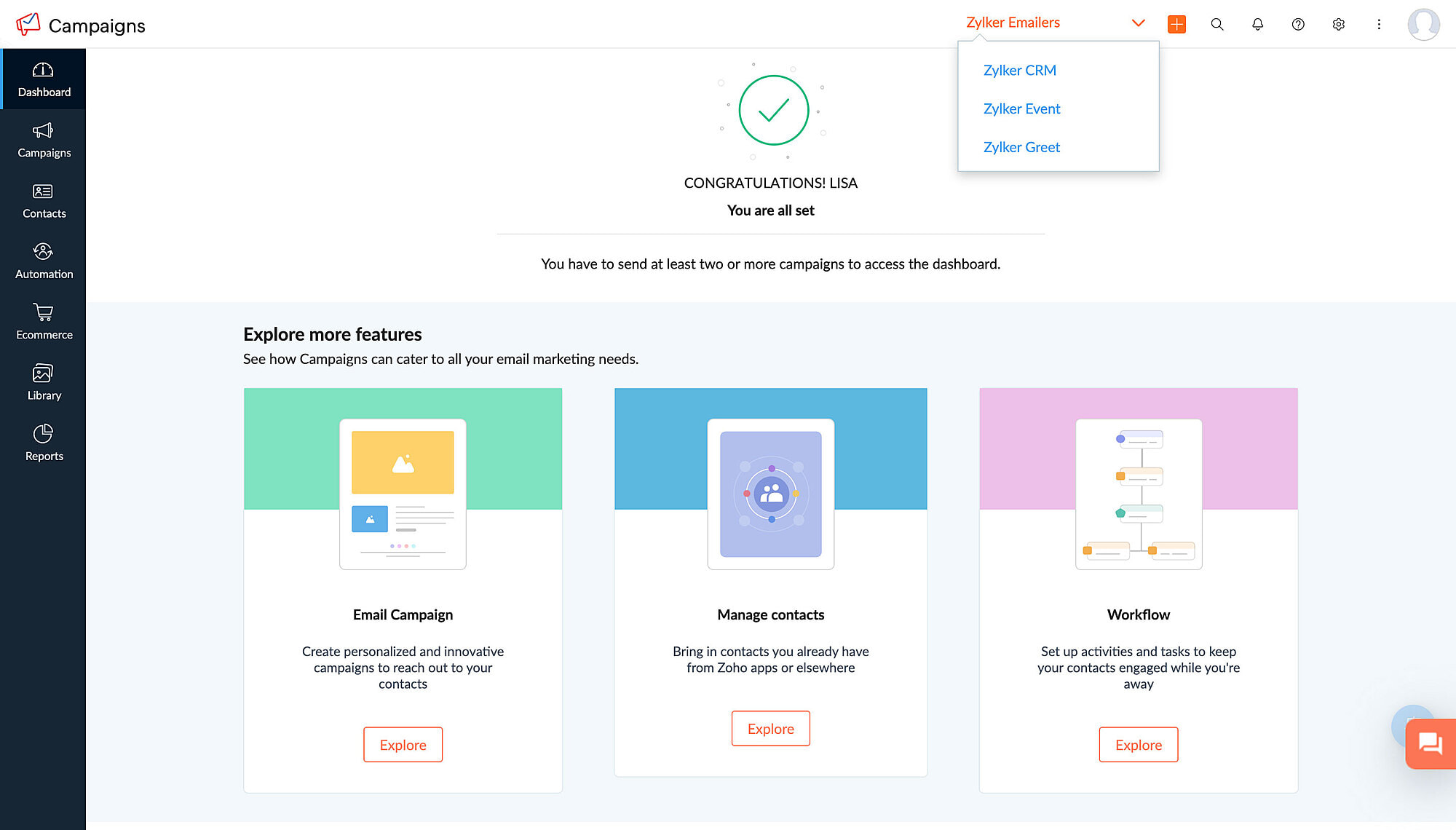
A workspace is a separate space within Zoho Campaigns to create and organize campaigns and workflows. It enables organization admins to create multiple spaces within a single account which can be accessed by multiple individuals. Admins have the authority to determine who can access each workspace based on the specific needs of the business.
To illustrate this, let's consider the example of Zylker, a product based company with different products that caters to various needs of a business. To ensure clarity and efficiency in managing these different products and teams, Zylker admin can create separate workspaces for each of the products, add users to each workspace (their respective products), and carry out marketing activities without encountering any confusion or complications.
By using workspaces, Zylker can maintain a clear separation of data and ensure customer data of one product (workspace) is not accessible to those responsible for managing other products (workspaces). This enhances data security and minimizes the risk of confusion or errors when coordinating marketing efforts.
Altogether,
- Workspace provide a practical solution for organizing and managing different aspects of your business within a single account.
- Workspace streamlines your marketing activities, assign appropriate user access, and maintain data integrity across various departments or business units.
- Workspace stores campaigns, workflows, and contacts and users will have restricted access to them.
- Admins can add all contacts or contacts matching a given criteria into a workspace.
- Users can have one role in one workspace and a different role in another workspace.
How will it function going forward?
After migrating to the new integration setup and assigning roles and privileges, a workspace will be created in your account by default. Admins will be able to create as many workspaces in the account as needed, assign users to each workspace, bring in all contacts or a restricted set of contacts as defined by a specified criteria, and switch between workspaces within the same account. This makes it much easier to manage campaigns across multiple organizations/teams, and also provides greater flexibility and control over campaign management.
FAQs
Where can I find workspaces in my account?
If you're an admin and would like to set up workspaces for your account, navigate to Settings > Users and Controls > Workspace.
Will I still be able to access campaigns and data from different workspaces?
If you're an admin, you'll be able to access campaigns and data from different workspaces. If not, you can access workspaces to which your admin has provided you access.
Is there a limit to the number of workspaces I can have in my account?
No, there is no limit to the number of workspaces that you can create in your account.
Is there a limit to the number of workspaces I can be a part of if I'm not an admin?
No, there is no limit to this either.
We understand that these changes require some adjustment, which is why we're giving you plenty of time for migration. All these updates will be implemented in Zoho Campaigns on August 10, 2023 and you will be able to migrate to this setup until July 15, 2024, after which it will become default for all users.
Please note that these updates doesn't affect the pricing or the subscription plan. If you have any questions or concerns regarding these updates, please reach out to us at support@zohocampaigns.com. We'll be more than happy to assist you throughout the process!
Best regards,
Team Zoho Campaigns
Topic Participants
Annet M
KP
Casey
Greg Obleshchuk
Tim Fockedey
Sticky Posts
Marketer's Space: Proven tips to improve open rates – Part II
Hello Marketers! Welcome back to another post in Marketer's Space! We're continuing from where we left off a fortnight ago. We ended the previous post discussing the subject line, and we'll continue from there. Let's dive right in. Pre-header Pre-headerTip of the week 03 - Sending emails in batches
Today's marketers not only want their email marketing to be efficient, but also smart. For an email campaign, you may think you have all the essential elements for lead conversion—a big mailing list, an attractive template design, and the most-engaging message content, but after hitting the ‘send’ button, you may not get the expected conversions. Wondering why? Here’s one of the major reasons. Many marketers miss out on sending the email campaign the right way. Did you know that you should not beTip of the week 04 - Know about your recipients' 'prime open time.'
In today's market, the importance of customer behavior is astounding, with a vast amount of research and resources going into finding how customers make decisions. The process of persuading your customers to open your email and click on your call-to-action becomes easy when you understand the psychology behind their behavioral traits. Time to turn into a psychologist! Let's get to the basics—you want your emails to resonate well with your recipients. So, what's the primary thing involved here? It'sZoho Campaigns Expert Diaries on SoundCloud, Spotify, Apple Podcasts, and YouTube
Hi email champs, As email marketers, we find great lessons in each other's works—be it the subject lines that worked good, the design that was received well, or the CTA that had the maximum clicks. Email marketing encompasses a wide variety of topics spanning everything from creation and design to development and deliverability. Here's when we from the Zoho Campaigns team found the need to build an email marketing community comprising of seasoned marketers and email geeks who can help each otherEmail Deliverability Tip #3: Seal the deal with the preheader
In the last post, we learned about the subject line. Today we'll be learning about the preheader. A preheader is the short text that follows the subject line in an email. The preheader is designed to hint at what your email message is all about. A good preheader should act as a second subject line and convince your contacts to open the email. Now, let's learn the best way to craft a preheader. Your subject line and preheader should work together and accurately convey the gist of your email. Keep
Recent Topics
Kaizen #194 : Trigger Client Script via Custom buttons
Hello everyone! Welcome back to another interesting and useful Kaizen post. We know that Client Scripts can be triggered with Canvas buttons and we discussed this with a use case in Kaizen#180. Today, let us discuss how to trigger Client Script when a[Webinar] A recap of Zoho Writer in 2025
Hi Zoho Writer users, We're excited to announce Zoho Writer's webinar for January 2026: A recap of Zoho Writer in 2025. This webinar will provide a recap of the features and enhancements we added in 2025 to enhance your productivity. Choose your preferredPicklist field shows "none" as default
Hello, Is there an option to avoid showing "none" as the default value in a picklist field? I also don't want to see any option displayed. My expectation is to have a blank bar, and then when I display the drop-down list, I can choose whichever I waStage-probability mapping feature in custom module
Hi, I'm building a custom module for manage projects. I would like to implement the stage-probability feature that Potentials has. Is this possible?Create static subforms in Zoho CRM: streamline data entry with pre-defined values
Last modified on (9 July, 2025): This feature was available in early access and is currently being rolled out to customers in phases. Currently available for users in the the AU, CA, and SA DCs. It will be enabled for the remaining DCs in the next coupleField Description is very small
Hello, The field Description in the activity is very small. Why don't try open a new window, or a bigger popup, or increase the width of the "popup". Example:StatusIQ
Please add StatusIQ to data sources. We using site24x7 and StatusIQ together and site24x7 integration is already there. Thanks and regards, TorstenIn Zoho People, the Operations buttons are frequently not visible or do not appear consistently.
In Zoho People, the Operations buttons are frequently not visible or do not appear consistently. We request you to please investigate and address this issue, as it is affecting daily HR operations and user access.Marketing Tip #14: Increase cart value with product bundles
Bundling products is a great way to increase average order value while giving customers more convenience. Think “camera + tripod + memory card” or “soap + lotion + bath salts.” Bundles make shopping easier and feel like a better deal. It’s a win-win forProblem with Workdrive folders
I'm having a problem a problem accessing files in a Zoho work drive folder when using the Zoho writer app. The problem folder appears grayed out in the Zoho work drive window in both the online and writer application. However I can open the folder inAdd RTL and Hebrew Support for Candidate Portal (and Other Zoho Recruit Portals)
Dear Zoho Recruit Team, I hope you're doing well. We would like to request the ability to set the Candidate Portal to be Right-to-Left (RTL) and in Hebrew, similar to the existing functionality for the Career Site. Currently, when we set the Career SiteAuto tracking URL generation based on Carrier
Hi, While creating a shipment order for a package in Zoho Books, I have a requirement that for example, if the carrier is Delhivery and tracking number is 1234, then can automatically the tracking link/URL be generated as www.delhivery.com/1234. Similary,Zoho Bookings form pre-filled with Zoho Forms in
Hi, I've got a contact page on my website and I'd like to have the option to book an appointment (redirected to zoho bookings page) after an option is submitted on the contact form. how would I go about doing this? thanksPre-orders at Zoho Commerce
We plan to have regular producs that are avaliable for purchase now and we plan to have products that will be avaliable in 2-4 weeks. How we can take the pre-orders for these products? We need to take the money for the product now, but the delivery willCustomer ticket creation via Microsoft Teams
Hi all, I'm looking to see if someone could point me in the right direction. I'd love to make it so my customers/ end users can make tickets, see responses and respond within microsoft teams. As Admin and an Agent i've installed the zoho assist app withinZoho Books' 2025 Wrapped
Before we turn the page to a new year, it’s time to revisit the updates that made financial management simpler and more intuitive. This annual roundup brings together the most impactful features and enhancements we delivered in 2025, offering a clearCan multiple agents be assigned to one ticket on purpose?
Is it possible to assign one ticket to two or more agents at a time? I would like the option to have multiple people working on one ticket so that the same ticket is viewable for those agents on their list of pending tickets. Is something like this currentlyEdit default "We are here to help you" text in chat SalesIQ widget
Does anyone know how this text can be edited? I can't find it anywhere in settings. Thanks!Can't change form's original name in URL
Hi all, I have been duplicating + editing forms for jobs regarding the same department to maintain formatting + styling. The issue I've not run into is because I've duplicated it from an existing form, the URL doesn't seem to want to update with the newFeature Request: Sync Leave Tracker to Zoho Mail / Calendar or provide option to download information
Zoho Leave Tracker offers the option to sync the leave Calendar to Microsoft 365 and Google Calendar. Adding an option to sync to Zoho-Mail Calendar would avoid duplication and add significant value for users. An alternative would be to allow users toCompensation | Salary Packages - Hourly Wage Needed
The US Bureau of Labor Statistics says 55.7% of all workers in the US are paid by the hour. I don't know how that compares to the rest of the world, but I would think that this alone would justify the need for having an hourly-based salary package option.Multiple currencies - doesn’t seem to work for site visitors / customers
I am trying to understand how the multiple currency feature works from the perspective of the website visitor who is shopping on my Zoho Commerce site. My site’s base currency is US Dollars (USD) but my store is for customers in Costa Rica and I wouldArchiving Contacts
How do I archive a list of contacts, or individual contacts?How do people handle using Outlook and Zoho Project calendar at the same time?
We have an ongoing problem in our organisation where we use Zoho Projects to plan all of our projects tasks and that also allows us to look forward using the workload report to see which of our consultants are overstretched etc and which are available.10GB Email Storage Limits in Zoho CRM
We’ve had Zoho One for almost 5 years and have always synced our emails from Gmail via IMAP… As of late, we’ve run into issues with our emails not syncing, due to being over the 10GB storage cap… What’s very odd is that we haven’t changed a thing? I knowPerformance is degrading
We have used Mail and Cliq for about three years now. I used to use both on the browser. Both have, over the past 6 months, had a severe degradation in performance. I switched to desktop email, which appeared to improve things somewhat, although initialHow to set page defaults in zoho writer?
hi, everytime i open the zoho writer i have to change the default page settings to - A4 from letter, margins to narrow and header and footer to 0. I cannot set this as default as that option is grayed out! so I am unable to click it. I saved the documentAdd Israel & Jewish Holidays to Zoho People Holidays Gallery
Greetings, We hope you are doing well. We are writing to request an enhancement to the Holidays Gallery in Zoho People. Currently, there are several holidays available, but none for Israel and none for Jewish holidays (which are not necessarily the sameUnable to Send Different Email Templates for Different Documents in Zoho Sign
Hello Zoho Community, I am facing a limitation with Zoho Sign regarding email notifications sent to customers when a document is sent for signing. Currently, whenever I send any template/document for signing, the email notification that goes to the customerEnable History Tracking for Picklist Values Not Available
When I create a custom picklist field in Deals, the "Enable History Tracking for Picklist Values" option is not available in the Edit Properties area of the picklist. When I create a picklist in any other Module, that option is available. Is there a specific reason why this isn't available for fields in the Deals Module?ZO25: The refreshed, more unified, and intelligent OS for business
Hello all, Greetings from Zoho One! 2025 has been a remarkable year, packed with new features that will take your Zoho One experience to the next level! From sleek, customizable dashboards to an all-new action panel for instant task management, we’veVault crashes on Android Devices
Vault is continuously closing after entering the master password on my Android device. After several attempts I get a system message that says there is a bug in the app. I've uninstalled and reinstalled the app, and cleared the app cache, but nothing¿Cómo puedo configurar las contraseñas creadas bajo una directiva para que nunca caduquen y no aparezcan como caducadas en los informes?
¿Cómo puedo configurar las contraseñas creadas bajo una directiva para que nunca caduquen y no aparezcan como caducadas en los informes? La razón por la cual contraseña estas no deben caducar es porque su actualización depende de mi cliente y no de mí.Camera access
My picture doesn't appear in a group discussion. (The audio is fine.) The guide says "Click the lock icon on address bar," but I can't find it. Advise, pleaseAre static links available
I'm still using Zoho Meeting in trial mode. My previous webinar software provided a static link, and I made the mistaken assumption that I could send out my link and start a meeting later. Mass confusion, but my fault. With a paid version do you get aWhy is Zoho Meeting quality so poor?
I've just moved from Office 365 to Zoho Workplace and have been generally really positive about the new platform -- nicely integrated, nice GUI, good and easy-to-understand control and customisation, and at a reasonable price. However, what is going onHow to print a label from zoho creator app?
Hello, I would like to print a label from zoho creator app record similar to attached one. Size 74mm x 102mm. I tried record template. It leaves plenty of space around the content and also I couldn't set the height of the page. So it is not printing properly. Could someone please direct me to right direction for this requirement?Integration between "Zoho Sprints Stories" and "Zoho Projects Tasks/Subtasks"
We have two separate teams in our organization using Zoho for project management: The Development team uses Zoho Sprints and follows Agile/Scrum methodology. The Infrastructure team uses Zoho Projects for traditional task-based project management. InWhere can we specify custom CSS in Zoho Forms custom theme ?
I'm using a form with a dark theme. The OTP popup window is unreadable, because for some reason, the OTP popup background fixes color to white, but still takes the font color specified in the custom theme. This ends up as white on white for me, renderingTeam Gamification
Would love to motivate, engage and encourage our team with our social media posts. Would like to include Gamification features of Social Media in Zoho Social or Marketing Automation. And also bring in Social Advocacy tools/tracking/management to these,Next Page