Hello Everyone
We've made improvements to Zoho CRM for Everyone's Nextgen UI. These changes are the result of valuable feedback from you where we’ve focused on improving usability, providing wider screen space, and making navigation smoother so everything you need is just one click away.
What's Improved?
- Navigate from a Single Sidebar
- Prominent Global Search and Quick Create options located on top
- Setup moved to the top-right along with a Setup Homepage
- Utility Actions moved to the top-right
- Access Reports and Dashboards in a single click.
- Relocation of the Teamspace switcher tab and Manage Teamspace option
- Hide and Show Sidebar options retained
- Filter option and Record Views brought together
- Custom Views as Tabs
Check out the video below to get a quick look at the updated CRM Nextgen interface.
Read on to learn more about each of these UI improvements.
Navigate from a Single Sidebar
Currently in the Nextgen UI, the sidebar (primary) could expand to reveal a secondary sidebar where modules/folders were listed. This took up some of the screen space on the left and left users unable to view module data in one place.
We’ve now replaced the dual sidebar layout with one unified sidebar where modules/folders would be displayed as a scrollable list at the bottom. This frees up space, giving you more room for larger screen views and reduces the number of clicks needed to switch between modules.
Prominent Global Search and Quick Create options now on top
Currently, the search icon in the Nextgen UI is placed below the modules available in the sidebar which lacked visibility making it difficult for users to search for records across their account.
In this upgraded version, global search now lives at the top of your CRM screen. The Quick Create menu has also been merged with the '+' icon from the Modules Tab in this enhancement so all quick create actions can be carried out from one single place. From here, you can:
- Quickly find records, modules, or information across your CRM using global search.
- Create records directly from any module, create new team modules or create org modules.
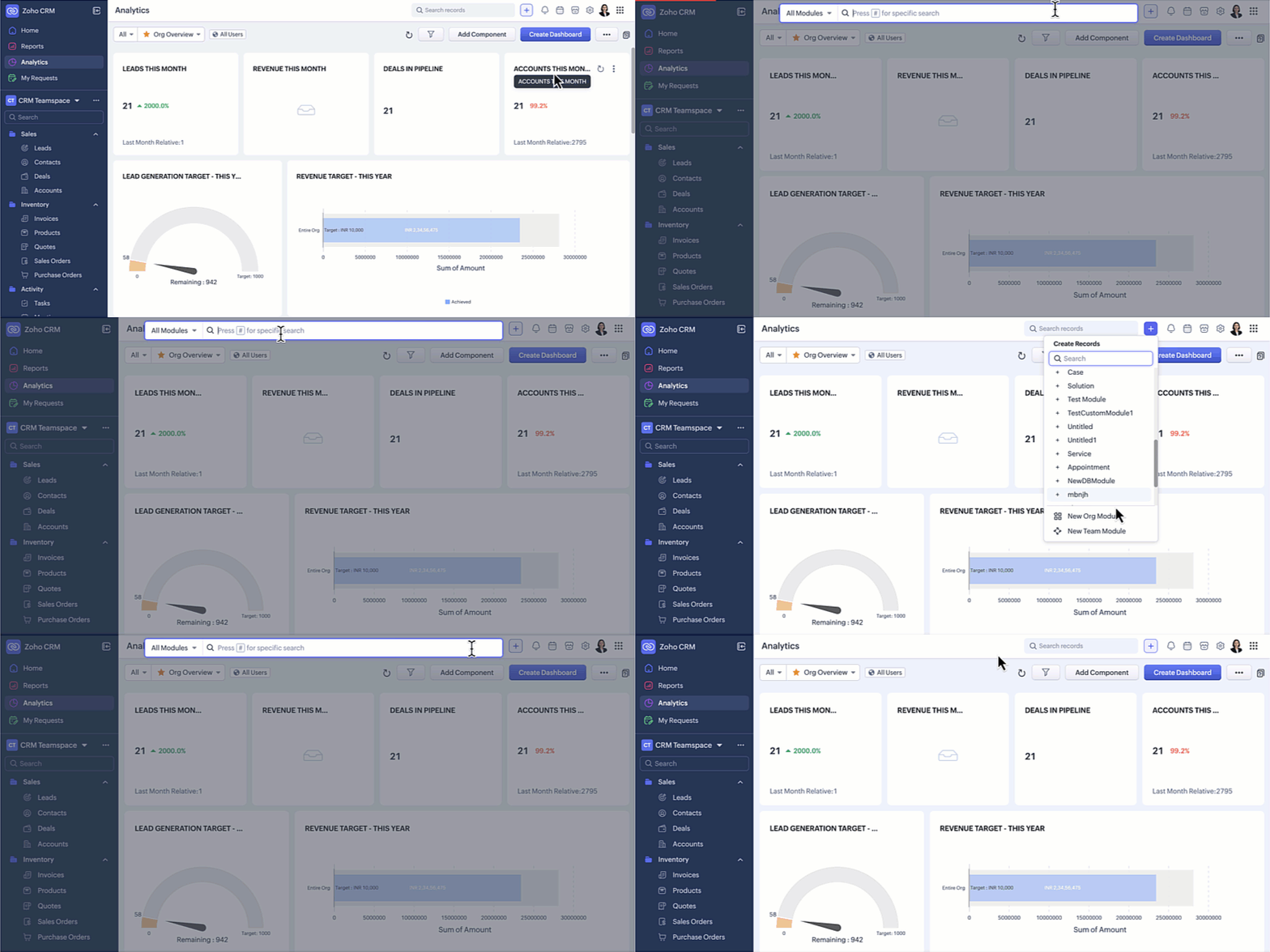
Setup moved to the top-right along with a Setup Homepage
Currently, the setup menu in the Nextgen UI is at the bottom and opens directly to the list of features available for users not giving users a bird's eye view of all the features CRM offers.
Now, Setup menu is moved to the top-right corner of your CRM account opening to a Setup homepage. All settings on the setup homepage are neatly organized into easy-to-understand categories, as shown in the GIF below. With everything brought together in one central view, you can navigate effortlessly, find the tools you need at a glance, and configure them with fewer steps.
Access Reports and Dashboards in a single click
Currently, Reports and Analytics modules will list the various reports and dashboards created on the secondary sidebar. Accessing other modules from reports and dashboards requires multiple clicks as shown in the GIF below.
In this enhancement, we moved this list into a drop-down menu from which you can choose the report or dashboard required. Earlier, navigating to other modules required multiple clicks, with this enhancement you need only a single click to move between modules.
You can also manage folders and dashboards created, use Zia and Zoho Analytics from the same drop-down menu option. Look at the GIF below to know where the list of reports and dashboards will now be located.
Hide / Show Sidebar Menu
We have retained the hide and show menu option to give you the option to view data in a larger screen space as shown in the video below.
Relocation of the Teamspace switcher tab
Currently, the teamspace switcher is placed at the bottom as shown in the screenshot below.
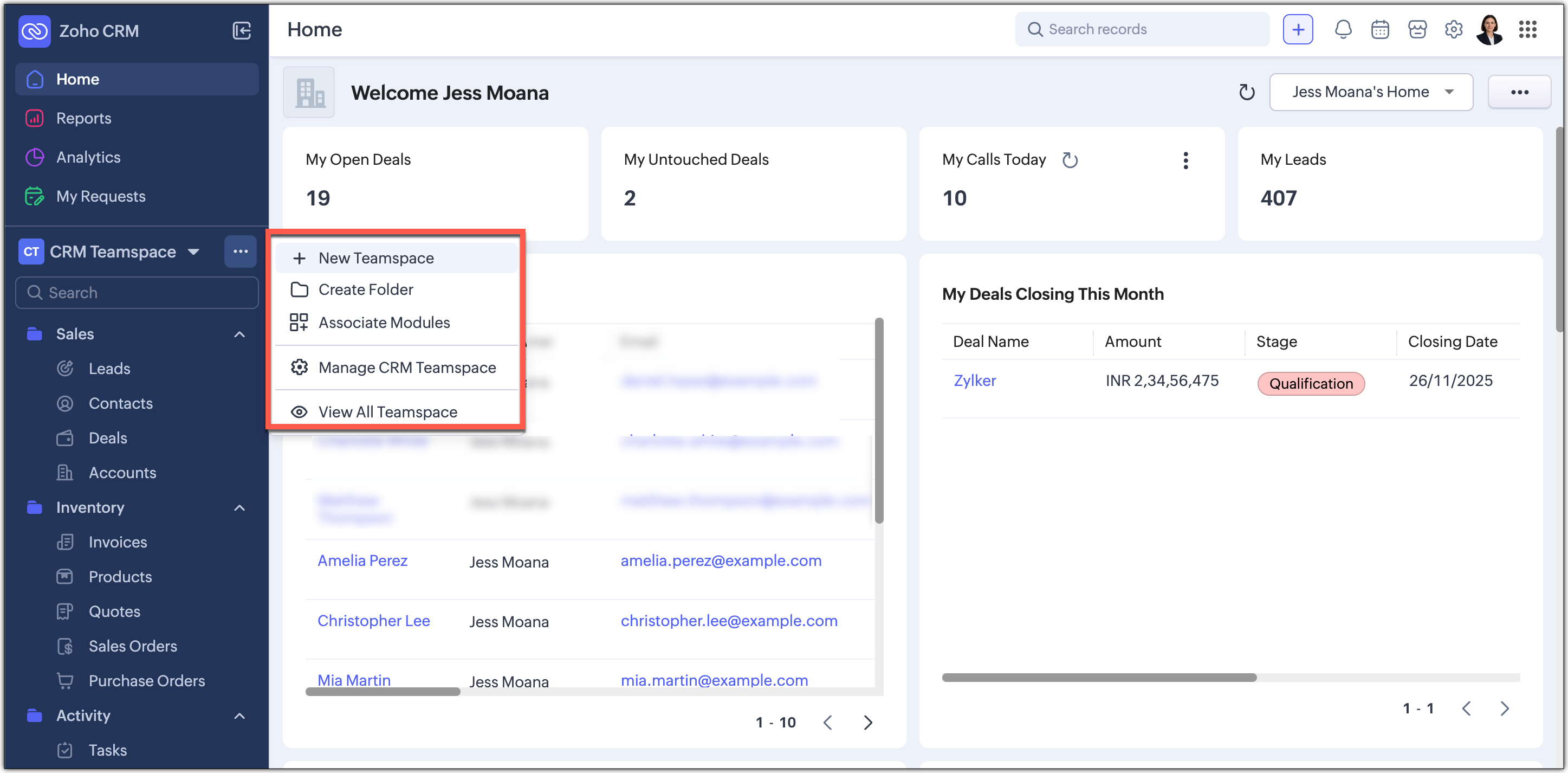
Now, we’ve relocated the teamspace switcher for easier access. We have added a More(...) option from where you can access the below options:
- It’s now centrally positioned, making it quicker to navigate between teamspaces.
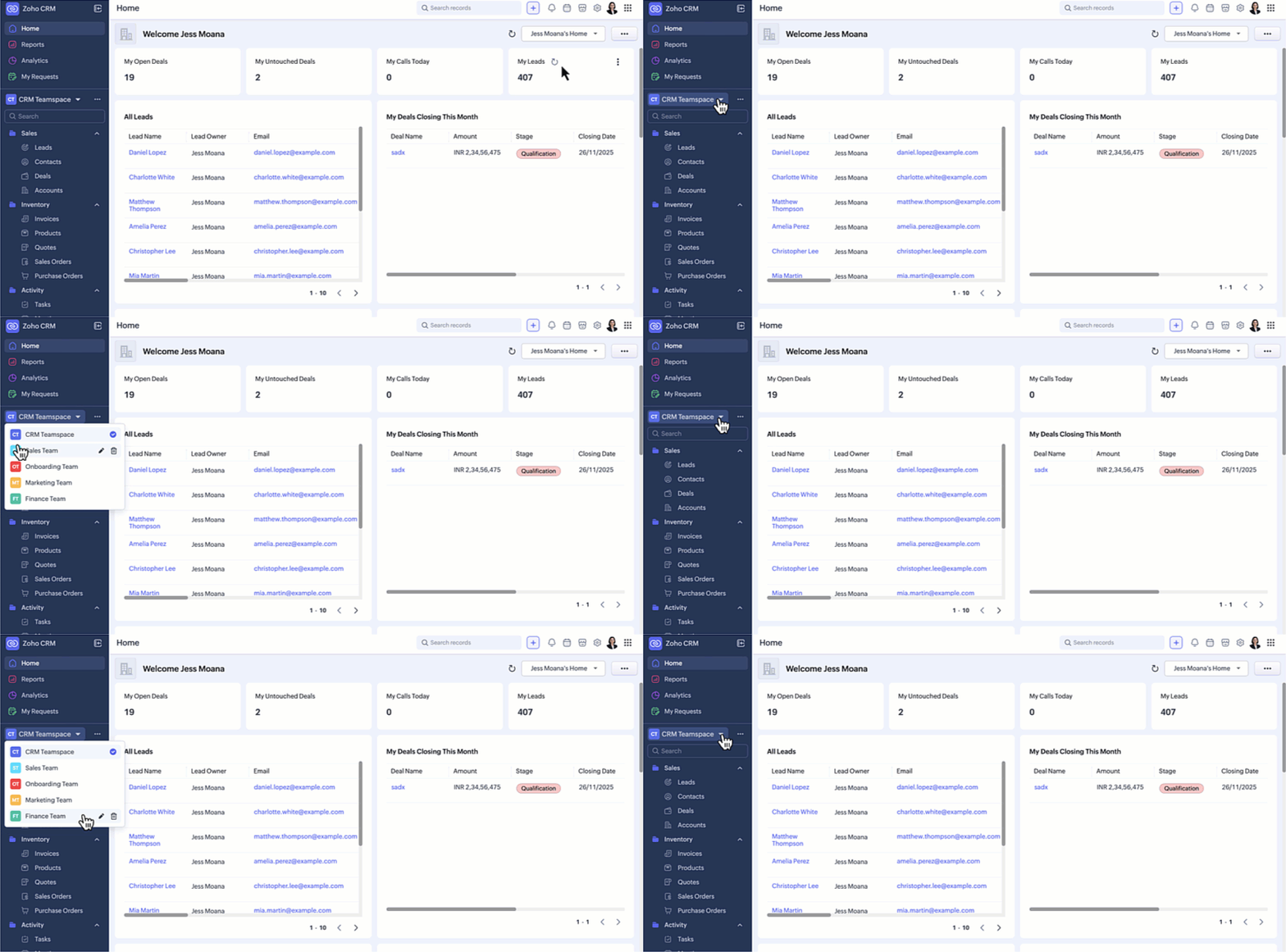
Create new teamspaces, create folders, associate modules, manage and view teamspaces can now be done through the More Option next to the switcher tab.
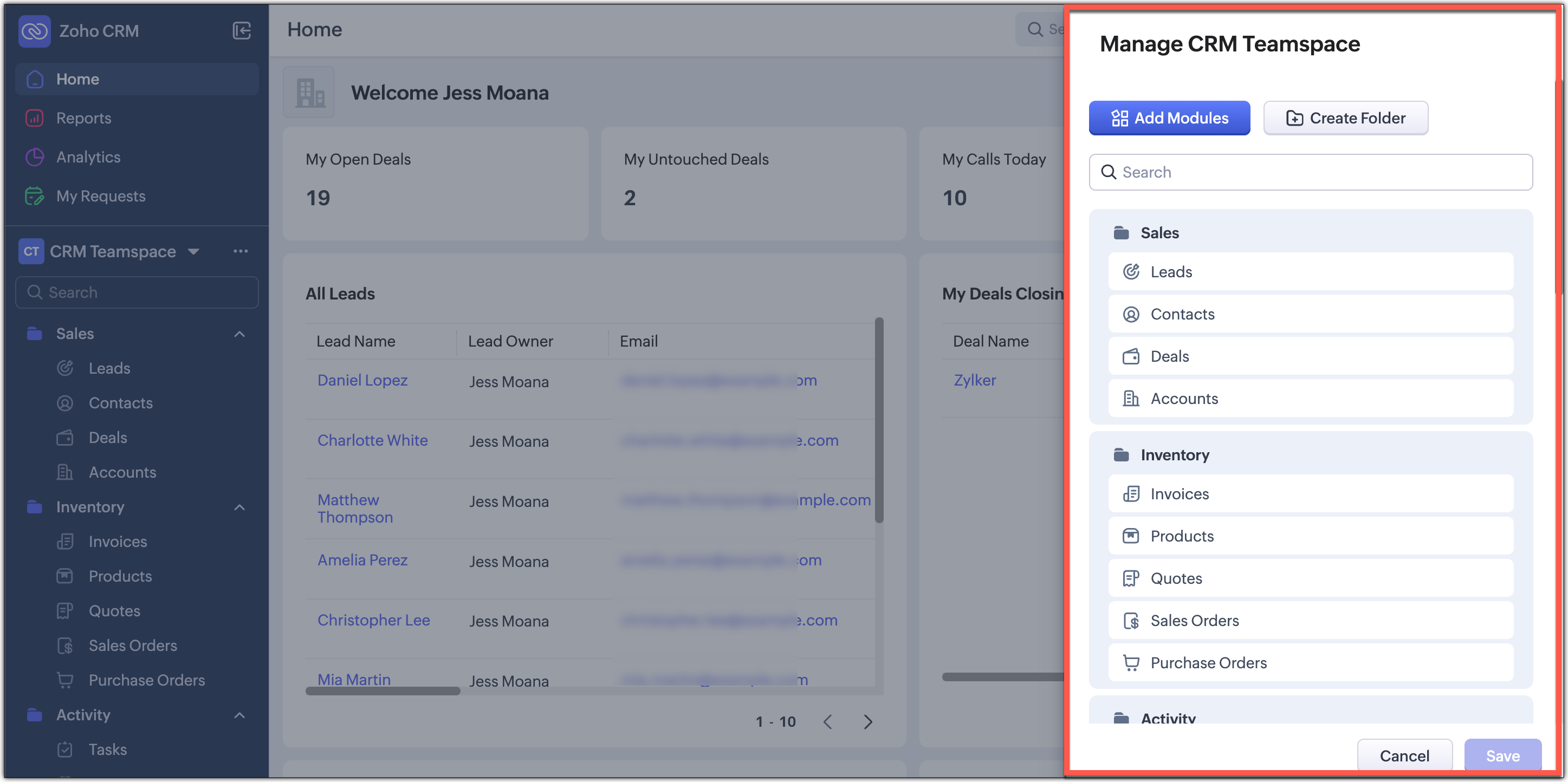
- Managing CRM teamspaces will now open out into a pop-up at the far-right of your screen.
Filter option and Record Views brought together
Currently, the filter option is available separately on top next to the custom view option. Similarly, record view for the module is also placed on top next to Create Record button and opens up as a drop-down for you to choose from.
In this enhancement, we’ve grouped the filter, sort, and record view options located on the action bar at the top of the list view just below the Module name. This creates a more consistent experience and makes these customization tools easier and quicker for you to access.
Custom Views as Tabs
You can now display your custom views as separate tabs, which makes them easy to spot and quick to open. This helps you keep your most used views right in front of you without extra clicks. It gives you a cleaner and more organized screen that matches the updated UI.
What does this mean for existing users?
We'll begin rolling out this upgraded version to existing accounts through a banner shown to users of the current Nextgen UI and the old UI. From the banner, users can either switch to this upgraded UI right away or choose to do it later at their convenience.
Timeline for the switch
For Nextgen UI users : The banner will be shown to switch to the upgraded version.You can either switch immediately or opt to choose at a later time. When you opt to switch later, you be forced to switch to the upgraded version after a week and the current Nextgen UI will no longer be available.
For old UI users : The banner will be shown allowing you to try the upgraded version. After this, clicking the Try CRM for Everyone button will take you to the upgraded version only, as the current Nextgen UI will no longer be available.
Availability
Currently this improved version is supported only in standalone CRM accounts. It will be supported for CRMPlus or Zoho One editions soon.
Release Plan
- For existing customers : We have started rolling out the upgraded Nextgen UI in batches for standalone accounts. Support for CRMPlus and Zoho One accounts will follow soon.
- For new signups : All new signups from today will get the upgraded Nextgen UI by default. This rollout is happening gradually across data centers.
Note : After switching to the upgraded Nextgen UI, users can still return to the Old UI if needed. However, they will not be able to switch back to the current Nextgen UI.
We're positive that this upgraded version of the Nextgen UI would definitely make your workday easier and more productive.
Your feedback continues to shape our product, so if you have any queries or thoughts, please do comment below and we will get back to you at the earliest.
Thanks & Regards,
Serena Woolridge
Recent Topics
merhaba
merhaba sosyal medya paketimiz mevcut ama yorumları göremiyoruz ve o yüzden cevap veremiyoruz destek rica ediyoruz.
Teaminbox not working
We couldn't send or receive any mail within the team inbox. Displaying error 'Unable to process this request.'
Related lists New option in missing
hi I have created quite a few modules and added as related lists to my main module. Some have new, some dont I can not see why?
Cliq and ToDo integrations?
I'm a bit surprised not to find any way to open a Cliq chat for the current thread, or to create a Zoho Mail ToDo from a thread. Are these on the roadmap?
Reply-to names are mangled
Hello, I'm seeing an odd behavior in replies. Steps to reproduce: 1. Click reply to an email from "John Doe <doe.john@example.com> in TeamInbox Expected outcome: TO field pre-filled with "John Doe <doe.john@example.com>" Actual outcome: TO field pre-filled
I CANT UPGRADE MY FREE ACCOUNT
I TRY TO UPGRADE MY FREE ACCOUNT AND I COULD NOT UPGRADE IT CAN SOMEBODY TELL ME WHY? AND I HAVE THE MONEY SO.
Level up your ASO game with tags & categories in store reviews
Introducing tags and categories in Apptics' store reviews Dear Apptics community, If your app is listed on the Play Store or App Store, you already know how important store reviews and ratings are. They’re one of the most direct signals of user sentiment
Including attachments with estimates
How can attachments be included when an estimate is sent/emailed and when downloaded as a .pdf? Generally speaking, attachments should be included as part of an estimate package. Ultimately, this is also true for work orders and invoices.
Adding VENDOR SKU to PURCHASE ORDERS
how can we add the Vendor SKU when issuing a Purchase Order , so the PO shows the Supplier SKU and our own Internal SKU , which is what we want to receive into the system .
Possible to freely prompt/query CRM data using Zia?
Is it possible to prompt Zia to query on any information stored in the CRM, especially on the data stored in custom text fields? My use case is the people in my organisation have entered lots of text in custom text fields to capture information from an
Restrict employees to take only one day holiday from a multi-day festival holiday
Hi everyone, I have a requirement related to Optional/Festival Holidays in Zoho People. For example, in the month of May there are three optional holiday dates: May 11, May 12, and May 13. Employees can choose one of these days as their optional holiday.
Cannot modify colours in invoice email template
I have tried switching browsers... but I cannot change the (pretty horrible) default colours in the preset email when sending an invoice... the blue banner, red outstanding total and the bright green button... I can change other things but not the colours?
Cannot find zpuid for Zoho Projects user
I'm using the Zoho Projects v3 API to create a task. The task is created successfully, but in order to assign the task owner, the "Create a Task" API also requires the zpuid of the task owner. Unfortunately I cannot find any user-related API calls that
Print a document from Zoho Writer via Zoho Creator
If i use the code below i can get writer to create a new document or email it to me but i want to be able to print it directly from the browser and not have to send it via email and then print. Below is the code im using. Attached options form zoho writer
Allow styling for specific Subform fields in Zoho Creator
Sometimes in forms we need to visually highlight a specific field inside a Subform (for example Sanctioned Amount, Approved Value, Critical Fields, etc.) so that users immediately notice it while entering data. Currently there is no direct UI option to
Career site URL - Suggestion to modify URL of non-english job posting
Hi, I would like to suggest making a few modification to career sites that are not in english. Currently, the URL are a mix of different languages and are very long. It makes for very unprofessional looking URLs... Here is an example of one of our URL
3/18 オンライン勉強会のお知らせ Zoho ワークアウト (無料)
ユーザーの皆さま、こんにちは。コミュニティチームの中野です。 3月開催のZoho ワークアウトの開催が決定しましたのでご案内します。 今回はZoomにて、オンライン開催します。 ▶︎参加登録はこちら(無料) https://us02web.zoom.us/meeting/register/BoNTN7zYR8OvOPGShqBY0A ━━━━━━━━━━━━━━━━━━━━━━━━ Zoho ワークアウトとは? Zoho ユーザー同士で交流しながら、サービスに関する疑問や不明点の解消を目指すイベントです。
New 2026 Application Themes
Love the new themes - shame you can't get a little more granular with the colours, ie 3 different colours so one for the dropdown menu background. Also, I did have our logo above the application name but it appears you can't change logo placement position
Placeholder format in Number field does not reflect Max Digits configuration
When the Max Digits (Maximum digits of number) property is set to a smaller value (for example, 2 digits), the placeholder in the input field still displays a 7-digit format (#######). The same behavior can also be observed in Decimal and Currency field
How does SKU work when selling products in parts in Zoho Inventory
Hello everyone, Zoho Inventory does not understand the physical cutting of the piece.. It only tracks quantities of the unit (like feet ). So when you sell part of an item, the system simply reduces quantity for that SKU. Assume that i have a 50 ft long
CRM Cadences - working timesThe Friday afternoon? The next Monday morning? Not at all?
I think I’m writing saying that cadence emails are only sent during the organisations set working hours in CRM. So if a particular email is set to send for example in three days and that lands on a Sunday (when working hours are not operational) when
CRM Cadences - working times
I think I’m right in saying that cadence emails are only sent during the organisations set working hours in CRM. So if a particular email is set to send for example in three days and that lands on a Sunday (when working hours are not operational) when
Push Notification for New Bookings in Zoho Bookings App
when a someone schedules an appointment through the booking page, is there any option to receive a push notification in the mobile app?
Intergrating multi location Square account with Zoho Books
Hi, I have one Square account but has multiple locations. I would like to integrate that account and show aggregated sales in zoho books. How can I do that? thanks.
Add the same FROM email to multiple department
Hi, We have several agents who work with multiple departments and we'd like to be able to select their names on the FROM field (sender), but apparently it's not possible to add a FROM address to multiple departments. Is there any way around this? Thanks.
Zoho Desk View Open Tickets and Open Shared Tickets
Hi, I would like to create a custom view so that an agent can view all the open tickets he has access to, including the shared tickets created by a different department. Currently my team has to swich between two views (Open Tickets and Shared Open Tickets).
Clone Banking Transaction
Why is there no option to CLONE a Transaction in the Banking module?? I often clone Expenses (for similar expense transactions each month) so I would also like to clone Income transactions. But there is no option in Banking to clone an existing Income
Zoho Expense - Bi-Weekly Report Automation
Hi Zoho Expense Team, My feature request is to please include an option to automate creation of reports bi-weekly (every 2 weeks)
Application Architecture in Zoho Creator: Why You Should Think About It from the Start
Many companies begin using Zoho Creator by building simple forms to automate internal processes. This is natural — the platform is extremely accessible and allows applications to be built very quickly. The challenge begins to appear when the application
Arquitetura de Aplicações no Zoho Creator: Por que pensar nisso desde o início
Muitas empresas começam a utilizar o Zoho Creator criando formulários simples para automatizar processos internos. Isso é natural — a plataforma é extremamente acessível e permite construir aplicações rapidamente. O problema começa a aparecer quando a
Dark Mode - Font Colors Don't Work
When editing a document in Dark Mode and selecting font colors, they don't show up on screen. Viewing/editing the same document in Light Mode shows them just fine.
How to Customize & Reorder Spaces in Zoho One 25 (Spaces UI) — Admin Tips Not in the Docs
Hey Zoho Community, After digging around in the new Spaces UI, I found a couple of admin features that aren't well documented yet but are really useful. Sharing here in case others are looking for the same things. 🔁 How to Change the Default Space Users
System Components menu not available for Tablet to select language
I have attached a screenshot of my desktop, mobile, and tablet menu builder options. I am using 2 languages in my application. Language Selection is an option under the System Components part of the menu, but only for my desktop and phone(mobile). My
Approvals in Zoho Creator
Hi, This is Surya, in one of my creator application I have a form called job posting, and I created an approval process for that form. When a user submits that form the record directly adding to that form's report, even it is in the review for approval.
How Zoho Desk contributes to the art of savings
Remember the first time your grandmother gave you cash for a birthday or New Year's gift, Christmas gift, or any special day? You probably tucked that money safely into a piggy bank, waiting for the day you could buy something precious or something you
Estimate PDF Templates - logo too large
Hello, I cloned a standard estimate template, but my logo is showing up much larger than intended. This doesn’t happen with the standard invoice template, where the logo displays correctly. How can I adjust the logo size in the estimate template? Thank
Select CRM Custom Module in Zoho Creator
I have a custom module added in Zoho CRM that I would like to link in Zoho creator. When I add the Zoho CRM field it does not show the new module. Is this possible? Do i need to change something in CRM to make it accesible in Creator?
Invoice emails not sending but reminders are
I am a new user. I have been creating some dummy invoices before I go live and have struck a block. Emails for the invoice are not being recieved by the recipient, however, when I send a reminder for the same invoice the email is sent. NOTE: I have checked
Deleted account recovery
I ended up accidentally deleting our Zoho invoice account while trying to work something out. Emailed support for recovery and restoration of the deleted account, if possible, but they responded by saying they can't find an account associated with that
Devis et factures multipage coupées
Bonjour, je suis sur Zoho invoice et je rencontre un problème sur mes devis et factures lorsqu'ils dépassent 1 page. je me retrouve souvent avec des lignes coupées ou le sous total page 1 et le total page 2. j'aimerai savoir s'il existe une possibilité
Next Page