Automation#23: Automate Guided Conversations in Zoho Desk with Business Hours

Hello Everyone,
This week's edition introduces a custom function designed to automate Guided Conversations in Zoho Desk, based on your business hours. With this feature, you can align the bot's behavior with your business schedule, ensuring a smooth and professional customer experience.
This week's edition introduces a custom function designed to automate Guided Conversations in Zoho Desk, based on your business hours. With this feature, you can align the bot's behavior with your business schedule, ensuring a smooth and professional customer experience.
Self-service platforms are now a cornerstone of effective customer service, improving productivity for both customers and support agents. With the evolving nature of customer support, self-
service has become indispensable. It saves time and provides quick access to solutions, empowering customers to address their concerns efficiently.
Zoho Desk's Guided Conversations serves as a robust self-service tool, offering Tier-1 solutions to customers through an intuitive interface. For more complex or escalated queries, the bot seamlessly connects customers to a live agent, ensuring both self-service and human assistance for effective issue resolution.
However, businesses often have non-working hours, such as weekends or holidays, when agents are unavailable. In such cases, configuring your Guided Conversations based on your business hours is essential. During non-working hours, the bot can:
- Notify customers that your business is currently closed, along with your operating hours.
- Provide an option for customers to submit a ticket, ensuring their query is addressed promptly during working hours.Configure your Guided Conversations today and streamline your customer support process!
How to incorporate this custom function within your GC flow?
1. Go to Setup (S) >> Self-Service >> Guided Conversation.
2. Choose the Department and click on Create Flow.
(If you would like to add this to your existing flow, click on the ellipsis icon under Published Flows and click on the Edit button.)
3. Select the channels, give a Name and Description, and click Next.
4. Click on the + icon, add the Webhook block, under Perform Actions.
5. Enter the Block name as Business Hours, Choose Get under Method.
 Note: In the Business Hours URL, replace .com with .in/.eu/.ca/.sa based on your DC
How to fetch the Business Hour Id?
6.1 To fetch the Business Id, Go to Setup (S) >> Organization >> Business Hours.6.2 Click on the Business Hours configured within your Zoho Desk Account. Go to the URL of the specific Business Hours, and you can fetch the business Id from the URL.
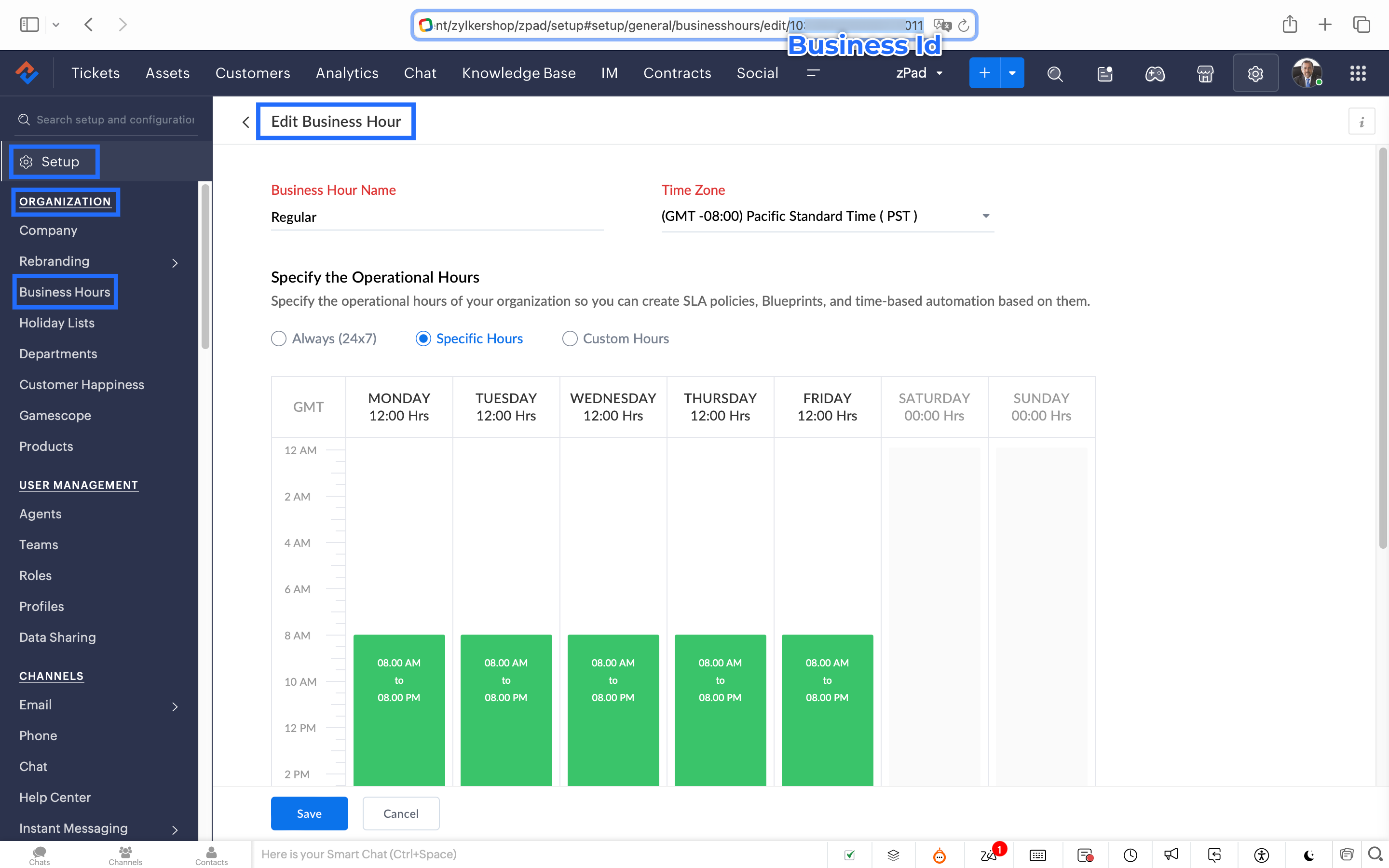
7. After entering the URL, do not make changes to the Query Params and Headers.
8. Under Connections, click on Add.
To Create a connection
8.1 Click Create Connection.
8.2 Select Zoho Desk under Default Services.
8.3 Give a connection name (let's say configureBusiness Hours).
8.4 Disable the toggle for User Credentials of Login User.
8.5 Under Scope, choose the below scope values:
Desk.settings.READ
8.6 Click Create and Connect.
8.7 Click Connect and click Accept.
Connection is created successfully.

9. After creating the connection, click on Refresh and then click on the drop down arrow and select the connection (configureBusiness Hours) created.
10. Click on the gear icon in the Formatter option and paste the below code in the Deluge window:
- dayMAp = {"SUNDAY","MONDAY","TUESDAY","WEDNESDAY","THURSDAY","FRIDAY","SATURDAY"};
- businessTimes = response.get("businessTimes");
- timez = response.get("timeZone").get("id");
- response = Collection();
- createdTime = zoho.currenttime.toString("yyyy-MM-dd HH:mm:ss",timez).toDateTime();
- createdDay = createdTime.getDay();
- //get this from above created time
- createdHour = createdTime.getHour();
- //get this from above created time
- createdMinute = createdTime.getMinutes();
- //get this from above created time
- createdWeekDay = createdTime.getDayOfWeek();
- //get this from above created time
- createdWeekDay = dayMAp.get(createdWeekDay - 1);
- for each businessTime in businessTimes
- {
if(businessTime.get("day") == createdWeekDay)
{
businessTimeStartHour = businessTime.get("startTime").getPrefix(":").toLong();
businessTimeEndHour = businessTime.get("endTime").getPrefix(":").toLong();
businessTimeStartMinute = businessTime.get("startTime").getSuffix(":").toLong();
businessTimeEndMinute = businessTime.get("endTime").getSuffix(":").toLong();
if((createdHour > businessTimeStartHour || createdHour == businessTimeStartHour && createdMinute >= businessTimeStartMinute) && (createdHour < businessTimeEndHour || createdHour == businessTimeEndHour && createdMinute <= businessTimeEndMinute))
{
response.insert({"status":"true"});
}
else
{
response.insert({"status":"false"});
}
}- }
- return response.get(0).get("status");
11. Click Save after pasting the code.
12. Click on the gear icon in the Response icon.
12.1 Click on the gear icon on the Status Code.12.2 Give Status Code as 200, Flow Variables as status, Response Value as /.12.3 Let the Type be single element and the Data Type be String. Click Save. Click Save for the Response List with the updated status.
13. Disable the toggle for the Multi Path.
14. Choose a Request timeout if required. This sets a response waiting time from the server.
15. Set the Error message if required to display in case waiting time exceeds the response time.
16. Click Save.
This is the configuration for setting the business hours through a custom function.
17. After the Webhook, click on the + icon and add the Fork block under the Perform Actions.

18. Give the Block Name as Check, Enter Path list : name it as Check.
Under Criteria 1, click on the drop-down arrow, and enter choose Status under Block variables, from the drop-down menu. Choose operation: contains and give the value : True.
19. Do not add an else path.
20. Click Save.
In the Fork block, under Check, you can add the Transfer to agent block from the Zoho Desk Blocks. Under Else, you can add a text icon/ info card stating you are out of business hours.
Note: This custom function does not include the Holiday Lists configured within Zoho Desk.
You can seamlessly integrate this Guided Conversation flow into your self-service platform to ensure you never miss a customer, even during non-working hours. Keep your customer support running smoothly!
See you next week!
Regards,
Lydia | Zoho Desk
Topic Participants
Lydia | Zoho Desk
Dikka
Shivani | Zoho Desk
Sticky Posts
Register for Zoho Desk Beta Community
With the start of the year, we have decided to take a small step in making the life of our customers a little easier. We now have easy access to all our upcoming features and a faster way to request for beta access. We open betas for some of our featuresShare your Zoho Desk story with us!
Tell us how you use Zoho Desk for your business and inspire others with your story. Be it a simple workflow rule that helps you navigate complex processes or a macro that saves your team a lot of time; share it here and help the community learn and grow with shared knowledge.Tip #1: Learn to pick the right channels
Mail, live chat, telephony, social media, web forms—there are so many support channels out there. Trying to pick the right channels to offer your customers can get pretty confusing. Emails are most useful when the customer wants to put things on record. However, escalated or complicated issues should not be resolved over email because it's slow and impersonal. When you need immediate responses, live chat is more suitable. It's also quick and convenient, so it's the go-to channel for small issues.Welcome to Zoho Desk Community - Say hello here!
Hello everyone! Though we have been here for a while, it’s time to formally establish the Zoho Desk Community; we’re really happy to have you all here! This can be the place where you take a moment to introduce yourself to the rest of the community. We’d love to hear all about you, what you do, what company or industry you work for, how you use Zoho Desk and anything else that you will like to share! Here’s a little about me. I am Chinmayee. I have been associated with Zoho since 2014. I joined hereWebinar 1: Blueprint for Customer Service
With the launch of a host of new features in Zoho Desk, we thought it’ll be great to have a few webinars to help our customers make the most of them. We’re starting off with our most talked about feature, Blueprint in Zoho Desk. You can register for the Blueprint webinar here: The webinar will be delivered by our in-house product experts. This is a good opportunity to ask questions to our experts and understand how Blueprint can help you automate your service processes. We look forward to seeing
Recent Topics
Show my cost or profit while creating estimate
Hi, While creating estimate it becomes very important to know exact profit or purchased price of the products at one side just for our reference so we can decide whether we can offer better disc or not .Issue on Upload API and href image URL
Here is my Full API Code , URL : URL: https://desk.zoho.com/api/v1/uploads/659563000000193003/content Headers* Authorization: 'Zoho-oauthtoken 1000.ed5ce2836bf5ba9b946f5ec9************88e73ff4883a3e9c58ffeb7870' orgId: 7586***** RESPONSE{ "errorCode":Issue when downloading a Mail Merged Zoho Writer Document as .docx
Hi, We are using within Zoho CRM mailmerge to create documents. This results in a Zoho Writer document. When we try to download as a Microsoft Docx file we get following error: "Word experienced an error trying to open the file. Try these suggestions.【Zoho CRM】ケイデンス機能のアップデート
ユーザーの皆さま、こんにちは。コミュニティチームの中野です。 今回は「Zoho CRM アップデート情報」の中から、ケイデンス機能のアップデートをご紹介します。 ケイデンス機能の2つの強化されたことで、適用と解除のタイミングをより柔軟に管理できるようになり、 よりタイムリーで的確なコミュニケーションが実現できるようになりました。 目次: 1. ケイデンスの再開/最初からのやり直し 2. ケイデンスからのデータ解除タイミングの設定 1. ケイデンスの再開/最初からのやり直し 手動削除、完了、または適用解除条件が満たされた場合など、以前に適用解除されたデータをケイデンスに再適用できるようになりました。Anyone get the OpenAI API to work in Zoho Meeting?
Has anyone been able to get the OpenAI API to work in generating meeting summaries? I have been trying, but I get an error that says "OpenAI key notes request rate exceeded. Please try again later or upgrade your open AI account." I contacted Zoho supportPush Notifications Customization
There is no way to customize the notifications we get. I would like to be able to get notifications based on if they are assigned directly to me, my team, my department, or perhaps tickets that match a specific criteria (a contact or account is a VIPAnnouncing Early Access to the next generation of Zoho Desk UI
Customer service is one of the categories where efficiency and quality of service have to run in parallel, and your team's experience with their helpdesk goes a long way ensuring these aspects are uncompromised. Introducing DOT Design for Zoho Desk -Editing the record in report
I have a use-case as below- User creates a assessment record by filling some fields. User assigns that record to portal user by using Assigned To dropdown (Assigned To is Users field in form with choices as customers). I have set the record owner of formCan we have Bills of Material Module ?
Can we have Bills of Material Module ?Main Ticket Page Customization
We do not love the ticket list page (right after clicking Tickets menu item) would like options to customize it.Agent Collision Missing from Mobile App
Please add Agent Collision capabilities to the mobile app.Zia Sentiment and Functionality on Mobile
Please add Zia sentiment and generative responses to the mobile app. It would be nice to see the ticket sentiment and generate a response back to a user using Zia on my iPhoneView Account Attachments on iOS
Please allow us to view account attachments on the mobile iOS app!How do I run a PnL by Sales Person?
I am trying to run a PnL by sales person but am not seeing the option do so. All I need to know (per salesperson) is revenue, cost of goods, gross profit.View Contracts and Support Plans on Mobile
We would like to be able to see contracts and support plans from the mobile app on iOS!App like Miro
Hi all, is there a way to have a interactive whiteboard like in Miro? We want to visualize our processes and workflows in an easy way.Loan repayment Entry
While receiving loan, i does following steps in My Zoho books. 1. Create "Loan & Advance " Account as Parent Account under Long Term Liabilities. 2. Create another account For Example "Mr. ABC's Loan as Child account under the parent account. Now: InQuotes module send email reverted back into 2022??
Our Zoho CRM PLUS quotes, sales orders, invoice modules is showing us an email composer from 2022. We cannot send emails and its been a real pain. I tried clicking the new version over there but it doesnt seem to do anything. Any help is welcome. thWorkflow Condition - how do check that a date / time value is in the past?
Hello, I'm got a workflow that runs a function when records reach their 'Effective Date / Time', but sometimes records are created after the 'Effective Date / Time' so I have another workflow that checks for records which needs to be processed immediately.Pre filling SignForm field values by URL field alias's in Zoho Sign
Hi, Does anyone know if it's possible to pre fill the field values of the SignForm by using field alias's like you can in Zoho forms? To be more specific, I want to be able to change the SignForm URL to include some information like this: Before : https://sign.zoho.eu/signform?form_link=234b4d535f495623920c288fc8538cb9e6db03bbfd44499b63f3e5c48daf78f44bc47f333e2f5072cc1ee74b7332fe18b25c93fab10cb6243278d49c67eacbf30bbe5b6e1cc8c6b2#/How to Split Payout in Zoho Books (Without Using Journal?)
Hi, I'm trying to properly record payouts in Zoho Books. The issue is that each payout is a combination of sales and expenses (fees). When I try to categorise the payout transaction from the Banking tab, I can only split the transaction using income-typePayment Schedule
Please add the ability to create a payment schedule. The other options, like retainer invoices or two invoices, do not work for the customer. We invoice a client and need to be able to show them everything they owe in one invoice, and when each paymentWhich pricing system do you think would work best for us?
Imagine we’re selling strictly wholesale. We’d rather not publish unit prices; instead, we quote customers case-by-case. To spur larger orders, we’re considering a transparent discount ladder—say: $0 – $999: 0 % $1,000 – $1,999: 5 % $2,000 – $4,999: 10Pushing to Shipstation from Zoho
I know there are four triggers in Flow for integration with Shiptation when something happens in Shipstation. What options do I have, if any, for pushing data TO Shipstation from Zoho?Integration with ShipStation
Any plans to integrate flow with Ship station? My scenario: When a sales order is fully picked order details get pushed to Ship station so shipping label can be created. Ideally then tracking number would be pushed back to order. ThanksCan't Remove Payment Gateway
I am getting the error "Settings cannot be cleared as some of the transactions are still in progress." when trying to remove the PayGate payment gateway which I was unable to get working. I am now using paystack and I want to remove Paygate.Sync specific Zoho Inventory Warehouses to Zoho Commerce
As said in the title, we would want to only sync stock from one warehouse of Zoho Inventory to the Zoho Commerce item stock. We have a 2 warehouses in different countries and the way that Zoho Commerce works (It takes stock from ALL WAREHOUSES EVERYWHEREWeekly Tips : Automatically clean clutter with Junk cleanup interval
If you regularly receive many unwanted or spam emails, your Spam folder can quickly fill up and start taking up valuable storage space in your Zoho Mail account. Instead of manually clearing it every few days, you might find it helpful to enable automaticAny solution for getting portal users list in deluge or in widget
Hi Team, Has anyone able to find the solution to get portal users list in deluge or in zoho creator widgets? Thanks, PayalThe Grid is here!
Hey Zoho Forms Community! 👋 We’re thrilled to announce the launch of a feature that’s been on your wishlist for a while: Grids What is Grids? Grids let you place form fields side by side in multiple columns to create a more concise and organized formGraphQL in new Send Webhooks feature
Hello, is it possible to use GraphQL apis in the new Send Webhooks feature?# 2 Why do we need a billing system when accounting covers billing?
In today's evolving financial tech stack, businesses use a mix of tools to manage their day-to-day operations, from invoicing to full-fledged accounting. While accounting platforms typically come with built-in invoicing features, specialized billing systemsHow to insert an Excel/Zoho Sheet table in a chat?
Hello, is there a way to paste an excel/zoho sheet table to a conversation without loosing table lines. I tried to paste a piece of a table and all the columns and rows were gone. How to easily paste a table without a need of sending a file? KatarzyMass Update Application Status
How to update application statuses of Multiple Applications at once? Is that possible? If not then why please consider adding it It can save hours of manual work Thats the only Option I seeFree webinar: Streamlining customer service paperwork with the Zoho Sign extension for Zoho Desk
Hi there! Wondering how to bridge the gap between digitized customer service and business paperwork? Attend our free webinar to learn how you can do this by connecting Zoho Sign, our digital signature app, with Zoho Desk, our online customer service helpMail Search Not Working
Hello, Mail search is not working at all. I've tried Chrome and Mozilla. I can try and search for an exact term, or even an email that is 1st in my email list. All search does is sit and spin, or it comes up with no results. I've also tried it on my androidCannot Send Email to a Gmail Account
Hello, I have a zoho-hosted email account, alex@chirochannelnetwork.com that has trouble sending to gmail accounts. But not all gmail accounts, only some of them. I've tried to figure this out with clients, and they don't appear to be going into theirUnblock ME
info@pentekykloi.gr Unable to send message;Reason:554 5.1.8 Email Outgoing Blocked. Learn more. I purchase additional storageCannot Print Landscape with Zoho Sheet
I am noticing that when using the Zoho Sheet desktop for Mac, that even when selecting landscape as the print option, once you choose "Print", a second system dialog opens that automatically makes the view portrait again, and does not allow printing inPower of Automation : Enhancing custom date field calculations by excluding Weekends and Holidays
Hello Everyone, A Custom function is a user-written set of code to achieve a specific requirement. Set the required conditions needed as when to trigger using the Workflow rules (be it Tasks / Project) and associate the custom function to it. Requirement:Next Page