Contacts and Accounts views support and Ticket details screen UI enhancement - Zoho Desk Android app update
Hello, everyone!
In the latest version(2.7) of the Zoho Desk Android app update, we have covered the following features:
- Contacts and Account views
- UI enhancement in the Ticket details screen
- IM icon display
Contacts and Accounts view
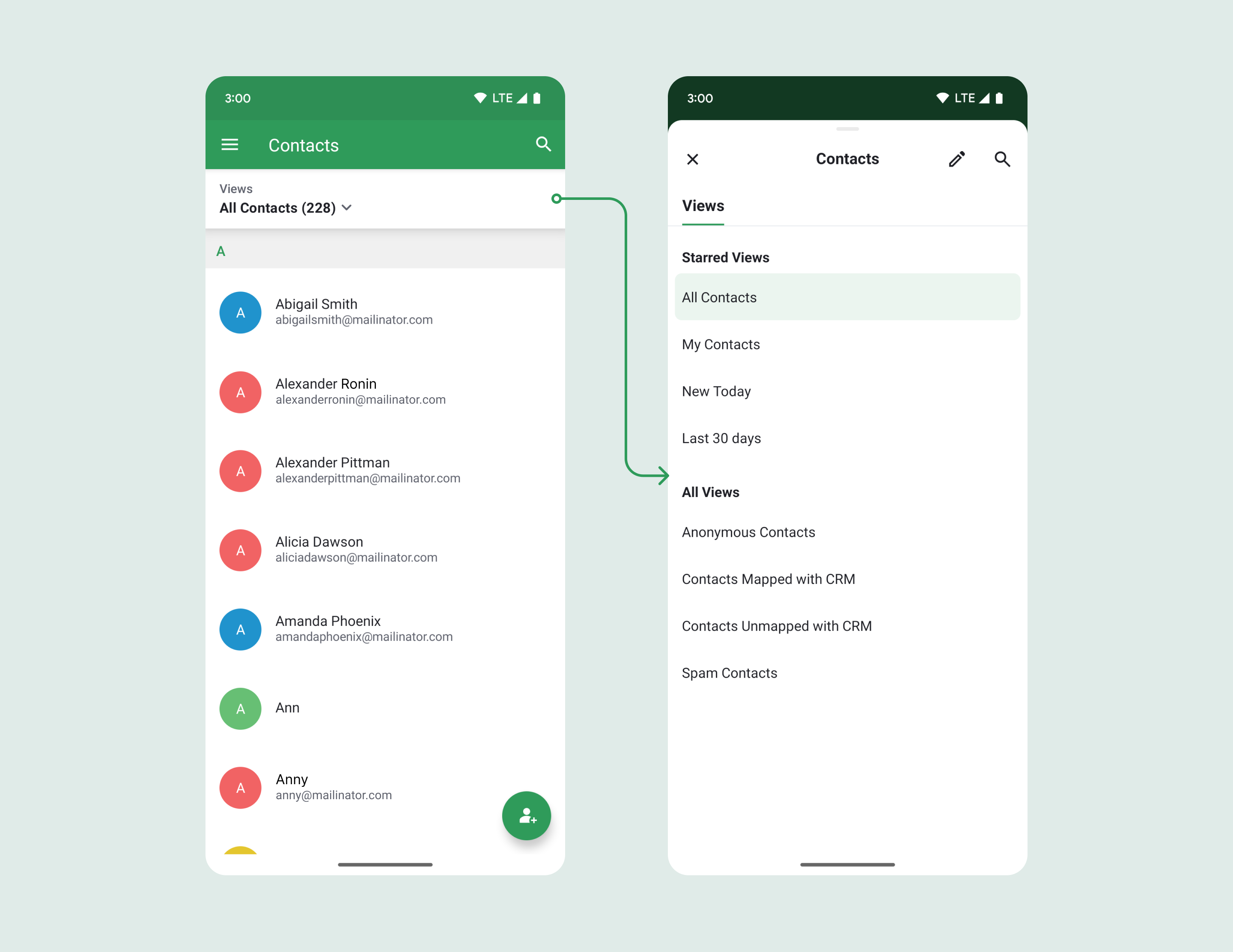
You can now access the contacts and account views on the Contacts and Accounts modules, respectively. You can also to star/ un star views via the edit views screen and see the count of the view. The views can be reordered as well.
UI enhancement in the ticket details screen
In the new Ticket Detail UI, the subtab modules have been updated from icons to tabs that can be swiped, enabling quick switching between modules.
The status and due date now display more detailed information, while the account name now appears alongside the contact name for added clarity.
The Ticket ID placement has been adjusted and now includes a tap-to-copy feature, making it convenient to copy the ticket ID when needed.

IM Channel Icon Display
The IM channel icon is now shown on both the ticket list and ticket detail pages, making it easier to identify the ticket's source channel at a glance.
Please update the app to the latest version directly from the Play Store or using the link given below:
In case you need any assistance or if you have any clarifications, please reach out to us at desk@zohomobile.com or submit feedback(go on to the settings module > select 'Feedback') and we'll get right back to you.
Have a great day!
Until next time,
Sneha