Happy new year, everyone!
We have an exciting addition to our suite of features and would like to introduce you to VoC (Voice of the Customer) for Zoho CRM, powered by Zia.
2023 is definitely the best time to be a customer with rapid innovations and advancements in the field of CX. Brands these days lose customers within minutes if they refuse to pay attention to what they're saying. The right VoC tool can help you stay on top of your CX game!
VoC for Zoho CRM offers insights into your customers' needs and sentiments which can translate into effective problem redressal, better planning and increased revenue.It also provides context from your CRM data and helps you get a clear picture of what your customers feel or expect from the product/service. While the end goal of VoC may look like just running customer satisfaction polls, it's not merely the act of putting out these surveys. Launching and carrying out customer satisfaction polls won't help a business truly understand their customers. The end goal of VoC is much deeper— it is about listening to your customers and valuing their thoughts, and using these insights for your business to thrive.
Use case
For example, an electronics store that sells laptops and mobiles also provides servicing of these products. The customer and product details are stored in CRM. They regularly send out surveys to gather customer feedback on the products and services. Additionally, they have a separate customer support team to help resolve challenges with products. The company notices a drop in their revenue in spite of the offers and discounts they've rolled out. Manually studying customer purchase patterns and collating feedback from multiple communication channels will cost a business valuable time that can be invested to develop the business further. The answer to this problem lies in automating such processes with better visualization of data within a centralized platform. VoC for Zoho CRM aims to digest customer information and make these results available for users in a single place to grasp information quickly and make goal-oriented as well as contextually-rich modifications to business plans and processes.
How to use VoC?
VoC for Zoho CRM can be activated under "Zia", located on the settings page within CRM.
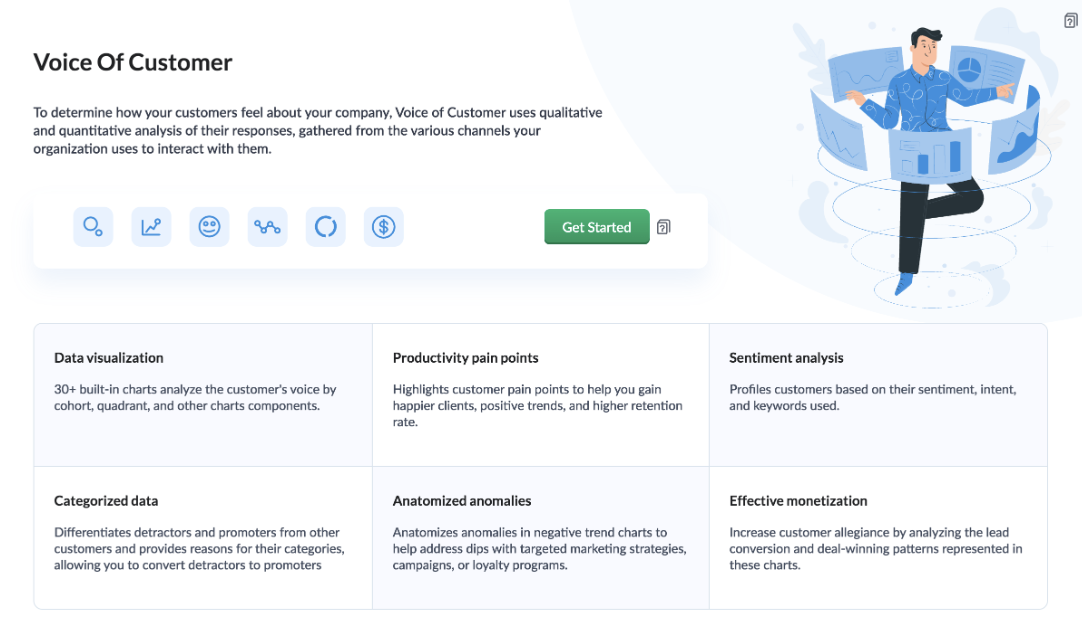
Once you click the 'Get Started' button, the activation page opens. Click 'Activate'.
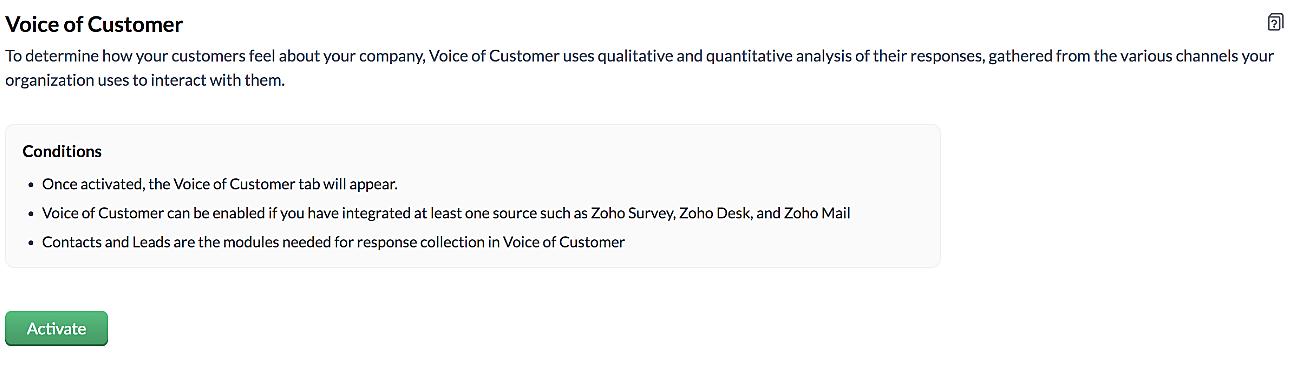
VoC for Zoho CRM is trained to conduct sentiment and intent analysis, keyword extraction, emotion & root cause analysis, customer trend analysis and predictions. It presents several accurate dashboards within your CRM account that showcase customer opinions on your business, competitor activity and sentiment, as well as the customer emotion behind emails, surveys and customer feedback.
Let us take a look at different dashboards that can help the management identify the root cause of inconsistencies in results and chalk out next steps to resolve them quickly.
The Sentiment-based Profile Analysis
The Sentiment Dial Analysis chart provides you with an overall picture of the customer sentiment shared across multiple communication channels such as surveys, emails, and customer ratings.
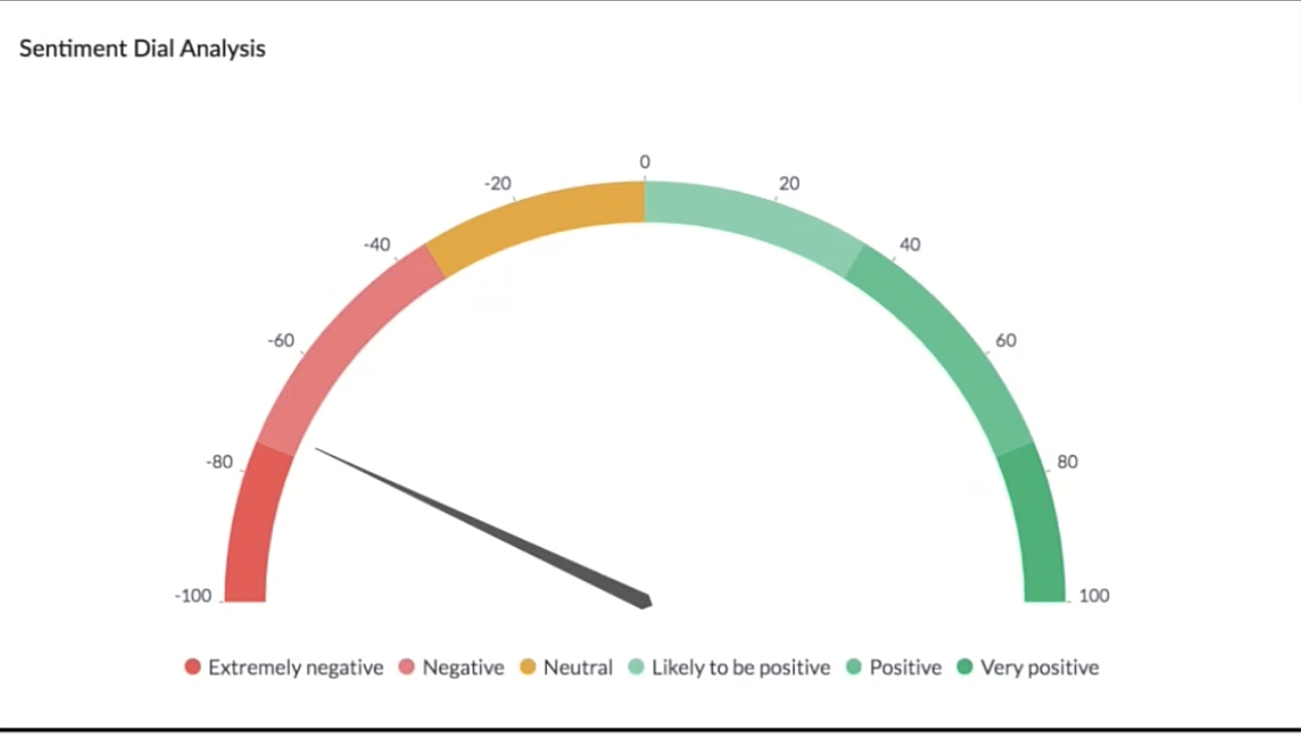
The dial chart shows that the overall sentiment expressed by the customers is on the negative end. This analysis incorporates the feedback from Desk, Survey and CRM emails. With a conservative approach that doesn't incorporate VoC, this requires a separate team to gather the feedback, digest it and incorporate it into business activities.
Even though this dial chart gives you a fair idea of the customers' views, the management needs more clarity on where the problem lies to increase customer satisfaction.
The frequently occurring keywords by sentiment narrow down the customer views expressed.
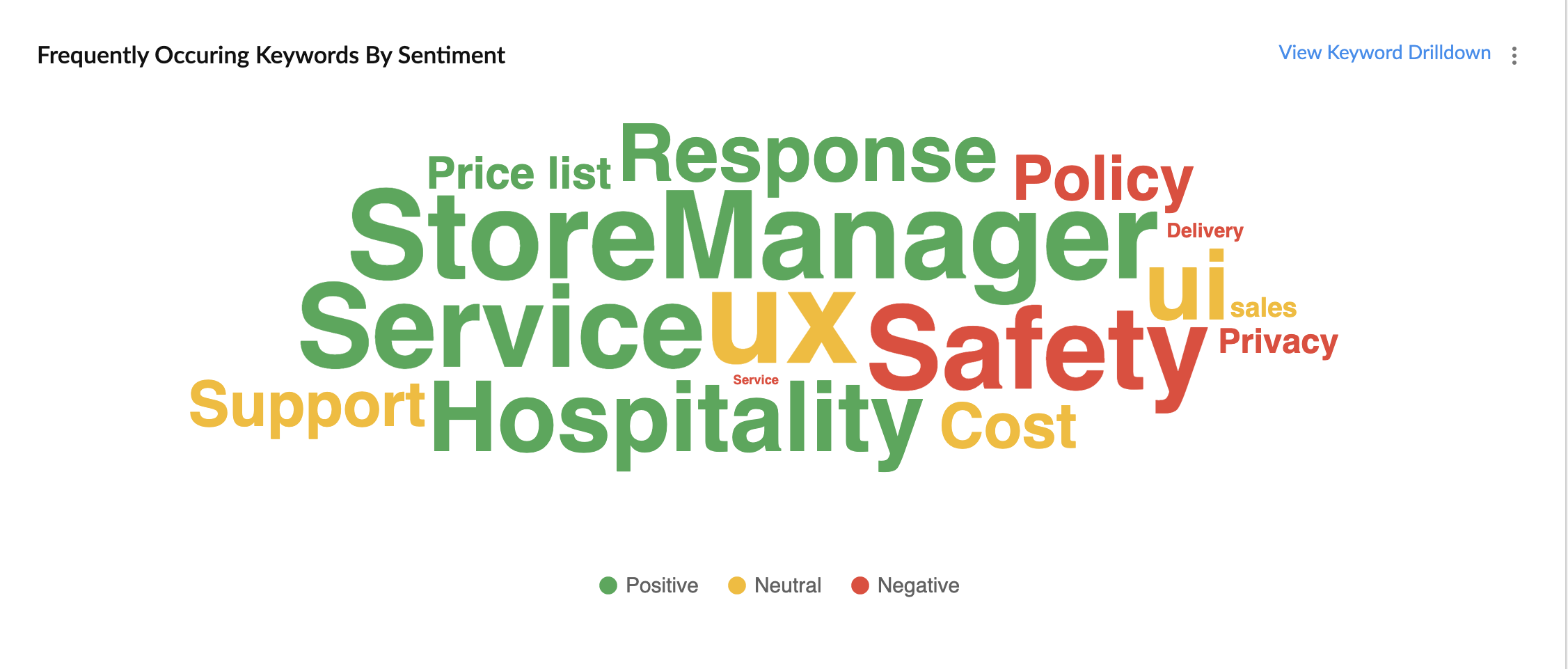
In the image above, the words in green have been used in a positive connotation by the customers. We can infer that customers are happy with the service, hospitality and price list. Whereas, delivery, policy and safety haven't been our strongholds. Therefore, we can now focus on improving our delivery, safety and privacy policies.
A drill down of the number of customers and channels from where their feedback has been gathered can also be viewed a table.
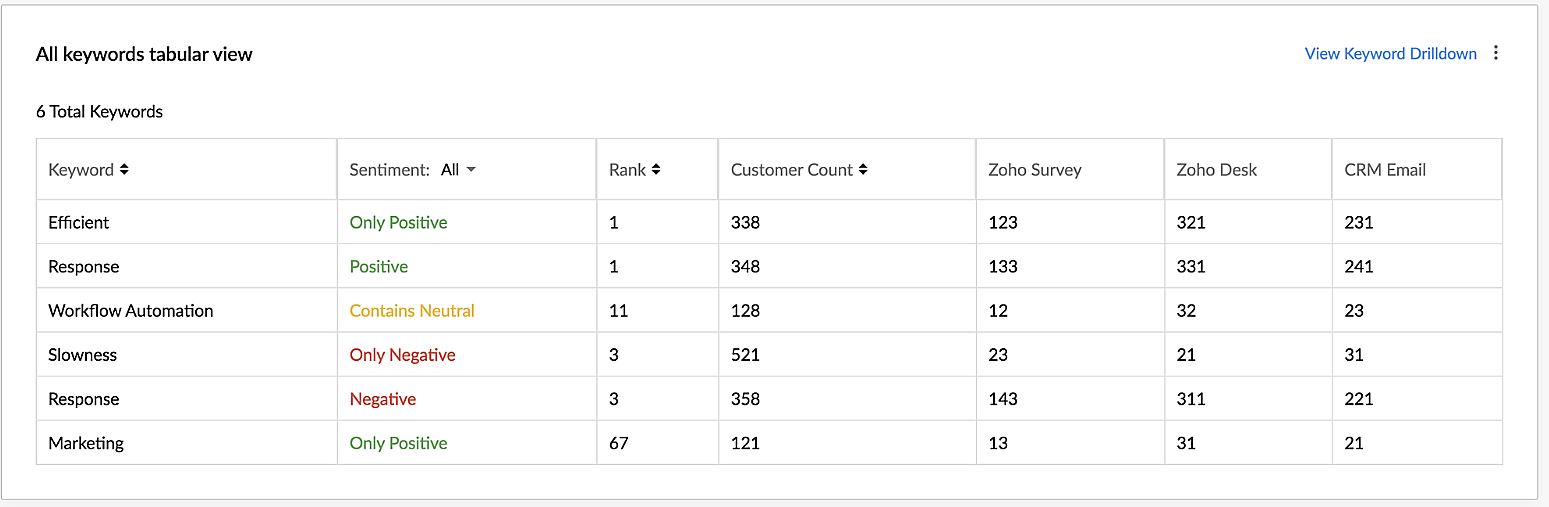
VoC for Zoho CRM helps you derive powerful insights on customer opinions and sentiment by processing data in minutes from several communication channels without burdening your team.
Response-based sentiment analysis
VoC for Zoho CRM captures the underlying emotion and intent behind customer responses and categorizes them by sentiment, intent, medium and revenue based on a particular timeframe.
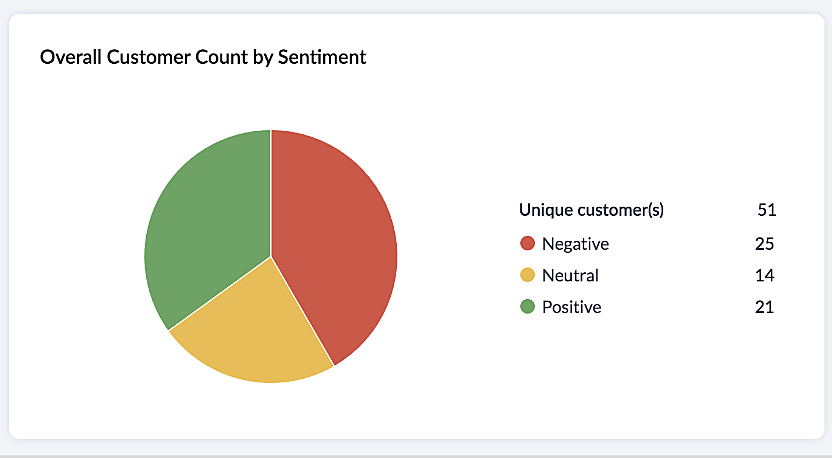
This chart paints an overall picture of the positive, neutral, and negative feedback count based on the responses gathered via surveys and customer rating.
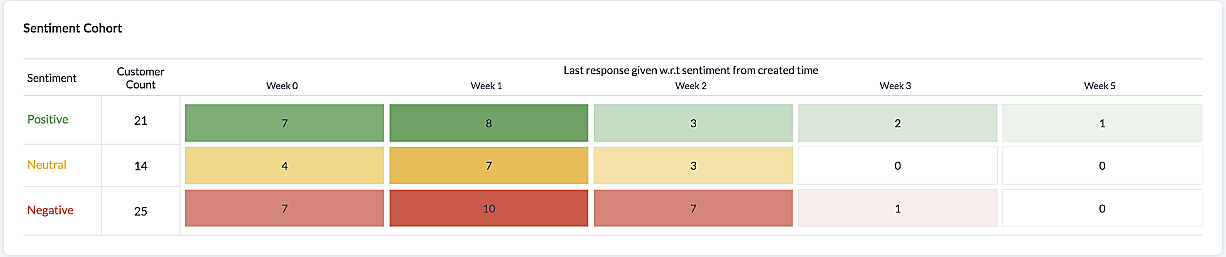
The Sentiment Cohort chart, a variation of the above, showcases the customer feedback with respect to the timeframe.
There are a few more dashboards that VoC offers to extract insights from - Competitor analysis, Cross-sell Analytics and Survey comparison.
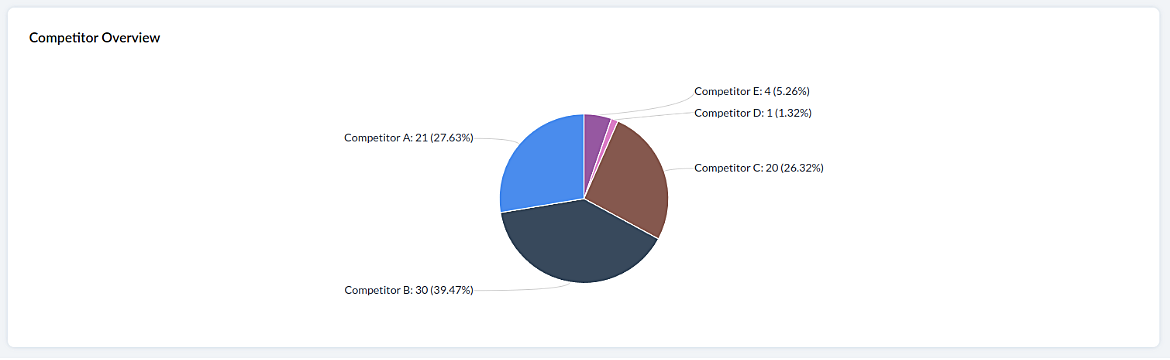
Competitor Analysis
Staying on par with our competitors is an important aspect of customer satisfaction and retention. VoC helps in this regard by offering prominent insights. If the deal closure rate has come down after the mention of the competitor, we can focus on our offerings against our competitors'.
Cross-sell Analytics
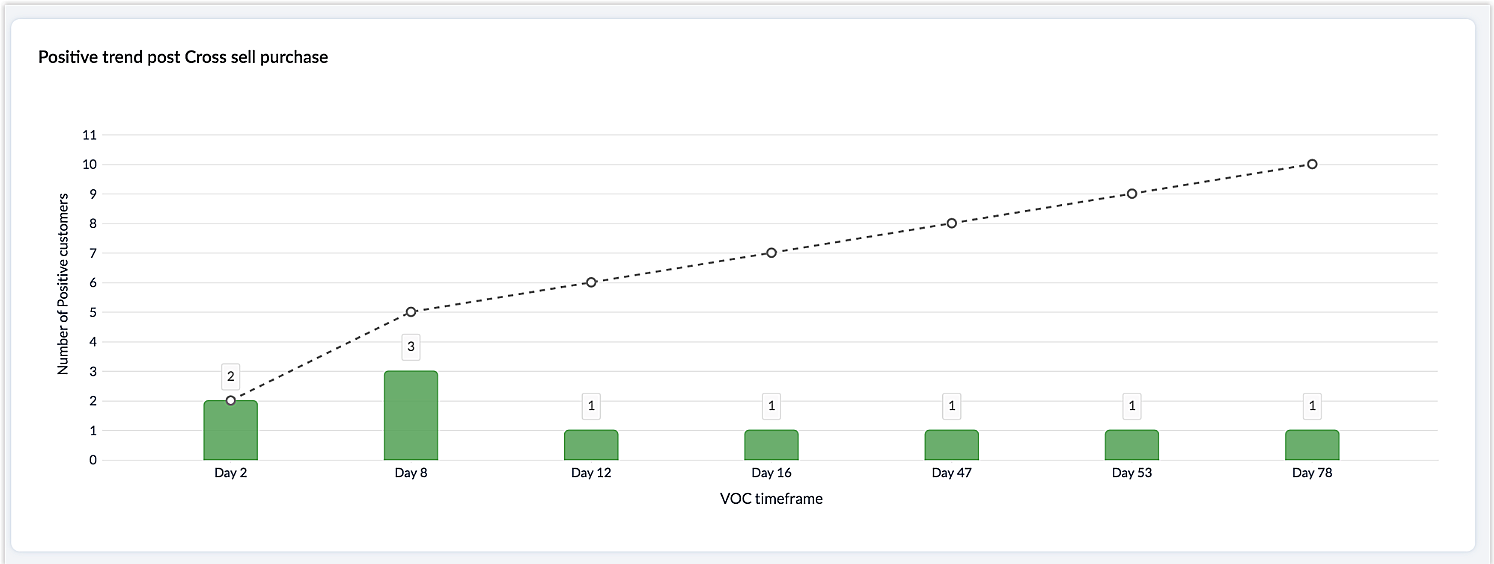
Cross-sell Analytics in VoC is designed to measure the effectiveness of cross-selling efforts. Zia studies the feedback after a cross-sell initiative is made and whether it is positive or negative. Depending on the feedback collected, it predicts the right product/service.
Survey comparison
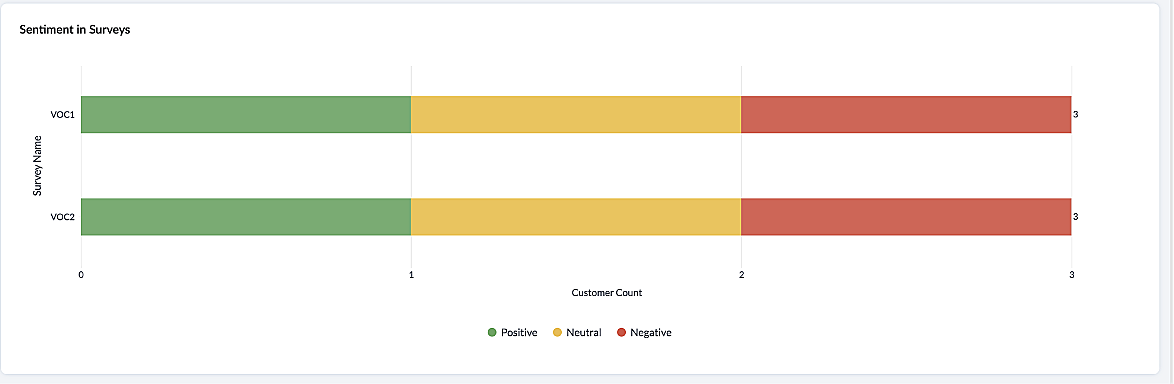
These dashboards come in handy when you want to evaluate your marketing efforts. If the customer feedback for an email offer is positive, you can plan your marketing strategies based on it. You can also improve your product/services based on survey responses.
Listed below are the different charts that VoC supports -
1. Pie chart and donut chart
2. Line graph
3. Bar graph—single, multi, stacked
4. Cohort
5. Quadrant
6. Waterfall
7. Gauge chart/ Dial chart
8. Anomaly dashboards
9. Word-cloud and Table
Please click here to watch a video about VoC for Zoho CRM to gain a deeper understanding of the feature.
Prerequisites/Notes:
VoC insights are available for surveys, customer rating and emails, using Zoho Survey, Zoho Desk and Email integration (IMAP) respectively.
Zia Competitor Alert should be configured for the competitor analysis dashboard. Additionally, Zia Recommendation needs to be configured for the cross-sell analytics dashboard.
All insights are a result of processing historical data. Collection of relevant data will be initiated upon activation of VoC and we will be processing this data over a period of three months.
Currently only admin profile users can view the VoC tab.
Pricing
VoC will be available for Zoho CRM to begin with. This will be a priced offering. The final pricing and editions supported will be announced during the time of public release.
What's in the roadmap
a) Option to customize dashboards and charts
b) Identify our vanishing customers and declining products
c) Evaluating strategies to attain a target
d) Feedback Summaries, and much more.
Please click here to get early access to VoC for Zoho CRM. We would love to hear your feedback and can't wait for you all to try this.
Note:
Early Access for customers: The Early Access to VoC is provided only for organizations with a license count greater than or equal to 20.
Recent Topics
CRM verify details pop-up
Was there a UI change recently that involves the Verify Details pop-up when changing the Stage of a Deal to certain things? I can't for the life of me find a workflow or function, blueprint, validation rule, layout rule ect that would randomly make it
Access to Specific Zoho Desk layout for external parties
Hi, We have a partner who handles for us sales requests from specific markets. He is not a Zoho Desk user. But we want him to b part of a specific Zoho Desk layout to handle inquiries. How to achieve it in the easiest way possible?
Is It Possible to Convert a Custom Module to a Quote?
I recently created a custom module in our CRM environment for RFQs so that our sales team can submit quote requests directly in Zoho rather than by email/phone. This allows for a cleaner overall process, minimizing potential errors and potentially encouraging
Ability to Disable System Banner Messages in Chat Flow Control
Dear Zoho SalesIQ Team, Greetings, We would like to request an enhancement related to the system banner messages in Zoho SalesIQ chat flow control. Current Behavior: SalesIQ allows configuring various automatic banner/system messages such as: Waiting
How do you do ticket add ons in Backstage?
Hi Everyone, If you wanted to have general admin tickets and allow for add ons, like camping, or car or Carbon offset. What would you do? Peace Robin
Writing SQL Queries - After Comma Auto Suggesting Column
When writing SQL Queries, does anyone else get super annoyed that after you type a comma and try to return to a new line it is automatically suggest a new column, so hitting return just inputs this suggested column instead of going to a new line? Anyone
Sort Legend & stacked bar chart by value
I'd love to see an option added to sort the legend of graphs by the value that is being represented. This way the items with the largest value in the graph are displayed top down in the legend. For example, let's say I have a large sales team and I create
Idle Chat Reminders for Agent-Handled Conversations
Dear Zoho SalesIQ Team, Greetings, We would like to request an enhancement to the Idle Chat Handling functionality in Zoho SalesIQ—specifically for chats that are handled by human agents after a bot-to-agent transfer. Current Behavior: In Zobot settings,
Layout Adjustment.
Hello Latha, Hope you are doing well. I wanted to check with you about adjusting the layout columns in the Service Report from the backend, as currently there is no capability for us to customize the layout from our end. Below is the output that I am
Snapchat
Are there any plans to add Snapchat to Zoho Social or is there any API that we can use to integrate into Zoho.
Zoho Sign "An unexpected error occured" when clients trying to sign documents
We are unable to have clients sign our documents. When attempting to complete the process an error appears saying "an unexpected error occured" and in the document history just shows "signing failure." We are at a complete standstill with no response
Service Reports.
Hello Team, I have a requirement to create multiple service reports for a single AP. That means, in one AP I have 5 service line items, and all line items are linked to assets. Once I complete the AP, I want to generate 5 individual service reports, one
¡Vuelven los Workshops Certificados de Zoho a España!
¡Hola usuarios de Español Zoho Community! Hace ya unos días que hemos dado la bienvenida al 2026, y promete ser un año de lo más emocionante. Y es que nos gustaría haceros nuestro particular regalo de Reyes, aunque lleguemos un poco tarde. 🎁 ¡Nos gustaría
Cancel Subscription
Hi , Im want to cancel my account but without success please help me to do it
Deprecation Notice: OpenAI Assistants API will be shut down on August 26, 2026
I recieved this email from openAI what does it means for us that are using the integration and what should we do? Earlier this year, we shared our plan to deprecate the Assistants API once the Responses API reached feature parity. With the launch of Conversations,
How to list services on quote instead of products
I need to create a customer facing estimate that displays our services. The default quote layout only allows products to be listed. Is there a way to correct this?
Making an email campaign into a Template
I used a Zoho Campaign Template to create an email. Now I want to use this email and make it a new template, but this seems to be not possible. Am I missing something?
Syncing calendar with Google Calendar doesn't work when events are sent to auto repeat
Hi... The ZOHO CRM -- GOOGLE CALENDAR sync is broken. If I create a single event on either side, sync works, but if I create an event with auto repeat on either side it doesn't work. Furthermore, events created before the sync don't show up in the calendar.
How Does Knowledge Base Search and Article Recommendation Work?
Hello, I would like to understand how the Knowledge Base search engine works. Specifically, does it search based on: The article title only? The full article content? Both, the article and the content? Keywords? Tags? Also, how does the system determine
Sync your Products Module for better context.
In customer support, context is everything. The integration between Zoho Desk and Zoho CRM helps your sales and support teams function as one, delivering better customer experiences. With the latest update to this integration, you can now sync the Product module in your Zoho CRM with your Zoho Desk portal. This feature enables products from Zoho CRM to reflect in the "product" field in Zoho Desk. This can save your support team valuable time and effort. Some things to note when syncing the two:
Invoice status on write-off is "Paid" - how do I change this to "Written off"
HI guys, I want to write off a couple of outstanding invoices, but when I do this, the status of the invoices shows as "Paid". Clearly this is not the case and I need to be able to see that they are written off in the customer's history. Is there a way
CRM gets location smart with the all new Map View: visualize records, locate records within any radius, and more
Hello all, We've introduced a new way to work with location data in Zoho CRM: the Map View. Instead of scrolling through endless lists, your records now appear as pins on a map. Built on top of the all-new address field and powered by Mappls (MapMyIndia),
Creating meetings from an email
Hi. Similar to Outlook, it would be helpful if a meeting can be scheduled from an email so that the attendees need not be manually entered every time it's created.
Please, make writer into a content creation tool
I'm tired of relying on Google Docs. I'm actually considering moving to ClickUp, but if Writer were a good content creation tool instead of just a word processor, I would finally be able to move all my development within the Zoho ecosystem, rather than
ZohoSalesIQ.Chat cannot send messages
Chat cannot send messages. Our app implements the customer service chat window functionality by integrating the Mobilisten SDK. Recently, we encountered an issue: after successful SDK initialization and visitor registration, when the `startWithQuestion`
Missed chats on WhatsApp closing after one minute
Hi, we have added WhatsApp as a channel. However, if a chat is not picked up within 2mins, the chat is marked as missed and is closed within a minute. Why are they not staying in our "missed" queue for 24 hours as per our WhatsApp preference settings?
Feature Request: Add Tax ID Display on Event Tickets
Hello Backstage Team, I’ve had several clients bring up an issue regarding tax compliance when creating events. For tax purposes, they are required to show their Tax ID on the event tickets. Currently, this isn’t an option, so they have to manually generate
Release Notes | January 2026
We have rolled out a set of powerful new enhancements across Zoho Vertical Studio that bring several long-awaited capabilities to your applications. These updates focus on deeper customization, smarter automation, better reporting, and improved usability
Email Alias: To keep emails flowing without disruption
Email Alias acts like a nickname for a user’s primary email address, allowing multiple email addresses to deliver messages into the same mailbox. Consider the scenario where an employee manages multiple responsibilities, such as responding to sales inquiries,
Zoho CRM for Everyone's NextGen UI Gets an Upgrade
Hello Everyone We've made improvements to Zoho CRM for Everyone's Nextgen UI. These changes are the result of valuable feedback from you where we’ve focused on improving usability, providing wider screen space, and making navigation smoother so everything
Prepayment of a sales order
How does everyone handle this common (at least it is common for us!) situation? We require all our orders to be fully prepaid before shipment since we manufacture made to order, custom products. Since ZOHO does not allow a sales order to be prepaid, we are forced to create an invoice at the time an order is placed to allow the customer to pay it. Our sales category is therefore skewed, since the sale was actually booked at the time an order was placed, rather then at the time it is shipped, which
Deposit on a Sales Order
Good day, 100% of my business is preorders, no inventory. I am trying to run away from QB for one of my businesses, but I require two options that I don't seem to find with Zoho Books. 1 - If there is a way to apply a deposit on a sales order, as with
Automating CRM backup storage?
Hi there, We've recently set up automatic backups for our Zoho CRM account. We were hoping that the backup functionality would not require any manual work on our end, but it seems that we are always required to download the backups ourselves, store them,
Archive Option in Conversation View
Hello, I have a suggestion\request to add an "Archive Thread" button in conversation view of Zoho Mail. The best suggestion I have is to put an "Archive Thread" button next to the "Label Entire Thread" button in conversation view. Most users don't just
Collapsing and expanding of lists and paragraphs
hello Would you ever implement Collapsing and expanding of lists and paragraphs in zoho writer ? Best regards
Does Zoho Writer have Dropdowns
I want to add a drop down field in Zoho writer. Is this possible?
Automatic Refresh on Page?
Hi everyone, We use a page as a dashboard which shows data for the laboratory and tasks pending etc. Is there a way to set the page to automatically refresh on a X time? Many thanks TOG
Dropshipping Address - Does Not Show on Invoice Correctly
When a dropshipping address is used for a customer, the correct ship-to address does not seem to show on the Invoice. It shows correctly on the Sales Order, Shipment Order, and Package, just not the Invoice. This is a problem, because the company being
Inventory "Bulk Actions" button - add more fields to "Bulk Update > Select a field"
Can we not get a lot more actions that are commonly used by customers into the "More Actions" button on the Inventory list? More fields listed in the Bulk Update > Select A Field? Possible Bulk update Fields Preferred Supplier ( to quickly move items
Ability to CC on a mass email
Ability to CC someone on a mass email.
Next Page