[Early Access] Voice of the Customer (VoC) for Zoho CRM

[Early Access] Voice of the Customer (VoC) for Zoho CRM

Happy new year, everyone!
We have an exciting addition to our suite of features and would like to introduce you to VoC (Voice of the Customer) for Zoho CRM, powered by Zia.
 
2023 is definitely the best time to be a customer with rapid innovations and advancements in the field of CX. Brands these days lose customers within minutes if they refuse to pay attention to what they're saying. The right VoC tool can help you stay on top of your CX game!
 
VoC for Zoho CRM offers insights into your customers' needs and sentiments which can translate into effective problem redressal, better planning and increased revenue.It also provides context from your CRM data and helps you get a clear picture of what your customers feel or expect from the product/service. While the end goal of VoC may look like just running customer satisfaction polls, it's not merely the act of putting out these surveys. Launching and carrying out customer satisfaction polls won't help a business truly understand their customers. The end goal of VoC is much deeper— it is about listening to your customers and valuing their thoughts, and using these insights for your business to thrive.

 
Use case
For example, an electronics store that sells laptops and mobiles also provides servicing of these products. The customer and product details are stored in CRM. They regularly send out surveys to gather customer feedback on the products and services. Additionally, they have a separate customer support team to help resolve challenges with products. The company notices a drop in their revenue in spite of the offers and discounts they've rolled out. Manually studying customer purchase patterns and collating feedback from multiple communication channels will cost a business valuable time that can be invested to develop the business further. The answer to this problem lies in automating such processes with better visualization of data within a centralized platform. VoC for Zoho CRM aims to digest customer information and make these results available for users in a single place to grasp information quickly and make goal-oriented as well as contextually-rich modifications to business plans and processes. 

How to use VoC?
VoC for Zoho CRM can be activated under "Zia", located on the settings page within CRM.
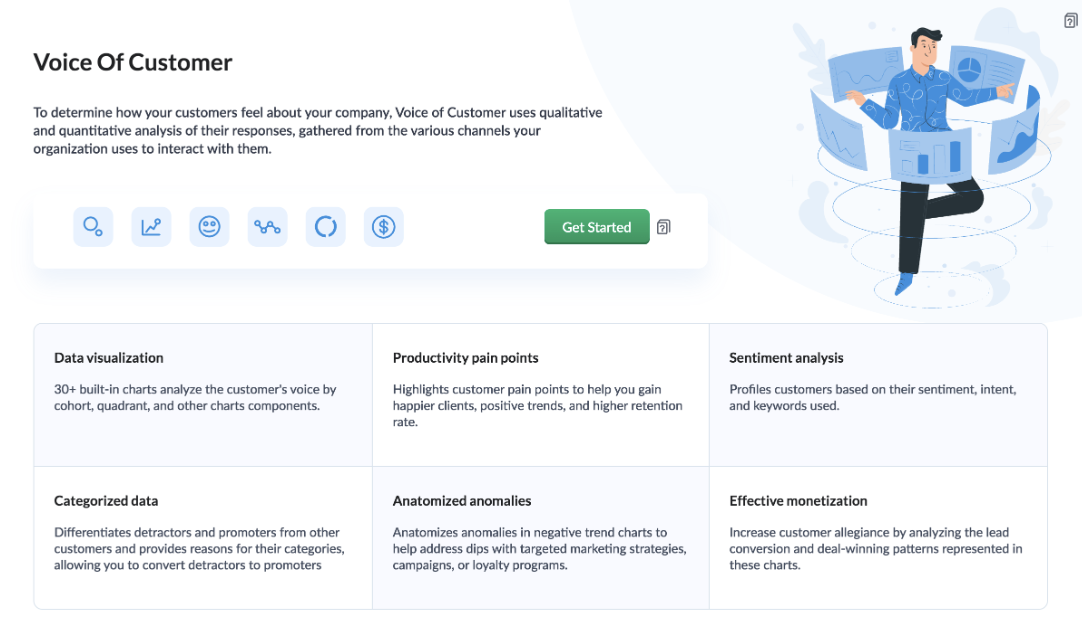
 
Once you click the 'Get Started' button, the activation page opens. Click 'Activate'.
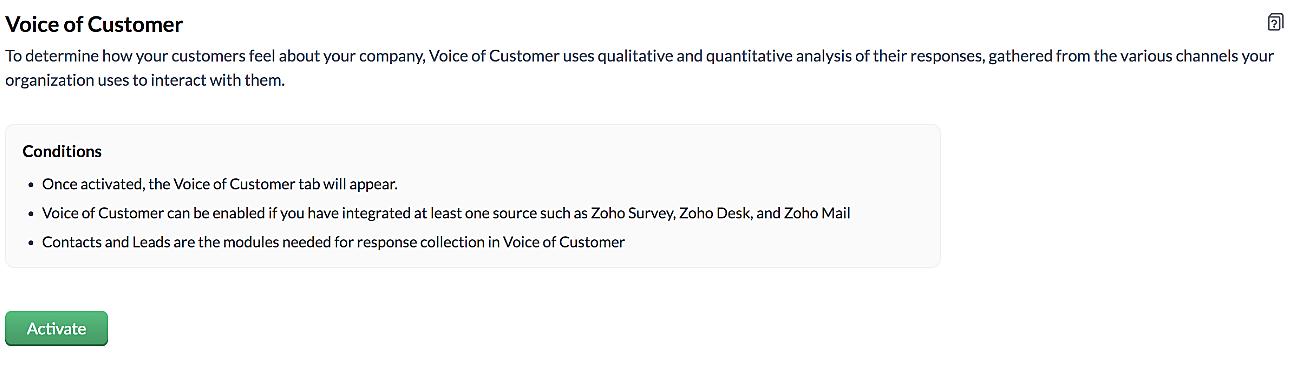
 
VoC for Zoho CRM is trained to conduct sentiment and intent analysis, keyword extraction, emotion & root cause analysis, customer trend analysis and predictions. It presents several accurate dashboards within your CRM account that showcase customer opinions on your business, competitor activity and sentiment, as well as the customer emotion behind emails, surveys and customer feedback.
 
Let us take a look at different dashboards that can help the management identify the root cause of inconsistencies in results and chalk out next steps to resolve them quickly. 
 
The Sentiment-based Profile Analysis
The Sentiment Dial Analysis chart provides you with an overall picture of the customer sentiment shared across multiple communication channels such as surveys, emails, and customer ratings.
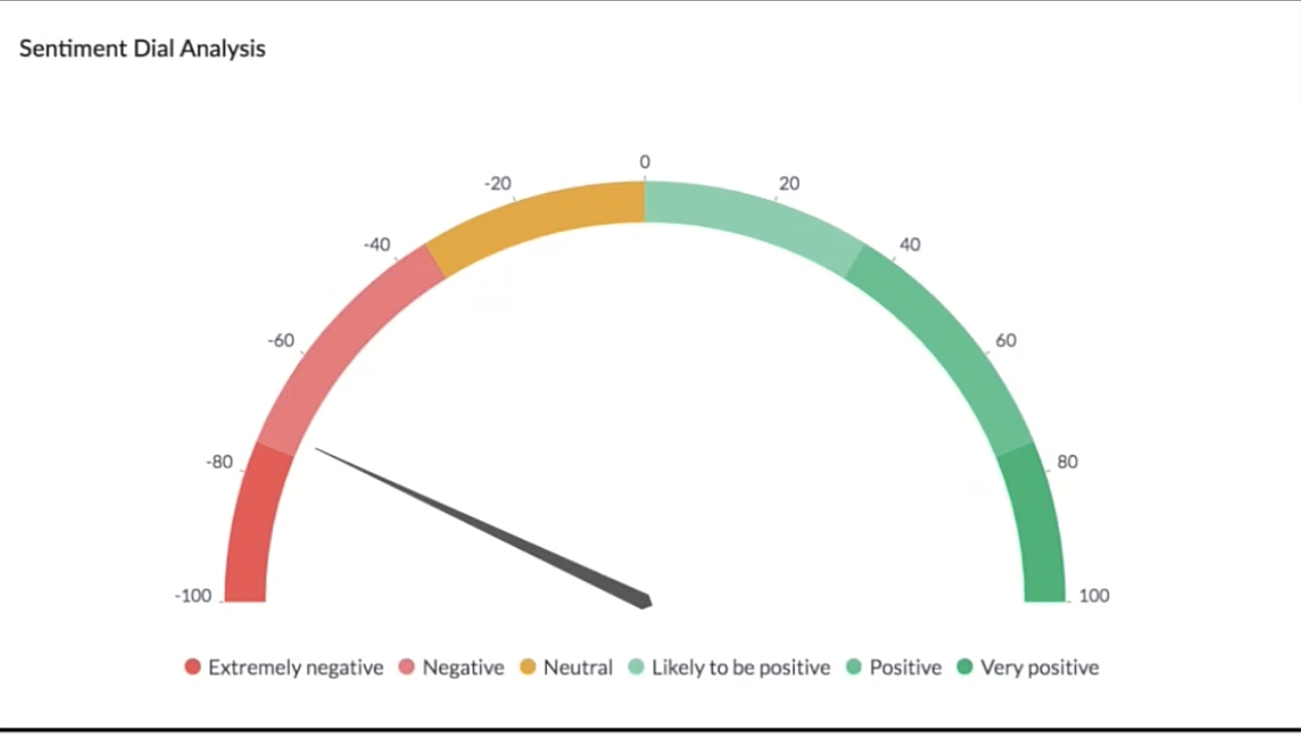
The dial chart shows that the overall sentiment expressed by the customers is on the negative end. This analysis incorporates the feedback from Desk, Survey and CRM emails. With a conservative approach that doesn't incorporate  VoC, this requires a separate team to gather the feedback, digest it and incorporate it into business activities. 
 
Even though this dial chart gives you a fair idea of the customers' views, the management needs more clarity on where the problem lies to increase customer satisfaction.
 
The frequently occurring keywords by sentiment narrow down the customer views expressed.
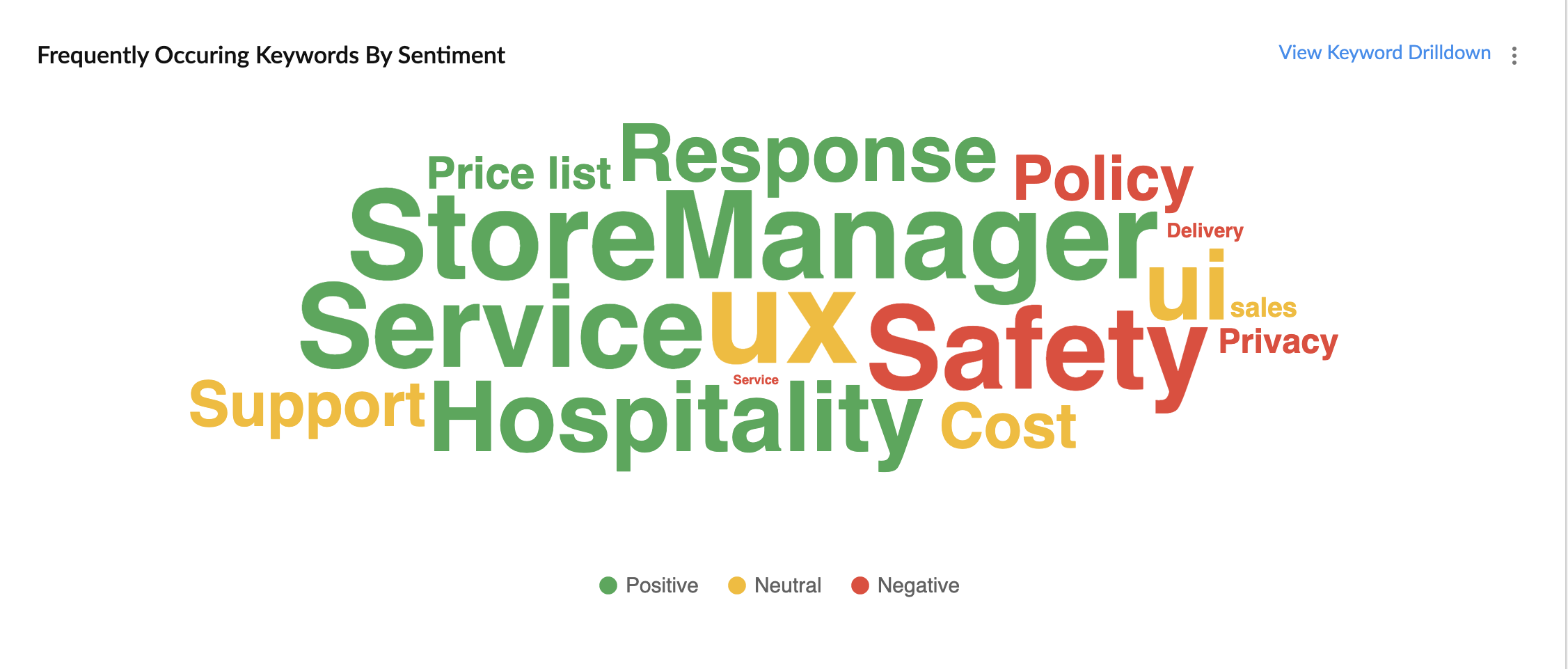
In the image above, the words in green have been used in a positive connotation by the customers. We can infer that customers are happy with the service, hospitality and price list. Whereas, delivery, policy and safety haven't been our strongholds. Therefore, we can now focus on improving our delivery, safety and privacy policies.
 
A drill down of the number of customers and channels from where their feedback has been gathered can also be viewed a table.
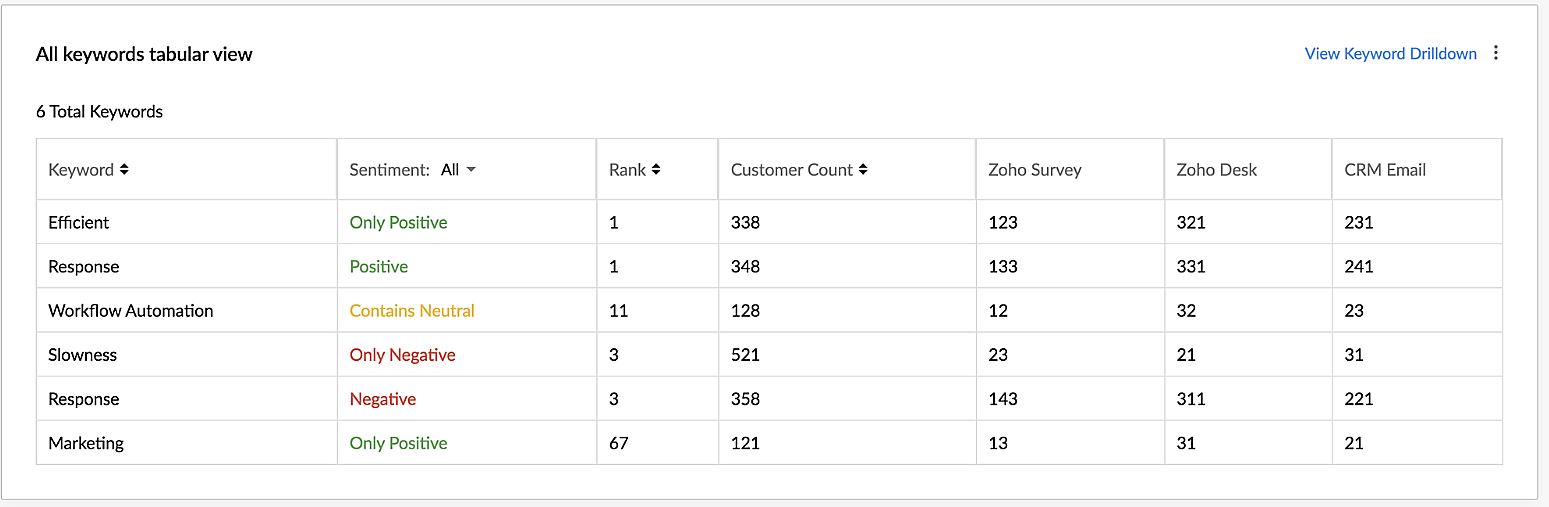
VoC for Zoho CRM helps you derive powerful insights on customer opinions and sentiment by processing data in minutes from several communication channels without burdening your team.

Response-based sentiment analysis
VoC for Zoho CRM captures the underlying emotion and intent behind customer responses and categorizes them by sentiment, intent, medium and revenue based on a particular timeframe.
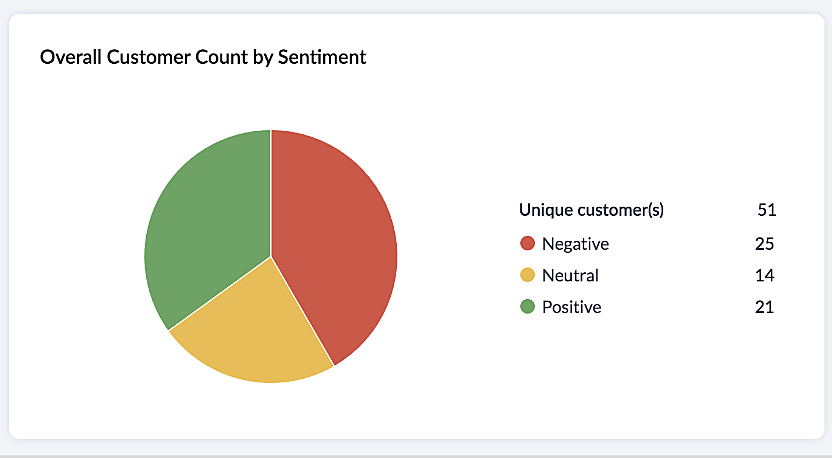
This chart paints an overall picture of the positive, neutral, and negative feedback count based on the responses gathered via surveys and customer rating.
 
The Sentiment Cohort chart, a variation of the above, showcases the customer feedback with respect to the timeframe.
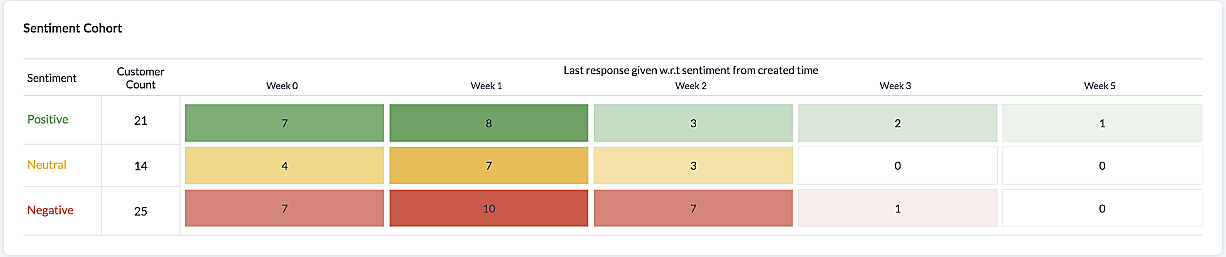
There are a few more dashboards that VoC offers to extract insights from - Competitor analysis, Cross-sell Analytics and Survey comparison.
 
Competitor Analysis
Staying on par with our competitors is an important aspect of customer satisfaction and retention. VoC helps in this regard by offering prominent insights. If the deal closure rate has come down after the mention of the competitor, we can focus on our offerings against our competitors'.
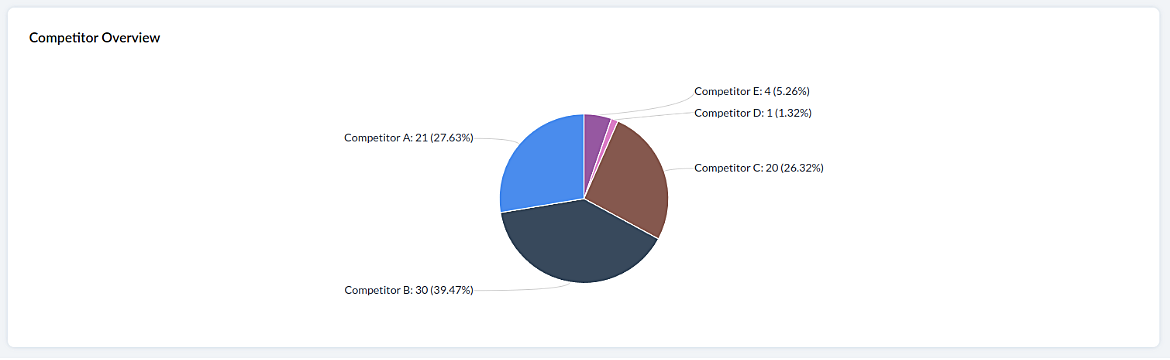
 
Cross-sell Analytics
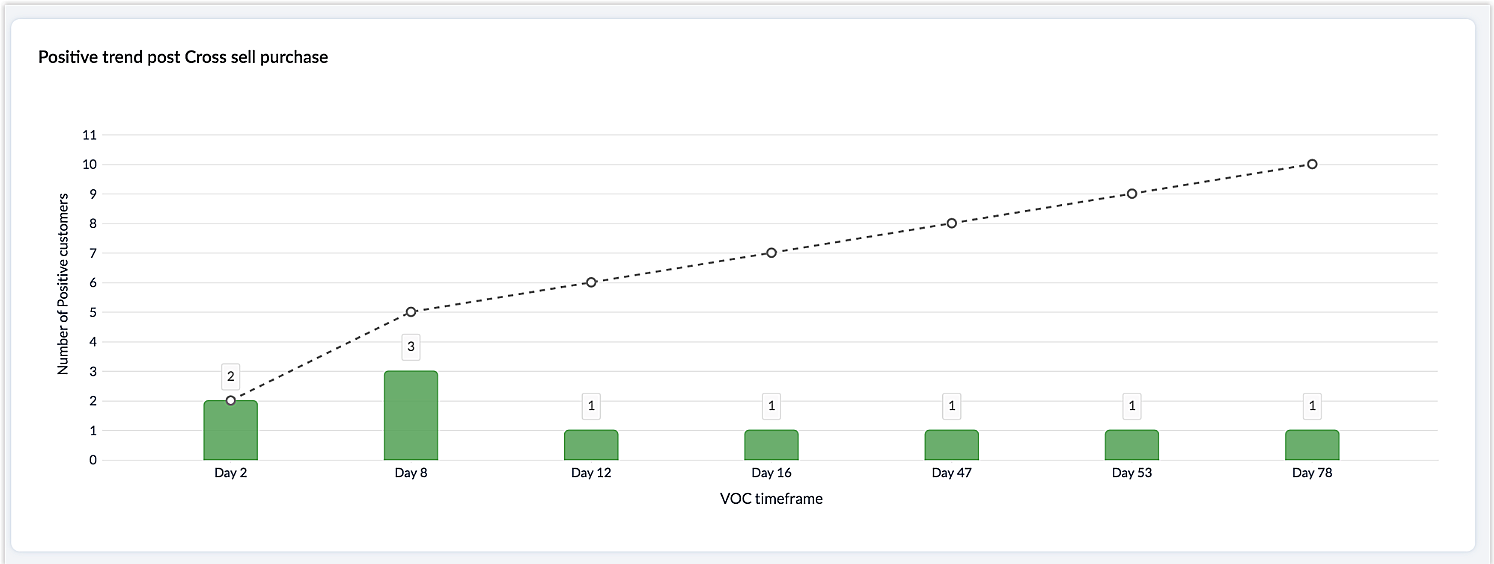
Cross-sell Analytics in VoC is designed to measure the effectiveness of cross-selling efforts. Zia studies the feedback after a cross-sell initiative is made and whether it is positive or negative. Depending on the feedback collected, it predicts the right product/service.
 
Survey comparison
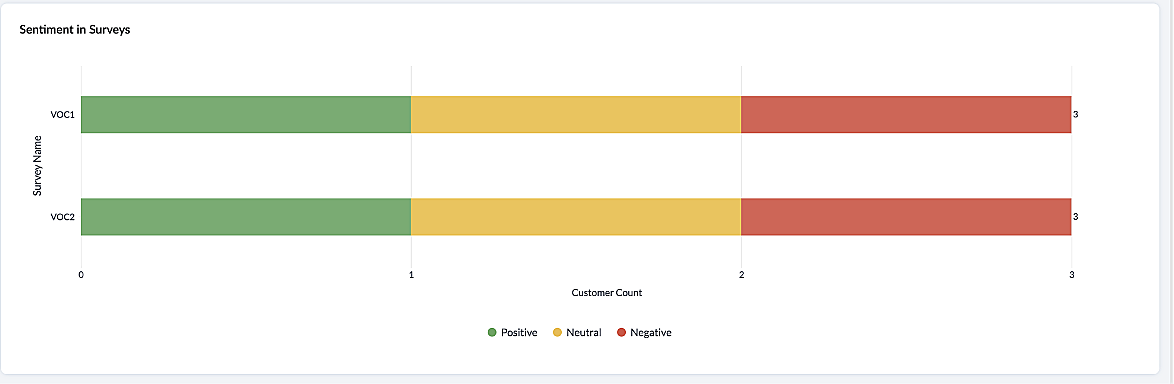
These dashboards come in handy when you want to evaluate your marketing efforts. If the customer feedback for an email offer is positive, you can plan your marketing strategies based on it. You can also improve your product/services based on survey responses.
 
 
Listed below are the different charts that VoC supports -
1. Pie chart and donut chart
2. Line graph
3. Bar graph—single, multi, stacked
4. Cohort
5. Quadrant
6. Waterfall
7. Gauge chart/ Dial chart
8. Anomaly dashboards
9. Word-cloud and Table
 
Please click here to watch a video about  VoC for Zoho CRM to gain a deeper understanding of the feature.
 
Prerequisites/Notes:
 
  1. VoC insights are available for surveys, customer rating and emails, using Zoho Survey, Zoho Desk and Email integration (IMAP) respectively.
  2. Zia Competitor Alert should be configured for the competitor analysis dashboard. Additionally, Zia Recommendation needs to be configured for the cross-sell analytics dashboard.
  3. All insights are a result of processing historical data. Collection of relevant data will be initiated upon activation of VoC and we will be processing this data over a period  of three months.
  4. Currently only admin profile users can view the VoC tab.
 
 
Pricing
VoC will be available for Zoho CRM to begin with. This will be a priced offering. The final pricing and editions supported will be announced during the time of public release.
 
What's in the roadmap
a) Option to customize  dashboards and charts
b) Identify our vanishing customers and declining products
c) Evaluating strategies to attain a target
d) Feedback Summaries, and much more.
 
Please click here to get early access to VoC for Zoho CRM. We would love to hear your feedback and can't wait for you all to try this.
 
Note: 
Early Access for customers: The Early Access to VoC is provided only for organizations with a license count greater than or equal to 20.

    • Recent Topics

    • Zoho CRM Functions: Redesigned Interface, Rich Analytics, and Multi-Language Support

      Hello everyone! We have given Functions in Zoho CRM a major overhaul with a new interface that makes it easier to build, organize, monitor, and troubleshoot your functions throughout their lifecycle. As part of this revamp, we have also introduced a unified
    • Native SMS and MMS Channel Support

      89% of US consumers say they prefer to communicate with businesses via SMS / MMS (aka "texting"). (link) Unfortunately, Zoho Desk does not currently support the most popular channel for consumer communications in the United States. For those of us in
    • Smarter holiday planning with yearly-specific Holiday Lists

      Hello everyone! Managing holidays and business hours is now easier and more efficient. Holiday Lists now support holidays that fall on different dates every year, while business hours now supports more than one holiday list. This helps businesses manage
    • Api de conversão da Meta

      Como conectar a Zoho com a api de conversão do Meta Ads?
    • Side-panel “Quick Preview & Edit” for Deals and Tasks (Web)

      Hi all, I’d like to submit a feature request to improve record navigation and data entry speed in Zoho CRM. NOTE: This feature exists on Pipedrive, HubSpot, and Bigin by Zoho. Requested Feature: Add a side-panel / slide-in “quick preview” for records
    • Why can't we choose Fixed Asset account for Purchased Items? (eTims issue?)

      Hello, When the company purchase items not for sale and not supposed to be in the inventory stock, like equipment for operational use, there is no way to access the Fixed Asset accounts in the drop down list. Is that an eTims limitation again? Or something
    • "Track Inventory for this item" is forced checked by default for goods items (eTims issue?)

      Hello, Since connecting our Zoho books to eTims (Kenya) the "Track Inventory for this item" is forced checked by default (eTims issue?) in the Item creation page for any type of goods. So when purchasing anything that the company does not intend to sale,
    • Can you import projects into Zoho Projects yet?

      I see some very old posts asking about importing project records into Zoho Projects. But I can't find anything up to date about the topic. Has this functionality been added? Importing tasks is helpful. But we do have a project where importing projects
    • reset password

      Hi I need to reset my password and need help
    • Is it possible to set a value to a field based on certain conditions

      Greetings Say i have a field that i want to set its value based on the value of another field.. for example if "number" field has value greater than 10, i want to set my field's value to X. Or if radio group had option 1 selected, then i want to set my
    • Zoho CRM Layout Rules: Nine New Actions, Profile-Based Execution, and Interactive Preview

      Hello everyone, Availability: This feature is now available for customers in the JP and SA DCs. It is planned to be released for other customers in soon. We’re excited to announce powerful new enhancements to Layout Rules in Zoho CRM - a feature built
    • How to add line breaks in formula with Concat?

      I am trying to combine different fields with a formula field, but want to add line breaks.  I.e. the current code looks like:  Concat(${Contacts.Company_Name}, ' ' ,${Contacts.First_Name}, ' ' ,${Contacts.Last_Name}) And the result should be:  John Doe
    • Introducing spam detection for webforms: An additional layer of protection to keep your Zoho CRM clean and secure

      Greetings all, One of the most highly anticipated feature launches—Spam Detection in webforms—has finally arrived! Webforms are a vital tool for record generation, but they're also vulnerable to submissions from unauthenticated or malicious sources, which
    • Is Zoho Assist Secure Connect even practical for 1 person shop?

      I was gun ho with Zoho Assist to replace my existing Remote Access product I have been using but I need to implement MFA on each unattended connection. Right now each of these connections in my other product has a rotating token that I have enter off
    • Join the Zoho Desk Virtual Classroom Training (VCRT)

      Hello everyone, Have you heard about Zoho's Virtual Classroom Training (VCRT)? Zoho Desk's Virtual Classroom Training offers end-to-end training for Zoho Desk users. Join the VCRT and get hands-on guidance for setting up Zoho Desk and getting your business
    • Zoho CRM's revamped timeline view now extends to 3 years and support notes, filters, and email statuses

      Editions: All DCs: All Release plan: These enhancements are being rolled out to customers in a phased manner. They will be available to most organizations by the end of May. For organizations with huge volumes of data, they will be available by the end
    • Zoho Mail App Unable to connect to server

      Hi all, For the last two weeks, my Zoho Mail App on my iPhone which has worked fine up to this point has been unable to connect to the mail server. I can't access my emails even though I will get notification banners on the screen saying that they have been received. I can open Safari on my phone and then log in that way. This issue happens when I'm connected to wifi and on my phone data.  I've tried deleting the app several times and reinstalling, and have updated to the latest version. But it still
    • Add the Zoom Option to the Camera

      Hi, I use the ZOHO Forms Camera so I can manage metadata, compression, etc. but this doesnt have the zoom parameter activated, so when we have photos in a tight space and want to use 0.5 for example, we can't, can this be enabled please. Thanks Dan
    • Manage booking pages from your Android phone

      Hello everyone! We are happy to announce that users can now add and manage booking pages from their Bigin Android app. It is a multi-step form that users can create for purposes like booking appointments, scheduling calls or meetings, conducting webinars,
    • Automating Employee Birthday Notifications in Zoho Cliq

      Have you ever missed a birthday and felt like the office Grinch? Fear not, the Cliq Developer Platform has got your back! With Zoho Cliq's Schedulers, you can be the office party-cipant who never forgets a single cake, balloon, or awkward rendition of
    • Unbundle feature for composite items

      We receive composite items from our vendors and sell them either individually or create other composite items out of them. So, there is a lot of bundling and unbundling involved with our composite items. Previously, this feature was supported in form
    • Inventory Barcode Creation - Add Picture of Item

      Hi I am trying to set up bar code labels and include a picture of the item on the label - any idea on how to add that field to the barcode generator?
    • CNIL - Suivi de Pixel

      Bonjour à tous, À la suite de la nouvelle recommandation de la CNIL sur les pixels de suivi dans les e-mails, savez-vous si Zoho Campaigns permet : de conditionner le suivi des ouvertures au consentement de chaque contact ; de proposer un lien permettant
    • Protect backed up and exported data using password encryption

      Hello everyone, Protecting live data is crucial for any organization or product, as it contains sensitive customer information. However, protecting data does not end within the platform. Backup and export files often contain sensitive information and
    • Zoho Projects - Cloning a task does not trigger task workflow when created

      Hello! I have a Project where my team uses a set of tasks from a tasklist as templates, so we could simply clone it and drag it to another list in kanban view to avoid creating a new one from scratch. The process works well, but after cloning it the new
    • Best way to setup Inventory bin tracking for products with multiple boxes/crates

      Hi - we need some advice from the community on setting up Items in the Inventory for products with multiple crates. We have large products in our warehouse where the product is delivered as two large (double pallet) crates. We've setup the Items for these
    • not able to access Zoho from home WIFI

      for some reasone i am not able to access Zoho on my laptop or my iphone while i am connected to my home Wifi, i am able to access these sites both on laptop as well as Iphone and associated apps on any other Wifi as well as when I am on my 4G connection
    • Five Guided Conversations Updates in Zoho Desk

      Hello everyone, Guided Conversations is getting updates that make it easier to create more inclusive customer experiences, retain important conversation context, customize your widget, keep track of changes, and connect with external services. Here are
    • An important update for Zoho Cliq desktop users

      The latest version of the Zoho Cliq desktop app (v1.8.0) will no longer be supported on macOS 10.15 Catalina and earlier versions. This is because the framework we use (Electron) no longer supports some older macOS versions. If you’re using macOS 10.15
    • Simplify eSignatures: Automate document workflows with Zoho WorkDrive

      Hello everyone, We’re excited to invite you to our upcoming live webinar, where Zoho WorkDrive and Zoho Sign will come together to show you how to simplify and automate document workflows. From creating and collaborating on documents to approvals, e-signatures,
    • Function #7: Fetch a value from Deal in Zoho CRM to the related Estimate in Zoho Books

      We're here with another function for those using the integration with Zoho CRM. You know that potentials can be linked to transactions in Zoho Books. But if you're including additional details about a Deal (potential) in Zoho CRM and you want to inherit
    • Workflows being applied and the Large unwanted popup

      When a workflow is being applied do to an action, then the Agent is left with a large Window asking if they would like the see the changes this workflow did. Is there any way to disable this prompt from appearing?
    • Maintenance notice for Zoho CommunitySpaces US data centers on August 23, 2026

      Dear customers, We have scheduled a maintenance activity for Zoho CommunitySpaces in our United States (US) data centers on August 23, 2026, from 1:30 a.m. to 2:00 a.m. During this 30-minute maintenance window, Zoho CommunitySpaces will be temporarily
    • Knowledge base: The nitty-gritty of SEO tags

      A well-optimized knowledge base with great SEO can benefit your company by allowing customers to find help articles and support resources using search engines. This enables customers to quickly and efficiently find the information they need without direct
    • zoho desk: Can tickets be created from Microsoft Teams messages?

      I am trying to see if there is a way to integrate Microsoft teams with zohodesk. we have a few customers who prefer to communicate requests through Teams, and it would be great to create tickets when they do.
    • ´´Send Email Reply´´ action does not work when the message body contains placeholders.

      Hi Community, I am working on a workflow where the Customer contact is notified via email when their ticket status goes On Hold. To do that, I chose the Send Email Reply action, and the minute I add a placeholder, the workflow does not work and the ticket´s
    • Zoho ERP | Product updates | July 2026

      Hello users, We're back with another round of updates to help you streamline your operations. This month's release brings new features and enhancements designed to help you work more efficiently. Read on to discover everything that's new in Zoho ERP this
    • Zoho Forms Spam Submissions

      Hello community! It seems that after updating the Recaptcha settings on our newsletter form (Zoho Forms), we keep getting low quality spam emails subscriptions. I first used 0.5 treshold on invisible google captcha, then raised it to 0.7 but to no avail.
    • Migration from Hosted Exchange Server

      I am looking for documentation on how to migrate from a hosted version of Microsoft Exchange to Zoho Mail.  The existing material is very good for non-hosted Exchange or local Outlook account but I have been unable to locate information to move from a hosted Exchange environment. This is complicated by not being able to have access to the Exchange Server (other than login credentials) and the lack of a local PST file (local Outlook uses OST files). I am to the point that all I need to do is migrate
    • Subform edits don't appear in parent record timeline?

      Is it possible to have subform edits (like add row/delete row) appear in the Timeline for parent records? A user can edit a record, only edit the subform, and it doesn't appear in the timeline. Is there a workaround or way that we can show when a user
    • Next Page