Easily perform calculations using dates with the new DATEDIF function

Easily perform calculations using dates with the new DATEDIF function

Hey Zoho Writer users!
 
We've enhanced Zoho Writer's formula capabilities with the new DATEDIF function. This allows you to calculate the difference between dates in days, months, and years.
 
Function syntax:
 
=DATEDIF(start_date, end_date, unit)

Inputs:
start_date
The date from which the calculation begins
end_date
The date till which the calculation is needed
unit
The format (day, month, year) in which the difference should be calculated.
 
You can also have the start_date and end_date as a merge field or an auto-date field.

List of supported units:

Unit
Description
Y
Calculates the difference in years
M
Calculates the difference in months
D
Calculates the difference in days
MD
Calculates the difference in days, excluding months and years
YM
Calculates the difference in months, excluding years
YD
Calculates the difference in days excluding years
 
D(Days) will be used as the default unit if no unit is specified.
DATEDIF returns the difference as an integer.


How to insert a DATEDIF function in Zoho Writer:
 
  1. Click the hamburger menu located on the top left side of the editor and click Fields.
  2. Click Formula located under the Dynamic Fields category.
  3. In the popup, click Choose Function and choose DATEDIF from the list of functions.


Here are some examples of the DATEDIF function:
 
Example
Syntax
Output
Calculate the difference between Dec. 28, 2023 and Feb. 28, 2024 in months
=DATEDIF([28/12/2023], [28/02/2024],"M")
2
Calculate the difference between Jan. 15, 2024 and March 16, 2024 in days, excluding months and years
=DATEDIF([15/01/2024], [16/03/2024],"MD")
1 (Because the difference is 1 day and 2 months, this formula returns 1 day)
Calculate the difference between Feb. 20, 2023 and April 20, 2024 in months excluding years
=DATEDIF([20/02/2023], [22/04/2024],"YM")
2 (Because the difference is 1 year and 2 months, this formula returns 2 months)

Please ensure the end_date is greater than the start_date.
To use the DATEDIF function in Writer's merge templates please make sure the field type is date and configured in a date format supported in Zoho Writer.
 
A real-world example:
 
Let's say you're sending reminder emails to your event attendees mentioning the number of days until the event. The DATEDIF function allows you to easily insert this number without doing the calculations manually.
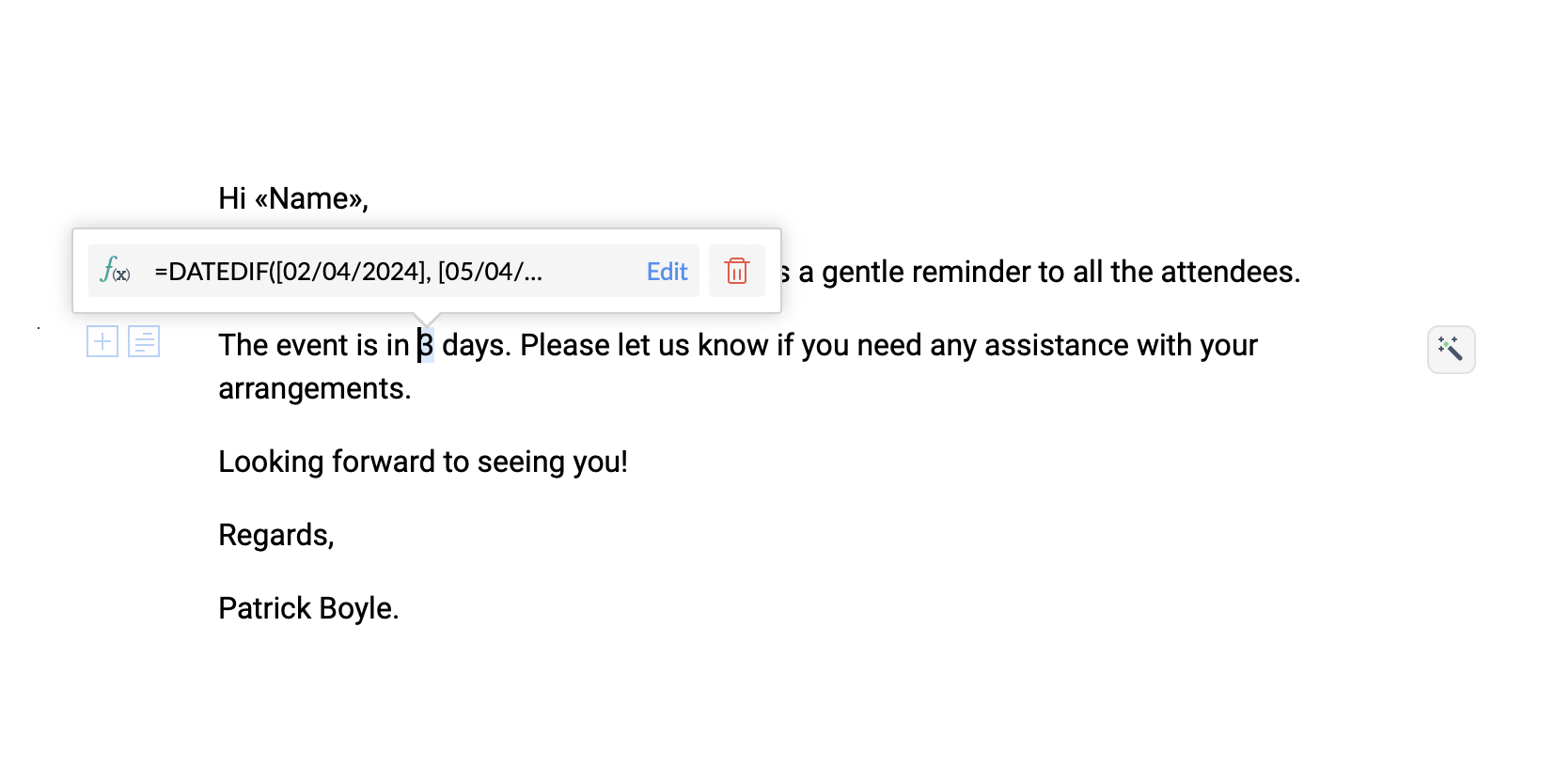


Try the new DATEDIF function in Zoho Writer and let us know your suggestions and feedback in the comments section below or email us at support@zohowriter.com or support@eu.zohowriter.com.
 
If you have any function that you want us to add in Zoho Writer, please let us know in the comments.
 
Regards,
Team Writer


    • Sticky Posts

    • Easily perform calculations using dates with the new DATEDIF function

      Hey Zoho Writer users! We've enhanced Zoho Writer's formula capabilities with the new DATEDIF function. This allows you to calculate the difference between dates in days, months, and years. Function syntax: =DATEDIF(start_date, end_date, unit) Inputs:
    • Zoho Writer's WordPress extensions

      Hey Zoho Writer users! Say goodbye to all your WordPress content publishing woes with Zoho Writer's WordPress extensions. Publish content with all your formatting and images, republish content when you update a document, and more—from a single window
    • Date-based conditions and filters

      Configure conditions with date  Hi everyone! We are excited to announce that you can now compare and filter data with date-based conditions. This update lets you compare date fields in a document to a reference date and display a text or value if the
    • Introducing group by, aggregation, and repeating regions in mail merge templates

      Display data exactly the way you want and highlight key insights with Zoho Writer's enhanced merge templates. We've supercharged Zoho Writer's merge templates with the capability to dynamically group, aggregate, and repeat data as blocks. You can now
    • Say hello to an improved way to merge documents!

      Automating all your documents from start to finish is now easier than ever with Writer's new merge tools.   If you haven't seen it yet, you can read the main announcement here. Here is the full list of the features we've rolled out: 1. Dynamic Table Headers
    • Recent Topics

    • Select CRM Custom Module in Zoho Creator

      I have a custom module added in Zoho CRM that I would like to link in Zoho creator.  When I add the Zoho CRM field it does not show the new module.  Is this possible?  Do i need to change something in CRM to make it accesible in Creator?
    • Client Script Not Working When Field is Set by Workflow

      Problem Context: I have implemented a client script in the Cases module that automatically assigns commands based on the value of the Priority field. The script functions correctly when the Priority field is manually set by a user through the form. Observed
    • Cannot give public access to Html Snippet in Zoho Creator Page

      Hi, I created a form in Zoho Creator and published it. The permalink works but I want to override the css of the form. (style based URL parameters is not good enough) So I created a page and added an Html snippet. I can now override the css, which is
    • integrating Zoho CRM vendors with Zoho projects

      In most of our projects we collaborate with our Vendors. Being able to integrate only Accounts and not Vendors from CRM, is a huge limitation for our perspective and needs. We would really love to see this feature in the CRM-Projects integration.
    • Zoho Creator Workshops 2026—Europe & UK | Coming to a city near you!

      Hello everyone! We're excited to announce the Zoho Creator Workshop Series 2026, coming to cities across Europe and the United Kingdom this year! Whether you're looking to explore the intermediate-to-advanced capabilities of Creator or you're a seasoned
    • Validation rule for Date field

      The condition settings for a Date field are are absolutlly usless. Conditions can only be set for a specific date, which is logically ineffective in most cases. When setting a condition for a Date field, users usually need to compare the value relative
    • Number 9 envelopes for invoice printing

      I email and print invoices. Being new to Zoho and coming from QB, we did both as we have a more traditional So in Zoho i want to do the same using Number 9 envelopes. These have both a return window and mail to windoow see attached image. Im just looking for best suggestions on how to get a ZOHO invoice to work, so I can mail my invoices...
    • Zoho Books/Square integration, using 2 Square 'locations' with new Books 'locations'?

      Hello! I saw some old threads about this but wasn't sure if there were any updates. Is there a way to integrate the Square locations feature with the Books locations feature? As in, transactions from separate Books locations go to separate Square locations
    • agentid : Where to find?

      I've been looking around for this agenId to check for the total ticket assigned on a specific agent url :"https://desk.zoho.com/api/v1/ticketsCountByFieldValues?departmentId=351081000000155331&agentId=35108xxxxxx132009&field=statusType,status" type :GET
    • Open Sans Font in Zoho Books is not Open Sans.

      Font choice in customising PDF Templates is very limited, we cannot upload custom fonts, and to make things worse, the font names are not accurate. I selected Open Sans, and thought the system was bugging, but no, Open Sans is not Open Sans. The real
    • Super Admin Logging in as another User

      How can a Super Admin login as another user. For example, I have a sales rep that is having issues with their Accounts and I want to view their Zoho Account with out having to do a GTM and sharing screens. Moderation Update (8th Aug 2025): We are working
    • Add Reporting feature to display variance/change columns when comparing periods

      When running reports to compare periods (for example, Profit and Loss comparing current year to previous), I would like to be able to display variance columns in both (a) amount or (b) percentage.
    • Payroll and BAS ( Australian tax report format )

      Hello , I am evaluating Zoho Books and I find the interface very intuitive and straight forward. My company is currently using Quickbooks Premier the Australian version. Before we can consider moving the service we would need to have the following addressed : 1.Payroll 2.BAS ( business activity statement ) for tax purposes 3.Some form of local backup and possible export of data to a widely accepted format. Regards Codrin Mitin
    • Intergrating multi location Square account with Zoho Books

      Hi, I have one Square account but has multiple locations. I would like to integrate that account and show aggregated sales in zoho books. How can I do that? thanks.
    • Invalid scope choice: Workdrive integration in CRM

      Bug: There is an invalid option in the permission choices for Workdrive integration in CRM. If the entry "WorkDrive.teamfolder.CREATE" is selected, it will return a message indicating invalid OAuth scope scope does not exist.
    • What's New - February 2026 | Zoho Backstage

      February 2026 brings a major new addition and a collection of enhancements across Zoho Backstage. We thought about writing a long introduction, but the updates in this release make a strong case on their own. So we’ll skip the buildup and dive straight
    • Attaching files to emails within CRM Deals.

      Hello, We have recently started using the extension "Workdrive for CRM" (Related List) to view/store our documents for each Deal, instead of using Attachments. Overall it feels like a better way to go but the user experience is not so great when it comes
    • Connect Bank in Zoho Books

      Can I connect UOB or Ariwallex in Zoho Books?
    • Clone entire dashboards

      If users want to customize a dashboard that is used by other team members, they can't clone it in order to customize the copy. Instead they have to create the same dashboard again manually from scratch. Suggestion: Let users copy the entire dashboard
    • Anyone worked out how to export or screengrab a full heatmap?

      I'd love to be able to include a copy of a heatmap in a report but can't work out how to grab the whole thing as there doesn't appear to be an export function? Thanks in advance.
    • Establishing Relationships among contacts/leads with Reciprocal

      Is there any way to create a relationship between contacts and leads and be able to go into just one of the files and have it reciprocate the entry in the other file? For example, if I have two people say John and Jane Smith who are husband and wife.
    • Placeholder for Agent Signature in Email Templates

      Dear Zoho Team, I hope this message finds you well. We currently face a limitation when designing email templates in Zoho Desk. While we can create email templates and include a footer at the end, the agent signature is always appended by default at the
    • Print a document from Zoho Writer via Zoho Creator

      If i use the code below i can get writer to create a new document or email it to me but i want to be able to print it directly from the browser and not have to send it via email and then print. Below is the code im using. Attached options form zoho writer
    • Custom View and Custom Fields on Zoho Books

      Hi, I have some custom fields on Estimates and Invoices. I also use Custom Views so I can have a lot of information at a glance. I want to include my custom fields as columns in my custom views of estimates / invoice, but it looks like is not possible.
    • %PaymentLink%

      Does not work. Software creates a BAD link. ....and yes payment options are turned on. Link on the invoice pdf once opened will work but this template is a joke.
    • World date & time format

      Hello, Is there a timeline to get the worldwide used date and time format ? I mean not the american one... I mean day month year, and 24 hours clock. Regards
    • Syncing calendar with Google Calendar doesn't work when events are sent to auto repeat

      Hi... The ZOHO CRM -- GOOGLE CALENDAR sync is broken. If I create a single event on either side, sync works, but if I create an event with auto repeat on either side it doesn't work. Furthermore, events created before the sync don't show up in the calendar.
    • Allow Global Admin to access/edit all forms without changing owners

      Hi there, Please consider adding a feature where the Global Admin of the account an automatically access/edit any form in the Company Account. I'm the Global Admin on our Zoho One plan, and we have multiple users that use/create forms. But for me to access
    • Actual vs Minimum

      Hi all, I am sure I am not the only one having this need. We are implementing billing on a 30-minute increment, with a minimum of 30 minutes per ticket. My question is, is there a way to create a formula or function to track both the minimum bill vs the
    • Dont want to list inactive items.

      If an item is made inactive, there is no point in showing it in the item list. Please provide an option to hide all inactive items in 'Preferences'. 
    • Can Zoho Marketing Automation send OTP codes via WhatsApp during user registration?

      The flow I would like to implement is: A user signs up in the mobile app and enters their phone number. The system generates a one-time verification code (OTP). The OTP is sent to the user via WhatsApp message. The user enters the code in the app to confirm
    • Related lists New option in missing

      hi I have created quite a few modules and added as related lists to my main module. Some have new, some dont I can not see why?
    • Where to show Customization Field ?

      Dear Sir, I have made some New Field in Item Field Customisation. Now I don't require that field in Estimate, Sales Orders etc. I just wants that field in Sales Invoice to Show/Hide... Is that possible ?
    • What's New in Zoho Analytics - February 2026

      Hello Users! We're back with another round of updates for Zoho Analytics. This month's release focuses on giving you greater flexibility in how you visualize, manage, and act on your data - with new features like custom visualizations, remote MCP server,
    • Zoho Books (and other Finance Suite Apps) - Clickable Item Name on Invoices and Reports

      Hi Zoho Books team, It would be really helpful if the Item Name on Reports were clicable to take me to the item. The same on Invoices, often I am looking at an invoice and I want to look at the deails of a product. A link here would be helpful to jump
    • ZOHO Reports are taking longer time to get refresh

      Hi Team, Since last few days, I'm facing issues in getting updated reports. For eg: right after making an expense entry or even posting a journal, it is taking longer then expected for the updated reports. Refer below: "You are viewing the report that
    • Display actual mileage on an invoice

      My users are creating expenses in Zoho expense. For example, they expense 10 miles and get paid 7 dollars (10 miles * IRS rate of .70). If I look at the expenses in Zoho Books, it does show them at 10 miles at .70 cent When I add these expense to an invoice
    • Can't change form's original name in URL

      Hi all, I have been duplicating + editing forms for jobs regarding the same department to maintain formatting + styling. The issue I've not run into is because I've duplicated it from an existing form, the URL doesn't seem to want to update with the new
    • Mail template DYNAMIC attachments

      Hello, I see there's been a lot of requests for having non static attachments in mail templates be automatically added. So not manually attached static attachments from record, but actual automatically attached attachments which are configurable in the
    • Can you create relationships BETWEEN contacts within the same module

      I am setting up my CRM, and I want to have a way to connect contacts within the same module.  Is there a way to do this?  If not - how do I decide how to split up contacts to make connections?  What are best practices for this? We have clients who need
    • Next Page