Enhance Data Visibility with Mapping Fields from Lookup Module
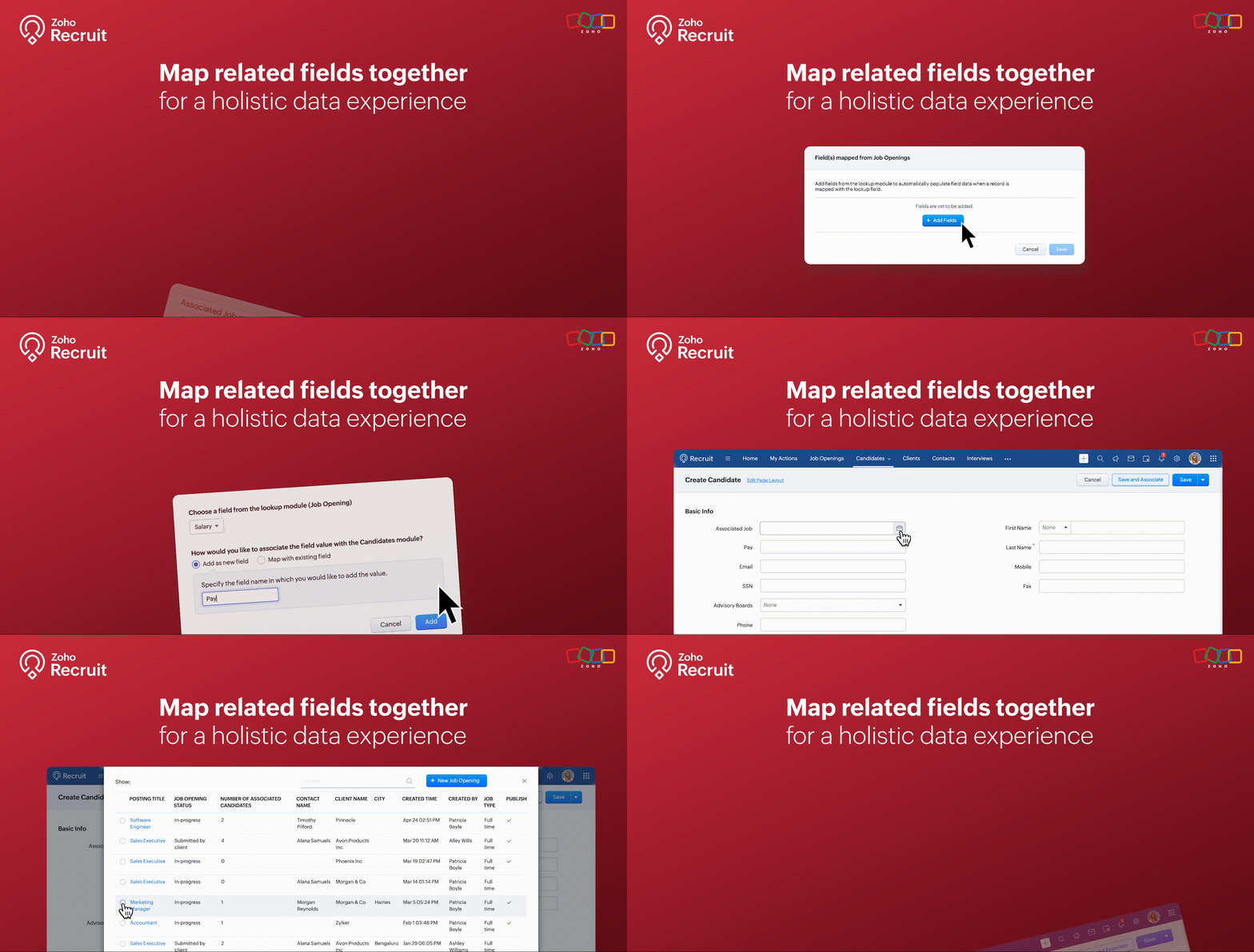
We’re thrilled to announce an exciting new feature in Zoho Recruit: Mapping Fields from Lookup Module! This powerful addition is designed to display additional details from a related module when using lookup fields. This enhances data visibility and provides more context within a single module view.
What is Mapping Fields from Lookup Module?
The "Mapping Fields from Lookup Module" feature allows you to incorporate additional fields from related (lookup) modules directly into your primary module's layout. This means you can now view more contextual information within a single view without the need to switch back and forth between different modules.
For example, if you're in the Candidates module, you can map fields like Job Location, Job Type, and Hiring Manager from the Job Openings module. This way, you can see all key details about the job opening a candidate applied for right within the candidate’s record.
Benefits
- Enhanced Data Visibility: By mapping fields from related modules, you can see all pertinent information at a glance. This comprehensive view enables better decision-making since all the relevant data is readily accessible within a single module.
- Improved Workflow Efficiency: Say goodbye to the constant toggling between different modules. With mapped fields, you have a more streamlined workflow, saving time and reducing the chances of missing critical information.
- Better Data Consistency: Ensure that all necessary information is consistently available across different modules. This reduces data silos and enhances the reliability of your recruitment data.
Use Cases
1. Streamlined Candidate Evaluation:
Managing candidate evaluations often requires accessing various details about job openings they’ve applied for. Mapping fields from the Job Openings module to the Candidates module makes this process seamless and efficient.
Example:
A recruiter at a healthcare organization is evaluating candidates for multiple nursing positions. By mapping fields like Shift Type, Department, and Hiring Manager from the Job Openings module, they can view all relevant job details directly within the candidate’s profile. This comprehensive view helps the recruiter quickly assess each candidate's fit for the roles based on the specific requirements of each department, without needing to navigate to the Job Openings module.
2. Comprehensive Interview Scheduling:
Scheduling interviews for candidates can be a complex task, especially when coordinating with multiple hiring managers. Mapping fields from the Interview Schedule module to the Candidates module can streamline this process.
Example:
An HR coordinator at a retail company is responsible for scheduling interviews for various store manager positions. By mapping fields such as Interview Date, Interview Time, and Interviewer from the Interview Schedule module to the Candidates module, they can keep track of all upcoming interviews directly from the candidate’s profile. This ensures that the coordinator can efficiently manage interview schedules and communicate details to candidates without missing any critical information.
3. Enhanced Client-Specific Job Management:
Recruitment firms often manage job postings for multiple clients, each with specific requirements and details. Mapping fields from the Clients module to the Job Openings module can provide a unified view of client-specific job postings.
Example:
A recruitment consultant at a staffing agency is managing job postings for several clients in the finance sector. By mapping fields such as Client Industry, Client Contact, and Special Requirements from the Clients module to the Job Openings module, the consultant can view all client-related information directly within each job opening. This comprehensive view helps the consultant tailor their recruitment efforts to meet the unique needs of each client, ensuring better client relationship management and more successful job placements.
How to Use the Mapping Fields from Lookup Module
- Identify the Fields: Determine which fields you want to map from the lookup module to your primary module.
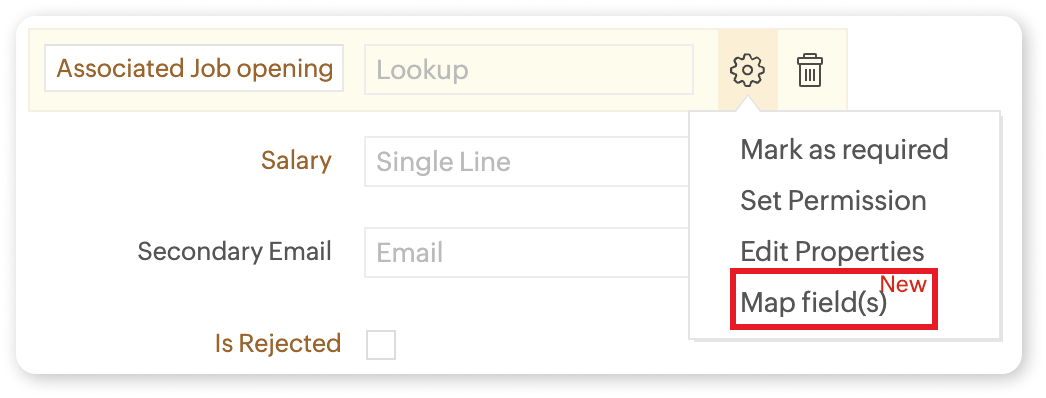
- Add the Lookup Field: Include the lookup field in your module layout where you want the additional information to appear.
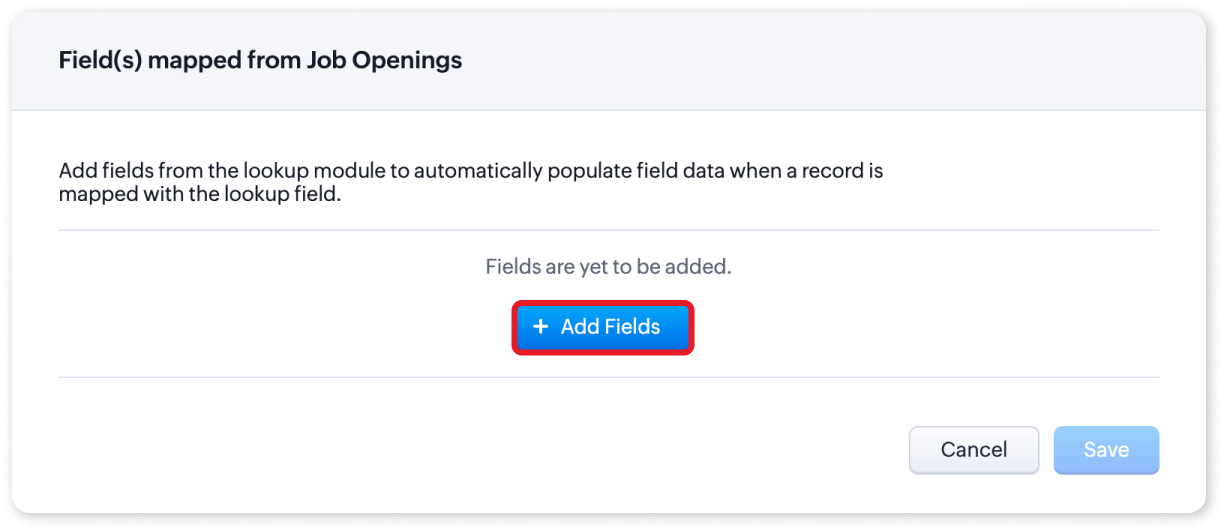
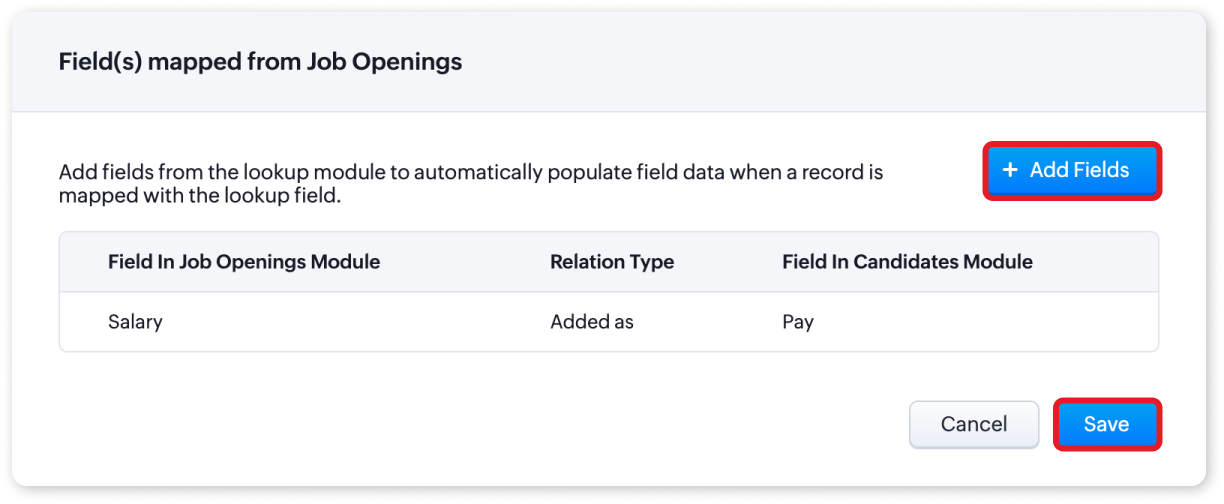
- Map the Fields: Click on the settings icon and select "Map Field(s)". You can choose to add the fields as new or map them to existing fields.
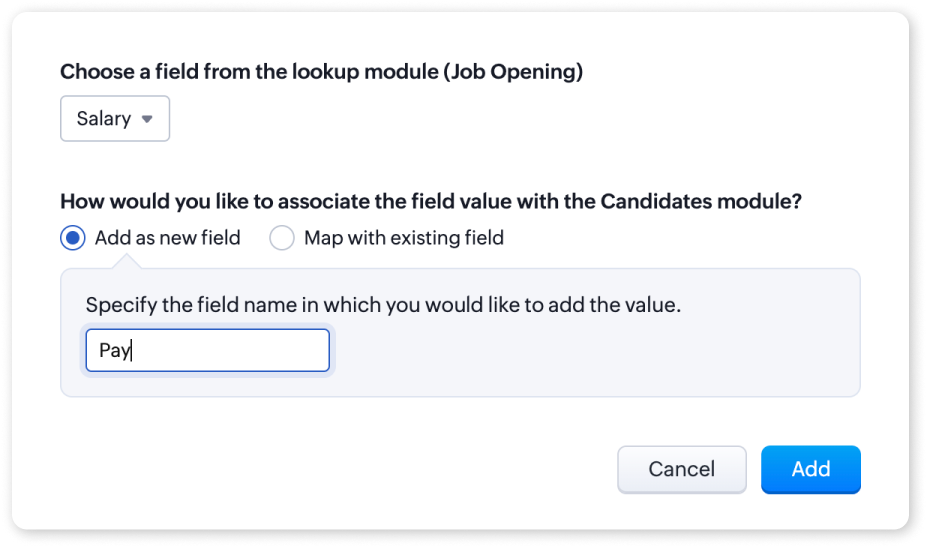
- Save Changes: Once you have mapped the fields, save the changes to your layout.
For more detailed information, please refer to our help article on Mapping fields from Lookup Module. If you have any questions or suggestions regarding this update, feel free to leave a comment below or reach out to our customer support team at support@zohorecruit.com.
Regards
Team Zoho Recruit
Topic Participants
Akshaya P
fundae Careers
Gowtham Prashanth
Sticky Posts
An update to improve email delivery | Email Authentication & Relay
Update Rollout Latest Update: Enterprise users (8th July, 2025) This update is now live for Enterprise plan users in all regions. This includes People Plus, but not Zoho One, which will be covered in an upcoming update. Professional users (31st May 2025)Zoho Recruit User Group Meet-up | INDIA 2025 (Venue Finalised)
Hello Zoho Recruit users from India, We’re pleased and excited to announce our 2025 edition of Zoho user group meet-up in India in five cities! In this meet-up, our team of experts will help you understand the intricate nuances to use Zoho Recruit better,Zoho Recruit is coming to the UK | Zoho Community Learning Series
Customers from the United Kingdom, Exciting news: We will be in London for the Zoho Recruit user meet up. Our team will help you better understand the intricate nuances of Zoho Recruit to help you hire faster, inform about new and upcoming features, andAsk the experts - A live Q & A discussion on Zoho Recruit
We are delighted to come back with another edition of Ask the Experts community series. This edition, we'll be focusing on everything about Zoho Recruit. The topics will focus on the features that are used/asked by the majority of users and also basedRestriction on 'From' addresses with a public domain
Dear Zoho Recruit Community, We hope this message finds you well. This post is to inform you about some important updates regarding email restrictions within Zoho Recruit. Effective post 31st March 2025, we will be implementing changes to the use of email
Recent Topics
Cancel and refund
Hi, Yesterday I paid for the Zoho email subscription. Within a few minutes, I realized that the subscription counts one email ID as one user. To make another email ID for the same domain name, I'd have to pay for another user. I emailed right away toOne Contact with Multiple Accounts with Portal enabled
I have a contact that manages different accounts, so he needs to see the invoices of all the companies he manage in Portal but I found it not possible.. any idea? I tried to set different customers with the same email contact with the portal enabled andKaizen# 209 - Answering Your Questions | All About Client Script
Hello everyone! Welcome back to another exciting Kaizen post! Thanks for all your feedback and questions. In this post, let's see the answers to your questions related to Client Script. We took the time to discuss with our development team, carefullyTo Do: shareable task links without login
Hi! I’m using Zoho Mail and ToDo in my daily work, and I’ve run into one limitation that’s a real blocker for me. Right now, to share tasks with managers or directors, they need to have a Zoho account and be added to a group. In practice, many of themAbility to turn off "Would you like this amount to be reflected in the Payment field?" message
Team, Is there any way to turn off the message" Would you like this amount to be reflected in the Payment field?" when I make a payment? This is so annoying. This happens EVERY TIME I put an amount in the Payment Made field.Unlock agreement intelligence with Zoho Sign's latest AI updates
Hello! If you've been struggling with long, complex agreements and spending way too much time on them, here's exactly what you'll want to hear: Zoho Sign now integrates with OpenAI's ChatGPT to make agreement management smarter and simpler. Acting likeCurrency abbreviations
Hello, Im stuck, and need help. I need the currency fields for example, opportunity value, or total revenue, to be abbreviated, lets say for 1,000 - 1K, 1,000,000 - 1M, and so on, how should I do this?Embed Sign Document
Has anyone tried embedding a document in a webpage? I'm building a webpage (using PowerPage) and I'm trying to embed it using an iframe then I got this error: Refused to display 'https://sign.zoho.com/' in a frame because it set 'X-Frame-Options' toWe’re transitioning from Zoho ShowTime to TrainerCentral
Hello everyone, Zoho ShowTime was originally built as a training platform to serve training agencies, HR teams, and individual trainers. As the platform grew, we realized that more creators and businesses could benefit from its capabilities. That’s whyEmails Are Not Being Delivered to My Inbox
Hello Zoho Support Team, I am experiencing an issue with my Zoho Mail account. The most important problem is that emails are not being delivered to my inbox. Details: My Zoho Mail address: info@coreforcelife.com What happens: I am not receiving any incomingRadar In Focus: Track customer support metrics using Radar's static reports
Hello everyone, Welcome back to the Radar In Focus series, where we explore how Radar features can add value to your business. In this episode, we're looking at Radar static reports. The help desk is filled with vast amounts of data that can be analyzedMail ToDo & Tasks Webhooks
Our company uses Zoho ToDo inside Mail to manage our tasks. When I create a task and assign it to a team member it does not notify them unless I add a reminder via mail. I'm trying to create a webhook for when a task is created to send a cliq messageAllocating inventory to specific SO's
Is there a way that allocate inventory to a specific sales order? For example, let's say we have 90 items in stock. Customer 1 orders 100 items. This allocates all 90 items to their order, and they have a back order for the remaining 10 items which couldImproved UI for a Seamless User Experience - Calls, Tasks, and Meetings
Hello all, We are making UI unification across CRM so that the UI experience is seamless across the product. As part of that effort, we have made changes to the details page of activity-based module records—Meetings, Calls, and Tasks. Let's look at theseWhere can I find rejected inbound mails and their reason for rejection
Hi, I was recently made aware by a mailing list which I am subscribed to (ffmpeg-devel@ffmpeg.org) that my Zoho mail Mail account is rejecting some emails. If I look under Admin Panel > Security & Compliance > Quarantine > Incoming, the list there isRefund
Hi There, Please refund me asap possible, because of no support given. Thank youتغيير عمله الدفع"Change payment currency"
ما هى طريقه تغيير عمله الدفع "ما هي طريقة تغيير عملة الدفع؟"How do I fix this? Unable to send message; Reason:554 5.1.8 Email Outgoing Blocked.
How do I fix this? Unable to send message; Reason:554 5.1.8 Email Outgoing Blocked.Attention API Users: Upcoming Support for Renaming System Fields
Hello all! We are excited to announce an upcoming enhancement in Zoho CRM: support for renaming system-defined fields! Current Behavior Currently, system-defined fields returned by the GET - Fields Metadata API have display_label and field_label propertiesZia's ability to generate and improve content extended to Desk mobile app (iOS and Android)
In support, agents will have to understand customers' pain points completely to provide empathetic personalized solutions and a positive experience. However, at times, agents might find it challenging to comprehend the customer issues and connect withBANK FEED - MAYBANK , provider from YODLEE IS NOT WORKING
As per topic, the provider YODLEE is not working for the BANK FEED. It have been reported since 2023 Q3, and second report on 2023 Q4. now almost end of 2024 Q1, and coming to 2024 Q2. Malaysia Bank Maybank is NOT working. can anyone check on this issue?Zoho Sign product updates - Q3 2025
Hello everyone! Q3 was all about AI. Here's the list of features and enhancements that have gone live, along with a list of what we have in pipeline for the last quarter: AI-powered agreement management Sending documents and authenticating recipientsZoho sites header
Good day, Im stuck with this situation. I choose a template for my website creation. I have tweaked every instance of the visual editor, regarding the header, I have created created customize fonts presets... I have followed every single step. and myQuick Create needs Client Script support
As per the title. We need client scripts to apply at a Quick Create level. We enforce logic on the form to ensure data quality, automate field values, etc. However, all this is lost when a user attempts a "Quick Create". It is disappointing because, fromKaizen #152 - Client Script Support for the new Canvas Record Forms
Hello everyone! Have you ever wanted to trigger actions on click of a canvas button, icon, or text mandatory forms in Create/Edit and Clone Pages? Have you ever wanted to control how elements behave on the new Canvas Record Forms? This can be achievedDNS set up
I want to create an email with my company domain. When I tried to add new record with cloudflare it didn't work. The DNS record can't be manually added. I followed the instruction but still can't add it. Could you help?Pocket from Mozilla is closing shop. Don’t lose your favorites . Move them to Zoho Mail Bookmarks now! 📥🔖
The end of Pocket shouldn't mean the end of your important links and content. Easily import them into Zoho Mail's Bookmarks and continue right where you left off. You can bring over your entire Saves, Collections, and tags just the way they are. BookmarksGeneral suggestions
Hello, I've picked this forum as it is at the top of the list! :) First suggestion: A general forum for issues and comments that are not specific to a particular Zoho application. Second suggestion: Put a link on the home page to "Zoho Identity Access Manager" The first suggestion came about because I didn't know where to post the second! ;) Regards MarkCan't upload attachments.
I can't upload attachment in Zoho Mail.Need Guidance on SPF Flattening for Zoho Mail Configuration
Hi everyone, I'm hoping to get some advice on optimizing my SPF record for a Zoho Mail setup. I use Zoho Mail along with several other Zoho services, and as a result, my current SPF record has grown to include multiple include mechanisms. My CloudflareHow use
Good morning sir I tried Zoho MailZoho Mail Desktop App Not Loading + Can’t Manage Multiple Accounts
Hi everyone, I’ve been having ongoing issues with the Zoho Mail desktop app for the past few weeks. The app starts to load but gives up midway and never actually opens — there’s no error message, it just stops loading. The main reason I use the desktopError when sending emails from Zoho
Hello, When trying to send an email from Zoho CRM I keep getting the below error: javax.mail.AuthenticationFailedException: 535 5.7.139 Authentication unsuccessful, the user credentials were incorrect. Any support on this will be much appreciated. Thanks,Zoho Tables is now live in Australia & New Zealand!
Hey everyone! We’ve got some great news to share — Zoho Tables is now officially available in the Australian Data Center serving users across Australia and New Zealand regions! Yes, it took us a bit longer to get here, but this version of Zoho TablesNot all emails from outlook365 migrated to my new zoho account
I recently setup a new email address hosted by zoho. I migrated all my folders and email from my Outlook365 account to my new zoho account, but not all my emails migrated. Looks like only the past 12 months, or so, made the move. How do I get the restMax numbr of IMAP Accounts in Zoho Mail?
In Zoho mail, you can manage the inboxes of other accounts using IMAP (and POP, actually) https://www.zoho.com/mail/help/external-imap-accounts.html Is there a max to the number of inboxes we can add?Formula Fields Trouble
Hi, I can't get even a simple formula field to work and must be doing something dumb. This formula: If(Len(Trim(${Quotes.Subject}))=0,1,2) Gives the error: You used the wrong type of data in an argument. Check what you entered between the parentheses of your functions to make sure you put the right kind of data in the right place. This formula: Len(Trim(${Quotes.Subject}))=0 Gives the error: Syntax Error. Check the examples for any functions you're using to see if you formatted them correctly. MakeOPTED FOR STORAGE BY DESCRIPTIVE MISGUIDANCE
We've opened a domain with three mail ids and payment has also been processed now the bill raised is for single use ID with additional storage capacity. Kindly request you to modify the purchase.How can I add a new organization on Zoho Campaign
I want to create a new organization with my Zoho CampaignWhite Label certificate
Hi all, About 72 hours ago, we fulfilled all steps for white labeling (CNAME to point to mail.cs.zohohost.eu), but since then the configuration page is now stuck at "generating certificate" since 3 days. When I execute an NSLOOKUP mail.webfoundry.be itNext Page