Enhance Data Visibility with Mapping Fields from Lookup Module
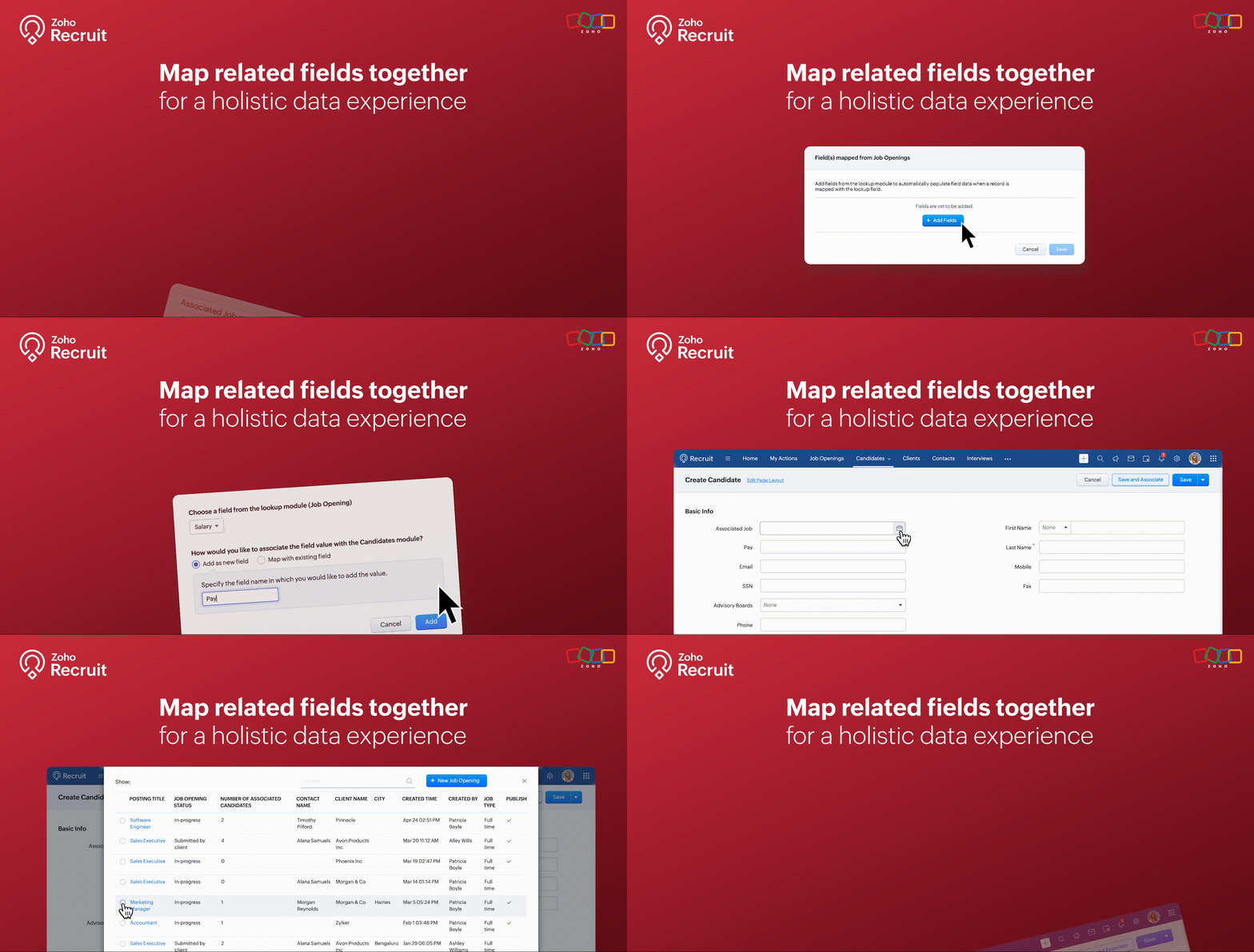
We’re thrilled to announce an exciting new feature in Zoho Recruit: Mapping Fields from Lookup Module! This powerful addition is designed to display additional details from a related module when using lookup fields. This enhances data visibility and provides more context within a single module view.
What is Mapping Fields from Lookup Module?
The "Mapping Fields from Lookup Module" feature allows you to incorporate additional fields from related (lookup) modules directly into your primary module's layout. This means you can now view more contextual information within a single view without the need to switch back and forth between different modules.
For example, if you're in the Candidates module, you can map fields like Job Location, Job Type, and Hiring Manager from the Job Openings module. This way, you can see all key details about the job opening a candidate applied for right within the candidate’s record.
Benefits
- Enhanced Data Visibility: By mapping fields from related modules, you can see all pertinent information at a glance. This comprehensive view enables better decision-making since all the relevant data is readily accessible within a single module.
- Improved Workflow Efficiency: Say goodbye to the constant toggling between different modules. With mapped fields, you have a more streamlined workflow, saving time and reducing the chances of missing critical information.
- Better Data Consistency: Ensure that all necessary information is consistently available across different modules. This reduces data silos and enhances the reliability of your recruitment data.
Use Cases
1. Streamlined Candidate Evaluation:
Managing candidate evaluations often requires accessing various details about job openings they’ve applied for. Mapping fields from the Job Openings module to the Candidates module makes this process seamless and efficient.
Example:
A recruiter at a healthcare organization is evaluating candidates for multiple nursing positions. By mapping fields like Shift Type, Department, and Hiring Manager from the Job Openings module, they can view all relevant job details directly within the candidate’s profile. This comprehensive view helps the recruiter quickly assess each candidate's fit for the roles based on the specific requirements of each department, without needing to navigate to the Job Openings module.
2. Comprehensive Interview Scheduling:
Scheduling interviews for candidates can be a complex task, especially when coordinating with multiple hiring managers. Mapping fields from the Interview Schedule module to the Candidates module can streamline this process.
Example:
An HR coordinator at a retail company is responsible for scheduling interviews for various store manager positions. By mapping fields such as Interview Date, Interview Time, and Interviewer from the Interview Schedule module to the Candidates module, they can keep track of all upcoming interviews directly from the candidate’s profile. This ensures that the coordinator can efficiently manage interview schedules and communicate details to candidates without missing any critical information.
3. Enhanced Client-Specific Job Management:
Recruitment firms often manage job postings for multiple clients, each with specific requirements and details. Mapping fields from the Clients module to the Job Openings module can provide a unified view of client-specific job postings.
Example:
A recruitment consultant at a staffing agency is managing job postings for several clients in the finance sector. By mapping fields such as Client Industry, Client Contact, and Special Requirements from the Clients module to the Job Openings module, the consultant can view all client-related information directly within each job opening. This comprehensive view helps the consultant tailor their recruitment efforts to meet the unique needs of each client, ensuring better client relationship management and more successful job placements.
How to Use the Mapping Fields from Lookup Module
- Identify the Fields: Determine which fields you want to map from the lookup module to your primary module.
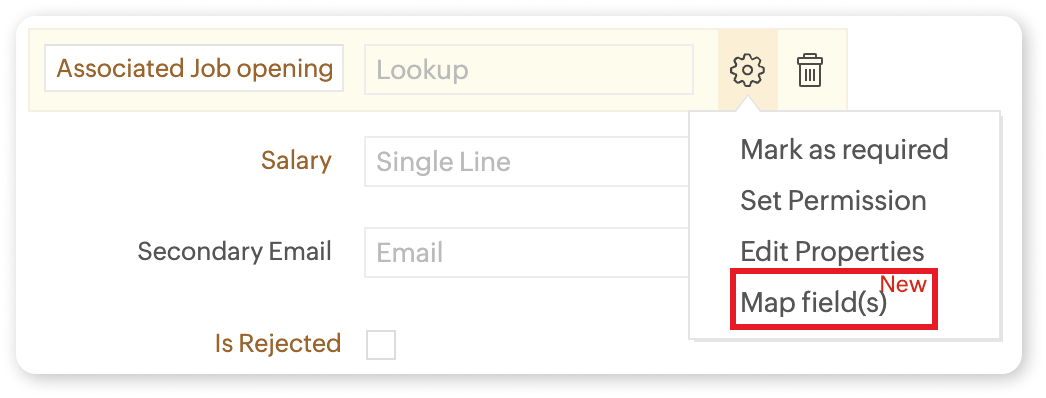
- Add the Lookup Field: Include the lookup field in your module layout where you want the additional information to appear.
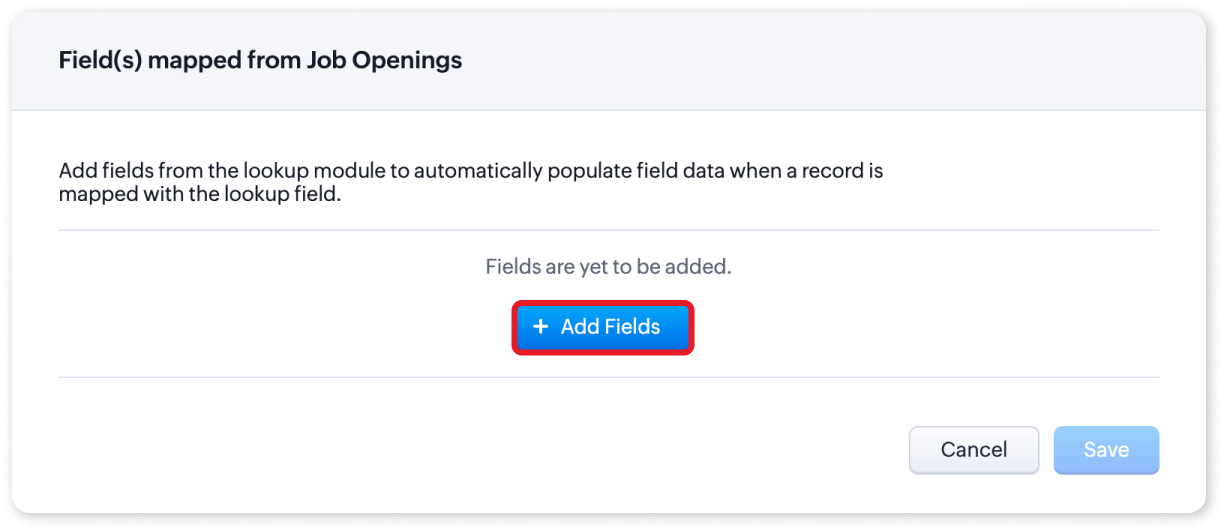
- Map the Fields: Click on the settings icon and select "Map Field(s)". You can choose to add the fields as new or map them to existing fields.
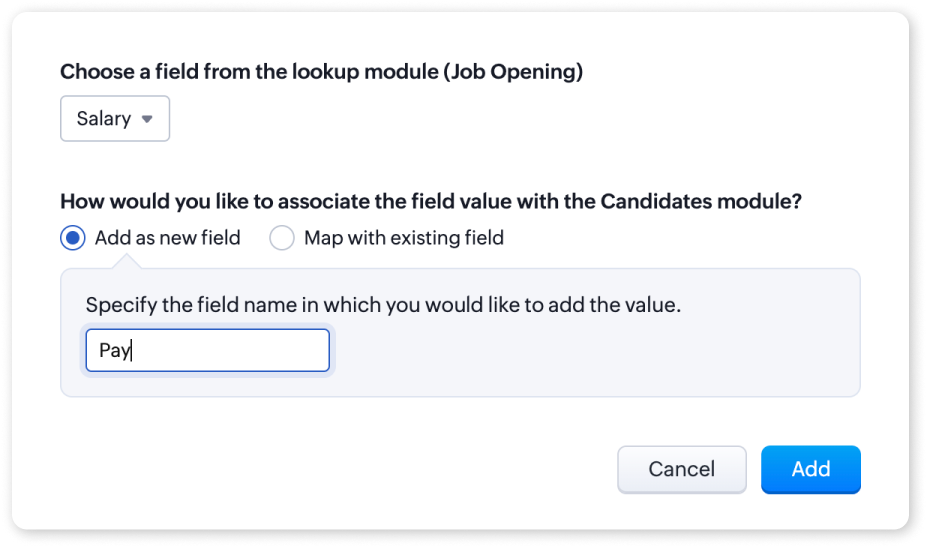
- Save Changes: Once you have mapped the fields, save the changes to your layout.
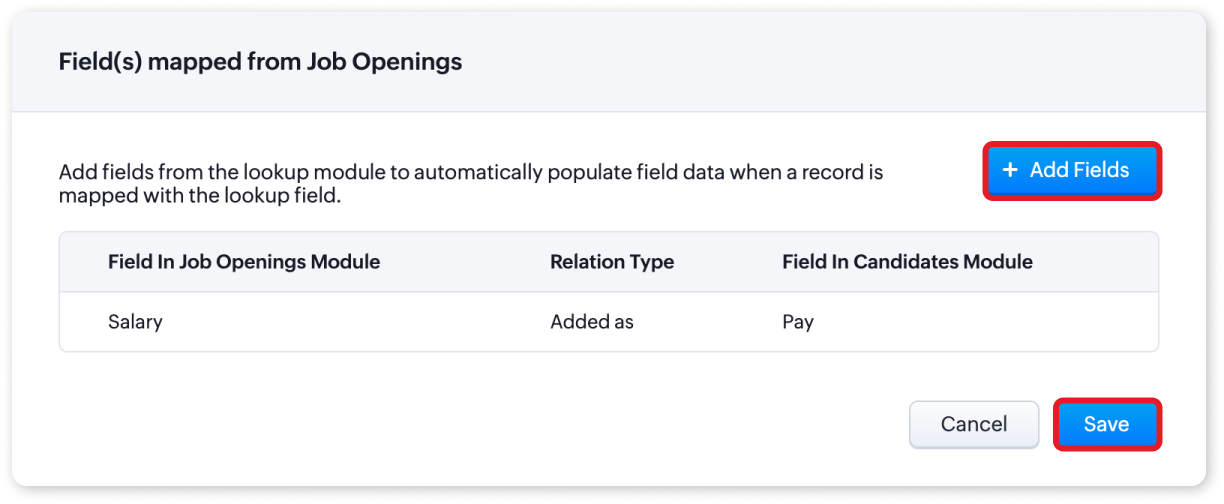
For more detailed information, please refer to our help article on Mapping fields from Lookup Module. If you have any questions or suggestions regarding this update, feel free to leave a comment below or reach out to our customer support team at support@zohorecruit.com.
Regards
Team Zoho Recruit
Topic Participants
Akshaya P
fundae Careers
Gowtham Prashanth
Sticky Posts
An update to improve email delivery | Email Authentication & Relay
Update Rollout Latest Update: Enterprise users (8th July, 2025) This update is now live for Enterprise plan users in all regions. This includes People Plus, but not Zoho One, which will be covered in an upcoming update. Professional users (31st May 2025)Zoho Recruit User Group Meet-up | INDIA 2025 (Venue Finalised)
Hello Zoho Recruit users from India, We’re pleased and excited to announce our 2025 edition of Zoho user group meet-up in India in five cities! In this meet-up, our team of experts will help you understand the intricate nuances to use Zoho Recruit better,Zoho Recruit is coming to the UK | Zoho Community Learning Series
Customers from the United Kingdom, Exciting news: We will be in London for the Zoho Recruit user meet up. Our team will help you better understand the intricate nuances of Zoho Recruit to help you hire faster, inform about new and upcoming features, andAsk the experts - A live Q & A discussion on Zoho Recruit
We are delighted to come back with another edition of Ask the Experts community series. This edition, we'll be focusing on everything about Zoho Recruit. The topics will focus on the features that are used/asked by the majority of users and also basedRestriction on 'From' addresses with a public domain
Dear Zoho Recruit Community, We hope this message finds you well. This post is to inform you about some important updates regarding email restrictions within Zoho Recruit. Effective post 31st March 2025, we will be implementing changes to the use of email
Recent Topics
Zoho Sheets
Hi, I am trying to transition into Zoho sheets, I have attached the issues encountered. Server issues, file trying to upload for more than 30 mins, even once uploaded my data aren't loaded. Simple calculations are not working I have attached the sample.Zoho CRM + Zoho FSM : alignez vos équipes commerciales et techniques
La vente est finalisée, mais le parcours client ne fait que commencer ! Dans les entreprises orientées service, conclure une vente représente seulement la première étape. Ce qui suit — installation, réparation ou maintenance régulière — influence grandementTop Bar Shifting issue still not fixed yet
I mentioned in a previous ticket that on Android, the top bar shifts up when you view collections or when you're in the settings. That issue still hasn't been fixed yet. I don't wanna have to reinstall the app as I've noticed for some reason, reinstallingPower of Automation:: Automate the process of updating project status based on a specific task status.
Hello Everyone, Today, I am pleased to showcase the capabilities of a custom function that is available in our Gallery. To explore the custom functions within the Gallery, please follow the steps below. Click Setup in the top right corner > DeveloperBilling Management: #3 Billing Unbilled Charges Periodically
We had a smooth sail into Prorated Billing, a practice that ensures fairness when customers join, upgrade, or downgrade a service at any point during the billing cycle. But what happens when a customer requests additional limits or features during theNo bank feeds from First National Bank South Africa since 12 September
I do not know how Zoho Books expects its customers to run a business like this. I have contacted Zoho books numerous times about this and the say it is solved - on email NO ONE ANSWERS THE SOUTH AFRICAN HELP LINE Come on Zoho Books, you cannot expectCitation Problem
I had an previous ticket (#116148702) on this subject. The basic problem is this; the "Fetch Details" feature works fine on the first attempt but fails on every subsequent attempt, Back in July after having submitted information electronically and wasFailing to generate Access and Refresh Token
Hello. I have two problems: First one when generating Access and Refresh Token I get this response: As per the guide here : https://www.zoho.com/books/api/v3/#oauth (using server based application) I'm following all the steps. I have managed to getAuto-Forward All Incoming Mail
I have setup the Zoho Business Mail to host my own domain's mail. Is it possible to have all incoming email auto-forwarded to another email account? What I would like to do is have all incoming emails forwarded to my Yahoo or Hotmail accounts until I can complete the migration to Zoho. I can't seem to locate this setting anywhere. I don't care whether the mail is kept on the Zoho server or not at this time.Zeptomail 136.143.188.150 blocked by SpamCop
Hi - it looks like this IP is being blocked, resulting in hard bounces unfortunately :( "Reason: uncategorized-bounceMessage: 5.7.1 Service unavailable; Client host [136.143.188.150] blocked using bl.spamcop.net; Blocked - see https://www.spamcop.net/bl.shtml?136.143.188.150Apply transaction rules to multiple banks
Is there any way to make transaction rules for one bank apply to other banks? It seems cumbersome to have to re-enter the same date for every account.How to bulk update records with Data Enrichment by Zia
Hi, I want to bulk update my records with Data Enrichment by Zia. How can I do this?How do I split a large CSV file into smaller parts for import into Zoho?
Hi everyone, I’m trying to upload a CSV file into Zoho, but the file is very large (millions of rows), and Zoho keeps giving me errors or takes forever to process. I think the file size is too big for a single import. Manually breaking the CSV into smallerClient Script Payload Size Bug
var createParams = { "data": [{ "Name": "PS for PR 4050082000024714556", "Price_Request": { "id": "4050082000024714556" }, "Account": { "id": "4050082000021345001" }, "Deal": { "id": "4050082000023972001" }, "Owner": { "id": "4050082000007223004" }, "Approval_Status":lead convert between modules
Hello, The workflow we set up to automatically transfer leads registered via Zapier into the Patients module to the Leads module started to malfunction unexpectedly on September 25, 2025, at 11:00 AM. Under normal circumstances, all fields filled in theFlow Task Limits - How to Monitor, Understand Consumption?
So, I got an email last night saying that I've exhausted 70% of my tasks for this month, and encouraging me to buy more tasks. I started to dig into this, and I cannot for the life of me figure out where to find any useful information for understanding,Cross References Do Not Update Correctly
I am using cross references to reference Figures and current am just using the label and number, i.e. Figure #. As seen here: When I need to update the field, I use the update field button. But it will change the cross reference to no longer only includingManage control over Microsoft Office 365 integrations with profile-based sync permissions
Greetings all, Previously, all users in Zoho CRM had access to enable Microsoft integrations (Calendar, Contacts, and Tasks) in their accounts, regardless of their profile type. Users with administrator profiles can now manage profile-based permissionsHow to Track and Manage Schedule Changes in Zoho Projects
Keeping projects on track requires meticulous planning. However, unforeseen circumstances can cause changes to schedules, leading to delays. It becomes important to capture the reason for such changes to avoid them in the future. Zoho Projects acknowledgesIs there a notification API when a new note is addeding
Trying to push to Cliq, or email notification when there's a new note added in module. How to implement this?Collaborate Feature doesn't work
Hello Team. It seems that the collaborate section is broken? I can post something but it all appears in "Discussions". In there is no way how I would mark something as Draft, Approval, post or any of the other filter categories? Also if I draft a postEdit Permission during and after approval?
When a record is sent for approval Can a user request for edit permission from the approver? We don't want to give edit permissions for all the records under approval Only on a case-by-case basis How can we achieve this?Zoho web and mobile application not workingn
Both zoho forms web and mobile application aren't working. I have checked my network connections and they are fine.Bulk Moving Images into Folders in the Library
I can't seem to select multiple images to move into a folder in order to clean up my image library and organize it. Instead, I have to move each individual image into the folder and sometimes it takes MULTIPLE tries to get it to go in there. Am I missingLatest updates in Zoho Meeting | Breakout rooms and End to end encryption
Hello everyone, We’re excited to share a few updates for Zoho Meeting. Here's what we've been working on lately: Introducing Breakout Rooms for enhanced collaboration in your online meetings and End-to-end encryption to ensure that the data is encryptedSystematic SPF alignment issues with Zoho subdomains
Analysis Period: August 19 - September 1, 2025 PROBLEM SUMMARY Multiple Zoho services are causing systematic SPF authentication failures in DMARC reports from major email providers (Google, Microsoft, Zoho). While emails are successfully delivered dueAccidentally deleted a meeting recording -- can it be recovered?
Hi, I accidentally deleted the recording for a meeting I had today. Is there a way I can recover it?How to access email templates using Desk API?
Trying to send an email to the customer associated to the ticket for an after hours notification and can't find the API endpoint to grab the email template. Found an example stating it should be: "https://desk.zoho.com/api/v1/emailtemplates/" + templateID;Update Portal User Name using Deluge?
Hey everyone. I have a basic intake form that gathers some general information. Our team then has a consultation with the person. If the person wants to move forward, the team pushes a CRM button that adds the user to a creator portal. That process isUnable to retrieve Contact_Name field contents using Web API in javascript function
Hello, I've added a field in the Purchase Order form to select and associate a Sales Order (Orden_de_venta, lookup field). I've also created a client script to complete some fields from the Sales Order (and the Quote), when the user specifies the relatedUpdating Woocommerce Variation Products Prices Via Zoho CRM
I can update product prices with this flow: But I can't update variant products. I got a code from Zoho for this, but I couldn't get it to work. It needs to find the product in the CRM from the SKU field and update the variation with the price there.Emails Disappearing From Inbox
I am experiencing the unnerving problem of having some of the messages in my inbox just disappear. It seems to happen to messages that have been in there for longer than a certain amount of time (not sure how long exactly). They are usually messages that I have flagged and know I need to act on, but have not gotten around to doing so yet. I leave them in my inbox so I will see them and be reminded that I still need to do something about them, but at least twice now I have opened my inbox and foundPower of Automation :: Automatic removal of project users once the project status is changed.
A custom function is a software code that can be used to automate a process and this allows you to automate a notification, call a webhook, or perform logic immediately after a workflow rule is triggered. This feature helps to automate complex tasks andCustomizing Form Questions per Recipient Group in Zoho Campaigns/Forms
Hello everyone, I would like to ask if it’s possible in Zoho Campaigns or Zoho Forms to send out a campaign where the form questions can be customized based on the group of recipients. Use case example: I have prepared 20 questionnaire questions. ForForms - Notification When Response Submitted
How do I set it up to generate an email notification when a response (class request) is submitted?How to disable user entry on Answer Bot in Zobot
Hi, I have an Answer Bot in my Zobot, here is the configuration: I only want the user to choose 1 of the 4 the options I have provided: When no answer found, user chooses 'I'll rephrase the question' or 'Ask a different question When answer is found,More admin control over user profiles
It's important for our company, and I'm sure many others, to keep our users inline with our branding and professional appearance. It would be useful for administrators to have more control over profile aspects such as: Profile image User names Email signaturesPlease Make Zoho CRM Cadences Flexible: Allow Inserting and Reordering Follow-Up Steps
Sales processes are not static. We test, learn, and adapt as customers respond differently than expected. Right now, Zoho Cadences do not support inserting a new step between existing follow-ups or changing the type of an existing primary step. If I realizeClear Tag & Linking Between Quotes and Sales Orders
Hi Zoho Team, In Zoho Books, when a quote is converted into a sales order, it would be extremely useful to have: A clear tag/indicator on the quote showing that it has been converted into a sales order. A direct link in the sales order back to the originatingAdd Direct Ticket Link to Zoho Help Center Portal in Email Replies
Hi Zoho Support Team, We hope you're doing well. We’d like to request a small but valuable improvement to enhance the usability of the Zoho Help Center portal (https://help.zoho.com/portal/en/myarea). Currently, when someone from Zoho replies to a supportNext Page