Enhance Data Visibility with Mapping Fields from Lookup Module
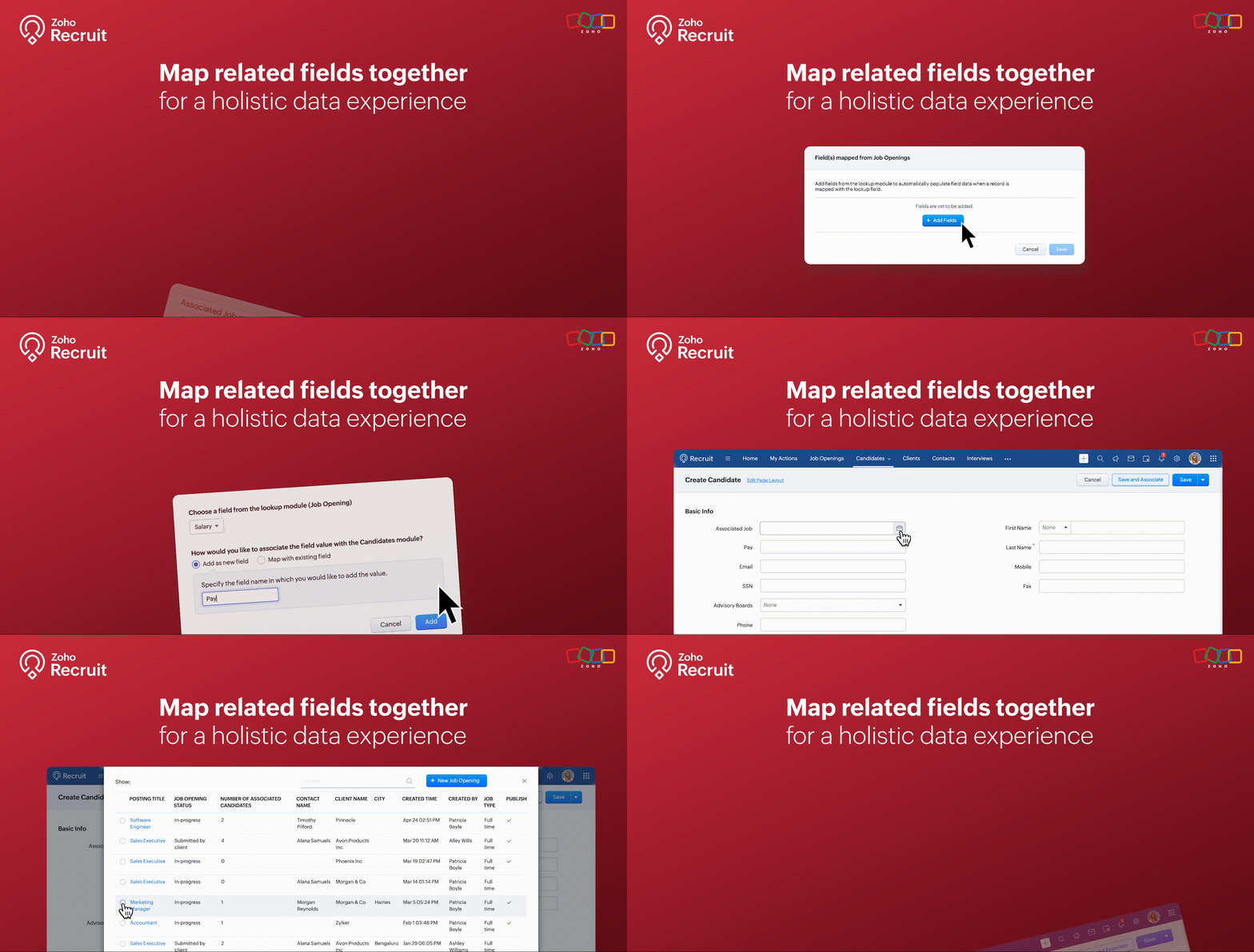
We’re thrilled to announce an exciting new feature in Zoho Recruit: Mapping Fields from Lookup Module! This powerful addition is designed to display additional details from a related module when using lookup fields. This enhances data visibility and provides more context within a single module view.
What is Mapping Fields from Lookup Module?
The "Mapping Fields from Lookup Module" feature allows you to incorporate additional fields from related (lookup) modules directly into your primary module's layout. This means you can now view more contextual information within a single view without the need to switch back and forth between different modules.
For example, if you're in the Candidates module, you can map fields like Job Location, Job Type, and Hiring Manager from the Job Openings module. This way, you can see all key details about the job opening a candidate applied for right within the candidate’s record.
Benefits
- Enhanced Data Visibility: By mapping fields from related modules, you can see all pertinent information at a glance. This comprehensive view enables better decision-making since all the relevant data is readily accessible within a single module.
- Improved Workflow Efficiency: Say goodbye to the constant toggling between different modules. With mapped fields, you have a more streamlined workflow, saving time and reducing the chances of missing critical information.
- Better Data Consistency: Ensure that all necessary information is consistently available across different modules. This reduces data silos and enhances the reliability of your recruitment data.
Use Cases
1. Streamlined Candidate Evaluation:
Managing candidate evaluations often requires accessing various details about job openings they’ve applied for. Mapping fields from the Job Openings module to the Candidates module makes this process seamless and efficient.
Example:
A recruiter at a healthcare organization is evaluating candidates for multiple nursing positions. By mapping fields like Shift Type, Department, and Hiring Manager from the Job Openings module, they can view all relevant job details directly within the candidate’s profile. This comprehensive view helps the recruiter quickly assess each candidate's fit for the roles based on the specific requirements of each department, without needing to navigate to the Job Openings module.
2. Comprehensive Interview Scheduling:
Scheduling interviews for candidates can be a complex task, especially when coordinating with multiple hiring managers. Mapping fields from the Interview Schedule module to the Candidates module can streamline this process.
Example:
An HR coordinator at a retail company is responsible for scheduling interviews for various store manager positions. By mapping fields such as Interview Date, Interview Time, and Interviewer from the Interview Schedule module to the Candidates module, they can keep track of all upcoming interviews directly from the candidate’s profile. This ensures that the coordinator can efficiently manage interview schedules and communicate details to candidates without missing any critical information.
3. Enhanced Client-Specific Job Management:
Recruitment firms often manage job postings for multiple clients, each with specific requirements and details. Mapping fields from the Clients module to the Job Openings module can provide a unified view of client-specific job postings.
Example:
A recruitment consultant at a staffing agency is managing job postings for several clients in the finance sector. By mapping fields such as Client Industry, Client Contact, and Special Requirements from the Clients module to the Job Openings module, the consultant can view all client-related information directly within each job opening. This comprehensive view helps the consultant tailor their recruitment efforts to meet the unique needs of each client, ensuring better client relationship management and more successful job placements.
How to Use the Mapping Fields from Lookup Module
- Identify the Fields: Determine which fields you want to map from the lookup module to your primary module.
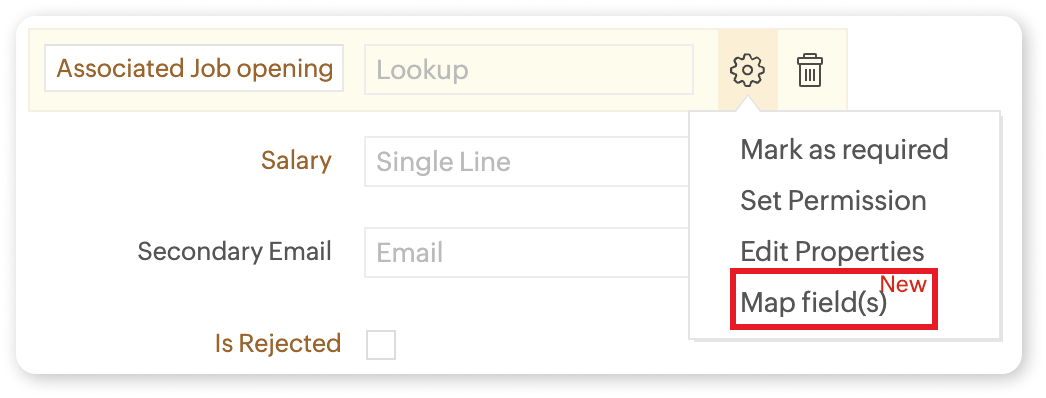
- Add the Lookup Field: Include the lookup field in your module layout where you want the additional information to appear.
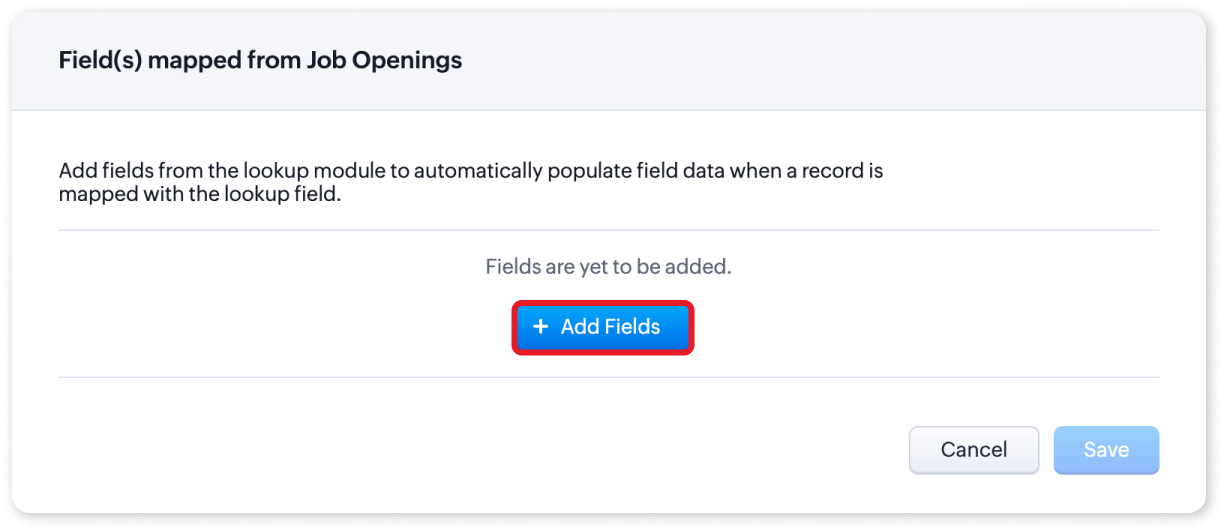
- Map the Fields: Click on the settings icon and select "Map Field(s)". You can choose to add the fields as new or map them to existing fields.
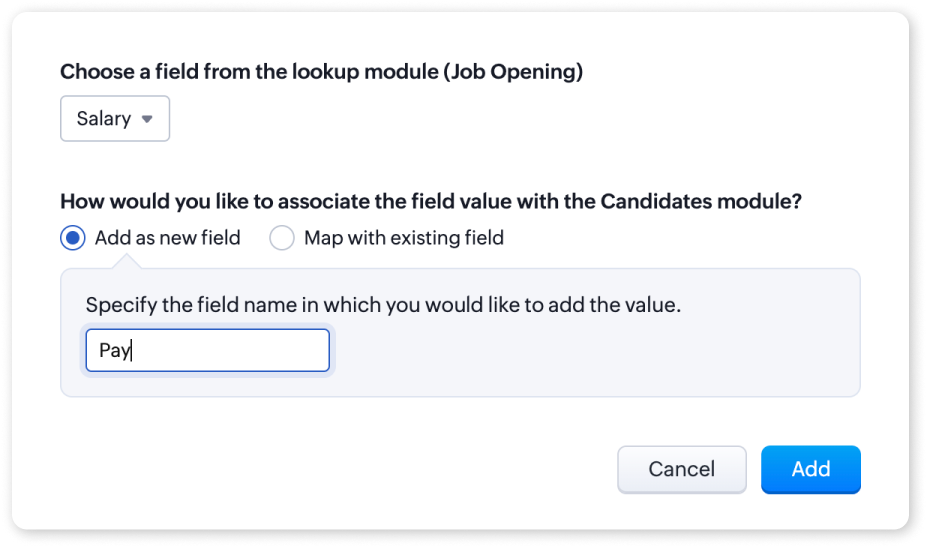
- Save Changes: Once you have mapped the fields, save the changes to your layout.
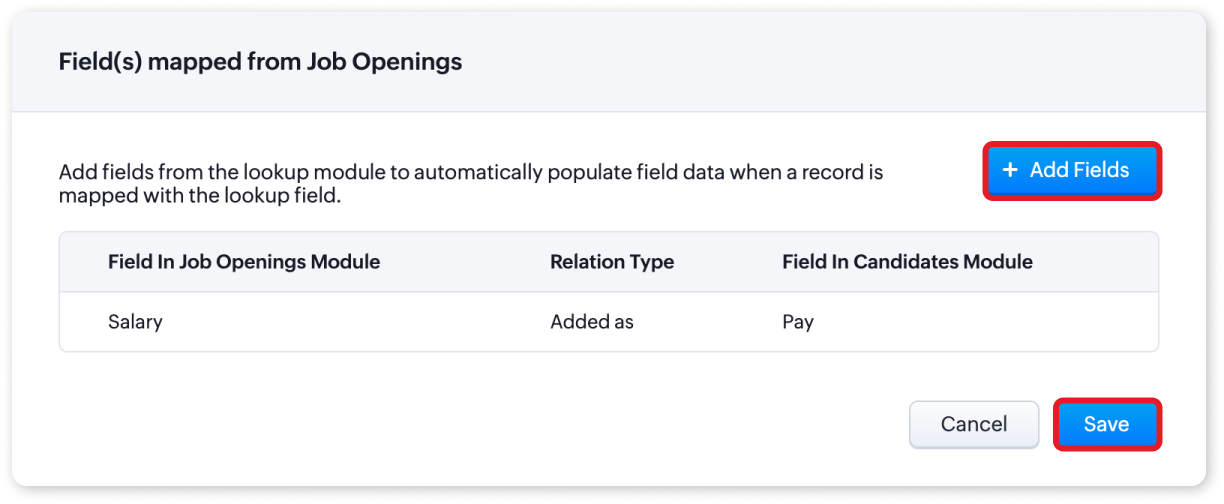
For more detailed information, please refer to our help article on Mapping fields from Lookup Module. If you have any questions or suggestions regarding this update, feel free to leave a comment below or reach out to our customer support team at support@zohorecruit.com.
Regards
Team Zoho Recruit
Topic Participants
Akshaya P
fundae Careers
Gowtham Prashanth
Sticky Posts
An update to improve email delivery | Email Authentication & Relay
Update Rollout Latest Update: Enterprise users (8th July, 2025) This update is now live for Enterprise plan users in all regions. This includes People Plus, but not Zoho One, which will be covered in an upcoming update. Professional users (31st May 2025)Zoho Recruit User Group Meet-up | INDIA 2025 (Venue Finalised)
Hello Zoho Recruit users from India, We’re pleased and excited to announce our 2025 edition of Zoho user group meet-up in India in five cities! In this meet-up, our team of experts will help you understand the intricate nuances to use Zoho Recruit better,Zoho Recruit is coming to the UK | Zoho Community Learning Series
Customers from the United Kingdom, Exciting news: We will be in London for the Zoho Recruit user meet up. Our team will help you better understand the intricate nuances of Zoho Recruit to help you hire faster, inform about new and upcoming features, andAsk the experts - A live Q & A discussion on Zoho Recruit
We are delighted to come back with another edition of Ask the Experts community series. This edition, we'll be focusing on everything about Zoho Recruit. The topics will focus on the features that are used/asked by the majority of users and also basedRestriction on 'From' addresses with a public domain
Dear Zoho Recruit Community, We hope this message finds you well. This post is to inform you about some important updates regarding email restrictions within Zoho Recruit. Effective post 31st March 2025, we will be implementing changes to the use of email
Recent Topics
How do I run a PnL by Sales Person?
I am trying to run a PnL by sales person but am not seeing the option do so. All I need to know (per salesperson) is revenue, cost of goods, gross profit.View Contracts and Support Plans on Mobile
We would like to be able to see contracts and support plans from the mobile app on iOS!App like Miro
Hi all, is there a way to have a interactive whiteboard like in Miro? We want to visualize our processes and workflows in an easy way.Loan repayment Entry
While receiving loan, i does following steps in My Zoho books. 1. Create "Loan & Advance " Account as Parent Account under Long Term Liabilities. 2. Create another account For Example "Mr. ABC's Loan as Child account under the parent account. Now: InQuotes module send email reverted back into 2022??
Our Zoho CRM PLUS quotes, sales orders, invoice modules is showing us an email composer from 2022. We cannot send emails and its been a real pain. I tried clicking the new version over there but it doesnt seem to do anything. Any help is welcome. thWorkflow Condition - how do check that a date / time value is in the past?
Hello, I'm got a workflow that runs a function when records reach their 'Effective Date / Time', but sometimes records are created after the 'Effective Date / Time' so I have another workflow that checks for records which needs to be processed immediately.Pre filling SignForm field values by URL field alias's in Zoho Sign
Hi, Does anyone know if it's possible to pre fill the field values of the SignForm by using field alias's like you can in Zoho forms? To be more specific, I want to be able to change the SignForm URL to include some information like this: Before : https://sign.zoho.eu/signform?form_link=234b4d535f495623920c288fc8538cb9e6db03bbfd44499b63f3e5c48daf78f44bc47f333e2f5072cc1ee74b7332fe18b25c93fab10cb6243278d49c67eacbf30bbe5b6e1cc8c6b2#/How to Split Payout in Zoho Books (Without Using Journal?)
Hi, I'm trying to properly record payouts in Zoho Books. The issue is that each payout is a combination of sales and expenses (fees). When I try to categorise the payout transaction from the Banking tab, I can only split the transaction using income-typePayment Schedule
Please add the ability to create a payment schedule. The other options, like retainer invoices or two invoices, do not work for the customer. We invoice a client and need to be able to show them everything they owe in one invoice, and when each paymentWhich pricing system do you think would work best for us?
Imagine we’re selling strictly wholesale. We’d rather not publish unit prices; instead, we quote customers case-by-case. To spur larger orders, we’re considering a transparent discount ladder—say: $0 – $999: 0 % $1,000 – $1,999: 5 % $2,000 – $4,999: 10Can't Remove Payment Gateway
I am getting the error "Settings cannot be cleared as some of the transactions are still in progress." when trying to remove the PayGate payment gateway which I was unable to get working. I am now using paystack and I want to remove Paygate.Sync specific Zoho Inventory Warehouses to Zoho Commerce
As said in the title, we would want to only sync stock from one warehouse of Zoho Inventory to the Zoho Commerce item stock. We have a 2 warehouses in different countries and the way that Zoho Commerce works (It takes stock from ALL WAREHOUSES EVERYWHEREWeekly Tips : Automatically clean clutter with Junk cleanup interval
If you regularly receive many unwanted or spam emails, your Spam folder can quickly fill up and start taking up valuable storage space in your Zoho Mail account. Instead of manually clearing it every few days, you might find it helpful to enable automaticAny solution for getting portal users list in deluge or in widget
Hi Team, Has anyone able to find the solution to get portal users list in deluge or in zoho creator widgets? Thanks, PayalThe Grid is here!
Hey Zoho Forms Community! 👋 We’re thrilled to announce the launch of a feature that’s been on your wishlist for a while: Grids What is Grids? Grids let you place form fields side by side in multiple columns to create a more concise and organized formSteuerberater der Zoho benutzt in Deutschland
I write in English because the issue is related to German regulations. Wir sind ein Unternehmen, welches aktuell keine Pflicht zur doppelten Buchführung hat. Aktuell bucht unser Steuerberater jeden Beleg, auch unsere Auslagen. Wir würden dies gerne selbstGraphQL in new Send Webhooks feature
Hello, is it possible to use GraphQL apis in the new Send Webhooks feature?# 2 Why do we need a billing system when accounting covers billing?
In today's evolving financial tech stack, businesses use a mix of tools to manage their day-to-day operations, from invoicing to full-fledged accounting. While accounting platforms typically come with built-in invoicing features, specialized billing systemsHow to insert an Excel/Zoho Sheet table in a chat?
Hello, is there a way to paste an excel/zoho sheet table to a conversation without loosing table lines. I tried to paste a piece of a table and all the columns and rows were gone. How to easily paste a table without a need of sending a file? KatarzyMass Update Application Status
How to update application statuses of Multiple Applications at once? Is that possible? If not then why please consider adding it It can save hours of manual work Thats the only Option I seeFree webinar: Streamlining customer service paperwork with the Zoho Sign extension for Zoho Desk
Hi there! Wondering how to bridge the gap between digitized customer service and business paperwork? Attend our free webinar to learn how you can do this by connecting Zoho Sign, our digital signature app, with Zoho Desk, our online customer service helpMail Search Not Working
Hello, Mail search is not working at all. I've tried Chrome and Mozilla. I can try and search for an exact term, or even an email that is 1st in my email list. All search does is sit and spin, or it comes up with no results. I've also tried it on my androidCannot Send Email to a Gmail Account
Hello, I have a zoho-hosted email account, alex@chirochannelnetwork.com that has trouble sending to gmail accounts. But not all gmail accounts, only some of them. I've tried to figure this out with clients, and they don't appear to be going into theirUnblock ME
info@pentekykloi.gr Unable to send message;Reason:554 5.1.8 Email Outgoing Blocked. Learn more. I purchase additional storageCannot Print Landscape with Zoho Sheet
I am noticing that when using the Zoho Sheet desktop for Mac, that even when selecting landscape as the print option, once you choose "Print", a second system dialog opens that automatically makes the view portrait again, and does not allow printing inPower of Automation : Enhancing custom date field calculations by excluding Weekends and Holidays
Hello Everyone, A Custom function is a user-written set of code to achieve a specific requirement. Set the required conditions needed as when to trigger using the Workflow rules (be it Tasks / Project) and associate the custom function to it. Requirement:Temporary Outage in Zoho Cliq Affecting US Users – July 23, 2025
We experienced a service disruption in Zoho Cliq that impacted core functionality for users in the US region. The issue occurred between Jul 23, 2025, 06:54:00 PM IST and 07:13:13 PM IST, lasting approximately 19 minutes. To restore service stability,portal.assignUserInProfile - Não esta adicionando
Estou encontrando problema com este comando portal.assignUserInProfile Não esta incluindo o usuário no portal Alguém pode me dizer o que pode ser thisapp.portal.assignUserInProfile("teste@gmail.com","Customer");CRM emails vs Campaigns
Please help me understand this. I am having a difficult understanding of "Campaigns" sent through CRM (real emails) or Zoho One (blast "potentially junk" emails) This is what I currently think emails sent via CRM are "real" emails sent through linked real personal email accounts and therefore are more likely to get delivered. We use this for critical updates for our "Approved " accounts and certain other preferred statuses emails via Campaigns are sent through the Zoho server (like MailChimp, CampaignSetting up property management in Zoho Books
Hi, I run a property management business that manages property complexes. There are multiple owners, some owning more than one property on the same complex. My role is to manage the fees they pay for maintenance of common areas, such as the swimming poolReverse proxy
We have a web application in the creator platform. When I launch a particular DNS, I would like that DNS to redirect to the web page of the application in creator app. Has anyone achieved it and if yes, please share how to do it.Still client need to download .exe?
Hello, the client for use zoho assist need everytime download .exe file and launch it?Splitting a ticket's entire thread
Hi, When you split a ticket it only splits the individual reply that you clicked "Split as new ticket" on. Is it not possible to split the entire ticket thread from that point into the new ticket (every reply from the split point forward)? Or is thereEditing the text on the Help Center home page
Is it possible to edit the "Welcome to Help Center" message anywhere? This one: We'd like to be able to tailor it a little more ourselves.WHMCS for Zoho Flow
Can we use WHMCS for Zoho flow?Online meetings through Calendar Booking form with options
This is great to see and particularly for those users who don't have Zoho BOOKINGS. The shame of it all though is that it could have been better. Why do we have to set up separate booking forms for each type of meeting and for each online conferencingAgents permission per department
Hi Team, can I setup permission for each agent what they can do in each department, for example I want account department agents to only have view access to support department tickets and not allowed to assign or reply to clients. I am sure this wouldCRM notes
I want to be able to add notes to a task that do not necessarily get rolled up into an account or contact. For example, I tasks to work on a Court Order for John Doe divorce account. There might be lots of updates (in the form of notes) that employeesFunction #8: Add additional charges to invoices
Here goes one of the highly sought-after custom functions in Zoho Books. If you find yourself needing to apply additional charges to customers on their invoices (say credit card surcharges, or fuel charges applicable to customers from a certain region,Alternative / optional Position
How do you create an alternative position or an optional position (article) in offers?Next Page