Function #46: Auto generate list of lapsed customers using Custom Button
Hello everyone, and welcome back to our series!
Customer retention is one of the key factors that impact the long-term success and sustainability of a business. High customer retention rates indicate satisfied customers, quality products or services, and brand loyalty, all of which contribute to overall business success. To maintain a high retention rate, it is necessary to implement various strategies such as collecting regular customer feedback, making improvements based on the feedback, building strong customer relationships, and offering loyalty programs. Additionally, it is equally important to identify and re-engage with lapsed customers as it offers businesses an opportunity to understand their preferences and reignite their interest in the business.
With today's script, you can implement a Custom Button to easily identify the lapsed customers. On clicking the button, it will email the list of customers who have not made any purchases in the last 90 days to specified users. This way, you can stay informed about your customer status and take the necessary measures to win them back.
Prerequisites:
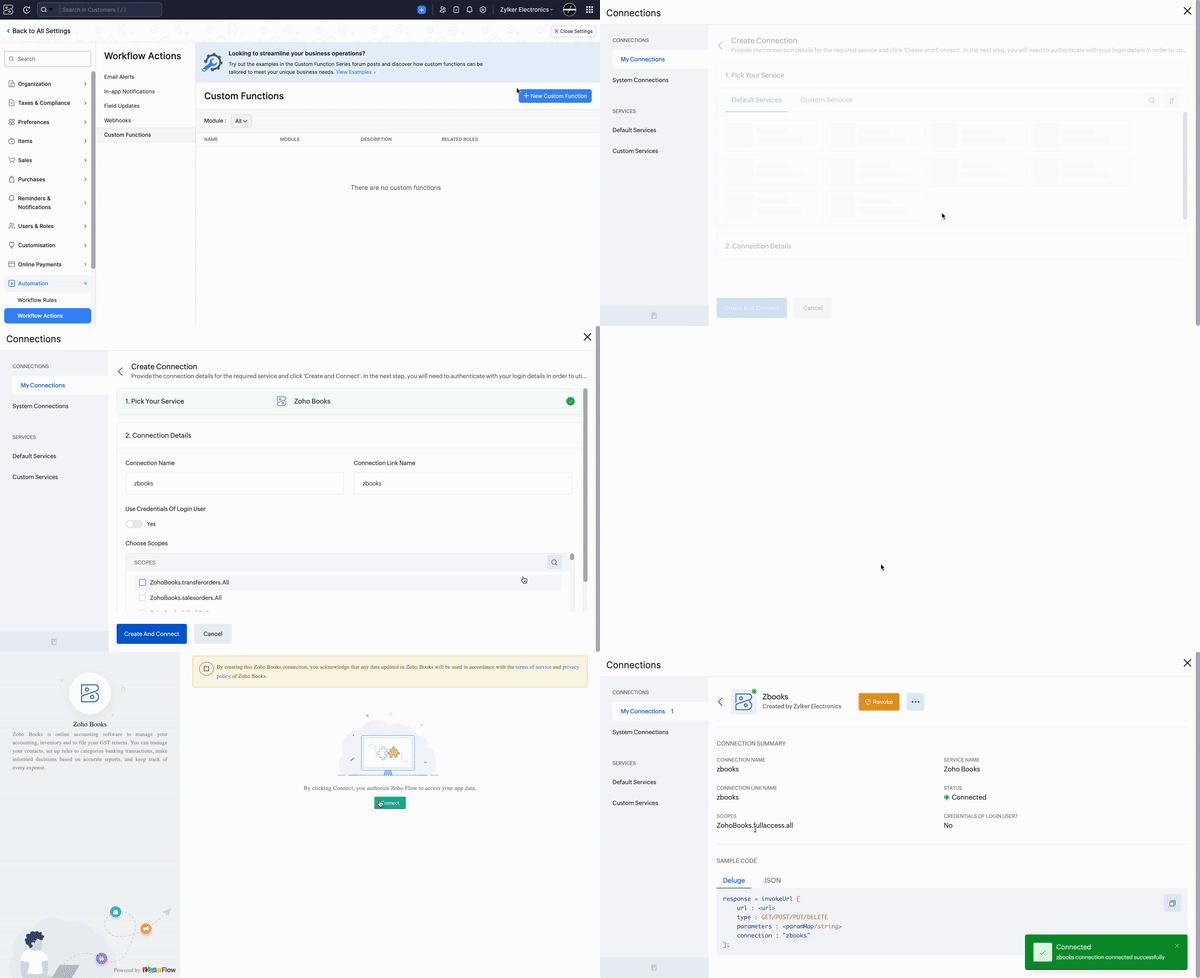
1. Create a Connection named "zbooks" to successfully execute the function. You can watch the GIF attached below to know how to create the connection.
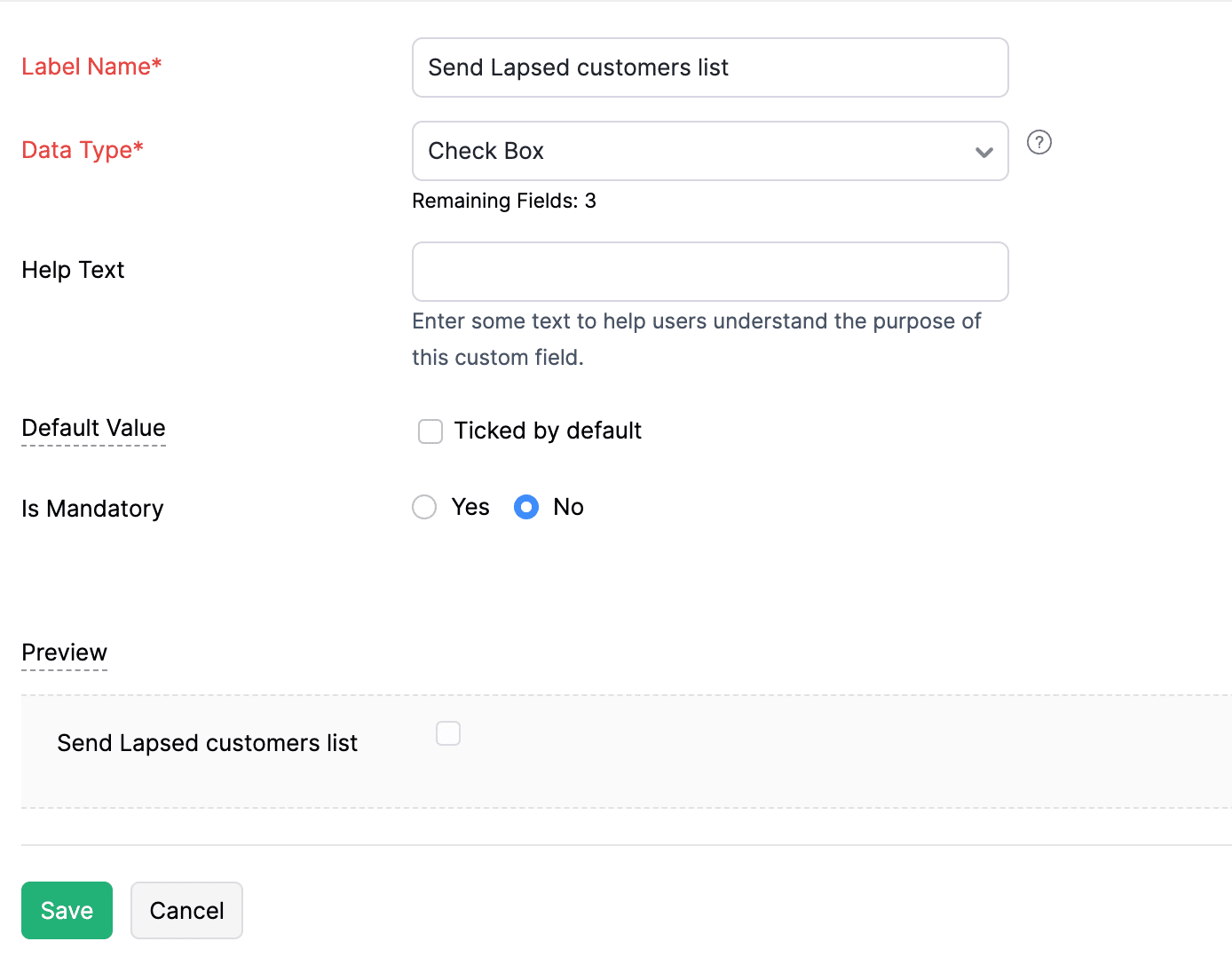
2. Create a Check Box-type custom field called "Send Lapsed customers list" for the users. The list of lapsed customers will be emailed to those users for whom the checkbox is ticked.
Custom Button:
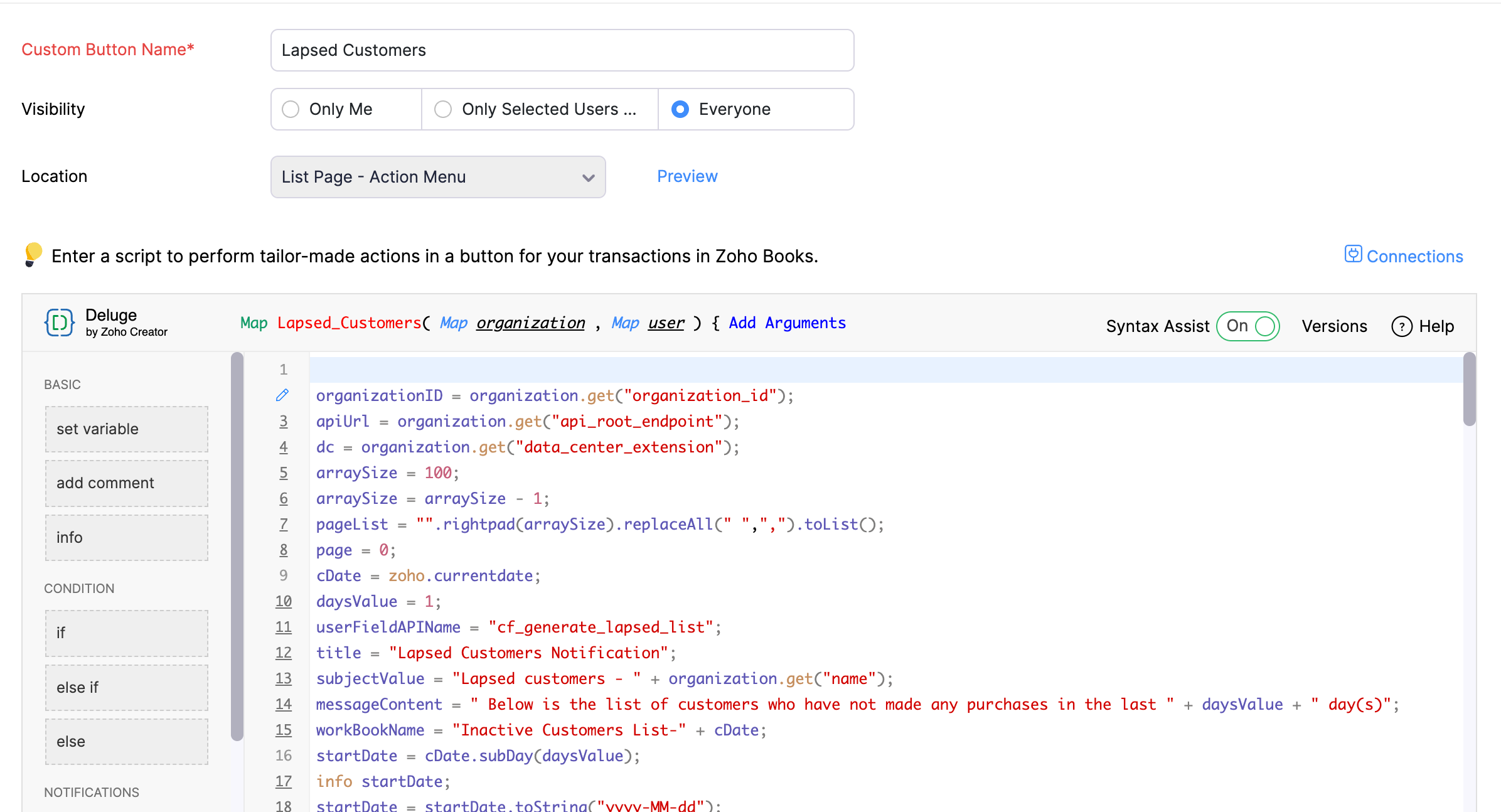
Go to Settings -> Preferences -> Customers and Vendors -> Custom Buttons -> Click +New and Choose "New Custom Button". Populate the details as mentioned below:
1. Name - Give a suitable name (e.g., Lapsed customers).
2. Visibility - Select the option that aligns with your preference for granting users access to the custom button.
3. Location - Choose "List Page - Action Menu".
Once done, add the script from this GitHub link -> Save.
Note: In line 19 of the script, replace the value "90" with the required number of days for which the lapsed customers list should be generated.
Here's how to access the button:
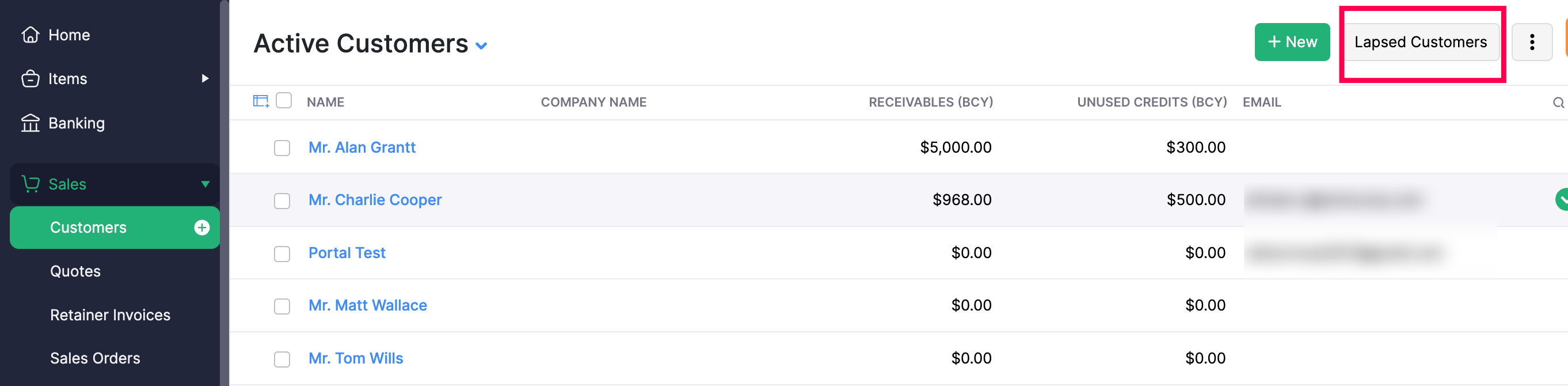
Go to Sales -> Customers -> Click the Custom Button (Lapsed Customers) -> Click Proceed. An email with the list of lapsed customers will be sent to the users.
Try out this function and drop your feedback in the comments section. If you have any specific customizations in mind, don't hesitate to reach out to our support desk at support[at]zohobooks[dot]com. We will be glad to help you.
See you next week with another useful function!
Regards,
Shireen Farhana
Zoho Books
Topic Participants
Shireen Farhana
SANDEEP SINGLA
support
Mrityunjai Kumar
Anthony Perez
Sticky Posts
[Webinar] Understanding the New Invoice Management Systems
Join industry expert CA Pritam Mahure as he discusses the importance of the new Invoice Management System (IMS) and its impact on taxpayers. Topics Covered: - Concept of IMS and pre-requisites - Applicability and Restrictions on Invoices/Records for IMSZoho Books Roadshows are back in the UAE!
Hello there, Business owners and accounting professionals of the UAE, we’re coming to your cities! FTA accredited Zoho Books is now officially one of the Digital Tax Integrators in the UAE. With the newly launched direct VAT filing capabilities, we'reZoho Books will discontinue support for older browser versions soon
Hello users, Starting from May 15, 2024, Zoho Books will no longer support the following browser versions: Browsers Version Restrictions Firefox Browser Versions older than 100 Google Chrome Versions older than 100 Microsoft Edge Versions older than 100Latest Updates of the 53rd GST Council Meeting & Its Business Implications
Join industry expert CA Venugopal Gella as he discusses the importance of 53rd GST Council Meeting, the latest notifications and changes introduced by the Finance Act 2024. Register Now: https://zoho.to/GST_WebinarBest practices for financial year-end closing with Zoho Books | Free Webinar
Ready to close your year-end finances like a pro? Join our free webinar and learn how Zoho Books helps you maintain clean accounts, carry forward balances, and get geared up for the new financial year. Register now - https://zoho.to/9f1
Recent Topics
WhatsApp Business Calling API
Dear Zoho SalesIQ Team, I would like to request a feature that allows users to call WhatsApp numbers directly via Zoho SalesIQ. This integration would enable sending and receiving calls to and from WhatsApp numbers over the internet, without the needWorkflows failing / fields not updating by function or action
Any one else having issues like this? All was working fine last week, now all of a sudden the system doesn't like 3 fields in one of my (most important) forms, and won't update these by workflow / deluge / action. Only by manually editing, or bulk edits.Europäische Zeichen: Komma "," anstatt Punkt "." möglich?
In alle Betragsfelder müssen wir mit dem Punkt "." die Beträge erfassen wie 123.34 EUR. Das müssen wir nur in Zoho so machen, weil in anderen Applikationen wird in "Europa" mit dem Komma 123,34 EUR gearbeitet. Das Datumsformat kann kann in Books eingestelltIntroducing Seek Profile & Seek Ad Sync in Zoho Recruit
Hiring on SEEK usually means working in two places. You check a candidate's SEEK Profile in one tab to confirm their work history and credentials, then switch back to Zoho Recruit to move them forward. When you post a new role, you rebuild the ad forZoho Bookings 1.0 is being retired – Switch to Bookings 2.0 by December 2, 2026
Hello everyone! Zoho Bookings 2.0 was launched on April 17, 2025, introducing a simpler, workspace-based interface for managing appointments and scheduling activities. As part of the transition to the new version, Zoho Bookings 1.0 is being retired. If[Webinar] AI-powered writing and automation in Zoho Writer
Live webinar on November 12, 2026 | Time: 2 PM IST | 2 PM EST Hi, When organizations create documents, they often start from scratch. Then they need to proofread and translate them. Doing all of this manually takes time, and errors and hard-to-read writingFeature Request - Ability to Customise Contact Info Card on Ticket Details View
Hi Desk Team, I've added a "Contact Priority" and "Account Prioirty" field and it would be very useful to agents if they could see that information in the Contact Info card on the Ticket Details view. It would be great if we could choose some fields toChatGPT Plugin / MCP Server auth error
Hi all I'm trying to connect the ChatGPT plugin for Zoho CRM but after username stage of the auth process, I get this error from the URL https://mcp.zoho.eu/mcp-client/ {"error_description":"Invalid request url, Request is not as per defined in oauthCriteria-based follow-ups , and additional email response signals in Cadences
Hello all, We've got a couple of updates for Cadences. Until now, the next follow-up in a Cadence was triggered based on the response to the previous follow-up. With this update, when the previous step is a call or a task, you can now also trigger theIntroducing Vibe in CRM: Turn Your Ideas to Live Experience
Hello Partners! AI is changing the way we work and build things every day. Everyone is using AI to build widgets and front-end apps, turning their ideas and requirements into working experiences faster than ever. Imagine simply describing what you wantCan Zoho CRM Emails be used in Zoho Analytics in any capacity?
We're wanting to display details about Lead Activity in regular reports through Zoho Analytics but we're having difficulty integrating Emails at all. We'd like to be able to note when an email is received and when it is sent somewhere other than justShow discounted amount on sales order / invoice against MRP when using Price List
Zoho has this great feature of having different Price Lists. The only thing missing perhaps is that MRP isn't shown when a price list is selected and discounted amount isn't shown on Sales Order / Invoice. This simple feature could be a great tool forTitle: How Are You Managing Sales Order Stock Allocation, Backorders, and Purchase Orders for Multiple Sales Orders in Zoho Inventory?
Title: How Are You Managing Sales Order Stock Allocation, Backorders, and Purchase Orders for Multiple Sales Orders in Zoho Inventory? Hi Zoho Community, We are using Zoho Inventory under our Zoho One subscription, and we are facing challenges with managingZoho CRM mobile updates: Display field settings, query support for kiosks, quick navigation button, and more
Hello everyone, We've made a few updates to the Zoho CRM mobile app to enhance your mobile CRM experience and efficiency. Here's a quick look at what's new: Display field customization (Android) Query support in Kiosk (Android) Quick navigation buttonZoho Inventory – Stock Allocation and Warehouse ManagementAs we implement Zoho One in our organization, we are currently facing a challenge with stock allocation and warehouse management. While the wa
As we implement Zoho One in our organization, we are currently facing a challenge with stock allocation and warehouse management. While the warehouse management part can be handled in Zoho Inventory, our main requirement is the customer-wise stock allocationZoho Desk MCP doesn't expose all functions
Hello, I'd like to be able to draft (rather than send) ticket replies using Claude Cowork. However, the Zoho Desk MCP doesn't currently offer that, despite it being available in the API (https://desk.zoho.com/DeskAPIDocument#Threads#Threads_DraftEmailReply).Total Outstanding via Whatsapp?
Is there a way to Send an automated WhatsApp message to all the customers (for whom outstanding is above 0) on daily basis from Zoho Books directly??Important update regarding public wikis
Hello everyone, We would like to share an important update regarding public access to wikis created under the Zoho Wiki Free plan. Public access was initially available as part of the Zoho Wiki Free plan. Over time, to improve and optimize our services,【開催報告】大阪 Zoho ユーザー交流会 2026 NEXUS|少人数でマーケティング・営業を回すZoho×AI活用
Zoho ユーザーの皆さん、こんにちは。 ゾーホージャパンの中野です。 11月12日(木)、AP大阪にて「大阪 Zoho ユーザー交流会 2026 NEXUS」を開催しました。 今回は、ZohoとAIを活用して、少人数でもマーケティング・営業・顧客対応を回していくための実践例を中心にご紹介しました。 ご登壇いただいた小園さん、アダルシさん、そしてご参加いただいた皆さん、ありがとうございました! ユーザー活用事例 聞き直さない、追いかけない、思い出さない 〜ZohoとAIで一人営業を回す方法〜 登壇者:株式会社ジーニアスウェブHiding old CRM Contacts in Desk
I have an issue with contacts in Desk. We sync contacts from CRM with DESK and we have old contacts, eg staff members that have left businesses. The issue is when adding a ticket (most of our tickets are raised over the phone), staff sometimes pickAction Request - Zia Agents - Get Agent API
It would be great if there was a "Fetch Agent" action for Zia Agents. The main use case here is getting the latest version of the Agent to populate the "Trigger Agent Execution" action. That action requires one to specify which version of the Agent isCalendar Reminders unavailable
For some received meeting invitations, Zoho Calendar’s web interface provides no option to add or edit a reminder. However, I can add a reminder to the same event through the phone app. That reminder then appears in the browser, but still cannot be editedEmail-Data Synchronization with Zoho Analytics
Hello, Enterprise Support Community! We're excited to announce the availability of Email Data Synchronization with Zoho Analytics! This highly requested enhancement allows you to sync email data from Zoho CRM into Zoho Analytics, making it easier to analyzeKeeping phone number text format exporting from Books to Sheet
We have a custom function that copies data from our customers in Books to Sheets. In the process the customers' phone numbers (unless they contain a space) get treated as numeric values, so leading zeros get stripped off, and in some cases scientific#22 I Sent It to the Wrong Person
Meera was sending an invoice to a client when she mistyped the email address. She noticed the mistake a week later, when the payment had not come in. She corrected the email address on the customer record and waited for the payment to arrive. But nothingNew Search Function
Hey Team, The search function updated in our CRM about a week ago, so I assume it was an automated update across Zoho. It no longer displays leads/deals etc in Chronological order so that the most recently created or updated is the first to display whichBuild a historical inventory snapshot in Google BigQuery using Zoho DataPrep
Businesses using Zoho Inventory may want to transfer their inventory data to Google BigQuery to maintain an up-to-date data warehouse. While scheduled pipelines help keep BigQuery updated with the latest inventory data, businesses that also need to trackZoho writer tabs
I'm trying to post a list of actions for my team to share online. For this I need to set tabs -- can't find a way of setting tabs anywhere. Would prefer not to go to the formality of a table. Can anyone tell me how to set tabs? greiggAbility to Set Text Direction for Individual Cells in Zoho Sheet
Dear Zoho Sheet Team, We hope you are doing well. We would like to request an enhancement in Zoho Sheet that allows users to set the text direction (right-to-left or left-to-right) for individual cells, similar to what is available in Google Sheets. UseKeep Zoho Books data in sync with Google BigQuery
Businesses using Zoho Books may need to transfer their financial data to a data warehouse like Google BigQuery for reporting and analysis. Zoho DataPrep helps automate this process by preparing Zoho Books data and syncing it with BigQuery at scheduledWhat's New - October 2026 | Zoho Backstage
Hello everyone, The last few months of the year are usually the busiest for events, with more people to reach and more details to manage. This month, we’ve made a few changes that should save you some time and back-and-forth along the way. Here’s what’sIntroducing user-based authentication across Zoho CRM
We have introduced two enhancements to simplify authentication and enable user-specific access when working with Connections and executing CRM operations across different developer tools. 1. Enable user-based authentication for Connections ConnectionsSet connection link name from variable in invokeurl
Hi, guys. How to set in parameter "connection" a variable, instead of a string. connectionLinkName = manager.get('connectionLinkName').toString(); response = invokeurl [ url :"https://www.googleapis.com/calendar/v3/freeBusy" type :POST parameters:requestParams.toString()Allow Multiple usage units to items while adding them to sales/purchase transactions
The usage unit of items added in zoho books are static right now and can not be changed. But certain items are received or sold in multiple usage units. One example is fabric. It can be bought in Meters, inches, kgs or other units. Another example wouldHow to restore deleted campaigns?
I accidentally deleted my first campaign that went out today (08/21/18). How do I restore it?Using IMAP configuration for shared email inboxes
Our customer service team utilizes shared email boxes to allow multiple people to view and handle incoming customer requests. For example, the customer sends an email to info@xxxx.com and multiple people can view it and handle the request. How can I configureNew in Cadences: Option to Resume or Restart follow-ups when re-enrolling records into a Cadence, and specify custom un-enrollment criteria
Managing follow-ups effectively involves understanding the appropriate timing for reaching out, as well as knowing when to take a break and resume later, or deciding if it's necessary to start the follow-up process anew. With two significant enhancementsAutomatic Invoice Number generation for createRecord
Hello, while testing some custom Buttons in my Zoho Books application, I noticed that I get an error that previously did not occur. After some further digging I found that the automatic transaction numbering of invoices no longer work in my organization.Stop completed task lists from disappearing?
Is there any way to stop projects from making tasks lists disappear when all the tasks in the list are completed? That's one of those little things where we're constantly fighting the product. For instance we have some projects which are ongoing - no start and end date. We use Kanban view to show the various task lists. We don't want the kanban list to disappear every time the items on it happen to be closed out. ThanksApproval Processes, Now in Standard and Professional
We encourage existing Approval Process users to switch to the new UI to access enhanced capabilities, including naming each rule and stage, setting stage-specific field updates and tasks, sending email notifications upon rejection, and tracking progressNext Page