Get Holiday ready with Zoho Mail's Templates

Get Holiday ready with Zoho Mail's Templates

As the holiday season approaches, it’s time to step away from work and unwind. You may not be able to respond to every email or send individual messages to wish everyone holidays greetings—but It is still important to stay connected. How do you send thoughtful holiday and vacation messages without spending time on manually typing out wishes?

Here’s where Zoho Mail’s Email Templates come in handy, allowing you to quickly send consistent messages while saving time and effort.

Zoho Mail Email Templates

You can use Templates in Zoho Mail to send emails in a predefined format without having to repeat the formatting multiple times. This is useful for organizations to standardize their emails across the organization. You can also categorize the templates to your preference to spot them easily.

Creating Templates

You can create email templates form Compose, Insert templates option and from Templates folder as well. To create an email template, follow the below mentioned steps:
  1. Log in to Zoho Mail.
  2. Click New Mail to compose a new email template.
  3. Provide the Subject - The template name will be the same as the Subject you provide here.
  4. Type in the required email content. 
  5. You can make the necessary formatting to the email content. 
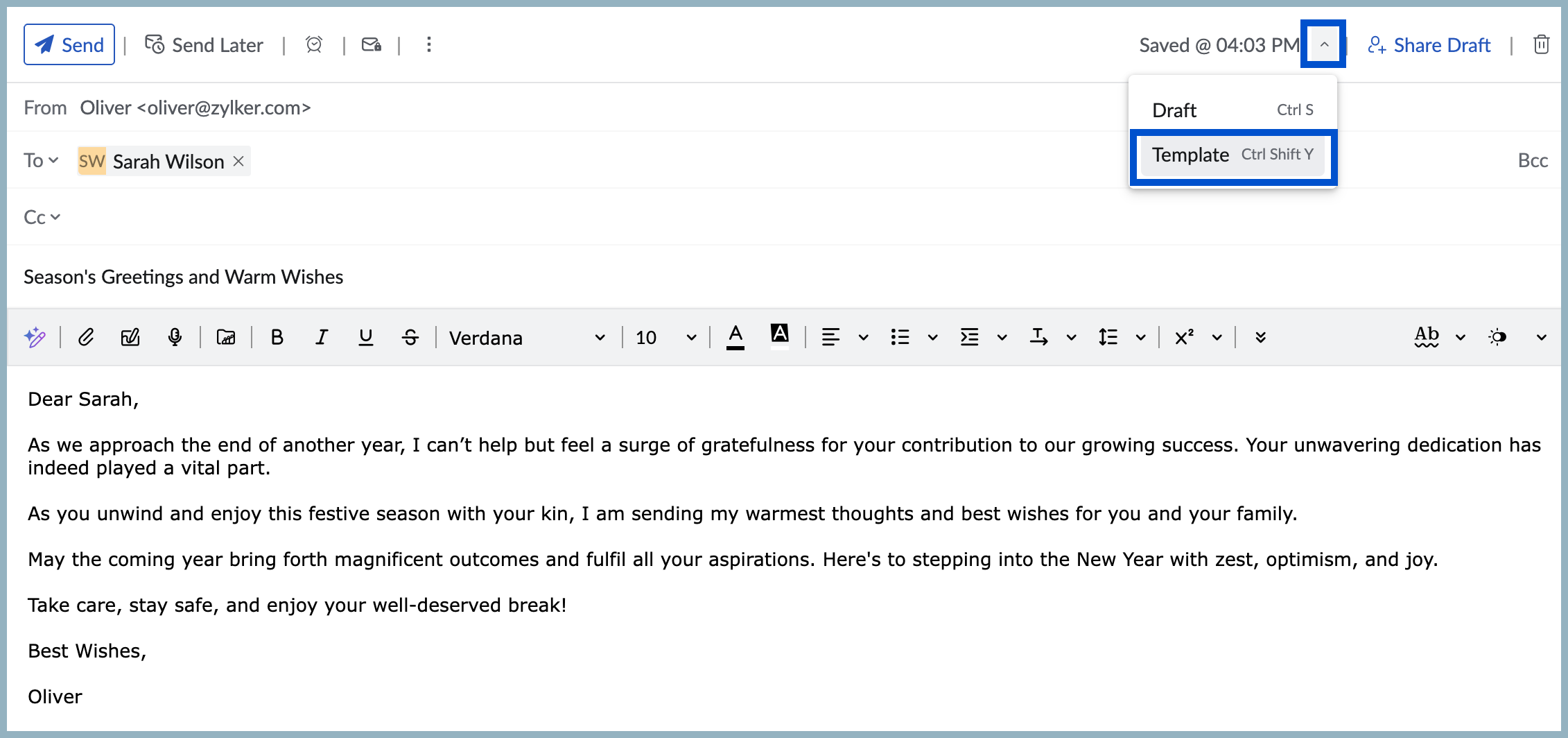
  6. Select the drop-down near Save to choose the Save Template option. 
  7. The message will be saved in the Templates folder under the ‘All Templates’ category by default.

Use templates to send an email

  1. Click New Mail to compose a new email.
  2. Click the Insert template icon in the formatting options.
  3. You will see the list of templates with the Subject and a Preview of the content. You can also view a detailed preview by clicking the Preview icon. You can use the search bar or browse through the categories to locate the template.
  4. Click on the relevant template to insert the same to your composer.
Start sending your holiday emails right away!

    • Sticky Posts

    • Weekly Tips : Save Time with Saved Search

      Let's assume your work requires you to regularly check emails from important clients that have attachments and were sent within a specific time period. Instead of entering the same conditions every time—like sender, date range, and attachments included—you
    • Weekly Tips: Protect Confidential Information with PGP in Zoho Mail

      We deal with confidential information almost every day, whether it is being sent out or received. Though emails sent using Zoho Mail are encrypted both during transit and at rest, attempts to access and steal your sensitive data are always a threat that
    • Get Holiday ready with Zoho Mail's Templates

      As the holiday season approaches, it’s time to step away from work and unwind. You may not be able to respond to every email or send individual messages to wish everyone holidays greetings—but It is still important to stay connected. How do you send thoughtful
    • Weekly Tips: Secure your attachment downloads with Zoho Mail

      Safety is one of our main concerns, whether it’s about device security or online protection. We use tools like fingerprint scanners, facial recognition, and two-factor authentication to keep our devices and email accounts secure. We use methods like OTP
    • Get Holiday ready with Zoho Mail's Offline mode

      With the holiday season right around the corner, this is the perfect time to get ready to unplug, relax, and enjoy a well-deserved break. In addition to preparing yourself, you can also make sure your organization members are set for their time away from
    • Recent Topics

    • Users I've shared the sheet with cannot use the Custom Functions

      Hi, I have a Zoho Sheet worksheet that I shared to 2 colleagues, giving them full access: In that worksheet, I created a button with a custom Deluge function and it works flawlessly for me: For those I shared the worksheet to, when they click the button,
    • Mail bounces due to bad reputation

      Good evening. I'm seeing these errors from both hotmail/outlook and yahoo, as well as hard bounce from Virgin Media and talktalk for some time now. Bounce category: Connection issues Reason: uncategorized-bounce Message: 4.7.650 The mail server [136.143.188.237]
    • Automation Series #3: Macro vs Workflow in Zoho Desk

      Workflows vs Macros in Zoho Desk: Choosing the right help desk automation This post is part of the "Desk Automation Series," Chapter 1. Through this series, we will help you choose the right automation type in Zoho Desk by comparing commonly confused
    • Limiting the form - Zoho People

      Hi Team, I would like to limit the number of form/request submissions for employees within a given month. For example, if an employee has already submitted 3 requests in the current month, they should not be allowed to submit any further requests. An
    • Introducing our new 'Extension Development' Series!

      Hello users, We're excited to launch a new series on 'Building Extensions in Zoho Sprints' where the workspace owner or developers can learn to customize the workspace to meet their unique or niche requirements. Each post in this series will guide you
    • Product Updates in Zoho Workplace applications | March 2026

      Hello Workplace Community, Let’s take a look at the new features and enhancements that went live across all Workplace applications for the month of March. Zoho Mail Create Collections Under Categories in Bookmarks Create multiple collections under categories
    • How to install Widget in inventory module

      Hi, I am trying to install a app into Sales Order Module related list, however there is no button allow me to do that. May I ask how to install widget to inventory module related list?
    • Credit card transactions are backwards after importing statements

      I am new to Zoho Books so I'm importing my firm's bank and credit card statements in. My credit card statements have a single column with negative numbers so that is the option I chose. But when I went to categorize the credit card transactions, I can
    • BMO bank connection not working with either Yodlee or Plaid

      Been experiencing this issue for almost a month now. Anyone else?
    • How to reduce inventory valuation when not tracking individual items?

      We purchase clothing items wholesale, embroider them with a company's logo, then resell. The garment style, size, color, etc. changes according to a customer's desire, so we don't track the individual item's purchase within Zoho Inventory unless there's
    • Stage-probability mapping feature in custom module

      Hi, I'm building a custom module for manage projects. I would like to implement the stage-probability feature that Potentials has. Is this possible?
    • Mastering Zia Match Scores | Let's Talk Recruit

      Feeling overwhelmed by hundreds of resumes for every job? You’re not alone! Welcome back to Let’s Talk Recruit, where we break down Zoho Recruit’s features and hiring best practices into simple, actionable insights for recruiters. Imagine having an assistant
    • Zoho Books - France

      L’équipe de Zoho France reçoit régulièrement des questions sur la conformité de ses applications de finances (Zoho Books/ Zoho Invoice) pour le marché français. Voici quelques points pour clarifier la question : Zoho Books est un logiciel de comptabilité
    • Zoho Home Tasks View - any way to add conditional formatting?

      Hello! Is there any way to add conditional formatting to the tasks window under Home Page? Id like tasks to be shown in green/yellow and red depending on its task date. I know Classic View shows colorfull icons: But its not possible to add any custom
    • User Name in Zoho Cliq Not Updating Across Apps?

      We updated the name of a user in Zoho. (From Sue to Taylor) Her name has not been updated in Cliq on all apps. When in Zoho One, if I go to Cliq directly, it is correct, but if I am in another app, and the Cliq bar pops up on the bottom, it will be the
    • New Customization options in the module builder: Quick Create and Detail view

      Hello everyone, We have introduced two new components to the module builder: Quick create and Detail view. The Quick Create Component It is a mini form used to create a record and associate it to the parent record from a lookup field. For example, if you have a Deals lookup in the Contacts module, then you can associate existing deals or create a deal and associate it with the contact. You can customize this Quick Create form by adding standard as well as custom fields. There is no limit to the number
    • How do I automate my package and shipment process

      Hey, I have a very basic problem regarding automating my package and shipment. My business does not require me to have those modules and manage them currently and since I'm new to zoho I want to start with just the basics. I just need to automatically
    • How to take result of calculation in a form and subtract from a value in another form

      I'm using the following code on successful form submission to perform a calculation and enter the result into a field a shown below input.Space_Used = ifNull(input.Area_In_Square_Meters,0) * ifNull(input.Total_Stock,0); I now need the result above, the
    • Missing Fields in Lead Conversion Mapping

      I’ve been using Zoho CRM since 2013 to manage leads and convert them into contacts and jobs. When I convert a lead to a customer, I create a new contact and a job. Previously, this process automatically transferred key information from the lead to the
    • Mass email from Report output

      Hi, I'd like to send a mass email based on a report output. The report is pulling multiple information from linked modules. Each line of the report ends up with a contact name, email and multiple field values pulled from the linked modules (some are custom
    • What's New in Zoho Analytics - February 2026

      Hello Users! We're back with another round of updates for Zoho Analytics. This month's release focuses on giving you greater flexibility in how you visualize, manage, and act on your data - with new features like custom visualizations, remote MCP server,
    • Understanding tasks

      So we have a module linked to contacts called Equipment and that in turn has a related module called service calls. Often on a service call we want add a task but we are not able. I think it needs a link to the contact. WE therefore tried to add tasks
    • Cross Module Filtering – Use Fields from Lookup modules in Custom Views criteria and Advanced Filters

      Hello everyone, Zoho CRM now enables you to achieve deeper filtering of records in a module, using fields of a lookup, thereby enhancing your data management experience manifold. This filtering based on lookup module fields is now available in advanced
    • Related Lists in Email Templates

      Hi Zoho team, I would love to see a feature where related list information can easily be added to an email template (instead of mail merge). I have a client who books flights for their customers. They do this through a Flights module so all booked flights
    • Auto-sync field of lookup value

      This feature has been requested many times in the discussion Field of Lookup Announcement and this post aims to track it separately. At the moment the value of a 'field of lookup' is a snapshot but once the parent lookup field is updated the values diverge.
    • Introducing SlyteUI : From Idea to a Working Interface in Minutes

      Hello everyone! Are you spending hours building basic UIs? Does even the smallest customization feel like a major task? CRM customization should feel intuitive and straightforward, not time consuming or exhausting. SlyteUI makes this possible by simplifying
    • need to add tax in servce and items

      please give access to add gst or tac to add in service and parts
    • Blueprint transitions on locked records

      We use the ability to automatically lock records (quotes, sales orders, etc.) based on criteria, such as stage. For instance, if a quote has been sent to a client, the quote is then locked for further edits. Our ideal quote stage process is: Draft>Sent>Won.
    • Lead Entry Strategy

      Hi there. Was wondering if anybody could share their strategy around lead entry into Zoho CRM. One of the challenges with Zoho CRM is a lead requires a last name. We want to capture companies that operate within our addressable market, and we often don't
    • Social posts not saving as drafts or posting

      Over the past two days, I have written and modified the same post for 5 different channels 4 different times. They will neither save as draft, nor go through and load in the scheduler, nor will they post when I try to push it live now. In every case,
    • Introducing user groups, roles, and profiles in Zoho Sign

      Hello, Today, we're excited to unveil user groups, roles, and profiles to offer granular access controls in Zoho Sign. These help administrators manage document visibility and accessibility based on assigned user roles and permission sets. User groups:
    • Add org-specific data with Custom modules

      Zoho Sprints offers a wide range of default modules designed to support agile project management. However, some projects or organizations may require additional modules to store project-specific or organization-specific data. To address this, Zoho Sprints
    • All new Address Field in Zoho CRM: maintain structured and accurate address inputs

      Availability Update: 29 September 2025: It's currently available for all new sign-ups and for existing Zoho CRM orgs which are in the Professional edition exclusively for IN DC users. 2 March 2026: Available to users in all DCs except US and EU DC. 24
    • 【無料/オンライン】4/30開催|Zoho ワークアウト(オンライン勉強会)

      ユーザーの皆さま、こんにちは。 コミュニティグループの中野です。 4月開催の「Zoho ワークアウト」のご案内です。 本イベントは、Zohoユーザー同士で交流しながら 設定・運用・活用に関する課題解決を目指すオンライン勉強会です。 「設定を進めたいけれど、一人だと手が止まってしまう」 「他社がどう活用しているのか知りたい」 「相談できる相手がおらず、運用に悩んでいる」 そんな方におすすめのイベントです。 ▶︎参加登録はこちら(無料) https://us02web.zoom.us/meeting/register/qIH1ut8aTnq-R7-21eF3BQ
    • Give your organization a branded login experience with White Labeling

      When users log in to their email, the URL they land on is often the first thing they notice. A generic login page can feel disconnected from your organization's identity, especially when you have already established a strong brand presence. For administrators,
    • Archive Option in Conversation View

      Hello, I have a suggestion\request to add an "Archive Thread" button in conversation view of Zoho Mail. The best suggestion I have is to put an "Archive Thread" button next to the "Label Entire Thread" button in conversation view. Most users don't just
    • Mail Merge in Zoho Desk

      Hello Team, Do we have an option of mail merge within Zoho Desk like we have in Zoho CRM? We have a requirement to generate some pdf file in the form of mail merge doc from the ticket.
    • No DINAR (Serbia) in currency list

      There is no Serbian Dinar listed in the currency list. Dinar is available in Books, Inventory, CRM, FSM. Please make it available in Desk as well. Without it, the integration with other apps is not possible.
    • Using Email Triggers on Zoho Flow

      Hello, I'm sending the email to create the variables as this article says: https://help.zoho.com/portal/en/kb/flow/user-guide/create-a-flow/articles/email-trigger#How_email_trigger_works But the collection of the variables only seems to work when the
    • Re-Apply SLA When Ticket Reopened from Closed Status?

      If you have an SLA applied, timers are deactivated when going to "On Hold" status type and reactivated when going back to an Open status type. What we discovered is when a customer replies to a closed case and it reopens, the SLA is not applied and timers
    • Next Page