Handling identifiers during an import
Importing your data


- Users can upload a .csv file or a .zip file containing multiple .csv files.
- The .zip file must be named, for example, Contacts.zip, Accounts.zip, etc.
Working with the Identifier Field
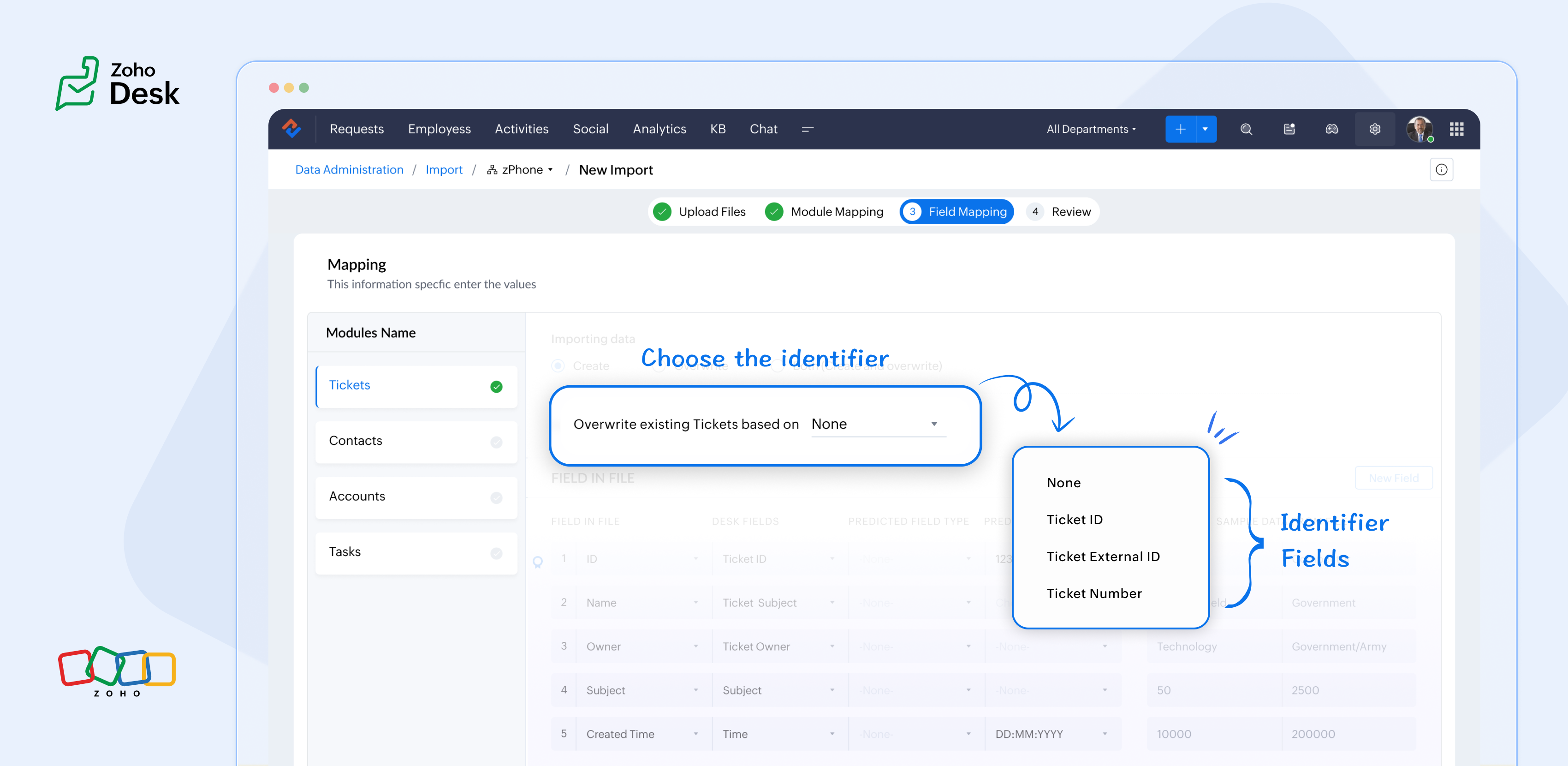
What are the Identifier Fields?
Identifier fields are fields used to find and match existing records when importing data into the product. They also help link related records, like connecting a contact’s name with their email address.
Each module supports different unique identifier fields for identification, as described in the table below:
Module | Unique Identifier Fields |
Accounts | Account ID Account External ID Account Name |
Contacts | Contact ID Contact External ID Last Name First Name Phone Number Mobile |
Tickets | Ticket ID Ticket External ID Ticket Number |
Products | Product ID Product External ID Product Name |
Tasks | TaskId Task External ID |
Calls | Call ID Call External ID |
Events | Event ID Event External ID |
Article Translation | Translation: External ID Translation ID |
Custom Modules | Record External ID Custom Module Name |

Points to remember:
- While these fields help find matching records.
- So, if multiple records match the value, the first matching record will be selected automatically.
- This can lead to unexpected matches or data being updated in the wrong record if you're not careful.
For your understanding:
Some users expressed a preference for matching Contacts by Last Name instead of Email, highlighting the importance of flexibility in their workflow. Furthermore, some additional users approached matching through the use of a custom field, emphasising the need for tailored solutions to fit their unique requirements. Moreover, users requested that the functionality be enhanced by updating existing records with the relevant entity's Zoho Desk ID, aiming to streamline their processes and improve data accuracy.
Commonly used identifier fields:
- Find By is used to identify an existing record during the import process.
- Map By is utilized to link a child record to a parent record, for instance, by linking a Contact to a Ticket.
You can now select specific fields for matching, providing enhanced control and customization during bulk processes or integrations. This functionality enables more precise data handling, ensuring that the information aligns with your specific requirements. By tailoring the matching criteria, you can streamline processes, ultimately leading to enhanced efficiency and better outcomes for your team. This flexibility enables you to harness the full potential of your data.
Import Systems
Let's start by preparing the CSV file.
A sample tickets module CSV file is given below,
External ID | Subject | Contact Email | Contact Name | About |
101 | Hitman | Sharma | Rohit Sharma's journey from a gifted schoolboy to an international icon and fierce competitor reflects resilience, elegance, and remarkable leadership. | |
102 | King Kohli | Virat | Virat Kohli is a world-renowned Indian cricketer known for his aggressive batting, unmatched consistency, and passionate leadership across all forms of the game. | |
103 | Lambu Ishanth | Sharma | Ishant Sharma is a tall and experienced Indian fast bowler known for his 300 test wickets and key performances in overseas conditions. |
Then choose the appropriate Find By identifier field.
The Find By field is selected from a predefined set of fields specific to each module. It is used to determine whether a record already exists in Zoho Desk.
When using the import tool, the system searches the Desk portal for a record (e.g., a ticket) that matches the value mapped to the selected Find By field. This prevents duplicate records by identifying existing entries based on the chosen field.
- Once the file is uploaded, you need to choose a Find By Field — for instance, Ticket External ID.
- Whichever Find By field we choose must correspond to the relevant column in the CSV file. Since we've selected the Ticket External ID, the Case External ID column in your file should be mapped to the Ticket External IDfield.
 If the chosen operation is to 'create new records while avoiding duplicates', and there is no existing ticket with the External ID 101, the import tool will generate a new ticket using the mapped fields. To associate the ticket to the correct Contact, the import tool utilizes the Map By field feature.
Finally, choose the appropriate Map By field.
The Map By field enables users to link imported records to their corresponding dependent records, such as associating a ticket with a specific contact. This functionality ensures that when you import ticket data, the import tool actively searches for a matching Contact in Zoho Desk based on the value defined in the selected Map By field.
For instance, during the field mapping process, you can specifically choose to map the Ticket to a Contact using criteria such as the Contact's email ID. This approach enhances the accuracy of data integration by ensuring that each ticket is correctly associated with the relevant Contact, thereby improving data integrity and streamlining the support process. This meticulous mapping not only minimizes the chances of errors but also facilitates a more organized and efficient ticket management system, ultimately leading to improved customer experiences and satisfaction.
Map by identifier field functionality
The tool efficiently searches for contacts associated with the provided email address.
Search: When a user submits a ticket, the system initiates a search for contacts associated with the specified email address.
Match found: If a single match is identified, the ticket is seamlessly associated with that Contact, ensuring that all relevant customer information is readily accessible for support agents.
Multiple Matches: If numerous contacts are found with the same email address, the system will prioritize and use the first match. This helps streamline the ticketing process while maintaining clarity in customer support.
In summary, the strategic use of Custom Unique Fields and External ID fields as identifiers, along with the potential for composite identifiers, positions support teams to operate more effectively and improve overall customer interactions.
Significant improvements in user experience
Transparent process and status tracking
Unique identifiers for entity mapping
Enhanced error handling and log accessibility
Support for custom modules
Takeaway
Topic Participants
Kavya Rao Addepalli
Sticky Posts
Zoho Desk Partners with Microsoft's M365 Copilot for seamless customer service experiences
Hello Zoho Desk users, We are happy to announce that Zoho Desk has partnered with Microsoft's M365 to empower customer service teams with enhanced capabilities and seamless experiences for agents. Microsoft announced their partnership during their keynoteWhatsApp pricing changes: Pay per message starting July 1, 2025
Starting July 1, 2025, WhatsApp is shifting from conversation-based pricing to per-message billing. That means every business-initiated message you send will count. Not just the first one in a 24-hour window. Pricing updates on the WhatsApp Business PlatformLive Webinar - Work smarter with Zoho Desk and Zoho Workplace integration
Hello customers! Zoho Desk and Zoho Workplace are coming together for a webinar on 14th May, 2024. Zoho Workplace is a suite of productivity apps for email, chat, docs, calls, and more at one single place. Zoho Desk is closely integrated with a few toolsApple iOS 17 and iPadOS 17 updates for Zoho Desk users
Hello Zoho Desk users! Apple recently announced the release of iOS 17 and iPad OS 17. These latest OS updates will help you stay productive and efficient, through interactive and seamless user experiences. Zoho Desk has incorporated the updates to helpZoho Desk Cheat Sheet For The Year-End
Check out these Zoho Desk best practices to end this year on a high and have a great one ahead! #1 Set Business (Holiday) Hours - If you have limited working hours, please make sure you restrict your business hours or set them as holidays for the coming days. Let your customers know when you will, and won't, be available. #2 Update the Annual Holiday List - Check the holidays for the new year and update the holiday schedule. Usually, holidays from the current year will be carried over for the next
Recent Topics
audio and video comments in tasks in zoho projects
Hi, is it planned to have the ability to post audio and video comments? the whatsapp wechat format of communicating is a reality... tools like zoho project would facilitate a lot teamwork by facilitating the way in which we can give feedback in audio and video rather than only text. thx!Looking for Zoho + Twilio Automation Specialist (Duda Website Integration)
Hi everyone, I’m looking for an experienced Zoho specialist to help build a mostly automated CRM and booking system for my service business. I already have a live website built on Duda.co and need help integrating my existing forms into Zoho CRM (no rebuildZoho CRM For Everyone UI Rollout Begins for All Users
Hello Partners, We have started rolling out the new Zoho CRM For Everyone UI as the default experience for all users. This update is being released in three phases based on organization size and account type. We want to keep you informed of the rolloutHow to retreive the "To be received" value of an Item displayed in Zoho inventory.
Hi everyone, We have our own Deluge code to generate a PO according to taget quantity and box quantity, pretty usefull and powerful! However, we want to reduce our quantity to order according to "To be received" variable. Seems like this might not evenIntroducing Explainer Videos for Zoho Desk: Solve everyday challenges with simple configurations
Dear everyone, We have created a set of short explainer videos that show how common support scenarios can be handled using simple configurations within the product. The solutions often lie in the plain sight, but go unnoticed. Through these videos weNotifications Feeds unread count?
How do I reset the unread count on feeds notifications? I've opened every notification in the list. And the count never goes to zero.Simple reliable solution to convert MSG files for AOL Mail?
A simple and reliable way to convert MSG files for AOL Mail is by using a professional tool MacGater Mac MSG Converter. This software allows users to quickly convert MSG files into formats compatible with AOL, such as MBOX or direct email migration. ItZoho One Support is non existent...
I've tried through Email, Chat, this community and finally through Phone. There is no way to receive an answer. Email = over a week and no answer Chat = not available Community = no answer at all Telephone = after clicking myself through the callcenterDisable Zoho Contacts
We don't want to use this app... How can we disable it?Custom module - change from autonumber to name
I fear I know the answer to this already, but thought I'd ask the question. I created a custom module and instead of having a name as being the primary field, I changed it to an auto-number. I didn't realise that all searches would only show this reference.Edit a previous reconciliation
I realized that during my March bank reconciliation, I chose the wrong check to reconcile (they were for the same amount on the same date, I just chose the wrong check to reconcile). So now, the incorrect check is showing as un-reconciled. Is there any way I can edit a previous reconciliation (this is 7 months ago) so I can adjust the check that was reconciled? The amounts are exactly the same and it won't change my ending balance.Introducing Zoho MCP for Bigin
Hello Biginners! We're excited to introduce Zoho MCP for Bigin, a completely new way of interacting with Bigin data using AI. With Zoho MCP, you can securely connect your Bigin account with popular AI tools like Claude, Cursor, Windsurf, and VS Code,SAP Business One(B1) integration is now live in Zoho Flow
We’re excited to share that SAP Business One (B1) is now available in Zoho Flow! This means you can now build workflows that connect SAP B1 with other apps and automate routine processes without relying on custom code. Note: SAP Business One integration[Action Required] : Update Shopify Access Scope to fetch complete order history
Hello Shopify Users! Shopify has updated the access scope for apps under developer portal. With this change, the read_orders scope now provides access only to the last 60 days of order history. To access older historical orders, Shopify requires a separateAdvance Payment Record Removed When Deleting Applied Credit from Bill
Hello, So while working with vendor advance payments, I noticed that removing the applied credit from a bill also removes the corresponding entry from the Payments Made section. What I did : Recorded an advance payment to a vendor through Payments Made.How to Connect Zoho Books with e-Way Bill Portal (Step-by-Step Guide)
Integrating Zoho Books with the e-Way Bill portal helps automate your logistics and compliance process. Follow the steps below to set it up easily: 🚀 How to Connect Zoho Books with e-Way Bill Portal (Step-by-Step Guide) Integrating Zoho Books with theIs there a way to update all the start and end dates of tasks of a project after a calendar change?
Hi! Here's my situation. I've built a complete project planning. All its tasks have start dates and due dates. After completing the planning, I've realized that the project calendar was not the right one. So I changed the project calendar. I now haveLookup fields can't be used for anything important
Hi It seems the lookup fields are mostly.... informative, you can at most link stuff between modules... You can't use lookup fields in blueprints, you can't use them in layout rules or anything... It that correct?Sales Allowed Beyond Available Stock and Payment Recorded Without Restriction
Hi, While testing in Zoho Inventory, I noticed that a sales order can be created with a quantity exceeding the available stock in the selected warehouse. In my case: Available stock: 5 units Ordered quantity: 6 units Despite this: I was able to convertZoho Writer Frequently not loading
I've reported this as a problem already but I can't log into my email right now or get onto the main site so you're going to hear about it again here: at least once a week, Zoho Writer will just refuse to load entirely. The main page will load and loadRead Thread Details
Does anyone know how to "read" the complete thread details in a ticket? I figured out how to pull a summary of the threads using a webhook, but it doesn't have all the details I want. I tried to create a loop in flow, which should have worked, but insteadHow to Structure Data in Zoho Creator Applications
Data structure is undoubtedly one of the most critical pillars in application development within Zoho Creator. Well-structured projects scale easily, enable more robust automations, and drastically reduce rework. Poorly modeled applications, on the otherApplication Architecture in Zoho Creator: Why You Should Think About It from the Start
Many companies begin using Zoho Creator by building simple forms to automate internal processes. This is natural — the platform is extremely accessible and allows applications to be built very quickly. The challenge begins to appear when the applicationCaptcha can't be enabled conditionally
Hi Problem: captcha on a form can't be enabled conditionally. Why is this a problem: Because I use the same form on our website (public) in the portal and mobile app. In the portal it works but in the mobile app it doesn't. So there should be a way toImproved RingCentral Integration
We’d like to request an enhancement to the current RingCentral integration with Zoho. RingCentral now automatically generates call transcripts and AI-based call summaries (AI Notes) for each call, which are extremely helpful for support and sales teams.WorkDrive issues with Windows Explorer Not Responding
We are using WorkDrive to collaborate on editing video content. We have a lot of files and quite a few are a few gigs. Recently anytime I try and work with the files Explorer freezes for a couple minutes whether it's dragging the files into Premiere orIs it possible to retrieve function (Deluge) code from Zoho CRM externally?
Hi Everyone, Is it possible to fetch or retrieve the Deluge function code from Zoho CRM using an external method (API or any other approach)? I would like to know if there is any way to access or extract the function script outside of Zoho CRM, or ifZoho CRM Integration Form + Custom Fields
Hi! I've created an Integration Form from Zoho CRM's Vendors Module, but I can choose a few standard fields and no custom fields I've created in Zoho CRM. There is a plan to add this feature soon? Thanks in advance.AI secretary
In our company, Claude is the secretary and creates inquiries and schedules from Gmail. You no longer have to enter them yourself. The secret is that we created an MCP server that connects to CRM. https://x.com/Mac_nishio/status/1917954562566328694Como estruturar dados em aplicações Zoho Creator
A estrutura de dados é um dos pilares mais críticos no desenvolvimento de aplicações no Zoho Creator. Projetos bem estruturados escalam com facilidade, permitem automações mais robustas e reduzem drasticamente retrabalho. Já aplicações mal modeladas rapidamenteCreditos API
Queria saber se alguém poderia me ajudar a resolver um problema na compra e utilização de créditos de mensagens API do WhatsApp. ja tentei todos o tutoriais porem não consegui realizar a compre, pois ao clicar no botão de comprar créditos aparece a mensagemUsing Zoho Forms vs Zoho Survey
Hello - I'm looking for advice on whether to use Zoho Survey or Zoho Forms for our small non-profit. We have a Zoho One subscription, so have access to both. The main use case at the moment is application forms for our professional development programs.Custom CSS for Zoho CRM Team Bookings embeded widget
Hello, we are adding Zoho CRM Team Bookings (crm.zoho.com) in our public website. We know that we can change Theme Color, Font Color and Background Color: Zoho CRM Booking Styling But is it possible to change other CSS attributes e.g. Font Family, likeEnable integration of CRM CPQ functionality for ZohoOne customers using Zoho Finance application
Hi there. I can't believe I'm needing to launch this idea as I would have thought this was a little obvious. Following a number of conversations with the technical team it's become evident that the CPQ functionality within CRM cannot integrate with ZohoZoho Certified Workshops in Berlin | 20. - 21. April
Liebe Mitglieder der deutschen Zoho-Community! Wir freuen uns, Ihnen mitteilen zu können, dass unsere Zoho Certified Workshops am 20. und 21. April nach Deutschland zurückkehren! 📍Wo finden die Workshops statt? Die zertifizierten Workshops finden imZoho Payroll Expansion Plans
Dear Zoho Team, I truly appreciate the continuous innovation and improvements you bring to your suite of products. However, I—and I’m sure many others—would love some clarity on your Zoho Payroll expansion roadmap. Currently, it’s only available in theUsar o Inventory ou módulo customizado no CRM para Gestão de Estoque ?
Minha maior dor hoje em usar o zoho é a gestão do meu estoque. Sou uma empresa de varejo e essa gestão é fundamental pra mim. Obviamente preciso que esse estoque seja visível no CRM, Inicialmente fiz através de módulos personalizados no próprio Zoho CRM,How do I setup the performance review module?
I am pretty adept when it comes to learning software and I've set up quite a few Zoho Apps over the past 3 years. But for the life of me, I can not figure out Zoho People performance reviews. I've figured out the "Organization" & LMS Modules, but theRecurring Addons
Hi, I know you can set the pricing interval for addons to weekly, monthly and yearly & set it for one off or recurring, which these are fine as a base addon item. It really would be helpful if when creating a subscription when you add on the addon itemCancellation Fees
Hi, It really would be good if Billing could take subscription management further with cancellations & being able to apply or set a cancellation fee for a plan that is either fixed or prorated. It is not uncommon in subscriptions for cancellation feesNext Page