Incoming Threads Report
From data to decisions: A deep dive into ticketing system reports

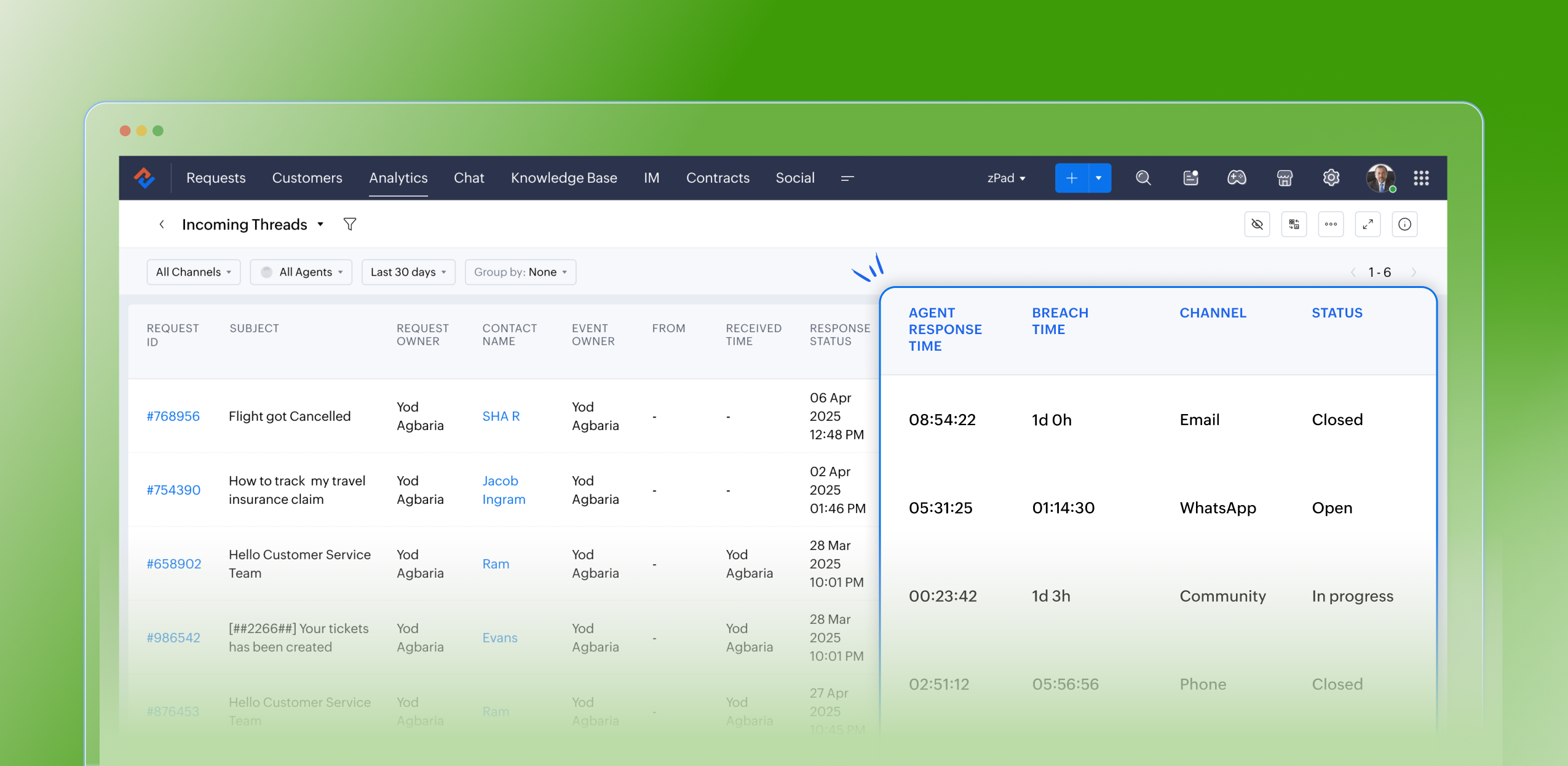
Customers raise questions and issues through multiple channels, such as email, chat, or tickets. To monitor the number of queries received on a specific day from each channel, leads can use the Incoming Threads report. This report enables them to allocate resources efficiently based on ticket volume. For instance, if more queries are received through WhatsApp than email, the manager can reassign some agents from the email team to handle WhatsApp queries, ensuring timely responses and effective customer service.
Purpose
The Incoming Threads report provides visibility into the number of messages (threads) received across all customer channels, including email, chat, web forms, social media, and WhatsApp. Each thread represents a customer interaction—whether a new ticket or a follow-up message—and helps teams determine how busy each channel is on a given day.
What are ticket-based reports?
Ticket-based reports are summaries created from the data collected in a help desk ticketing system. These reports focus on different aspects of ticket management and give insights into how customer support requests are handled and resolved. They usually include metrics like ticket volume trends, response times, resolution times, ticket statuses, agent and team performance, and customer satisfaction scores.
Specific attributes found in the incoming threads report
- Request ID: Zoho Desk identifies and distinguishes tickets using a unique reference number called a ticket ID
- Subject: The ticket subject is typically a summary or description of the issue the customer is experiencing
- Request owner: Owner of the ticket
- Contact name: The customer's contact name
- Event owner: The owner of the event
- From: The from email address
- Received time: The time the request was received
- Response status: The status of the response
- Responded by: The agent who responded to the request
- Agent responded time: The time stamp when an agent sends a reply to a ticket or customer message
- Agent response time: The total time taken by the agent to respond to a ticket; measured from when the ticket or customer message is received until the agent sends a reply
- System response time: The elapsed time between the receipt of a ticket and the first agent’s response, which assures the customer their issue is being addressed
- Is violated: If a ticket is marked as “violated,” it means the required action was not completed within the stipulated SLA period
- Violated time: The data and time the violation occurred
- Owner during the violation: The owner of the ticket when the breach occurred
- Breach time: The time of the breach
- Status: The status of the ticket
- Channel: The channel through which the ticket was submitted
Notable use cases:
- Resource Allocation: Assists managers in reallocating agents based on current workload. For instance, if there's a surge of tickets coming through chat or WhatsApp compared to email, agents can be redistributed to manage the demand effectively.
- Performance Monitoring: Allows for the assessment of agent responsiveness and efficiency across different communication channels.
- Customer Experience Optimization: By pinpointing peak times and identifying channels with increased ticket inflow, managers can ensure prompt responses and uphold SLA commitments.
Advantages
- Assists leads in filtering and analyzing the volume and types of incoming tickets
- Monitors the count of open tickets at any given moment
- Confirms the timestamps for ticket creation and resolution
- Identifies the individual responsible for resolving each ticket
- Greatly optimizes resource allocation and time management
- Boosts team productivity and ensures adherence to service level agreements (SLAs)
Takeaway
The Incoming Threads Report is a useful analytical tool within Zoho Desk that offers a unified view of communication inflow, agent activity, and SLA performance. It empowers support teams to maintain balanced workloads, ensure timely responses, and drive proactive, efficient customer service operations.
Please stay tuned for more in the Desk Reports series.
Regards,
Kavya Rao
The Zoho Desk Team
 Managing a help desk involves complex responsibilities, such as identifying bottlenecks, minimising errors, and evaluating team performance for seamless service delivery. To do this effectively, access to comprehensive analytics and real-time insights is crucial. Zoho Desk streamlines these tasks by also providing detailed analytics and live reports through the Radar app, allowing managers to make informed decisions anytime, anywhere. Download now!
Also read:
Time-based reports
Agent-based reports
Ticket-based reports