Hello Zoho Desk users!
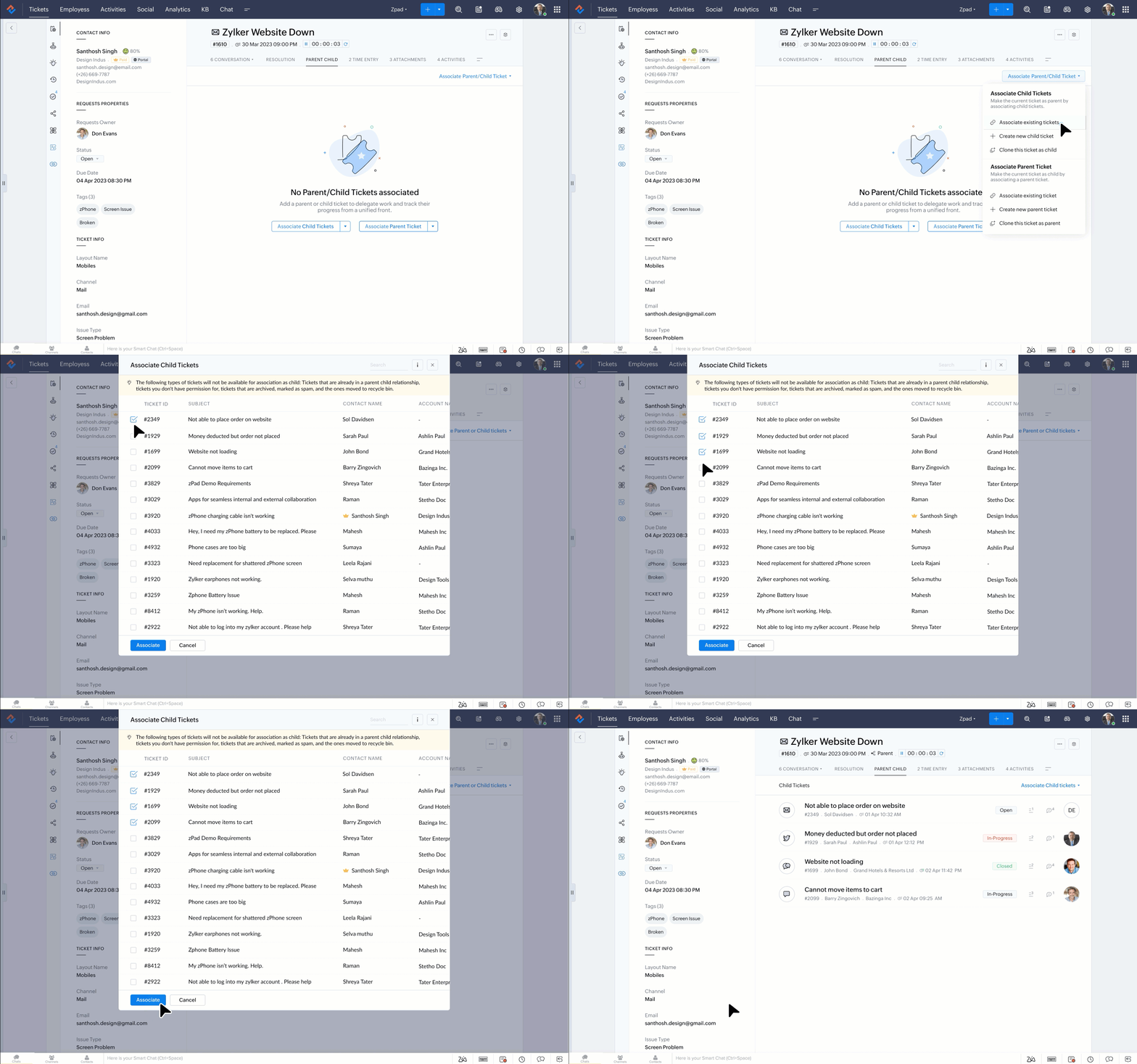
We have introduced the parent-child ticketing system to help customer service teams ensure efficient resolution of issues involving multiple, related tickets. You can now combine repetitive and interconnected tickets into parent-child units, work on them in parallel and offer resolution faster, as a team.
This helps your agents handle numerous customer issues simultaneously without becoming overwhelmed and losing productivity. Linking the tickets through the parent-child feature helps synchronize these conversations and minimize the resolution time.
Why do you need parent-child ticketing?
In scenarios where there are repetitive tickets on similar topics from multiple customers or when there are several sub-tickets for one master ticket for a single customer, it will be easier to categorize and solve them simultaneously. Parent-child ticketing is the new way to offload such tickets more efficiently.
Your teams can:
1) Offer faster resolution
2) Save time on related tickets and can focus on critical tasks
3) Can co-ordinate better within team members
How will parent-child ticketing boost the team's productivity?
Work smarter and faster
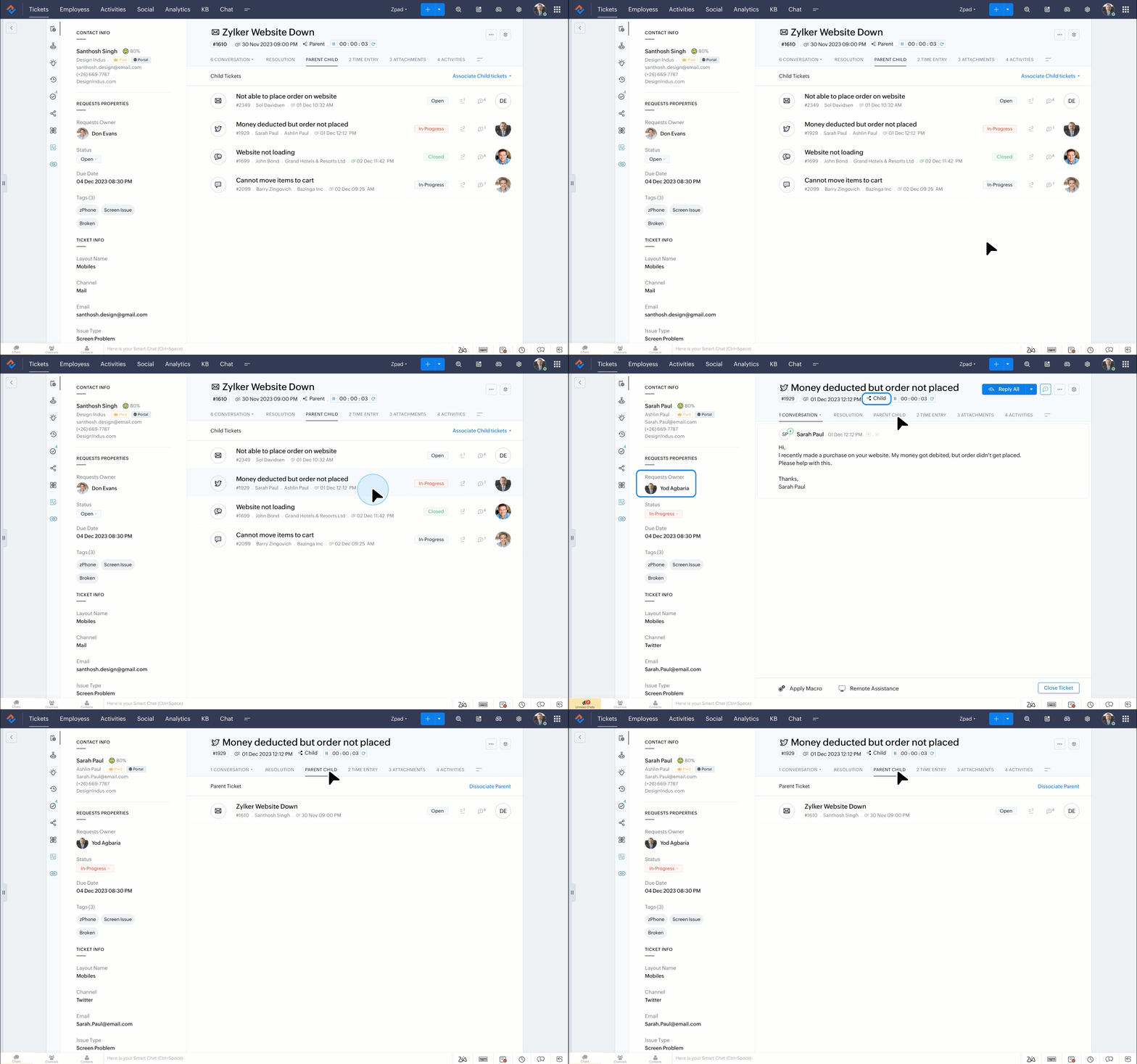
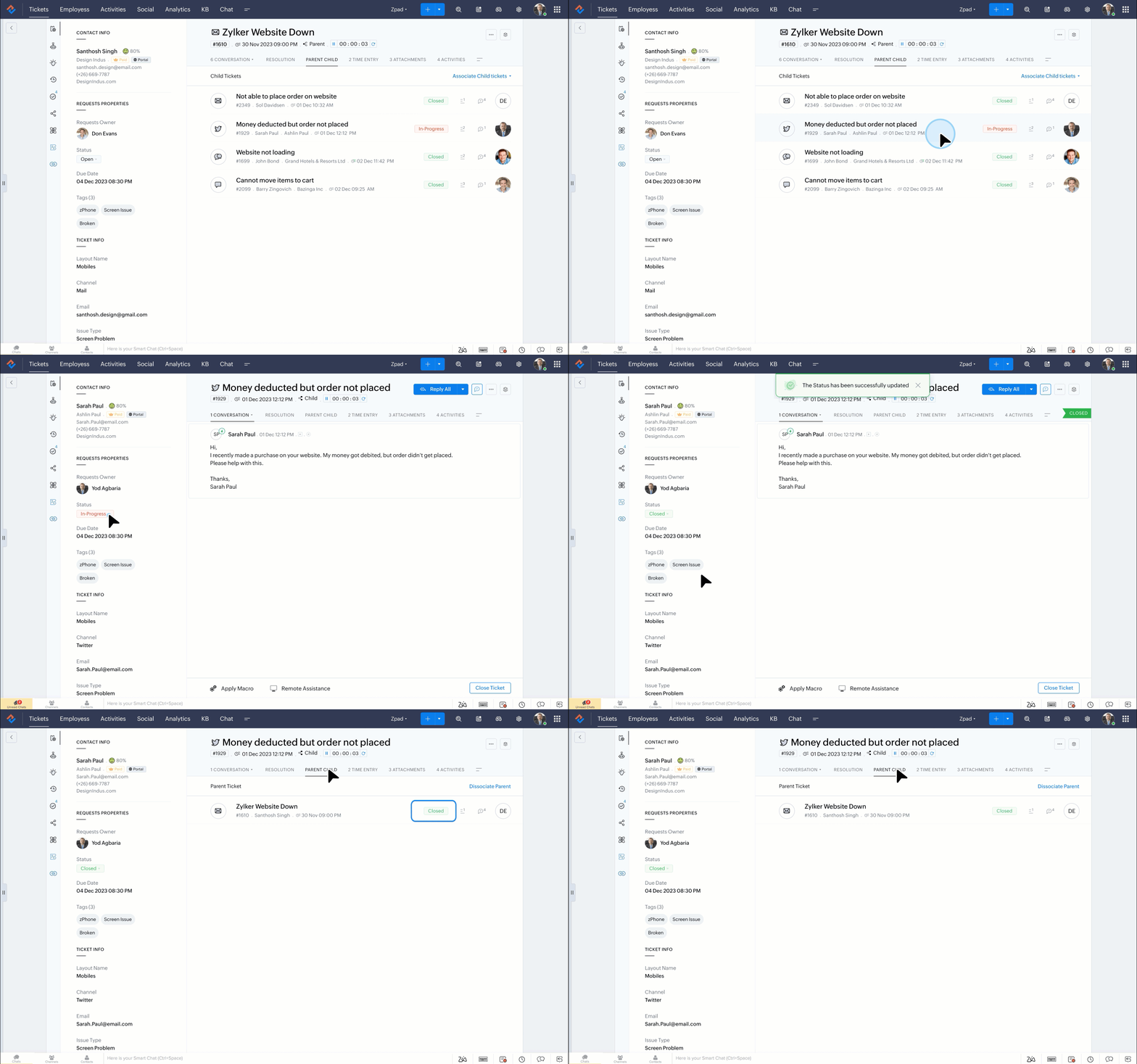
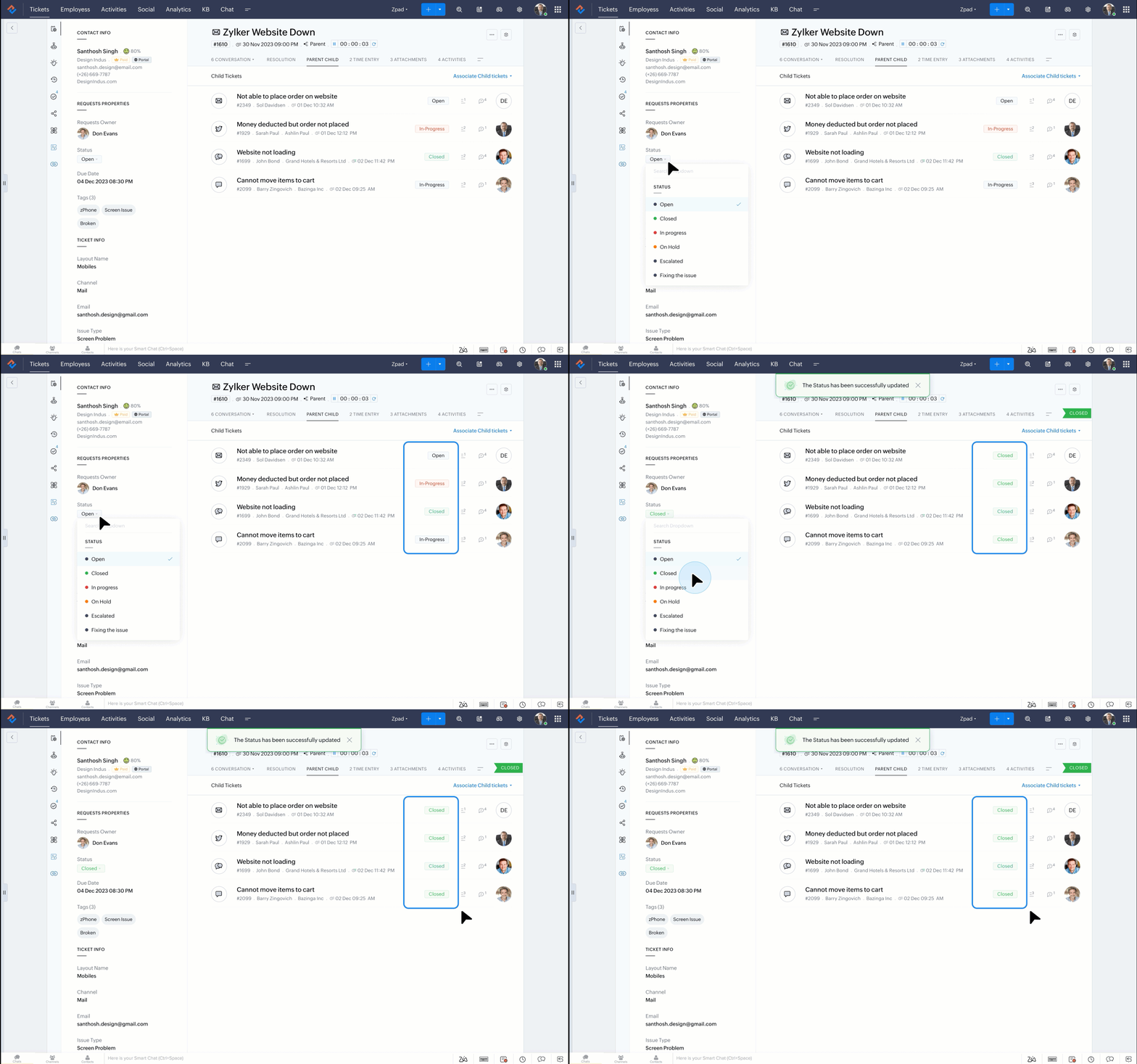
Agents working on multiple tickets related to the same issue can use the parent-child feature to group those conversations for easier organization. Once the problem has been resolved, an agent can close the parent ticket, and all associated child tickets will automatically be closed. This will help your teams resolve tickets faster and more efficiently.
Collaborate with context
All related tickets can be categorized as a parent or child. This will help agents break tickets down into groups that share the same context and resolve those related issues efficiently. This will ensure that no ticket gets missed and all the requests are closed systematically.
Maximize efficiency
Since tickets can be grouped and closed together, agents can save time and attend to more customer requests. This will improve the productivity and overall efficiency of customer service teams.
Example: Ecommerce business
It is common for online sellers to receive multiple tickets from a customer related to a single product or order. For example, imagine that a customer places an order for three items. First, they submit a request to check on the shipping timeline. Then, they receive the products but find that one of the items is defective and needs to be returned for a refund, while another needs to be exchanged for a different option.
The customer might submit a fresh ticket for each issue, but they should all be dealt with together for an efficient resolution. These requests can be linked through parent-child ticketing to ensure that any agents who work on the matter have all the context and approach the situation in an appropriate way.
The support team can address and close the child tickets one by one, and the parent ticket will automatically be closed once all the child tickets are resolved. Grouping related tickets helps prevent inadvertent delays, simplify the resolution process, and ensure that all tickets are closed at the right time.
Resolving parent-child tickets:
Note:
1) The feature is available in the Professional and Enterprise editions of Zoho Desk and will be available for customers with early access upon request.
2) Parent-child ticketing is available in all DCs.
Click on the link below to raise a request to tryout the new feature.
For further information and assistance from the team, you can comment on this announcement or send an email to support@zohodesk.com.
Hope you like the new feature! Let us know your feedback in the comments.
@Anonymous User @Anonymous User @Zohodesk
Thank you,
Zoho Desk team.
Recent Topics
Cliq iOS can't see shared screen
Hello, I had this morning a video call with a colleague. She is using Cliq Desktop MacOS and wanted to share her screen with me. I'm on iPad. I noticed, while she shared her screen, I could only see her video, but not the shared screen... Does Cliq iOS is able to display shared screen, or is it somewhere else to be found ? Regards
ZOHO Writer Folders
Hi We would love to have ability to create folders on the left hand side. We would then be able create and store our documents within each folder Hope you can provide this feature soon ! dux.centra
COQL API in JS Widget only pulling 200 records
Hello! We've been building a custom homepage widget using the Zoho JS SDK, and it seems that this https://help.zwidgets.com/help/latest/ZOHO.CRM.API.html#.coql only allows 200 records. I thought the limit was 2000 for COQL queries, but am I mistaken?
How can Data Enrichment be automatically triggered when a new Lead is created in Zoho CRM?
Hi, I have a pipeline where a Lead is created automatically through the Zoho API and I've been trying to look for a way to automatically apply Data Enrichment on this created lead. 1) I did not find any way to do this through the Zoho API; it seems like
Escalation request: organization merge and data export (Ticket [154609577])
Hello Zoho Team, I am posting here because my support ticket has not received substantive responses through the usual channels. Summary of the issue (ongoing for three weeks): I requested assistance with a data migration and a merge of two Zoho organizations.
Do buttons and vba msgbox work on mobile, specifially the iPhone zoho sheets app?
In Zoho sheets on the web, I inserted a button and assigned a VBA macro to it. It pops up a msgbox with some text. When I go onto the iPhone mobile zoho sheets app, the button is there. When I click on that button, the spinning asterisk appears for a
Different form submission results for submitter and internal users
I'm looking for suggestions on how to show an external submitter a few results while sending internal users all the results from the answers provided by the external user. The final page of our form has a section with detailed results and a section with
Column letter from number
Hello, I am trying to select a cell and i have the column number. How do i do this or is there a way of getting the letter from the number? Thank you
Help Desk Services Solution
I am here looking for Help Desk services solution for organization. I also searched this on many different website and found many solutions. We are bit confused to which one to choose. One of my friend suggest me this platform, and i am hoping i will
Formatting and slow
Creating campaigns are difficult. I'm fairly computer literate but some of the way Zoho Campaigns formatting works is painful. Images fail to upload or are very slow. To top it off, syncing the contacts is a pain as well as temperamental links to create Segments. At this rate I'm afraid we might need to migrate back to Mailchimp.
Boost your Zoho Desk's performance by archiving tickets!
The longer your help desk operations are, the more likely it is to accumulate tickets that are no longer relevant. For example, ticket records from a year ago are typically less relevant than currently open tickets. Such old tickets may eventually lead
Paste emails to create segment
We are moving over from Mailchimp to ZOHO. However Mailchimp allows me to create a segment by pasting in emails from excel (or importing a .csv) can I do the same in Mailchimp?
Getting the Record ID of a form once it is submitted - so that form can be edited later
In Zoho Forms, where can I access the record ID of a form once the form is submitted? - Record ID is not available in webhook payloads - It is not available to form fields, including in formulas - It is not available as a parameter in a thankyou page
Auto-Generate Line Numbers in Item Table Using HTML & CSS Counters (Zoho Books & Zoho Inventory Custom Templates)
<div> <style> /* Start counter from 0 inside tbody */ tbody#lineitem { counter-reset: rowNumber; } /* Increment counter for each row */ tbody#lineitem tr { counter-increment: rowNumber; } /* Show counter value in first column */ tbody#lineitem tr td:first-child::before
Possible to define default font and size in Zoho Campaigns?
Is it possible to define a default font (font, size and colour) for the text, H1 and H2 in Zoho Campaigns? For example: In a campaign, I add a text block, and the text is automatically century gothic, size 11, grey (6f6f6e) by default? Thank you!
Zoho Sites - General Feedback
Hi Everyone-- Quick question for discussion: is it me or is working with Zoho Sites like entering the Twilight Zone? I've built many sites over the years, but this platform seems impossible. I've spent an entire day and a half trying to get a simple one-color
File Upload field not showing in workflow
Hi, I have added a field on Zoho CRM. I want to use it in a workflow where that particular field is updated based on another field, however it is not showing up in the field list to select it in the workflow. Why is this please?
You cannot send this email campaign as it doesn't have any eligible contacts in the selected mailing list. You can try adding contacts or choose other mailing lists.
please help
Strengthening the capabilities of CommandCenter in Zoho CRM Plus
When you look at the prospect-to-customer journey in most businesses 10 to 15 years ago, it was relatively straightforward. Many of us remember walking into a store, sharing our requirements with a sales associate, reviewing a few options, and making
World date & time format
Hello, Is there a timeline to get the worldwide used date and time format ? I mean not the american one... I mean day month year, and 24 hours clock. Regards
Announcing Kiosk 1.1 - Customize screen titles, configure new fields & actions, use values from your Kiosk to update fields, and more.
Hello all We are back again with more enhancements to Kiosk. So what's new? Enhancements made to the Components Add titles for your Kiosk screens and adjust its width to suit your viewing preferences. Three new fields can be added to your screen: Percentage,
Any recommendations for Australian Telephony Integration providers?
HI, I am looking for some advice on phone providers as we are looking to upgrade our phone system, does anybody have experience with any of the Australian providers that integrate with CRM Telephony? So far we are looking at RingCentral and Amazon Connect, and would love to hear feedback on any of the other providers you might have tried. Thank you
Zoho Campaigns Workspaces
Hi, I’m currently working on a Zoho CRM + Zoho Campaigns setup for a franchisee-based organization, where each franchise must only see and use its own contacts. At the moment, franchisees cannot properly access their contact lists in Zoho Campaigns unless
Limited System because of Limited Number of Fields for Car Dealership
Dear Zoho Support, we want to have all the information about a car inside of a car record. We want to have Zoho CRM as our single source of truth for our data, but the limited number of fields are not allowing that. The data consist of: technical data
Zoho CRM for Everyone's NextGen UI Gets an Upgrade
Hello Everyone We've made improvements to Zoho CRM for Everyone's Nextgen UI. These changes are the result of valuable feedback from you where we’ve focused on improving usability, providing wider screen space, and making navigation smoother so everything
Newsletter in multiple languages
Hi We are planning on starting to use Zoho Campaigns for our newsletters. Since we send our newsletters in three languages, I would need the "unsubscribe page" and other pages related to the NL (Thank you page and so on) to be available in different languages
Fixed assets in Zoho One?
Hi, We use Zoho Books and have the fixed asset option in it. I started a trial for Zoho One and I do not see that as an option. Is the books that is part of zoho one equivalent to Zoho Books Elite subscription or is it a lesser version? Thanks, Matt
Set Default Status of Assembly to "Assembled" When Entered in UI
I've just discovered the new "confirmed" status of Assemblies within Inventory. While I understand the intent of this (allowing for manufacturing planning and raw material stock allocation), it was initially confusing to me when manually entering some
I need to Record Vatable amount and non vatable amount separately in zoho books in a single line
I need to Record Vatable amount and non vatable amount separately in zoho books in a single line give me the customisation option and in invoice copy to customer the total amount should be inclusive 5%vat and no need to show the vatable and non vatable
Sort Legend & stacked bar chart by value
I'd love to see an option added to sort the legend of graphs by the value that is being represented. This way the items with the largest value in the graph are displayed top down in the legend. For example, let's say I have a large sales team and I create
Scanned Doc - selecting Item overwrites Rate
I have a Vendor Invoice which was uploaded to Documents. I select Add To > New Bill. The OCR is actually quite good, but it is reading an Item Description instead of an Item Number. I remove the description and select the correct Item Number... and it
Timesheet invalid data error
Getting the "Invalid Date" error when trying to add a time sheet to an appointment in a work order. I initially though the work order was corrupt or something so I deleted the work order and recreated it. I added the first time sheet to the AP and saved
Convert invoice from zoho to xml with all details
How to convert an Invoice to XML format with all details
Any update on adding New Customer Payment Providers who support in store terminal devices?
Currently there is only one Customer payment provider listed for terminal devices in USA- Everyware. They charge a monthly fee of almost $149 minimum. Will you add other providers - like Zoho Payments or Stripe or Worldpay that would allow integrated
Dealing With One-Time Customers on Zoho Books
Hello there! I am trying to figure out a way to handle One-Time customers without having to create multiple accounts for every single one on Zoho Books. I understand that I can create a placeholder account called "Walk-In Customer", for example, but I
Customizing Helpcenter texts
I’m customizing the Zoho Desk Help Center and I’d like to change the wording of the standard widgets – for example, the text in the “Submit Ticket” banner that appears in the footer, or other built-in widget labels and messages. So far, I haven’t found
Passing the image/file uploaded in form to openai api
I'm trying to use the OpenAI's new vision feature where we can send image through Api. What I want is the user to upload an image in the form and send this image to OpenAI. But I can't access this image properly in deluge script. There are also some constraints
"Temporary" Field Value?
I have a custom action in Form A report Detail View that passes the Rec ID and updates a Temp Record ID lookup field in the Form B record via openURL (and opens the Form B report in popup) . The updated Temp Record ID field value in Form B is then used
File Upload field automatically replaces spaces with underscores – support experience
Hi everyone, I want to share my recent experience regarding the File Upload field behavior in Zoho Creator and my interaction with the Zoho support team. When a user uploads a file, the system automatically renames the document by replacing spaces in
We Asked, Zoho Delivered: The New Early Access Program is Here
For years, the Zoho Creator community has requested a more transparent and participatory approach to beta testing and feature previews. Today, I'm thrilled to highlight that Zoho has delivered exactly what we asked for with the launch of the Early Access
Next Page