Introducing the all-new email parser!

Introducing the all-new email parser!

Greetings,
 
We are pleased to introduce to you, a brand-new, upgraded version of the Zoho CRM Email Parser, which is packed with fresh features and has been completely redesigned to meet latest customers needs and their business requirements.
 
On that note, the Old Email Parser will reach end-of-life on June 1, 2023. After EOL, old email parser will not be available in your CRM account. In the spirit of preparing for this deprecation, we encourage all of you to try the all-new email parser at the earliest. In this post, we will discuss key pointers on the following:
— the improvements made in the New Email Parser
— how to prepare for deprecation of the Old Email Parser

What is the email parser?

Email parser is a data extraction tool in Zoho CRM that helps an organization in various business functions such as lead generation and information updates. It is designed to automate the process of adding records to Zoho CRM by extracting information from incoming emails.
Now, let's have a detailed look at the functionalities that we have brought with this enhancement. 

Enhancements in the New Email Parser

The following are the enhancements you can now see when you switch to the latest version of the email parser:

1. Single parser email ID for all parser rules  

Previously, for each parser rule there was a different parser address. It was often tedious to assign and keep track of a new parser ID for each individual vendors. The logistics involved in tracking and maintaining these parser IDs was itself often time-consuming. However, in the new version of the email parser, there's only a single, common parser email ID for all rules, meaning that regardless of how many vendors you're working with or how many rules you create, you can use one parser ID for all. This makes working with the email parser much easier and cuts down your setup and maintenance time significantly.
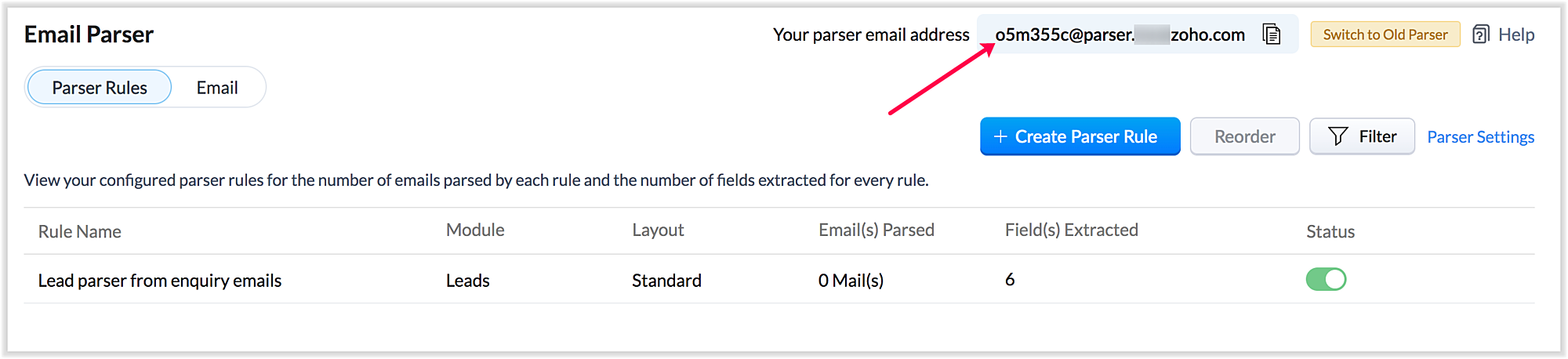

Also, a maximum of five approved parser addresses can be set up in common for all rules early on during the configuration.

2. A more powerful and intuitive configuration interface  

In the latest version of email parser, the entire configuration interface allows free parsing and is highly intuitive, powerful, and, most importantly, user-friendly—unlike the previous version, which demanded rigid adherence to delimiters. 
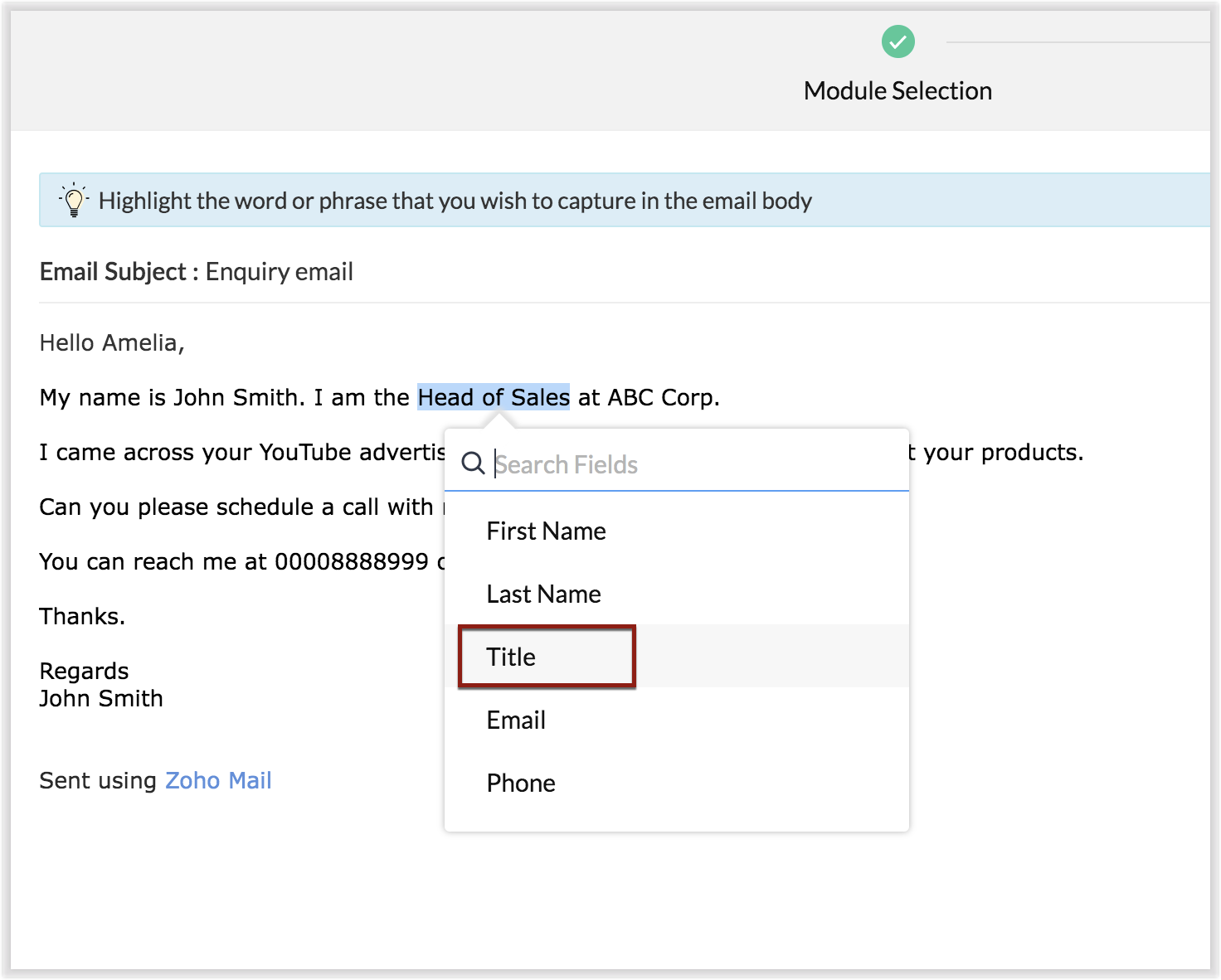

The email parser interface automatically gives you a preview of the parsed data on the same screen where the field mapping occurs, so it's easier to get a snapshot of all the fields that are being parsed.
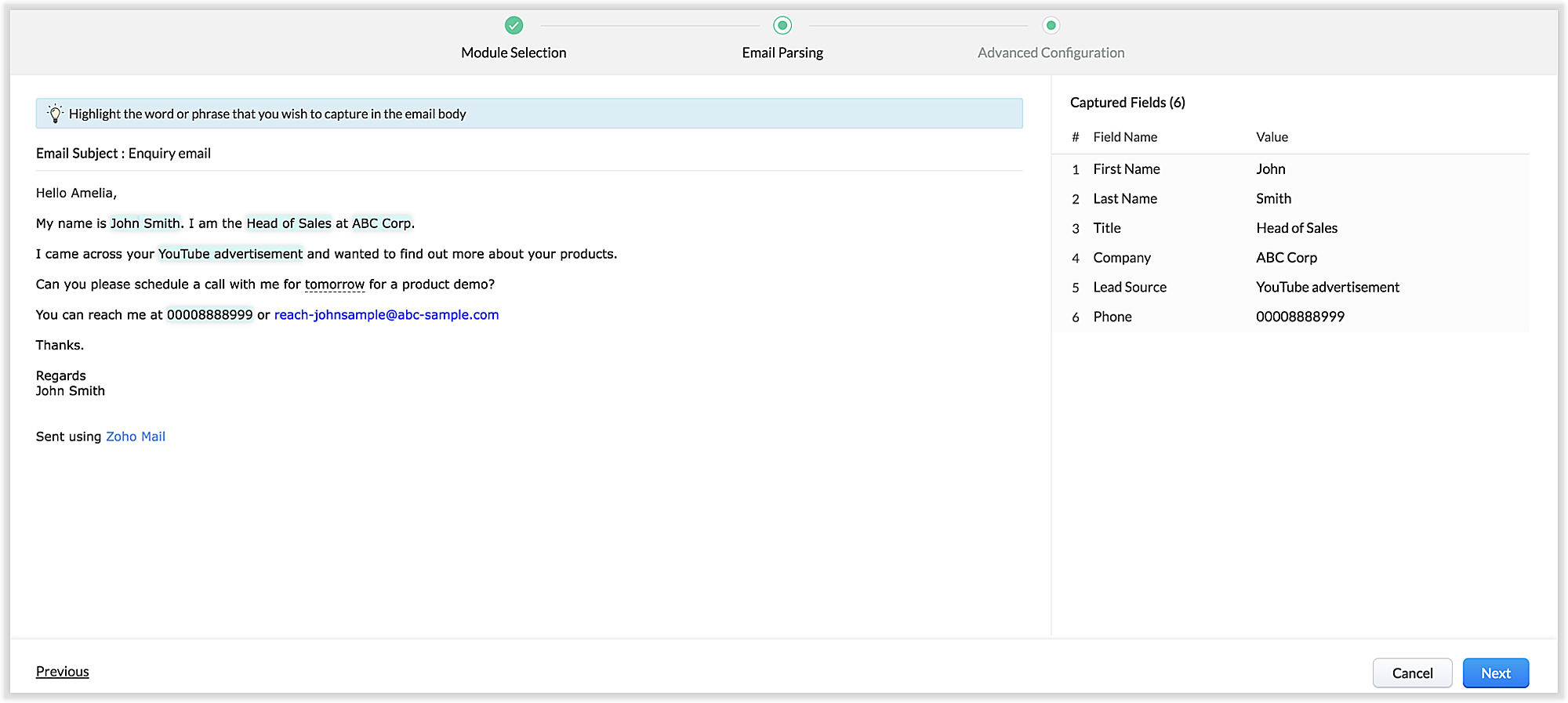
There's also an advanced configuration tab which involves options for filtering emails applicable to the parser based on criteria and associating automated actions, such as sending for approval, updating fields, and assigning records to certain users based on assignment rules.
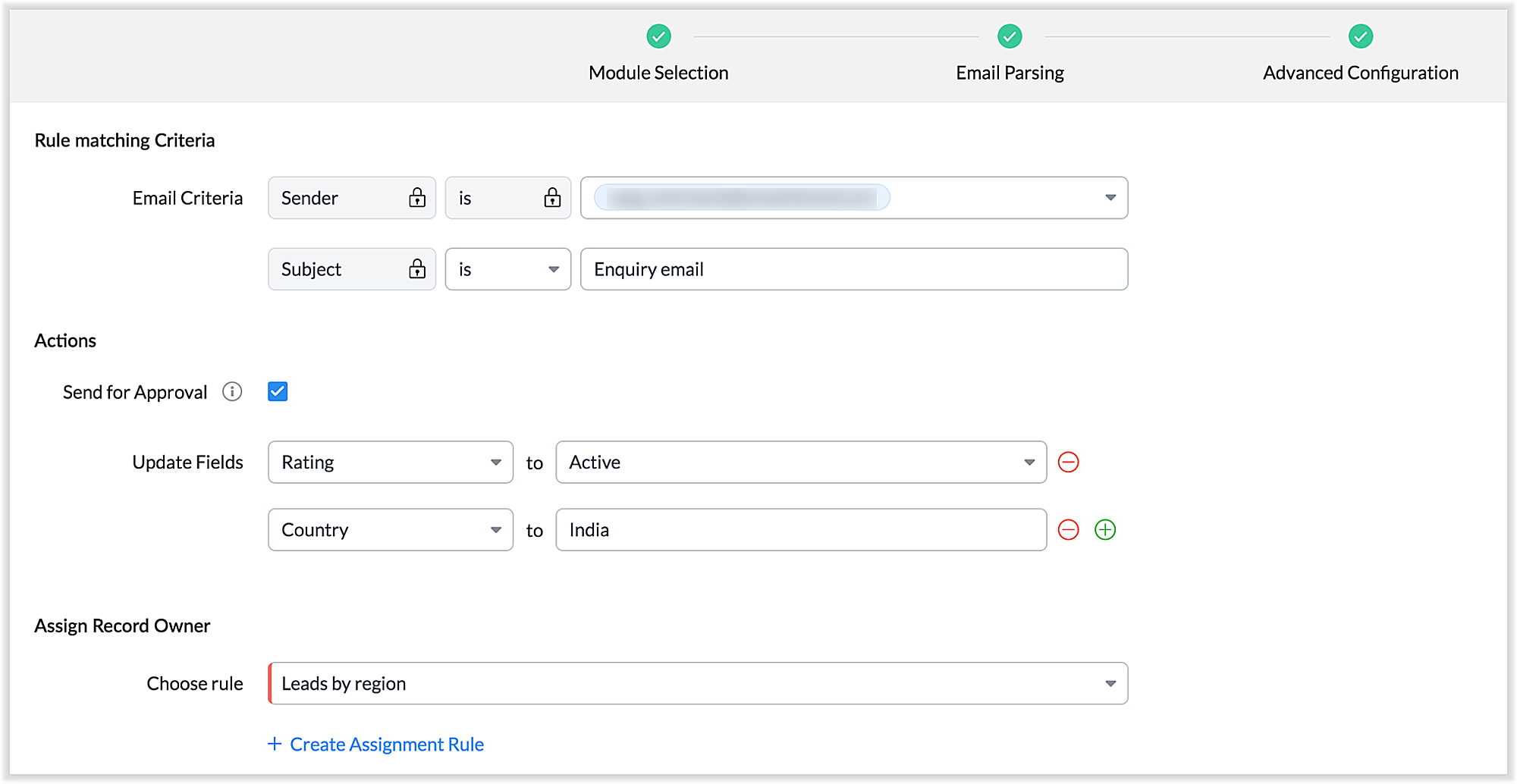
You can also parse HTML emails directly, as opposed to converting them to plain text emails first—which was necessary for the old parser. You can also create email parser rules for each layout in a module.

3. Custom functions: Configure the email parser without associating a module

The new email parser now supports the execution of custom functions based on parsed data. In this case, the parser rule is not associated with a particular module. Using custom functions helps you with extensibility and interoperability in Zoho CRM. You can extend the email parser function to more than one module within Zoho CRM, and even to connect with other Zoho services. You can also perform ad hoc actions in third-party applications based on the parsed data.
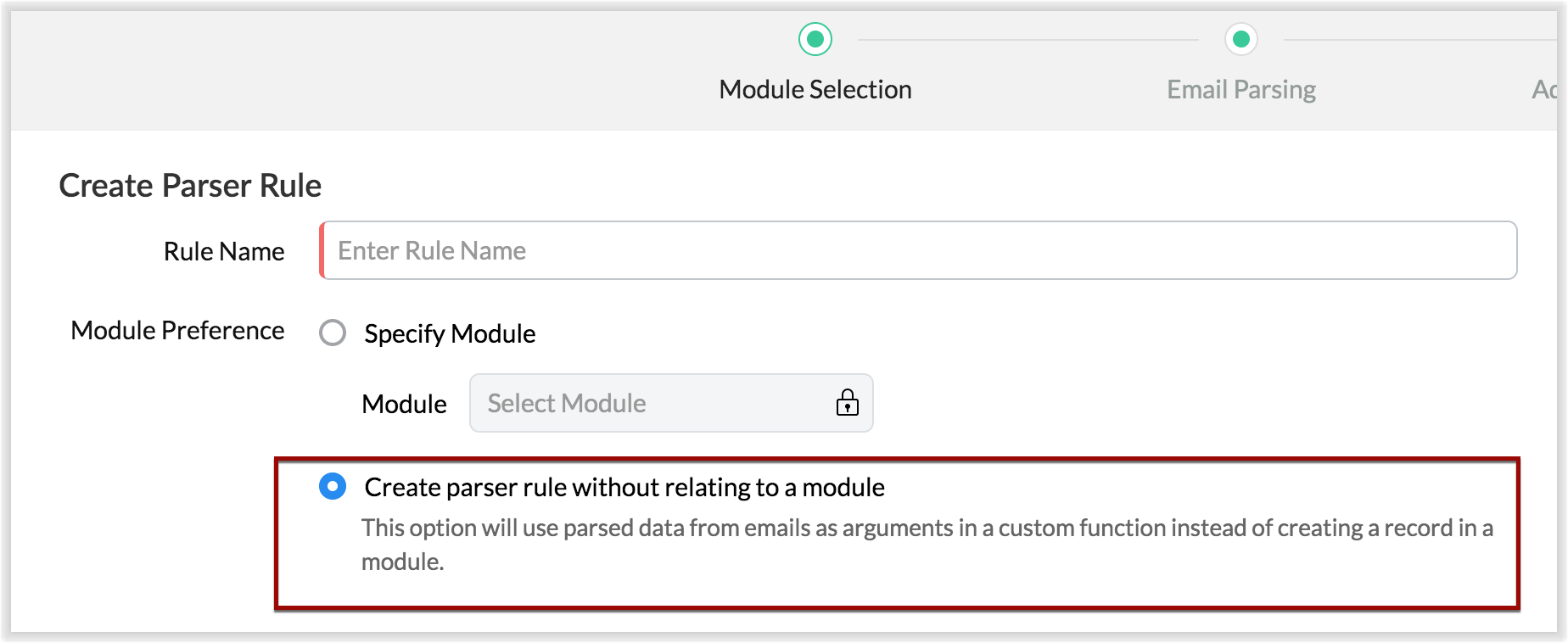
  • For example, let's say that based on an incoming email inquiry, a property management company called Zylker wishes to update both Contact and Account records in CRM. The email sender's name, phone number, and address will go to the Contacts module, whereas their company information will go to the Accounts module.
  • Let's say also that the same company has another requirement: Based on an incoming email from a customer regarding the status of their property, they want to update corresponding information on a third-party listing website automatically. They can achieve this by using the email parser to execute custom functions.
Once you have the required custom functions written, you can associate them to the parser rule and have the action executed for subsequent incoming emails.

4. Update records and send them for approval

Update Record is a function by which you can update the latest information on a record from an incoming parsed email.
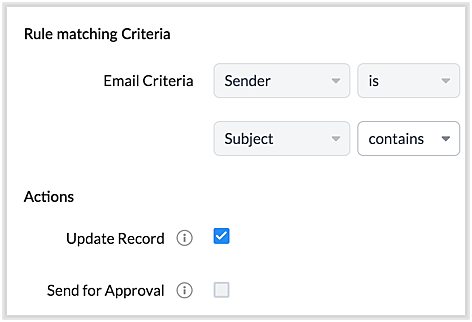
For example, say you receive an incoming email from a prospect named Jane Evans. Normally, a new lead record would be created for a new inquiry email, but if Jane is already in the CRM system, you want the CRM to update Jane's information on the same record as opposed to creating a duplicate record. If this is your expectation, you can check the Update Record option in the parser rule's Advanced Configuration settings.
 
Note: CRM will use the email field to detect duplicate records. For the Update Record option to show up, you must have first mapped the "Email" field from the email content, which serves as the primary identifier, or a "unique field" for a record.
 
You can also choose the Send for Approval option—in which case, records parsed via email parser need to be reviewed and approved from the Waiting for Approval tab in the selected module in order to become a part of the CRM system.

5. Informative parser reports 

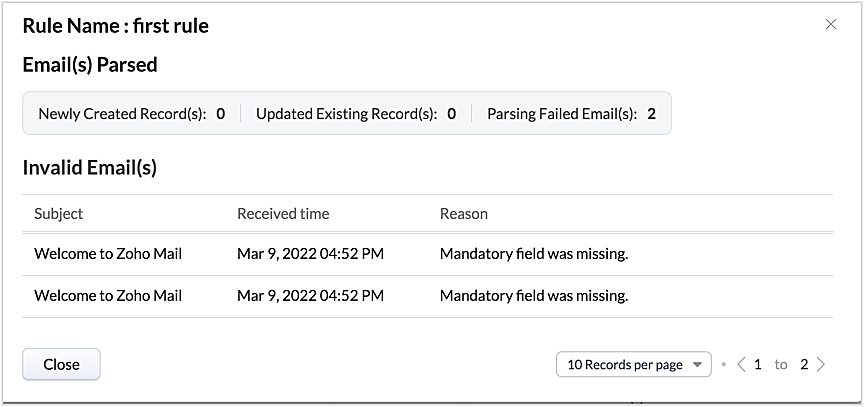
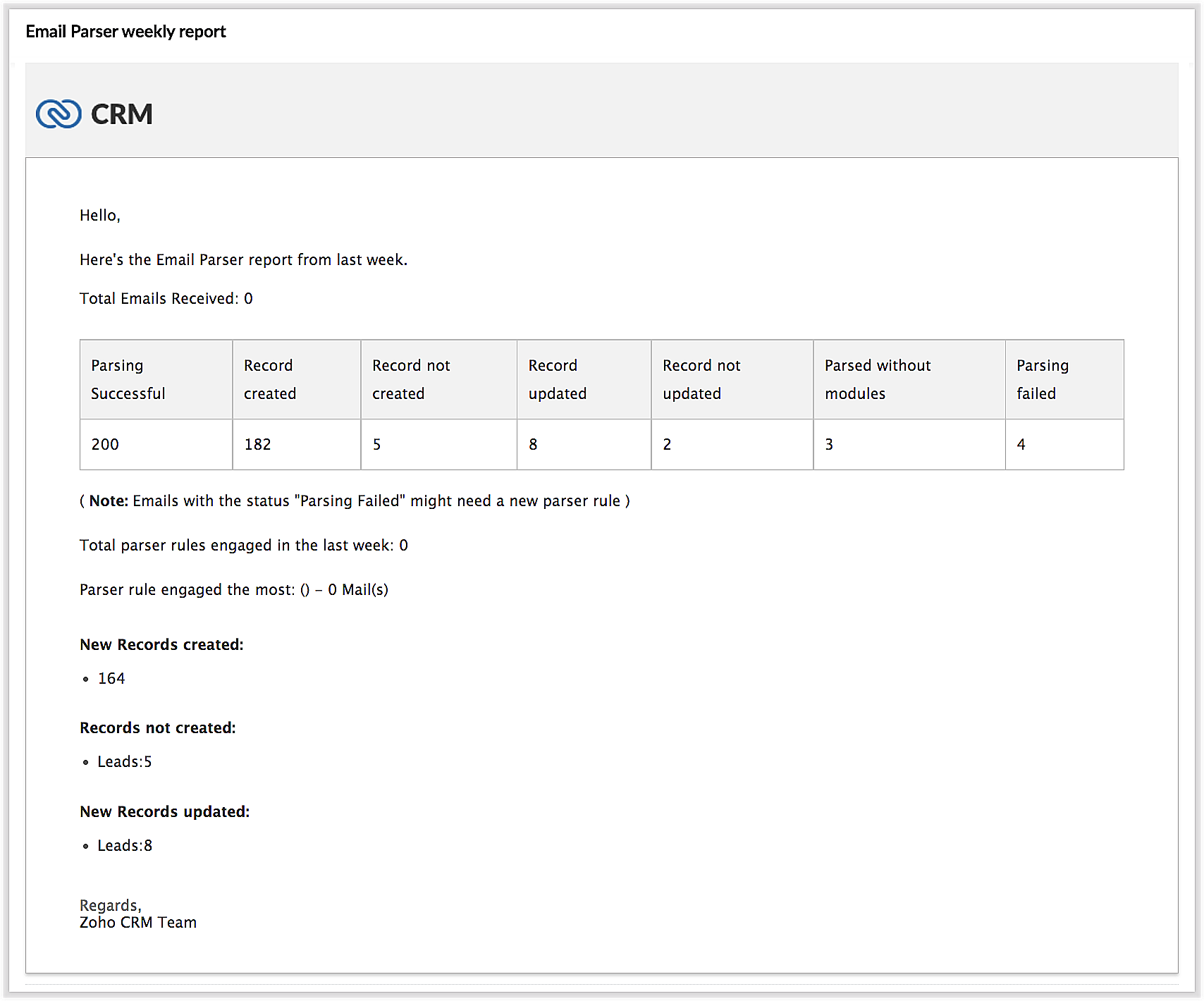
In the new version of the email parser, you're presented with accurate, detailed insights on the number of emails being parsed per rule, the fields extracted, and a list of customized actions associated with the records the parser has created. This detail summary gives you a clear picture of how effective your rules have been and indicates the revisions you may need to make to those rules based on those insights.
 
Detailed weekly performance reports can be sent to the creator of these rules or a custom email ID. Email reports are also sent upon record creation failure so that the appropriate users can take immediate action.

6. Reorder and filter  

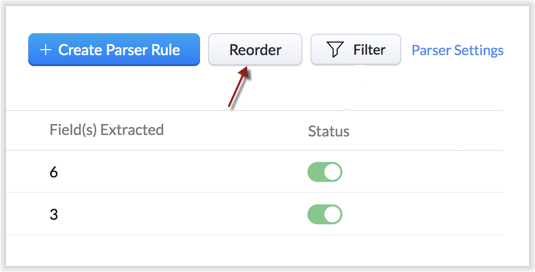
You now have an option to reorder the list of parser rules based on your preferred order. This is important because the email parser system is designed to execute only the very first rule whose criteria an incoming email meets. Therefore, the order of the parser rules becomes essential for effective email parser performance.
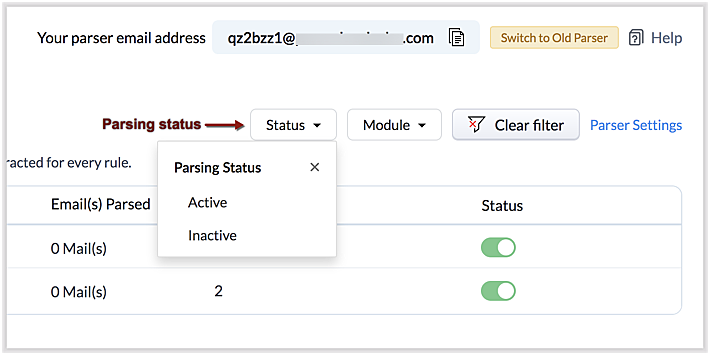
You can also filter rules by status (active/inactive) and also by module.
7. Contextual access to parsed emails  

You can view not only the Configuration Info for each parser rule, but also insights based on parsed emails.
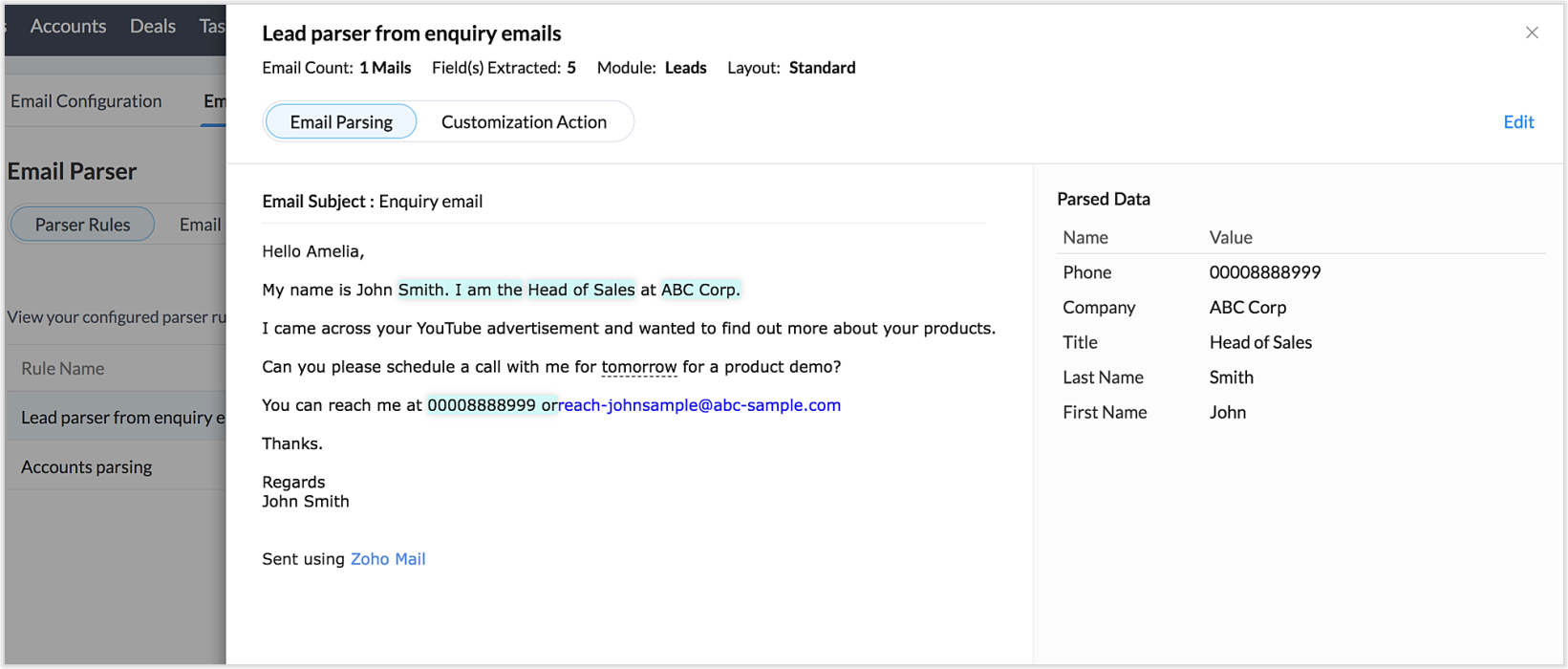


This way, from the perspectives of both parser rules and parsed emails, you can derive useful insights.
 
The "Email" tab lists the most recent email in your parser inbox, where you can check properties like parsing status, the rule used to parse it, and more. If the email has not met any rule, you may also create a new parser rule contextually from this email page.
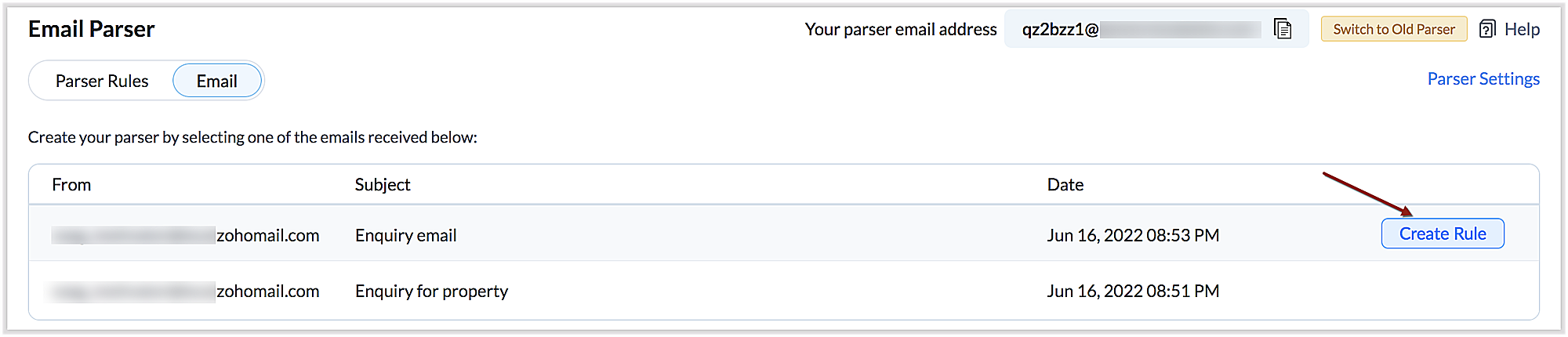

You can also re-run an email in the event of parser failure if there's no match found, as well as parse emails in bulk. (Note that this is applicable only for the emails that have a template match and for which the parsing was unsuccessful.)

Preparing for deprecation of the Old Email Parser

For existing users:

Existing users, who have not already switched to the new parser can do so by clicking on the Switch to New Parser button. Rules available in both the parsers will be working simultaneously until the Old parser is deprecated, but the rules available in the Old parser will not be displayed in the New parser view, and vice versa.

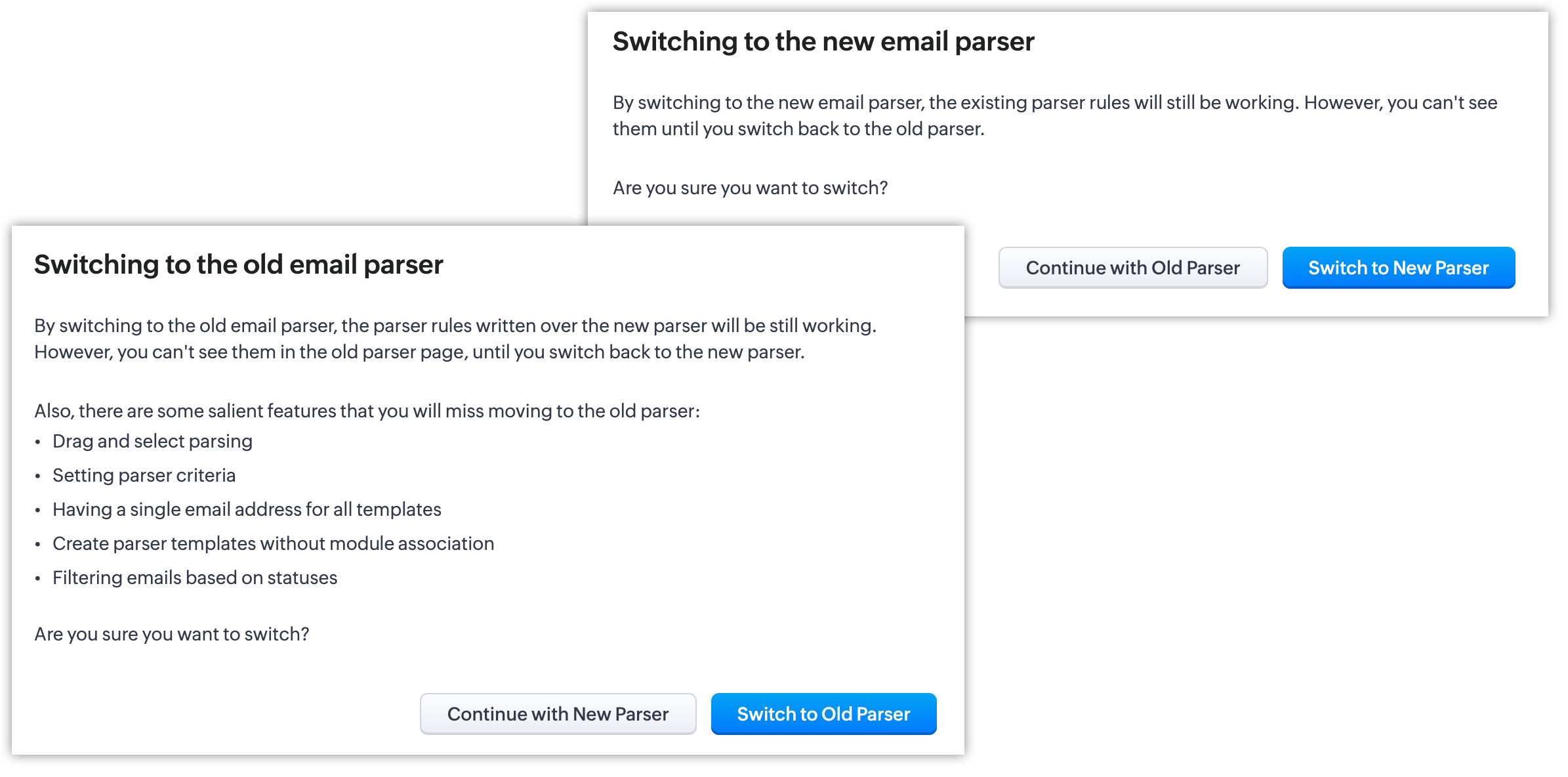

It's essential to manually create the existing rules in the New parser because once the Old parser is deprecated, only the rules present in the new parser will function. Since there won't be any rules from the previous parser available, the new parser will require that you create all rules from scratch.

Please note:  

  • Until the deprecation of the Old Email Parser on June 1, 2023, both the old and new versions will co-exist, after which, the New Email Parser will become the default version. .
  • The rules in the Old Email Parser parser won't be available once it has been deprecated. Therefore, if no rules are added to the New Email Parser , there won't be a parser to run. So be sure to write rules in the New Email Parser before the deprecation. Additionally, keep in mind that once your old rules have become obsolete, they cannot be recovered.

For new signups  

For new signups, only the new parser will be available as the default feature, and not the old parser. There is no action required from users in new signups.

Further reading   

Help Doc: Click here
What's New and What has Changed — A comparison guide: Click here

Thanks, have a great day. 
Regards, 
Sai Shree | Zoho CRM 

    • Recent Topics

    • The reason I switched away from Zoho Notebook

      My main reason for switching to Zoho was driven by three core principles: moving away from US-based products, keeping my data within India as much as possible, and supporting Indian companies. With that intent, I’ve been actively de-Googling my digital
    • Introducing the enhanced Zoho People integration

      We're excited to announce an enhancement to the integration between Zoho Recruit and Zoho People, designed to streamline your data management processes and boost efficiency across your recruitment and HR workflows. With this latest update, you can now
    • Zia should track how customer relationships evolve over time

      Here's a feature idea that I've been thinking about The Problem Zia is great at analyzing individual interactions email sentiment, call transcription, best time to contact. But here's what it can't do: tell you how a relationship has evolved over time.
    • Add an option to disable ZIA suggestions

      Currently, ZIA in Zoho Inventory automatically provides suggestions, such as sending order confirmation emails. However, there is no way to disable this feature. In our case, orders are automatically created by customers, and we’ve built a custom workflow
    • Filter our rejected quote items from the inventory quote template

      Hello, I am trying to have rejections at the line level on my quotes so I can track what items are often removed, I do not want to claim the whole quote as lost just the individual items for better data tracking. However I cannot figure out how to filter
    • Error AS101 when adding new email alias

      Hi, I am trying to add apple@(mydomain).com The error AS101 is shown while I try to add the alias.
    • Gamescope is leveling upto Motivator for Zoho CRM

      Hello,   As you are aware, we recently made Motivator for Zoho CRM available for Zoho One, CRMPlus and CRM Ultimate editions. Since Motivator has all the features of Gamescope and even more advanced gamification, we are planning to EOL Gamescope on 30th
    • Print JV of an Expenses in ZohoBooks

      When an expense is created in Zoho Books, the related journal entry can be viewed at the bottom of the expense record. However, when printing the expense, the journal entry is not included in the printed document, and there does not appear to be an option
    • Kiosk waiting for completion breaks previous field updates from occurring, yet timeline of record show changes

      hi 1) I set to statuses on a Get record . 2) Next i run a function and capture the result i.e. wait for completion 3) Then a Screen The record's timeline show the status changes. Yet the record has not changed. I can repeat this. I had another route in
    • Write-Off multiple invoices and tax calculation

      Good evening, I have many invoices which are long overdue and I do not expect them to be paid. I believe I should write them off. I did some tests and I have some questions:  - I cannot find a way to write off several invoices together. How can I do that,
    • Partner with HDFC And Sbi Bank.

      Hdfc and sbi both are very popular bank if zoho books become partner with this banks then many of the zoho books users will benefit premium features of partnered banks.
    • Print shipping label on Zebra Label printer from ZOHO Creator deluge

      Hi All, Allow me to guide you through the process of printing a shipping label from ZOHO Creator to a Zebra label printer (ZD421D). Step 1: To start, configure the SendFileToPrinter API, which enables the transmission of a file to a Zebra Link-OS printer.
    • Simple Custom Function to Update Candidate status

      Hi folks, We are currently using Zoho Recruit and have sources from where candidates are applying. Currently all candidates are being set to 'Associated' when they apply via 3rd party sources but that is not useful for us under our business process. I
    • Zoho FSM Work Order Creation Failure

      Hello FSM team and Latha, This automation is built in Zoho Creator and is triggered when a “New Repair Order” is created or updated through form submission. Once the form is submitted, the script automatically retrieves the related customer and company
    • Options on the New Auto Logged In User Profile for the Name Field

      Hi, I love the new function, but when used it automatically formats the record and therefore the export with comma separated values, so id you enable First Name & Last Name it puts "First Name, Last Name" rather than just "First Name Last Name". Could
    • Zoho Practice Roadmap

      Hi - interested to understand the roadmap for this product. I think a number of people are watching to see if this is receiving investment prior to exploring more - but it appears to be very quiet on the development front.
    • CRITICAL DOWNTIME IN ZOHO PRACTICE!! NO RESPONSE FROM SUPPORT TEAMS

      Dear Team, We are randomly unable to login to Zoho Practice since this morning. All our team members are reporting this issue. Work has come to a grinding halt and we are not getting any support or answers. This is a highly serious matter of concern for
    • Tip 49#: Obtaining global reports in Zoho Sprints

      Zoho Sprints comes with data analysis capabilities like reports and dashboards that enable the project teams to introspect quantifiable information. These reports and dashboards are project specific. Recently, a user contacted us regarding a requirement
    • Clone entire dashboards

      If users want to customize a dashboard that is used by other team members, they can't clone it in order to customize the copy. Instead they have to create the same dashboard again manually from scratch. Suggestion: Let users copy the entire dashboard
    • Zoho Cliq REST APIs v3 : A complete guide to what's changed and why 

      APIs are not just consumed by a developer with numerous automations and a series of open browser tabs. They are parsed by LLMs, fed into agent pipelines, and auto-completed by AI coding assistants that have zero tolerance for inconsistency. A verb tucked
    • Allow native Webhooks to authenticate via Connections

      Allow native Webhooks to authenticate via Connections (Basic Auth) instead of plaintext custom headers Summary Please allow native Webhooks (Workflow Rules > Instant Actions > Webhooks) to authenticate against the destination endpoint using the existing
    • Zoho desk extension update custom field

      Hi all, I'm trying to update a custom field in my zohodesk extension. But the documentation is fairly unclear. The custom field is named "testveld". The api name is cf_testveld I'm trying to update it like this: ZOHODESK.set('ticketForm.cf_testveld',
    • Zoho Expense Auto Tracking Sync Fails "Request Timed out"

      I am testing this feature to move away from MileIQ who significantly raised their prices. It seems to be tracking but it is not syncing unless I manually perform a resync under "Drives pending Sync". I am not sure what would be causing this, as some drives
    • Zoho projects dependancies is a joke

      About to cancel our Zoho One subscription because Zoho Projects is a mess. Can't build a proper progream in it because the dependancies doesn't work properly. Can't believe this software is promoter as a project program when one can't even build a proper
    • How to show product cards in your chatbot

      Hey everyone, If you are using Guided Conversations to help customers find products, you have probably run into this problem: the bot gives customers a list of options, but they still have no idea which one to pick. There will be no images, no specs,
    • Zoho Team Inbox - roadmap

      Hi, would be good to understand the Teaminbox roadmap, in particular: 1. API / Zoho Deluge connections. We have a process where the each email needs to be either tagged or assigned daily. It would be great if we could automate a 5pm alert for any exemptions
    • Zoho Projects Coming to CRM Teamspaces

      Availability: The US DC Standard Edition is now available. It will be rolled out to customer accounts in all DCs in phased manner. Hello all, You are probably already familiar with Teamspaces, the dedicated workspaces where teams organize the CRM modules
    • Canva Integration

      Hello! As many marketing departments are streamlining their teams, many have begun utilizing Canva for all design mockups and approvals prior to its integration into Marketing automation software. While Zoho Social has this integration already accomplished,
    • Editing Draft Fixed assets

      I have a few Fixed Assets still currently in Draft Status that I need to edit. I need to edit the Fixed Asset Type, the Fixed Asset Account, the Accumulated Depreciation account and the Depreciation account. Once I have done it and attempt to "Save as
    • Zoho Status Pages: Our Domain Has Changed — Here's What You Need to Know

      We're making a change to how you access Zoho Status Pages. Our status page domains have been updated to provide a more consistent and region-specific experience across all locations. If you have the old domain bookmarked or referenced anywhere — emails,
    • The Social Wall: May 2026

      Hello everyone, This month, we're excited to introduce two powerful features designed to help you create more engaging content and streamline your team's communication workflow. Adding audio via Zoho Social Audio is one of the biggest drivers of engagement
    • SalesIQ : How to disable "Idle chat handling" ?

      Hello SalesIQ Team. SalesIQ, How to disable "Idle chat handling" ? I would like to disable the option “Automatically close chats that have been idle for a specified amount of time.”
    • Zoho Webinar - Sharing System Audio (NOT AVAILABLE)

      Hi, We are having a serious problem with Zoho Webinar. In the webinars we run, we very often share the audio from a video we are streaming directly from YouTube or other applications. Until recently we were using Zoom, but as we use other Zoho applications
    • Customising Outcome drop down

      Is it possible to customize the drop down list for appointment outcomes?
    • Automate Backups

      This is a feature request. Consider adding an auto backup feature. Where when you turn it on, it will auto backup on the 15-day schedule. For additional consideration, allow for the export of module data via API calls. Thank you for your consideration.
    • Partial payments for retainer invoices

      When a customer does not pay the entire retainer invoice there is no way to apply a partial payment. PLEASE add this function.
    • Custom Display Field for Lookup Dropdowns in Zoho CRM

      Could Zoho CRM support changing the display field in lookup dropdowns, like Zoho Creator does? This would make it much easier to select the right record by showing a more useful field instead of only the default one. It would improve speed, clarity, and
    • Create custom field in multiple modules

      I am trying to create some custom fields that will be in both leads and contacts module without having to create them separately and then mapping them. How is that performed? it is too time-consuming to create 20+ fields and then do the same thing in a different module when they carry the same info. The idea is that when we get a lead from web site, there are items that we capture and once that lead is a client and moved to Contacts, that info should come over. So trying to find an easy way to create
    • Add Specific Identification as an Inventory Costing Method

      --- Business Context We are a security systems distributor handling high-value, serialized products such as IP cameras, NVRs, and RAID storage systems. Each unit is uniquely identified by a serial number and arrives in separate shipments at varying purchase
    • Creator Portal Page Customization Issues

      I have been using Creator to make Portals recently. Yesterday, I created a new portal and noticed that the page customization editor ("Open Builder") was different. Using the new page builder, I was able to customize and add an image to the various sign
    • Next Page