Introducing Zia AI in Zoho Show

Introducing Zia AI in Zoho Show


AI is no longer a distant concept. It’s one of our everyday tools, from answering casual questions to generating critical business documents. And presentations are one area where AI can be especially helpful.

At Zoho Show, we’ve been deliberate in how we integrate AI. Our goal wasn’t to replace your creativity, but to enhance it. We wanted to build an assistant who collaborates with you, not one who takes over.

Today, we’re excited to introduce you to Zia, your smart presentation assistant in Zoho Show. In this post, we’ll walk you through everything it can do for you.

Get a head start by generating presentations 

You no longer have to begin your presentations from scratch. Zia can instantly generate presentations based on your visual style and content tone. It will also give you a solid framework that you can build on later.


Add more slides to existing presentation

Once you’ve created a few slides, you can generate additional ones that align with your existing content and add them right away.


Bring life to images and content

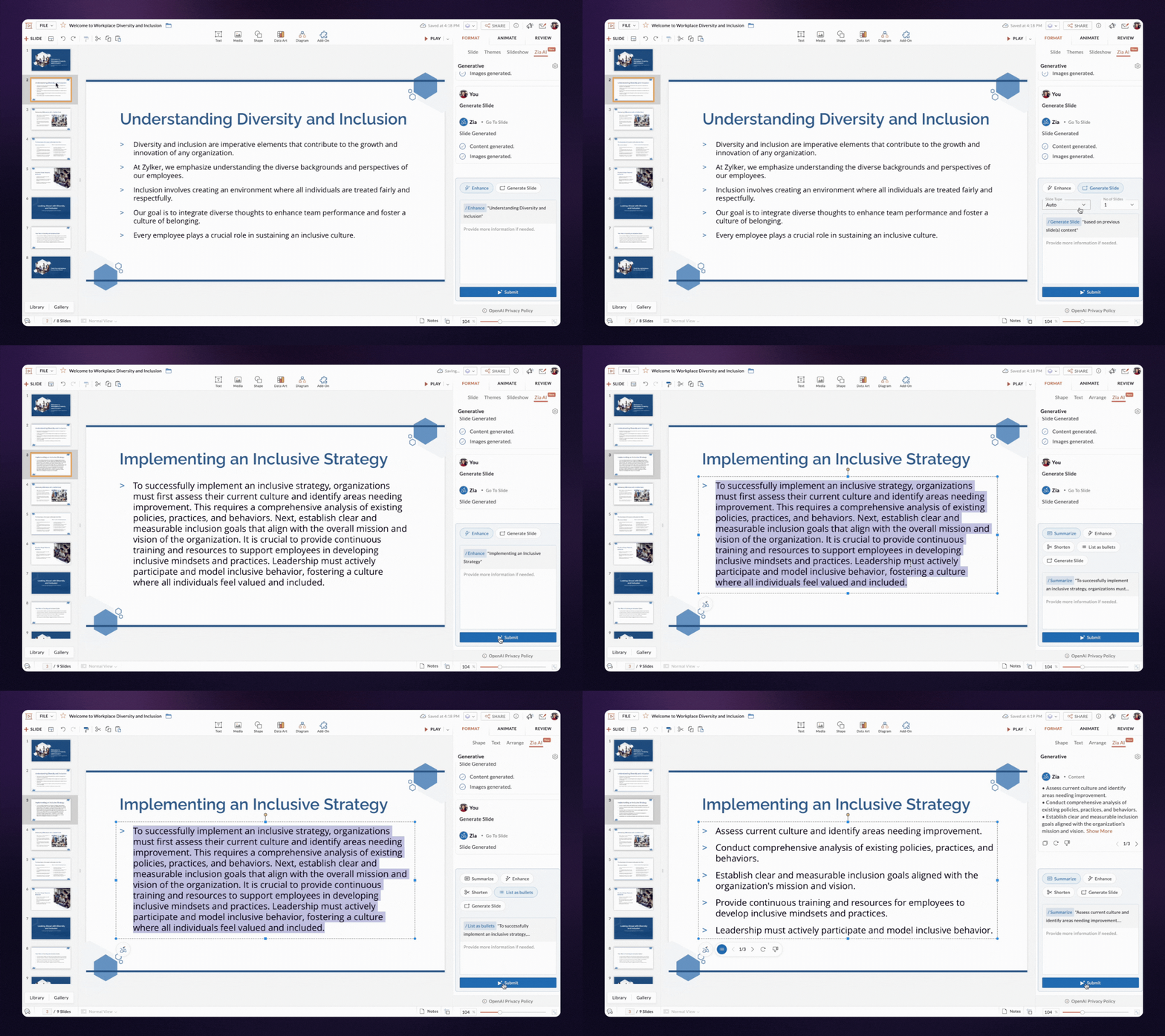
With Zia, you can generate both content and visuals for a slide based on its title. The text and images are designed to align well with your layout, reducing the need for manual adjustments.


Enhance slide content

If your content feels unclear or incomplete, Zia can help refine and enhance it, while keeping your original message intact.

Shorten and summarize your content

You can shorten content to maintain balance in your design. If you want to make your content crisp, try the summarizing option—Zia will read the content, analyze it, and give you the key points.

Turn huge paragraphs into lists

Bulleted lists are easier to read than long paragraphs. Zia can quickly break down your content and convert it into easy-to-digest bullet points.

That's not the end! We’re continuously enhancing and extending these capabilities to assist you through out your presentation journey.
If you use the Zoho Show mobile app, we’ve got good news! Zia AI features are in development for both Android and iOS and will be available to you soon.

We can't wait for you to try out AI in Zoho Show. Let us know your experience in the comments below.

If you have any suggestions or queries, feel free to reach out to us at support@zohoshow.com.

    • Sticky Posts

    • Introducing Zoho Show extension in Your Chrome Browser

      Hi everyone, Over the years, Chrome's feature-rich support extensions have grown to offer additional ways to easily access your favorite tools from anywhere. Today, Zoho Show is excited to announce our integration with Google Chrome as an extension app to help build and access presentations directly from your browser.   Zoho Show for Google Chrome is a free extension that allows you to dive straight into drafting your presentation material. Simply install the Show extension from the Chrome Web Store
    • Take your presentations anywhere with the Zoho Show app for iOS

      We're excited to announce the launch of the Show app for iOS. Our new presentation app gives you the power to view and present slideshows on your iPhone and iPad devices wherever and whenever you want.   The Show iOS app has a host of features that will make your presentations engaging and dynamic: Access all your presentations with a single tap Sign in to your Zoho Show account to view your slides and deliver presentations on-the-go. The app stores all the presentations you've created in the My
    • Introducing All New Zoho Show - Create and Design Stunning Presentations.

      Hello,   Whether you're a first-time presenter or an expert looking to make a lasting impression, Zoho Show is the tool for you. Whatever your expertise, the All New Zoho Show's contextual user interface lets you create all kinds of slides, from plain text on a simple background to complex presentations with animations, tweets, charts, media files, and lots more.   The UI doesn't leave you to figure everything out yourself, but presents something you can easily use. It's clear, obvious, and intuitive.
    • Three smart ways to share your presentation with Zoho Show.

      "What is the best way to share a presentation?", a lingering question that is asked after every live session or a meeting. Sharing presentations can be time consuming. It can be done, either by attaching the file to an email or by saving it in a pen drive. But what happens when your file size is large or your team is spread across the globe? Zoho Show lets you share your presentations both internally and externally without worrying about the file size. You can share your slides as a link and decide
    • Convey Your Ideas and Convince Your Audience with Zoho Show

      Visual presentations are highly impactful and it is a no-brainer that your audience gets attracted to them. The use of images and videos help you reach your objectives by emphasizing your ideas more effectively.  According to the psychologist Jerome Bruner of New York University, "people only remember 10% of what they hear and 20% of what they read, but about 80% of what they see and do." For example, if the above data on its own, was presented visually, there is an 80% chance that the information
    • Recent Topics

    • Delete Field that is used in a Zoho Flow connection

      I'm trying to delete a Field used in a Webhook created by Zoho Flow with CRM Connection and i get the following alert: When going to the alert i get to the following issue, can't edit it since its been deployed by a pluggin But yes i have here the prompted
    • Q3 USA ZUG Meetups - Build AI Agents with Zoho

      Hi everyone! What if you could build your own AI agent from scratch in just one session? That's exactly what we're going to do at the upcoming ZUG Meetups across the United States, where you'll get hands-on experience with Zia Agents and explore how AI
    • Data Export is forcing Creation/Modified date just like reports

      The data export now forces you to select a created or modified date. There is not an All-Time option. This severely cripples the whole function of data export for audit purposes. If the data export (or reports for that matter), requires a date, there
    • Default ticket template in helpcenter

      Hello, I have a web form and a ticket template created. How can I make that my default ticket template? If an user clicks New ticket or create a ticket, I want that template to be the default one. Thank you for the time and info.
    • Zia Agents looks promising, but I still cannot deploy my first agent or connect WhatsApp after weeks of support tickets

      Hi Everyone, I am posting here because I am stuck and need practical help from someone who has successfully deployed a Zia Agent with WhatsApp. Zia Agents looks like a very promising product. I have watched the platform expand quickly, and I have noticed
    • Valid characters for use in email addresses using Zoho's apps/APIs

      We have found an issue with the + sign character in zoho subs - we are allowed to create a customer with an email address that has a plus sign but the API doesn't allow the + so the billing portal is not created. We are going to prevent users from using
    • Feature Request – Per-Channel Pre-Chat Form Controls

      We'd like the ability to enable/disable the pre-chat form on a per-channel basis, rather than having a single global setting. On the website widget, asking for name and email before chat starts makes sense. On WhatsApp, however, email isn't necessary
    • Remove the mandatory Name Card buttons (or at least make them optional)

      Please remove the mandatory Name Card buttons (or at least make them optional) A recent change to the Name Card in Zoho SalesIQ (currently affecting WhatsApp) introduced mandatory buttons before a visitor can provide their name. I believe this change
    • Copy + Paste in Notes: Text color and text background are not retained

      I've recently started using Zoho Notebook as an Evernote replacement. When copying and pasting text within Zoho Notes, I notice that the formatting of the text (text color and background color) is not retained when pasting. Only the attributes "Bold"
    • Need to show discount before total after subtotal

      Need to show discount before total after subtotal on my estimate template (see attachment)
    • Google Ads Data is Publicly available in Zoho CRM

      We recently discovered that ALL of the following Google Ads fields are visible to all users in our CRM that have access to either Leads or Contacts modules. Not only is this troubling and inconvenient, it should be unacceptable. It also creates a mess
    • Zoho Books bill pay option not available with zoho one

      Why isn't Zoho Books bill pay add-on not available for Zoho one customers not even as a purchasable option. I think this is very inconvenient for companies wanting to use this feature all in one system
    • Bounce rates

      Where can I see my bounce rates for: 1. Each email I send out, and 2. in total?
    • Appointment- colour code

      This is a real world problem for many companies. We track several employees appointments and this is done by one person so one account. The calendar layout is not great but if we could just colour code appointments to make it easier to see and then what about printing out the diary. I know in the IT world everybody is connected but so many of use still use old technology- paper.
    • Add a Parameter to the ZOHO CRM Deluge sendmail to denote priority (defaulting to normal if unspecified)

      Hello! There is a similar thread for Creator out there that is 2 years old, but I'd like to raise it in the ZOHO CRM category as well. Would you kindly update the existing Deluge sendmail function to allow a priority parameter? The parameter should allow
    • Email outbox is now available in the sandbox

      Hello all! Testing emails without visibility has always been a blind spot in the sandbox. With the new Outbox, that gap is closed. You can now view and verify every email triggered from your sandbox, whether it’s through workflows, approvals, or mass
    • Transform your line of items into line items: ICR can now record your table values as subform values

      Enhancement in Zoho CRM Dear Customers, We hope you're well! Zia Vision’s ICR capability can now recognize, extract, and store tabulated values in your subforms. An ideal example is a university application form. It has printed fields and handwritten
    • is it possible to add more than one Whatsapp Phone Number to be integrated to Zoho CRM?

      so I have successfully added one Whatsapp number like this from this User Interface it seems I can't add a new Whatsapp Number. I need to add a new Whatsapp Number so I can control the lead assignment if a chat sent to Whatsapp Phone Number 1 then assign
    • Add the ability to Hide Pages in Page Rules

      Hi, We have Field Rules to show and hide fields and we have page Rules, but we can't hide a page in Page Rules so it isn't completed before the previous page (And then have the Deny Rules to prevent submitting without both pages completed), we can only
    • Calendar Year View?

      Is there a way I can view the calendar in year view? Maybe create a page with a view like this?
    • Automation Series: Auto-update Project End Date When a Task is Rescheduled

      When a project is planned, tasks are scheduled within the projects timeline. Any delay in the predecessor tasks can delay dependent tasks, which can in turn impact the project timeline. Unless the project is manually rescheduled, the end date might not
    • What is a realistic turnaround time for account review for ZeptoMail?

      On signing up it said 2-3 business days. I am on business-day 6 and have had zero contact of any kind. No follow-up questions, no approval or decline. Attempts to "leave a message" or use the "Contact Us" form have just vanished without a trace. It still
    • Zoho Social | Instagram Integration in Zoho Desk

      Good day Zoho team! I have a question. If we link the Instagram business account to our Facebook page, and we integrate the Facebook to Social in Zoho Desk, the "Messages" from Facebook will be converted into Ticket right? Does it also convert the Instagram
    • Rich-text fields in Zoho CRM

      Moderation Update: During the initial release of Rich Text fields, it was supported only in the Enterprise and Ultimate editions. We have gradually extended Rich Text fields to all the paid editions of Zoho CRM. Hello everyone, We're thrilled to announce
    • Tip #52: Practical uses of Zia Search in Zoho Sprints

      If your agile team uses multiple Zoho apps, your team members might often find themselves switching between those apps looking for related information. When the data you're looking for is spread across different workspaces within Zoho environment, rely
    • New field in Zoho Forms: Validate structured data with the Regex field

      Have you ever received form submissions where the information looked almost correct but wasn't quite in the format you expected? Maybe an employee ID was missing a character. A PAN number was entered in lowercase. A license number had an extra space.
    • Import Excel from email into CRM

      I receive a daily Excel file by email and I would like to have it automatically imported into a custom Zoho CRM module. Do you think there's anything that can be done? My first idea was searching for a native option in CRM, such as "send an email to a
    • Zoho Connect is now even smarter and more personalized

      Hello everyone, We’re excited to introduce new features and enhancements to help you personalize the employee experience, connect workplace knowledge with AI, and create more engaging dashboards. Deliver relevant dashboards with Audience With Audience,
    • Stop Zoho Projects From Automatically Adding Client Users

      I have a custom function that creates a Zoho Project for every Quote attached to a Deal when it moves to Closed Won. Everything works fine, except for the fact that connecting a Zoho Project to the CRM automatically takes the Contact associated with the
    • Global "Search" in FSM

      I'm missing the global Search function like in CRM. This should save us a lot of time. We don't now upfront if the customer is a Contact or a Company. So now we have to guess in what module to start a search/filter. Also looking up an address, phone number,
    • Canvas not working

      I have a canvas running. I selected it as the default for all options, but mainly want it for Portals. It isn't working. I selected Assign Canvas in both the Dtailed View and in the module itself. Nothing has happened. Any help?
    • LinkedIn RSC is now live in Zoho Recruit

      LinkedIn Recruiter System Connect (RSC) is here. Your Zoho Recruit data (candidates, jobs, notes, stage updates, resume attachments, and more) now syncs with LinkedIn in real time. Note: LinkedIn RSC is included with your LinkedIn Recruiter Corporate
    • Add the Zoom Option to the Camera

      Hi, I use the ZOHO Forms Camera so I can manage metadata, compression, etc. but this doesnt have the zoom parameter activated, so when we have photos in a tight space and want to use 0.5 for example, we can't, can this be enabled please. Thanks Dan
    • The Social Wall: July 2026

      Hello everyone! We're halfway through the year, and we bring to you three new updates designed to help you experiment with your content, discover your top-performing posts, and automate your engagement workflow. Instagram Trial Reels Instagram trial reels
    • What's New in Zoho Invoice | April – June 2026

      Hello everyone! We're back with the latest updates and enhancements we've rolled out in Zoho Invoice from April to June 2026. Here's what's new this quarter: Connect Zoho Invoice to AI Using Zoho MCP Customize Accessibility Preferences Attach Annexure
    • Help with SEO

      Hi There, I have recently published a site and added some Keywords in the SEO settings. Searching Google I currently don't find my site though. When do these settings take effect? In the SEO settings there is also a section "Sitemap" I can change settings for "frequency" and "Priority" What do these settings do? Kind regards
    • POS and payments

      Have i missed the point can i not use zoho POS as a payment terminal back into stripe like we can in Books?
    • HR Helpdesk Cases

      We have Zoho One Enterprise. I'm trying to find HR Helpdesk Cases, but my UI does not match the documentation. I'm not sure how to move forward.
    • Zoho Books Placeholder: Inventory Counts

      I was hoping to figure out how to find the placeholders for inventory counts by item. We use Location based inventory tracking, so I dont know if that affects things. I want my PDF and Printed PICK LISTS to show the Quantity Available to Pick. I have
    • Undocumented Books API error message - 1000 - The requested action could not be completed. Please try again. | Unexpected error

      This code sometimes throws this error 1000 - The requested action could not be completed. Please try again. | Unexpected error What does it mean? result = zoho.books.updateRecord("salesorders",organization.get("organization_id"),salesorder_id,sales_
    • Next Page