Introducing Zia AI in Zoho Show

AI is no longer a distant concept. It’s one of our everyday tools, from answering casual questions to generating critical business documents. And presentations are one area where AI can be especially helpful.
At Zoho Show, we’ve been deliberate in how we integrate AI. Our goal wasn’t to replace your creativity, but to enhance it. We wanted to build an assistant who collaborates with you, not one who takes over.
Today, we’re excited to introduce you to Zia, your smart presentation assistant in Zoho Show. In this post, we’ll walk you through everything it can do for you.
Get a head start by generating presentations
You no longer have to begin your presentations from scratch. Zia can instantly generate presentations based on your visual style and content tone. It will also give you a solid framework that you can build on later.

Add more slides to existing presentation
Once you’ve created a few slides, you can generate additional ones that align with your existing content and add them right away.
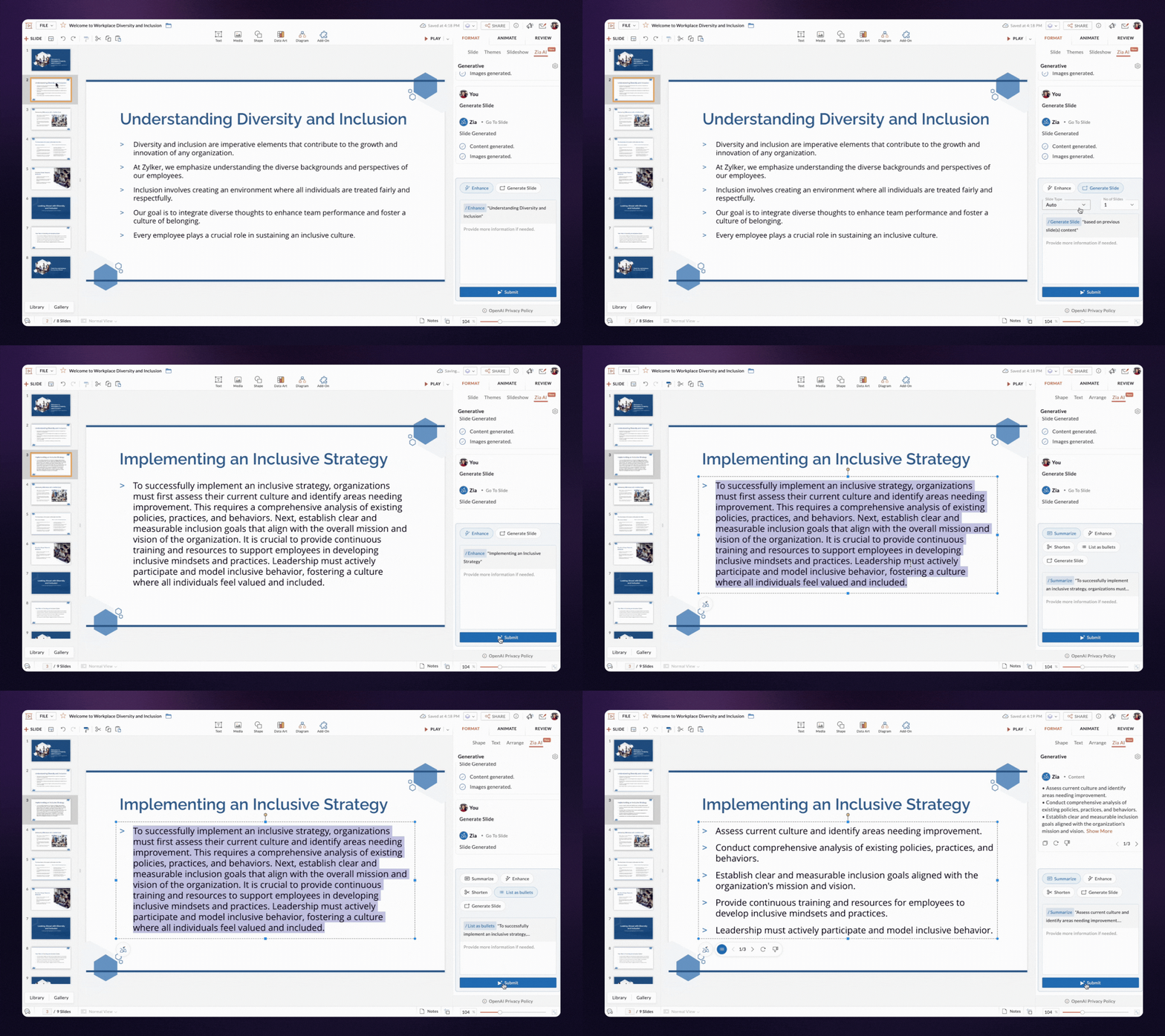
Bring life to images and content

Enhance slide content
Shorten and summarize your content
Turn huge paragraphs into lists
If you use the Zoho Show mobile app, we’ve got good news! Zia AI features are in development for both Android and iOS and will be available to you soon.
We can't wait for you to try out AI in Zoho Show. Let us know your experience in the comments below.
Topic Participants
Loshini D
Sticky Posts
Introducing Zoho Show extension in Your Chrome Browser
Hi everyone, Over the years, Chrome's feature-rich support extensions have grown to offer additional ways to easily access your favorite tools from anywhere. Today, Zoho Show is excited to announce our integration with Google Chrome as an extension app to help build and access presentations directly from your browser. Zoho Show for Google Chrome is a free extension that allows you to dive straight into drafting your presentation material. Simply install the Show extension from the Chrome Web StoreTake your presentations anywhere with the Zoho Show app for iOS
We're excited to announce the launch of the Show app for iOS. Our new presentation app gives you the power to view and present slideshows on your iPhone and iPad devices wherever and whenever you want. The Show iOS app has a host of features that will make your presentations engaging and dynamic: Access all your presentations with a single tap Sign in to your Zoho Show account to view your slides and deliver presentations on-the-go. The app stores all the presentations you've created in the MyIntroducing All New Zoho Show - Create and Design Stunning Presentations.
Hello, Whether you're a first-time presenter or an expert looking to make a lasting impression, Zoho Show is the tool for you. Whatever your expertise, the All New Zoho Show's contextual user interface lets you create all kinds of slides, from plain text on a simple background to complex presentations with animations, tweets, charts, media files, and lots more. The UI doesn't leave you to figure everything out yourself, but presents something you can easily use. It's clear, obvious, and intuitive.Three smart ways to share your presentation with Zoho Show.
"What is the best way to share a presentation?", a lingering question that is asked after every live session or a meeting. Sharing presentations can be time consuming. It can be done, either by attaching the file to an email or by saving it in a pen drive. But what happens when your file size is large or your team is spread across the globe? Zoho Show lets you share your presentations both internally and externally without worrying about the file size. You can share your slides as a link and decideConvey Your Ideas and Convince Your Audience with Zoho Show
Visual presentations are highly impactful and it is a no-brainer that your audience gets attracted to them. The use of images and videos help you reach your objectives by emphasizing your ideas more effectively. According to the psychologist Jerome Bruner of New York University, "people only remember 10% of what they hear and 20% of what they read, but about 80% of what they see and do." For example, if the above data on its own, was presented visually, there is an 80% chance that the information
Recent Topics
[Free webinar] Learning Table Series | Chat with intent: From conversations to intelligent actions
Hello everyone, We are excited to invite you to another edition of the Learning Table Series webinar. With AI-powered capabilities, the way users interact with applications is evolving. Instead of navigating multiple screens to find information, usershow do I move email responses to the top of the of the email body?
when someone responds to my email, their response is at the very bottom of the email. I have to scroll down to the bottom to see what they wrote. how can I move the response to the top of the email?OTP New email access
adding a new email sends a OTP code to the new email which I can't access. It send an OTP code but I can't access it without getting the new OTP code.M
Hi Zoho Support team, I got notification error in my email account when i sending email to my client (reply). It said that i exceeded limit 1600 send email per day, however i never reach that number. Could you check that ?How do I reorder the item table columns in my invoice template?
There must be a way I just cannot find it. Anyone?API - Add Tags to Search Articles
The ability to "search articles" programmatically via API would be meaningfully enhanced by allowing that search to filter for (or out) certain tags. There are lots of potential use cases here. The one that caused me to write this post is for agentic[Webinar] AI-powered writing and automation in Zoho Writer
Live webinar on November 12, 2026 | Time: 2 PM IST | 2 PM EST Hi, When organizations create documents, they often start from scratch. Then they need to proofread and translate them. Doing all of this manually takes time, and errors and hard-to-read writingWhat is "Child Sales Order"
When I click system predefine "Created Sales Order" button, sometimes will display "Create Child Sales Order" instead of "Create Sales Order", in "Child Sales Order" Create Page, system will not allow you to save the record. only one solution is refreshZoho Tables is now live in Australia & New Zealand!
Hey everyone! We’ve got some great news to share — Zoho Tables is now officially available in the Australian Data Center serving users across Australia and New Zealand regions! Yes, it took us a bit longer to get here, but this version of Zoho TablesEnhancements for Currencies in Zoho CRM: Automatic exchange rate updates, options to update record exchange rates, and more
The multi-currency feature helps you track currencies region-wise. This can apply to Sales, CTC, or any other currency-related data. You can record amounts in a customer’s local currency, while the CRM automatically converts them to your home currencyZoHo Mail & MCP connectors
Is ZoHo working an MCP connector for mail?? I find it very useful in Gmail to have Claude summarize messages for me. Thanks Jim P.S. Sorry if this is the incorrect forum. Mods please adjust as necessary.Optimize your Knowledge Base for better visibility by allowing search engine crawling and indexing
All you need to know about no-follow and no-index in KB. What are article crawlability and indexability? Crawlability and indexability are vital for making an article visible and accessible to search engines. When a search engine crawls an article, itTeam ticket accessibility when tickets are set to private
Hello! I would like to know if agents would be able to see tickets assigned to their team (but not to any specific user) if ticket sharing was set to Private. Thanks in advance, LucaNow you can bring your Zoho Tables data to AI Assistants with Zoho MCP!
Imagine asking your AI assistant questions about your Zoho Tables data, exploring records, or getting insights — all through natural language. With Zoho MCP (Model Context Protocol), you can connect Zoho Tables to compatible AI assistants and let themFollowed Tickets view
Hello, following a ticket makes no sense at all / offers no additional value.... Of course I can install and use the add-on My Followed Tickets for Zoho Desk, but what does it do for me? Not much! It cannot be used across departments! The range of functionsiPhone Duo support for Zoho Desk app?
When is iPhone Duo support expected for the Desk app? It’s miserable to use in its current form on the device. Please optimize for the new Duo!Zia AI capabilities now available in all paid editions
Hello everyone, We are expanding the availability of AI-powered features in Desk to the other paid subscriptions from 7th July 2026. Right now, the following AI-based features are available for Enterprise edition users: Intelligence: Sentiment analysis,Solution to Import OST File into Office 365.
In today’s digital workplace, organizations are rapidly moving toward cloud-based email systems for better flexibility, security, and collaboration. Microsoft 365 has become one of the most widely used platforms for business communication. A common requirementSales Tax paid upon Delivery and Installation of Job
We are new to Zoho Books. We pay sales tax when we deliver and install a job in a customer's home. For instance, if I received an order in September but deliver it in November. How can I get a report of all delivered sales in the month of November soThis user is not allowed to add in Zoho. Please contact support-as@zohocorp.com for further details
Hello, Just signed up to ZOHO on a friend's recommendation. Got the TXT part (verified my domain), but whenever I try to add ANY user, I get the error: This user is not allowed to add in Zoho. Please contact support-as@zohocorp.com for further details I have emailed as well and writing here as well because when I searched, I saw many people faced the same issue and instead of email, they got a faster response here. My domain is: raisingreaderspk . com Hope this can be resolved. Thank youHow do i change my login email address
I need helpDiscover the Latest Hosted Pages Enhancements
We've made several enhancements to Hosted Payment Pages in Zoho Billing, including a redesigned single page checkout, custom field configuration, mobile OTP verification, and the ability to share a single payment page for multiple items. You can alsoDécouvrez l’API Zoho Social : Créez des workflows personnalisés pour vos réseaux sociaux
Chaque entreprise a sa propre façon de gérer ses activités sur les réseaux sociaux. Certaines publient leur contenu depuis un CMS interne, d'autres synchronisent leurs campagnes avec leur CRM. Les agences, quant à elles, gèrent plusieurs dizaines de marques,New domain
I need assistance to add a new domain. I already paid for the monthly upgrade. Please provide instruction on the steps needed to add a new domain to start an updated email address.Stock management : updates of quantities
Hello, We are having many troubles with Zoho CRM on Stock Management. - We changed some names and added some status to the possible Status of SO and PO. - Now, the stock management has gone crazy. If we create a S.O., it increase the quantity in demandSplitting Expenses?
If I have an expense that falls under more than one expense category, is it possible to split it out? What's the timeline for this feature? Is there any way around it at the moment? Thanks!Can we do Image swatches for color variants?
We want to do something like the attached screenshot on our new zoho store. We need image swatches instead of normal text selection. We want to user to select an image as color option. Is this doable? I don't see any option on zoho backend. Please hAllow attendees to accept a Cliq meeting after declining it (or resend the invite to one attendee)
Hi team, We hope you are doing well. We would like to request an important enhancement related to meeting invitations in Zoho Cliq. Currently Once an attendee declines a Cliq meeting, there is no way for them to accept it again, and the organizer cannotLead auto responder marketing sales funnel email process
Hello Zoho, I want to create a dynamic auto generated follow up email process. We are a construction trade providing the same quotations for supplying services to multiple Building Companies who all bid (tender) on the same opportunity to secure workWhatsApp Coexistence
Hello, please implement WhatsApp Coexistence, we need to track staff whatsapp chats on their PC and they need to be able to use WhatsApp on their mobile in around the office and warehouse, as we video call customers and send them product pictures. ThankProduct Images on PDFs
Please allow for product images to be shown/hidden on some PDFs and not all PDFs. For example: Show product images on Estimates and Sales Orders, but not on Invoices. Thank YouQuickSupport is rejecting a valid Connect.exe signature
We isolated the issue to the installed **Zoho QuickSupport** application. On a fresh Windows 11 personal PC, using a separate personal Zoho Assist account, QuickSupport installs and launches normally. QuickSupport verifies its own signature successfully.Mobile App
I'm running some tests before we add zoho forms to our workflow. I have made several forms. I have download the app I can add entries to some forms on the app but other forms I get a ""new features on the web are still under development in the app. You can't view them here, but we're working on it" Is there somewhere to find out what those are so I can avoid them if necessary??Key enhancements to user management in Zoho Creator
Hello everyone, We're rolling out a major enhancement to the Users tab in Zoho Creator in order to bring stronger governance, security, and user management to the platform. With these new capabilities, organizations can achieve more structured accessIts 2022, can our customers log into CRM on their mobiles? Zoho Response: Maybe Later
I am a long time Zoho CRM user. I have just started using the client portal feature. On the plus side I have found it very fast and very easy (for someone used to the CRM config) to set up a subset of module views that make a potentially extremely usefulRenewal payment processed successfully but my account shows I am in "Free Edition"
Hi Zoho support team, I renewed my subscription in Oct 20th and received a message that renewal payment was processed successfully. But my account profile shows I am in "Free Edition". Can you pls confirm if there are any issues with subscription renewal?Agents Cannot Use Pre-Configured Connections?
As part of my process for architecting a multi-agent system, I put connections in place via Settings | Connections. When I created my first agent, I enabled tools well within the scope of the connections that I created. From the agent UI, I went to Connectorsexternernal user adding issue
externernal user adding issueCan I add Conditional merge tags on my Templates?
Hi I was wondering if I can use Conditional Mail Merge tags inside my Email templates/Quotes etc within the CRM? In spanish and in our business we use gender and academic degree salutations , ie: Dr., Dra., Sr., Srta., so the beginning of an email / letterSet department automatically for incoming calls
Is it possible, when receiving an incoming call through Zoho Desk (using Twilio integration), for the department to be auto-selected based on the phone line being called? Currently, we have to manually select the department from the dropdown menu whenNext Page