Kaizen #121 : Customize List Views using Client Script
Hello everyone!
Welcome back to another interesting Kaizen post. In this post, we can discuss how to customize List Views using Client Script. This post will answer the questions Ability to remove public views by the super admin in the Zoho CRM and Is it possible to restrict ZCRM user to see only custom views created by administrator?
In this post,
- What is a List View?
- Use Case - To hide all public views except one
- Solution using Client Script
- Other ZDKs available to customize List Views
- Summary
- Related Links
1. What is a List View?
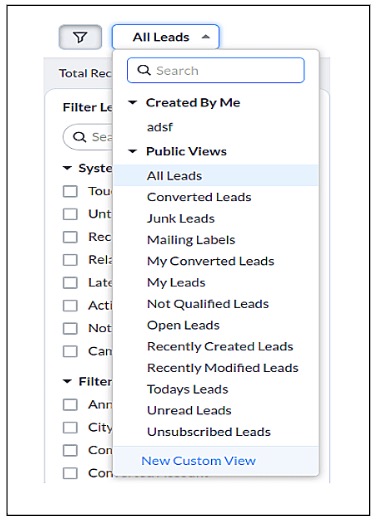
A List View is grouping of records based on a defined set of criteria. List Views are beneficial for displaying customer specific data according to your business requirements. For example, you may be interested in following-up on the leads created during the last week or reviewing overdue tasks. The best way to handle these scenarios is to filter the records using the list views. Click here for more details on List Views.There are two types of List Views in Zoho CRM -
- Standard List Views : You can modify the standard views and sort the order of the columns in the list.
- Custom List Views : You can create, modify, and delete custom views, and you can also sort the order of the columns in the list.
Often, there are business requirements where you need to customize these views, like hiding a view from certain users or masking a particular column in the view. Let us see how to control the list views visible to a user, using Client Script.
2. Use Case - To hide all public views except one
Zylker is a manufacturing company that uses Zoho CRM. A Salesman creates records in the custom module named "Orders".The name of the profile assigned to a Salesman is "Sales". The Admin does not want the "Sales" profile users to view the standard public views except the "My Orders" public view.
3. Solution using Client Script
Admin should remove the visibility to all public views for the profile "Sales" and permit only the "My Orders" view. Here are the list of steps to be followed.
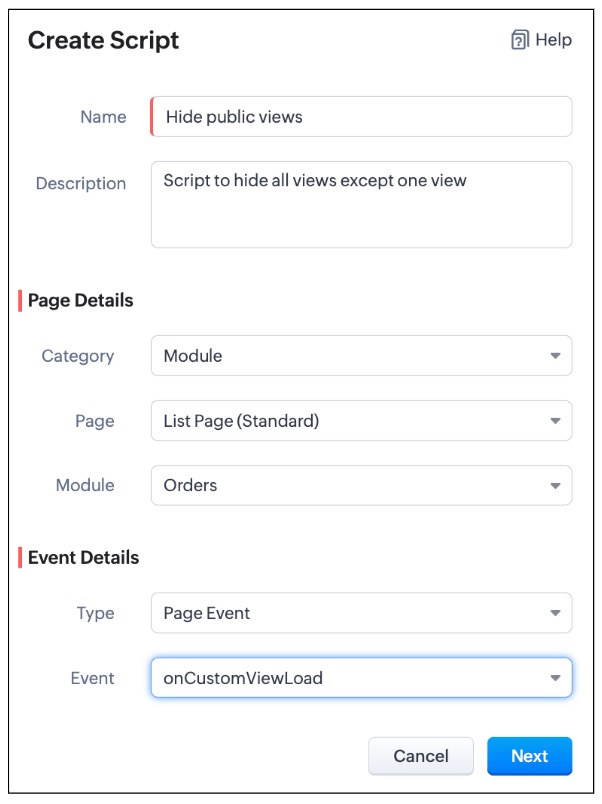
- Create a Client Script for List Page (Standard) of Orders module and specify the event as onCustomViewLoad. To know more about how to create a Client Script, click here.
- Now, using the getComponent.getOptions() , copy the id of My Orders view from the Messages panel in the "Run" component of Client Script IDE as shown below.
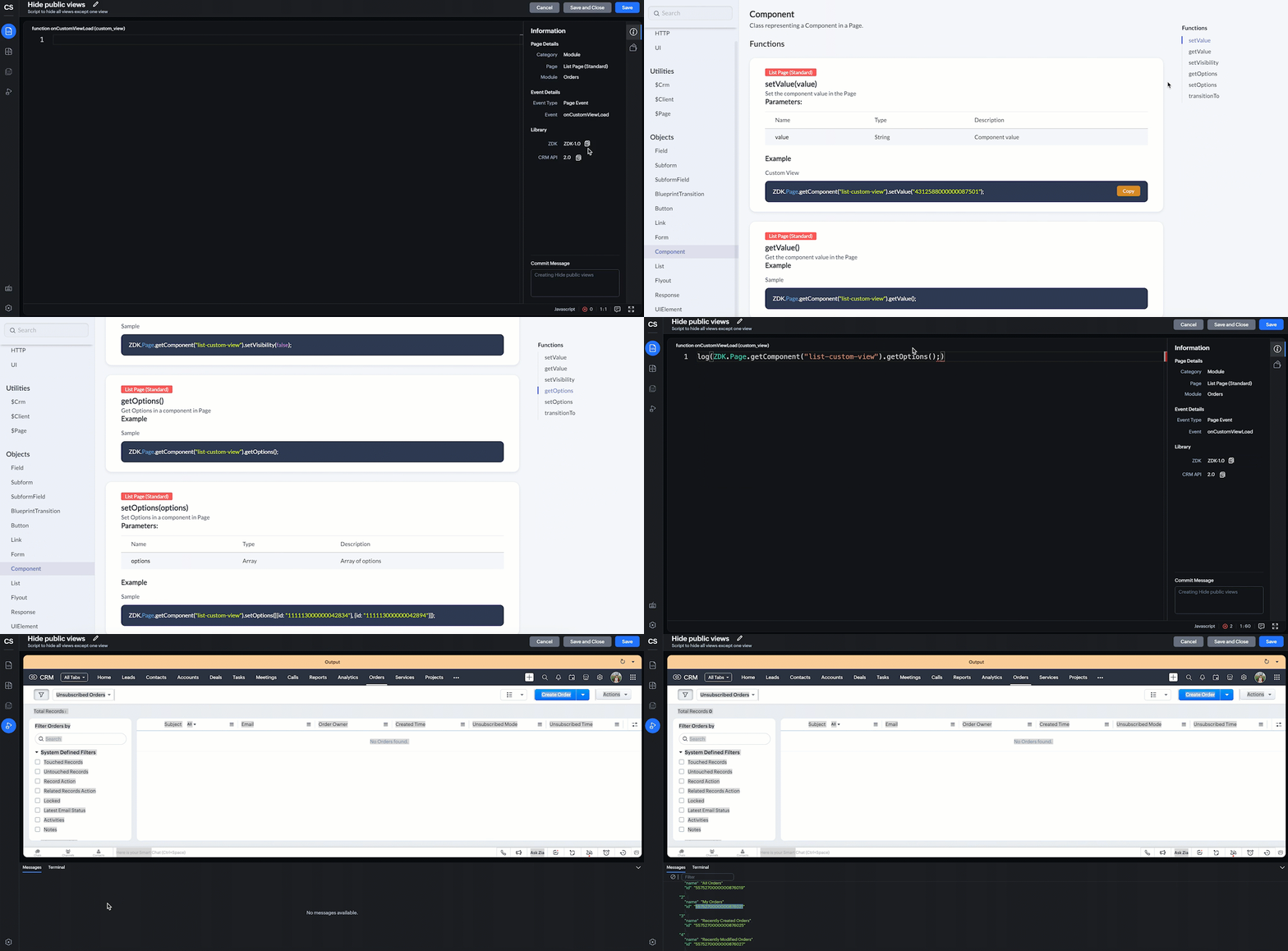
log(ZDK.Page.getComponent("list-custom-view").getOptions()); |
- In this script, ZDK.Page.getComponent("list-custom-view") will get the component that corresponds to the views drop down on the List Page.
- Then, getOptions() will return the options in the component of List Page. Here the component is 'list-custom-view'.
- Now with the copied id of "My Orders" view , use "getComponent.setOptions()" and add the only option on list-custom-view as "My Orders" view, if the profile is "Sales".
var user = ZDK.Apps.CRM.Users.fetchById($Crm.user.id); if (user.profile.name != 'Sales') { ZDK.Page.getComponent("list-custom-view").setOptions([{ id: "5575270000000876021" }]); } |
- Save the Script.
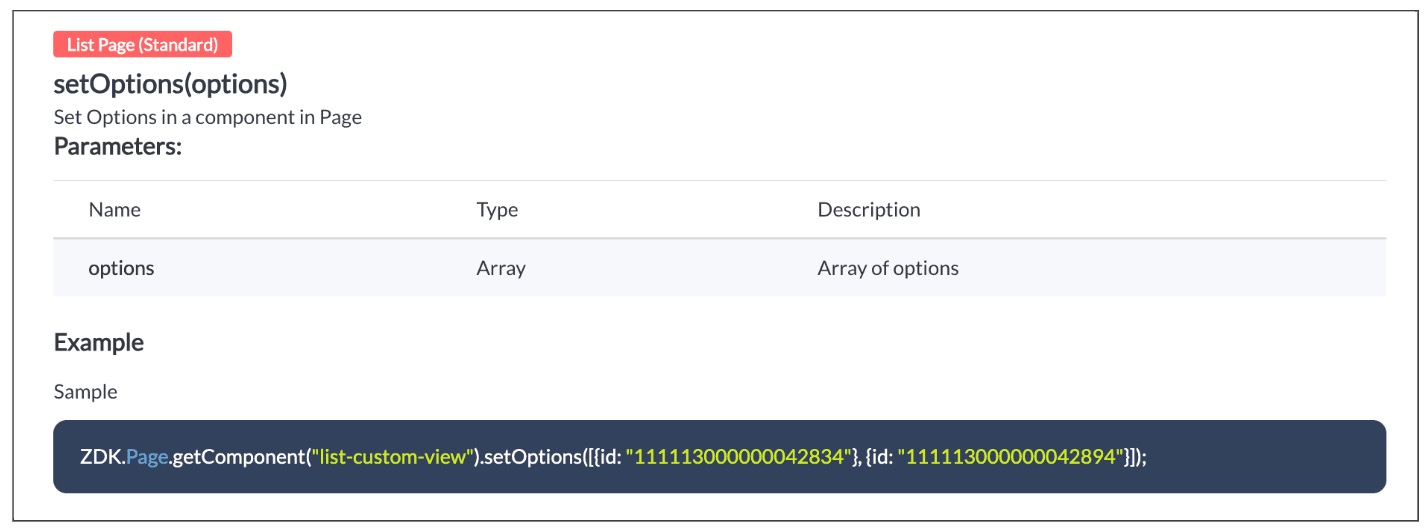
- Here is the syntax for setOptions(options).
- You can now see that only "My Orders" view is visible for the "Sales" profile, and all other public views are hidden.
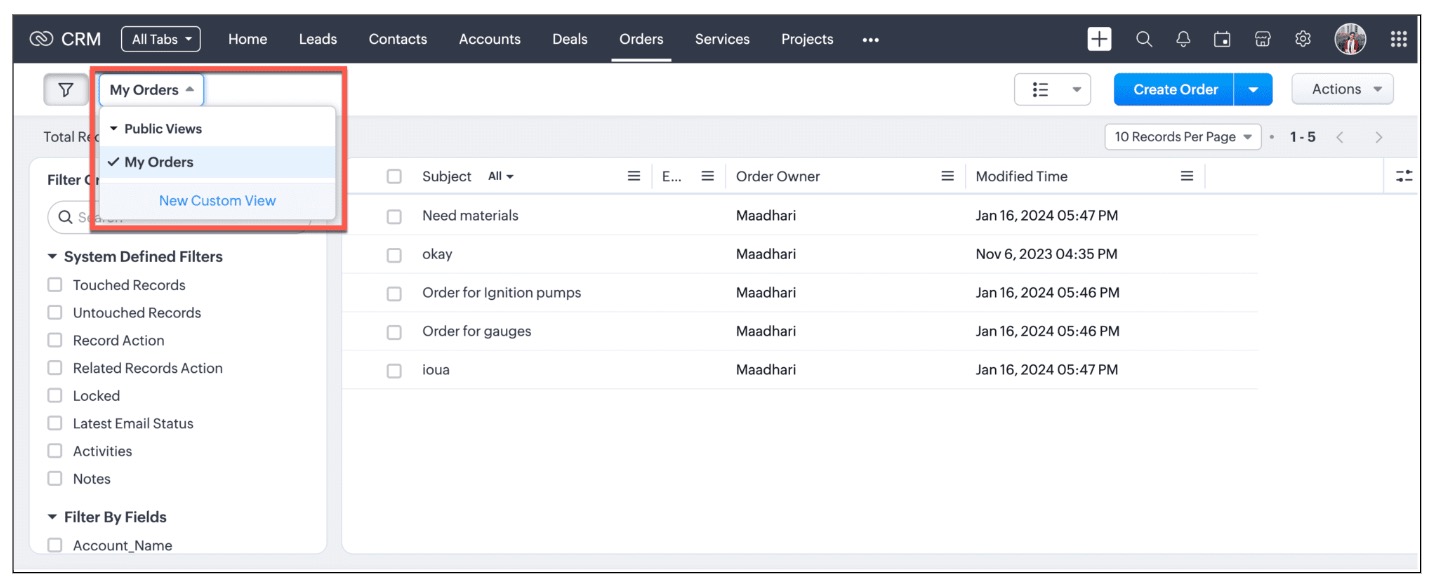
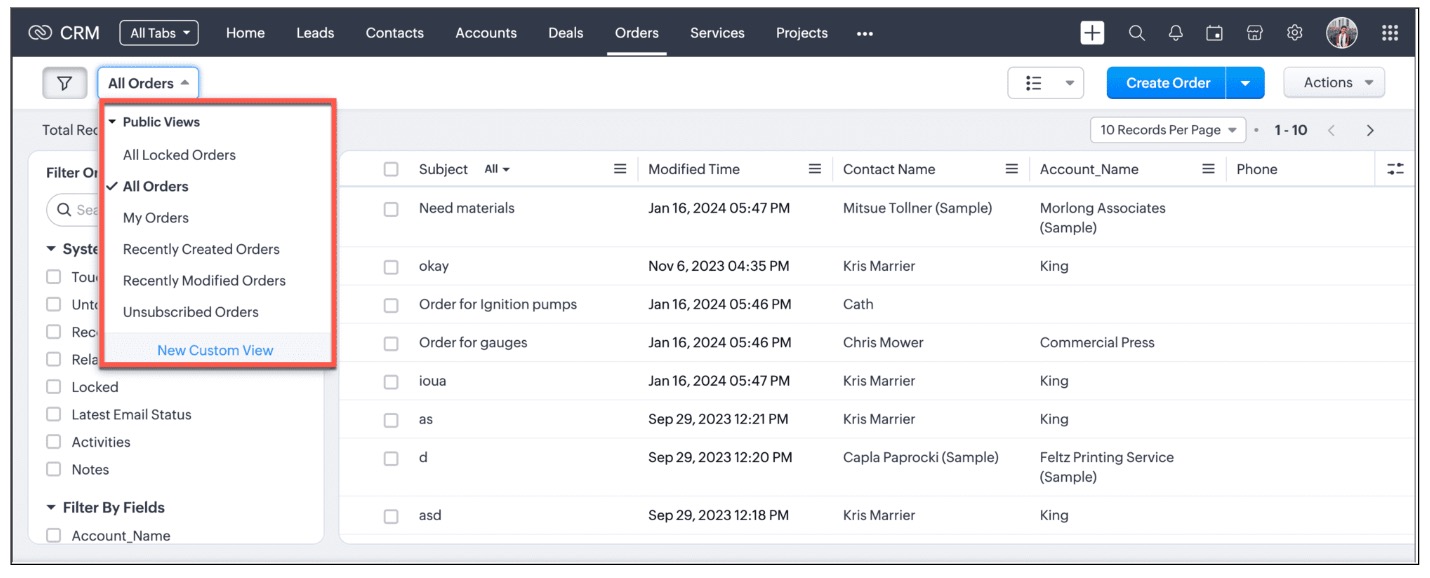
- For other profiles like Manager and Admin, all public views will be visible as shown below.
We are working on the other components in the List Page, and will let you know once they are live.
4. Other ZDKs available to customize List Views
Client Script enables you to customize List Views using the following list of ZDKs and Client Script functions.
- freezeColumns(option) - You can freeze list view and disable modifying columns.
- maskField(field_name, (length,character,reverse)) - You can mask fields in the List View
- sortByField(field_name, option) - You can sort field in the List View
- getRecords() - You can get Records in the List View
- selectRecords(criteria) - You can select Records in the List view by criteria
- selectRecordsByID(ids) - You can select Records in the List view by record ID
- clearSelection() - You can clear selected Records in the List view
- style(style_config, criteria) - You can style Records in the List View. Click here to view the related Kaizen post.
- setValue(value) - You can set the component value in the Page
- getValue() - You can Get the component value in the Page
- setVisibility(value) - You can set visibility of the component in the Page
5. Summary:
In this post, we have discussed,
- About standard and custom List Views.
- How to control the visibility of List Views using Client Script.
- How to fetch the list of views available for a module using Client Script.
- How to set your desired views for users using Client Script.
- ZDK methods available in Client Script to customize List views
6. Related Links
- Client Script Overview
- Creating a Client Script
- Client Script Events
- Client Script IDE
- Use cases of Client Script

Kaizen Collection :
Click here to view our Kaizen Collection.
Also, check our previous post - Kaizen #120 - A Guide to API Calls in Zoho CRM Sandboxes
We hope you found this post useful. We will meet you next week with another interesting topic!
If you have any questions, let us know in the comment section.
Cheers!
Topic Participants
Maadhari M
Irmyahou Azan
Ishwarya SG
Brandon
859953848@zohoclosedAccount.com
Sticky Posts
Announcing the new SKILL.md for Zoho CRM and the updated OAS repository!
We are introducing a new zoho-crm skill to make working with Zoho CRM Developer tools (like APIs, functions, widgets, client scripts, queries etc) easier and faster, with the help of AI in your preferred AI harness like Claude Code, Codex, Cursor, VSCodeKaizen #261 : Using Zoho CRM Skill to generate complex COQL queries
Hello everyone, In the previous Kaizen posts, we introduced the zoho-crm SKILL.md and discussed how it can help you when you are working with Zoho CRM APIs and Client Script. In this Kaizen, we will focus on using the Zoho CRM `SKILL.md` with GitHub CopilotKaizen #256 - Build an Arrival Readiness Web Tab in Zoho CRM
Hi everyone! Welcome back to the Kaizen series! In the post, we discuss a use case in hospitality industry: how an Arrival Readiness web tab widget can be used to let reception staff identify and resolve issues before arrival of guests. Use case In theKaizen #198: Using Client Script for Custom Validation in Blueprint
Nearing 200th Kaizen Post – 1 More to the Big Two-Oh-Oh! Do you have any questions, suggestions, or topics you would like us to cover in future posts? Your insights and suggestions help us shape future content and make this series better for everyone.Kaizen #226: Using ZRC in Client Script
Hello everyone! Welcome to another week of Kaizen. In today's post, lets see what is ZRC (Zoho Request Client) and how we can use ZRC methods in Client Script to get inputs from a Salesperson and update the Lead status with a single button click. In this
Recent Topics
Hourly Billing in Zoho CRM Deals, Books, and Projects?
We bill on an hourly basis and need that time added into a client's invoice in Books. A client might have multiple deals open with us that we are working on, and billing separately, and thus need separate invoices for each. The functionality of ProjectsTime taken on a task
I notice that you can record the length of a call, but not an event or a task. When a potential progresses from beginning to end it is just a series of tasks/calls/events in a process. I have most of it automated depending on the type of sale and triggered by updating the sales cycle field. It follows that you should be able monitor the time of each of them so that you actually know how much time you spend on each potential. This gives an idea of profitability of each potential. I would think thisTimesheets from Deals
Hi Guys, new Zoho One customer here with only a few employees. I run a small software company and currently our small number of employees are creating manual timesheets in excel. There is a column for a job number (that relates to a Zoho Deal) and they just put in the time taken to perform the work. As an example, they might spend 1 hour running some barcodes for a particular client (and deal). Then they may do a support all for another client and that takes 2 hours (This client would have a yearlyTimesheet option in zoho crm
Recording a timesheet against a job is very crucial for every business because it will help them in billing the client accordingly and also it keeps a track on how much time a user is exactly taking in marking the job as cloed. Currently in crm therePortal access is now available in the Zoho CRM mobile app
Hello everyone, Zoho CRM Portals provide a secure space for sharing selected records with people outside your organization. These portal users can include customers, vendors, partners, or anyone who needs access to specific CRM data. Previously, portalField of Lookup - 5 Field Association Limit.
This query relates to the post at: https://help.zoho.com/portal/en/community/topic/introducing-the-field-of-lookup-in-crm-public-early-access-2023 My simple (and common) scenario: I select an account / customer lookup and want their address pulled intoZoho Forms API
Is there any way to get all form entry list using API? Looking forward to hear from youMultiple locations
I have many customers (accounts) that have multiple locations, like bank branches. How can I manage them under one account?Calendar won't load
I run into this problem about once a week, where I try to open my Zoho calendar in a web browser, and it just gets stuck, waiting forever to load (see attached screenshot). I'm usually using Edge or Duck-Duck-Go browser. Sometimes it loads just fine,Feature Request: Enhance Zoho Books Customer Approvals with WhatsApp, Multiple Approvers, Automated Reminders, and Workflow Automation
Product: Zoho Books Module: Time Tracking → Customer Approvals Category: Feature Enhancement / Workflow Automation / Omnichannel Communication Description I would like to suggest several improvements to the Customer Approvals module in Zoho Books, particularlyFeature Request: Extend Zoho Books Customer Approvals API and MCP Support
Product: Zoho Books Category: API Enhancement / OAuth Scopes / MCP Integration Feature: Customer Approvals (Timesheet Approvals) Description I would like to suggest an enhancement to the integration and automation capabilities of Zoho Books, specificallyTip: #14 Save words and phrases in Writer for faster writing!
As you start working with more documents everyday, you'd find yourself using certain words and phrases across documents quite often. In this week's tip, let's discuss two easy ways to train Writer to remember your commonly used words—equipping you toZoho ERP | Product updates | October 2026
Hello users, A new month, a fresh set of updates in Zoho ERP. This month brings Netting, enhancements across our verticals, and more updates to help streamline your everyday work. Explore this month’s updates and see what’s new. Compliance with RevisedZoho Forms - Feature Request - Embed iFrame or Dynaic URLs in Description fields
Hi Zoho Forms team, I'm working with a client who uses Zoho Forms internally to collect information over the phone from potential work placement candidates. At the end of the form, the candidate needs to be booked in for an induction, which we've configuredBANK FEED - MAYBANK , provider from YODLEE IS NOT WORKING
As per topic, the provider YODLEE is not working for the BANK FEED. It have been reported since 2023 Q3, and second report on 2023 Q4. now almost end of 2024 Q1, and coming to 2024 Q2. Malaysia Bank Maybank is NOT working. can anyone check on this issue?Digest Octobre - Un résumé de ce qui s'est passé le mois dernier sur Community
Bonjour chers utilisateurs, Bienvenue dans ce nouveau digest de la communauté Zoho France ! Vous y trouverez les discussions marquantes, les nouveautés produits, les conseils pratiques partagés et bien sûr les événements à venir. Le mois dernier, nousBank feeds - still a problem
I'm really frustrated that the bank feeds only "sometimes" work. I raised this problem once before and was advised that Zoho used Yodlee and feeds were only updated once a day. That's fine but it only "sometimes" seems to work. Eventually transactions appear but they sometimes seem to take days. I know of other programs (Xero) that another business I am involved with uses Yodlee and they do not have this issue. My bank feeds are active, I tried to manually refresh however Zoho tells me thatthis is getting ridiculous
My checking account bank feeds haven't worked since 6/4/21. Multiple emails to Zoho since 6/10, and all they tell me is they have re-escalated my problem to their banking service provider team. 14 days and nothing is fixed. I'm just about ready to bailNo feedback from Zoho Books regarding Yodlee feeds for Investec
I reported on 6 Feb 2025 that the Bank Feeds for Investec bank via Yodlee are not working. To date there has been no resolution. You are charging us for a suite of products where the functionality does not work. Please advise how you will refund me forongoing bank sync problems
My bank feed broke May 14th 2021 Since then I just get an endless stream of we are working on it, "Kindly bear with us for sometime" from support Multiple times I have asked to speak to managers and half the time they don't call at all. If they do callWe must admit - Yodlee is an unreliable partner!
Hello Zoho, Our Yes Bank account intergration is messed up since the beginning and the problem has not been addressed yet. With bad synchronization, poor categorization of transactions, duplicate/unknown copies of accounts, no support, geared at income/expenses,Make your PDFs clearer with shapes
Sometimes the best way to mark up a PDF is to point at it directly. Zoho PDF Editor includes shape tools that let you add circle, check and cross marks anywhere in your PDF, so you can flag content for review without extra comments. Here's what you canAdmin Logging in as another User
How can a Super Admin login as another user. For example, I have a sales rep that is having issues with their Accounts and I want to view their Zoho Account with out having to do a GTM and sharing screens. Latest Update (27th April 2026): With the earlyProject Migration
We currently have two separate Zoho organizations: A Spark Robotic organization under Zoho CRM Plus A separate Contract Manufacturing organization under Zoho One We are working with Zoho Support to consolidate the CRM Plus organization into our existingCNIL - Suivi de Pixel
Bonjour à tous, À la suite de la nouvelle recommandation de la CNIL sur les pixels de suivi dans les e-mails, savez-vous si Zoho Campaigns permet : de conditionner le suivi des ouvertures au consentement de chaque contact ; de proposer un lien permettantLive connection to DS files in Zoho Creator / ChatGPT
As an idea, we are using ChatGPT to build with Zoho Creator (outside of Zia), which is works brilliantly to assist write deluge, provide test suggesitons etc. Currently we are uploading the DS files which are very point in time, it would be great to haveImproved Filtering and Tagging options for Notes
We rely on the notes section across several modules and would love to have some more options in filtering, grouping, and tagging notes. We would like to be able to filter notes differently on a contact or deal and have that choice stay on that recordAction required: Update the Zoho Desk Client SDK URL in your extensions
Hi Developers, To improve reliability and performance, the Zoho Desk Client SDK is now served from a new CDN domain. We request that you update your existing extensions with the new Client SDK URL given below. Note: Going forward, all newly created extensionsDecoupling Email Sending from Storage in CRM & Email Storage Add-on Purchases
Hello everyone, We are excited to announce the rollout of the second phase of our email storage management, designed around a simple principle: your business communication should never be disrupted by storage limits. We've decoupled email sending fromEdit PDFs using Zoho PDF Editor
Hello users, In a previous article, we covered the organizing capabilities of Zoho PDF Editor. Here, we'll provide a quick recap of its editing features, including a few new additions. A few highlights of Zoho PDF Editor's editing capabilities: Add andFeature Request - Ability to Customise Contact Info Card on Ticket Details View
Hi Desk Team, I've added a "Contact Priority" and "Account Prioirty" field and it would be very useful to agents if they could see that information in the Contact Info card on the Ticket Details view. It would be great if we could choose some fields toWhat is a realistic turnaround time for account review for ZeptoMail?
On signing up it said 2-3 business days. I am on business-day 6 and have had zero contact of any kind. No follow-up questions, no approval or decline. Attempts to "leave a message" or use the "Contact Us" form have just vanished without a trace. It stillCustomer portal: recommended way to scope lookup fields to the logged-in client?
Hi all, I'm building a customer portal on Creator for our clients (we're a esting lab, so each client has their own sites, contacts and jobs). Planning stage, so I'd rather get the approach right before I build it. The portal forms need several lookupZia for Mail: AI-powered assistance for Email, Calendar, and ToDo in Zoho Mail
Zia for Mail brings AI assistance into Zoho Mail for everyday email, calendar, and task activities. Administrators can integrate third-party AI providers, such as ChatGPT or Gemini, and decide which features are available to users. What is Zia for Mail"Else / If" Statement in Zoho CRM Inventory Template
Hello, I would like to use the below "Else If" in my Inventory Templates, but it's not working correctly. Essentially, if the field "Quote Payment Terms" is filled in, display that. If "Quote Payment Terms" is blank, display "Account Payment Terms" instead.Office Integrator
Our users are complaining the slowness and speed when working in Zoho Office. Explicitly when working in a sheet. Here are observed issues *Copy and pasting values from one cell into another takes 10-20 seconds to show it has done it. *Modifying a valueSubform UI Unresponsive
Has subform with a couple of hundreds of rows but suddenly the you can't add any row nor edit any fields. The subform has 10 columns Any thoughts on this Zoho team?Kaizen #267: Four Developer Tools, One Prompt: Cracking Custom Cases with the Zoho CRM Skill
Hello everyone! Welcome back to another Kaizen post. In this Kaizen, we’ll see how the Zoho CRM Skill solves a custom use case that requires multiple Zoho CRM developer tools. You describe the requirement in plain language, and the skill identifies the【開催報告】 福岡 ユーザー交流会 NEXUS 2026/10/30 | CRM×AIの実践事例とZia Agents活用を紹介
Zoho ユーザーの皆さん、こんにちは。 コミュニティグループの中野です。 10月30日(金)、福岡にてZoho ユーザー交流会 NEXUSを開催しました。 今回は、Zoho CRM × AIをテーマに、ユーザーさんによる実践事例、 Zia Agentsのデモ、参加者同士のグループワークなどを実施しました。 ご参加いただいた皆さん、ありがとうございました! 本投稿では、当日の様子を一部ご紹介します。 ユーザー活用事例 :Zoho CRM × AIを、実際の営業業務でどう使う? 登壇者:株式会社etikaKB Articles from Zoho Learn - Import as .md
I love the concept of being able to use articles from Zoho Learn as knowledge base articles for Zia Agents. This will absolutely help with proper documentation and organization of company processes and SOPs. This was a great concept. However, even whenNext Page