Let's build a dashboard with Cliq Widgets!

Let's build a dashboard with Cliq Widgets!


While juggling multiple tasks and tracking real-time data, you face a strict deadline for delivering a quarterly analysis report on a blank canvas while switching between different apps. Sounds exhausting, right? What if you could streamline everything into one interactive space?

With its vibrant tile-based design and internal components like widgets packed with elements like charts, graphs, tables, and custom fields, Cliq can transform your static data into visual dashboards that deliver business value.

Business benefits  
  • Rapid decision-making: Visual data representation ( with charts and graphs ) makes it easier to spot trends instantly, track KPIs, and identify areas that require immediate action. With clear insights, decision-makers can respond proactively.
  • Enhanced collaboration: Interactive widget elements, such as tables, fields, and charts, allow teams to view, update, and share critical information without communication gaps. This ensures data consistency and fosters a more connected and agile workflow, minimizing the need to leave the chat interface. 
  • Improved efficiency: Constantly switching between apps to gather insights slows productivity. By consolidating key metrics in a centralized location, teams can reduce context-switching and make well-informed decisions faster. 
  • Proactive problem solving: Addressing potential issues before they escalate is crucial for maintaining business continuity. Automated alerts and notifications triggered via bots and schedulers in Cliq allow teams to respond quickly to emerging concerns.
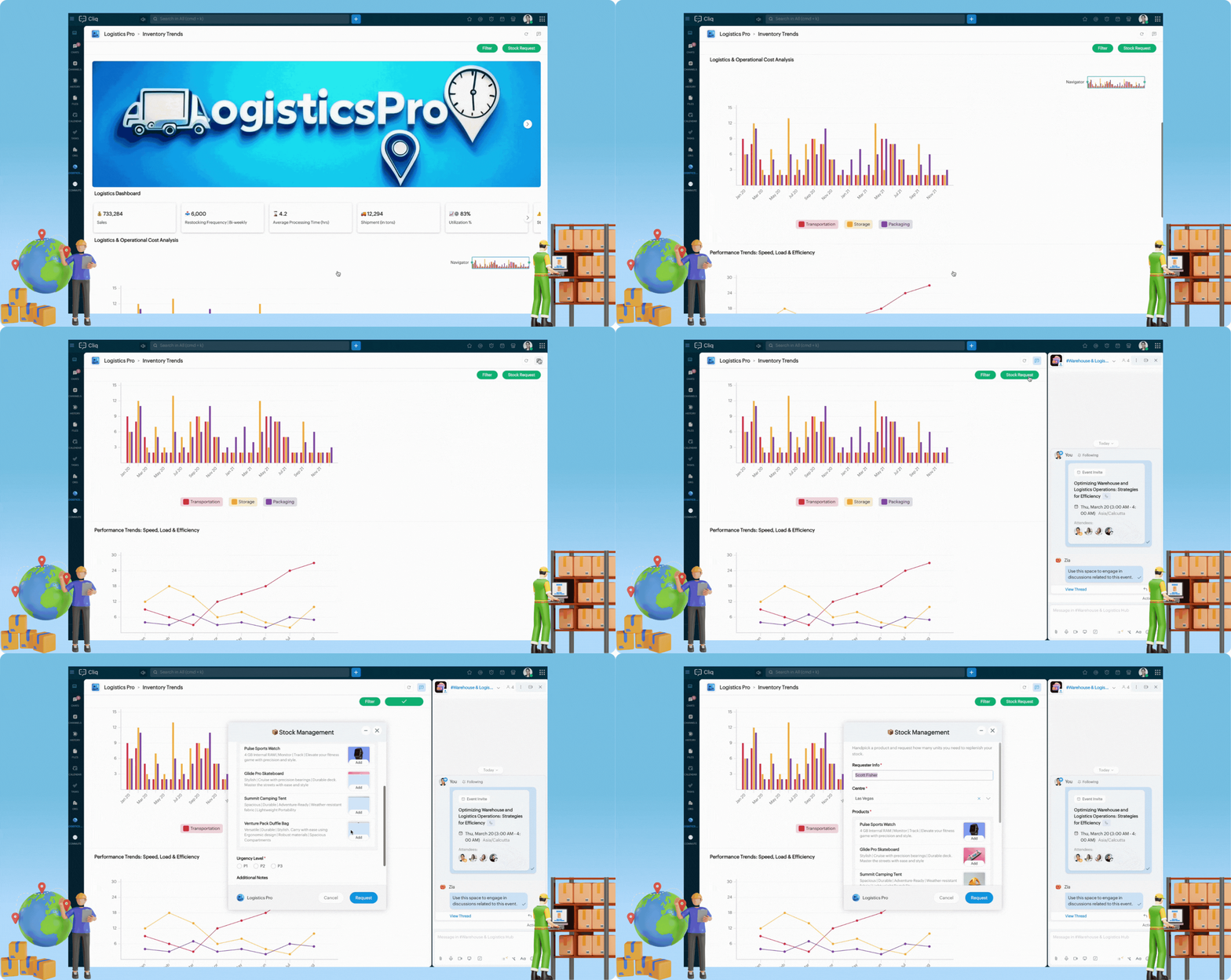
Let's design a Logistics Dashboard tailored for a Fleet Manager overseeing multiple deliveries. This dashboard will provide real-time insights into fleet performance, delivery status, and potential delays, ensuring smooth logistics operations.


  • Utilize the image element to enhance your business brand, strengthen your identity and recognition, and create a professional dashboard that stands out.
  • Incorporate vertical bar graphs to analyze operational costs, differentiating between storage, transportation and packaging expenses.
    • These graphs support legend-based filtering. Click on a category in the legend to remove it and focus on specific cost metrics.
    • Use the navigator to zoom in or expand the X-axis, allowing for precise monitoring within a specific range.
  • Monitor speed, load, and efficiency trends over time using graphs to identify performance patterns and operational bottlenecks. Hover over data points to see tooltips displaying exact values for each category, providing quick insights.
  • Use the table element to showcase supplier statistics and a doughnut chart to illustrate orders by delivery status. Add widget buttons to the header for tasks such as filtering dashboards by date range and requesting stocks via Cliq forms.
  • Use the catalogue form input to present detailed product information and images for a rich and intuitive experience in stock requests.
Sample code :
  1. tabsList = {{"label":"Inventory Trends","id":"reports"}};
  2. if(target.containsKey("id"))
  3. {
  4. id = target.get("id");
  5. }
  6. else
  7. {
  8. id = "reports";
  9. }
  10. sections = List();
  11. if(id == "reports")
  12. {
  13. elements = list();
  14. // Cover Image for the Widget
  15. data = list();
  16. imgMap = Map();
  17. imgMap.put("url","https://www.zoho.com/sites/zweb/images/cliq/dev-helpdoc/image_31_1.jpg");
  18. data.add(imgMap);
  19. elements.add({"type":"images","data":data,"style":{"view":"carousel","size":"large"}});
  20. elements.add({"type":"text","text":"\n\n"});
  21. sections.add({"id":"coverImage","elements":elements});
  22. elements = list();
  23. elements.add({"type":"title","text":"Logistics Dashboard"});
  24. sections.add({"id":"tagline","elements":elements});
  25. dataList = list();
  26. eachData = Map();
  27. eachData.put("title","💰 733,284");
  28. eachData.put("description","Sales");
  29. dataList.add(eachData);
  30. eachData = Map();
  31. eachData.put("title","📥  6,000");
  32. eachData.put("description","Restocking Frequency | Bi-weekly");
  33. dataList.add(eachData);
  34. eachData = Map();
  35. eachData.put("title","⌛ 4.2");
  36. eachData.put("description","Average Processing Time (hrs)");
  37. dataList.add(eachData);
  38. eachData = Map();
  39. eachData.put("title","🚚 12,294");
  40. eachData.put("description","Shipment (in tons)");
  41. dataList.add(eachData);
  42. eachData = Map();
  43. eachData.put("title","📈⚙️ 83%");
  44. eachData.put("description","Utilization %");
  45. dataList.add(eachData);
  46. eachData = Map();
  47. eachData.put("title","⚠️📦 5%");
  48. eachData.put("description","Stockout Risk");
  49. dataList.add(eachData);
  50. elements = list();
  51. elements.add({"type":"cards","data":dataList,"style":{"view":"carousel","size":"small"}});
  52. elements.add({"type":"text","text":"\n\n"});
  53. sections.add({"id":"cardstats","elements":elements});
  54. // Add buttons based on your preferred usecase
  55. button1 = {"label":"Filter","type":"invoke.function","name":"LPWidgetbuttons","emotion":"positive","id":"filter"};
  56. button2 = {"label":"Stock Request","type":"invoke.function","name":"LPWidgetbuttons","emotion":"positive","id":"stockRequest"};
  57. elements2 = list();
  58. elements2.add({"type":"title","text":"Logistics & Operational Cost Analysis"});
  59. operationalCostData = {{"category":"Transportation","values":{{"label":"Jan 20","value":9},{"label":"Feb 20","value":8},{"label":"Mar 20","value":5},{"label":"Apr 20","value":2},{"label":"May 20","value":2},{"label":"Jun 20","value":2},{"label":"Jul 20","value":2},{"label":"Aug 20","value":2},{"label":"Sep 20","value":9},{"label":"Oct 20","value":8},{"label":"Nov 20","value":5},{"label":"Dec 20","value":2},{"label":"Jan 21","value":2},{"label":"Feb 21","value":2},{"label":"Mar 21","value":2},{"label":"Apr 21","value":2},{"label":"May 21","value":9},{"label":"Jun 21","value":8},{"label":"Jul 21","value":5},{"label":"Aug 21","value":2},{"label":"Sep 21","value":2},{"label":"Oct 21","value":2},{"label":"Nov 21","value":2},{"label":"Dec 21","value":2}}},{"category":"Storage","values":{{"label":"Jan 20","value":6},{"label":"Feb 20","value":12},{"label":"Mar 20","value":3},{"label":"Apr 20","value":7},{"label":"May 20","value":3},{"label":"Jun 20","value":13},{"label":"Jul 20","value":5},{"label":"Aug 20","value":8},{"label":"Sep 20","value":9},{"label":"Oct 20","value":8},{"label":"Nov 20","value":5},{"label":"Dec 20","value":2},{"label":"Jan 21","value":2},{"label":"Feb 21","value":2},{"label":"Mar 21","value":2},{"label":"Apr 21","value":12},{"label":"May 21","value":3},{"label":"Jun 21","value":8},{"label":"Jul 21","value":5},{"label":"Aug 21","value":2},{"label":"Sep 21","value":8},{"label":"Oct 21","value":2},{"label":"Nov 21","value":2},{"label":"Dec 21","value":2}}},{"category":"Packaging","values":{{"label":"Jan 20","value":6},{"label":"Feb 20","value":11},{"label":"Mar 20","value":2},{"label":"Apr 20","value":5},{"label":"May 20","value":2},{"label":"Jun 20","value":6},{"label":"Jul 20","value":3},{"label":"Aug 20","value":5},{"label":"Sep 20","value":6},{"label":"Oct 20","value":11},{"label":"Nov 20","value":5},{"label":"Dec 20","value":3},{"label":"Jan 21","value":5},{"label":"Feb 21","value":7},{"label":"Mar 21","value":4},{"label":"Apr 21","value":6},{"label":"May 21","value":9},{"label":"Jun 21","value":8},{"label":"Jul 21","value":5},{"label":"Aug 21","value":2},{"label":"Sep 21","value":4},{"label":"Oct 21","value":6},{"label":"Nov 21","value":2},{"label":"Dec 21","value":3}}}};
  60. elements2.add({"type":"graph","styles":{"preview":"vertical_bar"},"data":operationalCostData});
  61. elements2.add({"type":"divider"});
  62. sections.add({"id":2,"elements":elements2});
  63. trendGraphData = {{"category":"Loading Time ⏳","values":{{"label":"Jan","value":9},{"label":"Feb","value":6},{"label":"Mar","value":3},{"label":"Apr","value":12},{"label":"May","value":15},{"label":"Jun","value":18},{"label":"Jul","value":24},{"label":"Aug","value":27}}},{"category":"Weight ⚖️","values":{{"label":"Jan","value":12},{"label":"Feb","value":18},{"label":"Mar","value":14},{"label":"Apr","value":6},{"label":"May","value":8},{"label":"Jun","value":4},{"label":"Jul","value":2},{"label":"Aug","value":10}}},{"category":"Processing Time ⏲️","values":{{"label":"Jan","value":4},{"label":"Feb","value":3},{"label":"Mar","value":7},{"label":"Apr","value":3},{"label":"May","value":4},{"label":"Jun","value":2},{"label":"Jul","value":6},{"label":"Aug","value":5}}}};
  64. elements3 = list();
  65. elements3.add({"type":"title","text":"Performance Trends: Speed, Load & Efficiency"});
  66. elements3.add({"type":"graph","styles":{"preview":"trend"},"data":trendGraphData});
  67. sections.add({"id":3,"elements":elements3});
  68. elements4 = list();
  69. elements4.add({"type":"table","headers":{"Supplier Name","Product Category","Avg. Delivery Time (Days)","Fulfillment Rate (%)","Contract Expiry Date","Price Variability (%)"},"rows":{{"Supplier Name":"GlobalTech","Product Category":"Laptops","Avg. Delivery Time (Days)":"6.5","Fulfillment Rate (%)":"92 %","Contract Expiry Date":"2025-12-31","Price Variability (%)":"1.5 %"},{"Supplier Name":"MedSupply","Product Category":"Medical Devices","Avg. Delivery Time (Days)":"4.2","Fulfillment Rate (%)":"96 %","Contract Expiry Date":"2026-06-30","Price Variability (%)":"2.8 %"},{"Supplier Name":"FreshAgri","Product Category":"Perishables","Avg. Delivery Time (Days)":"5","Fulfillment Rate (%)":"93 %","Contract Expiry Date":"2025-09-15","Price Variability (%)":"5.4 %"},{"Supplier Name":"AutoPartsCo","Product Category":"Auto Components","Avg. Delivery Time (Days)":"3","Fulfillment Rate (%)":"95 %","Contract Expiry Date":"2025-11-20","Price Variability (%)":"3.2 %"}},"style":{"text_align":{"center","center","center","center","center","center"}}});
  70. sections.add({"id":4,"elements":elements4});
  71. deliveryInfo = {{"label":"Delivered","value":1050},{"label":"In Progress","value":493},{"label":"Not Delivered","value":440}};
  72. elements5 = list();
  73. elements5.add({"type":"title","text":"Orders by Delivery Status"});
  74. elements5.add({"type":"percentage_chart","styles":{"preview":"doughnut"},"data":deliveryInfo});
  75. sections.add({"id":5,"elements":elements5});
  76. header = {"title":"","navigation":"new","buttons":{button1,button2}};
  77. }
  78. return {"type":"applet","tabs":tabsList,"active_tab":id,"sections":sections,"header":header};

Time to build your own dashboard!  

Cliq Widgets is not just for logistics. Do you want to track sales performance, monitor system health, or analyze customer support tickets? You can craft a dashboard that drives your unique business needs, turning static data into an interactive and actionable experience.

We're here to help, so don't hesitate to reach out to support@zohocliq.com with any questions or if you need assistance in crafting even more tailored workflows.
    • Sticky Posts

    • Zoho Cliq REST APIs v3 : A complete guide to what's changed and why 

      APIs are not just consumed by a developer with numerous automations and a series of open browser tabs. They are parsed by LLMs, fed into agent pipelines, and auto-completed by AI coding assistants that have zero tolerance for inconsistency. A verb tucked
    • Cliq Bots - Post message to a bot using the command line!

      If you had read our post on how to post a message to a channel in a simple one-line command, then this sure is a piece of cake for you guys! For those of you, who are reading this for the first time, don't worry! Just read on. This post is all about how
    • Automating Real-Time Zoho Bookings Alerts in Zoho Cliq

      Enable your teams to respond in seconds by bridging the gap between booking confirmation and team notification. No sticky notes, no calendar nudges and no follow-up frenzies. For businesses that rely on scheduled appointments, real-time visibility is
    • Add Claude in Zoho Cliq

      Let’s add a real AI assistant powered by Claude to your workspace this week, that your team can chat with, ask questions, and act on conversations to run AI actions on. This guide walks you through exactly how to do it, step by step, with all the code
    • Automate attendance tracking with Zoho Cliq Developer Platform

      I wish remote work were permanently mandated so we could join work calls from a movie theatre or even while skydiving! But wait, it's time to wake up! The alarm has snoozed twice, and your team has already logged on for the day. Keeping tabs on attendance
    • Recent Topics

    • Connect ZOHO social with Google Data Studio and download data from ZOHO social

      Dear ZOHO team, I am writing this message to enquire about how to connect ZOHO social with Google data studio since our company would like to use Google data studio to generate reports. Is it a way to download data from ZOHO social? Best regards, Chris
    • Zoho People Whats New - Q2 2026

      Hello Users! We're excited to share the latest updates introduced in Zoho People during Q2 2026. This release brings a range of new features and enhancements designed to simplify HR operations, automate routine processes, and deliver a smarter, more connected
    • Manage booking pages from your Android phone

      Hello everyone! We are happy to announce that users can now add and manage booking pages from their Bigin Android app. It is a multi-step form that users can create for purposes like booking appointments, scheduling calls or meetings, conducting webinars,
    • Zoho Team Inbox - roadmap

      Hi, would be good to understand the Teaminbox roadmap, in particular: 1. API / Zoho Deluge connections. We have a process where the each email needs to be either tagged or assigned daily. It would be great if we could automate a 5pm alert for any exemptions
    • Zoho CRM Community Digest - July 2026 | Part 1

      Hello everyone, July is here! The first two weeks brought six CRM updates ranging from privacy-ready webforms to a significantly more powerful Layout Rules engine, two community wins worth a look (a dashboard workaround for spotting leads with no activities,
    • How do I migrate from Office 365 to Zoho Mail?

      Check out Advik Email Migration Wizard, this software is specially developed to move mailboxes from Office 365 to Zoho Webmail. In addition you can migrate from Gmail, Yahoo, Rediffmail and 80+ webmail servers to ZOHO MAIL. Isn't it amazing? This is an all in one email migration solution. Steps to export emails from Office 365 to Zoho Webmail are as follows; Run Advik Email Migration Tool in your system. Select Office 365 as source and enter its login credentials. Select mailbox folders and choose
    • Topics not loading in individual contact records in Zoho Marketing Automation

      When working correctly, an individual contact record in ZMA shows a "Topics" section in the "Subscription" tab of the individual record. However, in 2+ different Zoho accounts and different browsers, the "Topics" section doesn't load and instead it spins
    • Help: Capture full page URL in hidden field when same Zoho Form is embedded on multiple pages (iframe)

      Hi all, Goal Use one Zoho Form across multiple pages and record the exact page URL (incl. subdomain + path + hash) where the user submitted it. Example pages: https://www.example.com/cargo/ https://www.example.com/cargo/containers/#contact https://cargo.example.com/auto/
    • how to get transcripts with speaker and time marks?

      Hello, I downloaded the transcript of a recent meeting and noticed that the TXT file does not bring the speaker name and the time mark. Is there any way to make it happen using ootb resources from Zoho Meeting? best
    • SalesIQ's Summer '26 Release: For The Moments That Matter

      Every customer journey is made up of moments. The moment someone discovers your business. The moment they need help. The moment you decide to reach out. The moment a simple chat turns into something more. And the moments that continue long after the conversation
    • Cannot deploy digital employee-

      I followed the guide here https://help.zoho.com/portal/en/kb/salesiq-2-0/for-administrators/operators/articles/zia-agents-in-zoho-salesiq#Supported_SalesIQ_Tools but no matter how many times I try I cannot for the love of god make it work I get this error
    • Displaying only unread tickets in ticket view

      Hello, I was wondering if someone might be able to help me with this one. We use filters to display our ticket list, typically using a saved filter which displays the tickets which are overdue or due today. What I'd really like is another filter that
    • 【受付開始】Zoholics Japan 2026 開催のご案内

      Zoho が年に一度開催するユーザー向けイベント「Zoholics」。 今年は 「AI-Powered DX with Zoho」 をテーマに、2026年9月25日(金)に 東京駅直結の会場とオンラインのハイブリッド形式で開催します。 今すぐ申し込む AIの活用が加速する今、業務効率化やDX推進に取り組む企業にとって、 「どのようにAIを業務へ取り入れ、成果につなげるか」が重要なテーマとなっています。 Zoholicsでは、Zohoの最新AI機能や製品アップデートに加え、実際の活用事例や業務改善のヒントをご紹介します。
    • Print checks for owner's draw

      Hi.  Can I use Zoho check printing for draws to Owner's Equity?  This may be a specific case of the missing Pay expenses via Check feature.  If it's not available, are there plans to add this feature?
    • Reconciliation: don't auto-select transactions outside the entered Period

      When initiating a reconciliation for a defined Period (say April 1 to April 30), Zoho Books auto-checks transactions whose Statement Detail dates fall after the period end date. With "Show based on grouped bank statements" enabled (the default), the screen
    • How can be requests for new job managed in Zoho recruit?

      If we use both Zoho people and recruit, can our managers (heads of department) use Zoho products to create requests for new job to HR department? The current workflow is following: a head of department needs some extra HR, he creates a request describing the job and send it to HR director, HR director approves a request and forward to a HR manager. I see only one way to partly solve the problem - grant the heads of departments recruit administrator permissions, so they could create new jobs. It is
    • Linking the Overview window between reports on a dashboard

      Is there a way to link the Overview window for two or more charts on a dashboard? We have several dashboards where users often want to set the window for 3 or 4 reports to the same time period. Doing it manually is time-consuming and cumbersome, but I
    • Subforms and automation

      If a user updates a field how do we create an automation etc. We have a field for returned parts and i want to get an email when that field is ticked. How please as Zoho tells me no automation on subforms. The Reason- Why having waited for ever for FSM
    • "code":3001 ["Failed to update data."]

      I would like to seek your expertise - I might be wrong on my approach also.. I highly appreciate your advice. 1 problem remains is when a new row was added on the existing one [from another form that trigger upon Successful form submission ], it gets
    • BUG: If you put "Blueprint" at the top of Workqueue, tab switching leads to long loading and no display

    • WORKFLOW ISSUE: Zoho Finance Extension

      Workflows are no longer triggering in my extension. This is true for the testing environment and 5 other organizations it is installed on. There are no conditions set for the workflow, and this is true for both create and delete related actions. Workflows
    • Drive Zoho CRM adoption and usage through our native integration with Zoho DAP

      You chose Zoho CRM for its depth: its powerful automation, its rich analytics, and its extensive customizability. But there's a hidden last mile in every rollout: the gap between the software's capabilities and your team's daily execution. When new hires
    • Moving from Office365 to Zoho Mail

      I have few mailboxes on Office365. One of the mailbox is coming up for renewal. How can I move this mailbox to Zoho Mail and continue to have other mail boxes continue to use Office365 mail? Thanks, -Naveen
    • Best sales insights for target accounts?

      Question for all the sales power-users out there: I would like to gain insights from Zoho CRM for a rotating list of target accounts. Each Outside Salesperson has 5 target accounts, and they can change these targets quarterly with management approval.
    • WhatsApp Vendors

      Hello, so WhatsApp works with the below, mainly with the customer side modules. Can we get functionality on the vendor side modules? WhatsApp is often the preferred method of communication with some vendors. Credit Notes Payment Receipts Sales Receipts
    • Text on Zoho Sign confirmation dialouge is very small compared to text used everywhere else on Zoho Sign.

      I've reported multiple times through Zoho's support email that the text on this notification is very small in contrast to all the other text on the Zoho Sign app. I think it's a bug and it just needs the font size to be increased. It's very minor but
    • Time Zone is incorrect

      Time zone is not working properly...I've checked it twice. I'm eastern U.S. time it's currently 12:22 pm EST. CRM shows 3:22 pm EST.
    • Over-the-Air (OTA) Updates for V3 Attendee Apps | Zoho Backstage

      Keeping participants on the latest version of your event app shouldn’t depend on App Store or Play Store review timelines. With Over-the-Air (OTA) updates for our V3 attendee app, the latest version is delivered directly to participants through an in-app
    • Please Remove the Confirmation Popup

      Currently, every time a recruiter changes the status of a candidate in Zoho Recruit, a popup confirmation appears that requires clicking “OK, Got it” before proceeding. This creates unnecessary friction in the workflow, especially for users handling high
    • Zoho Projects: Q2 Updates 2026

      Dear Users, During the first quarter, we launched our most advanced version of Zoho Projects, namely Zoho Projects Infinity. With support for Custom Modules, Custom Dashboards & Reports, along with built-in AI tools, we enabled users to create their own
    • Overview on users IMAP settings

      We have about 30 users who all have the channels/email/email configuration/IMAP integration/O365 enabled and emails are synchronized. Here my problem: Passwords for the email accounts are expiring on individual bases and most of the users forget to update
    • What is a realistic turnaround time for account review for ZeptoMail?

      On signing up it said 2-3 business days. I am on business-day 6 and have had zero contact of any kind. No follow-up questions, no approval or decline. Attempts to "leave a message" or use the "Contact Us" form have just vanished without a trace. It still
    • Alternate color rows

      After I changed the background color to a dark gray and changed the alternate rows to a light gray. I have discovered that I can no longer change the text in the light gray rows to Bold.
    • Tax/Vat Number Field As Standard - Customer & Vendor

      Hello, when are you'll going to have the customer & vendor tax/vat number as a standard field under the relevant profile pages? I find it strange that after 6 years of using Zoho Inventory that I still have to use a custom field for a tax/vat number,
    • Restricting coupon codes and plans to specific customers

      Having the ability to restrict coupon codes, plans and add ons to specific customers (new or existing) e.g. sending an invite link out to a certain customer or allowing a certain group of customers the ability to use a certain promo code or sign up to
    • Coupon Management Lacks functionality

      Hey Zoho Team, Let me start of by saying I'm a huge fan of the entire Zoho suite. I have a couple of thoughts about the way coupons are handled and believe there they are in need of some improvement. There are a couple of key issues: 1. Coupons need to
    • Free Webinar Alert! Zoho Mail + Zoho CRM: Turn inbox replies into CRM deals

      Hello Zoho Community! Are your sales conversations happening in Zoho Mail while your customer data lives in Zoho CRM? Join our upcoming webinar to learn how integrating the two can help you automate follow-ups, capture leads faster, and keep every customer
    • Introducing the Employee Portal for internal job posting

      Employee referrals and internal applications are one of the most trusted hiring channels. But in many organizations, employees only hear about openings through messages, word of mouth, or after the role has already been open for a while. When employees
    • Marketing Tip #42: Keep policy pages updated and accessible

      Policy pages may not be the most exciting part of your store, but they play a big role in building trust. Before buying, many customers look for information on shipping, returns, refunds, privacy, and terms. If these pages are missing, outdated, or hard
    • Extend the Image Choice Field

      Hi, The New Yes/No field is great for what it does, and the Image Choice Field is good but could be better with some functions from the Yes/No field. Take an example, rather than just Yes/No you want Yes/No/Maybe (Or more than 3 choices), but unlike the
    • Next Page