Leverage layout rules to customize workflow
 Layout rules in Zoho Sprints primarily aim to customize the field layout of your creation forms to meet complex requirements. But it doesn't stop there. Its customization can push the boundaries of how your fields behave, how data is gathered, how processes are branched out, and how workflow is channeled.
Based on conditions, you can tailor field behavior, direct the life cycle of an item, mandate specific actions, restrict the field options, or auto-assign users. The possibilities are aplenty.
We've tried to provide a few sample scenarios that help you automate your data collection and progress tracking flow. If you have any specific requirements, please state them in the comments, and we'll find out if layout rules can help you.
Use case 1: Restricting item statuses based on work item types
With layout rules, each item type can have its own workflow. This means it can have its own unique set of statuses that align with its specific lifecycle.
Let's assume you have three item types: Bug, Story, and Task.
Each type follows its own lifecycle, represented by the following statuses.
- Bug goes through the To Do, In Progress, Bug Fixing, Bug Testing, and Done statuses.
- Story has To Do, Ideation, In Progress, Development, Review, and Done.
- And Task moves through a simple To Do, In Progress, and Done.
To align with these flows, certain statuses should not be available to specific item types. For instance, a story or a task should not be moved to the Bug Fixing status. Similarly, a bug or a task should not be moved to the Development status.
To enforce this, we can create layout rules that control which statuses are available based on the item type.
So, we'll create three conditions with each item type as the primary field.
- If the item type is Bug, specify the condition with the trigger action to restrict the status pick list to To Do, In Progress, Bug Fixing, Bug Testing, and Done.
- If the item type is Story, specify the condition with the trigger action to restrict the status pick list to To Do, Ideation, In Progress, Development, Review, and Done.
- If the item type is Task, specify the condition with the trigger action to restrict the status pick list to To Do, In Progress, and Done.
Together, these conditions control the status progression for each item type. So, when you create a bug, it will only progress into the statuses that belong to the Bug lifecycle.

Use Case 2: Restricting future statuses based on the item's current status
When your team requires a pre-defined strict workflow where an item can be moved from a specific status to only a few statuses, layout rules can help implement this. For example, an item in the Bug Fixing status should only move to Bug Testing, and no other status. This way, each status controls the next status in the workflow.
To ensure this, create layout rules specifying conditions for each of the item status:
- If the status is To do, specify the condition with the trigger action to restrict the status pick list to In progress and Rejected.
- If the status is In progress, specify the condition with the trigger action to restrict the status pick list to In progress and Development.
- If the status is Development, specify the condition with the trigger action to restrict the status pick list to Review Level 1.
- If the status is Review Level 1, specify the condition with the trigger action to restrict the status pick list to Reopen and Review Level 2.
- If the status is Reopen, specify the condition with the trigger action to restrict the status pick list to In progress.

Use case 3: Making a field mandatory based on item status or item type
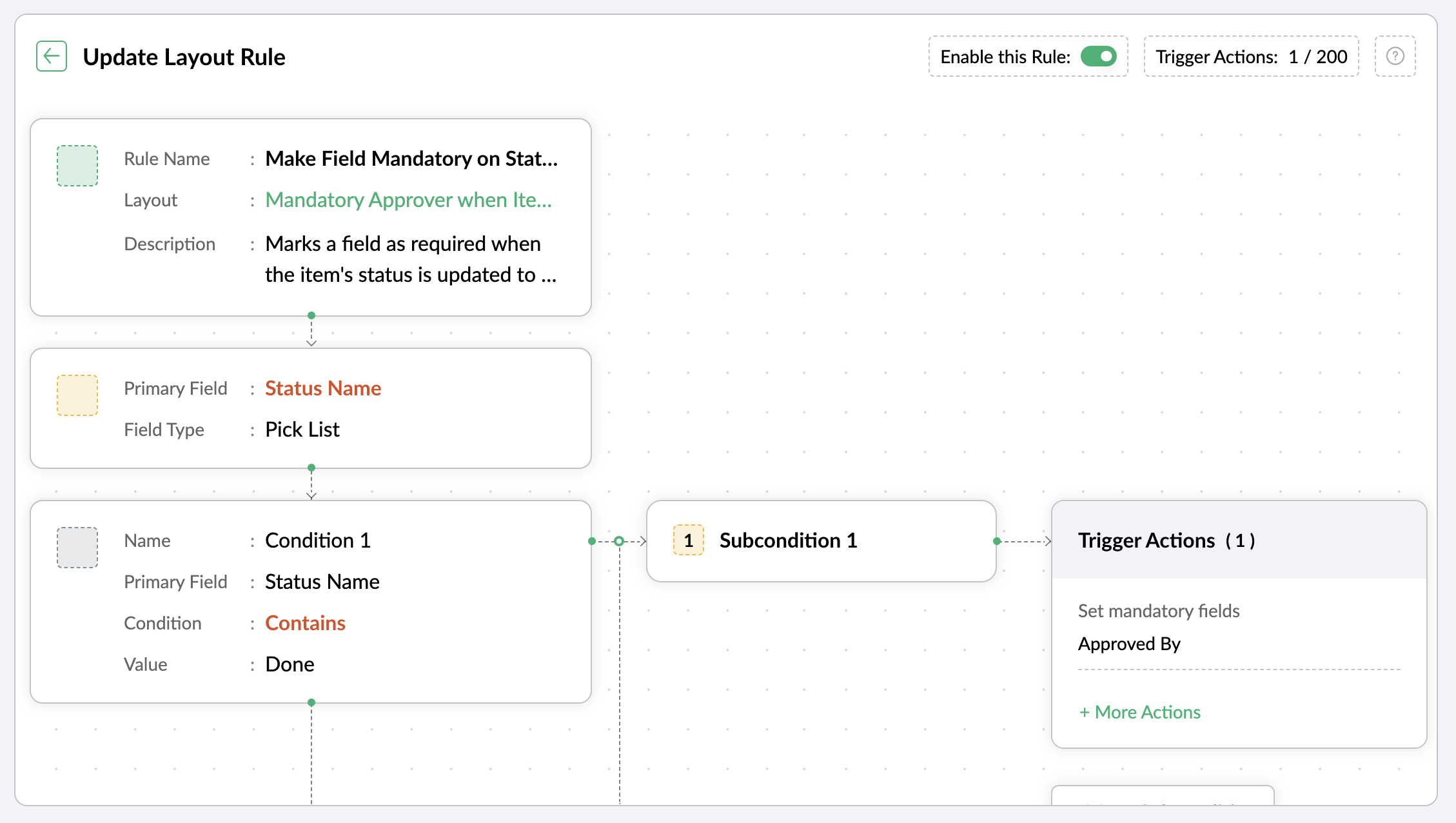
Let's assume you want a field to be made mandatory only when the item is moved to one particular status. Which implies the field will remain non-mandatory during other statuses and will be mandatory only at that particular status. So, the progress to that status must be allowed only when the mandatory field is updated.
For instance, when an item is moved to the Done status, the Approver field must become mandatory to record completion approval. To ensure that this process is executed, you can create a layout rule where the primary field is the Status Name. If the status field is updated to Done, specify the condition with the trigger action to set the Approver field as mandatory.
Use case 4: Showing or hiding a section or field based on item types
Layout rules enable you to show or hide fields or sections based on item type conditions.
Let's say a section with fields related to a new feature should only be visible when the item type is New Feature.
Similarly, when the item type is Security Issue, the section with fields related to Security issue must be visible.
To achieve this, create a layout rule with Item Type as the primary field.
- Create a condition for the New Feature item type with a trigger action to show the New Feature Details section.
- Create a condition for the Security Issue item type with a trigger action to show the Security Issue Details section.

Use case 5: Selecting specific assignees for item types and priorities
Layout rules can help you assign users based on the item type and priority. Let's say your team has a group of developers with varied levels of experience and expertise. You want to assign the high priority items to a more experienced member like John, while assigning low priority items to a novice like Peter.
If the item type is Bug and the priority level is Critical, you can assign the bug to John. If the priority level is High, it goes to Peter.
To meet this requirement, you can create a layout rule with Item Type as the primary field.
- Create a condition for the item type Bug with a subcondition where the priority level is Critical and the trigger action has the Set Field Value Assignee as John.
- For the same condition, add a subcondition where the priority level is High and the trigger action has the Set Field Value Assignee as Peter.
Similarly, say you want the Task item type with a medium priority level to go to Helen, and a low priority level should go to James.
- Create a condition for the item type Task with a subcondition where the priority level is Medium and the trigger action has the Set Field Value Assignee as Helen.
- For the same condition, add a subcondition where the priority level is Low and the trigger action has the Set Field Value Assignee as James.

These are just a few examples of how layout rules can streamline your project management. Do you have any particular scenario that needs resolution? Please share it with us.
Thanks,
Zoho Sprints Team
Topic Participants
Neethinila R
Sticky Posts
Tip #28 - Plan less and deliver more using WIP limit in Zoho Sprints
Hello, It's been a while since we met with a quick, interesting tip. As the saying goes, "Too much of anything is good for nothing", today the focus is on delivering your outcomes with the right amount of planning. Your plan should be practical, calculative, and achievable for driving a qualitative success. Laura's plan Laura has a habit of planning her project deliverables before assigning work to her team-mates. Once the plan is finalized, she schedules a general meeting with her team andTip # 3- Working on the Scrum board
Continuing from our Tip #2 on leading to a sprint, let's see how to manage the work items on the Scrum board. Once you start the sprint your work items are automatically displayed on the Scrum board where you will actually manage the work items. It is a snapshot of the backlog items identified for the current sprint. The layout of the Scrum board Simply put, the scrum board is just like a physical board with sticky notes on which the work items of the active sprint are displayed. The scrum boardTip#2- Leading you to a Sprint
Product Backlog After the user stories are written and finalized, they are sorted to create the Product Backlog for the project during the Backlog Grooming meeting. This is a master list of all the work items that have been identified for the project and sorted by priority. Requirements are not constant during this period.The Product Backlog is dynamic and is an ongoing process. Every user story in the Product Backlog is customer centric. The Product Backlog includes: User centric stories based onTip #1- Why swimlanes?
Lanes define a clear path to reach your destination. In Agile, swimlane is one such concept that sets a simple and clear process of the work that you do. The concept of swimlane can be related to the pool, where the swimmers gather in their respective lanes to start off. Similar to the pool, work items are grouped in different categories. Each category is referred as a lane and is displayed in horizontal format. Swimlanes are effective in categorizing the work items with respective to specific
Recent Topics
Delegates should be able to delete expenses
I understand the data integrity of this request. It would be nice if there was a toggle switch in the Policy setting that would allow a delegate to delete expenses from their managers account. Some managers here never touch their expense reports, andFunction #9: Copy attachments of Sales Order to Purchase Order on conversion
This week, we have written a custom function that automatically copies the attachments uploaded for a sales order to the corresponding purchase order after you convert it. Here's how to configure it in your Zoho Books organization. Custom Function: HitKaizen #8 - Handling Recurrence and Participants in the Events Module via API
Hello everyone! We are back this week with an exciting post—Handling recurrence and participants in the Events module through API. First things first—What is the Events module? "Events" is a part of the Activities module in Zoho CRM. An event is an activity that happens at a given place and time. You can find Events on the user's Zoho CRM's home page, Activities home page, Calendar, and in other related records. What are the types of Events? Events are of two types—Recurring and non-recurring events.Marketer’s Space - Get Holiday-Ready with Zoho Campaigns
Hello marketers, Welcome back to another post in Marketer’s Space! Q4 is packed with opportunities to connect with your audience - from Halloween, Black Friday, and Cyber Monday, to Thanksgiving, Christmas, and New Year. In this post, we’ll look at howPersonalized demo
can I know more about the personalized demo we are construction company andCan I collect email addresses in a form??
Can I add new subscribers to my email list (hosted in FloDesk) when they check a box and add their email address on a Zoho form?Zoho CRM Android app updates: Kiosk and multiple file upload support for subforms
Hello everyone, We've rolled out new enhancements to the Zoho CRM Android app to bring better mobile CRM experience and efficiency. Let's take a quick look at what's new: Kiosk Multiple file uploads for subforms Kiosk Kiosk is a no-code tool in Zoho CRMAlerts for mentions in comments
We are testing the use of Writer internally and found that when a user is mentioned in a comment, there is no email alert for the mention. Is this something that's configurable, and if so, where can we enable this option?OAuth integration issues
I'm experiencing persistent OAuth errors when trying to connect Make with Zoho API. I've tried multiple approaches but keep encountering the following issues: First error: 'Invalid Redirect Uri - Redirect URI passed does not match with the one configured'Zoho Mail Android app update: Manage folders
Hello everyone! In the latest version(v2.9) of the Zoho Mail Android app update, we have brought in support for an option to manage folders. You can now create, edit, and delete folders from within the mobile app. You can also manage folders for the POPvalidation rules doesn't work in Blueprint when it is validated using function?
I have tried to create a validation rule in the deal module. it works if I try to create a deal manually or if I try to update the empty field inside a deal. but when I try to update the field via the blueprint mandatory field, it seems the validationGet Zoho Mail API working (including DRE Connector, Oauth Token, ZUID, ZOID & ACCOUNT_ID)
Disclaimer: I’m not a professional coder! Do you need to use Zoho Mail API? Me too. It lets you do all sorts of things — like reading the complete header of an email, or forwarding an email with its attachments — which is what I wanted to do. But settingRevenue Deferrals
Does ZOHO books and subscriptions handle Revenue Deferrals?Can I make a website open inside Zoho whenever I log in?
Hi Zoho Team, Every day, I check a few websites for updates, for example, Rojgar--result, where I see the latest government job results and notifications. I was wondering if there’s any option in Zoho to make a website like that open inside Zoho wheneverKaizen #214 - Workflow APIs - Part 2
Welcome back to another week of Kaizen! Last week, we discussed how Zylker Cloud Services used the Workflow APIs to discover and audit all the automations in their CRM, listing every workflow, checking triggers, and understanding their automation limits.Zoho CRM Community Digest - September 2025 | Part 1
Hello Everyone! September's Here! Before we jump into product updates, and community highlights, here's a quick spotlight! Zoho has launched a Professional Sales Rep Certification course on Coursera, tailored for sales professionals to strengthen theirUpload my theme.
Hello. I would like to upload my own theme, this one: https://themeforest.net/item/panagea-travel-and-tours-listings-template/21957086 Is it compatible and where I upload it? If not I will hire a developer, what do I have to ask when I search for one?Product Updates in Zoho Workplace applications | September 2025
Hello Workplace Community, Let’s take a look at the new features and enhancements that went live across all Workplace applications this September. Zoho Mail Attach email as EML file in Compose Effortlessly attach emails as EML file in Compose by simplyVehicle Tracking
we have GPS devices that installed on our vehicles, and we would like to know if it's possible to get vehicle live location data from the GPS device To Zoho Creator App. Thank You🤝 Rencontres, partage et inspiration au Zoho Community Meetup de novembre
Chers utilisateurs, Bonne nouvelle 🎉 : notre Meetup Zoho Community approche, et nous serions ravis de vous y voir ! 📍 Toulouse : le 25 novembre 📍 Lyon : le 27 novembre (🎯 Il ne reste que quelques places !) Que vous soyez débutant ou utilisateur avancé,Need Help Mapping GST Registration Number Field Between Zoho Books & Zoho CRM + Slow Sync Issues
am facing an issue with field mapping between Zoho Books and Zoho CRM. I want to map the GST Registration Number field from the Customer module in Zoho Books to a custom GST field inside the Accounts module in Zoho CRM. However, I am getting a warningNotification received when self-assigning tickets
When I assign tickets in Zoho Desk the relevant agent gets a notification email. When assigning myself a ticket in Zoho Desk, I get a notification email. Now, as I am the person who assigned the ticket to myself, getting a notification in this regardNouveauté dans Zoho Writer - Création de documents et de modèles assistée par l'IA
Zia, l’assistant IA de Zoho Writer, soutient les utilisateurs dans l’amélioration de leur écriture et la création de contenus : correction orthographique et grammaticale en temps réel, suggestions adaptées au contexte, détection du plagiat, révisionsSession Expired
I constantly get "Session Expired" and need to relogin or close and open the application again. This gets really frustrating during the day. Is this something that can be solved? This really makes me want to leave the app as it is no go to need to reopenDisable Buttons for Users with Profiles without permission
Hey, I've noticed that users without permission of setting up things in the marketplace, can still see the icon: On a click, you see this: It would be way better, if they couldn't see this menu icon at all. (Aside from the fact that it completely misplacedMapping a new Ticket in Zoho Desk to an Account or Deal in Zoho CRM manually
Is there any way for me to map an existing ticket in Zoho desk to an account or Deal within Zoho CRM? Sometimes people use different email to put in a ticket than the one that we have in the CRM, but it's still the same person. We would like to be ableZoho Analytics - Make text clickable in underlying data
Hi Community, I have a simple sales report based on a Invoice query table. I have included a link on to each invoice on the table and sent the Invoice number URL to the link. This works find in the query table, but when I click underlying data on theCredit Management: #5 Advanced Refund Policy
You're subscribed to a well-known SaaS design tool. You've used it to manage your team's projects, create marketing visuals, brochures, and so on. But your needs change over time. Your company may switch to another tool or hire an in-house designer whoExported Slide Image Lacks Portion of the Background Image
This does not always happen, but when I export (or "download") the rendered image of a slide, it sometimes lacks a portion of the background image. I created a sample slide deck to demonstrate it and shared it with the admins. It is also publicly availableEffective Inbox Organization: Folders vs Tags in Zoho Mail?
I'm exploring the best ways to organize a busy inbox, especially when managing multiple clients or project using Zoho Mail. I’d love to know what works best for others: 1. Do you prefer **folders** (possibly with sub-folders) for each client or project?Piss poor service in Support in Domains and email
Srijith Narayanan B contacted me today. Very pleasant fellow. Just didn't want to tell him how bad your support service is. You help the person, but you leave before we can finish the next stage. Which causes a lot of frustration. It's been 8 days nowZoho Mail android app update: Block & reject future emails, Report phishing, Spam alerts, Suspicious URL detection
Hello everyone! In the most recent Zoho Mail Android app update, we have brought in support for the following features: Block & reject future emails Report Phishing Spam alerts in the mail details screen. Suspicious URL detection. Block & reject futureZohomail does not support additional fields in mailto links
Hello, I set up Zohomail as default composer in Firefox according to manual here: https://www.zoho.com/mail/help/defaultcomposer.html#alink2 Later, I wanted to use this functionality to answer in a Linux mailing list thread using mailto link: mailto:xxxxx@kernel.org?In-Reply-To=%3C727o0521-q24p-s0qq-66n0-sn436rpqqr1p@example.com%3E&Cc=xxxxx%example.org&Subject=Re%3A%20%5BPATCH%20v2%28%29Email address for forwarding is not saving and there's no confirmation ema
Steps to reproduce: 1. Enter my forward email in the email forward section of the account 2. Click save 3. See a notification stating saved successfully 4. Refresh the page, no forward email is saved 5. No email confirmation received at the forwardingThis domain is not allowed to add in Zoho. Please contact support-as@zohocorp.com for further details
This is the error i keep getting when trying to use my Zoho Domain Mail. This domain is not allowed to add in Zoho. Please contact support-as@zohocorp.com for further details Find attached. I hope this can be resolved very quickly so i can go on and makeAuto CC - Moving Departments
We have Auto CC e-mail replies to your support mailbox enabled. We have two departments: Helpdesk (helpdesk@domain.com) Delivery (delivery@domain.com) If we create a Helpdesk ticket, and reply, replies are CC'd to helpdesk@domain.com (OK) We then moveUnable to see free plan option
Hello Zoho Support Team, I hope you are doing well. I am trying to sign up for Zoho Mail, but I am unable to see the option for the free plan. Could you please guide me on how I can access or activate the free plan? Thank you for your assistance.Sorten the domain of zoho mail ids
I recently created zoho mail id and am quite excited with the features. But one issue ig nobody wanna type this big zohoaccounts.com I mean silly bold Suggestion zmail.com (sound gmail) (attraction) or some genz words looks coolWeekly Tips : Customize your Zoho Mail Notifications
In a professional context, email communication remains one of the most crucial channels for staying connected and managing workflows. Keeping track of your emails, task updates, or important announcements can be overwhelming—especially if you are jugglingThe attendees will now be redirected to the landing webpage when they exit the webinar, set by the organizer.
Hello All, In the latest version of the Zoho Meeting iOS mobile app (v1.3.16), we have brought in the below enhancements: Post Webinar Re-direction Revamped exit UI for Webinar Post Webinar Re-direction: The attendees will now be redirected to theNext Page