Leverage layout rules to customize workflow
 Layout rules in Zoho Sprints primarily aim to customize the field layout of your creation forms to meet complex requirements. But it doesn't stop there. Its customization can push the boundaries of how your fields behave, how data is gathered, how processes are branched out, and how workflow is channeled.
Based on conditions, you can tailor field behavior, direct the life cycle of an item, mandate specific actions, restrict the field options, or auto-assign users. The possibilities are aplenty.
We've tried to provide a few sample scenarios that help you automate your data collection and progress tracking flow. If you have any specific requirements, please state them in the comments, and we'll find out if layout rules can help you.
Use case 1: Restricting item statuses based on work item types
With layout rules, each item type can have its own workflow. This means it can have its own unique set of statuses that align with its specific lifecycle.
Let's assume you have three item types: Bug, Story, and Task.
Each type follows its own lifecycle, represented by the following statuses.
- Bug goes through the To Do, In Progress, Bug Fixing, Bug Testing, and Done statuses.
- Story has To Do, Ideation, In Progress, Development, Review, and Done.
- And Task moves through a simple To Do, In Progress, and Done.
To align with these flows, certain statuses should not be available to specific item types. For instance, a story or a task should not be moved to the Bug Fixing status. Similarly, a bug or a task should not be moved to the Development status.
To enforce this, we can create layout rules that control which statuses are available based on the item type.
So, we'll create three conditions with each item type as the primary field.
- If the item type is Bug, specify the condition with the trigger action to restrict the status pick list to To Do, In Progress, Bug Fixing, Bug Testing, and Done.
- If the item type is Story, specify the condition with the trigger action to restrict the status pick list to To Do, Ideation, In Progress, Development, Review, and Done.
- If the item type is Task, specify the condition with the trigger action to restrict the status pick list to To Do, In Progress, and Done.
Together, these conditions control the status progression for each item type. So, when you create a bug, it will only progress into the statuses that belong to the Bug lifecycle.

Use Case 2: Restricting future statuses based on the item's current status
When your team requires a pre-defined strict workflow where an item can be moved from a specific status to only a few statuses, layout rules can help implement this. For example, an item in the Bug Fixing status should only move to Bug Testing, and no other status. This way, each status controls the next status in the workflow.
To ensure this, create layout rules specifying conditions for each of the item status:
- If the status is To do, specify the condition with the trigger action to restrict the status pick list to In progress and Rejected.
- If the status is In progress, specify the condition with the trigger action to restrict the status pick list to In progress and Development.
- If the status is Development, specify the condition with the trigger action to restrict the status pick list to Review Level 1.
- If the status is Review Level 1, specify the condition with the trigger action to restrict the status pick list to Reopen and Review Level 2.
- If the status is Reopen, specify the condition with the trigger action to restrict the status pick list to In progress.

Use case 3: Making a field mandatory based on item status or item type
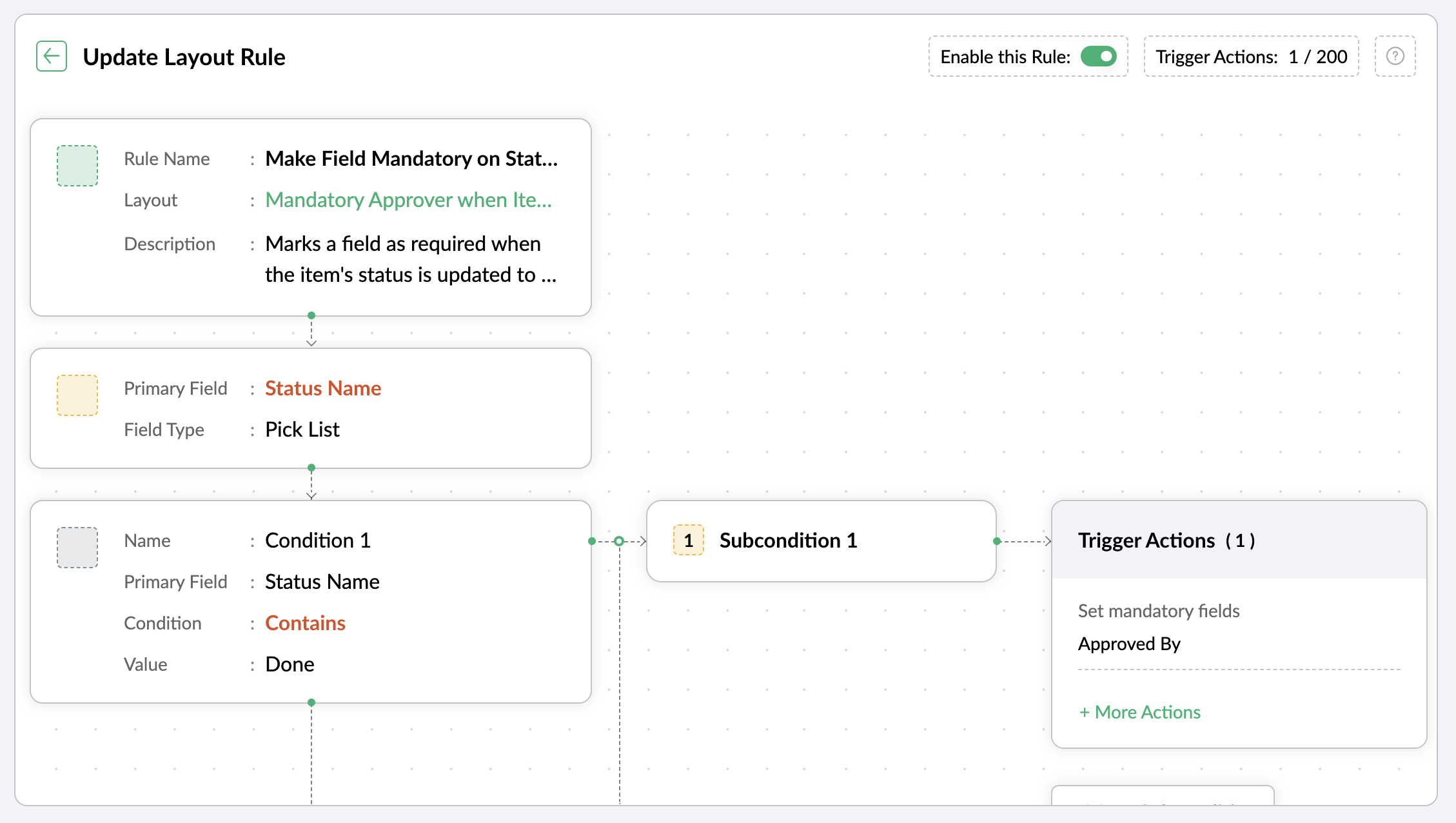
Let's assume you want a field to be made mandatory only when the item is moved to one particular status. Which implies the field will remain non-mandatory during other statuses and will be mandatory only at that particular status. So, the progress to that status must be allowed only when the mandatory field is updated.
For instance, when an item is moved to the Done status, the Approver field must become mandatory to record completion approval. To ensure that this process is executed, you can create a layout rule where the primary field is the Status Name. If the status field is updated to Done, specify the condition with the trigger action to set the Approver field as mandatory.
Use case 4: Showing or hiding a section or field based on item types
Layout rules enable you to show or hide fields or sections based on item type conditions.
Let's say a section with fields related to a new feature should only be visible when the item type is New Feature.
Similarly, when the item type is Security Issue, the section with fields related to Security issue must be visible.
To achieve this, create a layout rule with Item Type as the primary field.
- Create a condition for the New Feature item type with a trigger action to show the New Feature Details section.
- Create a condition for the Security Issue item type with a trigger action to show the Security Issue Details section.

Use case 5: Selecting specific assignees for item types and priorities
Layout rules can help you assign users based on the item type and priority. Let's say your team has a group of developers with varied levels of experience and expertise. You want to assign the high priority items to a more experienced member like John, while assigning low priority items to a novice like Peter.
If the item type is Bug and the priority level is Critical, you can assign the bug to John. If the priority level is High, it goes to Peter.
To meet this requirement, you can create a layout rule with Item Type as the primary field.
- Create a condition for the item type Bug with a subcondition where the priority level is Critical and the trigger action has the Set Field Value Assignee as John.
- For the same condition, add a subcondition where the priority level is High and the trigger action has the Set Field Value Assignee as Peter.
Similarly, say you want the Task item type with a medium priority level to go to Helen, and a low priority level should go to James.
- Create a condition for the item type Task with a subcondition where the priority level is Medium and the trigger action has the Set Field Value Assignee as Helen.
- For the same condition, add a subcondition where the priority level is Low and the trigger action has the Set Field Value Assignee as James.

These are just a few examples of how layout rules can streamline your project management. Do you have any particular scenario that needs resolution? Please share it with us.
Thanks,
Zoho Sprints Team
Topic Participants
Neethinila R
Sticky Posts
Tip #28 - Plan less and deliver more using WIP limit in Zoho Sprints
Hello, It's been a while since we met with a quick, interesting tip. As the saying goes, "Too much of anything is good for nothing", today the focus is on delivering your outcomes with the right amount of planning. Your plan should be practical, calculative, and achievable for driving a qualitative success. Laura's plan Laura has a habit of planning her project deliverables before assigning work to her team-mates. Once the plan is finalized, she schedules a general meeting with her team andTip # 3- Working on the Scrum board
Continuing from our Tip #2 on leading to a sprint, let's see how to manage the work items on the Scrum board. Once you start the sprint your work items are automatically displayed on the Scrum board where you will actually manage the work items. It is a snapshot of the backlog items identified for the current sprint. The layout of the Scrum board Simply put, the scrum board is just like a physical board with sticky notes on which the work items of the active sprint are displayed. The scrum boardTip#2- Leading you to a Sprint
Product Backlog After the user stories are written and finalized, they are sorted to create the Product Backlog for the project during the Backlog Grooming meeting. This is a master list of all the work items that have been identified for the project and sorted by priority. Requirements are not constant during this period.The Product Backlog is dynamic and is an ongoing process. Every user story in the Product Backlog is customer centric. The Product Backlog includes: User centric stories based onTip #1- Why swimlanes?
Lanes define a clear path to reach your destination. In Agile, swimlane is one such concept that sets a simple and clear process of the work that you do. The concept of swimlane can be related to the pool, where the swimmers gather in their respective lanes to start off. Similar to the pool, work items are grouped in different categories. Each category is referred as a lane and is displayed in horizontal format. Swimlanes are effective in categorizing the work items with respective to specific
Recent Topics
Passing the CRM
Hi, I am hoping someone can help. I have a zoho form that has a CRM lookup field. I was hoping to send this to my publicly to clients via a text message and the form then attaches the signed form back to the custom module. This work absolutely fine whenHow to next stage blueprint in Zoho Creator
Hello, I have question, its possible to next stage blueprint? in case, Start - (first stage) Leader 1 (with condition 1) - (second stage) Leader 2 (with condition 2) - (third stage) Leader 3 (with condition 3) - (fourth stage) After first stage, i wantFeature Request: Email Follow-Up Sequences Similar to Zoho CRM
I’m wondering if Zoho Recruit is planning to introduce a feature similar to the Email Automation – Follow-Up Sequences that is available in Zoho CRM. In CRM, this allows users to send a series of timed follow-up emails triggered by specific actions (forCurrency limitation when integrating Zoho CRM & Zoho Books
Brief Video of Problem: https://www.loom.com/share/d61d1d07d0904e149d80c1901a22418e. Background · Our business is based in Australia and we have to have Zoho Books in AUD to comply with tax and reporting regulations in Australia. · We sellMulti-select Lookup does not have Advanced filter options in CRM
With much fanfare Zoho announced the advanced filter options for CRM lookup fields which was a nice addition. This feature is not available for Multi-Select lookup fields. Will it be rolled out in the next 3-6 months, considering the standard lookup filterExperience effortless record management in CRM For Everyone with the all-new Grid View!
Hello Everyone, Hope you are well! As part of our ongoing series of feature announcements for Zoho CRM For Everyone, we’re excited to bring you another type of module view : Grid View. In addition to Kanban view, List view, Canvas view, Chart view andKaizen #157: Flyouts in Client Script
Hello everyone! Welcome back to another exciting edition of our Kaizen series, where we explore fresh insights and innovative ideas to help you discover more and expand your knowledge!In this post, we'll walk through how to display Flyouts in Client ScriptAdmin Control Over Profile Picture Visibility in Zoho One
Hello Zoho Team, We hope you are doing well. Currently, as per Zoho’s design, each user can manage the visibility of their profile picture from their own Zoho Accounts page: accounts.zoho.com → Personal Information → Profile Picture → Profile PicturePublished Course Not Reflecting In Hub
Hi! I am trying to create micro-learning courses for our team to be available for self-guided learning. I have published the courses with enrollment settings open to all users of the hub, but they don't appear to be available for enrollment. Am I missingUnlock Locked Users via Zoho One Mobile App
Hello Zoho One Team, We have noticed that in the Zoho One web admin panel, we can unlock a locked user when needed. However, when using the Zoho One mobile app, there is no indication that a user is locked, nor is there an unlock button similar to whatTip #47- Stay Ahead with Automated Scheduled Reports in Zoho Assist- 'Insider Insights'
We’ve made it easier for you to stay informed, even when you’re busy managing remote sessions! With Scheduled Reports in Zoho Assist, you can now automatically receive detailed insights about your remote support and unattended access activities directlyColour Coded Flags in Tasks Module List View
I really like the colour coded flags indicating the status of the tasks assigned to a Contact/Deal in the module list view. It would be a great addition to have this feature available in the list view of activities/tasks. I understand you have the DueUploading data to S3
Has anyone successfully uploaded data from Creator to S3 using the InvokeURL command or any other method in Deluge? (keywords: S3, AWS, Amazon, bucket)UPS Label size when generated via Zoho
We've integrated UPS with Zoho inventory. When creating and downloading the shipping labels they are created in a larger paper size. I'd like them to be generated to print on a 4x6 printer. Zoho have told me I need to do this within our UPS portal. UPSCredit Management: #4 Credits on Unused Period
Recall a familiar situation. You sign up for a monthly gym membership. You pay the subscription fee upfront, get motivated, and show up consistently for the first week. Then, suddenly, you get caught up in work deadlines, travel plans, or a dip in motivation.Zoho Analytics Automatically Deletes Queries and Reports When a Synced CRM Field Is Removed
We’ve encountered a serious and recurring issue that poses a massive data integrity risk for any Zoho Analytics customer using Zoho CRM integration. When a field is deleted in Zoho CRM — even an unused one — Zoho Analytics automatically deletes everyPrevent new Record Association
Hello all, We have a small sales organization therefore, it's helpful for everyone on the sales team to be able to view the full list of accounts to assist in preventing duplicate accounts from being created. However we want to prevent people from creatingTip of the Week #73– Automate workflow with Make integration.
Make is a no-code workflow automation platform designed to connect your favorite apps and automate repetitive tasks across services. By integrating Make with Zoho TeamInbox, you can streamline everyday inbox management and save valuable time. With thisViewing attachments
I'm using a Web Form integrated in my web site to collect Leads several info, including a image upload. In order to to approve each lead, we have to view the image uploaded. Unfortunately, in the Leads view, the Attachments can only be downloaded, notKaizen #89 - Color Coding using Client Script
Hello everyone! Welcome back to another exciting Kaizen post. Today let us see how you can apply color codes to the List and Detail Pages of Zoho CRM using Client Script. Need for color code in Zoho CRM When you mark things with different colors as aInstant Sync of Zoho CRM Data?
With how valuable Zoho Analytics is to actually creating data driven dashboards/reports, we are surprised that there is no instant or near instant sync between Zoho CRM and Zoho Analytics. Waiting 3 hours is okay for most of our reports, but there areIs it possibly to directly set the tax amount on order instead of indirectly via tax rates?
We own an eCommerce application and want to funnel submitted orders from that system into Zoho. We're already calculating tax in our application and just need a way to set it in Zoho. We tried to use Zoho's tax objects for tax by setting the rates toZoho account sign in with passkey
Hello, I am trying to sign in using passkey, but the option doesn't show up in the web and is disabled in Oneauth on mobile, saying the admin has restricted the use. On the Admin page in Security MFA I can find no option for passkey. Help would be greatlyRescheduled US meetups: Zoho Desk user meetups are coming to seven U.S. cities in October and November, 2025
Hello to our Zoho Desk users in the United States, We're excited to share the revised dates for the upcoming Zoho User Groups happening across the US this summer. Our product experts are heading to seven cities throughout the country, and for the firstChecklists as templates
Is it possible to save checklists as templates to reuse them in other tasks? Example: I have a web project. I maintain individual web URLs as tasks. Within the tasks the same checklist should be used again and again: - Page created in CMS - PropertiesSend mass email using my secondary email
Hello, When I send an email to just one person from Zoho CRM, a complete email editor appears, where I can choose which of my email addresses I want to use in the From field. When I send a mass email, there is not such option. I can only select the emailZOHO TEAM INBOX Calendar Integration
The Problem: Clients send meeting invitations to our TeamInbox address. TeamInbox receives these invites, but we cannot accept them. We do not use individual inboxes for transparency purposes. Ideal Solution: A way to accept calendar invites sent to ourWhy Can't I add unicode emoji's to my signature?
Why would Zoho Mail prevent me from adding unicode emojis to my email signature? Every time I try to save the signature, Zoho Mail erases the emoji and any nearby content. Every time I setup something with Zoho, I know I'm going to run into some incrediblyUnearned / Deferred Revenue Automatic Calculation for Subscriptions
As a SaaS business, we have multiple active subscriptions with varying dates and amounts. Is there a way to have a monthly automatic calculation for all of them that debits or credits the unearned revenue and revenue accounts accordingly? Alternatively,Zoho Desk Limit for Comma Separated Queries
Hi, I have just discovered a limit that I believed is not mentioned in any of Zoho's documentations. My search query looks like so: "query: {"accountId":"786050000091629966,786050000163589273,786050000163589427,786050000162753705,786050000162112971,786050000161987643,786050000160752868,786050000167089504,786050000167089378,786050000167089024,786050000167070005,786050000166295256,786050000128153693,786050000110560021,786050000046594575,786050000039106461,786050000002225356,786050000076889093,786050000047895103,786050000043365354,786050000044765191,786050000041790249,786050000040359116,786050000037945198,786050000024605077,786050000000525015,786050000155333895,786050000157741437,786050000000718125,786050000011574353,","departmentId":"786050000042648070","status":"Finished","sortBy":"createdTime","customField2":"cf_completion_date:2025-01-28T03:00:00.000Z,2025-10-28T03:00:00.000Z","customField3":"cf_billed:false"}"Module Name doesn't exist
I am trying to create a module named Activity, with plural Activities, but I have an error that module name already exists. This module is doesn't exist, and I don't have a single field called Activity or Activities.Zoho Desk iOS and Android app update: AI powered: Reply Assistance and Refine Messages on IM module.
Hello everyone! We are excited to introduce new AI powered features on the IM module of the Zoho Desk app. Reply Assistance: Reply Assistance generates suggested responses for incoming chat messages, which you can directly insert into the conversationIs it possible to embed Youtube shorts?
Hi Zoho desk support, This is Ryan from Accuver America. While I'm trying to create a knowledge base article with embed video, I ran into this issue. "www.youtube.com refuse to connect" A little bit background is that because this video is recorded onSplit functionality - Admins need ability to do this
Admins should be able to split an expense at any point of the process prior to approval. The split is very helpful for our account coding, but to have to go back to a user and ask them to split an invoice that they simply want paid is a bit of an inDelegates - Access to approved reports
We realized that delegates do not have access to reports after they are approved. Many users ask questions of their delegates about past expense reports and the delegates can't see this information. Please allow delegates see all expense report activity,How to include total km for multiple trips in expense report.
Whenever I create a mileage report it only shows the total dollar amount to be reimbursed. The mileage for each individual trip is included but I also need to see the total distance for all trips in a report? How do I do this?I didn't receive my domain verification mail
I didn't receive my domain verification mailGet logged in user ID in Deluge script
Hello all, How do I get the id of the logged-in user in a deluge script? the "zoho.loginuserid" function actually returns the users email address or whatever the user id they use to login to zoho with and not the id of the user record, and given thatItem Details Field - New Barcode / Document option?
Is this a new feature??? its in both books and inventory.Shared Mailbox - Mark as read for all users
Hi all, Maybe someone can help me out. At the moment we have a shared mailbox without streams. When a users reads an mail or marks it as read other users will not see this. How can we resolve this? We now archive the mails when read and followed up. HoweverNext Page