Leverage layout rules to customize workflow
 Layout rules in Zoho Sprints primarily aim to customize the field layout of your creation forms to meet complex requirements. But it doesn't stop there. Its customization can push the boundaries of how your fields behave, how data is gathered, how processes are branched out, and how workflow is channeled.
Based on conditions, you can tailor field behavior, direct the life cycle of an item, mandate specific actions, restrict the field options, or auto-assign users. The possibilities are aplenty.
We've tried to provide a few sample scenarios that help you automate your data collection and progress tracking flow. If you have any specific requirements, please state them in the comments, and we'll find out if layout rules can help you.
Use case 1: Restricting item statuses based on work item types
With layout rules, each item type can have its own workflow. This means it can have its own unique set of statuses that align with its specific lifecycle.
Let's assume you have three item types: Bug, Story, and Task.
Each type follows its own lifecycle, represented by the following statuses.
- Bug goes through the To Do, In Progress, Bug Fixing, Bug Testing, and Done statuses.
- Story has To Do, Ideation, In Progress, Development, Review, and Done.
- And Task moves through a simple To Do, In Progress, and Done.
To align with these flows, certain statuses should not be available to specific item types. For instance, a story or a task should not be moved to the Bug Fixing status. Similarly, a bug or a task should not be moved to the Development status.
To enforce this, we can create layout rules that control which statuses are available based on the item type.
So, we'll create three conditions with each item type as the primary field.
- If the item type is Bug, specify the condition with the trigger action to restrict the status pick list to To Do, In Progress, Bug Fixing, Bug Testing, and Done.
- If the item type is Story, specify the condition with the trigger action to restrict the status pick list to To Do, Ideation, In Progress, Development, Review, and Done.
- If the item type is Task, specify the condition with the trigger action to restrict the status pick list to To Do, In Progress, and Done.
Together, these conditions control the status progression for each item type. So, when you create a bug, it will only progress into the statuses that belong to the Bug lifecycle.

Use Case 2: Restricting future statuses based on the item's current status
When your team requires a pre-defined strict workflow where an item can be moved from a specific status to only a few statuses, layout rules can help implement this. For example, an item in the Bug Fixing status should only move to Bug Testing, and no other status. This way, each status controls the next status in the workflow.
To ensure this, create layout rules specifying conditions for each of the item status:
- If the status is To do, specify the condition with the trigger action to restrict the status pick list to In progress and Rejected.
- If the status is In progress, specify the condition with the trigger action to restrict the status pick list to In progress and Development.
- If the status is Development, specify the condition with the trigger action to restrict the status pick list to Review Level 1.
- If the status is Review Level 1, specify the condition with the trigger action to restrict the status pick list to Reopen and Review Level 2.
- If the status is Reopen, specify the condition with the trigger action to restrict the status pick list to In progress.

Use case 3: Making a field mandatory based on item status or item type
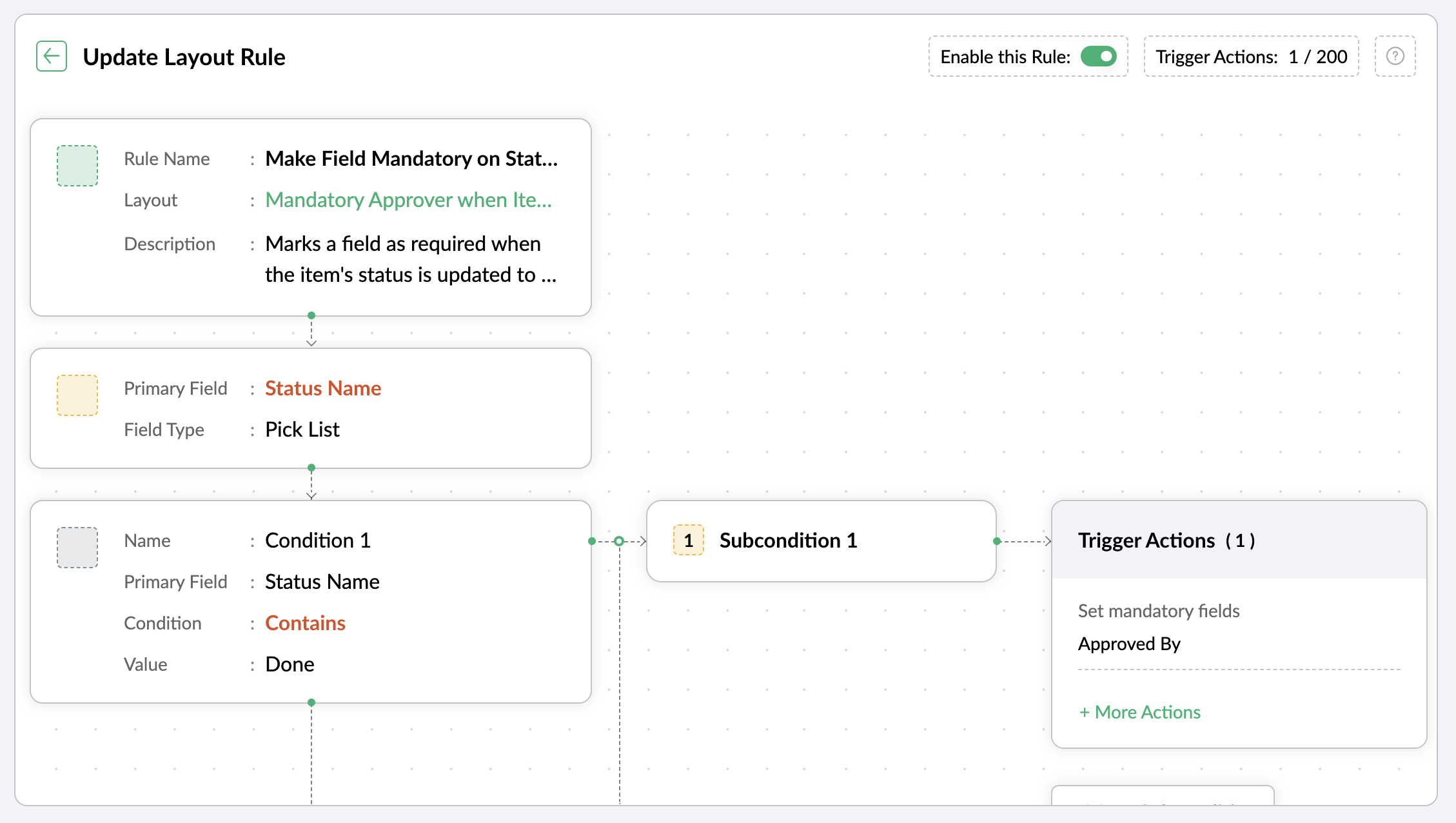
Let's assume you want a field to be made mandatory only when the item is moved to one particular status. Which implies the field will remain non-mandatory during other statuses and will be mandatory only at that particular status. So, the progress to that status must be allowed only when the mandatory field is updated.
For instance, when an item is moved to the Done status, the Approver field must become mandatory to record completion approval. To ensure that this process is executed, you can create a layout rule where the primary field is the Status Name. If the status field is updated to Done, specify the condition with the trigger action to set the Approver field as mandatory.
Use case 4: Showing or hiding a section or field based on item types
Layout rules enable you to show or hide fields or sections based on item type conditions.
Let's say a section with fields related to a new feature should only be visible when the item type is New Feature.
Similarly, when the item type is Security Issue, the section with fields related to Security issue must be visible.
To achieve this, create a layout rule with Item Type as the primary field.
- Create a condition for the New Feature item type with a trigger action to show the New Feature Details section.
- Create a condition for the Security Issue item type with a trigger action to show the Security Issue Details section.

Use case 5: Selecting specific assignees for item types and priorities
Layout rules can help you assign users based on the item type and priority. Let's say your team has a group of developers with varied levels of experience and expertise. You want to assign the high priority items to a more experienced member like John, while assigning low priority items to a novice like Peter.
If the item type is Bug and the priority level is Critical, you can assign the bug to John. If the priority level is High, it goes to Peter.
To meet this requirement, you can create a layout rule with Item Type as the primary field.
- Create a condition for the item type Bug with a subcondition where the priority level is Critical and the trigger action has the Set Field Value Assignee as John.
- For the same condition, add a subcondition where the priority level is High and the trigger action has the Set Field Value Assignee as Peter.
Similarly, say you want the Task item type with a medium priority level to go to Helen, and a low priority level should go to James.
- Create a condition for the item type Task with a subcondition where the priority level is Medium and the trigger action has the Set Field Value Assignee as Helen.
- For the same condition, add a subcondition where the priority level is Low and the trigger action has the Set Field Value Assignee as James.

These are just a few examples of how layout rules can streamline your project management. Do you have any particular scenario that needs resolution? Please share it with us.
Thanks,
Zoho Sprints Team
Topic Participants
Neethinila R
Sticky Posts
Tip #28 - Plan less and deliver more using WIP limit in Zoho Sprints
Hello, It's been a while since we met with a quick, interesting tip. As the saying goes, "Too much of anything is good for nothing", today the focus is on delivering your outcomes with the right amount of planning. Your plan should be practical, calculative, and achievable for driving a qualitative success. Laura's plan Laura has a habit of planning her project deliverables before assigning work to her team-mates. Once the plan is finalized, she schedules a general meeting with her team andTip # 3- Working on the Scrum board
Continuing from our Tip #2 on leading to a sprint, let's see how to manage the work items on the Scrum board. Once you start the sprint your work items are automatically displayed on the Scrum board where you will actually manage the work items. It is a snapshot of the backlog items identified for the current sprint. The layout of the Scrum board Simply put, the scrum board is just like a physical board with sticky notes on which the work items of the active sprint are displayed. The scrum boardTip#2- Leading you to a Sprint
Product Backlog After the user stories are written and finalized, they are sorted to create the Product Backlog for the project during the Backlog Grooming meeting. This is a master list of all the work items that have been identified for the project and sorted by priority. Requirements are not constant during this period.The Product Backlog is dynamic and is an ongoing process. Every user story in the Product Backlog is customer centric. The Product Backlog includes: User centric stories based onTip #1- Why swimlanes?
Lanes define a clear path to reach your destination. In Agile, swimlane is one such concept that sets a simple and clear process of the work that you do. The concept of swimlane can be related to the pool, where the swimmers gather in their respective lanes to start off. Similar to the pool, work items are grouped in different categories. Each category is referred as a lane and is displayed in horizontal format. Swimlanes are effective in categorizing the work items with respective to specific
Recent Topics
mail admin not loading
i am trying to login to mailadmin ... gears keeps rotating forever... its not a password issue whats so ever ... not cookies issues whatsoever from android app i can login but there so few things to do from there .. i changed ip address the same... iUnify All Zoho Video Meeting Experiences into One Standardized Platform
Hi Zoho Team, We would like to share an important user experience concern regarding the current state of video meeting functionality across the Zoho ecosystem. The Problem Within Zoho, there are multiple ways to initiate or schedule a video meeting: ZohoChanging Account in Quote form does not update address information.
I am trying to update the address information in a quote I've created. I corrected the address in the "Account" but that did not change in the quote. If I re-enter the Account Name in the Quote form, nothing updates. How do I fix this?Zoho One Backup of entire account
Hello, When using Zoho one is there a way to backup your entire account of all apps that you are using \ activively using in a single step or do you have to backup each applications data individually? Thanks,Issue with “CC” and “Subject Details” of the initial mail when reply / replied all / forward using Zoho Mail Client (Desktop / Web Mail / Mobile App)
It is observed that when I reply / reply all / forward a mail using Zoho Mail Client (Desktop / Web Mail / Mobile App), the “CC” and “Subject Details” are omitted from the mail which was replied/forwarded. However this is not the case with outlook mailUnable to send Emails - 452 4.3.1 Temporary System Error
Whene ever i request smtp server to send the email (without attachment). i recieve error "452 4.3.1 Temporary System Error"I can't receive email
I cannot receive any email sent to my Zoho email after the free upgrade plan trial is finished.Help for the alisa adding
Sorry, I would like to add a paypal alias on my domain email address. However, the system blocked it. How can I do it?Lite plan attachment said 250mb but actually 25mb ?
Lite plan attachment said 250mb but actually 25mb ? I can't attach over 25mb files, and can't receive mails has attached files over 25mb tooAny update on much requested feature, to delete attachments without deleting the e-mail body?
People have been requesting the ability to delete e-mail attachments without deleting the e-mail for more than ten years now. The latest I see is marked "Working On It" and a year ago it was supposedly being added, see here: https://help.zoho.com/portal/en/community/topic/is-there-a-way-to-delete-mail-attachments-without-deleting-the-textOld vs New Value for Deleted Lookup Values
Suppose the following scenario, where a value in a lookup is deleted: 1. User has countries form 2. Form A has a lookup to countries form 3. User selects Italy in Form A and saves it with the Italy ID 4. Form A report shows Italy 5. Italy is inadvertentlyZoho email using a python or html template
# main.py import smtplib import csv from email.mime.text import MIMEText from email.mime.multipart import MIMEMultipart from config import SENDER_EMAIL, APP_PASSWORD, SMTP_SERVER, SMTP_PORT # email Subject email_subject = "🎉 Python + Zoho Mail HTML Emailcustomize payment page
Is there a way to customize, other than the theme colour, the payment page that customers are taken to from invoices? I can't seem to find a way. I just don't like the formatting of the current page and would like to make it look better. I've looked atSolution: How to send email using a python follow up this
# Step One Setup Your App Password For this url {https://accounts.zoho.in/home#security/app_password} #How to genarate App password {https://help.zoho.com/portal/en/kb/bigin/channels/email/articles/generate-an-app-specific-password#To_generate_app_specific_password_for_Zoho_Mail}Are Environments Worth It?
In concept, Environments in ZC is a great idea. I think the flow is pretty smart when you compare it to GitHub, especially for a low code audience. However, in practice, I've found it to be unpredictable, and I've only used it a few times. Aside fromEnhanced duplicate check for Leads in CRM
Hello Everyone, We are excited to announce that you can now check for duplicate entries in leads by comparing them with similar records in the Contacts Module. Previously, when you added a lead, only the converted leads were checked for duplicates. ThisPause(1);
I'm using scheduler to invoke an interaction via http post with an external service. The schedule code uses a for-each loop that runs so fast my external application's log files get messed-up (they are named by date-time stamp). What I'm suggesting isIntegration Request: Elementor
Integrating Zoho CRM forms with Elementor, the most popular page builder on Wordpress, would be great. I use it for our site, goenergylink.com, and I have had to use Zapier webhooks to be able to connect it with Elementor. The one issue I have run intoAbility to Change Visibility of Published YouTube Videos
Hi Zoho Social Team, How are you? We would like to request an enhancement in Zoho Social regarding the management of already published youtube videos. Currently, after publishing a youtube video through Zoho Social, there is no option to change its visibilityAdding anchor links in Zoho CRM email templates
I know you can add anchor link in Campaigns, but I dont see the option to that in the CRM email template. Am I missing something?openUrl in blueprints
My customer wants to open a URL at the end of a blueprint transition. Seems this isn't possible right now but it would be very useful. In this thread, https://help.zoho.com/portal/en/community/topic/openurl-not-working the Zoho agent said that it's logicallyAbility to Add YouTube Video to Playlist During Publishing
Hi Zoho Social Team, How are you? While publishing YouTube videos through Zoho Social, we noticed that the platform currently does not allow selecting a playlist at the time of publishing. Instead, we can only add the video to a playlist after it hasIntroducing Zoho Creator's 2025 Release Projection 2
Hello Creators! I'm Prakash, from the Creator product management team, and today I'm delighted to unveil our next set of features as part of Release Projection 2 for 2025. With thoughtful analysis and planning, we've curated powerful new capabilitiesSharing Form Ownership Among Multiple Users
I would really like the ability to share form ownership among multiple users. It's frustrating to me that if a co-worker wants to make an edit to a form, I have to transfer ownership to them. It would be great if forms could act like google forms, where multiple people can edit a form and view responses.Marketer’s Space - Ace Your Spooky-Season Marketing with Pre-designed Templates in Zoho Campaigns
Hello marketers, Welcome back to another post in Marketer’s Space! We’re in Q4, which means that you have endless opportunities to connect with your audience, starting with Halloween campaigns! In this post, we’ll show you how to design the perfect HalloweenZia expands to China with native features and DeepSeek-powered generative AI features
Hello everyone, We are glad to support Zia native features and Zia generative AI features for our customers in China. From hereon, all AI-features in Desk will be accessible in China data center with the integration of DeepSeek generative AI model. DeepSeekEmail in each module
We have a contact ,module which then has a link to customer assets which in turn the asset has a multiple link to service visits. When we link assets to customers we choose by name and it brings over the associate email via the lookup. Great feature.Global Search placement in the new UI
Having a hard time with the global search placement in the UI redesign. Surely I can't be the only one. Previously global search placement was perfect. A bar at the top/center of the page. Exactly where you would expect it to be. Since the new UI hasIntroducing Skill-Based Ticket Assignment
The goal of every support team is to provide great support, and to do so as fast as they can. To make this possible, it is important that agents spend their time judiciously, especially when they're dealing with a large number of tickets of varying urgencyKaizen #213 - Workflow APIs - Part 1
Welcome to another week of Kaizen! If you have ever managed complex business processes, you know that Workflows are the quiet backbone of any well-run business process. They keep things moving; assigning owners, sending alerts, keeping deals on track,Browser and address bar hide
Hi, How i can do hide the address bar with browser headline when i am working on the sheet, because i am using (freeze panes) which i want visible for full work. For your reference here i am attached the screen shot and marked yellow lines which reallyCells Border
Hi I am using Zoho Sheet on S Tab , is there any option to make all border of any cell at once. I think this is very basic which we are missing. This is available in mobile but not in tab or suggest if i am missing this function. And for Tab can you giveCredit Management: #2 Configuring Right Payment Terms for Credit Control
Think about the last time you ordered something online and saw that little note at the checkout, "Pay on Delivery" or "Pay later". It's simple, but it actually sets the tone. As a business owner, you know exactly when payment is expected. Now, imagineZobot and Sales IQ
What will happen to the Zoho Sales IQ being integrated to the website after creating the Zobot on the website tooHelp Center and SEO: Any Benefit to My Domain-Mapped Website Ranking?
First of, I love the Help Center which I've just decided to integrate into my website to replace its old-fashioned FAQs. So much more to achieve there now! Lots of new benefits to the site visitors and to me in terms of organizing and delivering all theSupport french language options
Greetings, I want to use Zoho with the french language portal, however the supplied translation is not very good (google translate). There are many basic mistakes on the main most important sections (my requests, submit a request). Is there a way forAutomation #7 - Auto-update Email Content to a Ticket
This is a monthly series where we pick some common use cases that have been either discussed or most asked about in our community and explain how they can be achieved using one of the automation capabilities in Zoho Desk. Email is one of the most commonlyIntroducing the Workflow and Actions APIs for Zoho CRM
We are absolutely thrilled to announce the release of Workflow APIs and Actions APIs in Zoho CRM’s v8 API suite! This powerful new set of endpoints gives developers unprecedented programmatic control over business automation. For years, Workflow RulesZoho CRM Analytics - Allow To Reorder Dashboards
I would like to suggest that you add the ability to reorder dashboards in the Analytics Module. I can see that this has been requested some time ago, the latest 9 years ago. I am not sure if this is a big or small endeavor, but such a small fix can goZoho Form URL displays incorrect name
Hi, I have a form I created called "Design Request form". It displays this way everywhere I look. However, in the URL, it shows up as "DesignJobRequestFormFINAL011325PROOFV1B" and I'm not sure why. I can't find where to fix this. Does anyone have anyNext Page