Leverage layout rules to customize workflow
 Layout rules in Zoho Sprints primarily aim to customize the field layout of your creation forms to meet complex requirements. But it doesn't stop there. Its customization can push the boundaries of how your fields behave, how data is gathered, how processes are branched out, and how workflow is channeled.
Based on conditions, you can tailor field behavior, direct the life cycle of an item, mandate specific actions, restrict the field options, or auto-assign users. The possibilities are aplenty.
We've tried to provide a few sample scenarios that help you automate your data collection and progress tracking flow. If you have any specific requirements, please state them in the comments, and we'll find out if layout rules can help you.
Use case 1: Restricting item statuses based on work item types
With layout rules, each item type can have its own workflow. This means it can have its own unique set of statuses that align with its specific lifecycle.
Let's assume you have three item types: Bug, Story, and Task.
Each type follows its own lifecycle, represented by the following statuses.
- Bug goes through the To Do, In Progress, Bug Fixing, Bug Testing, and Done statuses.
- Story has To Do, Ideation, In Progress, Development, Review, and Done.
- And Task moves through a simple To Do, In Progress, and Done.
To align with these flows, certain statuses should not be available to specific item types. For instance, a story or a task should not be moved to the Bug Fixing status. Similarly, a bug or a task should not be moved to the Development status.
To enforce this, we can create layout rules that control which statuses are available based on the item type.
So, we'll create three conditions with each item type as the primary field.
- If the item type is Bug, specify the condition with the trigger action to restrict the status pick list to To Do, In Progress, Bug Fixing, Bug Testing, and Done.
- If the item type is Story, specify the condition with the trigger action to restrict the status pick list to To Do, Ideation, In Progress, Development, Review, and Done.
- If the item type is Task, specify the condition with the trigger action to restrict the status pick list to To Do, In Progress, and Done.
Together, these conditions control the status progression for each item type. So, when you create a bug, it will only progress into the statuses that belong to the Bug lifecycle.

Use Case 2: Restricting future statuses based on the item's current status
When your team requires a pre-defined strict workflow where an item can be moved from a specific status to only a few statuses, layout rules can help implement this. For example, an item in the Bug Fixing status should only move to Bug Testing, and no other status. This way, each status controls the next status in the workflow.
To ensure this, create layout rules specifying conditions for each of the item status:
- If the status is To do, specify the condition with the trigger action to restrict the status pick list to In progress and Rejected.
- If the status is In progress, specify the condition with the trigger action to restrict the status pick list to In progress and Development.
- If the status is Development, specify the condition with the trigger action to restrict the status pick list to Review Level 1.
- If the status is Review Level 1, specify the condition with the trigger action to restrict the status pick list to Reopen and Review Level 2.
- If the status is Reopen, specify the condition with the trigger action to restrict the status pick list to In progress.

Use case 3: Making a field mandatory based on item status or item type
Let's assume you want a field to be made mandatory only when the item is moved to one particular status. Which implies the field will remain non-mandatory during other statuses and will be mandatory only at that particular status. So, the progress to that status must be allowed only when the mandatory field is updated.
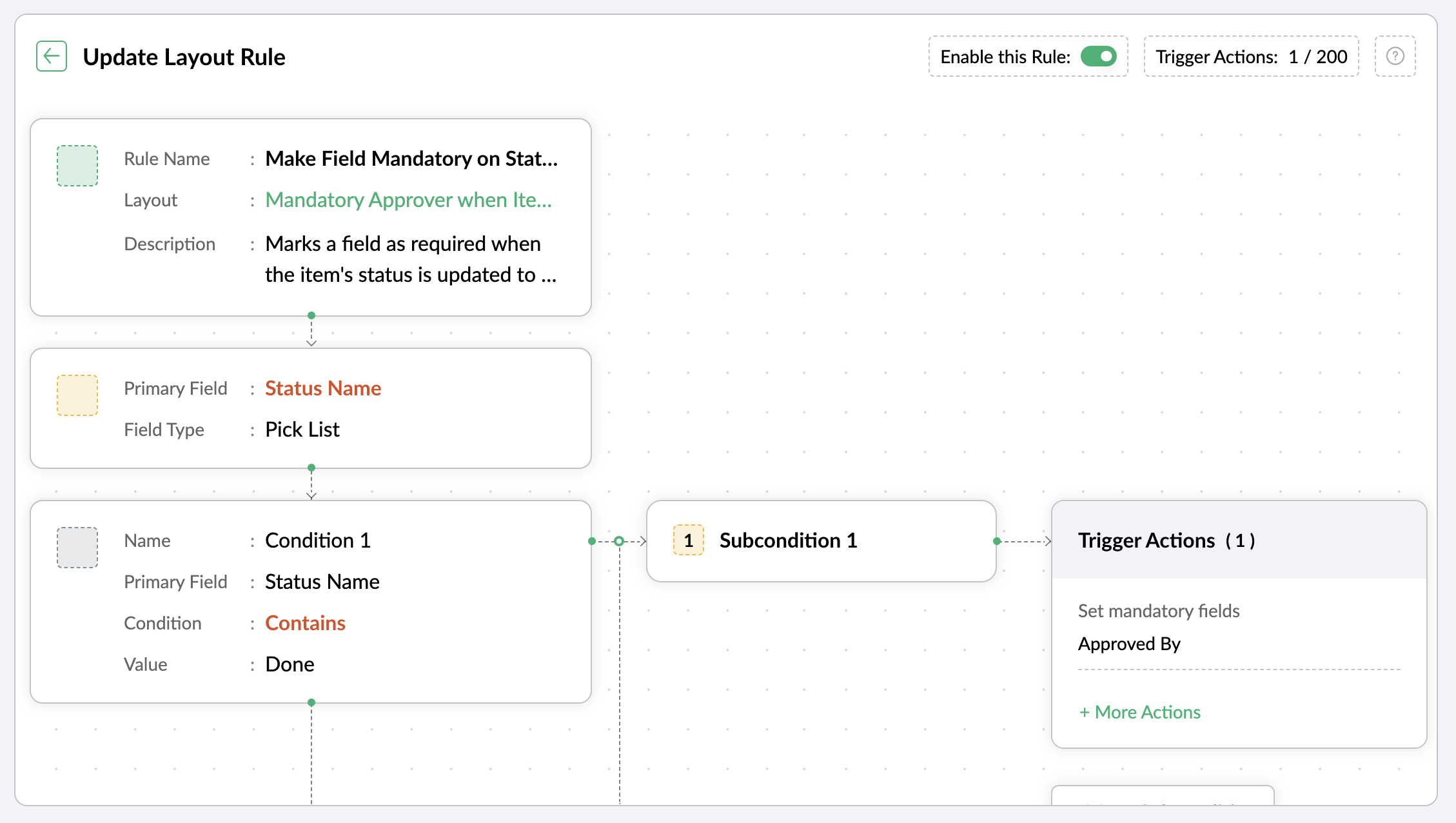
For instance, when an item is moved to the Done status, the Approver field must become mandatory to record completion approval. To ensure that this process is executed, you can create a layout rule where the primary field is the Status Name. If the status field is updated to Done, specify the condition with the trigger action to set the Approver field as mandatory.
Use case 4: Showing or hiding a section or field based on item types
Layout rules enable you to show or hide fields or sections based on item type conditions.
Let's say a section with fields related to a new feature should only be visible when the item type is New Feature.
Similarly, when the item type is Security Issue, the section with fields related to Security issue must be visible.
To achieve this, create a layout rule with Item Type as the primary field.
- Create a condition for the New Feature item type with a trigger action to show the New Feature Details section.
- Create a condition for the Security Issue item type with a trigger action to show the Security Issue Details section.

Use case 5: Selecting specific assignees for item types and priorities
Layout rules can help you assign users based on the item type and priority. Let's say your team has a group of developers with varied levels of experience and expertise. You want to assign the high priority items to a more experienced member like John, while assigning low priority items to a novice like Peter.
If the item type is Bug and the priority level is Critical, you can assign the bug to John. If the priority level is High, it goes to Peter.
To meet this requirement, you can create a layout rule with Item Type as the primary field.
- Create a condition for the item type Bug with a subcondition where the priority level is Critical and the trigger action has the Set Field Value Assignee as John.
- For the same condition, add a subcondition where the priority level is High and the trigger action has the Set Field Value Assignee as Peter.
Similarly, say you want the Task item type with a medium priority level to go to Helen, and a low priority level should go to James.
- Create a condition for the item type Task with a subcondition where the priority level is Medium and the trigger action has the Set Field Value Assignee as Helen.
- For the same condition, add a subcondition where the priority level is Low and the trigger action has the Set Field Value Assignee as James.

These are just a few examples of how layout rules can streamline your project management. Do you have any particular scenario that needs resolution? Please share it with us.
Thanks,
Zoho Sprints Team
Topic Participants
Neethinila R
Sticky Posts
Tip #28 - Plan less and deliver more using WIP limit in Zoho Sprints
Hello, It's been a while since we met with a quick, interesting tip. As the saying goes, "Too much of anything is good for nothing", today the focus is on delivering your outcomes with the right amount of planning. Your plan should be practical, calculative, and achievable for driving a qualitative success. Laura's plan Laura has a habit of planning her project deliverables before assigning work to her team-mates. Once the plan is finalized, she schedules a general meeting with her team andTip # 3- Working on the Scrum board
Continuing from our Tip #2 on leading to a sprint, let's see how to manage the work items on the Scrum board. Once you start the sprint your work items are automatically displayed on the Scrum board where you will actually manage the work items. It is a snapshot of the backlog items identified for the current sprint. The layout of the Scrum board Simply put, the scrum board is just like a physical board with sticky notes on which the work items of the active sprint are displayed. The scrum boardTip#2- Leading you to a Sprint
Product Backlog After the user stories are written and finalized, they are sorted to create the Product Backlog for the project during the Backlog Grooming meeting. This is a master list of all the work items that have been identified for the project and sorted by priority. Requirements are not constant during this period.The Product Backlog is dynamic and is an ongoing process. Every user story in the Product Backlog is customer centric. The Product Backlog includes: User centric stories based onTip #1- Why swimlanes?
Lanes define a clear path to reach your destination. In Agile, swimlane is one such concept that sets a simple and clear process of the work that you do. The concept of swimlane can be related to the pool, where the swimmers gather in their respective lanes to start off. Similar to the pool, work items are grouped in different categories. Each category is referred as a lane and is displayed in horizontal format. Swimlanes are effective in categorizing the work items with respective to specific
Recent Topics
Meet up de Zoho en Bilbao
Buenos días comunidad! Estamos estudiando hacer un Meet up en Bilbao desde zoho y varios Partners. Para que la experiencia sea excelente, queremos saber cuantas pesonas se vendrían a Bilbao al evento. Y para que sea lo mas útil posible, que temas dentroPicklist reference value in REST
picklist options can be configured to have a different reference value than the displayed one, should be helpful in things like multilanguage: https://help.zoho.com/portal/en/kb/crm/customize-crm-account/translations/articles/translations is there a wayIn Zoho inventory Converting sales return to cerdit note from using Api from Creator Error details: {"code":-1,"message":"Invalid Sales Return ID."}
In Zoho inventory Converting sales return to cerdit note from using Api from Creator Error details: {"code":-1,"message":"Invalid Sales Return ID."} this is button Function used in the Creator map Inventory.Create_Credit_note(int CRE_ID) { return_valueMarketing Tip #2: Recover lost sales with abandoned cart emails
Did you know most online shoppers don’t complete checkout? Automated cart recovery emails are an easy way to bring them back. A simple reminder can recover sales you’d otherwise lose. Try this today: Enable abandoned cart emails in Zoho Commerce and setBilling Management: #9 Usage Billing in IoTs
We live in a world where connectivity has become a lifestyle rather than a luxury. From smart thermostats that adjust your home's temperature to GPS trackers monitoring end-to-end fleets and sensors that optimize energy grids, the Internet of Things has{"code":1038,"message":"JSON is not well formed"}
Today this began failing: sales_order_data = zoho.books.createRecord("salesorders",books_organization_ID,order_data); with this error message. {"code":1038,"message":"JSON is not well formed"} This code has been running for two years. Here is the inputHow can I migrate Shared Mailbox from Zoho Mail to Team Inbox?
I am unable to migrate mails from my shared mailbox in Zoho Mail to Team Inbox. I am the super admin of my Zoho One plan and yet I am getting an error saying only admins can do this? I don't understand the issue.Remember all the ways we've posted?
The world celebrates World Postal Day in 2025 with the theme “#PostForPeople: Local Service. Global Reach". The story of the “post” is a story of human connection itself, evolving from simple handwritten notes carried over long distances to instant digitalCan no longer upload my own Notebook cover
I've had Notebook for over a year and have been able to create my own notebook covers, but when I tried to upload my own cover for a new notebook today, the upload feature has suddenly been starred, requiring me to upgrade my account. When did thisZoho Desk - Cannot Invite or Register New User
Hi who may concern, we encountered a problem that we cannot invite user or the visitor cannot register for a user at all through our help center portal, with the snapshot shown as below and the attachement. It always pops up that "Sorry, Unable to processCustom domain issue
I recently changed records for my support area custom domain for a few months, I then wanted to come back to Zoho, but now I can't connect it and I can't login as it's having an SSL issue. I cannot get a good response from support, as I've been notifiedHow do you generate personalized certificates and save them in dynamic folders using Writer's mail merge?
Zoho Writer's mail merge feature can help you enhance the certificate management process. It's a great way to save time and effort! Merge certificates and maintain a well-organised repository with personalised certificates stored in separate folders forZoho Editor
Zoho PDf Editor is not working I am clicking on EDIT PDf then it again bringing me back to the same page. again and again.The present is a "present"
The conversation around mental health has been gaining attention in recent years. Even with this awareness, we often feel stuck; the relentless pace of modern life makes us too busy to pause, reflect, and recharge. In the world of customer support, thisMarket cap
Market cap formula?? Kaise nikaleMail and OS
Jai Hind! Zoho is doing good by creating good software (made in india) on par with other tech giants. 🥰 Suggestion: 1. Whenever we sign up on zoho mail its asking for other mail id. It shouldn't be like that. You should ask general details of a userNeed Help to setup plugs along with codeless bot buidler. To send sms OTPs to users via Zoho Voice and to verify it
Need Help to setup plugs along with codeless bot buidler. To send sms OTPs to users via Zoho Voice and to verify it. I get leads from our website and we need to make sure those are not junk. So we are using proactive chat bot and we need mobile OTPs toDirect Integration Between Zoho Cliq Meetings and Google Calendar
Dear Zoho Team, We’d like to submit the following feature request based on our current use case and the challenges we’re facing: 🎯 Feature Request: Enable meetings scheduled in Zoho Cliq to be automatically added to the host's Google Calendar, not justZoho sheet
Unable to share zoho sheet with anyone on internet with editer option only view option is showPersonal account created under org account
Hi there, I am Jayesh. We are using ME Central, and we have an account by the email ID soc@kissht.com.. Now I have created a personal account., jayesh.auti@zohomail.in, accidentally. Can you help me to remove this jayesh.auti@zohomail.in from my organizationAdd another account
How to add another mail account to my zoho mail.Recover deleted user
Hi by mistake i have deleted an added user and his email associated. Please help me recover it thank you.No connection to the server
Hello! I can't add a new email address to my mailbox because your server is rejecting me. Please help. I took and added a screenshot of this problem Marek OlbrysEmails missing from desktop but visible on phone
Subject says it all. Windows 11 laptop. Apple phone. all systems up to date.Website Hosting
Hello, I want to host my domain on Hostinger, and I want my emails to run through Zoho Mail. Please provide me with the SPF record, MX record (Type: TXT), and A record, so that I don’t face any issues with my emails. My website is on Hostinger hosting,Can not search zoho mail after update V.1.7.0
i can not search mail on to and cc box from attached picture and then search contacts box can't click or use anything. include replay mail too.How to retreive the "To be received" value of an Item displayed in Zoho inventory.
Hi everyone, We have our own Deluge code to generate a PO according to taget quantity and box quantity, pretty usefull and powerful! However, we want to reduce our quantity to order according to "To be received" variable. Seems like this might not evenKaizen #211 - Answering your Questions | Using Canvas and Widgets to Tailor CRM for Mobile
Howdy, tech wizards! We are back with the final post in addressing the queries you shared for our 200th milestone. This week, we are focusing on a couple of queries on Zoho CRM mobile configurations and custom payment gateway integration. 1. Mobile SDKRemove "Invalid entries found. Rectify and submit again" modal
Following up on a post from a few years back, but can the Zoho team consider either removing the 'Invalid entries found. Rectify and submit again' modal that displays for empty mandatory fields OR allow an admin to change it? I've built a custom errorCadence reports as front-end reports
Hello everyone, We have built a cadence which is connected to the Leads module. There are 11 steps in total, 7 are automatic emails and 4 are tasks for the Lead owners. As admins, we have access to this (very nicely made) 'View Reports' tab where we canShow elapsed time on the thank-you page?
Is it possible to display the total time a user spent filling out a Zoho Form on the thank-you? I’d like to show the difference between the `form submission timestamp` and the `start time` (currently have a hidden Date-Time field set to autofill the dateEmail Integration - Zoho CRM - OAuth and IMAP
Hello, We are attempting to integrate our Microsoft 365 email with Zoho CRM. We are using the documentation at Email Configuration for IMAP and POP3 (zoho.com) We use Microsoft 365 and per their recommendations (and requirements) for secure email we haveI need to do crud with snippet html
I need to implement a form with an improved user interface. I would like to use snippets to build a CRUD that allows me to create and update records. How could I achieve this using snippets?Allow Stripe Credit Card and Stripe ACH payment methods to be enabled separately on an invoice.
I need to be able to pick at the invoice level whether Stripe Credit Card and/or Stripe ACH payment methods are available. Currently, I'm not able to select from the two Stripe payment methods individually on an invoice. However, there are some largerIncorrect “correct” password on email client apple mail
I have troubleshot this account several times. I have deleted and re added account. It keeps saying incorrect password. Can you check that it is not locked on your end?Is it possible to lock editing subform rows?
Ideally editing would only be locked after the form has been updated but I still want them to be able to add new subform records at any time and they should be able to delete rows from the subform. It is a named subform if that's relevant however theWhat is the maximum file size of a video upload in Zoho chat?
Can I upload a 20 mb video file and share it with my colleagues?Update a field in ALL all calls under a contact
HI guys! I have written some deluge code to update a field in my calls after i have comepleted the call, i need this field to update in all my scheduled calls as well that are comeing up. I just cant seem to get it to work, i have put teh code below,Fat Download of Ulaa Browser
I just observed that Ulaa Browser is offering an one-capsule big download. These days it is a custom to offer a small bootstrap downloader and based on user customization options an appropriate download completes. And this is particularly common withCancelled Transfer order problem
Hello, We've canceled a transfer order, and we can't add the related items to a new Transfer Order. The system tells us that the bin doesn't have the required quantity, but when we check the item, it indicates that there are 2 units in the bin. It alsoNext Page