Leverage layout rules to customize workflow
 Layout rules in Zoho Sprints primarily aim to customize the field layout of your creation forms to meet complex requirements. But it doesn't stop there. Its customization can push the boundaries of how your fields behave, how data is gathered, how processes are branched out, and how workflow is channeled.
Based on conditions, you can tailor field behavior, direct the life cycle of an item, mandate specific actions, restrict the field options, or auto-assign users. The possibilities are aplenty.
We've tried to provide a few sample scenarios that help you automate your data collection and progress tracking flow. If you have any specific requirements, please state them in the comments, and we'll find out if layout rules can help you.
Use case 1: Restricting item statuses based on work item types
With layout rules, each item type can have its own workflow. This means it can have its own unique set of statuses that align with its specific lifecycle.
Let's assume you have three item types: Bug, Story, and Task.
Each type follows its own lifecycle, represented by the following statuses.
- Bug goes through the To Do, In Progress, Bug Fixing, Bug Testing, and Done statuses.
- Story has To Do, Ideation, In Progress, Development, Review, and Done.
- And Task moves through a simple To Do, In Progress, and Done.
To align with these flows, certain statuses should not be available to specific item types. For instance, a story or a task should not be moved to the Bug Fixing status. Similarly, a bug or a task should not be moved to the Development status.
To enforce this, we can create layout rules that control which statuses are available based on the item type.
So, we'll create three conditions with each item type as the primary field.
- If the item type is Bug, specify the condition with the trigger action to restrict the status pick list to To Do, In Progress, Bug Fixing, Bug Testing, and Done.
- If the item type is Story, specify the condition with the trigger action to restrict the status pick list to To Do, Ideation, In Progress, Development, Review, and Done.
- If the item type is Task, specify the condition with the trigger action to restrict the status pick list to To Do, In Progress, and Done.
Together, these conditions control the status progression for each item type. So, when you create a bug, it will only progress into the statuses that belong to the Bug lifecycle.

Use Case 2: Restricting future statuses based on the item's current status
When your team requires a pre-defined strict workflow where an item can be moved from a specific status to only a few statuses, layout rules can help implement this. For example, an item in the Bug Fixing status should only move to Bug Testing, and no other status. This way, each status controls the next status in the workflow.
To ensure this, create layout rules specifying conditions for each of the item status:
- If the status is To do, specify the condition with the trigger action to restrict the status pick list to In progress and Rejected.
- If the status is In progress, specify the condition with the trigger action to restrict the status pick list to In progress and Development.
- If the status is Development, specify the condition with the trigger action to restrict the status pick list to Review Level 1.
- If the status is Review Level 1, specify the condition with the trigger action to restrict the status pick list to Reopen and Review Level 2.
- If the status is Reopen, specify the condition with the trigger action to restrict the status pick list to In progress.

Use case 3: Making a field mandatory based on item status or item type
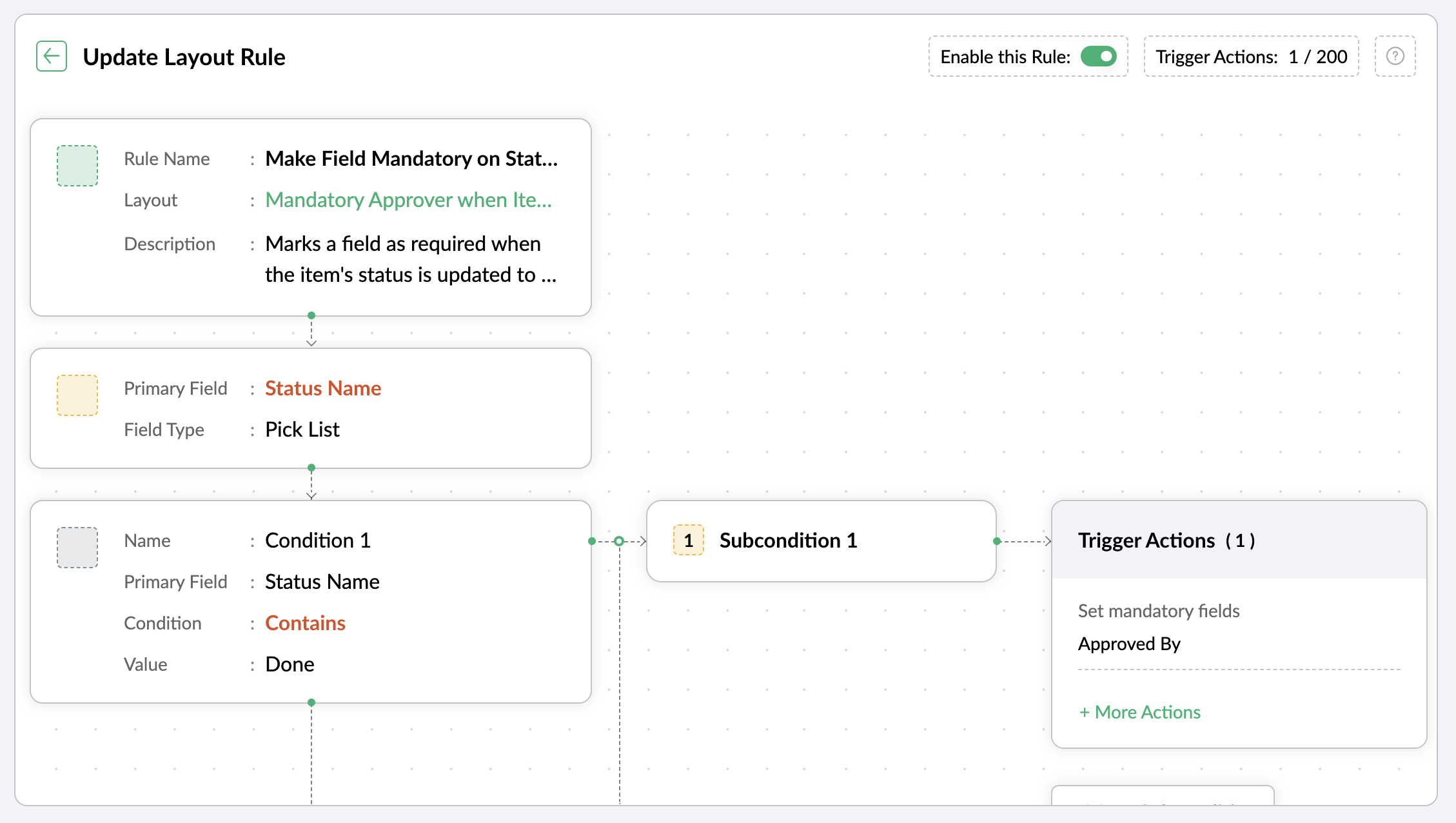
Let's assume you want a field to be made mandatory only when the item is moved to one particular status. Which implies the field will remain non-mandatory during other statuses and will be mandatory only at that particular status. So, the progress to that status must be allowed only when the mandatory field is updated.
For instance, when an item is moved to the Done status, the Approver field must become mandatory to record completion approval. To ensure that this process is executed, you can create a layout rule where the primary field is the Status Name. If the status field is updated to Done, specify the condition with the trigger action to set the Approver field as mandatory.
Use case 4: Showing or hiding a section or field based on item types
Layout rules enable you to show or hide fields or sections based on item type conditions.
Let's say a section with fields related to a new feature should only be visible when the item type is New Feature.
Similarly, when the item type is Security Issue, the section with fields related to Security issue must be visible.
To achieve this, create a layout rule with Item Type as the primary field.
- Create a condition for the New Feature item type with a trigger action to show the New Feature Details section.
- Create a condition for the Security Issue item type with a trigger action to show the Security Issue Details section.

Use case 5: Selecting specific assignees for item types and priorities
Layout rules can help you assign users based on the item type and priority. Let's say your team has a group of developers with varied levels of experience and expertise. You want to assign the high priority items to a more experienced member like John, while assigning low priority items to a novice like Peter.
If the item type is Bug and the priority level is Critical, you can assign the bug to John. If the priority level is High, it goes to Peter.
To meet this requirement, you can create a layout rule with Item Type as the primary field.
- Create a condition for the item type Bug with a subcondition where the priority level is Critical and the trigger action has the Set Field Value Assignee as John.
- For the same condition, add a subcondition where the priority level is High and the trigger action has the Set Field Value Assignee as Peter.
Similarly, say you want the Task item type with a medium priority level to go to Helen, and a low priority level should go to James.
- Create a condition for the item type Task with a subcondition where the priority level is Medium and the trigger action has the Set Field Value Assignee as Helen.
- For the same condition, add a subcondition where the priority level is Low and the trigger action has the Set Field Value Assignee as James.

These are just a few examples of how layout rules can streamline your project management. Do you have any particular scenario that needs resolution? Please share it with us.
Thanks,
Zoho Sprints Team
Topic Participants
Neethinila R
Sticky Posts
Tip #28 - Plan less and deliver more using WIP limit in Zoho Sprints
Hello, It's been a while since we met with a quick, interesting tip. As the saying goes, "Too much of anything is good for nothing", today the focus is on delivering your outcomes with the right amount of planning. Your plan should be practical, calculative, and achievable for driving a qualitative success. Laura's plan Laura has a habit of planning her project deliverables before assigning work to her team-mates. Once the plan is finalized, she schedules a general meeting with her team andTip # 3- Working on the Scrum board
Continuing from our Tip #2 on leading to a sprint, let's see how to manage the work items on the Scrum board. Once you start the sprint your work items are automatically displayed on the Scrum board where you will actually manage the work items. It is a snapshot of the backlog items identified for the current sprint. The layout of the Scrum board Simply put, the scrum board is just like a physical board with sticky notes on which the work items of the active sprint are displayed. The scrum boardTip#2- Leading you to a Sprint
Product Backlog After the user stories are written and finalized, they are sorted to create the Product Backlog for the project during the Backlog Grooming meeting. This is a master list of all the work items that have been identified for the project and sorted by priority. Requirements are not constant during this period.The Product Backlog is dynamic and is an ongoing process. Every user story in the Product Backlog is customer centric. The Product Backlog includes: User centric stories based onTip #1- Why swimlanes?
Lanes define a clear path to reach your destination. In Agile, swimlane is one such concept that sets a simple and clear process of the work that you do. The concept of swimlane can be related to the pool, where the swimmers gather in their respective lanes to start off. Similar to the pool, work items are grouped in different categories. Each category is referred as a lane and is displayed in horizontal format. Swimlanes are effective in categorizing the work items with respective to specific
Recent Topics
Cancelled Transfer order problem
Hello, We've canceled a transfer order, and we can't add the related items to a new Transfer Order. The system tells us that the bin doesn't have the required quantity, but when we check the item, it indicates that there are 2 units in the bin. It alsoBilling Management: #8 Usage Billing in Logistics & Delivery Services
The logistics and delivery industry thrives on movement and precision. Every delivery completed, every kilometre driven, and every ton transported is a measurable activity. However, billing often lags behind. Many logistics companies still rely on fixed-rateTags for New Tickets
Hi there, When creating a new ticket, there is currently no way to choose a tag you would like to associate with the new ticket. Being able to associate a tag while creating a new ticket will be very beneficial as it will save time and flow well withZoho Desk: No Incoming email
Is Zoho Desk services down? No incoming email reflect to desk tickets.Zoho CRM - Widgets | Update #3 : Introducing SDK V1.5 along with new ZDK Methods and ZRC Support
Hello everyone! Widgets in Zoho CRM just got a big upgrade! With the release of SDK v1.5, developers can now create more immersive widget experiences. This update elevates Widget development with new ZDK methods for easier interactivity and ZRC supportUnusual activity detected, account blocked
I am unable to send emails and am getting the error "Outgoing blocked: Unusual activity detected. To unblock your account, please and submit a request. Learn more.". I am unsure as to why this is happening since all my activity is legitimate, mainly confirmationUnable to Send Emails – Outgoing Mail Blocked (Error 554 5.1.8)
Description: Hello Zoho Support Team, I am facing an issue with my Zoho Mail account ( admin@osamarahmani.tech ). Whenever I try to send an email, I get the following error: 554 5.1.8 Email Outgoing Blocked I would like to clarify that I have not doneIssue connecting Zoho Mail to Thunderbird (IMAP/SMTP authentication error)
Dear Zoho Support, I am trying to configure my Zoho Mail account on Thunderbird, but I keep getting authentication errors. Account: info@baktradingtn.com Domain: baktradingtn.com Settings used: IMAP: imap.zoho.com, Port 993, SSL/TLS, Normal Password SMTP:Payment issue with Mail Lite plan – personal NIF not accepted as payment info
Hello, I have already contacted Zoho Support by email regarding this, but since I haven’t received any reply yet, I’m sharing it here as well to see if the community can help. I’m facing a payment issue for my Mail Lite plan. I have a personal accountCustomer payment alerts in Zoho Cliq
For businesses that depend on cash flow, payment updates are essential for operational decision-making and go beyond simple accounting entries. The sales team needs to be notified when invoices are cleared so that upcoming orders can be released. In contrast,Figma in Zoho Creator
Hi Team, I’m creating a form using Figma and would like to know how to add workflows like scheduling, custom validation, and other logic to it. Can anyone help me understand how to set this up for a Figma-based Creator UI form?Not receiving Gmail confirmation email to send emails as Zoho account from Gmail
Hello! I'm having an issue with the "Send mail as" option on Gmail. I am not receiving the confirmation email on my Zoho Mail account. A few days ago, it worked, then it stopped, and now when I try to fix it, I simply don't receive the confirmation emailRestore lost Invoice!
Some time ago I tried to Upgrade from Invoice to Books. I not upgraded and staid n Invoice. Now i tried again and first i deleted the old trial of books. But now all is gone, PLEASE HELP!! i have no backup and i have to have at least 7 years data retention by law.Zoho Desk Down
Not loadinglookup and integrated forms
I might be misunderstanding things but I wanted to integrate our zoho crm contacts into creator. I imagined that when I used the integration it would mirror into creator. It did brilliant. BUT We have a ticket form in creator that we want to use a lookupPartially receive PO without partial Bill?
Most of our inventory is pre-paid. Let's say we purchase 30 pieces of 3 different items for a total of 90 pieces. It is common for our supplier to send us the items as they are ready. So we will receive 30 pieces at a time. How can I partially receive2 users editing the same record - loose changes
Hello, I'm very new to Zoho so apology if this has been addressed somewhere i can't find. I have noticed the following: If we have 2 users put an inventory item in edit mode at the same time: say user1 click on edit and user2 while user1 is still in edit,How to get the Dashboard page to be the first page when you open the app
So when it opens on a tablet or phone it opens on the welcome page, thanks.How I set default email addresses for Sales Orders and Invoices
I have customers that have different departments that handle Sales Orders and Invoices. How can i set a default email for Sales Orders that's different than the default email for Invoices? Is there a way I can automate this using the Contact Persons DepartmentsFormula fields not refreshing until page is reloaded
I need help/advice about the formula fields and how I can refresh the information in real-time. We have two formula fields on our deals page which show calculated prices: One formula is in a subform which calculates the subform total + 1 other field amountHow can I setup Zoho MCP with Chat GPT
I can set up custom connections with Chat GPT but I cat an error when I try to set it up. The error is: "This MCP server can't be used by ChatGPT to search information because it doesn't implement our specification: search action not found" Thoughts?API ZOHO CRM Picket list with wrong values
I am using Zoho API v.8. with python to create records in a custom module named "Veranstaltung" in this custom module I've got a picket list called "Email_Template" with 28 Values. I've added 8 new values yesterday, but if I try to use on of those valuesGroup Emails
I have synced Zoho CRM to Campaigns but there are certain email not synced. showing it is Group Emails, but this email ids belongs to different individuals. please provide a solution as i nedd to sync the same.Enable Password Import option in ulaa browser
Dear Ulaa Team, I noticed that the Ulaa Password Manager currently offers an option to export passwords, but not to import them. This limitation poses a challenge for users like me who have stored numerous credentials in browsers like Chrome. Manually"Is Zoho CRM customer" vs "Is linked with Zoho CRM"
Recently while building a Flow, I was setting up a Decision action following a Zoho Invoice Fetch record action. There were 2 choices that I had not seen as something I could manually action in Zoho Invoice: "Is Zoho CRM customer" and "Is linked withClient Script | Update - Introducing ZRC: Simplified HTTP request library
Hello Developers! Are you tired of juggling different methods to make API calls? Are you confused with multiple syntaxes and version restrictions? Have you ever wished for one simple way to make all API calls in CRM? We heard you :) Here comes ZRC (ZohoSelection Filed for Data Export section
Hi FSM Team, I hope you are all doing well. I would like to share an idea for future development based on my experience. Currently, in FSM, we can only download up to 5,000 records at a time. If the development team could add a selection option to chooseText wrap column headers in reports?
Is it possible to auto wrap column headers so that a longer multi-word header displays as two lines when the column is narrower than the width of the header title?What if I dont see contacts on the left side list
My CRM does not show the contacts tab. In order to create list this is needed and I cant find it.Comments Vs. Replies
I'm curious as to the difference between a "Reply" and a "Comment" on a ticket. It appears that "Replies" are what's used to determine response time SLA's and there are also used to automatically re-open tickets. I'm just trying to understand the key differences so I can educate both our clientele and our back-end users on which function/feature to use to better improve the ticket lifecycle. If anyone has any insight it would be appreciated. Thanks!Transitioning to API Credits in Zoho Desk
At Zoho Desk, we’re always looking for ways to help keep your business operations running smoothly. This includes empowering teams that rely on APIs for essential integrations, functions and extensions. We’ve reimagined how API usage is measured to giveResetting auto-number on new year
Hi everyone! We have an auto-number with prefix "D{YYYY}-", it generates numbers like D2025-1, D2025-2, etc... How can we have it auto-reset at the beginning of the next year, so that it goes to D2026-1? Thanks!Can you prevent closing Ulaa window when the last tab is closed (inadvertently)?
Most browsers have started to bring this feature in to prevent closing their windows when the last tab is closed (inadvertently). I hope Ulaa should get this in too.Microsoft Phone Link
Does anyone know if you can use Microsoft Phone Link to make calls through Zoho?Voip Phone system that integrates with Zoho
Just checking to see if anyone could tell me what phone system they are using with Zoho that is on the list of systems that integrate with Zoho. I use Vonage and have been with them for quite a few years but their service has really gone down hill andRemoving Related Modules Lookup Fields Assignment / Relationship
Issue: When creating a related list, I accidently selected module itself creating a circle reference. See attached. Situation: I wish to relating a custom module called "Phone Calls" to Leads and Contacts. Outcome: 1) I either want to remove the thisMultiple email accounts, one phone
Hi, I have my own businesses that use Zoho mail, now I would like to use zoho mail also for a local charity. But I noticed adding a phone number is compulsory for registering an account, and I only have one phone. This means I can not open an account because my phone number is already in use for another account. Can this be fixed? Thanks VincentKaizen #210 - Answering your Questions | Event Management System using ZDK CLI
Hello Everyone, Welcome back to yet another post in the Kaizen Series! As you already may know, for the Kaizen #200 milestone, we asked for your feedback and many of you suggested topics for us to discuss. We have been writing on these topics over theSeriously - Create multiple contacts for leads, (With Company as lead) Zoho CRM
In Zoho CRM, considering a comapny as a lead, you need us to allow addition of more than one contact. Currently the Lead Section is missing "Add contact" feature which is available in "Accounts". When you know that a particular lead can have multiplecan I link a contacts to multiple accounts
can I link a contacts to multiple accountsNext Page