Leverage UX to Power CX: VoC insights are now available in Kiosk

Leverage UX to Power CX: VoC insights are now available in Kiosk

Efficient teams deliver exceptional experiences

Dear Customers,
 
We hope you're well!
 
When we built VoC for Zoho CRM, our focus was in fact to study the "voice" of the customers. It's been over a couple of years since we opened it for you, and we have arrived at a stage where you can act on their responses; Customer experience as a result of customer experience.

Today, we step up and touch on a new chapter—User experience using the Kiosk studio.
Quote
Kiosk is our no-code self-service tool that empowers CRM users with convenience and information on demand. You can summon record information from across the CRM, submit new data to the system, configure if-else decisions, and ascribe quick actions from Kiosk placed anywhere in Zoho CRM. 
With Voice of the Customer joining hands, your users can factor in interpersonal customer insights to make quick decisions and act on them from within the Kiosk.
   

VoC insights in Kiosk:

 
CX or UX—When we talk about optimizing experiences, we cannot omit the human aspect of it. Ultimately, we are all catering to a human entity that expresses sentiments, emotions, biases, and preference which subsequently influences their decisions. Every business needs to have data and cues about their voice to strategize engagement, promotion, reconciliation, and retention.

Thus, VoC insights in Kiosks have become a necessity. Let's see how this is a real UX empowerment!

Escalation management:
Escalation management is a key skill exhibited by leaders in the organization, and it often involves an angry and/or frustrated customer at the other end. While it is their job to offer convincing solutions, the manager might not always know the customers' state of being. With VoC insights sought out at Kiosk, the manager can get a true sense about the customers' pulse before engaging them in reconciliation measures.
This is how you can configure a Kiosk for them: The configuration

This is how the escalation manager can make use of VoC insights in Kiosk:
Kiosk rendering VoC insights associated to the homepage:


Assess product reception:

Irrespective of the number of marketing tools available in the market, the reception of a new product is often reflected in their demand and the customer responses. As a marketer, if you'd like to assess the usage before creating targeted campaigns, VoC in Kiosk will help you see insights firsthand.
  1. You can fetch records of prospects who are enthusiastic about the new product and have queries about the product based on their sentiments and intents. The following can be their criteria:
    1. Response intent is Query, request, purchase
    2. Response sentiment is positive
    3. Response emotion is Enthusiasm, Happy, Gratitude, Trust
  2. Also, to identify and reward customers that promoted the product by mentioning it on their social media handles by tracking their social media mentions right from within the Kiosk.
    1. Response type is Social - Twitter (X). Facebook (Meta)


Optimizing patient response management using VoC:

When it comes to hospitals, end-to-end experience has a big influence on patients' trust. From appointments to admissions, patients expect the hospital administration to be empathetic and thoughtful in their approach. This is where VoC in Kiosk come in handy.
  • As an administrator, you can pull out records of all patients that expressed negative sentiments in their post-care services, further look into each of their personal insights to understand the common problem. From here, you can improvise your response management.
    • Keyword sentiment is negative
    • Keyword mentioned by customer
    • Response emotion is Discontentment
    • Response intent is complaint
    • Survey NPS score is < 3
  • Patients' historical emotional state of being is an important element psychologists refer to before meeting with their patients and VoC insights capturing exactly the same, can become very handy for the counselor to prepare beforehand.
  • Accurate diagnosis is a challenge in online consultations. Doctors, before they connect with their patients, can fetch their patients records from Kiosk to understand their previous ailments and allergies. On top of that, the doctor can understand the patients' sentiments to adjust their approach.
    • Keyword is not empty
    • Keyword mentioned by customer
    • Response is Confusion, Discontentment
    • Responded time is till yesterday
 
These are different use cases VoC can solve using Kiosk. Kindly refer to the help document to explore its use and application in-depth. 

Enhancement 2: VoC charts in homepage dashboards:

In addition to this, for ease of access, we made VoC components available for homepage dashboards. You can create dedicated dashboard only with desired VoC components to get a quick update.
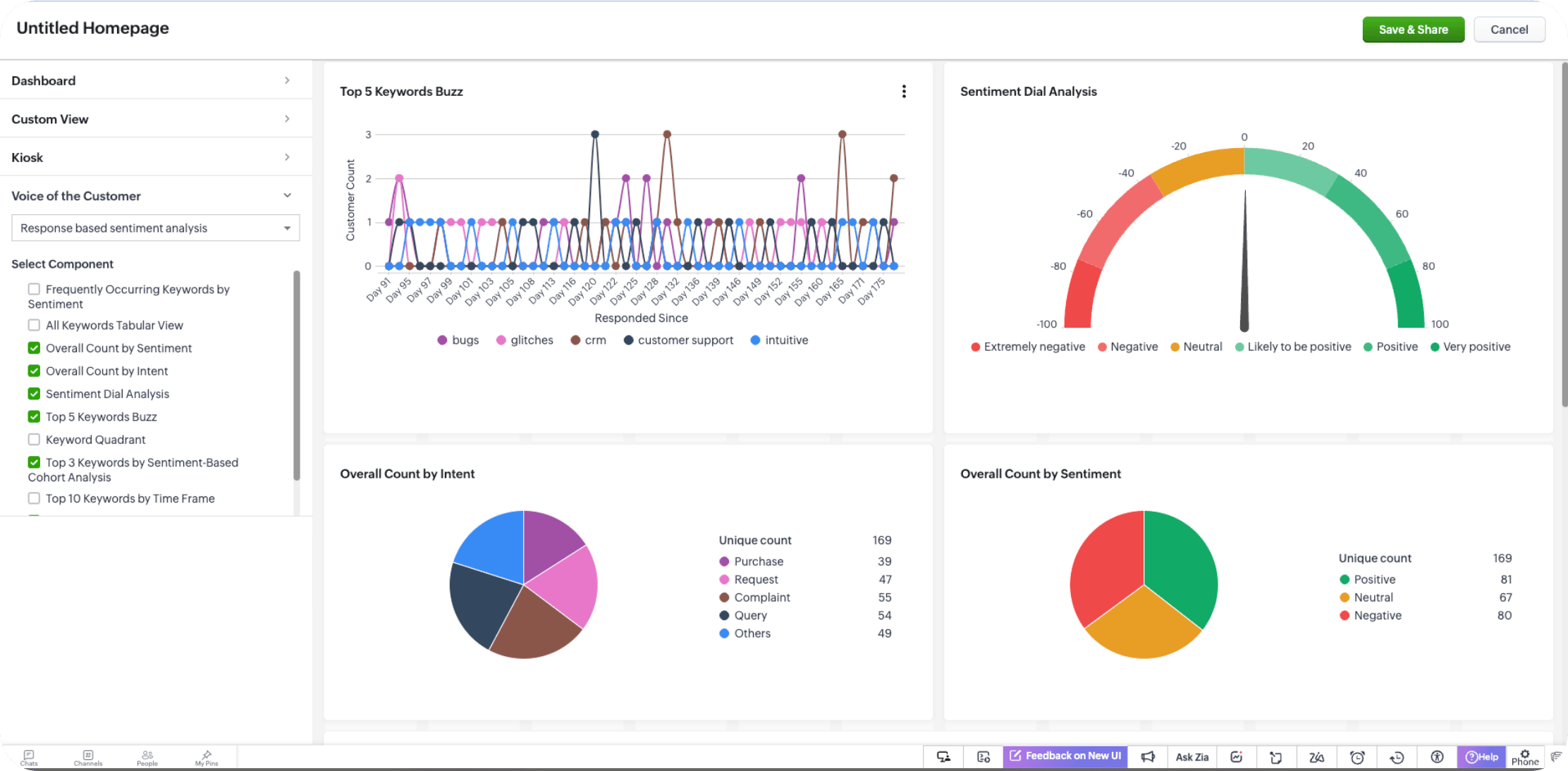
We have opened these capabilities for all customers that have enabled VoC in their organization. We hope to improve your productivity and performance using these on-demand intelligence using VoC. With more such capabilities, we will see you soon!

 
Thanks and have a good one!
 
Kind regards,
Saranya Balasubramanian

    • Recent Topics

    • Add Custom Reports To Dashboard or Home Tab

      Hi there, I think it would be great to be able to add our custom reports to the Home Tab or Dashboards. Thanks! Chad
    • MCP > Creator connection failing with Claude

      I'm trying to get claude to access any of my Zoho Creator apps and it keeps failing. I have enabled all tools for creator and ensured in claude settings that everything is authorised. Here is what claude says : Unfortunately, the error messages I'm receiving
    • Pricing Strategies: #1 Nuances in Pricing

      When Clara first opened her digital printing shop, pricing was simple. She sold handmade greeting cards, planners, business cards, and other physical items at fixed label prices, individually and in bulk. One SKU, one price, one bill, and that's all it
    • [Free Webinar] Learning Table Series – Education Management in Zoho Creator

      Hello Everyone! We’re excited to invite you to another edition of Learning Table Series, where we showcase how Zoho Creator empowers industries with innovative and automated solutions. About the Learning Table Series The Learning Table Series is a free,
    • Adding Multiple Files to a Zoho Vault Entry

      There is a old blog post talking about adding multiple file attachments to one Zoho Vault Secret: https://www.zoho.com/blog/vault/introducing-new-features-in-zoho-vault-powerful-password-sharing-wider-storing.html Is that still possible, I can see how
    • Channel Configuration and Default Channels

      There are some of the default fields that cannot be removed or changed. Examples are the social media ones, such as Facebook. It would be nice to be able to remove these fields as it would be confusing if someone selected this but it's not configure
    • CRM x WorkDrive: File storage for new CRM signups is now powered by WorkDrive

      Availability Editions: All DCs: All Release plan: Released for new signups in all DCs. It will be enabled for existing users in a phased manner in the upcoming months. Help documentation: Documents in Zoho CRM Manage folders in Documents tab Manage files
    • Move attachments from one module to another with Deluge

      I have created a button that works just like the convert button for my custom modules. I would like this custom function to move any attachments in this record to the new module. I can't seem to find any documentation on how this can be accomplished.
    • Help in function code

      Hi, could someone look at the code below and tell me what 's wrong with it? After a deal creation or edition the code should find the related Account, than all open Deals for that Account and copy the field Total_Open_Deals from the Account record to
    • Automation Series: Auto-update Phase Status

      Hello Folks! You can auto-update your phase's status based on status of underlying tasks using custom functions. In this series, we will showcase how to create and run custom functions, using Deluge, with ease. Follow the steps below and automate your
    • Zoho CRM for Everyone's NextGen UI Gets an Upgrade

      Hello Everyone We've made improvements to Zoho CRM for Everyone's Nextgen UI. These changes are the result of valuable feedback from you where we’ve focused on improving usability, providing wider screen space, and making navigation smoother so everything
    • Is it possible to sync data every 5–10 minutes in Zoho Analytics (CRM or Excel imports)?

      Hello Team, I want to know if Zoho Analytics supports near real-time syncing of data from different sources. My requirements: I am importing data from Zoho CRM → Zoho Analytics I also have some datasets maintained in Excel/CSV I want both data sources
    • how to add subform over sigma in the CRM

      my new module don't have any subform available any way to add this from sigma or from the crm
    • Reporting Limitation on Lead–Product Relation in Zoho CRM

      I noticed that Zoho CRM has a default Products related list under Leads. However, when I try to create a report for Lead–Product association, I’m facing some limitations. To fix this, I’m considering adding a multi-lookup field along with a custom related
    • Zoho Projects - Project Details on the Project Menu

      Hi Project's team, I've helped may businesses setup and use Zoho Project and one thing I see time and time again is confusion on where to find the Project Details information. I would be much more intuitive if Project Details was on the menu before Dashboard.
    • Zoho Projects - Add Feed to Project Tabs

      Hi Projects Team, I'm working on a lightweight communications requirement for one of my customers in relation to communicating with their client users via Zoho Projects. I noticed that the Feed is only available in the Collaboration section, but you can
    • Zoho Projects - Visual improvement to parent and sub-task relationship

      Hi Projects Team, My feature request is to improve sub-task visibility. Please see screenshot below. I really think parent child relationships could be visually improved. Even if the first letter of the parent task was inline with other same level tasks
    • Zoho Logs - Not seeing logs since 30 Nov

      Hi, we have a few functions running, I am testing some new ones and noticed that although I can see executions, I cannot see any logs, even when the first line on the functions is a log. I reviewed some existing functions, one of which is invoked on a
    • Flow - Fetch info from drop down in another module

      I am running into a road block which I thought would be a simple task. My goal - The account is assigned to a "route" which can be selected from a drop down menu and adds a tag to the account accordingly (easy enough). Now when I create a task for this
    • Problem with signature on zoho survey

      Hello, I'm trying to export individual responses with signatures on zoho survey. But the signatures on some of my surveys are not exported as the original image, but as a generic image, same for all (screen joins). Is there a solution to have the signatures
    • Show unsubscribed contacts ?

      Hello, I would like to display the unsubscribed contacts. Unfortunately, I do not have this subscription type as described in the documentation (https://help.zoho.com/portal/en/kb/marketing-automation-2-0/user-guide/contacts/contact-management/articles/subscription-type-24-1-2024#Subscription_Type_field.)
    • Widget shows error

      Hi, May I ask why below characters will be auto added into the widget link and how to solve this error? As my widget shows 404 error now. ?serviceOrigin=https%3A%2F%2Fcrm.zoho.com&frameorigin=https%3A%2F%2Fcrm.zoho.com
    • Zoho Developer Community Hackathon 2025 is LIVE!

      Hey developers! It’s that time of the year again — the Zoho Developer Community Hackathon 2025 is officially open for registrations! If you’ve been waiting for a chance to stretch your skills, try something new, or finally bring that idea to life, this
    • Converted Leads Not Showing in Lead Reports

      Converted leads are not showing in the Lead reports. How can I make converted leads visible in the report,
    • Can I open PST file on Windows without Outlook?

      Yes, you can open PST file on Windows even if Outlook isn’t installed by using a dedicated MSOutlookHelp PST viewer tool. These programs are designed to work independently of Outlook and let you read the entire contents of a PST file, including emails,
    • Text widgets in dashboards

      Having a text widget in a dashboard would help immensely. It would allow adding links to related documents, relevant CRM views, etc. It would allow adding explanations of the data displayed in the other widgets, about how to interpret them or about filtering.
    • Read webpage - MSXML2.ServerXMLHTTP

      I have the following VBA script, put together from various sources (mainly zoho forum/help/support, so it once worked, I guess): private Sub GetListOfSheets() Dim url As String Dim xmlhttp As Object Dim parameters As String Dim html As String range("B1").value
    • [Webinar] Zoho Writer for content creators and publishing houses

      Managing multiple drafts, edits, and client reviews doesn't have to slow you down. Join our upcoming webinar to see how Zoho Writer helps content creators and publishing houses create, edit, and publish seamlessly—all in one place. You'll learn how to:
    • Adding Reports to Portals

      Is there a way to add Reports to portals so only the user can see report templates relevant to them?
    • How to assign one Manual to multiple Spaces?

      Hello, I have two spaces, one called tech knowledge and the other one called HR knowledge. I have a manual that is called HR tech. I want to assign this manual to HR knowledge and tech knowledge. How should I do that?
    • How can I assign courses to Spaces?

      How can I make courses show up here in this space?:
    • When will Zoho Learn be able to support SCORM files on the mobile app?

      When I click the SCORM content, I just get a message saying it's not possible yet. Yet implies that it will be coming soon. All I'm asking for is a realistic timeline so I know whether or not to invest my time in using it. If it will be soon, then I will
    • Announcing new features in Trident for Windows (v.1.35.6.0)

      Hello Community! Trident for Windows just got better with an update that makes working with your emails even more efficient. Let’s dive into what’s new! Work with PST files more efficiently. You can now do more than just view mounted PST files. You can
    • AI feature in Zoho Desk suggesting answers based on past ticket threads

      Hi I would like to suggest something that would be very useful : instead of suggesting answers based on the Knowledge Base, I think it would be great if Zia could analyze the history of all customer and agents threads, to suggest answers in new tickets.
    • Work Order Assignment for Engineers Handling Their Own Requests

      I’m setting up FSM for a business where there are multiple engineers, but each engineer handles their own process end-to-end receiving the service request, creating the work order, and completing the field service job. I noticed that I must create an
    • Looking for best practices to import data from SAP Business One (on-prem) into Zoho Analytics via Zoho DataPrep / Databridge — daily automated schedule

      Hi all, I’m using SAP Business One on-prem (SQL Server / or HANA — depending on DB backend) as our ERP. I want to build a pipeline that, every morning at 9:00 AM IST: pulls transactional data (invoices, customers, products, stock, etc.) from SAP B1, loads
    • Marketing Tip #9: Track your traffic sources

      Not all marketing channels work equally well. Knowing whether your visitors come from Google, Instagram, or email helps you focus on what actually drives sales. Try this today: Check your Zoho Commerce reports or connect Zoho PageSense to see your top
    • Google Analytics import data inaccurate (as of October 11, 2025)

      We have Zoho Analytics connected to GA4 to import daily event data. This has been running without issue for a couple of years. However, a month ago we started noticing discrepancies. All data until October 10 lines up perfectly - October 11 onward is
    • Can't make a document editable to anyone

      Hey everyone, I am using Zoho Workdrive and trying to share a document so that it is editable by anyone with the link. I am trying to convince people to shift from Google to Zoho, but they don't have accounts yet. When I try to change the share settings
    • E-Invoicing in Belgium with Zoho Billing

      Starting January 1, 2026, Belgium is introducing mandatory electronic invoices (e-invoicing) for all B2B transactions between VAT-registered businesses. Invoices and credits notes must be exchanged in a prescribed digital format. How E-Invoicing works
    • Next Page