Marketing and sales go hand in hand, yet teams often struggle with inefficiencies in lead management. Leads may go cold due to delayed follow-ups, and valuable prospects might get lost in the shuffle. This is where integrating Zoho CRM with Zoho Marketing Automation (ZMA) comes into play. By utilizing CRM actions in Journeys, businesses can automate lead nurturing, push only engaged leads to sales, and ensure seamless collaboration between the marketing and sales teams. This integration helps marketers target the right prospects at the right time while allowing sales teams to act on high-intent leads without delays.
In this post, we’ll explore how leads that originate in Zoho CRM are nurtured through ZMA before being handed off back to sales.
Syncing Leads from Zoho CRM, Engaging Them, and Automating Sales Follow-Ups
Many businesses capture leads first in Zoho CRM—through website forms, inbound inquiries, or sales outreach. However, not all leads are immediately ready for sales engagement. That’s where marketing steps in, using Zoho Marketing Automation to nurture these leads until they show clear interest. Here’s how you can set up a CRM-integrated Journey to automate this process from start to finish.
Sync Leads from Zoho CRM to Zoho Marketing Automation
To ensure a smooth transition of records between Zoho CRM and ZMA, you first need to sync your CRM leads into Marketing Automation. This allows marketers to send targeted campaigns to the right audience. Ensure all relevant fields (such as Name, Email, Lead Source, and Lead Stage) are mapped properly. Once synced, these leads will now be available in ZMA for segmentation and targeted campaigns.
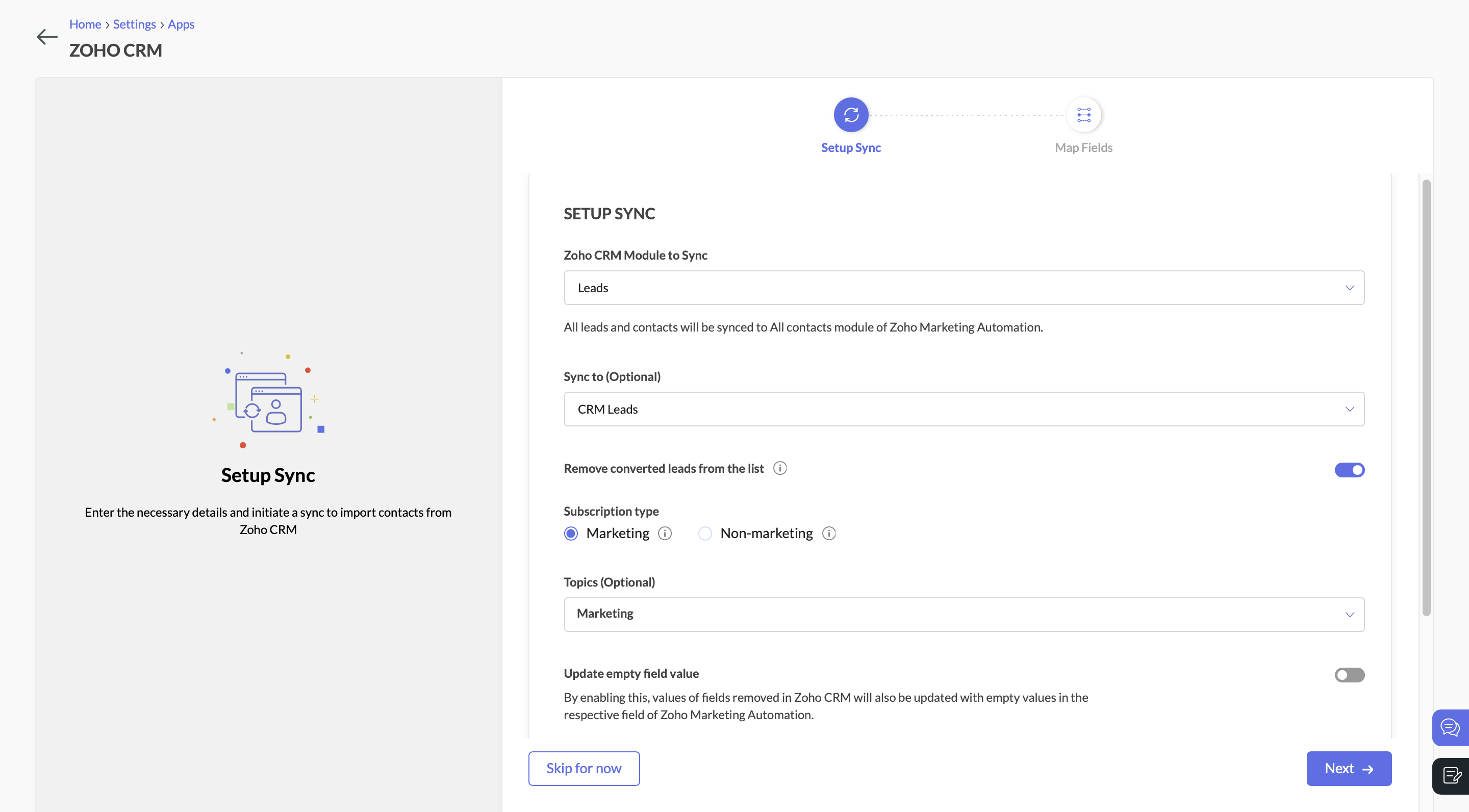
Sync Leads from Zoho CRM to Zoho Marketing AutomationSend a Marketing Campaign to Engage CRM Leads
With the leads synced, you can now target them with an email campaign. Let’s say you’re promoting a product demo or a free consultation. You send an email with a call-to-action (CTA) button, inviting leads to learn more.
Create a Journey to Target Interested Leads
Navigate to the Journeys section in Zoho Marketing Automation and create a new Journey. This Journey will track engagement and ensure that interested leads are identified, categorized, and updated in both ZMA and Zoho CRM.
- Add the Email Action Trigger . Click on “Specific Email” and choose the email campaign.
- Then select the email action “Specific link clicked” and choose the CTA that you included in the campaign.
- Specify the exact URL you want to track (e.g., a demo request page, a pricing page, or a consultation booking link).
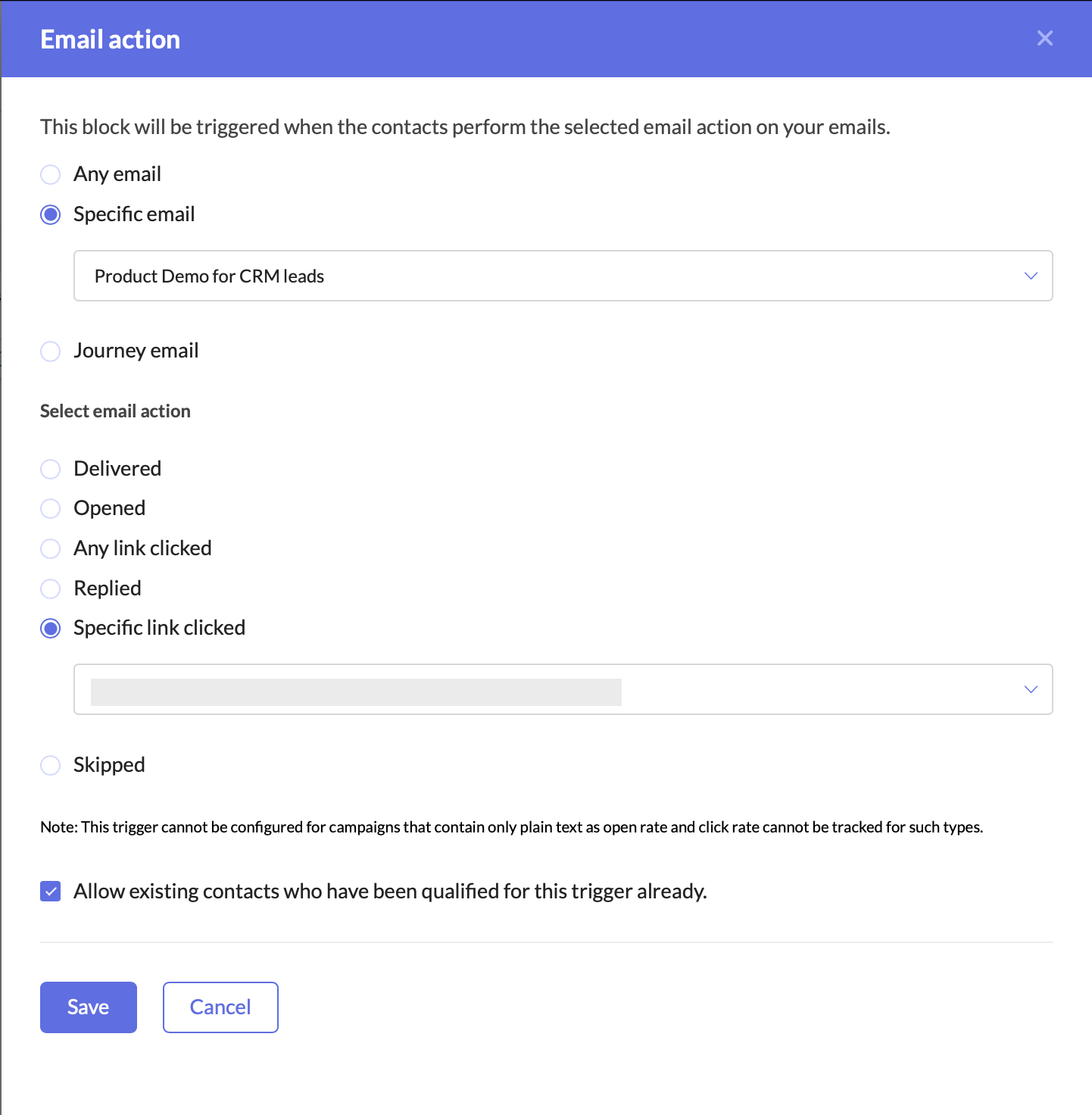
Create a Journey to target interested leadsAdding this trigger ensures that your Journey only targets leads who have shown clear intent by clicking on your email’s CTA. This helps you:
- Identify engaged leads who are actively interested in your offering.
- Filter out unresponsive leads, allowing marketing and sales teams to focus their efforts on high-potential prospects.
- Automate lead qualification without manual tracking.
Once a lead clicks on the CTA, they enter the Journey, signaling that they are engaged and should be prioritized for further marketing and sales efforts.
Update the Lead Stage in Zoho Marketing Automation
Now that the lead has clicked on the CTA and entered the Journey, the next step is to update their lead stage to reflect this new level of engagement.
- Add the Update Lead Stage action component right after the Email Action Trigger.
- Configure it to move these contacts to the “Marketing Engaged” stage in ZMA.
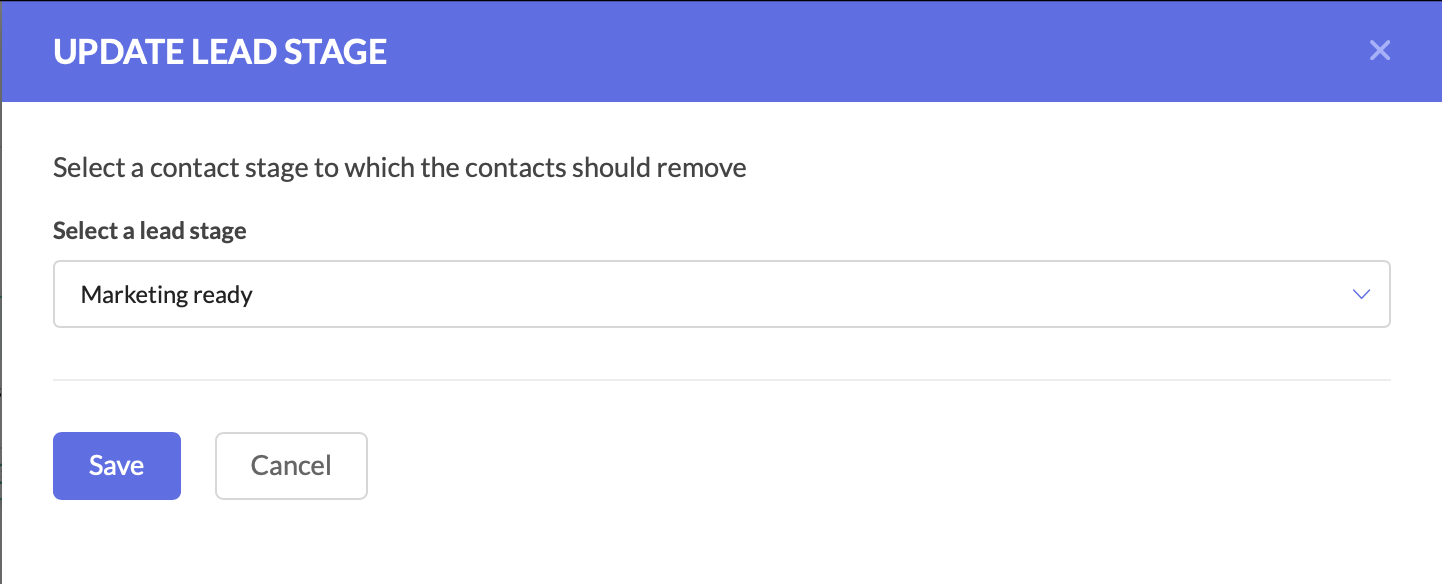
Update the Lead Stage in Zoho Marketing AutomationBy moving them to the Marketing Engaged stage, you’re ensuring that these leads are recognized as actively interested, making it easier to track their Journey through your funnel.
Push the Updated Lead Data to Zoho CRM
At this stage, the lead stage has been updated in Zoho Marketing Automation, but we also need to reflect these changes in Zoho CRM. Since both platforms need to have the latest details, we now push the updated lead information back to Zoho CRM.
- Add the Push Data to CRM action component after the Update Lead Stage action.
- Configure it to push the lead’s latest details into the Leads module in Zoho CRM.
- Ensure that all relevant fields are mapped correctly.
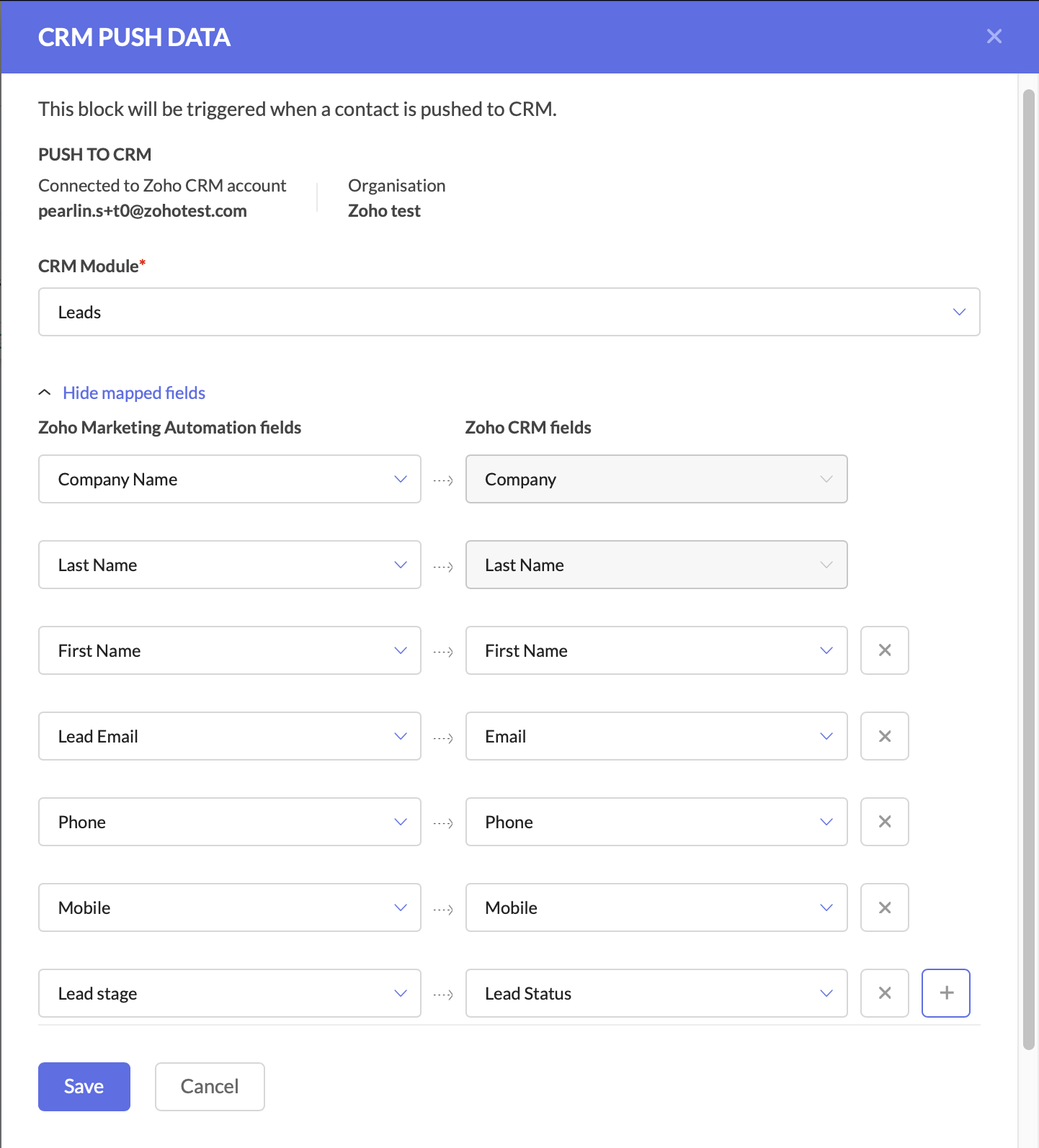
Push the Updated Lead Data to Zoho CRM
Keeping Zoho CRM up to date is critical for sales teams, as it ensures they are always working with the latest information.
At this point, your Journey has:
- Tracked engaged leads through the Email Action Trigger.
- Updated the lead stage in ZMA to “Marketing Engaged.”
- Pushed the updated lead data back to Zoho CRM.
With these foundational steps in place, you are now ready to take the next action—automating deal creation and assigning follow-up tasks to the sales team.
Create a Deal for the Interested Lead
At this stage, the lead has shown interest, so we should automatically create a deal in Zoho CRM.
- Add the Create Deal CRM Action Component and configure the deal name, due date, stage, amount, and deal assignment.
- You can also map fields at this stage.
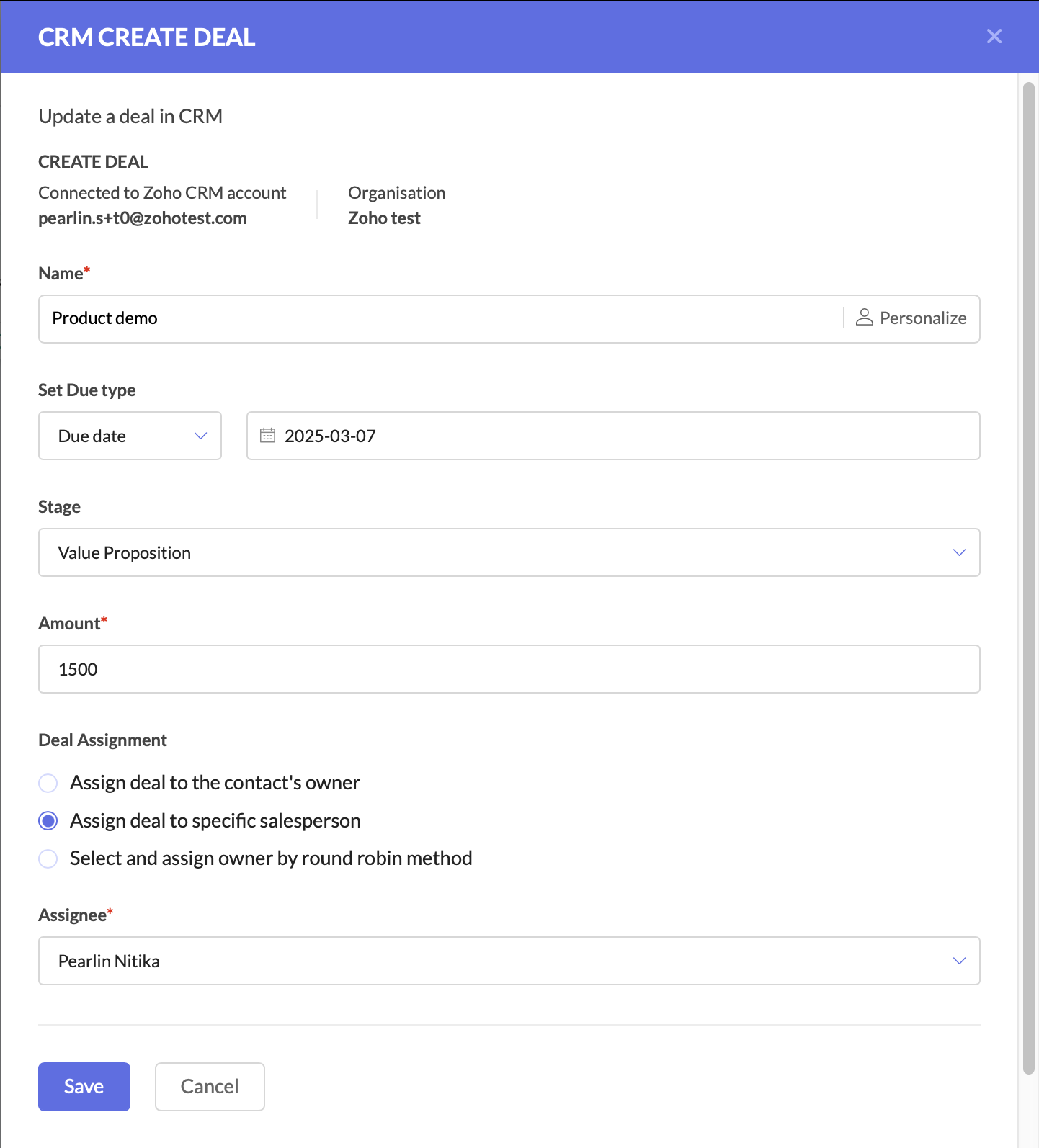
Create a deal for the interested lead Create a Task for Follow-Up
The final step is to ensure a salesperson takes action on the newly created deal.
- Add the Create Task CRM Action Component.
- Configure the CRM module, subject and description, due date, priority, status, and assign the task to the deal owner in CRM.
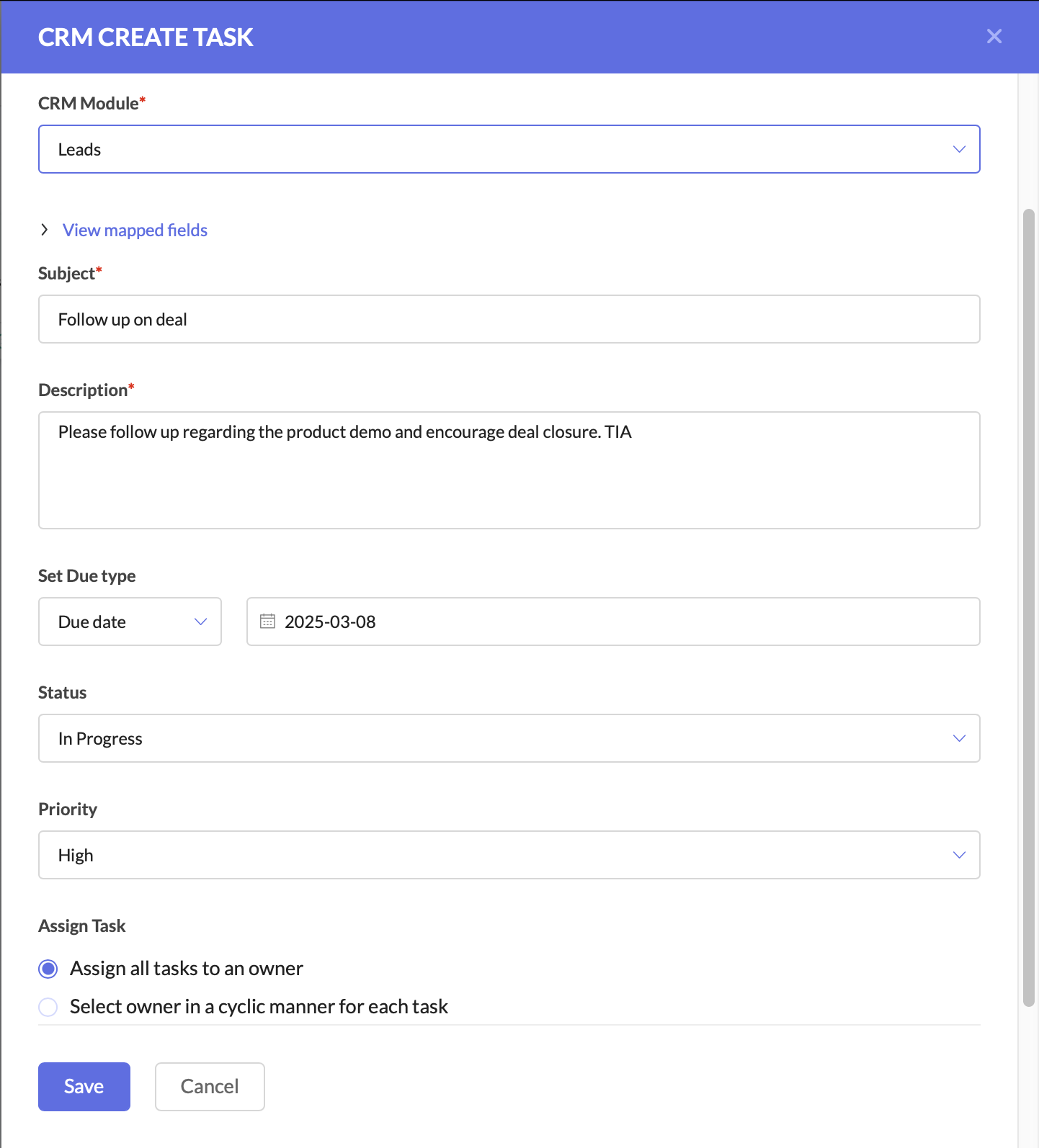
Create a task for follow-up
After this, you can connect the components to ensure a seamless flow.
This setup ensures that leads are not just nurtured, but also seamlessly handed off to sales when they show interest. The sales team receives up-to-date CRM records, active deals, and clear follow-up tasks, increasing their chances of closing the deal faster.
Why This Matters for Businesses
By using Zoho CRM and ZMA together, marketing and sales teams need not waste time on cold outreach, and can focus on high-intent leads.
For businesses, this means:
- Higher revenue by focusing only on engaged leads.
- Stronger collaboration between marketing and sales.
- Better customer experience with timely follow-ups.
This is just one of the many ways you can use Zoho CRM actions in ZMA Journeys to refine your lead management process and ensure that only high-intent prospects reach your sales team. In the next post, we’ll explore another powerful use case—how to handle leads that originate in ZMA and transition them seamlessly into Zoho CRM for sales follow-up. Stay tuned for part two, and until then, happy marketing!
Regards,
Pearlin Nitika
User education | Zoho Marketing Automation
Recent Topics
How to add interviews through API
I'm trying to add an interview without much luck. The documentation gives examples of adding just about everything except an interview. However, the issue might be the way I'm formatting it, because the documentation is unclear to me. It seems as if the xml should be passed in the url, which seems unusual. I've tried the data as both plain and character escaped, but nothing seems to work, nor do I even get an error response. https://recruit.zoho.com/recruit/private/xml/Interviews/addRecords?authtoken=***&scope=recruitapi&version=2&xmlData=<Interviews>
<row
Deprecation of the Zoho OAuth connector
Hello everyone, At Zoho, we continuously evaluate our integrations to ensure they meet the highest standards of security, reliability, and compliance. As part of these ongoing efforts, we've made the decision to deprecate the Zoho OAuth default connector
Auto tagging
Some of the articles I enter into Notebook get there when I enter them in Raindrop.io and IFTTT copies the articles in Notebook. When this happens the notes are tagged but instead of useful one word tags with topic the tag pertains to the specific article
Work Order wont mark as Completed
I have a couple of work orders that won't mark as completed even when I've marked the Service Appointments as completed fully.
Kaizen #210 - Answering your Questions | Event Management System using ZDK CLI
Hello Everyone, Welcome back to yet another post in the Kaizen Series! As you already may know, for the Kaizen #200 milestone, we asked for your feedback and many of you suggested topics for us to discuss. We have been writing on these topics over the
How do I save audio files to my PC that I record into Zoho Notebook from my phone?
I was thinking of using Zoho Notebook as a way to store composition ideas, as well as for other things if it can handle this. For this to be useful for me though, I need to be able to have an easy way to download those audio files to my PC, either individually
Introducing Radio Buttons and Numeric Range Sliders in Zoho CRM
Release update: Currently out for CN, JP, AU and CA DCs (Free and standard editions). For other DCs, this will be released by mid-March. Hello everyone, We are pleased to share with you that Zoho CRM's Layout Editor now includes two new field formats—
How to filter subform report based upon main form report in dashboard
Hi Team, I am creating a dashboard in Zoho Analytics. I want to have a main form report and below I want to show subform report of main form. If I filter the main form with date then I want to show subform records based upon main form. how can I achieve
Search mails in shared mailbox
Hi everyone, is there a way to search mails in shared mailbox's? Search in streams or mail doesn't return anything from mails in shared mailboxes. Thanks! Rafal
Zoho CRM for Everyone's NextGen UI Gets an Upgrade
Hello Everyone We've made improvements to Zoho CRM for Everyone's Nextgen UI. These changes are the result of valuable feedback from you where we’ve focused on improving usability, providing wider screen space, and making navigation smoother so everything
Kaizen #186 : Client Script Support for Subforms
Hello everyone! Welcome back to another exciting Kaizen post on Client Script! In this edition, we’re taking a closer look at Client Script Support for Subforms with the help of the following scenario. " Zylker, a manufacturing company, uses the "Orders"
Change eMail Template for Event-Invitations
Hello ZOHO-CRM Team How I can change the eMail Template for Event-Invitations? I work with the German Version of the Free Version. I know how I can modify eMail alerts or Signature Templates, but where I can other eMails modify you send out? Thank you for your answer. Regards, Juerg
Changes to the send mail Deluge task in Zoho CRM
Hello everyone, At Zoho, we continuously enhance our security measures to ensure a safer experience for all users. As part of our ongoing security enhancements, we're making an important update on using the send mail Deluge task in Zoho CRM. What's changing?
Fail to send Email by deluge
Hi, today I gonna update some email include details in deluge, while this msg pops up and restrict me to save but my rules has run for one year. can you tell me how to use one of our admin account or super admin account to send the email? I tried to update
Writing SQL Queries - After Comma Auto Suggesting Column
When writing SQL Queries, does anyone else get super annoyed that after you type a comma and try to return to a new line it is automatically suggest a new column, so hitting return just inputs this suggested column instead of going to a new line? Anyone
Introducing Multiple Sandbox Types and Support for Module's Data Population
Register here for the upcoming Focus Group webinar on Multiple Sandbox | Help documentation to learn more about the new enhancements Hello everyone, Sandbox in CRM is a testing environment for users to create and test new configurations like workflow
Is It Possible to Convert a Custom Module to a Quote?
I recently created a custom module in our CRM environment for RFQs so that our sales team can submit quote requests directly in Zoho rather than by email/phone. This allows for a cleaner overall process, minimizing potential errors and potentially encouraging
Convert invoice from zoho to xml with all details
How to convert an Invoice to XML format with all details
Importing into the 'file upload' field
Can you import attachments into the file upload field. I would expect it to work the same way as attachments do, But can't seem to get it to work.
Sync your Products Module for better context.
In customer support, context is everything. The integration between Zoho Desk and Zoho CRM helps your sales and support teams function as one, delivering better customer experiences. With the latest update to this integration, you can now sync the Product module in your Zoho CRM with your Zoho Desk portal. This feature enables products from Zoho CRM to reflect in the "product" field in Zoho Desk. This can save your support team valuable time and effort. Some things to note when syncing the two:
Automating CRM backup storage?
Hi there, We've recently set up automatic backups for our Zoho CRM account. We were hoping that the backup functionality would not require any manual work on our end, but it seems that we are always required to download the backups ourselves, store them,
CRM verify details pop-up
Was there a UI change recently that involves the Verify Details pop-up when changing the Stage of a Deal to certain things? I can't for the life of me find a workflow or function, blueprint, validation rule, layout rule ect that would randomly make it
Does Zoho Writer have Dropdowns
I want to add a drop down field in Zoho writer. Is this possible?
Custom Button to convert a Deal to a Custom Module?
Hello Community I am in process of building out a custom CRM for my team and part of this is looking at building out a Custom Button or function of some sort where when a Deal is marked Closed Won the system will allow for a "Convert to Job" option to
How can Data Enrichment be automatically triggered when a new Lead is created in Zoho CRM?
Hi, I have a pipeline where a Lead is created automatically through the Zoho API and I've been trying to look for a way to automatically apply Data Enrichment on this created lead. 1) I did not find any way to do this through the Zoho API; it seems like
Transitions do not update fields until the record moves to next stage
We have a blueprint where a couple of stages have multiple transitions. If only some of the transitions are completed, but not all, Zoho does not update any of the fields impacted by the completed transitions. Is there any way Zoho can udate the fields
Blueprint enhancements - Parallel and multiple transitions, and more
Last modified on Sep 4, 2023: All Zoho CRM users can now access these enhancements. Initially, these features were available only on an early access basis and by request. However, as of August 2, 2023, they have been made available to all users in all
Optimum CRM setup for new B2B business
Can some advise the most common way to setup Zoho CRM to handle sales for a B2B company? Specifically in how to handle inbound/outbound emails. I have spent hours researching online and can't seem to find an accepted approach, or even a tutorial. I have
using the Client script on the load of the form if service no is empty means then i want to make issue relate to is Service
using the Client script on the load of the form if service no is empty means then i want to make issue relate to field is Service if Purchae no is empty means then i want to make issue relate to is Purchase
Multiple header in the quote table???
Hello, Is it possible in Zoho CRM to add multiple headers or sections within the Quote product table, so that when the quote is printed it shows separate sections (for example “Products” and “Services”)? To clarify, I’m asking because: This does not appear
using the Client script I want to Hide Show the Fields
if Related to service means some of the field like service no want to shoe and hide Amc no , purchase no how i achive this let issu = ZDK.Page.getField('Issue_Related_To').getValue(); if (issu == 'Service') { var field_obj = ZDK.Page.getField('Warranty_Cases');
openUrl in blueprints
My customer wants to open a URL at the end of a blueprint transition. Seems this isn't possible right now but it would be very useful. In this thread, https://help.zoho.com/portal/en/community/topic/openurl-not-working the Zoho agent said that it's logically
Dropshipping Address - Does Not Show on Invoice Correctly
When a dropshipping address is used for a customer, the correct ship-to address does not seem to show on the Invoice. It shows correctly on the Sales Order, Shipment Order, and Package, just not the Invoice. This is a problem, because the company being
Prepayment of a sales order
How does everyone handle this common (at least it is common for us!) situation? We require all our orders to be fully prepaid before shipment since we manufacture made to order, custom products. Since ZOHO does not allow a sales order to be prepaid, we are forced to create an invoice at the time an order is placed to allow the customer to pay it. Our sales category is therefore skewed, since the sale was actually booked at the time an order was placed, rather then at the time it is shipped, which
Access to Specific Zoho Desk layout for external parties
Hi, We have a partner who handles for us sales requests from specific markets. He is not a Zoho Desk user. But we want him to b part of a specific Zoho Desk layout to handle inquiries. How to achieve it in the easiest way possible?
Deposit on a Sales Order
Good day, 100% of my business is preorders, no inventory. I am trying to run away from QB for one of my businesses, but I require two options that I don't seem to find with Zoho Books. 1 - If there is a way to apply a deposit on a sales order, as with
How Does Knowledge Base Search and Article Recommendation Work?
Hello, I would like to understand how the Knowledge Base search engine works. Specifically, does it search based on: The article title only? The full article content? Both, the article and the content? Keywords? Tags? Also, how does the system determine
validation rules doesn't work in Blueprint when it is validated using function?
I have tried to create a validation rule in the deal module. it works if I try to create a deal manually or if I try to update the empty field inside a deal. but when I try to update the field via the blueprint mandatory field, it seems the validation
Bulk Delete Attachments
Is there a way to bulk delete attachments on the form entries? our storage is full and deleting files one by one is pain taking process.
How do I sync multiple Google calendars?
I'm brand new to Zoho and I figured out how to sync my business Google calendar but I would also like to sync my personal Google calendar. How can I do this so that, at the very least, when I have personal engagements like doctor's appointments, I can
Next Page