Marketer's Space: Proven tips to improve open rates – Part II - Online Help | Zoho Campaigns

Marketer's Space: Proven tips to improve open rates – Part II - Online Help | Zoho Campaigns

Hello Marketers!

Welcome back to another post in Marketer's Space!

We're continuing from where we left off a fortnight ago. We ended the previous post discussing the subject line, and we'll continue from there. Let's dive right in.

Pre-header

Pre-header text accompanies the subject line. While the subject line tells your contacts what your campaigns are about, the pre-header text adds detail to it. We strongly recommend having it when you're creating campaigns.

The image below shows an email from Perplexity, wherein both the subject line and pre-header are present.



Here, the pre-header text drives home the point of why you need to use it. If you don't include it, you're missing out on important information you can display to your contacts even before they open your campaigns.

Here are some tips for crafting pre-header text:
  • Keep the length between five and 12 words, and 30 to 60 characters. Any longer than that, and the text tends to get truncated and your contacts can't read it fully. Adhering to this length is also essential for making your campaigns mobile-friendly and mobile-responsive.
  • Don't repeat what you've already mentioned in the subject line. You're wasting precious space by doing that.
  • Place the most important hook in the first few words of your pre-header to grab your contacts' attention.

 
Sender name, from address, and reply-to address 

Let's say Patricia is the owner of Zylker Labs, an AI-centric marketing agency. She's new to this business, so she isn't fully aware of the dos and don'ts in email marketing. Though she sent well-crafted email campaigns to her contacts, she was dismayed to find that even after waiting for a couple of months, she didn't receive a single reply from them.

Upon closer inspection, she discovered that the fault lied with the sender name, sender address, and the reply-to address she had used. She didn't provide a sender name, and her sender and reply-to address was no-reply@zylkerlabs.com.

Zoho Campaigns provides granular control over sender details like these to help you avoid such mishaps. When you're creating an email campaign, you can add sender details such as your Sender Name, Sender email address, and Reply-to Address.
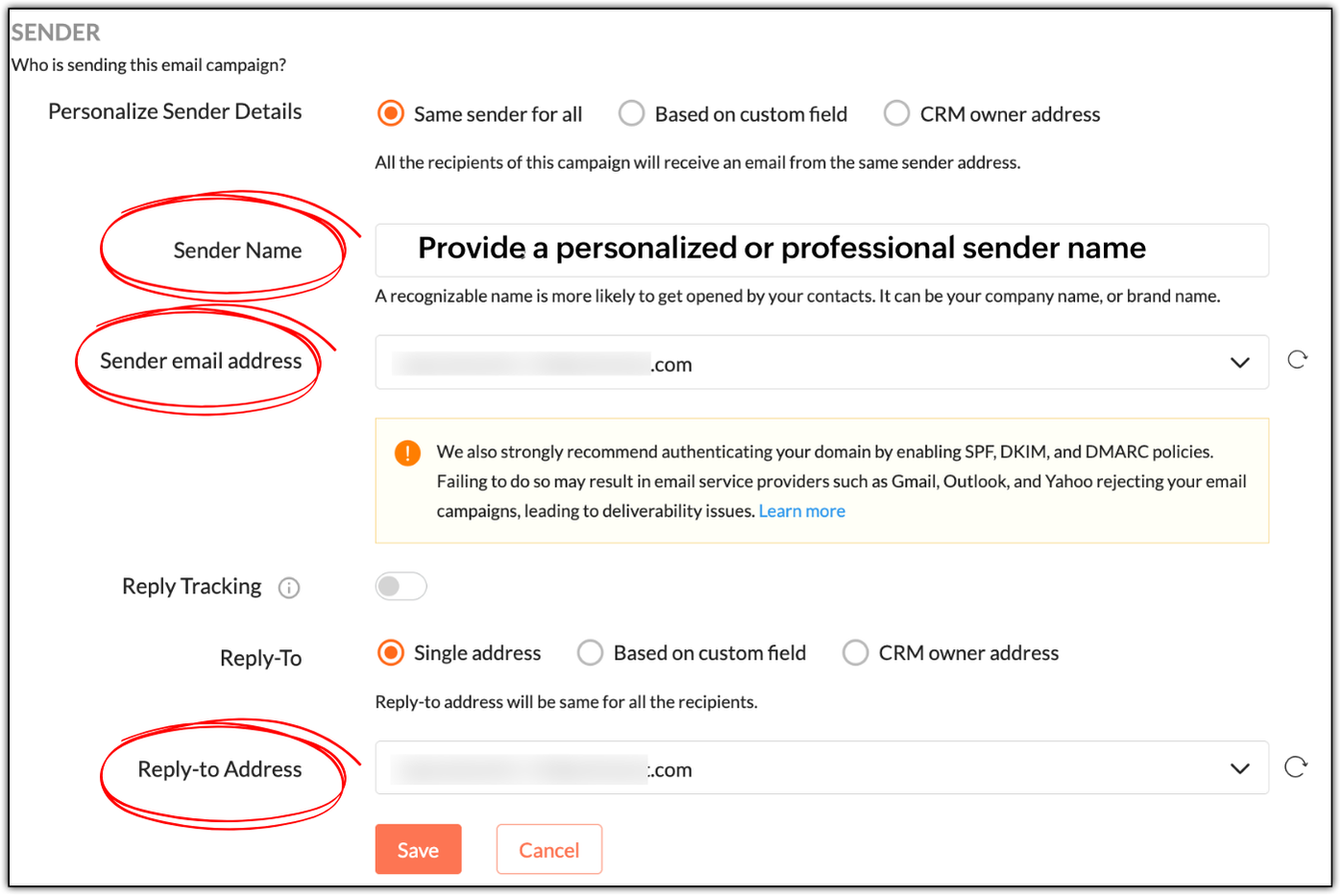


While "Sender Name" is not a mandatory field, it's best to specify a personalized or professional sender name, as it helps build trust. In Patricia's example, she can use:
  • Patricia as a personable variant
  • Patricia | Zylker Labs for a mixture of personableness and professionalism
  • Zylker Labs for a simple, professional sender name

Not having a sender name will put off your contacts; they won't be tempted to open your emails.

NotesNote: Zoho Campaigns automatically displays your sender address as the sender name if its left empty. 

If you use no-reply email addresses as your sender and reply-to addresses, you're telling your contacts not to communicate with you, which is a red flag. Instead use something like patricia@zylkerlabs.com, support@zylkerlabs.com, or help@zylkerlabs.com as your sender address. The same applies to your reply-to address, but if you wish to track the replies in a separate inbox, you can use a different address like mail-to@zylkerlabs.com or team@zylkerlabs.com.

Get consent

Let's say Julie has built a signup form using Zoho Campaigns and embedded it in her website (https://zylkerfashions.com) to attract customers. Many customers have signed up via the form to receive communications from her. Julie is excited and starts sending them campaigns. Soon, she realizes that half of these customers either marked her campaigns as spam, didn't reply, or unsubscribed—and that some campaigns didn't get delivered at all. Naturally, Julie is disappointed and frustrated, as she doesn't understand what went wrong.

Upon checking, Julie realizes that she didn't follow double opt-in to get consent from her customers. While you may assume that because people have signed up via your website, that means they're ready to receive campaigns—we strongly advise that you always confirm with them once.

Go to Settings > Manage Opt-in to enable double opt-in in Zoho Campaigns.


As soon as your contacts sign up via a signup form, Zoho Campaigns will automatically send a confirmation email that asks them to confirm their email address. Once they've confirmed, they'll be added as contacts in Zoho Campaigns. This is done to ensure that:
  • Your contacts are genuinely interested in receiving communications.
  • If they've specified an incorrect email during sign-up, the double opt-in email won't reach them, so they won't get added to Zoho Campaigns.
  • You can avoid unnecessary unsubscribes, spam, and abuse complaints.
  • Your mailing list remains clean, so you don't send campaigns to invalid email addresses, which can negatively affect your email deliverability.
 

Warm up your sender domain 

If you're starting out or haven't sent emails for quite some time, your sender domain is new or dormant—which means you have a cold domain.

Let's say you've imported 10,000 new contacts, and in your eagerness to start your marketing journey, you've sent campaigns to all of them at once—something called as an email blast. You should avoid this, because you can trigger the spam filters of email clients like Gmail, Yahoo, and Outlook, which not only leads to your campaigns being marked as spam, but also to rejection.

Sending from a cold domain affects your email deliverability negatively. Your domain can ultimately get blacklisted due to poor reputation, as well, which means you'll lose out on the opportunity to do business.

Hence, it's vital to warm up your domain by sending your campaigns in equal or incremental batches. For example, you can send 1,000 campaigns per day for 10 days or increase the number each day number from 1,000 to 1,250 to 1,500, and so on.

We've explored essential techniques to boost your email open rates, from crafting smarter pre-headers to warming up your sender domain for better deliverability. Apply these practices consistently to build trust and achieve long-term campaign success.

In two weeks' time, you'll be reading the final part of this series.

Happy marketing!

Kind regards,
Sai Prashanth
User Education
Zoho Campaigns

    • Sticky Posts

    • Marketer's Space: Proven tips to improve open rates – Part II

      Hello Marketers! Welcome back to another post in Marketer's Space! We're continuing from where we left off a fortnight ago. We ended the previous post discussing the subject line, and we'll continue from there. Let's dive right in. Pre-header Pre-header
    • Tip of the week 03 - Sending emails in batches

      Today's marketers not only want their email marketing to be efficient, but also smart. For an email campaign, you may think you have all the essential elements for lead conversion—a big mailing list, an attractive template design, and the most-engaging message content, but after hitting the ‘send’ button, you may not get the expected conversions. Wondering why? Here’s one of the major reasons. Many marketers miss out on sending the email campaign the right way. Did you know that you should not be
    • Tip of the week 04 - Know about your recipients' 'prime open time.'

      In today's market, the importance of customer behavior is astounding, with a vast amount of research and resources going into finding how customers make decisions. The process of persuading your customers to open your email and click on your call-to-action becomes easy when you understand the psychology behind their behavioral traits. Time to turn into a psychologist! Let's get to the basics—you want your emails to resonate well with your recipients. So, what's the primary thing involved here? It's
    • Zoho Campaigns Expert Diaries on SoundCloud, Spotify, Apple Podcasts, and YouTube

      Hi email champs,  As email marketers, we find great lessons in each other's works—be it the subject lines that worked good, the design that was received well, or the CTA that had the maximum clicks. Email marketing encompasses a wide variety of topics spanning everything from creation and design to development and deliverability.  Here's when we from the Zoho Campaigns team found the need to build an email marketing community comprising of seasoned marketers and email geeks who can help each other
    • Email Deliverability Tip #3: Seal the deal with the preheader

      In the last post, we learned about the subject line. Today we'll be learning about the preheader. A preheader is the short text that follows the subject line in an email. The preheader is designed to hint at what your email message is all about. A good preheader should act as a second subject line and convince your contacts to open the email. Now, let's learn the best way to craft a preheader. Your subject line and preheader should work together and accurately convey the gist of your email. Keep
    • Recent Topics

    • Zoho Creator In-App Notification

      Hi Team, I have implemented an in-app notification using code, as it required some customization. I followed the example in the link below: https://www.zoho.com/deluge/help/pushnotify-using-deluge.html#Example I have a couple of questions regarding this
    • Deluge Error: "Data type of argument of function 'get' did not match required type [BIGINT]" when working with Lookup fields

      Hi everyone, I’m facing an issue in Zoho CRM Deluge while working with lookup fields. Setup: Module: Monthly Bills Field: Customer (Lookup → Accounts) Module: Laundry Orders Field: Laundry_Account_Name (Lookup → Accounts) Field: Expected_Revenue (Currency)
    • Add Flexible Recurrence Options for Meeting Scheduling in Zoho Cliq (e.g., Every 2 Weeks)

      Hello Zoho Cliq Team, We hope you are doing well. Currently, when scheduling a meeting inside Zoho Cliq, the recurrence options are limited to Daily, Weekly, Monthly, and Yearly. There is no ability to set a meeting to occur every X weeks — for example,
    • Announcing Zoho Sheet desktop app for macOS and Windows (Beta)

      Hello Sheet users, We know you’ve been waiting for this one. It has always been the top priority on our roadmap to provide a single native desktop app for macOS and Windows that works both online and offline. Today, we are excited to announce that the
    • In App Auto Refresh/Update Features

      Hi,    I am trying to use Zoho Creator for Restaurant management. While using the android apps, I reliased the apps would not auto refresh if there is new entries i.e new kitchen order ticket (KOT) from other users.   The apps does received notification but would not auto refresh, users required to refresh the apps manually in order to see the new KOT in the apps.    I am wondering why this features is not implemented? Or is this feature being considered to be implemented in the future? With the
    • Unable to Log In to FSM Mobile App

      Hello FSM Team, We are encountering an issue when logging in to the FSM mobile app. When entering the user email, the system shows the error: “This account does not exist.” However, the same user is able to log in successfully via web (fsm.zoho.com).
    • Clarification on “Change Owner” vs Dispatcher Role in Work Orders

      Hi Mr. Abid, Good day! We would like to understand the purpose and correct usage of the “Change Owner” option in the Work Order module. As we noticed, there is an option to Change Owner in the Work Order. At the same time, there is also a separate field/role
    • New Income Tax Act 2025 and Rules 2026 for India (Effective 1 April 2026)

      Hello everyone, The Income Tax Act 2025 came into effect from 1 April 2026. This new law replaces the old Income Tax Act of 1961. Along with the new Act, the Income Tax Rules 2026 have also been released by the government. These updates bring practical
    • Facturation électronique 2026 - obligation dès le 1er septembre 2026

      Bonjour, Je me permets de réagir à divers posts publiés ici et là concernant le projet de E-Invoicing, dans le cadre de la facturation électronique prévue très prochainement. Dans le cadre du passage à la facturation électronique pour les entreprises,
    • How can I delete a user profile created ?

      I can't delete custom profiles created. Why ?
    • Search API filter/sort ignores comment-triggered modifiedTime updates

      Summary When a comment is added to a Call or Account, the parent record's modifiedTime is correctly bumped. This bumped value is visible in: GET /api/v1/calls/{id} ✅ GET /api/v1/calls/search without a filter ✅ — the record's response body shows the new
    • Dynamic Multi-Staff Selection for Ad-Hoc Bookings

      Summary Allow customers or internal schedulers to select specific staff members at the time of booking, with Zoho Bookings automatically surfacing only the time slots where all selected members are simultaneously available. Current Behaviour Zoho Bookings
    • How Can I Clear Deleted Members and Free Up Their Storage?

      Can we remove these deleted members and free up their storage?
    • Zoho Books Create Invoice API

      I am creating zoho invoices via the API.  Now that zoho has released sub-accounts, i'd like to create invoices and link them to sub-accounts within "sales" account.   For example; my chart of accounts looks like this; Sales ->Website Sales    ->Campaign Sales ->Offline Sales However, when I try to pass these accounts to the API, I receive an error that only Bank accounts can be passed with the create invoice.  
    • Ability to Set Text Direction for Individual Cells in Zoho Sheet

      Dear Zoho Sheet Team, We hope you are doing well. We would like to request an enhancement in Zoho Sheet that allows users to set the text direction (right-to-left or left-to-right) for individual cells, similar to what is available in Google Sheets. Use
    • Contact not saved after editing

      Hi. I discovered a couple of problems with Zoho contact. (1) BUG. Contact is not saved after editing. If you edit an existing contact by putting a bracket in one of the fields you get the message "Contact updated successfully" but nothing is saved. All updates (including the other fields) are lost. Steps to reproduce. Go to an existing contact and change the first name to "Robert (Bob)". (2) In the phone number fields you can only save numeric data (0 to 9). This seems an unneccessary restriction.
    • Zoho Mail Android app update: UI revamp

      Hello everyone! We are excited to share that the first phase of the Zoho Mail Android UI revamp is now live. In this update, we have redesigned navigation bar at the bottom to quickly access the Email, Calendar, Contacts, and Settings modules. Also, the
    • Opt-out from mailing list means can't email at all??

      It seems that if a contact unsubscribes from a mailing list the only way to email them is to uncheck the email opt-out box first, then re-check after the email has been sent. I've been through a chat with support and they confirmed this. This seems bizarre.
    • Items Landed Cost and Profit?

      Hello, we recently went live with Zoho Inventory, and I have a question about the Landed Cost feature. The FAQ reads: "Tracking the landed cost helps determine the overall cost incurred in procuring the product. This, in turn, helps you to decide the
    • Bank Feeds

      Since Friday my bank feeds wont work. I have refreshed feeds, deactivate and reactivate and nothing is working
    • Show backordered items on packing slip

      Is it possible to show a column on the Packing Slip that shows number of backordered items when a PO is only partially filled? I would also like to see the Backordered column appear on POs after you receive items if you didn't get ALL of the items or partial amounts of items. And lastly, it would be nice to have the option of turning on the Backordered column for invoices if you only invoice for a partial order. -Tom
    • Newby Questions

      Q1. The top bar of Zoho Books has a "Search in Banking (/) " field. What is the proper use of this text box? - Searching for Amazon for example has no results but there are transactions. - Is the search case sensitive? - Are regular expressions allowed?
    • Add Custom Fields only in Customer module and not on supplier module!? Is not there a way to do that!?

      I am trying to create custom fields on clients module but it also gets created on suppliers module; which of course does not make sense at all as a lot of custom fields are client or supplier specific but never both. I am missing something? This seems
    • Inventory "Bulk Actions" button - add more fields to "Bulk Update > Select a field"

      Can we not get a lot more actions that are commonly used by customers into the "More Actions" button on the Inventory list? More fields listed in the Bulk Update > Select A Field? Possible Bulk update Fields Preferred Supplier ( to quickly move items
    • Using Email Triggers on Zoho Flow

      Hello, I'm sending the email to create the variables as this article says: https://help.zoho.com/portal/en/kb/flow/user-guide/create-a-flow/articles/email-trigger#How_email_trigger_works But the collection of the variables only seems to work when the
    • Zoho Bookings - Provide Appointment System ID in Zoho Flow Variable

      Hi Bookings Team, It would be great if you could provide the system record ID for appointments as a variable in Zoho Flow trigger outputs and Fetch Appointments action. This would allow us to create a dymanic URL which can be clicked by a staff user to
    • Tip #7: Customize the appointment confirmation page

      A confirmation page plays a crucial role in creating the first impression, as that's where customers land when booking with you. It shows your brand identity, engages your audience, and drives more conversions. Yet, this section is often overlooked when
    • WhatsApp Calling Integration via Zoho Desk

      Dear Zoho Desk Team, I would like to request a feature that allows users to call WhatsApp numbers directly via Zoho Desk. This integration would enable sending and receiving calls to and from WhatsApp numbers over the internet, without the need for traditional
    • Show backordered items on packing slip

      We send out a lot of large orders, and often there are one or two things backordered. How can I fix the packing slips to show quantity ordered  & quantity packed There should also be the ability to "ship" 0 of an item so the receiver knows that things
    • How do you create an event/meeting in a different time zone?

      Does anyone know how do you create an event/meeting in a different time zone? 
    • Deluge Learning Series – Mastering file handling in Deluge | April 2026

      The Deluge Learning Series is conducted on the fourth thursday of every month. In each session, we discuss built-in functions and statements in Deluge and demonstrate how they are used across different Zoho products. With practical examples and real-world
    • Multi-currency and Products

      One of the main reasons I have gone down the Zoho route is because I need multi-currency support. However, I find that products can only be priced in the home currency, We sell to the US and UK. However, we maintain different price lists for each. There
    • Editing recurring tasks

      Hi there, I use recurring annual tasks quite often but sometimes I have a contact leave an organization so I want to re-assign that annual task to a new contact. When I go into the task to change the contact it only does so for the current year. Future
    • On Duty Requests - Zoho People Data

      Hello Team, We are currently using the On Duty Form to record Work From Home (WFH) requests in our organization. However, we are facing an issue where pending On Duty requests are not appearing in the Attendance Module. For example, if I submit On Duty
    • Styling for Subform Fields using client script

      Currently we can add styles to list and detail page for fields using .addstyle in the Client Script But that is missing for fields of Subform We would really like the feature to addstyle for subforms in the detail page Can you please consider adding it,
    • Add a way to connect Log360 Cloud logs with Zoho analytics

      Hi, Several month ago Log360 Cloud was added to zoho one - and this is great. But as far as I see there is no prebuilt way to connect Zoho analytics to the logs we have in Log360 Cloud. Please add a prebuilt connection like we have for so many other zoho
    • IP flagged as abusive

      I'm getting the error that 136.143.188.15 is listed as abusive. I've checked with mxtoolbox.com and it is indeed in the list
    • date & datetime client script getInput types

      Please add date & datetime as available types for the getInput client script function. https://www.zohocrm.dev/explore/client-script/clientapi/Client#getInput
    • Approval Workflow Not Triggering When Status Updated via Custom Button

      Hi Team, I’m facing an issue with an approval workflow in my application. I have a workflow that updates a record’s Status field from “Pending” to “Waiting for Approval.” I have configured an Approval Workflow with the condition: Status = "Waiting for
    • Data Import

      Hello Latha, Is there any option to enable data import option in Equipment module? Best regards, Chethiya.
    • Next Page