The all new Marketing Automation 2.0 is now part of Marketing Plus
Hey everyone,
We're excited to introduce the latest version of Marketing Automation to Zoho Marketing Plus for all users. The new version comes with a lot of features to help simplify and streamline your marketing activities
Revamped user interface
The Marketing Automation module has a whole new user interface that's carefully designed to make it easy to navigate and manage your marketing activities, including creating campaigns, personalizing journeys, generating leads via signup forms, building landing pages, and much more. 
Simplified contact management
Managing your contact list in Marketing Automation is a lot easier with the all-new Contacts module, which was previously known as the Leads module. Firstly, a new dashboard offers a holistic picture of your contacts by offering insightful metrics such as your total number of contacts, contacts that are ready for marketing or sales, contacts by stage, source, and location, and much more.
The detailed contacts view has a new look as well. You can view important details like stages, associated lists, segments, journeys, subscription details, engagements, and a timeline of all activities in chronological order.

You can also view a complete list of contacts filtered by stage with the help of a Kanban view, and you can easily drag and drop contacts across various stages.
Lists have also been simplified. Each list has a detailed dashboard related to contacts, such as contact growth, associated entities, status, and so on. You can also view associated journeys and campaigns for a particular contact list, segment your contacts based on various criteria, and manage them from Marketing Automation.
More ways to generate leads
Websites are one of the best and most effective marketing channels, as they help visitors understand more about your brand and what you offer. Hence, it's essential for businesses to optimize their websites in order to capture and convert these visitors as leads.

Keep tabs on your website
Once your website is live, it's important to measure the performance to increase conversions. Marketing Automation module comes with a detailed dashboard and in-depth analytics on the behavior and acquisition of your website visitors. The behavior report gives you the complete picture of how visitors are interacting with your website, the top performing page, time spent on pages, the page through which visitors first land on your website, and the last page visited before they exit, and lot more.
Marketing campaigns simplified
Marketing Automation now offers a whole new streamlined experience in creating and managing your campaigns across channels. You can create your email campaigns and promote your surveys, webinars, SMS campaigns, and promotions via WhatsApp.
Personalize touchpoints with Journeys
The journey builder comes with a lot of updates. With Journey X-Ray, you can dissect and understand the path your contacts take, the most- and least-engaged actions, the number of entrances and exits, and a lot more. This is designed to give you a better understanding of your customer journey across various touchpoints to help optimize them further.
Triggers | Actions |
Missed goal Date field trigger (revised) Email action trigger (revised) Video click Attachment download | Send survey mail Reminder loop A/B test Three-way condition Update deal Mile stone End of process components |
If you've created journeys with these deprecated components, you'll need to replace them manually before migrating them to the new version.
Revamped roles and permissions
Roles and privileges in Marketing Plus enable you to define and control access to data and various features in Marketing Plus. There are four different roles available by default: Brand Admin, Brand Marketer, Brand Member, and Event Member.

Now, we've introduced more control over how users can access data and features. You can define appropriate permissions for contacts and lists, lead generation functions, marketing channels, websites, and assets.

Accessing the new version
The all-new Marketing Automation will be available for all Marketing Plus users starting on June 4, 2024. All topics, integrations, SMS gateways, and smart URLs will have to be migrated to start accessing the new version.
Migrating topics
Previously, topics in Marketing Automation were usually associated with lists. Now, you can associate them with contacts directly, as well as associate multiple topics to a contact. They can unsubscribe from these topics per their preferences.
Migrating integrations
Previously, Marketing Automation users could integrate and create syncs with Zoho or other third-party services, which was sometimes hard to track and led to data duplication.
To streamline integrations between solutions, now only the administrator of both applications can integrate and create syncs in Marketing Automation—and only one integration and sync.
For example, if you want to integrate Marketing Automation in Marketing Plus and Zoho CRM, you need to be the Brand Admin in Marketing Plus and an Administrator in Zoho CRM. Once an account is integrated, other users in your organization can't configure another integration.
If multiple integrations are configured in Marketing Automation, you can see the complete list of all the accounts while migrating to the new version. Make sure to select the account you want to retain in the new version.
Migrating SMS providers
To increase accuracy, SMS campaigns will only be sent to the mobile numbers specified in each contact's Mobile field. If you've used any other field to store the contact information in the older version, the data will need to be moved to the Mobile field to start sending SMS campaigns in this new version.
Migrating Smart URLs
Previously, Smart URLs in Marketing Automation can be created for two custom domains. Now, in the new version, you can create smart URLs using the default or your custom domain. Only one custom domain can be connected. So, while migrating to the new version, you can choose the domain that you want to migrate to the new version.
To access the new version
- Go to the Marketing Automation module in Marketing Plus and click Switch to new version.

- Click Proceed in the pop-up.
- In the Topic Management tab, click Migrate now.
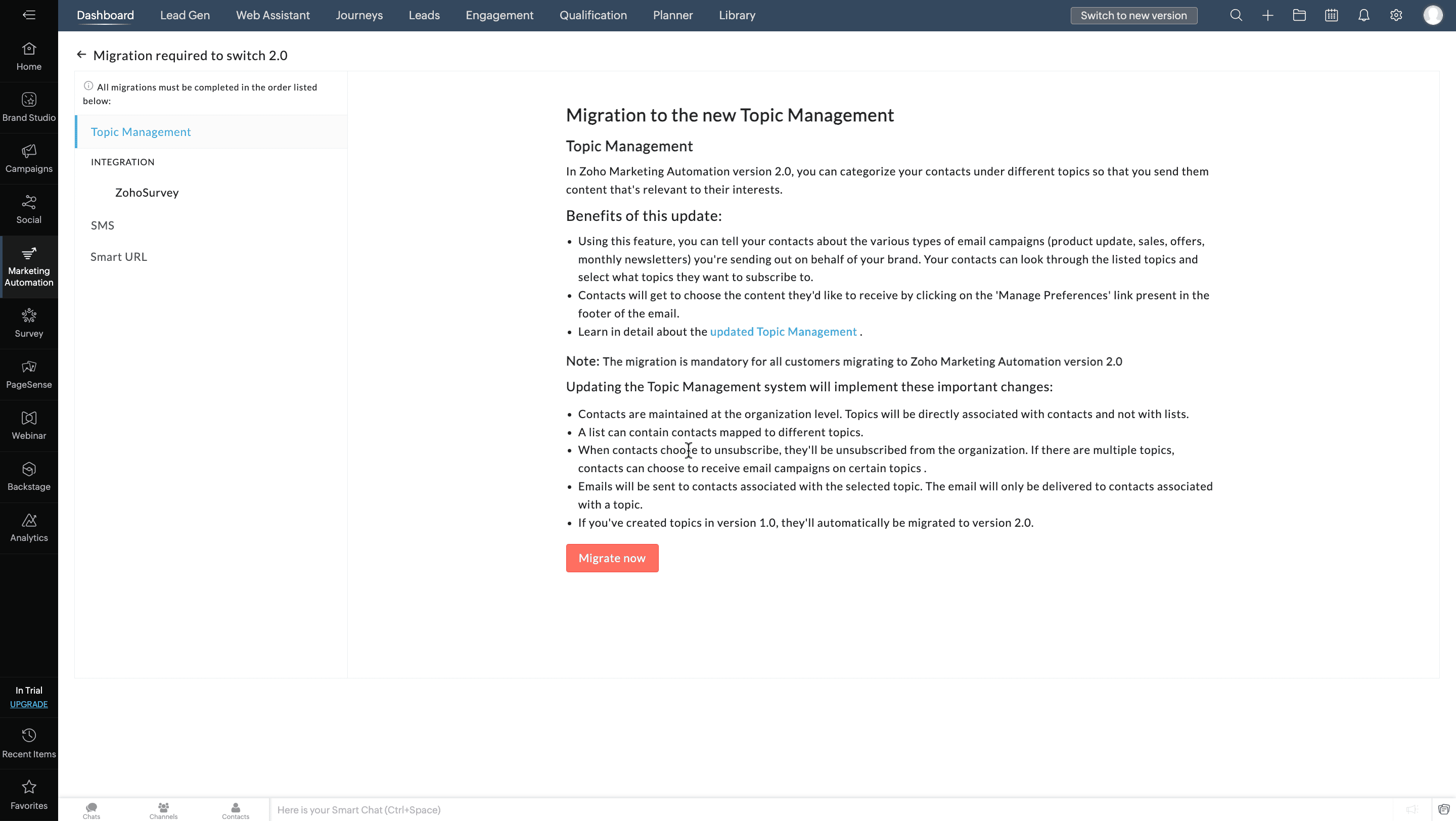
- Select an integration from the Integration tab and click Migrate and Proceed.
Do the same if more integrations are listed in the Integration tab. - In the SMS tab, select your preference.
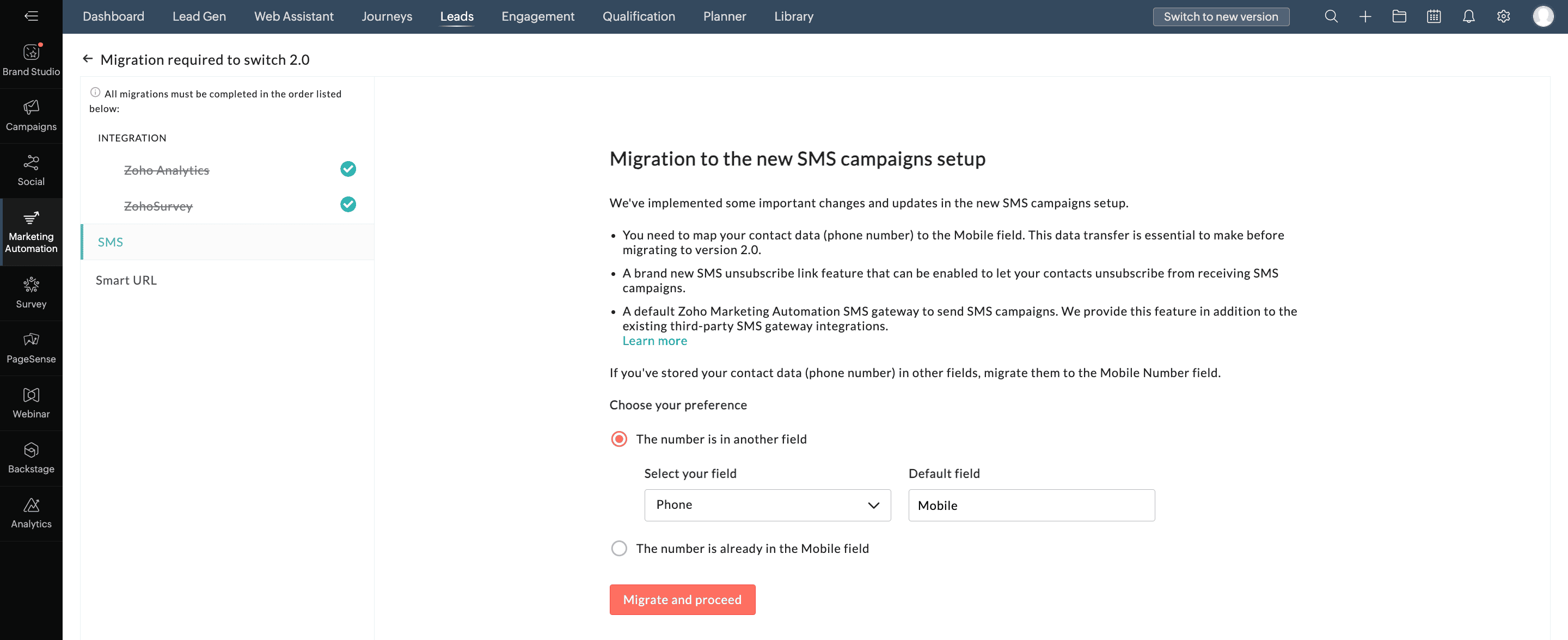
- Click Migrate and Proceed.
- In the Smart URL tab, select the appropriate domain from the drop down list.
- Click Migrate and Proceed.
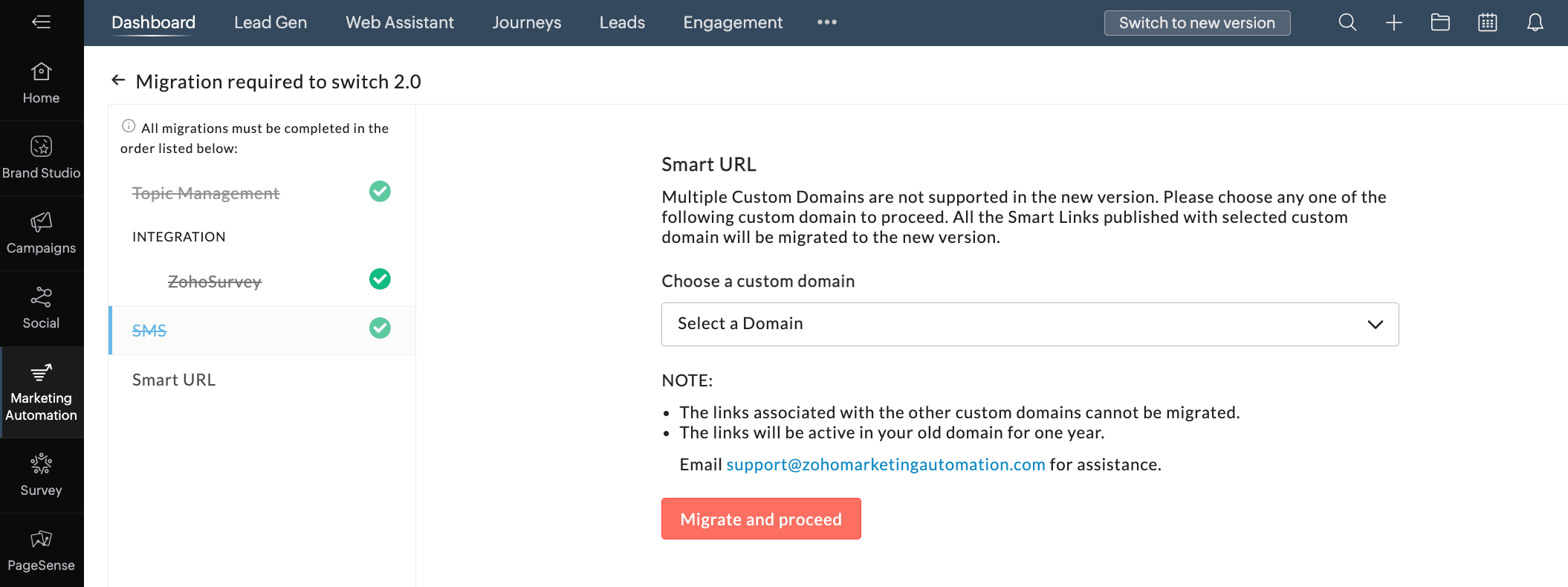
- Click Switch Now in the pop-up.
We hope you find this information useful. Please give it a try and feel free to share your valuable feedback with us.
Regards,
The Marketing Plus TeamTopic Participants
Arun Kumar V
John Legg
Abishek Mazumdar
Sticky Posts
Introducing Budget Board in Zoho Marketing Plus
Hey everyone, Marketing Plus enables marketers to collaborate more effectively and manage their marketing efforts, from campaign planning to execution to performance measurement—all on one platform. One of the most challenging yet critical tasks for marketingPlan, visualize, and execute your marketing projects with a unified marketing calendar
Hey everyone, We're excited to introduce the unified marketing calendar in Marketing Plus, which we're confident will make it easier for you to plan and manage your various marketing activities. Here's the gist of what it is and how you can use it. What'sThe deprecation of Facebook Groups in Social for Zoho Marketing Plus
Hey everyone, With the introduction of v19.0, Facebook recently announced the deprecation of the Facebook Groups API. For this reason, Zoho Social in Zoho Marketing Plus will no longer support publishing posts in your Facebook Groups starting on AprilRefer Zoho Marketing Plus to your friends and earn rewards!
Hey everyone, We would like to thank you from the bottom of our heart for subscribing to Zoho Marketing Plus. Now you have the opportunity to refer Zoho Marketing Plus to your friends or family members who are looking for a suitable solution to empowerSocial in Marketing Plus now supports TikTok, Instagram Stories and Reels, and YouTube Shorts
Hey everyone, We are excited to inform you that Social now allows you to publish on TikTok! We've also updated it to let you create Instagram Stories and Reels, as well as YouTube Shorts. Here's a brief about the updates. Publishing on TikTok Connect
Recent Topics
Share Edit while in Workflow
There are times that while a writer document is in the middle of a workflow the user that's responsible for that stage of the workflow needs to bring in other people to work on the document. Currently there is no way for the user to be able to allow other'sHow can I use the API to add a drop-shipping address to a sales order for one-time use?
I need to be able to add a drop-shipping address for one-time use to a sales order via the API. Adding every such address to the contact (customer), then feeding the shippingaddress_id into the sales order, is not an acceptable approach; we have someNeed to set workflow or journey wait time (time delay) in minutes, not hours
Minimum wait time for both Campaigns workflows and Marketing Automation journeys is one hour. I need one or the other to be set to several minutes (fraction of the hour). I tried to solve this by entering a fraction but the wait time data type is an integerAuto sync Photo storage
Hello I am new to Zoho Workdrive and was wondering if the is a way of automatically syncing photos on my Android phone to my workdrive as want to move away from Google? ThanksAdd a way to connect Log360 Cloud logs with Zoho analytics
Hi, Several month ago Log360 Cloud was added to zoho one - and this is great. But as far as I see there is no prebuilt way to connect Zoho analytics to the logs we have in Log360 Cloud. Please add a prebuilt connection like we have for so many other zohosending email with another account
Hello there, i write there for an our costumer request. They want to send email from CRM with a different email (confirmed and added to zoho profile). For example they use account@zilium.com but with this account they want to send (not only with emailMajor journey crash and not loading. Zoho Marketing Automation
Hi all. Last night (19MAR, 2026) Marketing Automation for a specific journey completely crashed, and since the crash the specific journey has failed to load at all (blank journey canvas, no journey appears, no menu accessible) but other separate journey'sIzettle or Sumup Integration for Zoho Books.
The Stripe & Square clearing works great in Zoho Books. Any further integrations planned in the future for Izettle or Sumup? These card processors are very common for taking payments with a card reader.Is anyone experience missing functions in the new UI until hard refresh?
The set of functions including search is almost always missing upon loading an app in the new UI. If you refresh, the functions return. (see second screenshot) Anyone else experiencing this?Adding Images to a Quote in Zoho CRM
We are currently preparing to use Quotes in Zoho CRM and we are building out our Quote templates. We came across an issue of not being to add Images of the products to the Quote - specifically in the body of the Quote templates. This is a problem,Mail Search should allow grouping by conversation like Gmail.
Having switched from gmail I have found the search function hard to use. Mostly because mail is not grouped by conversation in search. If I search for a word when looking for a conversation had with someone then sometimes 10 emails will come up from theServer-based Appication API access for Social, Sites, Flow, Pages.
Hello, I am trying to hook up API access for a number of apps and I have hit a wall trying to add these scopes to the API feed. We cannot find the correct way to list the scope for these Zoho apps; Social, Sites, Flow, Writer. Error on web-page comesZoho Landing Page "Something went wrong" Error
Hello, Every time I try to create a new landing page, I receive a "Something went wrong" error with no explanation. I cannot create any new pages, which means we cannot use this application. I did create one landing page successfully over a month ago,Sync desktop folders instantly with WorkDrive TrueSync (Beta)
Keeping your important files backed up and accessible has never been easier! With WorkDrive desktop app (TrueSync), you can now automatically sync specific desktop folders to WorkDrive Web, ensuring seamless, real-time updates across devices. Important:Cliq iOS can't see shared screen
Hello, I had this morning a video call with a colleague. She is using Cliq Desktop MacOS and wanted to share her screen with me. I'm on iPad. I noticed, while she shared her screen, I could only see her video, but not the shared screen... Does Cliq iOS is able to display shared screen, or is it somewhere else to be found ? RegardsZoho → ShipStation Integration – Sales Order–Driven Fulfilment Workflow
Hello All, I’m reaching out to explore the best way to integrate a shipping tool into our inventory which will speed our process up. We are looking to integrate ShipStation into our existing order-to-fulfilment workflow, as we’re keen to standardise onNewby Questions - Vendors, Customers, and Income vs. Other Income Clarifications
Q1. For Deposits, there does not seem to be an option for "Income". "Other Income" is an option however. What is the process to add the option to assign a deposit to type "Income"? Q2. In many cases Vendors and Customer are the same. Vendors may purchaseZoho Booking - TIN vs ATIN & ITIN
Zoho Booking Vendors allows for TAX ID values of SSN, EIN, ATIN an ITIN. There is no option for TIN. What is the method to properly add TIN to the list of taxable values for companies? For reference: Social Security Numbers (SSN) Individual Taxpayer IdentificationBank Feed shows redacted description numbers (xxxx)
Hi All, Is there any way to change this behaviour? Either Zoho or Yodlee is redacting important numbers from the transaction description, preventing us from being able to easily recognise and reconcile transactions. For example, a transaction with a descriptionCan I write a check in Zoho Books with no associated bill?
This currently does not seem possible, and I have a client that desperately needs this function if I am able to convert them with Quickbooks. Thank you in advance for your reply.Handling large product migrations in Zoho?
Hi everyone, How do you usually manage large product catalog migrations (10K+ SKUs) into Zoho One? Main concerns I’m thinking about: Avoiding downtime Preventing data loss Keeping supplier and product relationships intact Do you prefer bulk imports orReassign Partially Saved Entries
Hi, I would like to be able to go to Partially Saved Entries and like the option to delete them I would like the option to multi-select and be able to reassign them to another user to complete (Such as when a user has left the company). Thanks DanPreventing auto-redirect to Parent Record on Save...
Our users often create records from the related list on th left side of the screen. They click the blue "plus" button to create the record. This is handy, but for some modules, or situations, they would like to remain on the record AFTER clicking "Save",Introducing Version-3 APIs - Explore New APIs & Enhancements
New Update - The end of life timeline for V2 APIs has now been extended to 30th June, 2026 Happy to announce the release of Version 3 (V3) APIs with an easy to use interface, new APIs, and more examples to help you understand and access the APIs better.Correlated subqueries not supported in Zoho Analytics. This creates huge limitations
Running into a major limitation in Zoho Analytics: correlated subqueries simply don’t work, even in completely standard SQL patterns inside a JOIN. Example: LEFT JOIN "Bills" b ON d."Id" = b."Deal ID" AND EXISTS ( SELECT 1 FROM "BillUnknown table or alias 'A1'
I would like to create a subquery but i am getting the following error: Unknown table or alias 'A1' used in select query. This is the sql statement: SELECT A1.active_paying_customers, A1.active_trial_customers, A1.new_paying_signup, date(A1.date_active_customers),Feature announcement - Introducing recipient authentication via Didit in Zoho Sign
Hi everyone! Zoho Sign already integrates with trusted providers like IDology (US), eID Easy (EU), and Stripe Identity. Today, we're excited to add another powerful option: Didit. Some benefits of using Didit: Unified ID verification Streamlined eKYCCRM x WorkDrive: File storage for new CRM signups is now powered by WorkDrive
Availability Editions: All DCs: All Release plan: Released for new signups in all DCs. It will be enabled for existing users in a phased manner in the upcoming months. Help documentation: Documents in Zoho CRM Manage folders in Documents tab Manage filesAll new Address Field in Zoho CRM: maintain structured and accurate address inputs
Availability Update: 29 September 2025: It's currently available for all new sign-ups and for existing Zoho CRM orgs which are in the Professional edition exclusively for IN DC users. 2 March 2026: Available to users in all DCs except US and EU DC. 24Super Admin Logging in as another User
How can a Super Admin login as another user. For example, I have a sales rep that is having issues with their Accounts and I want to view their Zoho Account with out having to do a GTM and sharing screens. Moderation Update (8th Aug 2025): We are workingWhat's New in Zoho POS - February 2026
Hello everyone, Welcome to Zoho POS’s monthly updates, where we share our latest feature updates, enhancements, events, and more. Let’s take a look at how February went. Purchase and sell items on different units We have introduced a unit conversion functionalityRegarding the integration of Apollo.io with Zoho crm.
I have been seeing for the last 3 months that your Apollo.io beta version is available in Zoho Flow, and this application has not gone live yet. We requested this 2 months ago, but you guys said that 'we are working on it,' and when we search on GoogleMessage as bot
I would like to be able to send a Cliq message truly as a bot. the current implementation of this function, while it sends the message as a bot it sends that message inside a chat from the user how authenticated the flow cliq connection instead of directlyUsing a custom single line External ID form as merge fields in templates
Hey everyone, We're looking to integrate a few external systems better with our Zoho CRM, and we had hoped to use external fields for this purpose. In this case, it would mean being able to use our own inoice system's invoice numbers are a direct id compatibleBuild an approval management system with Custom Modules
Dear users, Task management is at the heart of project management. But not all tasks are created equal. You can have your tasks reviewed before any work begins, to improve transparency or stay within budget or as part of your process. Zoho Projects allowsCRM's sandbox now supports the Zoho Desk integration
Hello everyone, Sales and customer support teams often collaborate to solve tickets and identify pain points. In Zoho's suite of products, sales teams primarily use Zoho CRM while customer support teams work in Zoho Desk. These two tools are often integratedCountries List Global Set- Complete with Phone Country Code and Continent.
Dear Zoho Team I saw your recent addition to the Global Sets regarding the Countries list and states. While working on it, why didn't you also add things like Continent and Phone Country Code? Also, some ISO codes from some Countries/regions are mismask Customer phone number and agents cant see customer phone number
Is there any way we can integrate Zoom Phone with Zoho CRM while ensuring that customer phone numbers remain masked? We need a solution where agents can make outbound calls but cannot see customer phone numbers. Please let us know if there is any solutionZoho Community Digest — Marzo 2026
¡Hola, comunidad! Un mes más os traemos las novedades más interesantes de Zoho para marzo de 2026, incluyendo actualizaciones de producto publicadas oficialmente, cambios de políticas y noticias del ecosistema. ¡Gracias por venir a los Workshops de Madrid!Files Uploaded to Zoho WorkDrive Not Being Indexed by Search Engines
Hello, I have noticed that the files I upload to Zoho WorkDrive are not being indexed by search engines, including Google. I’d like to understand why this might be happening and what steps I can take to resolve it. Here are the details of my issue: FileNext Page