Qntrl's 2023 year in review

Qntrl's 2023 year in review

This year has been all about analyzing our customer feedback and building a resilient and solution-driven product from it. As a result of this work, we're happy to announce that a whole new version of Qntrl is getting ready for release soon.
 
This new version—Qntrl 3.0—has a fresh interface with simplified navigation and seamless performance. To make onboarding for new users easier, we’ve built a bunch of tailor-made, ready-to-install-and-use templates that are equipped with full-fledged automation to kick-start your processes.
 
Qntrl 3.0 also comes with a straightforward approach to adding users and setting up permissions, as they're decentralized for each orchestration rather than the whole organization, as in our current version. You can also now automate your orchestrations with quick navigation options.  

Here’s a quick run-down of the exciting new features in Qntrl 3.0!
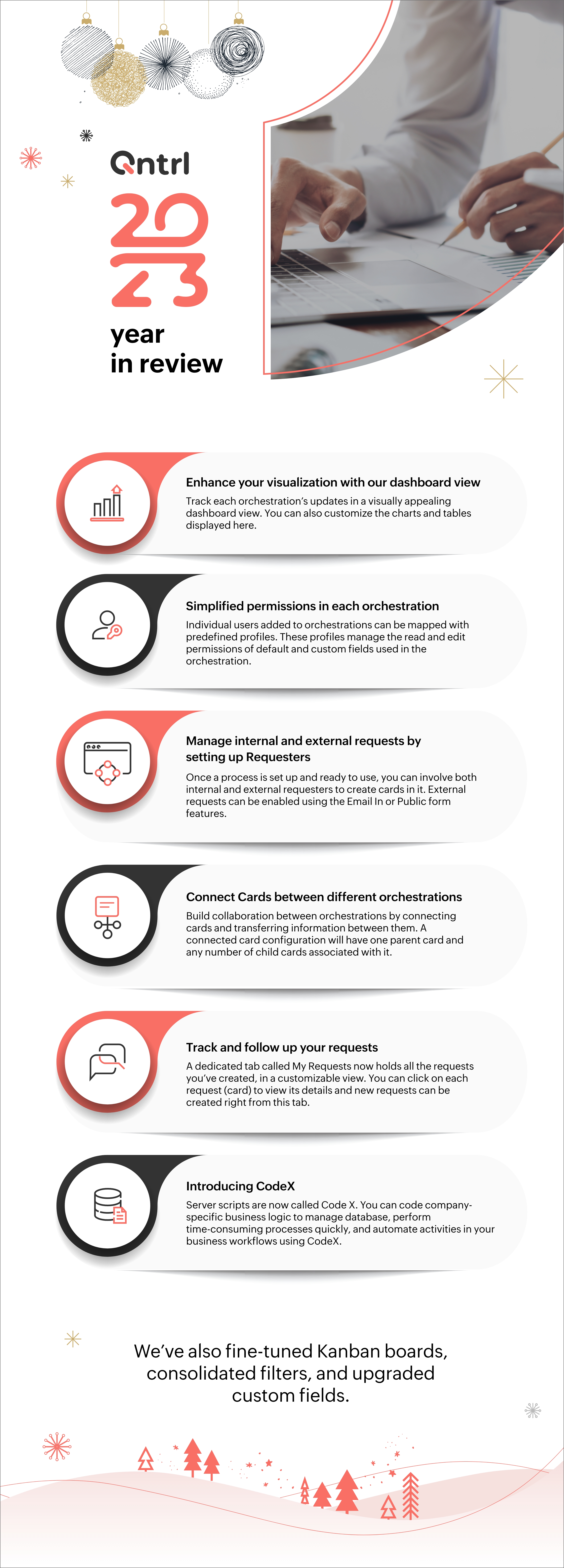


We can't wait to share our brand new Qntrl experience with you and help you level up your automation. Stay tuned!


    • Sticky Posts

    • Tip #21: Increase user engagement using dynamic email content and attachments in Orchestly

      Businesses often send out bulk emails like weekly newsletters, monthly event updates, promotional emails, surveys, beta access emails, product reviews, seasonal greetings, and so on. Even as the gist of these emails remain constant for all recipients, personalizations capture the audience’s attention and help brands connect with them.   Orchestly’s email templates allows you to draft and send dynamic emails with personalized content and attachments to internal and external users. Email templates
    • Qntrl's 2023 year in review

      This year has been all about analyzing our customer feedback and building a resilient and solution-driven product from it. As a result of this work, we're happy to announce that a whole new version of Qntrl is getting ready for release soon. This new
    • Tip #61: 5 different ways to create Cards in Qntrl

      Qntrl supports an array of features that covers everything required for business orchestration, from process automation to business advancement. Cards, being the elemental feature of Qntrl, record all the details of a particular task from the beginning
    • Tip #17: Stay informed of significant business impact using Orchestly

      With remote working becoming the new norm, leaders across sectors need to stay updated of their business performance in the market to aid business decisions. Instead of awaiting virtual meetings from sales and finance heads to put forth the business status, organization leaders can themselves dig into the system to keep an eye on their revenue generating customers or set up notifications to monitor major updates.   Orchestly recognizes such requirements and provides adaptable solutions for all business
    • Onboard faster with Orchestly's Tutorials

      We are actively rolling out new learning materials to assist our customers onboard at ease and automate their processes effortlessly. On that front, we recently launched Tutorials for Orchestly.   Tutorial is a step-by-step guide to help users familiarize the concepts of Orchestly and automate simple processes right from scratch. We’ve documented 3 such business processes viz. Order Manufacturing, Product Implementation, and Change Management.   We're looking forward to document more customer-centric
    • Recent Topics

    • Email templates for estimates

      Hi there, When I send an estimate the option to choose a template appears. However it is common to need to make some minor personalizations and modifications to the email before sending ie. adding a second person to the greeting, or adding a small note
    • Stage-probability mapping feature in custom module

      Hi, I'm building a custom module for manage projects. I would like to implement the stage-probability feature that Potentials has. Is this possible?
    • Mastering Zia Match Scores | Let's Talk Recruit

      Feeling overwhelmed by hundreds of resumes for every job? You’re not alone! Welcome back to Let’s Talk Recruit, where we break down Zoho Recruit’s features and hiring best practices into simple, actionable insights for recruiters. Imagine having an assistant
    • Zoho Books - France

      L’équipe de Zoho France reçoit régulièrement des questions sur la conformité de ses applications de finances (Zoho Books/ Zoho Invoice) pour le marché français. Voici quelques points pour clarifier la question : Zoho Books est un logiciel de comptabilité
    • Zoho Home Tasks View - any way to add conditional formatting?

      Hello! Is there any way to add conditional formatting to the tasks window under Home Page? Id like tasks to be shown in green/yellow and red depending on its task date. I know Classic View shows colorfull icons: But its not possible to add any custom
    • User Name in Zoho Cliq Not Updating Across Apps?

      We updated the name of a user in Zoho. (From Sue to Taylor) Her name has not been updated in Cliq on all apps. When in Zoho One, if I go to Cliq directly, it is correct, but if I am in another app, and the Cliq bar pops up on the bottom, it will be the
    • Set Default Status of Assembly to "Assembled" When Entered in UI

      I've just discovered the new "confirmed" status of Assemblies within Inventory. While I understand the intent of this (allowing for manufacturing planning and raw material stock allocation), it was initially confusing to me when manually entering some
    • New Customization options in the module builder: Quick Create and Detail view

      Hello everyone, We have introduced two new components to the module builder: Quick create and Detail view. The Quick Create Component It is a mini form used to create a record and associate it to the parent record from a lookup field. For example, if you have a Deals lookup in the Contacts module, then you can associate existing deals or create a deal and associate it with the contact. You can customize this Quick Create form by adding standard as well as custom fields. There is no limit to the number
    • Items Landed Cost and Profit?

      Hello, we recently went live with Zoho Inventory, and I have a question about the Landed Cost feature. The FAQ reads: "Tracking the landed cost helps determine the overall cost incurred in procuring the product. This, in turn, helps you to decide the
    • How do I automate my package and shipment process

      Hey, I have a very basic problem regarding automating my package and shipment. My business does not require me to have those modules and manage them currently and since I'm new to zoho I want to start with just the basics. I just need to automatically
    • Announcing Zoho Sheet desktop app for macOS and Windows (Beta)

      Hello Sheet users, We know you’ve been waiting for this one. It has always been the top priority on our roadmap to provide a single native desktop app for macOS and Windows that works both online and offline. Today, we are excited to announce that the
    • zoho creator panel add formula

      Hello. I'm using zoho panels which works good for me but i need to add an extra calculation the predefined sum function provided by zoho. not sure if this is possible? The code zoho is generating for the sum is as follows; <text margin='0px' padding='0px'
    • How to take result of calculation in a form and subtract from a value in another form

      I'm using the following code on successful form submission to perform a calculation and enter the result into a field a shown below input.Space_Used = ifNull(input.Area_In_Square_Meters,0) * ifNull(input.Total_Stock,0); I now need the result above, the
    • Re: Application Architecture in Zoho Creator — A Platform-Specific Deep Dive

      A recent community post on application architecture made some excellent points about planning architecture early in Zoho Creator projects. The core message is right — Creator applications have a habit of growing organically into maintenance nightmares,
    • Missing Fields in Lead Conversion Mapping

      I’ve been using Zoho CRM since 2013 to manage leads and convert them into contacts and jobs. When I convert a lead to a customer, I create a new contact and a job. Previously, this process automatically transferred key information from the lead to the
    • Mass email from Report output

      Hi, I'd like to send a mass email based on a report output. The report is pulling multiple information from linked modules. Each line of the report ends up with a contact name, email and multiple field values pulled from the linked modules (some are custom
    • What's New in Zoho Analytics - February 2026

      Hello Users! We're back with another round of updates for Zoho Analytics. This month's release focuses on giving you greater flexibility in how you visualize, manage, and act on your data - with new features like custom visualizations, remote MCP server,
    • Understanding tasks

      So we have a module linked to contacts called Equipment and that in turn has a related module called service calls. Often on a service call we want add a task but we are not able. I think it needs a link to the contact. WE therefore tried to add tasks
    • Cross Module Filtering – Use Fields from Lookup modules in Custom Views criteria and Advanced Filters

      Hello everyone, Zoho CRM now enables you to achieve deeper filtering of records in a module, using fields of a lookup, thereby enhancing your data management experience manifold. This filtering based on lookup module fields is now available in advanced
    • Related Lists in Email Templates

      Hi Zoho team, I would love to see a feature where related list information can easily be added to an email template (instead of mail merge). I have a client who books flights for their customers. They do this through a Flights module so all booked flights
    • Auto-sync field of lookup value

      This feature has been requested many times in the discussion Field of Lookup Announcement and this post aims to track it separately. At the moment the value of a 'field of lookup' is a snapshot but once the parent lookup field is updated the values diverge.
    • Introducing SlyteUI : From Idea to a Working Interface in Minutes

      Hello everyone! Are you spending hours building basic UIs? Does even the smallest customization feel like a major task? CRM customization should feel intuitive and straightforward, not time consuming or exhausting. SlyteUI makes this possible by simplifying
    • need to add tax in servce and items

      please give access to add gst or tac to add in service and parts
    • Blueprint transitions on locked records

      We use the ability to automatically lock records (quotes, sales orders, etc.) based on criteria, such as stage. For instance, if a quote has been sent to a client, the quote is then locked for further edits. Our ideal quote stage process is: Draft>Sent>Won.
    • Lead Entry Strategy

      Hi there. Was wondering if anybody could share their strategy around lead entry into Zoho CRM. One of the challenges with Zoho CRM is a lead requires a last name. We want to capture companies that operate within our addressable market, and we often don't
    • Social posts not saving as drafts or posting

      Over the past two days, I have written and modified the same post for 5 different channels 4 different times. They will neither save as draft, nor go through and load in the scheduler, nor will they post when I try to push it live now. In every case,
    • Introducing user groups, roles, and profiles in Zoho Sign

      Hello, Today, we're excited to unveil user groups, roles, and profiles to offer granular access controls in Zoho Sign. These help administrators manage document visibility and accessibility based on assigned user roles and permission sets. User groups:
    • On Duty Requests - Zoho People Data

      Hello Team, We are currently using the On Duty Form to record Work From Home (WFH) requests in our organization. However, we are facing an issue where pending On Duty requests are not appearing in the Attendance Module. For example, if I submit On Duty
    • Add org-specific data with Custom modules

      Zoho Sprints offers a wide range of default modules designed to support agile project management. However, some projects or organizations may require additional modules to store project-specific or organization-specific data. To address this, Zoho Sprints
    • All new Address Field in Zoho CRM: maintain structured and accurate address inputs

      Availability Update: 29 September 2025: It's currently available for all new sign-ups and for existing Zoho CRM orgs which are in the Professional edition exclusively for IN DC users. 2 March 2026: Available to users in all DCs except US and EU DC. 24
    • 【無料/オンライン】4/30開催|Zoho ワークアウト(オンライン勉強会)

      ユーザーの皆さま、こんにちは。 コミュニティグループの中野です。 4月開催の「Zoho ワークアウト」のご案内です。 本イベントは、Zohoユーザー同士で交流しながら 設定・運用・活用に関する課題解決を目指すオンライン勉強会です。 「設定を進めたいけれど、一人だと手が止まってしまう」 「他社がどう活用しているのか知りたい」 「相談できる相手がおらず、運用に悩んでいる」 そんな方におすすめのイベントです。 ▶︎参加登録はこちら(無料) https://us02web.zoom.us/meeting/register/qIH1ut8aTnq-R7-21eF3BQ
    • Give your organization a branded login experience with White Labeling

      When users log in to their email, the URL they land on is often the first thing they notice. A generic login page can feel disconnected from your organization's identity, especially when you have already established a strong brand presence. For administrators,
    • Archive Option in Conversation View

      Hello, I have a suggestion\request to add an "Archive Thread" button in conversation view of Zoho Mail. The best suggestion I have is to put an "Archive Thread" button next to the "Label Entire Thread" button in conversation view. Most users don't just
    • Search API filter/sort ignores comment-triggered modifiedTime updates

      Summary When a comment is added to a Call or Account, the parent record's modifiedTime is correctly bumped. This bumped value is visible in: GET /api/v1/calls/{id} ✅ GET /api/v1/calls/search without a filter ✅ — the record's response body shows the new
    • Automation#17: Auto-Create Tasks in Zoho Projects Upon Ticket Creation in Zoho Desk

      Hello Everyone, This edition delivers the solution to automatically create a task in Zoho Projects when a ticket is created in Zoho Desk. Zylker Resorts uses Zoho Desk for bookings and handling guest requests. Zylker resorts outsources cab bookings to
    • Mail Merge in Zoho Desk

      Hello Team, Do we have an option of mail merge within Zoho Desk like we have in Zoho CRM? We have a requirement to generate some pdf file in the form of mail merge doc from the ticket.
    • No DINAR (Serbia) in currency list

      There is no Serbian Dinar listed in the currency list. Dinar is available in Books, Inventory, CRM, FSM. Please make it available in Desk as well. Without it, the integration with other apps is not possible.
    • CRM Notes

      Hello, We want to add a Note to the Contact record when a Note is added to a Case or Deal. I wasn't able to do this using a workflow, so I tried using Zoho Flow, but that didn't work either. Does anyone have a suggestion on how we can accomplish thi
    • Zoho Forms for Vertical Studio Subscriber Organizations

      We’re excited to introduce the Zoho Forms integration with Vertical Studio. This allows you to capture data using forms and send it directly to your Vertical Studio modules. With this integration, form submissions can be used to create or update records,
    • Using Email Triggers on Zoho Flow

      Hello, I'm sending the email to create the variables as this article says: https://help.zoho.com/portal/en/kb/flow/user-guide/create-a-flow/articles/email-trigger#How_email_trigger_works But the collection of the variables only seems to work when the
    • Next Page