Response Time Report

Response Time Report

From data to decisions: A deep dive into ticketing system reports

Every organization that interacts with its customers should have an established timeframe for how soon an agent is expected to send the first response and any reply to any follow-up messages. 

It's common for the support team to operate under  a service level agreement that requires the first response to any customer ticket to be sent within one hour of ticket creation.

If a team has 10 agents, the manager does not need to check each ticket to see if the response time SLA is met. Instead, the response time report can help identify whether all responses are sent on time or if there is a delay.

What are time-based reports?

Time-based reports are valuable tools that help us understand how well things are going by breaking down key metrics over specific periods. By tracking, measuring, and visualizing data, these reports allow us to evaluate performance, spot trends, and make better decisions. They enable businesses to monitor efficiency, productivity, and operational effectiveness.

If a ticket was raised on February 23, and the response was sent on February 28, the manager can review the details to understand why there was a delay. This might be due to reasons such as holidays, a mistake by a new agent who is unfamiliar with the process, or unusually high demand for support. By identifying the cause, the manager can offer more training on SLA processes, adjust the way agents' workloads are allocated, or arrange for extra help during holidays to ensure timely customer responses in the future.

Example of response time reports

Suppose a ticket was raised on February 23rd about a patient’s health concern, and the response was sent on February 28th. In this case, the hospital manager can review the details to see why there was a delay in addressing the patient's needs. This delay may be caused by factors such as holidays affecting staffing levels, staff being unfamiliar with the ticketing process related to patient care, or an increased workload resulting from a sudden rise in patients.

By figuring out the cause of the delay, the manager can take proactive steps. For example, they could provide more training on the standard procedures for handling patient inquiries to ensure all staff understand the process. The manager might also adjust the workload by redistributing cases among staff or bringing in temporary help during busy times or holidays.

Another strategy is to form a dedicated task force to handle customer inquiries during peak periods to provide quicker responses. By tackling these issues, the organization can improve its operations and ensure timely responses to ensure customer satisfaction.
Quote
Availability: All paid versions

Specific attributes of the report

  • Ticket ID: Zoho Desk identifies and distinguishes tickets using a unique reference number called a ticket ID.
  • Subject: The ticket subject is typically a summary or description of the issue the customer is experiencing.
  • Ticket owner: Owner of the ticket.
  • Contact name: The customer's contact name.
  • Event owner: The owner of the event.
  • Event team: The change in the ticket's status.
  • Responded by: The name of the agent who responded to the customer's ticket.
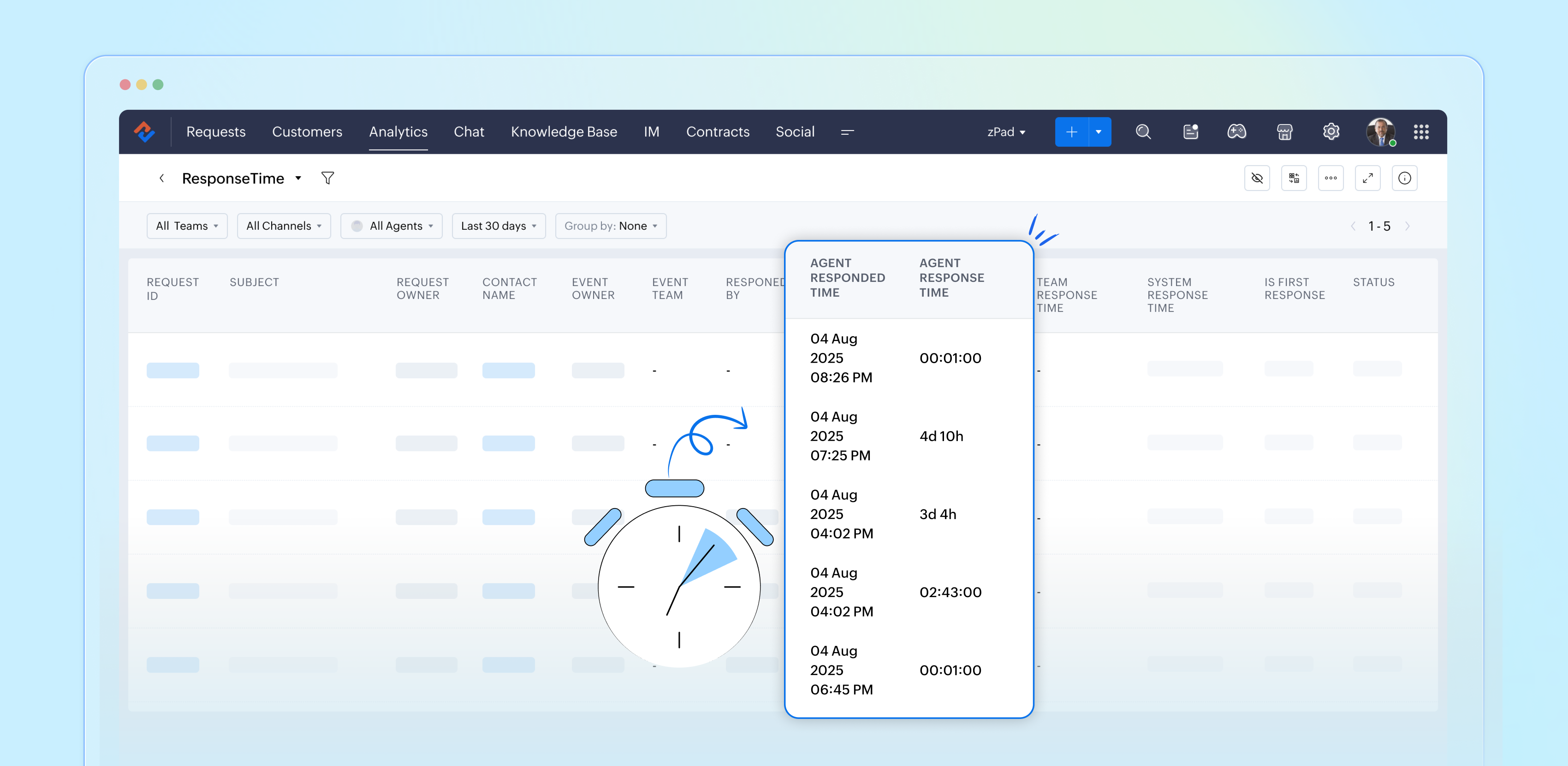
  • Agent responded time: The time the response was sent.
  • Agent response time: The total time taken to respond to the ticket.
  • Team response time: The time the team responded to the ticket.
  • System response time: The total time the team took to respond to the ticket
  • Is first response: Confirms if this is the first response in the conversation's thread.
  • Status: The current status of the ticket.
  • Status during event: The status of the ticket at a particular point in time.
  • Channel: The channel through which the ticket was submitted.

Importance of response time reports

Response time reports are important for support systems. They measure how quickly agents reply to customer inquiries.

  • Enhance customer satisfaction
  • Easily promote customer loyalty
  • Enable performance tracking
  • Drive operational efficiency
  • Support data-driven decisions
  • Reinforce brand reputation

Analyze and improve response times with reports 

By closely examining both our first response times and the tickets that require more attention, the support team can gather valuable insights from every customer interaction. This continual analysis of response time reports allows us to identify patterns and areas for improvement, ultimately enhancing our overall performance and ensuring a superior experience for our customers.


Please stay tuned for more articles in our Desk Reports series.


Regards,


Kavya Rao

The Zoho Desk Team

Idea

Also read:

Time-based reports

    • Sticky Posts

    • Zoho Desk Partners with Microsoft's M365 Copilot for seamless customer service experiences

      Hello Zoho Desk users, We are happy to announce that Zoho Desk has partnered with Microsoft's M365 to empower customer service teams with enhanced capabilities and seamless experiences for agents. Microsoft announced their partnership during their keynote
    • WhatsApp pricing changes: Pay per message starting July 1, 2025

      Starting July 1, 2025, WhatsApp is shifting from conversation-based pricing to per-message billing. That means every business-initiated message you send will count. Not just the first one in a 24-hour window. Pricing updates on the WhatsApp Business Platform
    • Live Webinar - Work smarter with Zoho Desk and Zoho Workplace integration

      Hello customers! Zoho Desk and Zoho Workplace are coming together for a webinar on 14th May, 2024. Zoho Workplace is a suite of productivity apps for email, chat, docs, calls, and more at one single place. Zoho Desk is closely integrated with a few tools
    • Apple iOS 17 and iPadOS 17 updates for Zoho Desk users

      Hello Zoho Desk users! Apple recently announced the release of iOS 17 and iPad OS 17. These latest OS updates will help you stay productive and efficient, through interactive and seamless user experiences. Zoho Desk has incorporated the updates to help
    • Zoho Desk Cheat Sheet For The Year-End

      Check out these Zoho Desk best practices to end this year on a high and have a great one ahead! #1 Set Business (Holiday) Hours - If you have limited working hours, please make sure you restrict your business hours or set them as holidays for the coming days. Let your customers know when you will, and won't, be available. #2 Update the Annual Holiday List - Check the holidays for the new year and update the holiday schedule. Usually, holidays from the current year will be carried over for the next
    • Recent Topics

    • Introducing Workqueue: your all-in-one view to manage daily work

      Hello all, We’re excited to introduce a major productivity boost to your CRM experience: Workqueue, a dynamic, all-in-one workspace that brings every important sales activity, approval, and follow-up right to your fingertips. What is Workqueue? Sales
    • UI issue with Organize Tabs

      When looking at the organize Tabs window (bellow) you can see that some tabs are grayed out. there is also a "Add Module/Web Tab" button. When looking at this screen it's clear that the grayed out tabs can not be removed from the portal user's screen
    • I created a signup form in Zoho Marketing Automation with the correct field mapping, but the data is not being reflected under Leads in Zoho CRM.

      web to lead from zoho marketing automation
    • Pasted Images not being embedded in custom mail

      Hi, I'm making a custom report by email based on commentaries. I have the email ready, all working great except for images that are being pasted in the commentaries. Zoho deals with them as temp images and so it requires authentication to view them, something
    • Kaizen #232 - Building a Ticket Escalation Mechanism from Zoho CRM

      Howdy, Tech Wizards! Picking up the thread from last week, we will continue our Zoho CRM and Zoho Desk integration. In Kaizen #231 - Embedding Zoho Desk Tickets in Zoho CRM, we built a Related List widget that displays open Zoho Desk tickets within the
    • Inactive License for free account.

      I recently upgraded my Cliq subscription not my team (on the free version), are unable to login to their accounts. The error message received is Inactive License Looks like you have not been covered under the current free plan of users. Please contact
    • Deluge scripts

      Why is there not a search function to make it easier to find the script of interest when modifications are required.
    • Zoho Sheet for Desktop

      Does Zoho plans to develop a Desktop version of Sheet that installs on the computer like was done with Writer?
    • Zoho Books (and other Finance Suite Apps) - Clickable Item Name on Invoices and Reports

      Hi Zoho Books team, It would be really helpful if the Item Name on Reports were clicable to take me to the item. The same on Invoices, often I am looking at an invoice and I want to look at the deails of a product. A link here would be helpful to jump
    • Zoho Books - Payment Gateway - Revolut

      Hi Books Team, My feature request if to include the popular platform Revolut as a payment collection option on invoices in Zoho Books. Please upvote if you are also looking for this option.
    • Searching for an item from within an invoice should show any item containing the string, not just those that begin with the string.

      Hello, I've found myself becoming increasingly frustrated with the limited line-item seach when adding new items to an invoice. The problem is that the characters being typed are only being matched from the beginning of the item name.  This might be usable
    • How to Rank Tables by Row Count in Descending Order

      I am trying to understand the consume of lines that grow up so fast in the last week. Is there any way to create a pivot table or query to get TABLE NAME LINES in descending order?
    • Dealing With One-Time Customers on Zoho Books

      Hello there! I am trying to figure out a way to handle One-Time customers without having to create multiple accounts for every single one on Zoho Books. I understand that I can create a placeholder account called "Walk-In Customer", for example, but I
    • Feature Request: Render Markdown (.md) files in Zoho Cliq

      Hi, We regularly share Markdown (.md) files in Zoho Cliq. However, when we open these files in Cliq, the content does not render as Markdown—it displays as plain text. This forces us to copy/paste the content into an external Markdown viewer to read it
    • CRM Percent custom fields: When will it show the % symbol and behave like %?

      1. Actually Percent custom fields fail to show the % symbol. 2. When in formulas Percent fields work like number: 100 x 5% = 5 ideal world 100 x 5% = 500 what happens actually 3. When importing Percent fields the % symbol has to be removed and the data
    • Subforms and automation

      If a user updates a field how do we create an automation etc. We have a field for returned parts and i want to get an email when that field is ticked. How please as Zoho tells me no automation on subforms. The Reason- Why having waited for ever for FSM
    • Xero Billing Data (22 instances) - Zoho (CRM) - Single Source of Truth For Client Data & Notes

      Hi - I’m trying to build out a CRM for a Single Source of Truth Currently I have 22 Instances of Xero (for legal entity purposes - can’t consolidate to one) How would I be best placed to do this? Is it possible to have all the Xero instances (22) → Consolidated
    • Select CRM Custom Module in Zoho Creator

      I have a custom module added in Zoho CRM that I would like to link in Zoho creator.  When I add the Zoho CRM field it does not show the new module.  Is this possible?  Do i need to change something in CRM to make it accesible in Creator?
    • New 2026 Application Themes

      Love the new themes - shame you can't get a little more granular with the colours, ie 3 different colours so one for the dropdown menu background. Also, I did have our logo above the application name but it appears you can't change logo placement position
    • Zoho Expense - Bi-Weekly Report Automation

      Hi Zoho Expense Team, My feature request is to please include an option to automate creation of reports bi-weekly (every 2 weeks)
    • Zoho CRM Quotes – Subform and PDF/Writer Limitations

      Hello, I am encountering the following limitations in Zoho CRM Quotes: Custom product images cannot be uploaded in the subform – the image upload field cannot be added; only the file upload field is available. File upload placeholders cannot be used in
    • Strange behavior in CRM Number Field – Characters allowed but not "e"?

      Hi everyone, Has anyone faced this strange issue in Zoho CRM? In a Number field, it is possible to type some characters, but the character "e" cannot be entered. This was really surprising to me. Normally, a number field should restrict all characters
    • No background for video recordings, no playback speed, can't even playback longer recordings - have to download…

      Hi. We utilize heavily video messages on Slack, but wanted to migrate to Cliq with Zoho One, however very basic yet very frequently used feature is missing: backgrounds for video recordings and playback speed. We were not happy with Slack's 5 minute limits
    • Support inefficiency

      We have been asking for support for a minor adjustment for 12 days now and we haven't got a single viable resolution from support team despite there are 19 emails going between our HR team and various support emails from Zoho. 1. they do not understand
    • Zia capabilities now available in the Professional edition announcement

      Hello all! The Professional edition now supports a broader set of Zia capabilities, enabling teams to bring AI into more of their everyday CRM work. From writing assistance and summaries to setup support, predictions, and recommendations, Zia can now
    • Where Do I set 24h time format in Cliq?

      Where Do I set 24h time format? Thanks
    • This will be long, Please bear with me - Next Gen Layout - Search

      In general, I think that Zoho are going in the right direction with the Next Gen UI. The latest update brings some nice improvements and all-in-all from a user's perspective I think the improvements are generally very good. However, there are some areas
    • Selecting all notes in a notebook

      In Windows11, I select a notebook and I get a list of notes, but only 30 notes. If I scroll down to the end, I get an additional 30 notes (and at the top it now shows 60 notes). I can keep doing this to eventually see all my notes but this is a real pain.
    • Filter Records in CRM API

      Hi Team, I’m currently working on a task to retrieve expired deals from the CRM. By “expired deals,” I mean deals where the closing date has already passed and the stage is not “Closed Won” or “Closed Lost” (i.e., all other stages). I tried using both
    • User Name in Zoho Cliq Not Updating Across Apps?

      We updated the name of a user in Zoho. (From Sue to Taylor) Her name has not been updated in Cliq on all apps. When in Zoho One, if I go to Cliq directly, it is correct, but if I am in another app, and the Cliq bar pops up on the bottom, it will be the
    • Ability to Use Both AND and OR When Creating Rules (Advanced Conditions)

      I'd like to be able to use more complicated logic when setting up rules. E.g. in Zoho Mail, I can choose "Advanced conditions (AND/OR) to create a rule that can be applied to multiple subject lines from the same sender. But in Zoho TeamInbox, I will have
    • Why I can't map Account Name from lead module to Account module?

      When I qualify a lead in the bluerprint, I use automated conversion in Blueprint to automatically create Contact, Account and Deal. the Deal record and contact record has been successfully created automatically as I expect, but I can't see any account
    • Pause(1);

      I'm using scheduler to invoke an interaction via http post with an external service. The schedule code uses a for-each loop that runs so fast my external application's log files get messed-up (they are named by date-time stamp). What I'm suggesting is
    • Release Notes | February 2026

      We have rolled out another set of enhancements in Vertical Studio during February 2026, bringing improvements to Canvas customization, reporting capabilities, and data access controls. Here is a summary of what was released during February 2026: Canvas
    • Agentic Engineering with Zoho: The Next Evolution of Intelligent Systems

      The concept of Agentic Engineering is reshaping how modern systems are designed. It introduces a new layer to the way we think about artificial intelligence and system architecture. For years, most software systems have operated in a reactive way — responding
    • Engenharia Agêntica e as soluções da Zoho

      O conceito de engenharia agêntica impacta diretamente como os sistemas são projetos. Este tema inseri mais uma camada a nossa idéia de inteligência artificial. Antes o desenvolvimento de sistemas operavam de forma reativa e dependente de comandos diretos,
    • Effective project and task customization with CodeX

      Dear users, Beyond Task Lists is a series of articles aimed at showcasing the various customization capabilities of Zoho Projects. We'll discuss real life project management scenarios, use cases, and requirements that needs combining multiple features.
    • Set expiration date on document and send reminder

      We have many company documents( for example business registration), work VISA documents. It will be nice if we can set a expiry date and set reminders ( for example 90 days, 60 days, 30 days etc.,) Does Zoho workdrive provide that option?
    • Debit opening balances of vendors

      Dear colleagues: I am looking at the trial balance as on 31st March 2024, and punching opening balances (1st April 2024) in Zoho Books. Vendors have credit balances, by its nature, but some of our vendors have debit balances as well (e.g., we have paid
    • Zoho Books emails suddenly going to Spam since 11 Nov 2025 (Gmail + now Outlook) — anyone else?

      Hi everyone, We migrated to Zoho Books in July 2025 and everything worked fine until 11 Nov 2025. Since then, Zoho Books system emails are landing in customers’ Spam (first Gmail, and now we’re seeing Outlook/Office 365 also starting to spam them). Impacted
    • Next Page