Supercharge your VoC analyses with data from anywhere: Modules are now sources for VoC

Supercharge your VoC analyses with data from anywhere: Modules are now sources for VoC

Dear customers,
 
We hope you're well!

Your customers talk about your brand, praise your service, criticize your offerings, or promote your business—literally from anywhere on the internet—and it has become strategically necessary to factor in all possible feedback to improve, optimize, and grow your business.
 
Foreseeing opportunities this feedback could bring, we've developed the ability to use any module as a source to process VoC analyses, and we're excited to talk about it.

A module as a source


Previously, VoC channeled various kinds of responses into Zoho CRM for analysis:
  • Tickets from Zoho Desk
  • Survey responses from Zoho Survey
  • Social media mentions from Zoho Social
  • Email responses from email integrations
  • Calls from PhoneBridge integrations
  • Notes from CRM records
All these are mostly service responses. However, customer opinions aren't just limited to their "official" feedback responses. You probably also receive feedback in the following forms, to name a few:
  • Comments on your social media posts
  • Reviews about your products
  • Discussions on community platforms
  • Messages on networking sites
  • Ideas in forums
  • Blog comments
These represent feedback your business gets externally, and tapping into them can benefit your business—big time.

But how do you do it?

The anchor is your business. By identifying your business's presence online and connecting various platforms with Zoho CRM, you can channelize this feedback as records and ultimately map these destination modules as sources of VoC data.
 
Zoho Marketplace, REST APIs, webhooks, Zoho DataPrep, and Zoho Flow are all various ways you can channelize this data. Here are some examples:

Analyze and act upon YouTube comments using Zoho Flow

Zoho Flow is Zoho's app integration tool, which connects applications and enables data to flow between them based on triggers and actions you can configure. Using it, you can trigger actions in Zoho CRM whenever a YouTube video gets a new comment. The action in Zoho CRM could be that a record is created or a field is updated from where data can be used for VoC processing.


Similarly, using Zoho Flow's gallery of readily available triggers, you can import reviews from Trustpilot, the Collect Reviews app, and Zoho Connect apps available in their gallery.
 

Gather real-time feedback from hotel guests using kiosks

With Zoho CRM's Kiosk Studio, you can collect customer feedback when they check out. Ask about their experiences using the fields available in Kiosk Studio's interface, save that data in dedicated modules or route it into an existing module, and use that module as a source for VoC processing.

Survey responses via Zoho DataPrep

Businesses use surveys for various reasons, and the Zoho Survey integration already funnels survey data into VoC analysis. If you use other data providers—like Zoho Forms or SurveyMonkey—you can identify, clean, and bring responses into Zoho CRM through Zoho's DataPrep application, and then subject it to VoC analysis.
 

Parse reviews from Zoho Marketplace and other B2B app stores

Your apps serve as other sources of customer feedback. Whether it's from a mobile app or a B2B marketplace, these apps are rich sources of reviews. This includes data from apps like Google Business, Amazon, Apple's App Store, the Google Play store, G2, Yelp, and other providers, from which you can derive data via code-based integrations.

Adding modules as sources


Once you have feedback from your desired sources stored in modules in Zoho CRM, it's time to add these modules as VoC sources.


Existing standard sources, like Zoho Desk, Zoho Survey, emails, calls, and social media, are called basic data sources. Any module you select as a source is called an advanced source.
 
NotesNote: Feedback from the Notes source is now nested as and parsed from a child module.
 
Here's how you configure any module as a source:

Under Module as a source, choose the source module that contains your reviews, then fill out the following fields:
  1. Display name: This labels the source module.
  2. Choose field for response to be extracted: This tells the system which field(s) to import data from—typically descriptive multi-line fields.
  3. Choose a response provider: This is your lead or customers. This tells the system whom the feedback should be attributed to and which record to associate the analysis with.
  4. Response time: This defines the time frame from which the system should include feedback data.
That's all you need to do. VoC will start importing your feedback data for analysis. To associate data with existing customers, you can also include them in your settings .

Derive insights from your modules and act on them

The minute your source modules are configured, you can build dashboards that include them, filter records based on their attributes, and automate workflows as you would for any other VoC response.
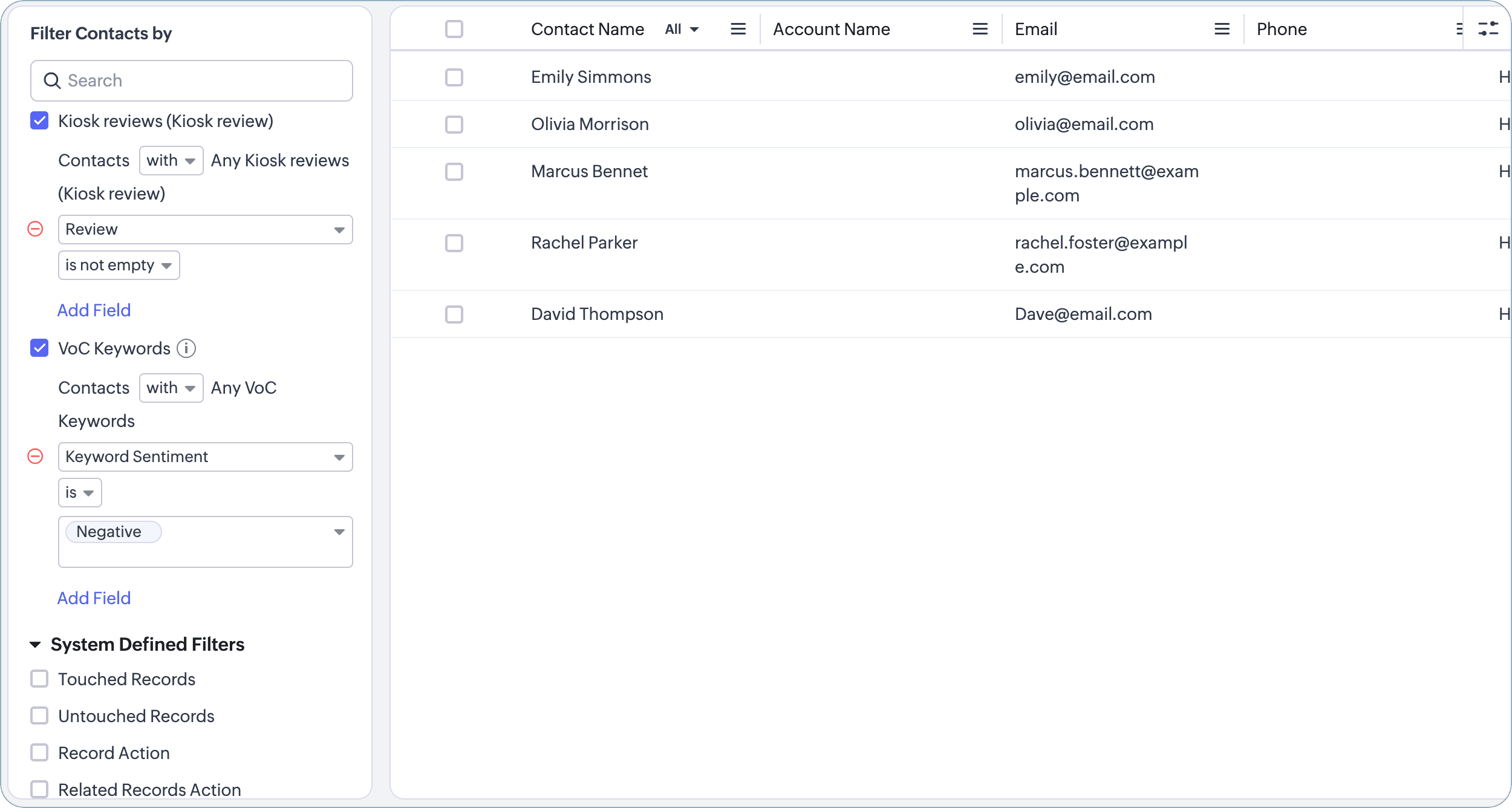

There—that's how you can add bring reviews from the Internet to power your VoC analyses.

With the emphasis on customer experience growing, we are working to boost VoC with more CX-bound capabilities each day. We shall meet you with one such in the near future. See you!

Release: Available for customers in all DCs

Thanks and have a good one!

Kind regards,
Saranya Balasubramanian

    • Recent Topics

    • Zoho Books Placeholder: Inventory Counts

      I was hoping to figure out how to find the placeholders for inventory counts by item. We use Location based inventory tracking, so I dont know if that affects things. I want my PDF and Printed PICK LISTS to show the Quantity Available to Pick. I have
    • Undocumented Books API error message - 1000 - The requested action could not be completed. Please try again. | Unexpected error

      This code sometimes throws this error 1000 - The requested action could not be completed. Please try again. | Unexpected error What does it mean? result = zoho.books.updateRecord("salesorders",organization.get("organization_id"),salesorder_id,sales_
    • Reporting Tags and COGS

      Is there any way to get COGS recorded against reporting tags? The use cases seems very straightforward to me. If I'm running a P/L report against a specific reporting tag (I use mine for customer type, but it could be used for regions, etc.), the revenue
    • Please critique my CRM design

      I run a disability healthcare business with 2 business units. We run on Zoho One and are re-designing our CRM. We have developed the design concept ourselves, and I am hoping to get some critical feedback: 1) Noting that this is an early design of the
    • CRM x WorkDrive: We're rolling out the WorkDrive-powered file storage experience for existing users

      Release plan: Gradual rollout to customers without file storage add-ons, in this order: 1. Standalone CRM 2. CRM Plus and Zoho One DCs: All | Editions: All Available now for: - Standalone CRM accounts in Free and Standard editions without file storage
    • Error in Batch Details Stock Reportt

      I am a new user of zoho inventory. When extracting batch details stock report as of dec 2025, the report takes into account transactions that happen this year. Thus causing discrepancies when comparing with Stock Report. Is this a global error? Can zoho
    • Invoice template, how to change the text under "Notes" and "Terms and Conditions"

      In "Invoice templates", there are two text/info sections at the bottom:"Notes" and "Terms and Conditions". It is possible to change the names of these two headings, but how is it possible to change/alter the text under it. As a standard it says "Thank you for your business" under Notes - I need to change it into something different- How? Thank you.
    • Zoho Commerce B2B

      Hello, I have signed up for a Zoho Commerce B2B product demo but it's not clear to me how the B2B experience would look for my customers, in a couple of ways. 1) Some of my customers are on terms and some pay upfront with credit card. How do I hide/show
    • Need complete Zoho Commerce theme ZIP example and safe staging workflow

      I want to build a complete custom Zoho Commerce storefront through Edit Code, including: • Global header and footer • Responsive homepage • Category, search and filter pages • Product cards and product-detail pages • Cart and checkout wrapper • Mobile
    • Conflict with Google Sheets

      While I was working on a google sheet in Firefox, I suddenly started getting an error dialog in Google sheets: "Loading issue. Troubleshoot this issue by clearing application resources". It then says to clear cookes etc. etc. which didn't help. Disabling
    • Add Large Lists to Choice-Based Field Rules

      Hi, The new Large List is good, but you can't then use the Choice-Based Field Rules with it to limit the Group Choices or Choices? Thanks Dan
    • Auto-fill from logged-in user's profile for Name Fields in Subforms

      Hi, The Name field is great, but I see you can't tick the Initial Value option of "Auto-fill from logged-in user's profile" when it is on a Subform, why not? Thanks Dan
    • [Free webinar] Creator Tech Connect – Creator product updates (Part 1), August 2026

      Hello everyone, We are excited to invite you to another edition of the Creator Tech Connect webinar. About Creator Tech Connect The Creator Tech Connect series is a free monthly webinar comprised of pure technical sessions, where we dive deep into the
    • Is there a way to show contact emails in the Account?

      I know I can see the emails I have sent and received on a Contact detail view, but I want to be able to see all the emails that have been sent and received between all an Accounts Contacts on the Account Detail view. That way when I see the Account detail
    • Mail Id’s backup

      Dear Zoho Team, Kindly share the backup of my all mail id’s associated with Zoho account. Thanks, Saurabh Sharma +91 8851066915
    • Recurring Events Not Appearing in "My Events" and therefore not syncing with Google Apps

      We use the Google Sync functionality for our events, and it appears to have been working fine except: I've created a set of recurring events that I noticed were missing from my Google Apps calendar. Upon further research, it appears this is occurring
    • 360 SMS App - Zoho CRM SMS, MMS & WhatsApp Messaging Extension

      Sharing our extension for anyone looking for texting inside Zoho CRM: 360 SMS App supports SMS, MMS, WhatsApp, and two-way texting, connected directly to your Leads, Contacts, Deals, and custom modules. Built-in TCPA/GDPR opt-in management handles compliance
    • Stock Based Sort-by option in Category Pages

      In a category page product with In-Stock should come in the top of the categories product list rather than out-of-stock products. No having this option is extremely disappointing, I made the initial request about 7 months ago but still not even an update
    • Stock based sort-by option

      I have more than 300 products in a category with out of stock items count of 150. The out of stock items are coming on top of the category product page list, is there a way to show the in-stock items on top of the list & move the out -of stock items in
    • Out of Stock items showing in Commerce

      I have over 6000 items and most are not in stock, but all items are showing up in Commerce whether they are inventory or not. What option or feature can you use to hide items in Commerce at zero or negative quantities? I currently am using Commerce for
    • Creating Email template that attaches file uploaded in specific field.

      If there's a way to do this using Zoho CRM's built-in features, then this has eluded me! I'm looking to create a workflow that automatically sends an email upon execution, and that email includes an attachment uploaded in a specific field. Email templates
    • What's New in Zoho Billing | July 2026

      July brings a new set of updates to Zoho Billing to make your billing operations more efficient. These include a redesigned checkout experience, expanded Hosted Payment Page capabilities, compliance improvements, enhanced reporting, and more. Enhancements
    • Zoho CRM Community Digest - July 2026 | Part 1

      Hello everyone, July is here! The first two weeks brought six CRM updates ranging from privacy-ready webforms to a significantly more powerful Layout Rules engine, two community wins worth a look (a dashboard workaround for spotting leads with no activities,
    • Zoho CRM - Email/Message icon for Deal List View

      Hi Team, My idea is to include a message icon at the start of the row of Deals when an unread message has been received. This would really help highlight the Deals where urgent action is required. Thanks for considering this request. Regards, Ashley
    • Email notification for followers

      Is there a way to enable email notification for followers of a support ticket? ie: Ticket #123 is owned by Agent#1, Agent#2 adds themselves as a follower. Whenever ticket #123 receives an email from the customer, Agent#1 receives an email. Agent#2 would
    • Introducing parent-child ticketing in Zoho Desk [Early access]

      Hello Zoho Desk users! We have introduced the parent-child ticketing system to help customer service teams ensure efficient resolution of issues involving multiple, related tickets. You can now combine repetitive and interconnected tickets into parent-child
    • Desk Contact Name > split to First and Last name

      I am new to Zoho and while setting up the Desk and Help Center, I saw that new tickets created or submitted from the Help Center used the Contact Name field. This would create a new Contact but put the person's name in the Last Name field only. The First
    • Vendor payment unexpectedly routed through Prepaid Expenses instead of Accounts Payable

      Hello, We are investigating an unexpected accounting behavior in Zoho Books. We created vendor bills and vendor payments for two suppliers using what appears to be the same workflow, but the journal entries are different. Vendor 1 – UZ Store (works correctly)
    • Dashboard Metric Drill-Down Shows Stale Data

      Summary: When clicking between different metric components on a custom dashboard, the drill-down list shows data from the previously opened metric instead of the one just clicked. Steps to Reproduce: Create a custom dashboard with multiple pre-defined/templatized
    • Managing Shopify Payout Balances in Zoho Books

      I am recording my Shopify orders as Invoices and once Shopify credits my bank account I reconcile the payout to the specific invoices and create a new transaction to account for the Shopify Merchant Fee. That is fairly straightforward to me. How should
    • Charging for WhatsApp replies starting in October 2026

      Meta has announced that it will charge for reply messages on WhatsApp starting October 1, 2026, and the free 24-hour window will no longer exist. How will Zoho SalesIQ handle this billing? https://developers.facebook.com/documentation/business-messa
    • Upcoming Change: Increased character limits for module and field labels

      To provide greater flexibility in customizing your CRM, we are increasing the maximum character limits for module labels and field labels in Zoho CRM. What's changing? Label Current Limit New Limit Module Label 25 characters 50 characters Subform Module
    • Change of Blog Author

      Hi, I am creating the blog post on behalf of my colleague. When I publish the post, it is showing my name as author of the post which is not intended and needs to be changed to my colleague's name. How can I change the name of the author in the blogs?? Thanks, Ramanan
    • Q3 USA ZUG Meetups - Build AI Agents with Zoho

      Hi everyone! What if you could build your own AI agent from scratch in just one session? That's exactly what we're going to do at the upcoming ZUG Meetups across the United States, where you'll get hands-on experience with Zia Agents and explore how AI
    • SPAM (and some other) folders missing on three of my Zoho Mail accounts

      I have four email accounts with Zoho Mail. Three days ago, the Spam folder on three of these accounts vanished. It is gone on the Windows and Linux desktops as well as the web-based and Android versions, and I have tried it on multiple machines. The only
    • Using data from multiple sheets

      I am looking for a way to automate the process of taking multiple Zoho sheets and collating the data into one combined sheet (such that no duplicates occur). Currently I can only think of importing all the sheets into Excel and then running a macro to perform the task. Is there a simpler way offered by Zoho?
    • Error 1011 saving website personalisation — blocking all changes (corrupted "home_page.content" field)

      When trying to save changes under Settings → Brands → MY COMPANY → Website → Personalisation → Messenger, I receive the following error: "Either the request parameters are invalid or absent" upon checking on the developer console of the browser I get
    • Tip #7 - Siri shortcuts in Zoho CRM

      Hello Everyone, Here is a tip about the 'Siri Shortcuts' feature and how it works in the iOS version of the Zoho CRM mobile app. What are Siri shortcuts? Siri Shortcuts are quick actions across your apps on iOS. They can perform an action automatically
    • Delete Field that is used in a Zoho Flow connection

      I'm trying to delete a Field used in a Webhook created by Zoho Flow with CRM Connection and i get the following alert: When going to the alert i get to the following issue, can't edit it since its been deployed by a pluggin But yes i have here the prompted
    • Automatic Department and Employee Sync Between Zoho One and Zoho People

      Dear Zoho Support, I'm writing to propose a valuable feature request that would streamline data management and improve user experience within the Zoho ecosystem: automatic synchronization between departments and employees in Zoho One and Zoho People.
    • Next Page