One of the things we love most about our Zoho User Community is how readily our users help each other out, and share their Zoho and business knowledge. Be it the community forums, the virtual and in-person meetups, or Zoholics, it's been heart-warming to see our users - right from rookies in the Zoho ecosystem to veteran Zoho users - help fellow Zoho users thrive in their businesses. We've seen Zoho users go out of their way to help the larger community. We've seen them make recommendations to fellow users when they're in a pickle, we've seen them give insight based on their own experiences, we've seen them step up and offer to deliver whole Zoho presentations and spearhead discussions. We've had Zoho users across various industries, from the vast real estate field to the niche arts sector, pitching in, to empower and impact individual Zoho journeys.
We'd like to use this as yet another opportunity to thank and appreciate our customers and partners for actively participating and contributing to the community and making it worthwhile for the members. We also want to create an avenue for our members to appreciate each other and have fun doing it. So, we are happy to roll out this Zoho SuperBud program, building up to the holiday season to recognize users who go out of their way to help the Zoho Community!
Who are SuperBuds?
SuperBuds are Zoho users who've helped a peer with a tip, a solution, a best practice, general business advice, or have participated in an interesting/useful discussion with them.
How it works:
- You can nominate a SuperBud on Zoho Community Forums, on Social Media, and through the nomination form. You can nominate on all these three channels to gain more points.
- The nominees are awarded 10 goodwill points for every nomination
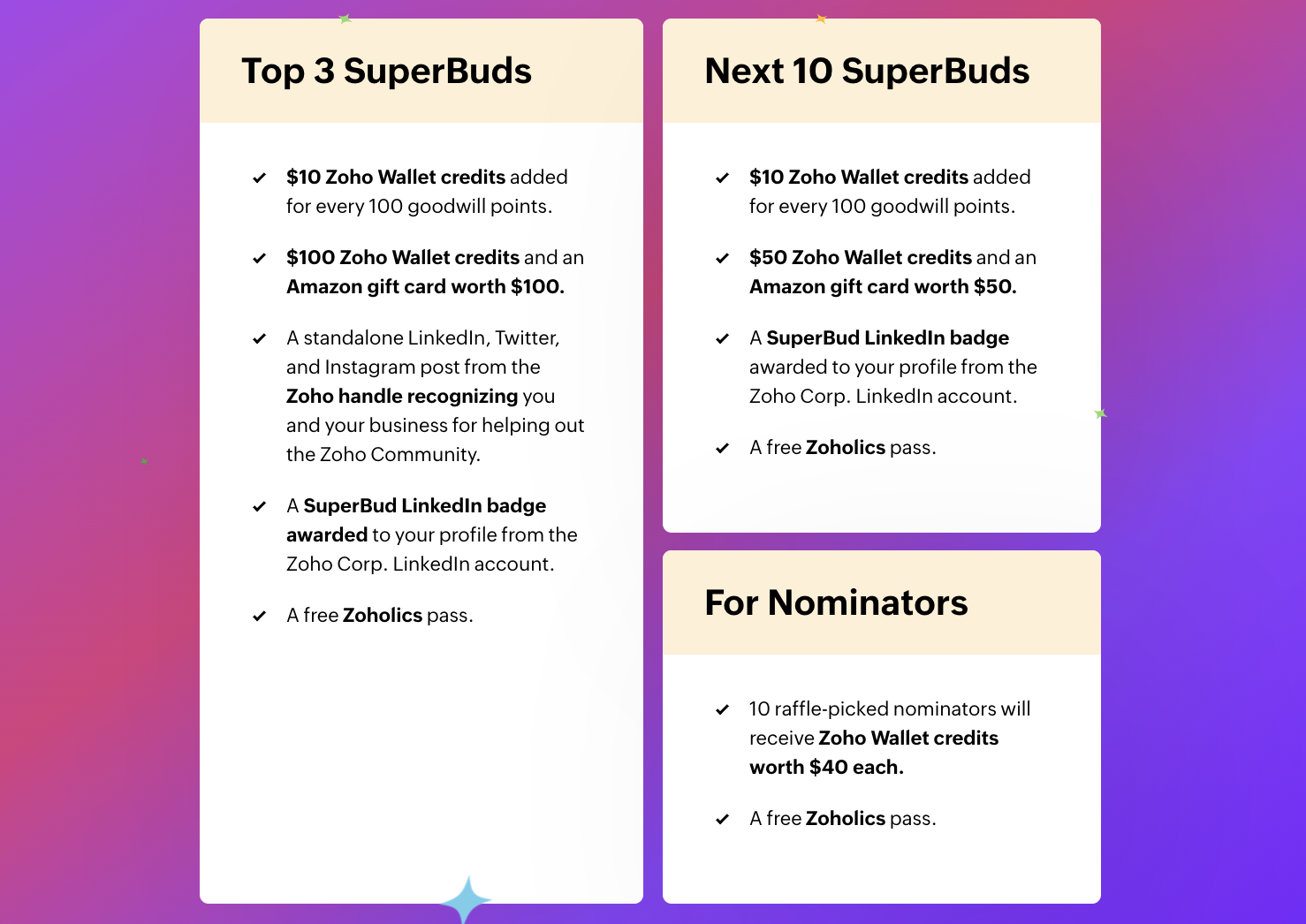
- The SuperBud nominees earn $10 wallet credits for every 100 goodwill points they receive
- The top 13 on the leader-board will win prizes in addition to these wallet credits
- 10 of the nominators get to earn rewards too. These winners will be raffle-picked.
How to participate:
If you are a Zoho user who has been receiving help or useful insights from fellow Zoho users, go on and nominate them to be a SuperBud!
Here's how you can nominate: (adds 10 additional Goodwill points to their profile) There are three channels in which you can nominate your SuperBuds. You can nominate on all the three channels as well:
1. Zoho Community Forums : (adds 10 additional Goodwill points to their profile) Simply use the comments section below to tag and nominate your SuperBud.Share your experience talking to them, any issues they've helped you solve, or useful discussions you had with them, and thank them in your comment.
2. On Social Media : (adds 10 additional Goodwill points to their profile) On any social media platform of your choice, make a post about your SuperBud using the hashtag #SuperBud and tagging @ZohoCommunity, and fill in this
form.
3. Nomination form : Once you've done that, nominate them using the form on this site, and we'll add points so they can advance up the leader-board.
Rewards for the SuperBuds and the nominators
You can also nominate SuperBuds at Zoho User Group meetups by handing out a SuperBud card directly to them. Here are some clips from some such exchanges!

Recent Topics
What's New - May 2026 | Zoho Backstage
Another month, another round of improvements in Zoho Backstage. We’ve been busy refining existing experiences and introducing new capabilities to help you plan, manage, and deliver successful events with less effort. Here’s a quick look at everything
Recurring Events Not Appearing in "My Events" and therefore not syncing with Google Apps
We use the Google Sync functionality for our events, and it appears to have been working fine except: I've created a set of recurring events that I noticed were missing from my Google Apps calendar. Upon further research, it appears this is occurring
Product sorting in Zoho Commerce - how can I influence standard behaviour?
Hello Zoho, I want to sort my products by e.g. name, SKU (Ascending / Descending) or by another attribute. I could neither find any solution in the settings, nor an entry in this help. Can you advice how this would work? Seems the standard sorting is
Dynamically prefill ticket fields
Hello, I am using Zoho Desk to collect tickets of our clients about orders they placed on our website. I would like to be able to prefill two tickets fields dynamically, in this case a readonly field for the order id, and a hidden field for the seller
Price Managment
I have been in discussions with Zoho for some time and not getting what I need. Maybe someone can help explain the logic behind this for me as I fail to understand. When creating an item, you input a sales rate and purchase rate. These rates are just
Workflow Assistance in Zoho CRM
Our client's sales team visits customers on-site and currently fills a physical paper form to capture customer details, and then separately re-enters the same data into Zoho CRM via the mobile app — resulting in double data entry. We want the salesperson
Integration problem between zoho crm and zoho forms for an update in zcrm, with two mapped custom fields
Hello everyone, I need to correct an existing integration between Zoho CRM and Zoho Forms: the use case is that a user needs to send an email to a contact, who will click on a button in this email, redirecting to a Zoho Forms. The contact can update or
Delivery Note without services
Hi all, It there a possibility to create a delivery note from an invoice without the listed services "idem type: service"? Thank you in advance, Michel
Automation Series: Auto-assign Task Followers
As task progresses, several users are required to stay aware of the updates to plan their upcoming work items efficiently. Manually adding users as followers for an active task might create additional overhead. With this automation, followers can be added
Send Email Directly to Channel
Hi, We are coming from Slack. In Slack each channel has a unique Email address that you can send emails too. I currently forward a specific type of email from my Gmail InBox directly do this channel for Verification Codes so my team doesn't have to ask
Terms & Conditions
I have defined Terms & Conditions in the invoice setting and have set %TermsAndCondition% where I want it to appear but nothing shows up in that area. Is this something we have to define per invoice or can we have a global variable?
Billing Status Update
Hello Latha, I’m working on a new automation (deluge) to fulfill one of our requirements. In this automation, there is a step to update the Work Order billing status from “Not Yet Invoiced” to “Non-Billable.” I tried to find the API information relevant
Export to pdf. Images not showing
My report contains a column with images. When I export it as a list, the images do not show in the PDF document. I have published the report but the images are still not visible. What should I do so that the photos appear in the export?
Zoho CRM Kiosk question – Passing Screen Fields to a Function
I am building a Kiosk in Zoho CRM to create new Supplier (Vendors) records. Current setup: Screen 1 contains user input fields: Supplier Name (Vendor_Name) First Name (First_Name) I created a Deluge function: createSupplier(vendor_name, first_name) The
パスワード
ログインするためのパスワード取得したい。
Associate Zoho Project with Deal that is in a specific stage?
Hi there, When a deal hits a certain stage, I'd like to associate it with an pre-exisiting zoho project? I am using blueprints. Using a custom function and deluge, how could I do this? I was thinking that the easiest option would be the modify the pre-made
[Product Update] Locations module migration in Zoho Books integration with Zoho Analytics
Dear Customers, As Zoho Books are starting to support an advance version of the Branches/Warehouses module called the Locations module, users who choose to migrate to the Locations module in Zoho Books will also be migrated in Zoho Analytics-Zoho Books
Canvases Auto-Skewing/Adding Scroll Bars When They Were Not There Prior
Is anyone else noticing rendering issues in their canvases today? It seems to be mainly icons which now have scroll bars added which makes them all look off, though some fields seemed to revert to squished length as well. Were the icons replaced with
New UI for Writer - Disappointed
I've been enjoying Zoho Writer as a new user for about 6 months, and I really like it. One of my favorite things about it is the menu bar, which you can hide or leave out while still seeing most of your page because it is off to the left. I think this
Client Script Button in Related List become invalid
Hi, I am the admin of our organization. And I setup a client script button in related list to raise payment refund request While this button become non selectable recently. I believe there is something wrong from zoho as this button had run for a year.
SMTP outgoing problem
Hello I have a website where the SMTP email is connected through Zoho Mail SMTP. Today I am no longer receiving emails from the website. Joomla shows that the email was sent successfully, but I do not receive it.
Fiscal year setting
Hi, I am looking into using Zoho Books. I cannot understand the organisation fiscal year setting. Our fiscal year runs from 1 April to 31 March. In the organisation profile, I need to set Fiscal Year to “April to March” and Start Date to “2” for the period
Issue with payments on invoices
Hello, I’m having the following issue. When I create an invoice and try to apply a partial payment in a single transaction, the system does not allow it — it only allows full payment. Is this the expected behavior, or am I missing some configuration?
auto add as member the contact owner
is there a way that i can make a zoho flow that will add the owner of the contact as a member of the chat after the round robin assignment?
Welcome to Zoho CommunitySpaces
Hello everyone, This is your space to ask questions, share ideas, and connect with others building and growing their own communities. For those new here, Zoho CommunitySpaces is a platform for building and managing online communities—from discussion spaces
Announcing new features in Trident for Windows (v.1.20.4.0)
Hello Community, Trident for Windows is here with some new features to elevate your work experience. Let's take a quick look at what's new. Export emails. You can now export emails in the .eml file format as compressed zipped files to create a secure
Announcing new features in Trident for Windows (v1.14.5.0)
Hello Community, Trident for Windows is here with new features to elevate your workplace productivity. Let's take a quick look at what's new. Add and edit contacts Previously, you could view all of your personal and organizational contacts in Trident.
Announcing Trident desktop app for Zoho Mail & Zoho Workplace users
Hello Community, I hope you are doing well and staying safe. As you know, our Mail & workplace teams have been constantly working on adding more value to our offerings to ensure you and your organization continue enjoying your Zoho experience. As part
Quick way to add a field in Chat Window
I want to add Company Field in chat window to lessen the irrelevant users in sending chat and set them in mind that we are dealing with companies. I request that it will be as easy as possible like just ticking it then typing the label then connecting
Please Remove the Confirmation Popup
Currently, every time a recruiter changes the status of a candidate in Zoho Recruit, a popup confirmation appears that requires clicking “OK, Got it” before proceeding. This creates unnecessary friction in the workflow, especially for users handling high
Team Module Issues?
We are testing Team Licenses for use by our Customer Service staff. I created a Teamspace called CSR and only assigned two users to this space: Administrator (me) and “Team License Test.” Team License Test is assigned to the Team User profile, with a
Announcing new features in Trident for Windows (v.1.41.5.0)
Hello Community! Trident for Windows just received an exciting update with new ways to collaborate and stay organized without leaving your workspace. Let’s take a look at what’s new! Integrate Zoho Meeting with Trident. You can now schedule, start, and
Zoho ERP | Product updates | June 2026
Hello users, We launched Zoho ERP on January 23, and since then, our goal has been to help businesses streamline and manage their operations with greater efficiency, flexibility, and control. Since the launch, we've continued to enhance the platform every
Zia Agent activation in Zoho Desk forces new Organization creation instead of deploying to existing one
While attempting to complete the deployment and activation sequence of a new Zia Agent within our existing Zoho Desk environment, the activation process failed on the user interface, throwing a generic error (see print). However, despite the activation
Allow native Webhooks to authenticate via Connections
Allow native Webhooks to authenticate via Connections (Basic Auth) instead of plaintext custom headers Summary Please allow native Webhooks (Workflow Rules > Instant Actions > Webhooks) to authenticate against the destination endpoint using the existing
How do page versions work these days?
I thought that Zoho Wiki had the capability to display previous versions of a page, and optionally reinstate them. But I can't find a current doc on this subject -- is there one? From what I remember, that capability was accessed via the Version number
Warehouse -> Locations Transition Causing Errors
After saying "okay" to the transition from 'warehouses' to 'locations', I've now got shipped Sales Orders that I cannot invoice. How does one proceed?
Problem with the blueprint flow.
Scenario: 3 departments in a single environment: A-B-C agents from department 1 D-E-F agents from department 2 G-H agents from department 3 Since we've been using Zohodesk (2023), agents can assign tickets to the correct department using the blueprint
Ability to run report over 180 days
Is there a reason Zoho limits the ability to run reports for records older than 180 days? In my view, the only reason I can think of is that it forces us to pay for Advanced Analytics (which I do).
Cloning a View
When I clone a View, it doesn't make a copy; it only creates a new copy with the same default fields as if I were creating a new view. What is the purpose of cloning if it doesn't bring in the same fields? Thanks Rudy
Next Page