Tip #13: Identify where your bookings come from with Source Tracking
Tip #13: Identify where your bookings come from with Source Tracking


Source tracking is the practice of identifying where your bookings originated. This is important, because online bookings come from a wide variety of sources like social media platforms, your website, email and ad campaigns, partner websites, organic traffic from search engines, and recommendations from previous clients. Understanding where your bookings come from enables you to make better decisions about where to focus your marketing efforts. If you can identify which channels are generating the most bookings, you can adjust your strategy accordingly and make more informed choices about pricing and promotions.


Use case

For example, if a hotel discovers that the majority of their bookings come from a certain online travel agency, they can engage in negotiations to secure better terms and discounts for their customers. This strategic move could result in more bookings from that channel, contributing to overall revenue growth.


In Zoho Bookings, you can implement source tracking by adding a hidden field to the booking form. Use a unique URL for each channel to specify the channel name in the hidden field. When customers book using those links, you'll be able to easily identify which channels are generating the most new customers and bookings.

Steps to implement source tracking:

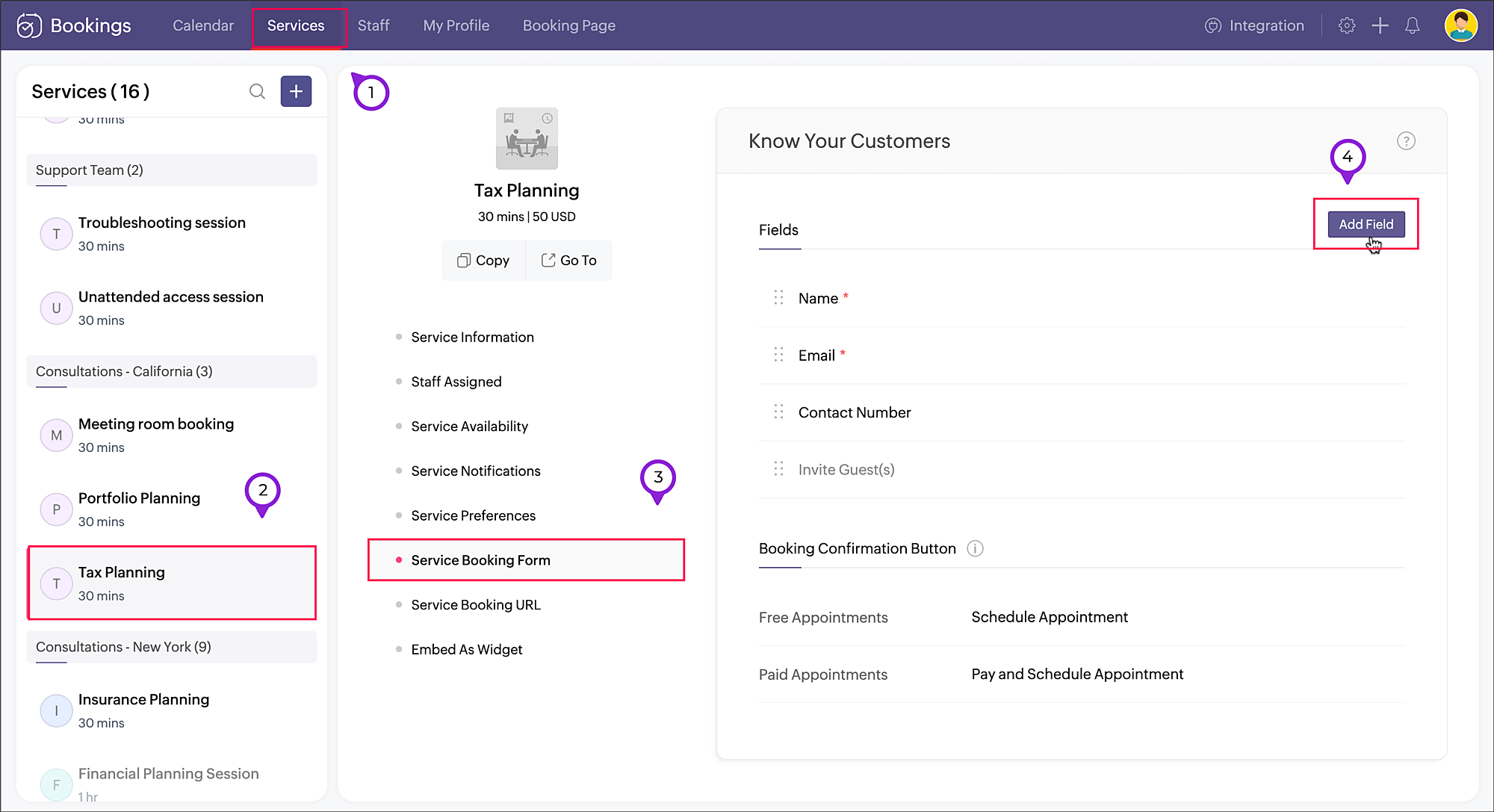
  1. Navigate to Services, select the required service, and click Service Booking Form. 
  2. Click Add Field in the right corner of the Fields section.


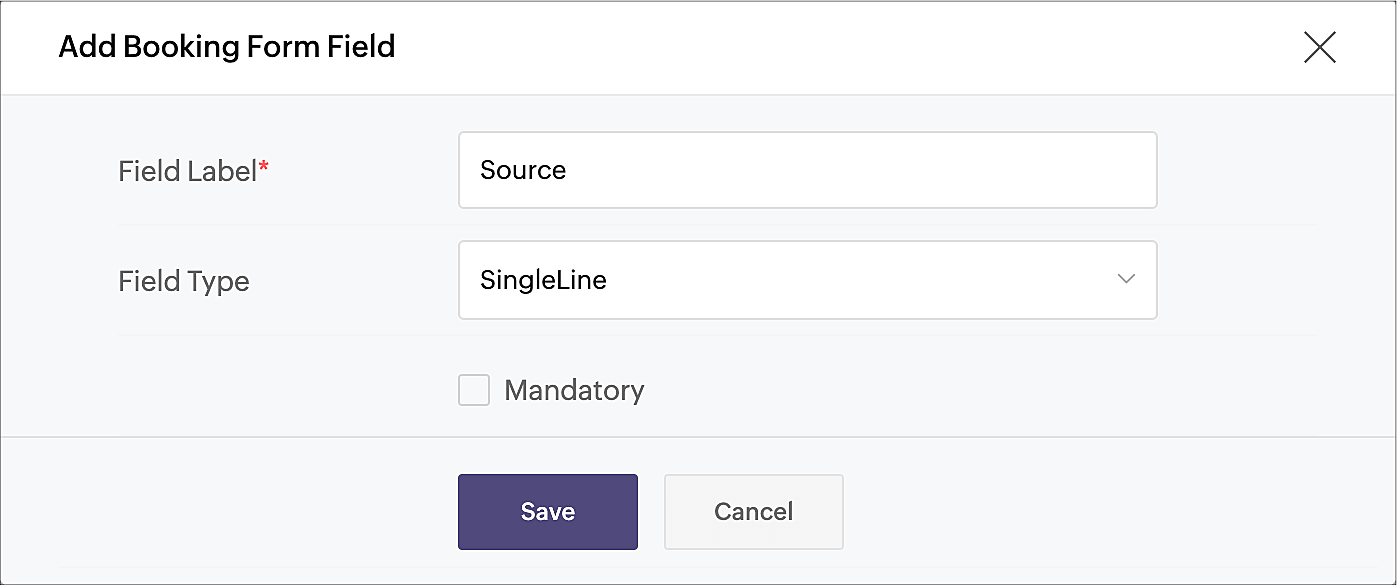
  3. A pop-up window will appear. Enter the Field Label as "Source" (or use any name of your choice). Choose SingleLine in Field Type, as we'll be using a limited amount of text in this field. Click Save


  4. Click the eye icon next to the Source field that you just created and make the field hidden in the booking form.
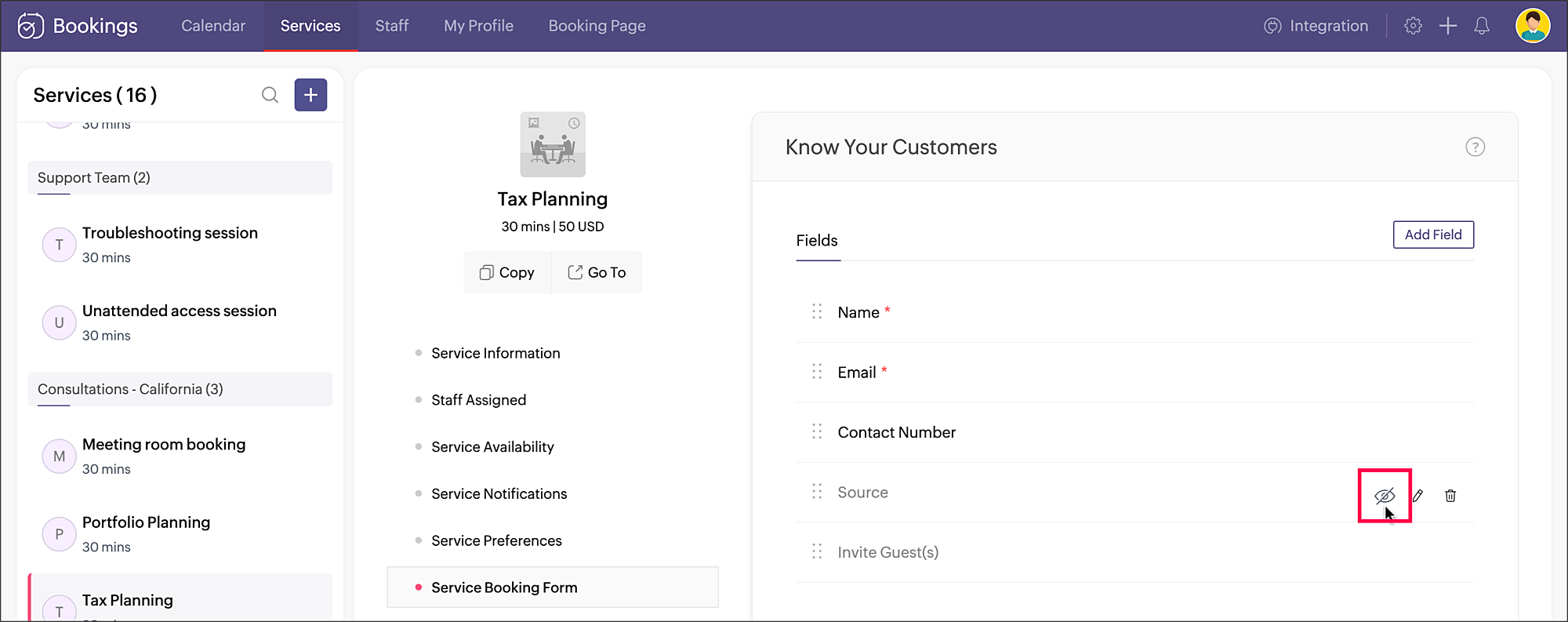


    Your source tracking is all set. When you share the service booking page link, add the source name accordingly. You can include the source value as a query parameter to the booking URL in the below format:
    <service_booking_page_URL>?source=<source_name>

    For example, lets say the above service Tax planning has the booking page link: https://business.zohobookings.com/#/customer/4050029000003367030.

    When this link is shared on Facebook, the source name can be added at the end: https://business.zohobookings.com/#/customer/4050029000003367030?source=facebook
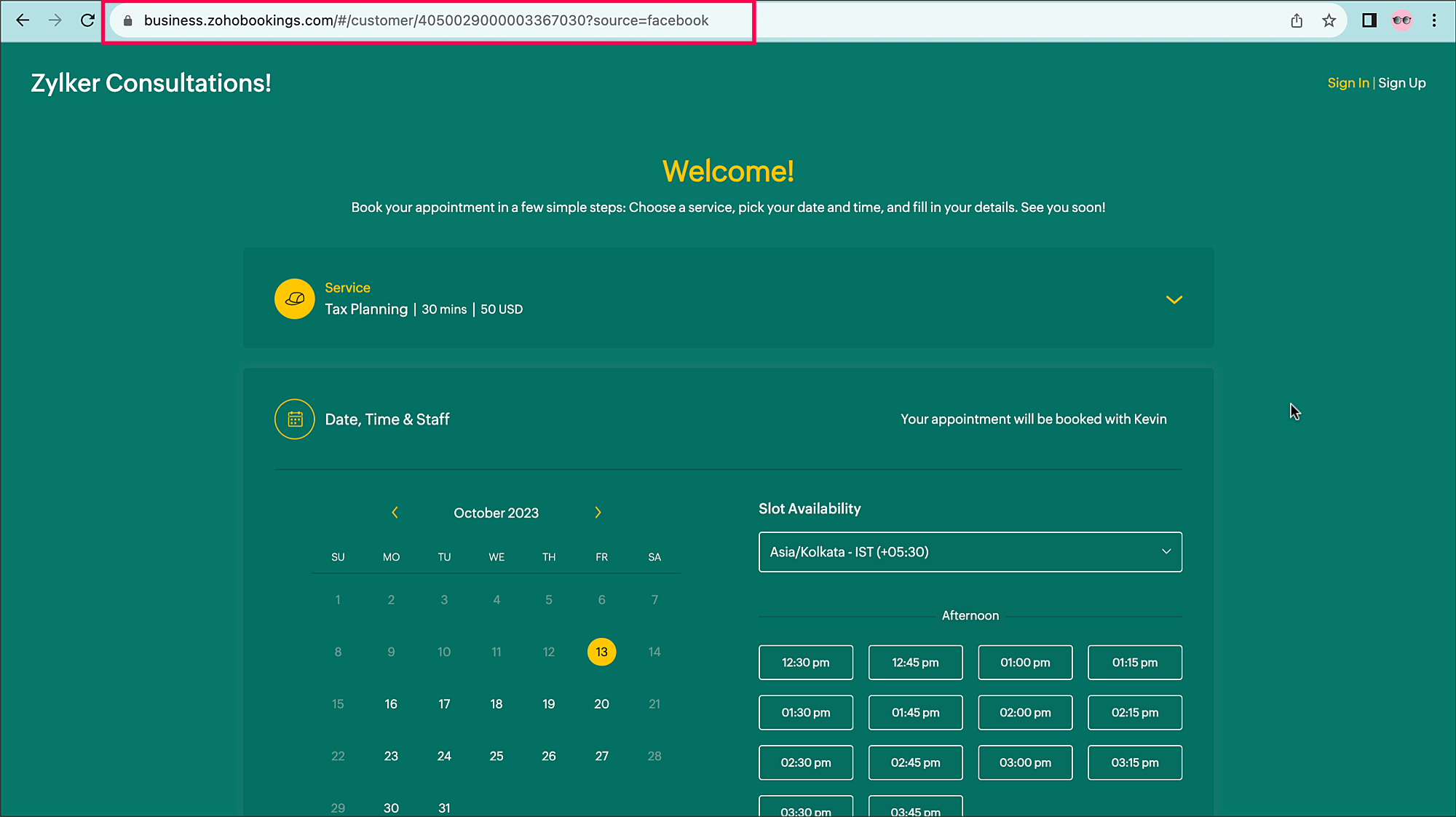


    You can easily add additional sources, such as:
    ?source=official_website
    ?source=partner
    ?source=email_campaign


    When an appointment is booked, the source name can be seen in the
    Appointment Summary under Additional Info.
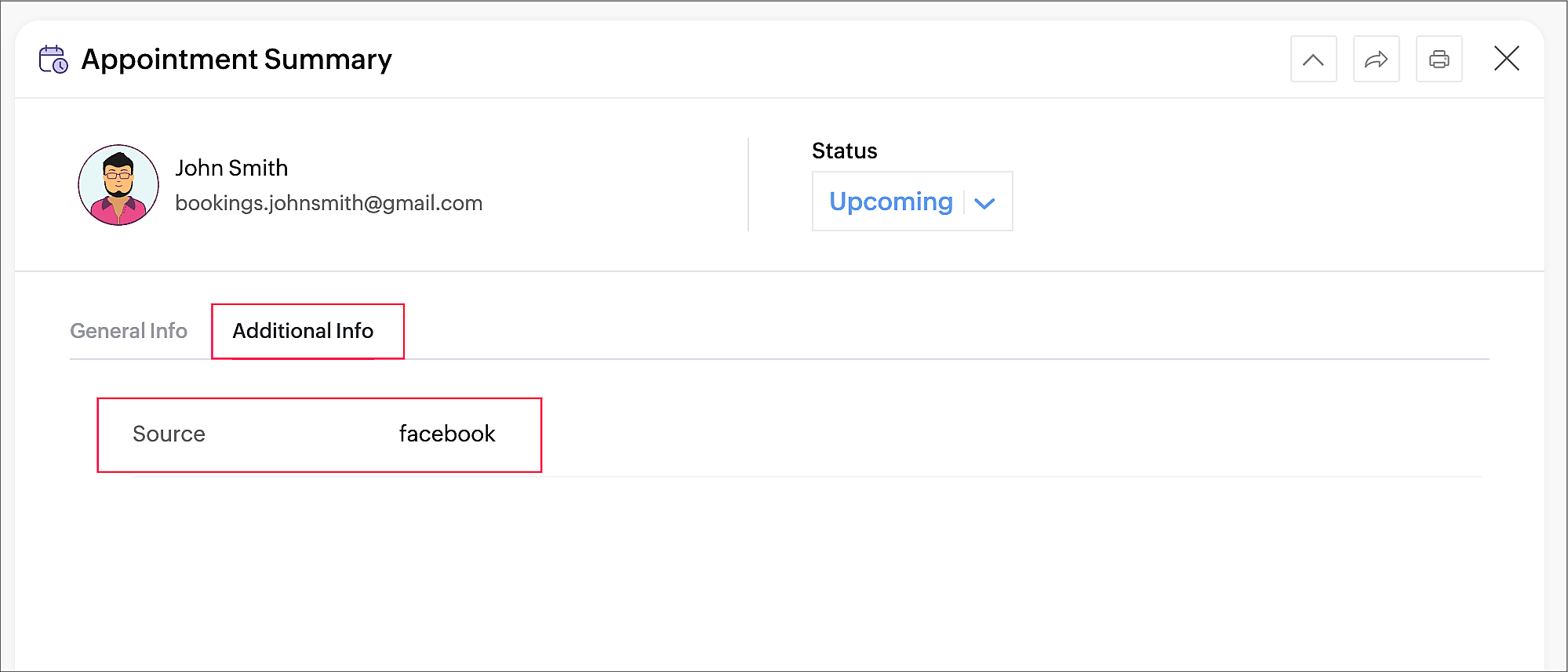
     

Tracking the sources of your bookings can help you identify which channels are effective for acquiring new customers and contribute the most to your revenue, so you can implement more targeted marketing and customer engagement strategies.

Thanks for reading! Please watch this space for more tips about online appointment scheduling.


Related Topics

Service Booking Form

    • Sticky Posts

    • Tip #13: Identify where your bookings come from with Source Tracking

      Source tracking is the practice of identifying where your bookings originated. This is important, because online bookings come from a wide variety of sources like social media platforms, your website, email and ad campaigns, partner websites, organic
    • Tip #17: How to mandate partial payment for your appointments

      When you require partial payments during the booking process, customers can only schedule with you after paying a certain amount in advance. This deposit acts as a commitment between both parties. Apart from that, it has many more advantages. Benefits
    • Tip #18: Organize a group workshop in a few steps

      It's the season for workshops—they're everywhere, catering to diverse interests and needs. Whether for more professional goals like leadership development or creative endeavors like painting, there's an abundance of workshops offered every day. A scheduler
    • Tip #16: Custom labels for staff, service, and resources

      Every industry uses its own jargon. Take healthcare, for example; when you visit a doctor, it's not just an appointment, it's a consultation. The people who provide consultations are the providers. Similarly, in the tranquil world of a spa, a massage
    • Tip #15: Customize service prices for each staff member

      It's common practice for a service to be priced differently based on the staff member providing it. For example, an experienced hair stylist may charge more for a haircut compared to the other stylists. This pricing strategy allows businesses to charge
    • Recent Topics

    • Customer Message Edit/Delete Function & Backend Visibility Inquiry

      目前客服已发送的对话支持编辑和删除功能,请问在 Zoho 系统后台,是否可以查看客服具体发送了什么内容,以及删除或修改了哪些信息?如果无法查看,这个功能是否可以通过设置关闭客服的编辑和删除权限?如可以,请告知具体设置路径。 Currently, customer service agents are able to edit and delete messages after sending them. In the Zoho system backend, is it possible to view
    • In App Auto Refresh/Update Features

      Hi,    I am trying to use Zoho Creator for Restaurant management. While using the android apps, I reliased the apps would not auto refresh if there is new entries i.e new kitchen order ticket (KOT) from other users.   The apps does received notification but would not auto refresh, users required to refresh the apps manually in order to see the new KOT in the apps.    I am wondering why this features is not implemented? Or is this feature being considered to be implemented in the future? With the
    • Sync Task Status from Zoho Projects to Zoho Desk

      Hi Zoho Desk Team, Hope you’re doing well. We’re actively using the Zoho Desk–Zoho Projects integration, which helps our support and project teams stay aligned. However, we noticed that when we change a task’s status in Zoho Projects, the change is not
    • Lost the ability to sort by ticket owner

      Hi all, in the last week or so, we have lost the ability to sort tickets by Ticket Owner. Unlike the other columns which we can hover over and click on to sort, Ticket Owner is no longer clickable. Is it just us, or are other customers seeing this too?
    • Placeholder doesnt work in email tempalate

      Hi Team,  I have put in the customer happiness rating place holder in my email template but when I pick the template in my ticket and send it to client, the place holder doesnt get generated. What am I missing here? screenshot attached. 
    • Search API filter/sort ignores comment-triggered modifiedTime updates

      Summary When a comment is added to a Call or Account, the parent record's modifiedTime is correctly bumped. This bumped value is visible in: GET /api/v1/calls/{id} ✅ GET /api/v1/calls/search without a filter ✅ — the record's response body shows the new
    • Automation#17: Auto-Create Tasks in Zoho Projects Upon Ticket Creation in Zoho Desk

      Hello Everyone, This edition delivers the solution to automatically create a task in Zoho Projects when a ticket is created in Zoho Desk. Zylker Resorts uses Zoho Desk for bookings and handling guest requests. Zylker resorts outsources cab bookings to
    • Introducing parent-child ticketing in Zoho Desk [Early access]

      Hello Zoho Desk users! We have introduced the parent-child ticketing system to help customer service teams ensure efficient resolution of issues involving multiple, related tickets. You can now combine repetitive and interconnected tickets into parent-child
    • Cross Module Filtering – Use Fields from Lookup modules in Custom Views criteria and Advanced Filters

      Hello everyone, Zoho CRM now enables you to achieve deeper filtering of records in a module, using fields of a lookup, thereby enhancing your data management experience manifold. This filtering based on lookup module fields is now available in advanced
    • Schedule Timeout 5 minutes vs. stated 15 minutes

      I am running into a function run timeout error after 5 minutes for my schedules. The Functions - Limits documents states it should be 15 minutes: Functions - Limits | Online Help - Zoho CRM. What should it actually be? Due to the 5 minute timeout, I'm
    • Printing invoice from creator using writer

      Hello. I have created my invoices using Zoho Writer and i'm sending data to them from Zoho Creator by selecting a row in a report and then clicking a button which has workflow connected to it to send the date to the invoice in writer. This is working
    • Remove Bounced email addresses from CRM after running a campaign

      HI, Is there a simple way to remove bounced leads in the CRM where there email doesn't exist anymore after running a campaign?
    • CRM Notes

      Hello, We want to add a Note to the Contact record when a Note is added to a Case or Deal. I wasn't able to do this using a workflow, so I tried using Zoho Flow, but that didn't work either. Does anyone have a suggestion on how we can accomplish thi
    • Building a custom site

      do we have an option in Zoho to build custom sites like adding custom functionalities? want to make a site like jumble puzzle answers for today. Is it doable? Please assist.
    • How to Automate an Unsubscribe based on Scoring

      I automatically assign a negative point score to bounced emails and would like to automate unsubscription of these emails from our Campaigns, without losing the contact data. (Oftentimes the lead is no longer at a business, but I want to keep the business
    • Introducing PDF conversion in Deluge

      Hello everyone, We're pleased to introduce built-in PDF conversion capabilities in Deluge with the launch of the convertToPDF task. As PDF is one of the most widely used formats in professional environments, this task helps streamline document generation
    • Recurring Addons

      Hi, I know you can set the pricing interval for addons to weekly, monthly and yearly & set it for one off or recurring, which these are fine as a base addon item. It really would be helpful if when creating a subscription when you add on the addon item
    • Start Workflow from Deluge Script

      I have developed a customized process from our CRM that leverages a deluge script to create a statement of work document. Once the document has been created via the merge and store function, I would like the ability to start a workdrive review & approve
    • Re: Application Architecture in Zoho Creator — A Platform-Specific Deep Dive

      A recent community post on application architecture made some excellent points about planning architecture early in Zoho Creator projects. The core message is right — Creator applications have a habit of growing organically into maintenance nightmares,
    • Option+C shortcut conflict

      In the latest Cliq release, you introduced `Option+C` shortcut to start a new audio call. In Polish, `option+C` is used for letter `ć`. I changed this button combo but `Option+C` is still being blocked and doesn't allow me to write letter `ć`.
    • Zoho Books | Product updates | April 2026

      Hello users, Welcome to our April 2026 product updates roundup! Highlights include profit margin for sales transactions, insights in reports, recording deposits from undeposited funds in banking, and faster production workflows with improved assembly
    • Need Easy Way to Update Item Prices in Bulk

      Hello Everyone, In Zoho Books, updating selling prices is taking too much time. Right now we have to either edit items one by one or do Excel export/import. It will be very useful if Zoho gives a simple option to: Select multiple items and update prices
    • What is the maximum length/size of a presentation on Apple TV?

      Hello, I have a presentation here that I regularly show on Apple TV. It’s always the same presentation, which keeps getting longer and more extensive over time. Almost every slide contains a graphic or photo that takes up the entire slide. That means:
    • Items Landed Cost and Profit?

      Hello, we recently went live with Zoho Inventory, and I have a question about the Landed Cost feature. The FAQ reads: "Tracking the landed cost helps determine the overall cost incurred in procuring the product. This, in turn, helps you to decide the
    • How to set custom Sales Order numbers

      I am trying to create Sales Orders with data from Jotform submissions. Auto number generation is disabled within Books. Whereas the flow Input recognizes the number (40732 in this example), the Output does not. How can I fix this? I'd like the number
    • Differences - Blueprint vs. Approval Process

      Cannot seem to get my head around the key differences between the Blueprints and the Approval Process. For me it seems like different flavours of more or less the same thing - especially now that we have the option of Record Locking. Have a quote to sales
    • Displaying Rate Inclusive of GST per unit

      Hello, Currently when I enter the pricing of a line item it shows the overall amount (price including tax * quantity). I would like to see price/unit inclusive of GST. Is there any way to simplify this and to be able to view it? I've attached my current
    • RouteIQ user Licensefor Non–Zoho One User

      Zoho RouteIQ needs to be purchased for Zoho CRM. The current setup uses the Zoho One plan, but RouteIQ is required for a different user who is not part of Zoho One. However, they need access to routes and customer details within RouteIQ for planning their
    • Zoho Flow not handling Boolean properly

      Hi, I have a checkbox in one system that I'm trying to sync with a checkbox in Zoho CRM. The value from the source system comes in as blank (unticked) or 1 (ticked). I've written the following custom function to convert the output to either boolean false
    • Set Default Status of Assembly to "Assembled" When Entered in UI

      I've just discovered the new "confirmed" status of Assemblies within Inventory. While I understand the intent of this (allowing for manufacturing planning and raw material stock allocation), it was initially confusing to me when manually entering some
    • Introducing the New Applications Module

      We're excited to introduce the Applications module, a powerful new feature designed to revolutionize how you manage job applications. This module offers a more streamlined, efficient approach to tracking and processing candidates throughout your recruitment
    • Zoho Browser??

      hai guys, this sounds awkward but can v get a ZOHO BROWSER same as zoho writer, etc. where i can browse websites @ home and continue browsing the same websites @ my office, as v have the option in Firefox, once i save and close the browser and again when i open it i will be getting the same sites. If u people r not clear with my explanation, plz let me know. Thanks, Sandeep  
    • since the new interface of ZOHO writer can't turn of automatic reminder option for merge documents

      Since the new interface of ZOHO writer I have this problem. I have a large set of templates that I use to send documents to ZOHO Sign. But now in all those templates the box for Sending reminders is ticked, which i don't want. But even if I untick the
    • Sales Allowed Beyond Available Stock and Payment Recorded Without Restriction

      Hi, While testing in Zoho Inventory, I noticed that a sales order can be created with a quantity exceeding the available stock in the selected warehouse. In my case: Available stock: 5 units Ordered quantity: 6 units Despite this: I was able to convert
    • Function #25: Automatically generate purchase orders from a sales order

      We kicked off the "Function Fridays" series with the goal of helping you automate your everyday accounting tasks. As we delve into today's post, I'm delighted to announce that we're here to present the 25th custom function in this series. While it is
    • How can I add Material cost to a project?

      Hello, We use Zoho project to manage scheduled work. This consists in labour tasks and matrials cost. How can I add the material budget, then teh cost to the project? Thanks Barbara
    • Users I've shared the sheet with cannot use the Custom Functions

      Hi, I have a Zoho Sheet worksheet that I shared to 2 colleagues, giving them full access: In that worksheet, I created a button with a custom Deluge function and it works flawlessly for me: For those I shared the worksheet to, when they click the button,
    • Mail bounces due to bad reputation

      Good evening. I'm seeing these errors from both hotmail/outlook and yahoo, as well as hard bounce from Virgin Media and talktalk for some time now. Bounce category: Connection issues Reason: uncategorized-bounce Message: 4.7.650 The mail server [136.143.188.237]
    • Automation Series #3: Macro vs Workflow in Zoho Desk

      Workflows vs Macros in Zoho Desk: Choosing the right help desk automation This post is part of the "Desk Automation Series," Chapter 1. Through this series, we will help you choose the right automation type in Zoho Desk by comparing commonly confused
    • WO Completion Status Not Updating Automatically

      Hello Latha, Hope you are doing well. Over the past few days, we have been facing an issue with WO completion. When an AP is marked as complete, the work order status is not automatically updating to “Completed,” and we have to mark it manually. Could
    • Next Page