In Zoho Analytics, small tweaks can lead to big insights. One such feature is Conditional formatting based on other columns, your key to instantly spotting where sales success is overshadowed by product returns.
Our tip this week shows you how to apply conditional formatting across columns to uncover products and categories that look like top performers in sales but reveal a different story once returns are factored in.
The Big Picture
High sales don’t always mean healthy business. A category may dominate revenue, but if product return rates are unusually high, your profits and customer trust take a hit. Looking only at sales hides this risk.
Conditional formatting based on return rates bridges that gap. It helps you go beyond surface numbers and focus on product quality and customer experience.
In this demo, we’ll start with a pivot table arranged as follows:
Columns: Month
Rows: Product Category
Data: Sales (USD), Return Rate (%)
Get ready to see how sales dominance changes month to month and how return rates reveal a deeper layer of truth.
We’ll highlight three eye-catching zones using conditional formatting:
- Healthy Zone - Low returns
- Warning Zone - Rising returns
- Critical Risk - Unacceptable return rates
By the end of this demo, sales won’t just be tall bars on your pivot; they’ll instantly tell you which categories are fueling sustainable growth, and which ones are silently eroding your margins.
Check out the video here:
Steps to Apply
- Open your Pivot Table.
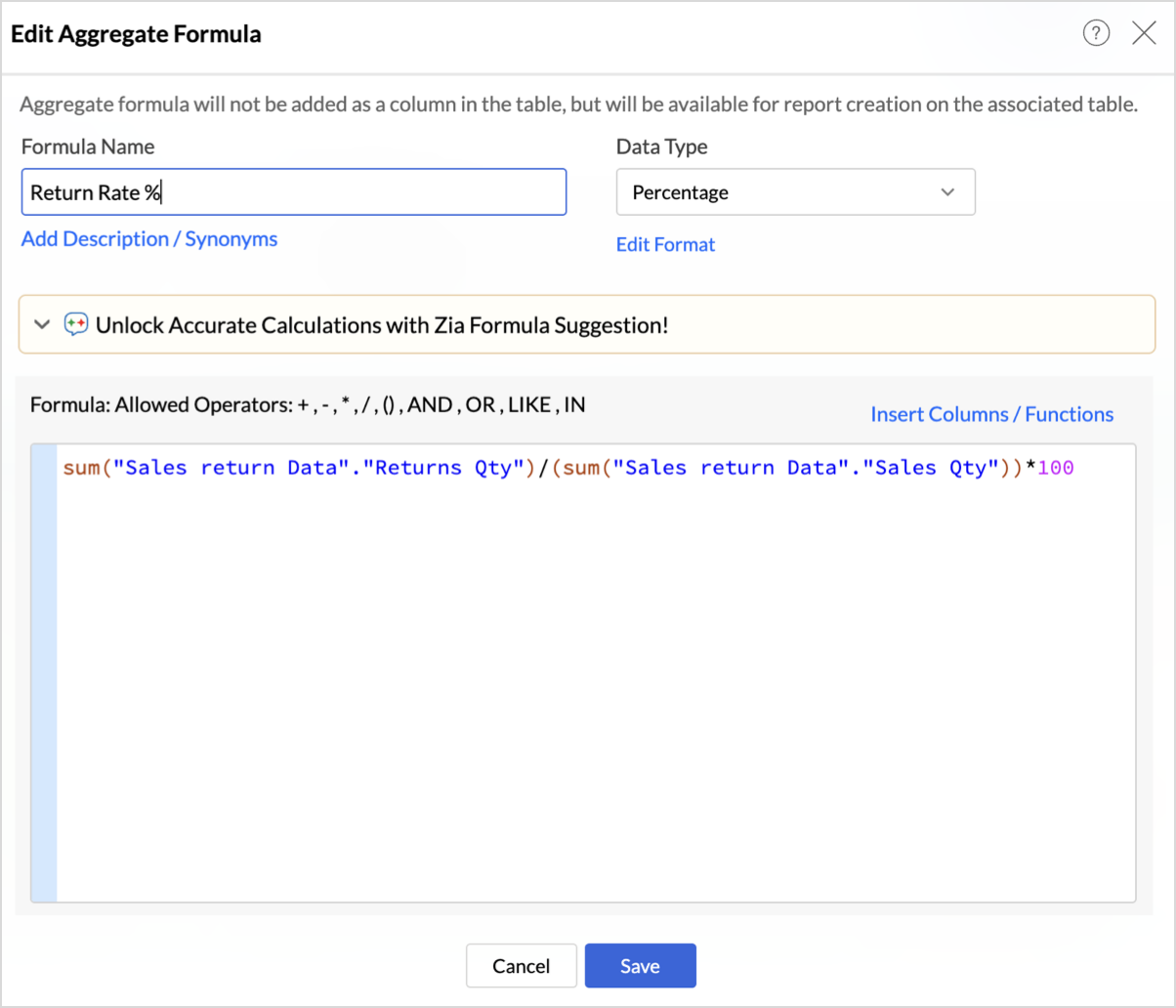
- Creating Return Rate Formula:
- Click Add Aggregate Formula.
- Enter Formula name as Return Rate.
- Define the metric as below:
sum("Sales return Data"."Returns Qty")/(sum("Sales return Data"."Sales Qty"))*100
This formula calculates the percentage of sold items that were returned, giving you the Return Rate % for each product category and month in your pivot.
- Click Save.

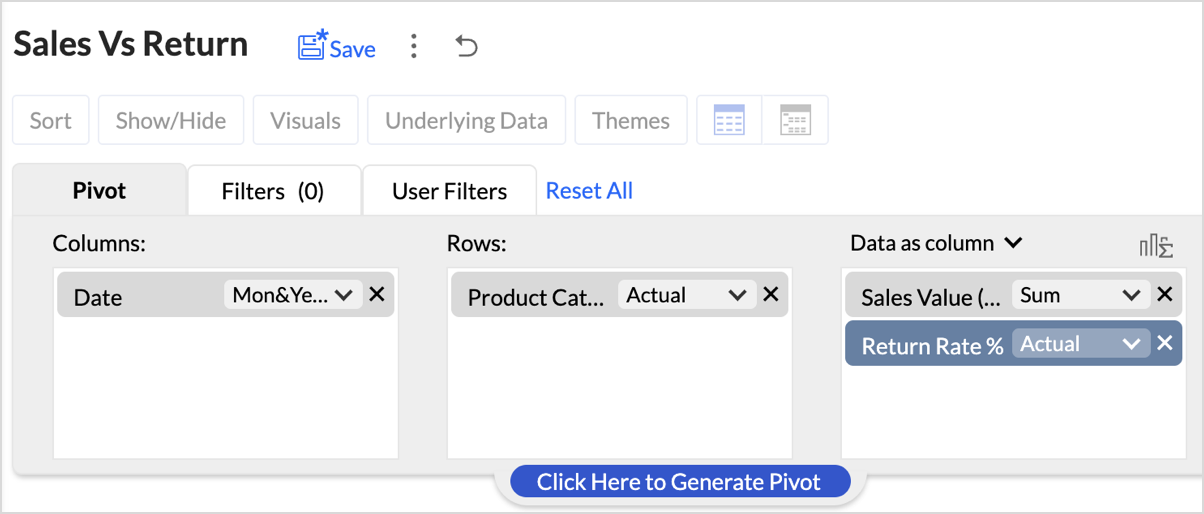
- Set up your pivot table as shown below.
- Columns: Month
- Rows: Product Category
- Data: Sales (USD), Return Rate (%)
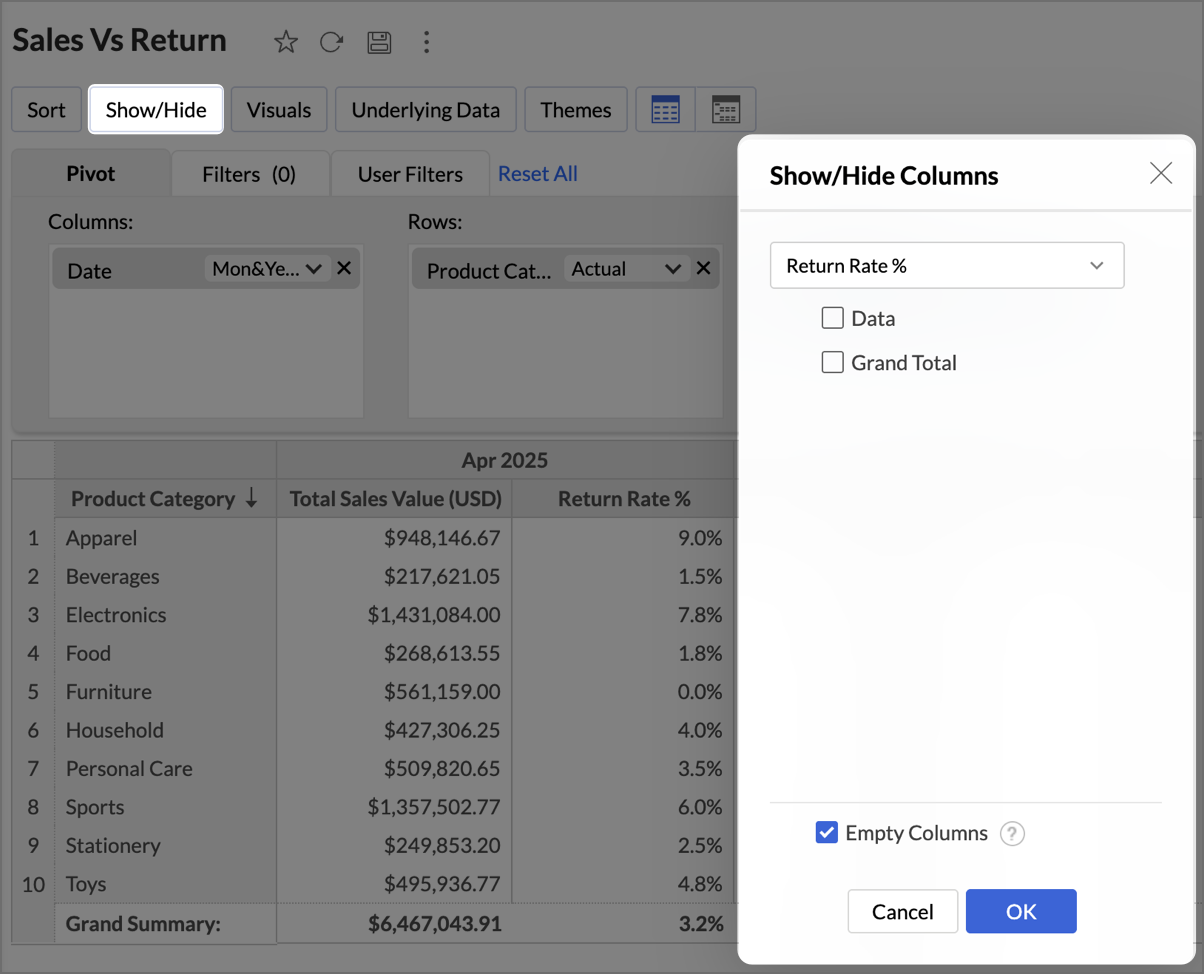
- Hide the Return Rate % column from the pivot as shown below.
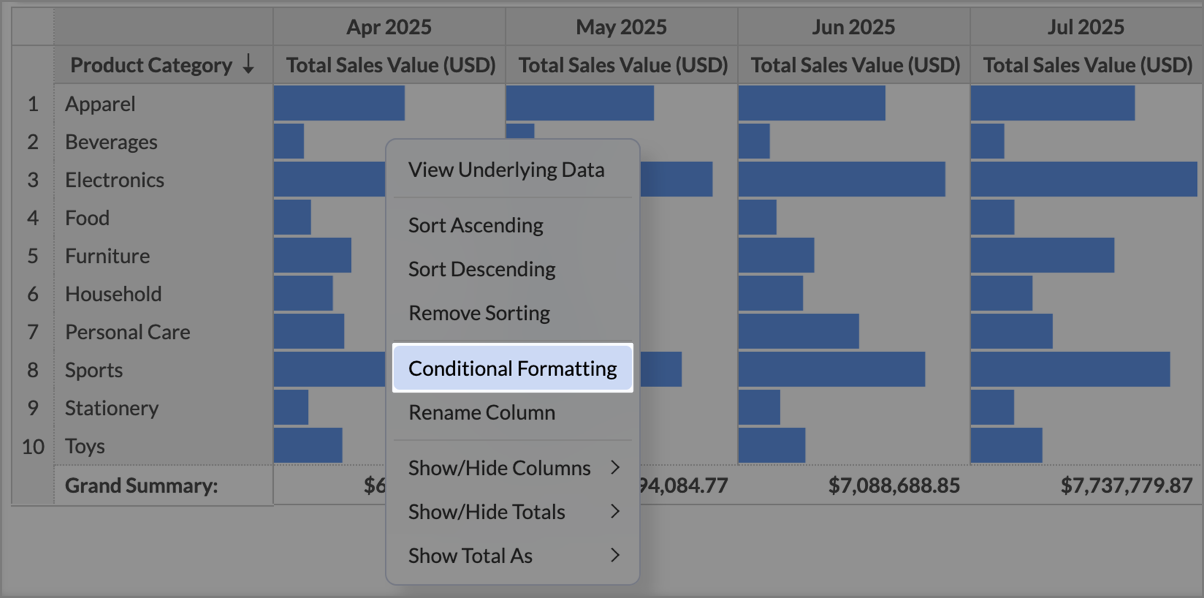
- Click Visuals and select Only Data Bars.
- Right-click on any Sales cell and select Conditional Formatting.
- In the Conditional Formatting dialog, under Based On, choose Return Rate (%).
- Define three conditions based on the following zones:
- Critical Risk - Set the condition as Greater than or Equal to 10 and choose Red fill in Additional Formatting options.
- Warning Zone - Set the condition as Between 5 to 10 and choose Amber fill.
- Healthy Zone - Set the condition as Less Than or Equal To 5 to 10 and choose Amber fill.
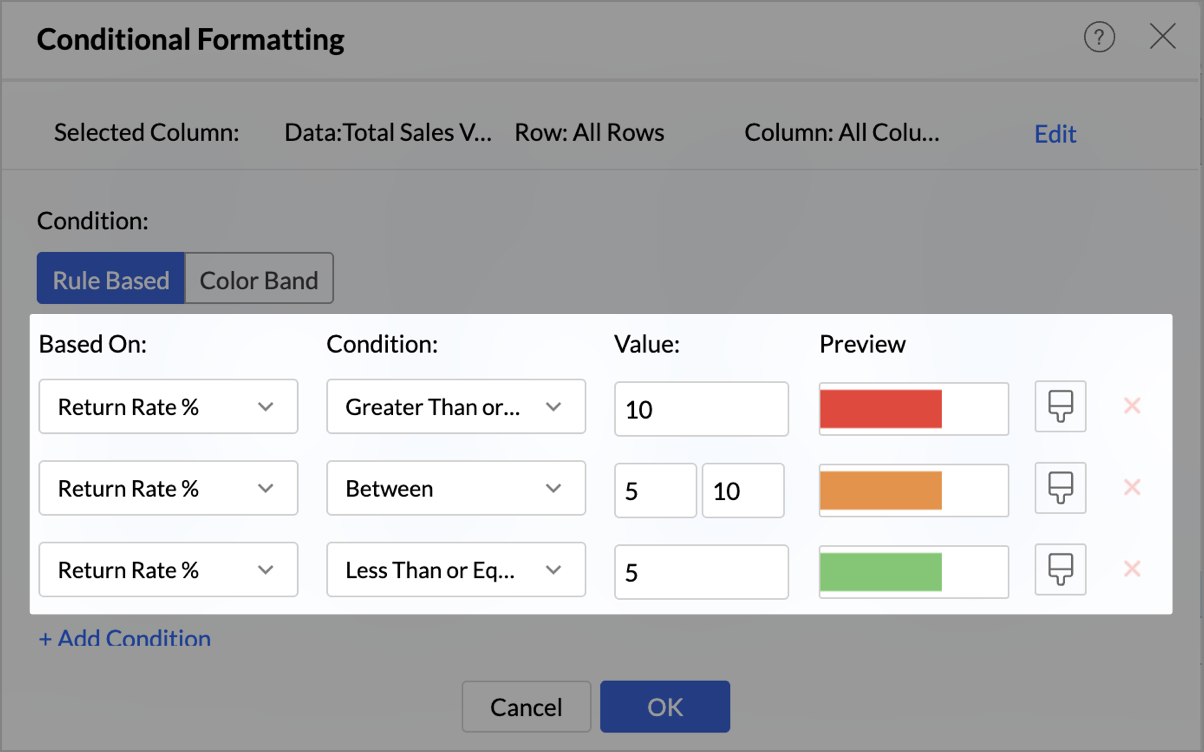
- Click OK to save the conditions.
What you should see
- Green Sales Bars where return rates are low → sustainable business.
- Amber Bars where returns are rising → early warning.
- Red Bars where sales are hit by high returns → high-priority fix.
With one glance, your pivot now tells a double story: who’s leading in sales and who’s at risk due to high returns.
Best Practices
- Highlight what matters most: Focus on key risk signals like high return rates or unexpected spikes. This keeps the pivot sharp and attention where it belongs.
- Use KPI-driven thresholds: Base your rules on meaningful KPIs (like Profit Margin % or Return Rate %), not arbitrary numbers. This ensures the colors always map to business impact.
- Keep colors intuitive: Stick to natural associations: Green = Healthy, Red = Risk, Orange = Caution. This makes insights instantly recognizable for everyone.
- Pair visuals for impact: Don’t stop at colors. Combine conditional formatting with Data Bars to highlight magnitude, or Sparklines to reveal trends over time. Layering visuals makes patterns clearer without adding extra clutter.
- Test across different data ranges: For broader cues, try Color Bands to show intensity (like a heatmap of return rates) or Icon Bands to flag quick signals
- Avoid overlapping rules: Overlaps can confuse users. Keep each condition distinct to avoid conflicting colors on the same cell.
- Explore Color Bands and Icon Bands: If you want a broader visual cue beyond rule-based formatting, try Color Band (gradient shades that show intensity, like heatmaps) or Icon Band (symbols that signal performance trends). These are especially effective where quick scanning matters more than raw numbers.
- Think ahead for storytelling: Design your formatting with the end reader in mind. The goal isn’t to decorate numbers; it’s to tell a story at first glance.
When done right, conditional formatting turns pivots into a decision board. Your wins glow green, your risks flash red, and your opportunities pop out without a single extra click.
Keep Exploring
- Help Documentation
- Pivot Tables in Zoho Analytics
- Conditional Formatting in Pivot
- Visuals in Pivot
- Help Videos
- Creating Pivot tables
- Adding Visuals in Pivot table
Recent Topics
Automatic Matching from Bank Statements / Feeds
Is it possible to have transactions from a feed or bank statement automatically match when certain criteria are met? My use case, which is pretty broadly applicable, is e-commerce transactions for merchant services accounts (clearing accounts). In these
Zoho Desk Android and iOS app update: Access multilingual templates on the IM module
Hello everyone! We have introduced multilingual templates on the IM module of the Zoho Desk mobile app allowing you to send IM template messages in translated versions. iOS: Android: Please update the app to the latest version directly from the App Store/
Can't login IMAP suddenly
Since this evening I'm getting the error: You are yet to enable IMAP for your account. Please contact your administrator... IMAP always been enabled in my account and was workign fine for the past 7 years. Already tried turning IMAP off and on again.
Zia Profile Summary now supports six languages and responds faster
After numerous customer requests, we’ve expanded Zia Profile Summary to do more than just summarize resumes quickly. It can now summarize them in six different languages and deliver results even faster. What’s New 1. Extended language support Zia can
Nimble enhancements to WhatsApp for Business integration in Zoho CRM: Enjoy context and clarity in business messaging
Dear Customers, We hope you're well! WhatsApp for business is a renowned business messaging platform that takes your business closer to your customers; it gives your business the power of personalized outreach. Using the WhatsApp for Business integration
CRM x WorkDrive: File storage for new CRM signups is now powered by WorkDrive
Availability Editions: All DCs: All Release plan: Released for new signups in all DCs. It will be enabled for existing users in a phased manner in the upcoming months. Help documentation: Documents in Zoho CRM Manage folders in Documents tab Manage files
Custom buttons
Getting Error "You can only create 10 custom buttons per module" ! I already have more than 10 for 1 module before trying to create another. Is this a new restriction brought about by the all knowing what's best for businesses Zoho guru ? It would be
Client Script | Update - Support for List Page (Canvas) and Notes
Hello everyone! We are glad to announce two exciting updates in Client Script. Client Script support for List Page (Canvas) Client Script support for Notes These open the door to more dynamic and interactive customizations! 1. Client Script support for
Desk Field Not Showing in Analytics
Hi there, I recently added a field to our Zoho Desk Ticket Information. I went and added the data retrospectively to the tickets. It is also marked as required, so all new tickets cannot be closed off without it being filled in. When I try to run a report
COD with Partial payment
Two reasons why we need COD with partial payment option. 1) Since we deal heavy weight products our shipping costs are too high. If shipment is rejected by customer we incur huge loss. 2) Some competitors place fake orders with different names and return
Pincode based Product Restriction
we have different types of products. 1) Very bulky items like plywood. 2) Too delicate items like glass These type of products we want to sell to local customers. Other products we want to supply all over India. There should be an option to restrict products
Pincode Based Pricing
We want to give extra discount to customers within city limits because our shipping and packing costs are less. My proposal is assign list of pincodes to price list and assign the price list to customers whenever they sign up with pincodes. Also show
feature question: lookup field in Projects task layout
Hello, Below we have interface to configure a custom task layout, however, we need a lookup field to let pickup data from other apps, such as Zoho CRM Products module, is that possible or already in your roadmap? or a workaround to achieve it? Thanks in advance.
Error AS101 when adding new email alias
Hi, I am trying to add apple@(mydomain).com The error AS101 is shown while I try to add the alias.
Download a writer template as .docx instead of .pdf.
I have been trying to implement a feature to download a writer template as a .docx and got it working partly but it isn't good. Earlier I checked our code and I saw openurl("https://crm.zoho.com/crm/org121314/specific/Template.do?action=print&step=pdfPreview&id="
Can we do Image swatches for color variants?
We want to do something like the attached screenshot on our new zoho store. We need image swatches instead of normal text selection. We want to user to select an image as color option. Is this doable? I don't see any option on zoho backend. Please h
Account in Quick View Filter
I have a report that I often run against a specific Account. Every time, I have to go into the edit menu and change the Advanced Filter. I would prefer to use the Quick View Filter, but it does not allow me to use the one and only field that makes any
Paste issues in ZOHO crm notes
Hi, since a week or so I have issues with the paste function in ZOHO CRM. I use "notes" to copy paste texts from Outlook emails and since a week or so, the pasting doesnt function as it should: some text just disappears and it gives a lot of empty lines/enters.....
Calendar not working
Are we the only ones. On any browser we cannot click on any of our calendar appointments and get them to open. They just make the browser loop. WE have reached out and have been told they are working on it. The office staff are really stuck. The point
WhatsApp Message Template Quick Reply Buttons
Hello, I created my first Message Template to overcome the 24-hr messaging window and it was approved by WhatsApp/Meta. When I go to Meta, I also see that template brought from Zoho Desk, and used it via Zoho Desk IM. However, I notice that when in Meta's
Resizing a Record Template Background Inage
Hi everyone, I have an issue which I can't seem to resolve: Basically, I'm designing a record template in certificate form. I've specified A5 landscape. I've set my background image the same dimensions with total pixels at 443,520. Whatever I try, when
What's New in Zoho Analytics - October 2025
Hello Users! We're are back with a fresh set of updates and enhancements to make data analysis faster and more insightful. Take a quick look at what’s new and see how these updates can power up your reports and dashboards. Explore What's New! Extreme
Zoho Analytics & SQL Server - Live connect
Below are the steps I did Created a fresh database and table in my own virtual server Created a new data source connection with live connect I was able to select the tables and created the data source successfully I am getting the error when I try to
Explore the Redesigned Quotes Module in Zoho Billing
Dear users, We’re excited to introduce a refreshed look for the Quotes details page in Zoho Billing! This update brings you a more efficient user interface experience without changing your existing workflow. We've enhanced layouts with organized tabs,
Latest updates in Zoho Meeting | Create departments, Share PDF files
Hello all, You can now create departments to group team members within your organization. This will make it easier for you to organize department-level meetings and invite members. In webinars, use the Share material feature to share PDF files directly
Unify All Zoho Video Meeting Experiences into One Standardized Platform
Hi Zoho Team, We would like to share an important user experience concern regarding the current state of video meeting functionality across the Zoho ecosystem. The Problem Within Zoho, there are multiple ways to initiate or schedule a video meeting: Zoho
[Free Webinar] Product Updates: Quick Catch-Up Session - Part I - Creator Tech Connect
Hello Everyone! We welcome you all to the upcoming free webinar on the Creator Tech Connect Series. The Creator Tech Connect series is a free monthly webinar featuring deep-dive technical sessions designed for developers, administrators, and app builders.
Project expenses in Zoho Books
Just the way timesheet is used to calculate labour cost for a particular project, how do i record other expenses against a project such as materials and consumables used for the project? So that under report, I can view the total amount expended on each
Blueprint status change
I want to change the Blueprint status of a workflow. The status is completed automatically when I added the record through API call. But I want to make it active, I don't see any options for this. Even if I draw transition from any stage , it is not visible
Integrate Projects for Desk KB article release tasks
Could you please look into the possibility of integrating project tasks for Zoho Desk article release processes? We are looking for an internal integration between Zoho Projects and Zoho Desk's KB article drafting, reviewing and releasing tasks. We could also settle with custom functions if the publication of articles can be controlled from Zoho Projects. We want to be able to assign tasks to content creators, reviewers and approvers from within Projects and be able to publish them after the approval
What is going on with GMail extension.
Suddenly, it is popping up and saying "Please wait while we work our magic... 10%" and it sits there. Yesterday I waited for an entire hour call and it never got further. Today, it's not resolved. Is there a fix I can do? I've tried all the typical
Collapsible Sections & Section Navigation Needed
The flexibility of Zoho CRM has expanded greatly in the last few years, to the point that a leads module is now permissible to contain up to 350 fields. We don't use that many, but we are using 168 fields which are broken apart into 18 different sections.
Marketing Tip #6: Cross-sell with related products
Don’t let customers stop at just one product. Suggesting related or complementary items improves the shopping experience and increases order value. Try this today: Use the Item Recommendations feature in Zoho Commerce and add two to three suggested items
i cannot use <b></b> to bold the message in Creator C6!!!!???What?
Dear experts and friends, Now Creator 6 blocking us from using <b></b> Anyone facing this issue? I faced it on Creator C6 Previously, it used to work. Now failed to work. Faint~ Seek guidance from everyone on how to bold the message. The super simple
Zoho Writer - Option to Export as .zdoc format
I've noticed that it's not possible to export a Zoho Writer Document in the .zdoc format. Isn't zdoc, Zoho Writer's own format? My use case is that I sometimes need to create quite complex documents with floating elements, which sometimes need to become
[Announcement] Enhanced Merge APIs of Zoho Writer for automating document generation using Zoho Apps data
Hi users, With the record_id parameter in Zoho Writer's Merge APIs, fields related to the given record id is automatically fetched from the Zoho app. You don't have to spend time manually mapping the records and fields in the Deluge code. Here is a sample
Pin multiple columns and adjust column widths in CRM subforms
Hello all, Subforms act as secondary forms or tables in which you can associate multiple line items to a primary record and thereby ensure more structured and comprehensive data organization. We've made some recent enhancements to subforms. Here's what's
[Webinar] Automate sales and presales workflows with Writer
Sales involves sharing a wide range of documents with customers across the presales, sales, and post-sales stages: NDAs, quotes, invoices, sales orders, and delivery paperwork. Generating and managing these documents manually slows down the overall sales
Automate insurance document workflows with Zoho Writer
Insurance companies have to deal with creating and managing complex documents and forms, such as policy applications, explanation of benefits documents, brochures, renewals, and claim forms. Handling all of this manually is hugely time and effort intensive,
Latest updates in Zoho Meeting | New End of session notification to remind everyone about the session end time
Hello everyone, We’re excited to share a new feature for Zoho Meeting ; End of session notification. With this new setting, you can choose to remind all participants or only the host about the scheduled end time of a meeting. You can also choose when
Next Page