In deel 1 van het automatiseren met Zoho Desk las je een use case over een probleem in een appartementencomplex en hoe dit door gebruik te maken van Zoho Forms en Zoho Desk kan worden opgelost. In deel 2 lees je meer over het integreren van Zoho Forms met Zoho Desk.
Zoho Forms integreren met Zoho Desk
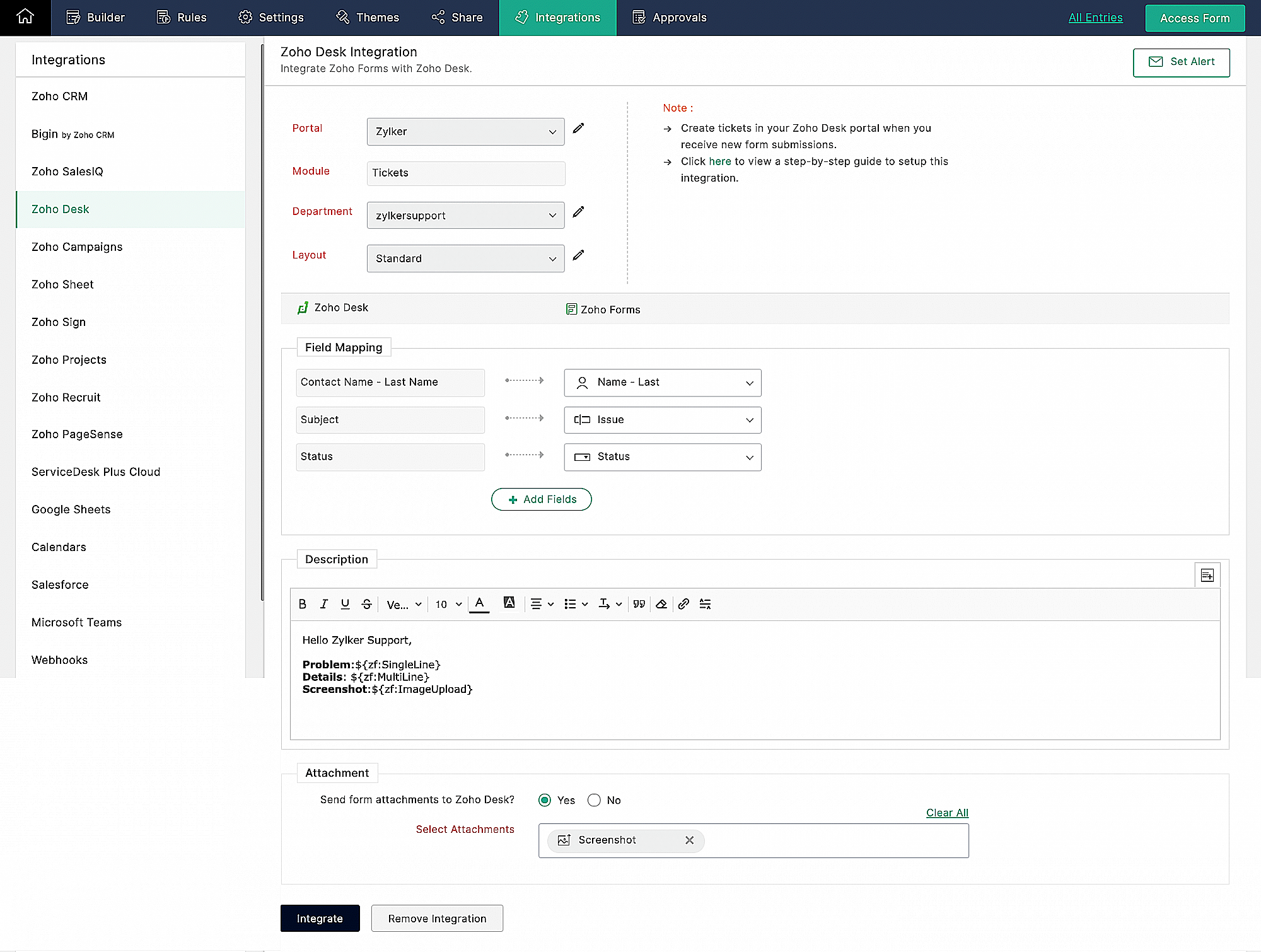
Wanneer je meerdere klantvragen en support verzoeken van huurders ontvangt, kan het handmatig aanmaken van support tickets in de helpdesk vervelend worden en veel tijd kosten, die anders gebruikt kan worden om je huurders te helpen. Als Zoho Desk wordt gebruikt om support tickets te beheren, kun je de Zoho Forms - Zoho Desk integratie gebruiken om de ingevoerde formulieren automatisch als support tickets naar je Desk portal te pushen. Je kunt een beschrijving toevoegen en door de huurders geüploade bestanden en afbeeldingen toevoegen aan de tickets die via deze integratie zijn aangemaakt.
Klachtenmanagement
Zoho Desk, een Omnichannel Customer Service Software, is de eerste contextbewuste helpdesk software die bedrijven helpt zich te focussen op de klant. Met Zoho Desk kun je eenvoudig helpdesk tickets toewijzen, volgen en meldingen instellen. Je kunt Zoho Desk aanpassen aan je behoeften en zorgen voor tevredenheid bij de support van je huurders.
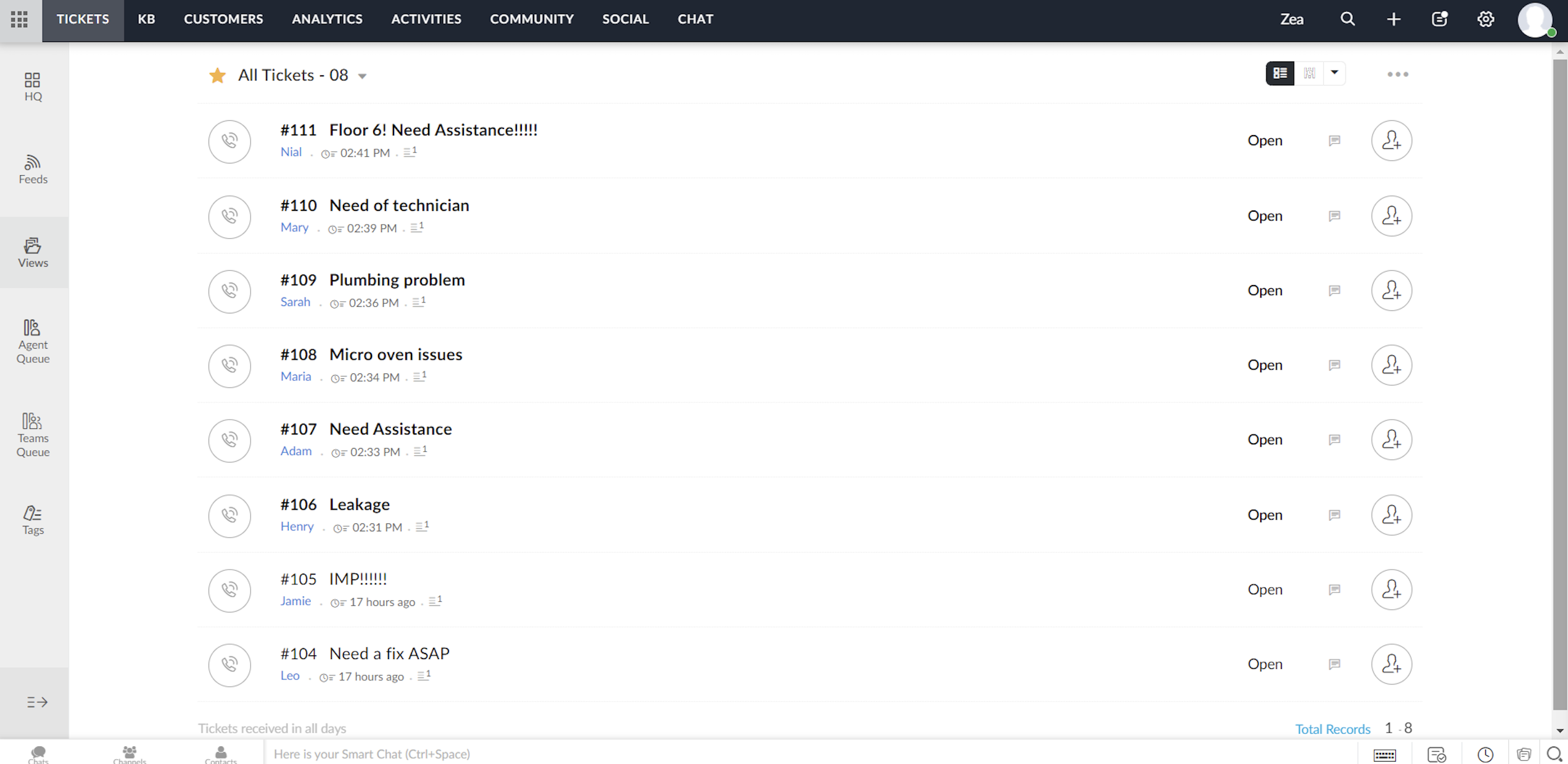
Elk ticket dat wordt ingediend door huurders die het klachtenformulier invullen, wordt toegewezen aan één van de agenten in Zoho Desk, waar het probleem wordt aangepakt en de nodige acties voor het probleem worden ondernomen.
Toewijzingsregel
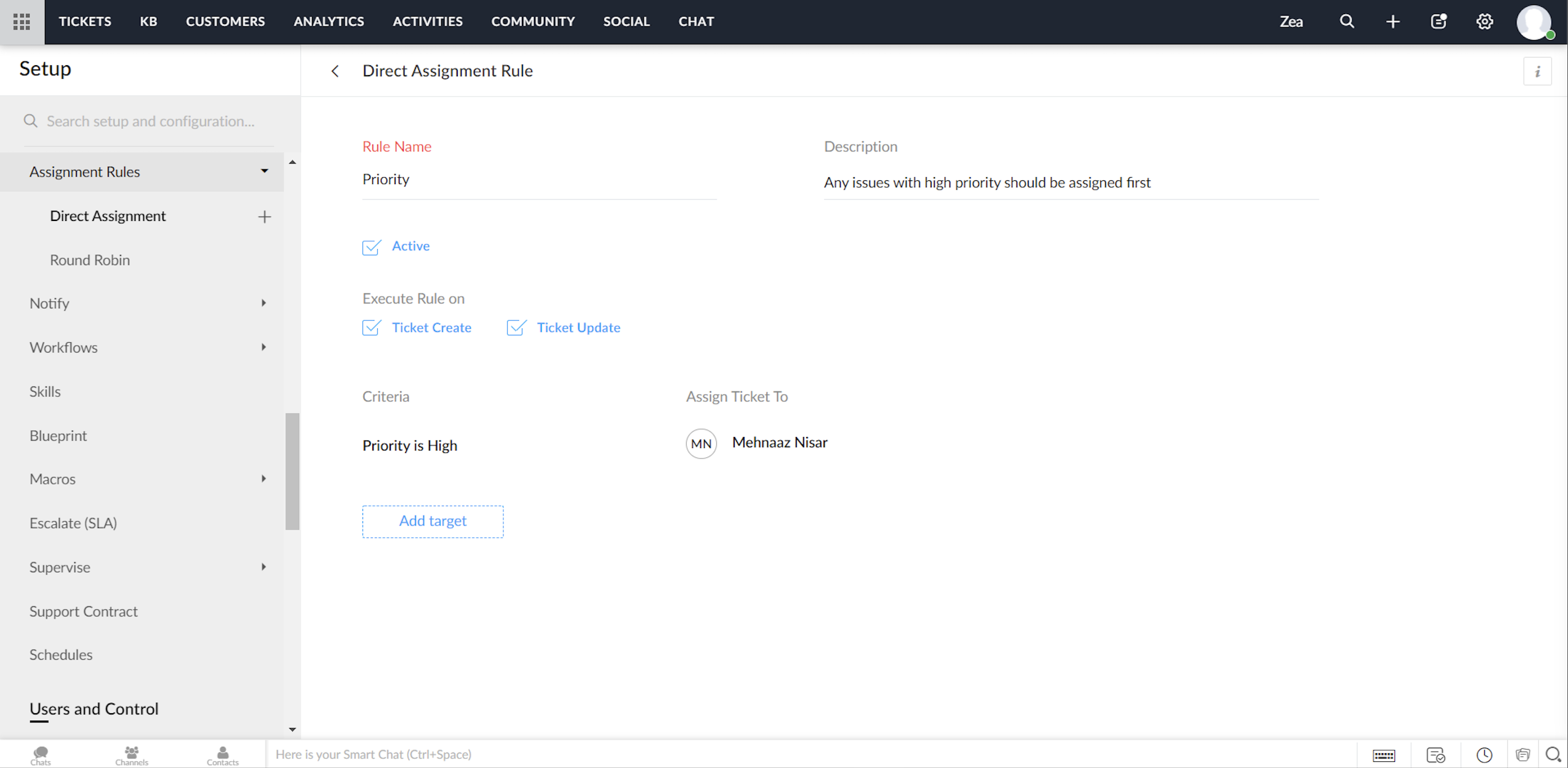
Ga tot in de fijnste details van ticketbeheer door, via het instellen van toewijzingsregels. Op deze manier hoef je niet elke keer dat er tickets binnenkomen handmatig tickets/klachten toe te wijzen aan agents. Het geeft je meer controle, en je team meer autonomie. Met behulp van toewijzingsregels wijs je automatisch de Tickets/Klachten toe die via Zoho Desk binnenkomen.
Directe toewijzing
De regel op basis van bepaalde gespecificeerde voorwaarden kan Tickets / Klachten naar de juiste afdeling leiden en er verder eigendomsrechten aan toekennen. Hoewel dit zinvol is voor nieuwe Tickets / Klachten, kun je ook een toewijzingsregel activeren wanneer Tickets / Klachten worden bijgewerkt in je helpdesk.
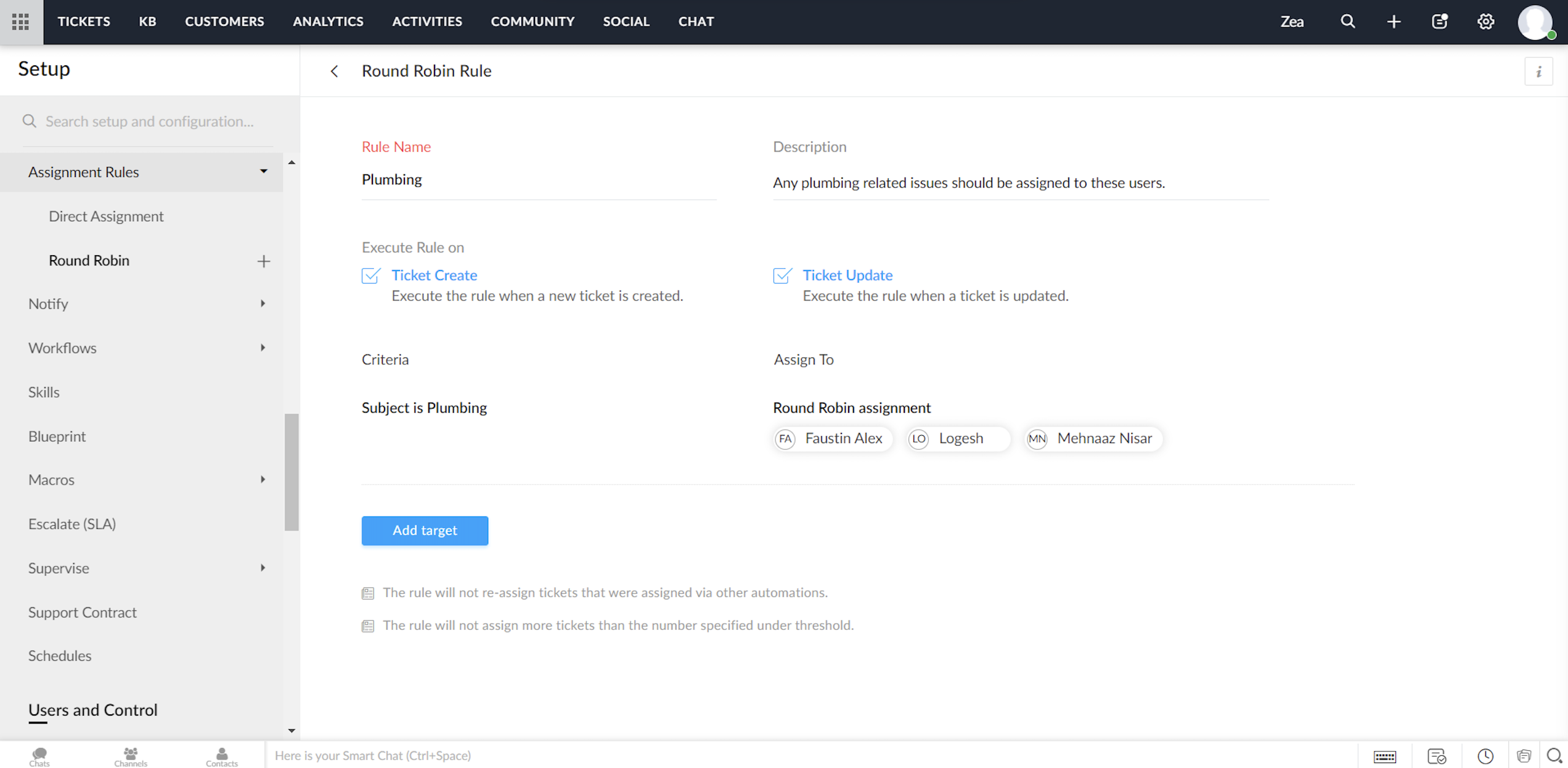
Round Robin
Round Robin is de eenvoudigste vorm van het automatisch toewijzen van tickets. Het verdeelt tickets/klachten gelijkmatig over al je agents op basis van het limiet dat je instelt. Met een minimale tussenkomst zorgt Round Robin ervoor dat geen enkel ticket niet wordt toegewezen. Ook zorgt de Round Robin regel ervoor dat de werkdruk van je agents in Zoho Desk in balans is. Dat wil zeggen, dat Tickets / Klachten eerst worden toegewezen aan de minst belaste agent.
Service Level Agreement (SLA)
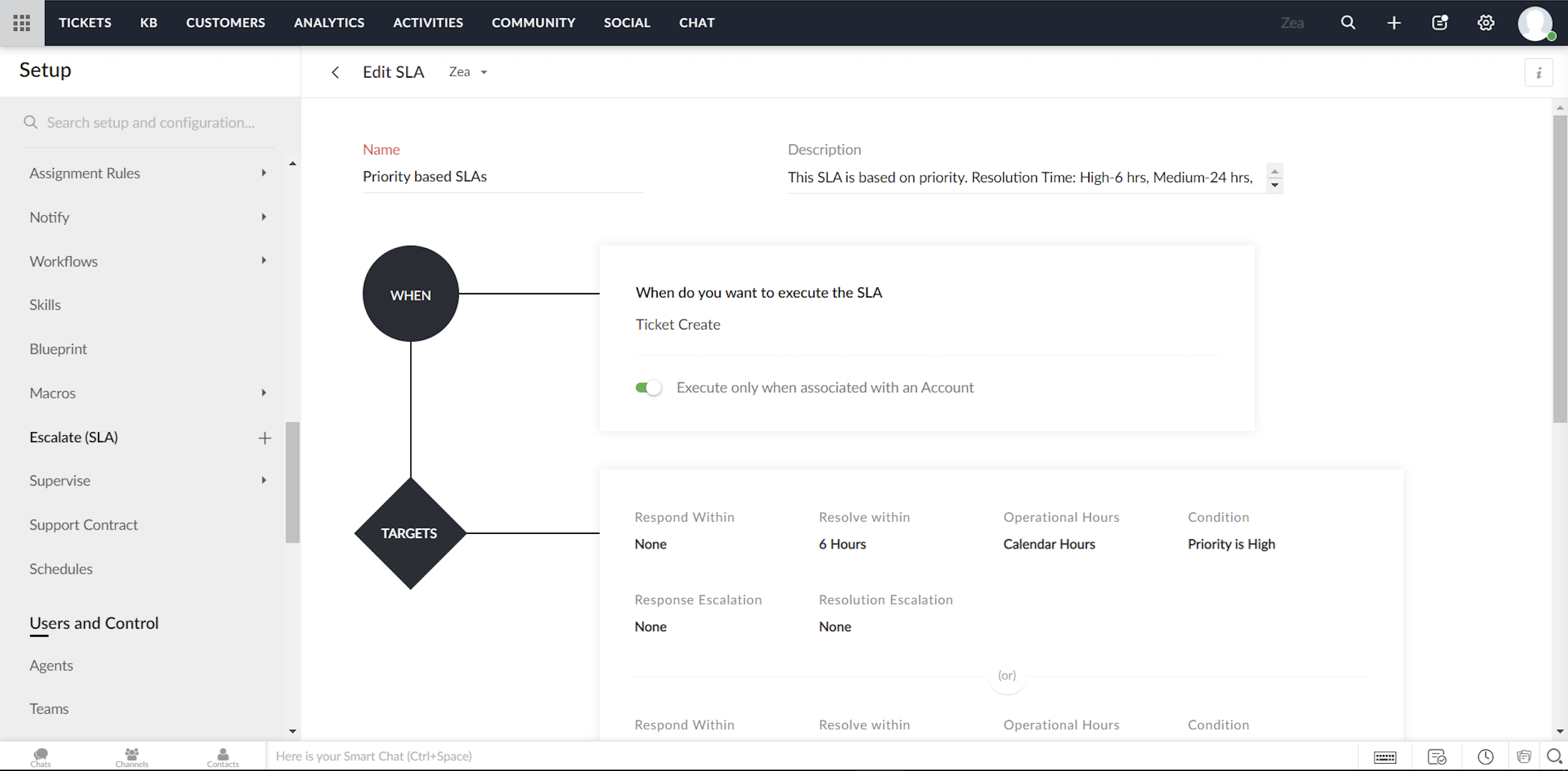
Een Service Level Agreement, of SLA, is de servicestandaard die je hebt afgesproken om aan je klanten te leveren. De serviceovereenkomst geeft de responstijden en de oplostijden weer die door je medewerkers worden aangeboden. Meestal bevat een SLA de uitvoeringscriteria en een reeks vooraf bepaalde voorwaarden of doelstellingen. Terwijl de uitvoeringscriteria bepalen wanneer een SLA moet worden geactiveerd, bevat het doel de acties die zullen worden uitgevoerd op de trigger. Je kunt acties configureren zoals reactietijd, oplostijd, het sturen van escalaties, het opnieuw toewijzen van Tickets/Klachten en het bijwerken van de prioriteit.
Om te beginnen kunt je met Zoho Desk twee modellen van service level agreements volgen:
Notificatie regels/Triggers beheren in Zoho Desk
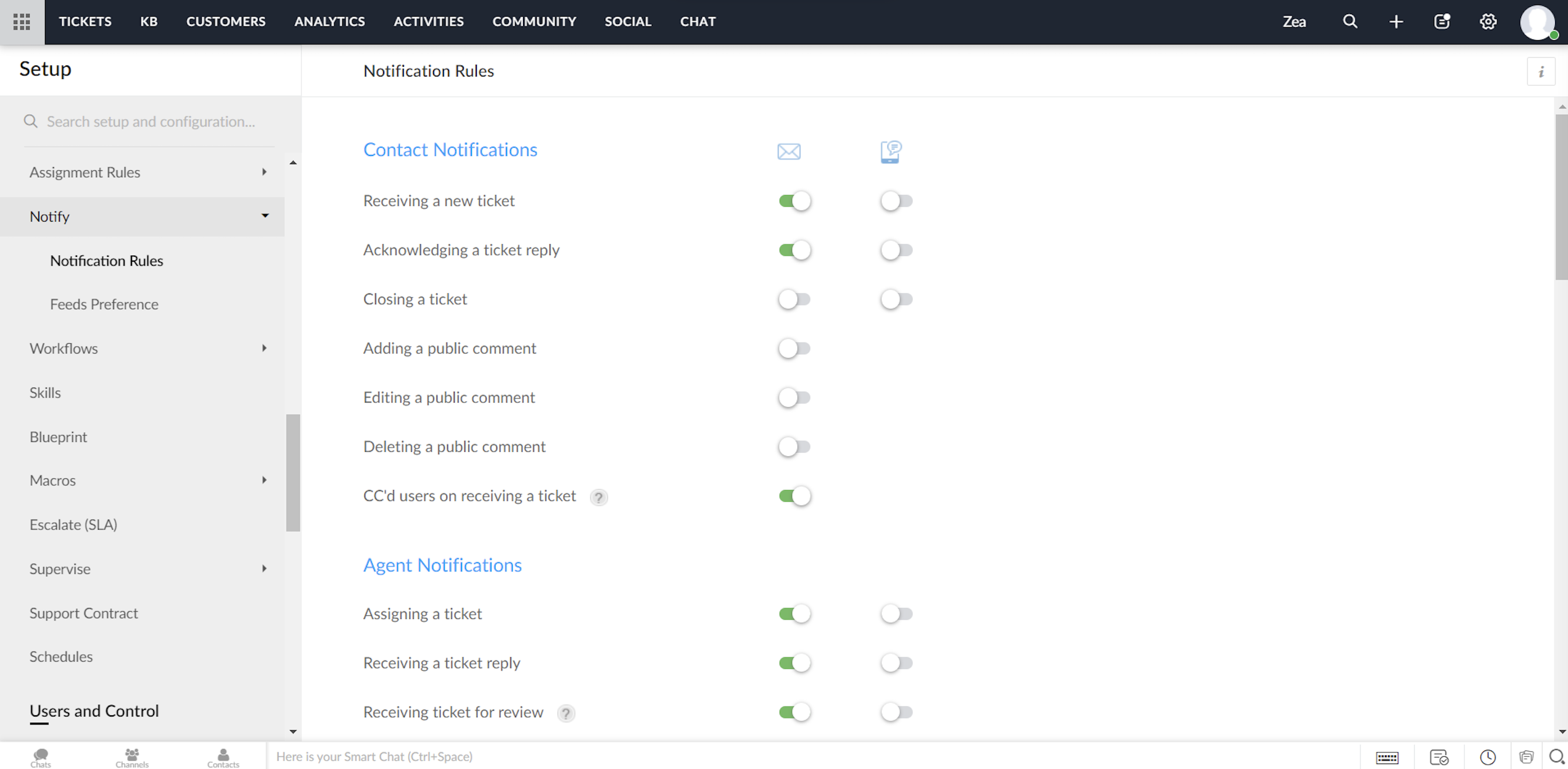
Zoho Desk biedt een standaardset meldingsregels die kunnen worden gebruikt om je klanten en agents te notificeren. Je kunt deze regels indien nodig activeren of deactiveren. Ook kunnen meldingen via e-mail of SMS worden verzonden.
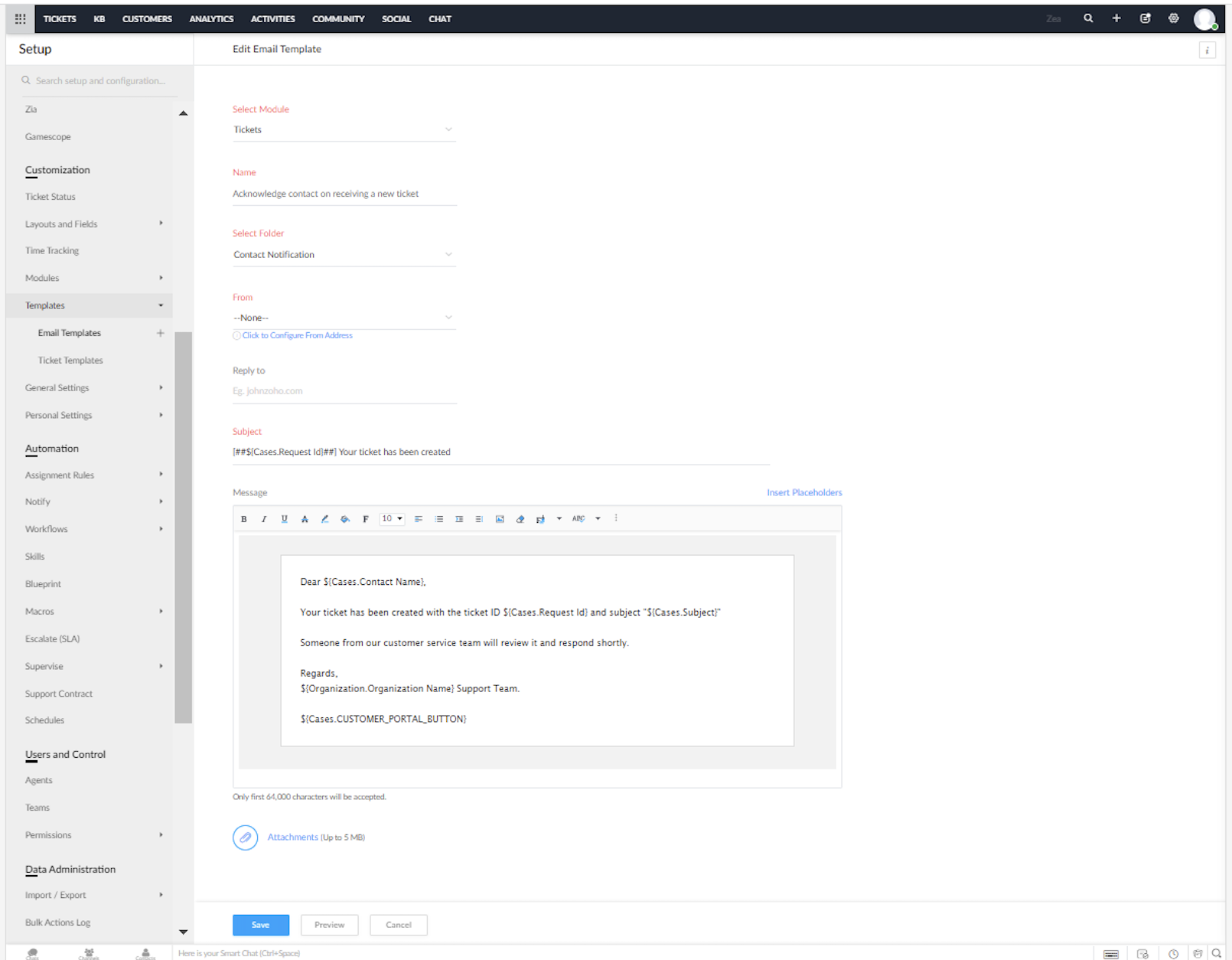
Je kunt de vooraf opgestelde e-mail en SMS sjablonen voor de meldingen in Zoho Desk aanpassen.
Heeft dit jou ook een beter beeld gegeven van het inzetten van Zoho Desk in combinatie met Zoho Forms? We lezen het graag in de opmerkingen hieronder.
Met vriendelijke groet,
Recent Topics
Announcing new features in Trident for Mac (1.32.0)
Hello everyone! We’re excited to introduce the latest updates to Trident, which are designed to reinforce email security and protect your inbox from evolving threats. Let’s take a quick look at what’s new. Deliver quarantined emails. Organization admins
Marketing Tip #5: Improve store speed with optimized images
Slow-loading websites can turn visitors away. One of the biggest culprits? Large, uncompressed images. By optimizing your images, your store loads faster and creates a smoother shopping experience leading to higher sales. It also indirectly improves SEO.
PDF Attachment Option for Service Reports
Hello Team, I would like to check with you all if there is an option to attach PDF documents to the service reports. When I try to attach a file, the system only allows the following formats: JPEG, JPG, and PNG. Could you please confirm whether PDF attachments
Zoho Browser??
hai guys, this sounds awkward but can v get a ZOHO BROWSER same as zoho writer, etc. where i can browse websites @ home and continue browsing the same websites @ my office, as v have the option in Firefox, once i save and close the browser and again when i open it i will be getting the same sites. If u people r not clear with my explanation, plz let me know. Thanks, Sandeep
SMS to customers from within Bigin
Hi All, Is there anyone else crying out for Bigin SMS capability to send an SMS to customers directly from the Bigin interface? We have inbuilt telephony already with call recordings which works well. What's lacking is the ability to send and receive
No OR Filter for Views with a Related Modules Criteria
We would like to create a Deal View where the User can see all their deals. For that, we would need an OR to connect the criteria. One of the Fields is a "multiselect User", these (Related Modules Criteria) can only be Filter with an AND. Even between
Admins cannot see each others' Scheduled Reports?!
Very frustrating that as an admin I cannot see what my reports my fellow admins have created and scheduled. After asking about this on the help chat, I was told the issue is trust and security. By giving someone Admin status, it means we trust them with those responsibilities. Please change this, it is not a good process to have to bother other users to change a report or change users within a report.
Automatically CC an address using Zoho CRM Email Templates
Hi all - have searched but can't see a definitive answer. We have built multiple email templates in CRM. Every time we send this we want it to CC a particular address (the same address for every email sent) so that it populates the reply back into our
Writer update results in BitDefender blocking it as malware
After updating Writer to latest update, Bitdefender blocked the app and writer no longer runs.
Is there a way to invoke deluge function from within a widget?
Hi! I have custom functions in deluge and I was wondering whether there is any way to call this function through a widget? Something like on click of a button inside a widget, run the deluge custom function. Would this be possible?
Missing Import Options
Hello, do I miss something or is there no space import option inside of this application? In ClickUp, you can import from every common application. We don't want to go through every page and export them one by one. That wastes time. We want to centralize
Zoho CRM Portal Field Level Permission Issue
Hi Support Team, I am using the Zoho CRM Portal and configuring field-level editing permissions. However, we are unable to restrict portal users from editing certain fields. We have created a portal and provided View and Edit (Shared Only) access for
Why am I seeing deleted records in Zoho Analytics syncing with Zoho CRM?
I have done a data sync between Zoho CRM and Zoho Analytics, and the recycle bin is empty. Why do I see deleted leads/deals/contacts in Zoho Analytics if it doesn't exist in Zoho CRM? How can I solve this problem? Thanks
Zoho Tables is now live in Australia & New Zealand!
Hey everyone! We’ve got some great news to share — Zoho Tables is now officially available in the Australian Data Center serving users across Australia and New Zealand regions! Yes, it took us a bit longer to get here, but this version of Zoho Tables
Custom Fonts in Zoho CRM Template Builder
Hi, I am currently creating a new template for our quotes using the Zoho CRM template builder. However, I noticed that there is no option to add custom fonts to the template builder. It would greatly enhance the flexibility and branding capabilities if
Introducing the Zoho Projects Learning Space
Every product has its learning curve, and sometimes having a guided path makes the learning experience smoother. With that goal, we introduce a dedicated learning space for Zoho Projects, a platform where you can explore lessons, learn at your own pace,
All new Address Field in Zoho CRM: maintain structured and accurate address inputs
The address field will be available exclusively for IN DC users. We'll keep you updated on the DC-specific rollout soon. It's currently available for all new sign-ups and for existing Zoho CRM orgs which are in the Professional edition. Latest update
Import Function: ONLY update empty fields
When setting up an import from a spreadsheet to CRM, there is a checkbox "Don't update empty values for existing contacts" (see screenshot below). While I see some limited benefit from this functionality, I think there should also be an "ONLY update empty
Collaboration with customers made easy with Zoom Meeting and Zoho Desk integration
Hello everyone! We are happy to announce that you can now integrate your Zoho Desk account with Zoom Meeting. The integration bridges the gap between digital communication and human connection, empowering teams to deliver timely support when it matters
CRM Canvas - Upload Attachments
I am in the process of changing my screens to Canvas. On one screen, I have tabs with related lists, one of which is attachments. There doesn't appear to be a way to upload documents though. Am I missing something really obvious? Does anyone have
TrueSync regularly filling up my local disk
Seems that WorkDrive's TrueSync randomly starts filling up my local hard drive space. None of the folders have been set as "Make Offline" but still it seems to randomly start making file offline. The settings of the app is so minimal and is of no real
Kaizen #194 : Trigger Client Script via Custom buttons
Hello everyone! Welcome back to another interesting and useful Kaizen post. We know that Client Scripts can be triggered with Canvas buttons and we discussed this with a use case in Kaizen#180. Today, let us discuss how to trigger Client Script when a
[Webinar] A recap of Zoho Writer in 2025
Hi Zoho Writer users, We're excited to announce Zoho Writer's webinar for January 2026: A recap of Zoho Writer in 2025. This webinar will provide a recap of the features and enhancements we added in 2025 to enhance your productivity. Choose your preferred
Picklist field shows "none" as default
Hello, Is there an option to avoid showing "none" as the default value in a picklist field? I also don't want to see any option displayed. My expectation is to have a blank bar, and then when I display the drop-down list, I can choose whichever I wa
Stage-probability mapping feature in custom module
Hi, I'm building a custom module for manage projects. I would like to implement the stage-probability feature that Potentials has. Is this possible?
Create static subforms in Zoho CRM: streamline data entry with pre-defined values
Last modified on (9 July, 2025): This feature was available in early access and is currently being rolled out to customers in phases. Currently available for users in the the AU, CA, and SA DCs. It will be enabled for the remaining DCs in the next couple
Field Description is very small
Hello, The field Description in the activity is very small. Why don't try open a new window, or a bigger popup, or increase the width of the "popup". Example:
StatusIQ
Please add StatusIQ to data sources. We using site24x7 and StatusIQ together and site24x7 integration is already there. Thanks and regards, Torsten
In Zoho People, the Operations buttons are frequently not visible or do not appear consistently.
In Zoho People, the Operations buttons are frequently not visible or do not appear consistently. We request you to please investigate and address this issue, as it is affecting daily HR operations and user access.
Marketing Tip #14: Increase cart value with product bundles
Bundling products is a great way to increase average order value while giving customers more convenience. Think “camera + tripod + memory card” or “soap + lotion + bath salts.” Bundles make shopping easier and feel like a better deal. It’s a win-win for
Problem with Workdrive folders
I'm having a problem a problem accessing files in a Zoho work drive folder when using the Zoho writer app. The problem folder appears grayed out in the Zoho work drive window in both the online and writer application. However I can open the folder in
Sortie de Zoho TABLE ??
Bonjour, Depuis bientôt 2 ans l'application zoho table est sortie en dehors de l'UE ? Depuis un an elle est annoncée en Europe Mais en vrai, c'est pour quand exactement ??
Add RTL and Hebrew Support for Candidate Portal (and Other Zoho Recruit Portals)
Dear Zoho Recruit Team, I hope you're doing well. We would like to request the ability to set the Candidate Portal to be Right-to-Left (RTL) and in Hebrew, similar to the existing functionality for the Career Site. Currently, when we set the Career Site
Auto tracking URL generation based on Carrier
Hi, While creating a shipment order for a package in Zoho Books, I have a requirement that for example, if the carrier is Delhivery and tracking number is 1234, then can automatically the tracking link/URL be generated as www.delhivery.com/1234. Similary,
Zoho Bookings form pre-filled with Zoho Forms in
Hi, I've got a contact page on my website and I'd like to have the option to book an appointment (redirected to zoho bookings page) after an option is submitted on the contact form. how would I go about doing this? thanks
Pre-orders at Zoho Commerce
We plan to have regular producs that are avaliable for purchase now and we plan to have products that will be avaliable in 2-4 weeks. How we can take the pre-orders for these products? We need to take the money for the product now, but the delivery will
Customer ticket creation via Microsoft Teams
Hi all, I'm looking to see if someone could point me in the right direction. I'd love to make it so my customers/ end users can make tickets, see responses and respond within microsoft teams. As Admin and an Agent i've installed the zoho assist app within
Zoho Books' 2025 Wrapped
Before we turn the page to a new year, it’s time to revisit the updates that made financial management simpler and more intuitive. This annual roundup brings together the most impactful features and enhancements we delivered in 2025, offering a clear
Can multiple agents be assigned to one ticket on purpose?
Is it possible to assign one ticket to two or more agents at a time? I would like the option to have multiple people working on one ticket so that the same ticket is viewable for those agents on their list of pending tickets. Is something like this currently
This user is not allowed to add in Zoho. Please contact support-as@zohocorp.com for further details
Hi Team, when I,m trying to create a email account (imagixmidia.com.br) it's showing this error >> This user is not allowed to add in Zoho. Please contact support-as@zohocorp.com for further details plz help me thanks
Next Page