¡Hola a todos!
Si utilizas Conversaciones Guiadas (Guided Conversations) en Zoho Desk para ayudar a los clientes a encontrar productos, probablemente te hayas encontrado con este problema: el bot ofrece una lista de opciones, pero los clientes siguen sin saber cuál elegir.
No hay imágenes, especificaciones ni precios; solo aparecen los nombres. Como resultado, los clientes hacen preguntas adicionales, los agentes tienen que intervenir innecesariamente y todo el flujo pierde eficacia.
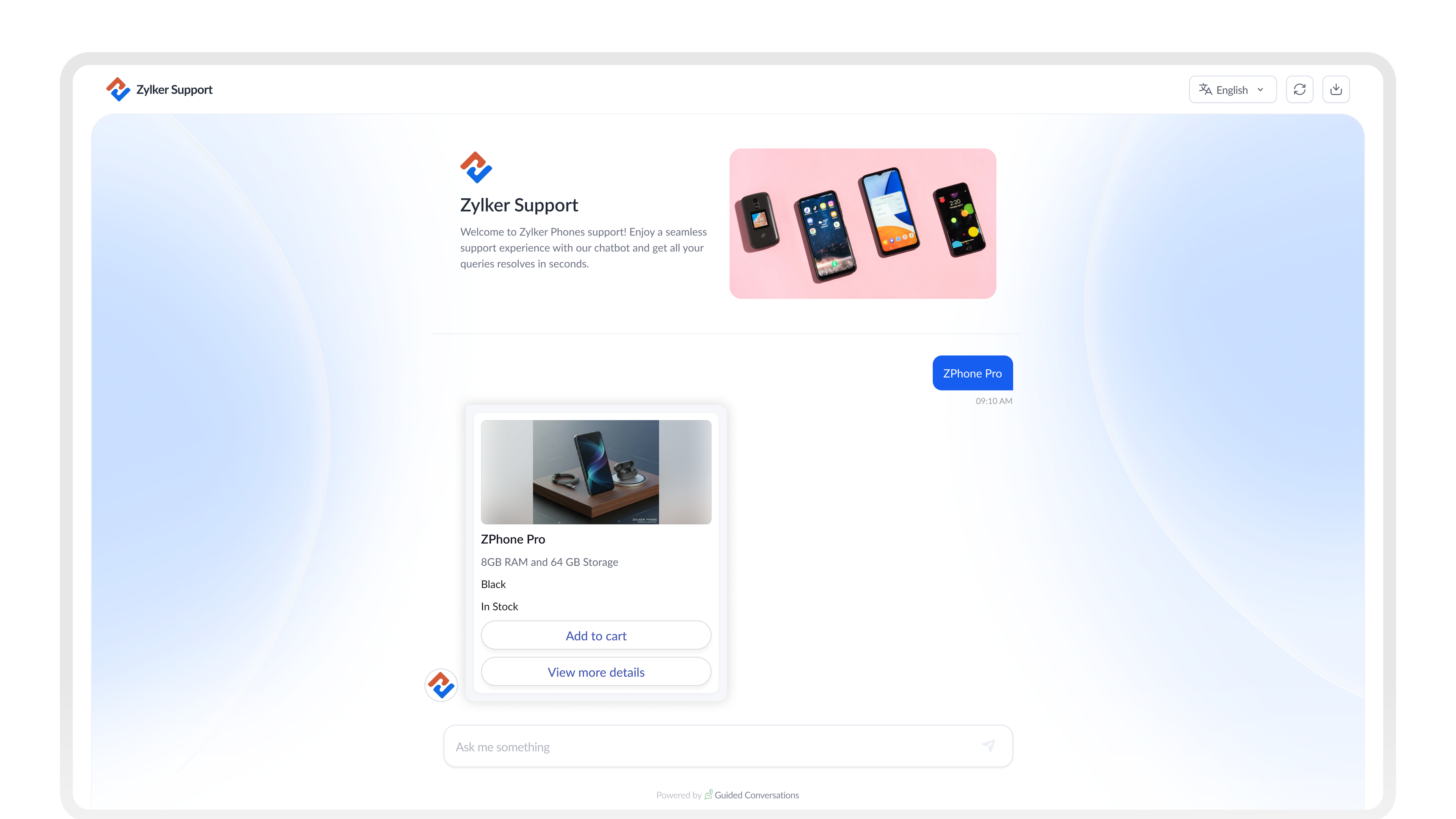
Card Choice en GC soluciona este problema. Permite mostrar opciones de productos como tarjetas visuales e interactivas dentro del chat, para que los clientes dispongan de toda la información necesaria para tomar una decisión sin salir de la conversación.
A continuación, te explicamos cómo configurarlo de principio a fin para tu empresa.
¿Qué es Card Choice?
En lugar de utilizar simples botones de texto, Card Choice permite mostrar opciones mediante tarjetas enriquecidas. Cada tarjeta puede incluir:
- Una imagen del producto
- Un título y un subtítulo
- Una descripción breve
- Especificaciones clave, como precio o disponibilidad
Botones de acción como:
- Ver detalles
- Comparar
- Añadir al carrito
¿Tarjetas estáticas o dinámicas?
Antes de empezar la configuración, determina qué tipo se adapta mejor a tu caso de uso.
Usa tarjetas estáticas cuando... | Usa tarjetas dinámicas cuando... |
Las opciones son fijas y cambian poco
Departamentos o categorías de soporte
Tipos de citas o reservas
Planes de suscripción
| Los datos provienen de un sistema externo
Catálogos de productos que cambian con frecuencia
Precios o stock actualizados en tiempo real
Amplias gamas de productos
|
CONSEJO
Para la mayoría de los flujos de comercio electrónico, las tarjetas dinámicas son la mejor opción. Obtienen los datos automáticamente de tu sistema, por lo que no tendrás que actualizar manualmente las tarjetas cada vez que cambien los productos o los precios.
Configuración de Card Choice en tu flujo
1. Diseña el flujo
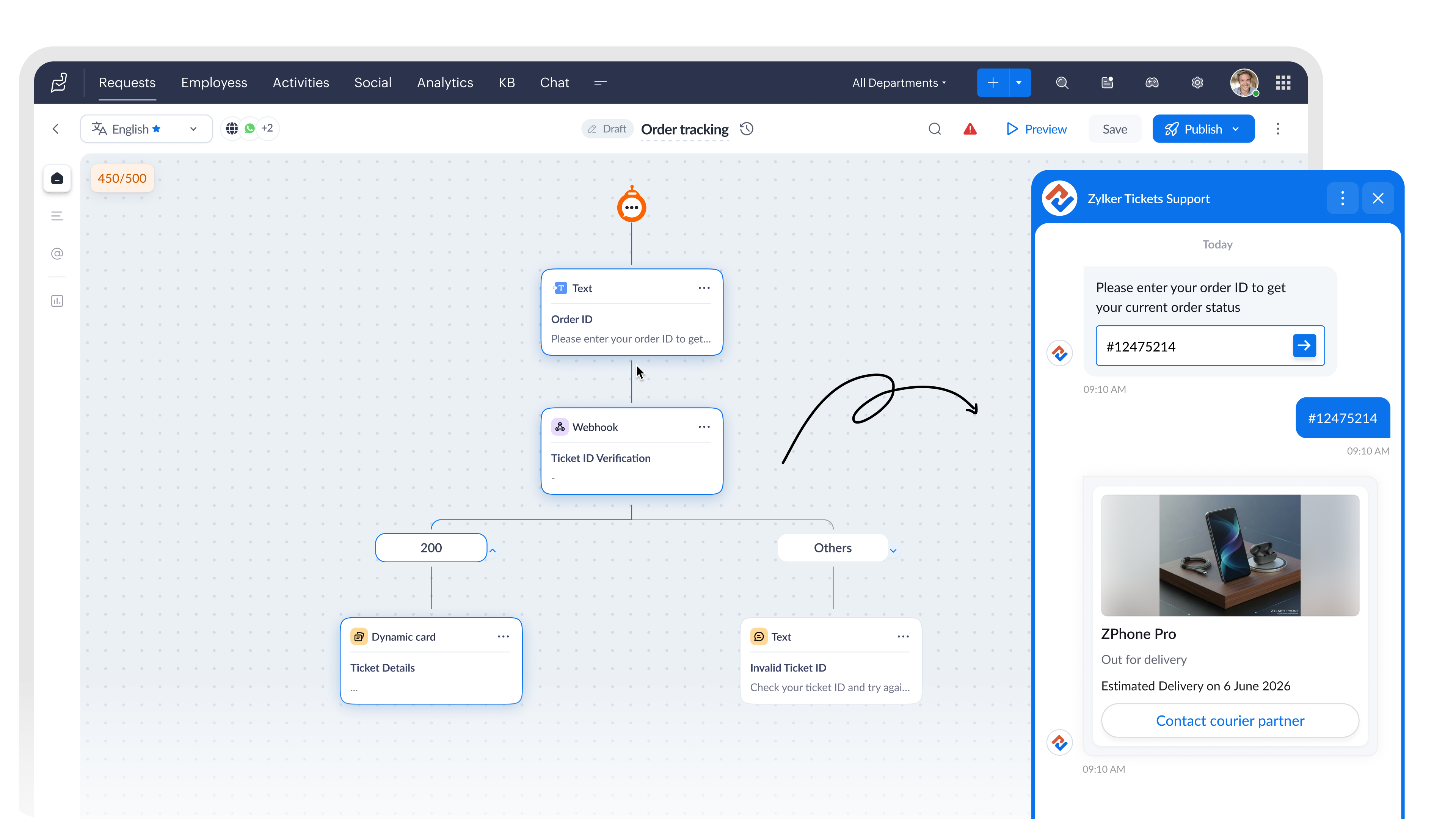
Comienza con un bloque de preguntas para identificar qué está buscando el cliente. A continuación, añade un bloque de API o webhook para obtener los productos que coincidan con su búsqueda desde tu sistema.
Después, agrega un bloque de Dynamic Card Choice para mostrar los resultados.
2. Configura el bloque Card Choice
Dentro del bloque, establece Card Type como Dynamic Card.
Después, selecciona el Rendering Style según la cantidad de opciones que quieras mostrar simultáneamente.
| Una sola tarjeta funciona bien para... | Varias tarjetas funcionan bien para... |
Resúmenes de reservas
Confirmaciones de pedidos
Planes de seguros
| Exploración de productos
Comparación de habitaciones de hotel
Paquetes de servicios |
3. Vincula los datos de tus productos con los campos de la tarjeta
Cuando se ejecuta el bloque Webhook, este obtiene los datos de producto desde tu API y guarda la respuesta como una variable del flujo.
Después, puedes asignar esa variable directamente a los campos del bloque Dynamic Card Choice, de modo que cada tarjeta se complete automáticamente con información actualizada del producto, como:
- Nombre
- Precio
- Imagen
- Descripción
Todo ello sin necesidad de introducir los datos manualmente.
Función de cada campo
- Imagen: muestra la fotografía del producto. Configura el tipo de dato como Image.
- Título: nombre principal del producto obtenido desde la API.
- Subtítulo: ideal para mostrar precio, marca o disponibilidad.
- Descripción: resumen breve del producto (2 o 3 líneas).
- Etiqueta: etiqueta que acompaña a un valor, como «Almacenamiento» o «Stock».
- Variable: almacena la selección realizada por el cliente para utilizarla posteriormente en el flujo.
- Ocultar campo: oculta datos internos, como identificadores de producto, para que no aparezcan en la tarjeta.
4. Utiliza la selección del cliente
En un bloque Dynamic Card Choice (Selección de tarjetas dinámicas), la elección realizada por el cliente se guarda automáticamente en la variable del bloque.
Puedes utilizar esta variable en los siguientes pasos del flujo, por ejemplo para:
- Realizar una llamada a un webhook
- Crear un ticket
- Transferir la conversación a un agente
¿Qué cambia para tu equipo?
Una vez configurado Card Choice, los clientes dejan de hacer preguntas como:
- «¿Puedes enviarme una imagen?»
- «¿Cuál es el precio de ese producto?»
- «¿Qué modelo tiene más capacidad de almacenamiento?»
- «¿Puedes mostrarme más opciones?»
Toda esa información ya está disponible directamente en la tarjeta.
Esto se traduce en:
- Menos mensajes de seguimiento antes de que el cliente tome una decisión.
- Menor intervención de agentes durante la fase de descubrimiento de productos.
- Conversaciones más cortas y con resultados más claros.
- Clientes que llegan al agente sabiendo exactamente qué quieren.
NOTA
Si estás creando flujos para WhatsApp, los bloques Static Card Choice y Dynamic Card Choice no están disponibles en ese canal.
Pruébalo
Card Choice es una de esas funcionalidades que marcan una diferencia real una vez puesta en marcha. Los clientes exploran más rápido, toman decisiones antes y los agentes dedican menos tiempo a responder preguntas sobre productos que deberían resolverse automáticamente.
Si ya lo has configurado o estás creando un flujo ahora mismo, comparte tus preguntas o capturas de pantalla en los comentarios. Estaremos encantados de ayudarte a resolver cualquier problema o compartir buenas prácticas.
Ruta: Zoho Desk → Guided Conversations → Card Choice Block.

Redactado por Prabin de Zoho Desk
Beatriz Moya | Zoho España
Recent Topics
Shared inbox unable to see replies
Hi we are a small company me and someone else, we have a shared inbox for our sale@ and contact@ however we have this issue where by if i reply to an email or the other person reply to the email, it does not show it to them and therefore we end up replying
Record Payment - Auto Populate Amount as payments are selected
When recording payments you have the option of clicking on "Pay in Full" next to the bill which automatically adds the total at the bottom of the page next to "Amount used for payments" but this should also auto populate / update the total at the top
Can't set conditional layout rule on lookup field in Zoho CRM
Namaskaram Zoho CRM team, Usually any fields of module except mandatory fields can be hide using conditional layout rules. But that can't be set on lookup fields event that is not a mandatory fields. Many users are in need of that. Crafted with ❤️ Zoho
[Request] Pivot filter date option : from set date to relative value ie from 01Jan to LastMonth
I don't think I can currently do this... but it's worth asking if it's possible. My use case is concerning annual leave which is calculated from the beginning of the calendar year (01Jan) then each month I want to have details of leave taken etc... In
Need to be able to apply layout rules to 'Multi Pick List'
Currently, we are unable to apply layout rules to fields that are 'Multi Pick List'. This means we have to instead use checkbox fields, but they are inefficient. For example, we use the Multi Pick List to list our products. However, we're unable to apply
My "trigger" panel disappear from my workflow ...
Hello, I want to add a trigger to an email sequence, but the "trigger" panel has disappeared when I want to modify ...I used a predefined template to create this sequence, is that because of that? Thank you. I have attached a screenshot to you
Workflow Automation Not Triggering
My Zoho CRM workflow sometimes doesn’t trigger when a record is updated, even though the workflow criteria appear to be met. What should I check to find out why the workflow is being skipped?
Zoho Sheet as KB Document
It would be nice if Zia Agents could take Zoho Sheets as part of the knowledge base. The use case here is that it's infinitely easier for humans to maintain a spreadsheet table than any .md / TAML / JSON document. For situations where humans are responsible
Ask the Experts: Five-hour live Q&A session with Zoho WorkDrive product experts
Have questions about WorkDrive 5.0? Let’s talk! We recently launched Zoho WorkDrive 5.0, packed with powerful updates to help your team work smarter, stay secure, and get more value from your business content. From content-centric workflows and AI-powered
Automating CRM backup storage?
Hi there, We've recently set up automatic backups for our Zoho CRM account. We were hoping that the backup functionality would not require any manual work on our end, but it seems that we are always required to download the backups ourselves, store them,
Zoho Community Digest - September 2026 | Part 3
Hi everyone, and welcome back! Zoho CRM launches PRM for partner management, Bigin builds this year's Apple AI updates into the app, and Snapchat is now a connected channel in Zoho Social. There are also three notices worth reading, including WhatsApp
ERROR: This user is not allowed to add in Zoho. Please contact support-as@zohocorp.com for further details
I can add new user for mail, i received message error about; This user is not allowed to add in Zoho. Please contact support-as@zohocorp.com for further details Try creating user name; instagram@eficaztecnologia.com.br
Support for Custom Fonts in Zoho Recruit Career Site and Candidate Portal
Dear Zoho Recruit Team, I hope you're doing well. We would like to request the ability to use custom fonts in the Zoho Recruit Career Site and Candidate Portal. Currently only the default fonts (Roboto, Lato, and Montserrat) are available. While these
Ability to filter services and parts based on a field in the Work Order
Hell FSM team, We have a customer with 2 value streams using Zoho FSM. Each value stream uses different products, at different price point. Currently, all of the products are accessible when creating a work order and modifying a service appointment, which
SubTotaks for Item Headers in Estimates
Hi, Apparently, one can add Item Headers in Estimates in Zoho Books. Is this feature like an Estimate section with a SubTotals for each Item Header/Section? Or is the Item Header just a Title and cannot be SubTotalized? Thank You
Sync of products and orders between Zoho Inventory, Zoho Books and Shopify
Good Day I migrated from QuickBooks to Zoho Books and Zoho Inventory at the beginning of this year. The migration team assisted with importing my data, but I am currently experiencing multiple issues affecting syncing between Shopify and Zoho. 1. SKU
Best practices for importing phone numbers
I've recently found a problem with my phone provider, integrated with Zoho CRM, where a phone number that starts with 00 instead of + won't work. The problem has no solution: they tell me to replace all 00 with + I've always preferred using 00 instead
Copy + Paste in Notes: Text color and text background are not retained
I've recently started using Zoho Notebook as an Evernote replacement. When copying and pasting text within Zoho Notes, I notice that the formatting of the text (text color and background color) is not retained when pasting. Only the attributes "Bold"
Add Comprehensive Accessibility Features to Zoho Writer
Hello Zoho Writer Team, We hope you are doing well. We would like to submit a feature request to enhance Zoho Writer with a full set of accessibility tools, similar to the accessibility options already available in the Zoho Desk agent interface. 🚧 Current
MAKING ENTRY TIME MORE USER FRIENDLY AND FASTER O PREVENT TAB TIME
I AM CURIOUS TO KNOW IF WE CAN MAKE IT MORE USER FRIENDLY WHILE MAKING BILLS , I MAJORLY USE OVER DESKTOP SO I AM SUGGESTING TO REMOVE TAB TIME WHILE ENTERING BILL OR MAKING INVOICE DIRECT JUMP TO ONLY REGULAR PARTS OF THE BILL . YOURS RAKESH 782866
Shopify B2B Integration: Option to Match Customers by Company Name
It would be great if the Shopify integration could include Company Name as a customer matching option. At the moment customers can only be matched by: Email Name Email and Name Phone For businesses using Shopify B2B, the company is often the customer
Free Methods to Convert PST to MBOX on Mac & Windows
Converting PST files to MBOX is often needed when moving Outlook mailbox data to email clients such as Thunderbird, Apple Mail, or other MBOX-supported applications. The process can be different on Windows and macOS, and free methods may involve several
Print checks for owner's draw
Hi. Can I use Zoho check printing for draws to Owner's Equity? This may be a specific case of the missing Pay expenses via Check feature. If it's not available, are there plans to add this feature?
Deliver exceptional customer experience with Field Service Management in Zoho Service Plus
The advent of automation and personalization in the AI era has raised customer expectations exponentially for faster resolution of issues with less tolerance to friction in the process. Fast, accurate, and intelligent service that understands customer
Zoho Extensions 101: Building extensions for Zoho People
Hello developers! Welcome to our new video series on building extensions for Zoho People! If you're new to extension development or looking for guidance on building extensions for Zoho People, you're in the right place. We've curated a series of videos
Build A Happier Workforce With Zoho People
The success of an organization depends on its people. Therefore, a comprehensive and cloud-based HRMS software is an integral part of the IT ecosystem for the business. With a wide number of key modules to define the structure of an organization, manage
Project Change Orders and Additions
We are in the process of migrating from QuickBooks Online to Zoho Books. We have Zoho One and like the ability to sync all of our data across everything. And I like that projects work in a way that's less dumb than QuickBooks. I'm trying to figure out
Support Recording Payments in a Different Currency Than the Invoice Currency
We would like to request the implementation of a feature that allows users to record customer payments in a currency different from the currency of the original invoice. Current Limitation in Zoho Books Currently, if an invoice is issued in USD, Zoho
Customer Statement Showing Incorrect Negative Balance Due to Unused Advance
Dear Zoho Support Team, We are facing an issue with the Customer Statement in Zoho Invoice related to customer advances/mobilization advances. The issue is that when a customer has made an advance payment that has not yet been fully utilized against invoices,
【10/15・残席わずか】Zoho Championに学ぶ!Zoho Campaigns メール配信の基礎・活用勉強会
皆さま、こんにちは。ゾーホージャパンの中野です。 10月15日(木)、Zoho コミュニティ初となる「Zoho Campaigns メール配信の基礎・活用勉強会」をオンラインで開催します! 今回の登壇者は、Zoho の導入・活用支援に豊富な経験を持つZoho Champion の岡安 裕一さんです。 「一斉配信はできるけれど、現在の設定や運用が正しいか自信がない」 「Zoho CRMとZoho Campaignsのどちらから配信すればよいか分からない」 「リストとセグメントの違いや、配信停止の扱いを整理したい」
WorkDrive API: allow the modification time to be set when updating an existing file (x-last-modified-date is honoured on create, ignored on update)
Hi, I contribute to the Zoho WorkDrive backend of rclone, the open-source sync/copy tool. I would like to raise one specific, narrow API gap that currently makes reliable syncing to WorkDrive impossible, and ask whether it can be addressed. What already
WhatsApp Coexistence
Hello, please implement WhatsApp Coexistence, we need to track staff whatsapp chats on their PC and they need to be able to use WhatsApp on their mobile in around the office and warehouse, as we video call customers and send them product pictures. Thank
Kiosk / CRM Timezone Oddity
I grant you this is much easier to see than to explain, and snapshots here won't help much and I don't want to snapshot my record anyway in a forum, so bear with me... Effectively... As there had been discussions on times coming through in different timezones
Restricted Account - "This user is not allowed to add in Zoho" - citbinvestment.com.
Hi Zoho Support Team, I am attempting to set up user mailboxes for my domain citbinvestment.com, but I am receiving the following error: "This user is not allowed to add in Zoho. Please contact support-as@zohocorp.com for further details." > My MX, SPF,
Contact Sharing: Hide email alias from global address list
As the superadmin, I would like to hide my domain aliases from appearing in the global address list. Currently, my end users can see all my aliases. The aliases also appear as type-in addresses when composing a new email. This is a potential security
Incorrect Currency Shown
On Bills, each line shows the rate in the wrong currency (home currency).
This user is not allowed to add in Zoho. Please contact support-as@zohocorp.com for further details
Hello, Just signed up to ZOHO on a friend's recommendation. Got the TXT part (verified my domain), but whenever I try to add ANY user, I get the error: This user is not allowed to add in Zoho. Please contact support-as@zohocorp.com for further details I have emailed as well and writing here as well because when I searched, I saw many people faced the same issue and instead of email, they got a faster response here. My domain is: raisingreaderspk . com Hope this can be resolved. Thank you
[Free webinar] Beyond prompt-to-app: Vibe coding with Zoho Creator | Creator Tech Connect (October 2026)
Hello everyone, We are excited to invite you to another edition of the Creator Tech Connect webinar. About Creator Tech Connect The Creator Tech Connect series is a free monthly webinar consisting of purely technical sessions, where we dive deep into
Zoho Recruit Staffing version Interview using Zoho Meeting
I would like to understand whether Zoho Meeting has a native integration with Zoho Recruit – Staffing Edition. As of now, I am unable to find the native Zoho Meeting integration within the Staffing Edition of Zoho Recruit. Could someone please confirm
Payroll needs to automatically remit taxes, not just give me the calculations
Wagepoint, PayEvo, Waveapps, etc... All your competitors deposit employee payroll, but they ALSO remit taxes automatically. Get with the program, your Payroll app is extremely sparse.
Next Page