Improved UI for a Seamless User Experience - Calls, Tasks, and Meetings
Hello Enterprise Support Community,
Just a quick post today about some upcoming changes to the UI involving Meetings, Calls and Tasks activity records within Zoho CRM.
To provide a consistent and seamless user experience across Zoho CRM, we’ve updated the details page for activity-based module records—Meetings, Calls, and Tasks. These enhancements align the layout and functionality with other CRM modules, making it easier to view and manage activity details at a glance.
Here's a quick preview of the upcoming changes:
Timeline Tab:
Previously, the Timeline tab in the Meetings, Calls, and Tasks modules was situated on the right panel of the record detail page, between the Info and Conversations tabs. We've moved it to the main space beside the Overview tab, like it is in the other modules. This applies to both records with and without contact associations.
The previous Timeline tab contained updates related to both the activity record and the associated records. Now, the Timeline tab contains only the timeline information of the activity record streamlining the information that is presented to the user.
To view the timeline of a related record, users can access the Timeline tab within that record.

Meetings Header Title:
In the record detail page of the Meetings module, the Host and Related to details (which were previously situated on the top panel) are now in the business card section in field vs. value format.
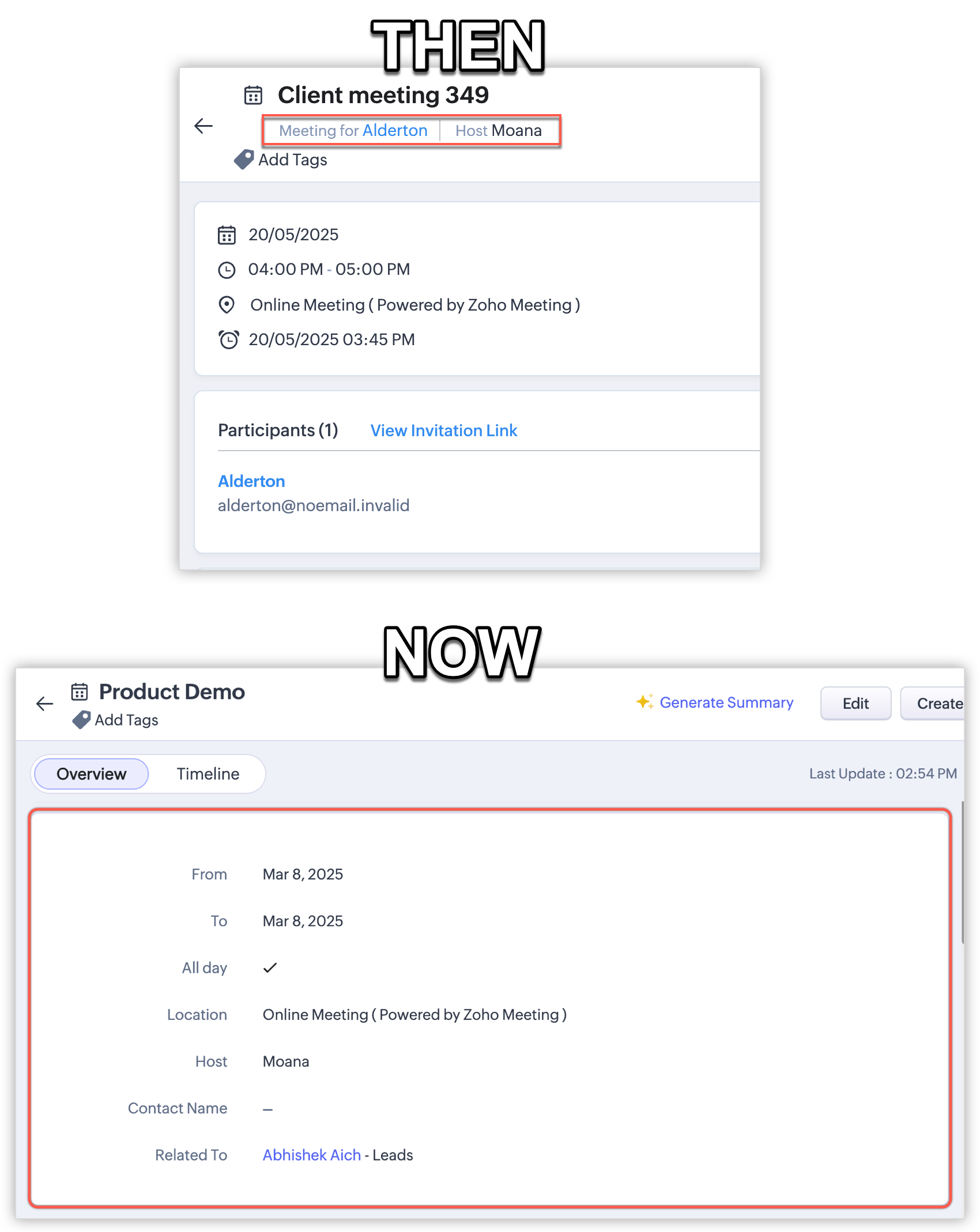
Meeting Information Section:
In the Meetings module, the new Meeting Information section will now hold all details related to meeting in a fields vs. values format to ensure uniformity with other modules.

Call Reminder:
Previously, the call reminder time was displayed when hovering over the clock symbol beside the Call Start Time in the Calls record detail page. Now, the call reminder time will be displayed as a value in a new field labeled as "Reminder" under the Call Information section.

RSVP Response:
The meeting invitation RSVP buttons, which were previously displayed near the Participants section, are now available under a separate section named Meeting Invitation.

Task follow-up message:
The location of the task follow-up message has been moved from inside the business card to a success prompt in the top panel.

Close Task Button:
In the Tasks record detail page, we've moved the Close Task button from inside the business card to the top panel to ensure uniformity with other modules.

Locked Record Messaging:
In the Tasks record detail page, the "Record is locked" message (along with its details) was previously displayed inside the business card, is now displayed in the top panel.

Business Card View:
In the record detail page of any module, when you click the Customize Business Card option under the ellipses (···) button, the Business Card View pops up. In this enhancement, we've made some changes to make it easier to customize your business card.

That's all for now! These changes will help deliver a more consistent user experience when working with activity-related records in the CRM. The updates will begin rolling out to all accounts, across all DCs, starting next week.
Let us know if you have any questions or concerns by commenting below or submitting a request via your dedicated support address.

Availability:
DC: All DCs
Editions: All editions
Release Plan: This update will be deployed to all users, across all DCs, in phased rollout beginning next week.
Have a wonderful rest of the week!
Sincerely,
The Zoho Enterprise Support Team
